-
Genesis 8.1 Face Controls
MxD said:
Just picked up the Victoria 8.1 upgrade and started exploring. So far i am extremly unimpressed, the face controls seem to be a disaster in the making. As soon as you inadvertently touch the wong part of any control DAZ crashes instantly every time. It's just completly useless and utterly frustrating. For any one contemplating this UPGRADE??? i would suggest to wait a while and see if DAZ gets the controls working unless of course you enjoy constantly recreating what has allready been done or have the discipline to save after each and every adjustment you make.
THIS IS VERY DISAPPOINTING
So many people say it's been crashing on them and I haven't had one crash using it. What version of DS are you using? Public or beta?
Genesis 8.1 / Victoria 8.1Kharma said:
Petra said:
Ok, as I said in the previous post after I installed the updated G8 Expressions, none of them worked on G8.1 anymore.
I uninstalled them and now they are working again on G8.1.
I installed some purchased G8 expressions and they don't work on Victoria 8.1 whether I have the updated g8 expressions installed or not.
You are right, I checked and only a few work and only when I use the dials.
(Released!) Vellus Horizon Shader System USER GUIDE IN COMMENTSArtini said:
It will be even more interested to see the difference between this system and the newly released Vellus hair in:
Nothing against that one in the University bundle, but I find Those Things' version far more realistic. It covers the body better is more accurate to actual vellus. I haven't sat up waiting on a new release like this in a good while!
Genesis 8.1 / Victoria 8.1Petra said:
Ok, as I said in the previous post after I installed the updated G8 Expressions, none of them worked on G8.1 anymore.
I uninstalled them and now they are working again on G8.1.
I installed some purchased G8 expressions and they don't work on Victoria 8.1 whether I have the updated g8 expressions installed or not.
Genesis 8.1 / Victoria 8.1I put a water shader on the tear but I still don't see it. Is it only visible on Victoria? Also realized the expression is too extreme with the eyebrow going into the eye lol!
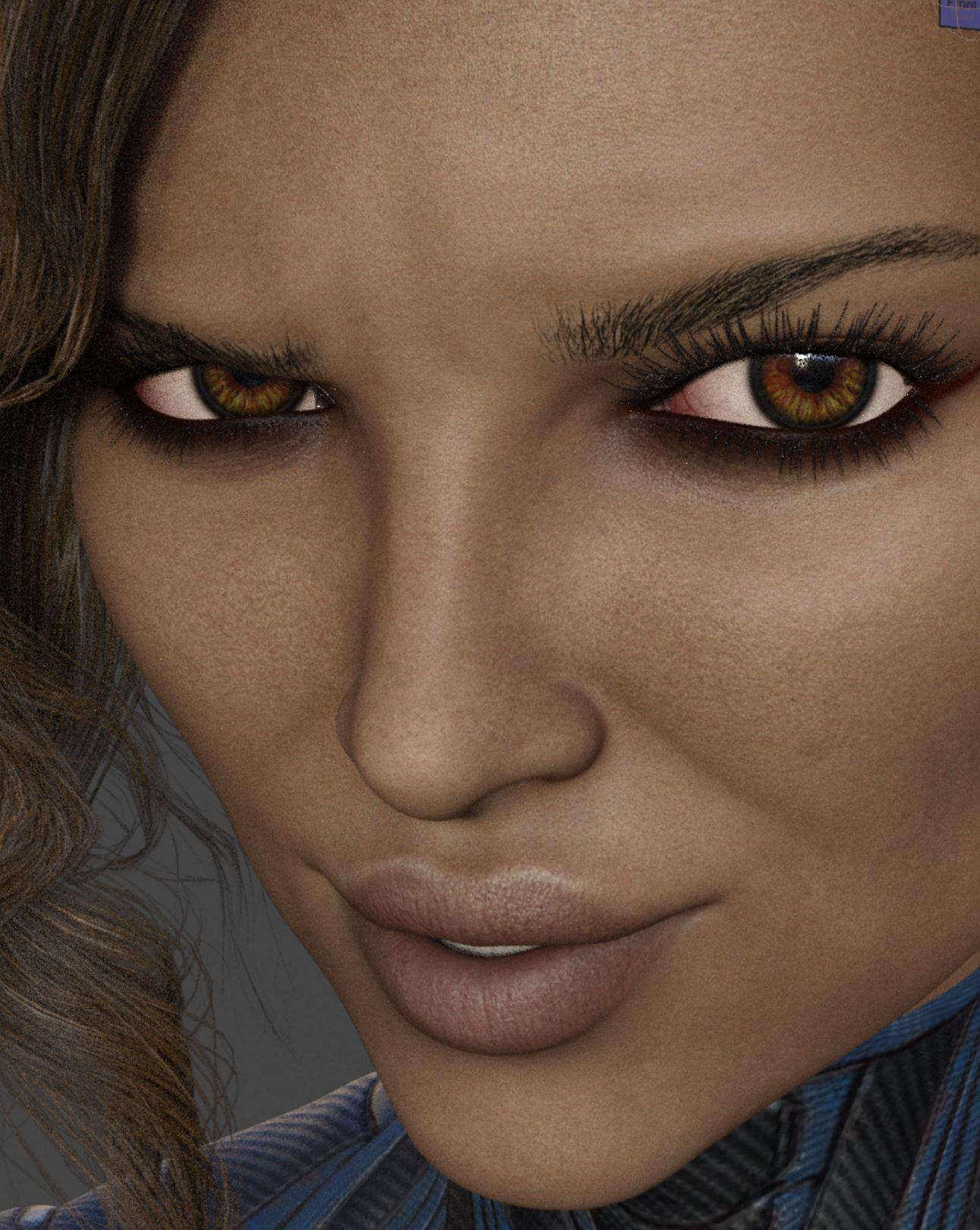 Genesis 8.1 / Victoria 8.1
Alrighty - my render took 13 hours, but that's because I went made with emissive lighting... Anyways, this is my first render of Victoria 8.1 without any customisations, just a little bit of expression change so it wasn't the default blank expression.
To cut a long story short, I'm delighted with my purchase - she has great potential.
Genesis 8.1 / Victoria 8.1plasma_ring said:
WendyLuvsCatz said:
plasma_ring said:
WendyLuvsCatz said:
so is the FACS thing only with Victoria 8 then?
no information in that video how it works as in what tool to use or if there is a window, Powerpose doesn't seem to have it just the usual dots so am assuming not just base 8.1
If you go to Expressions > any part of the face there are a bunch of new dials for 8.1. For example, eyes have options like Blink and Look Out/In. You can also move the bones directly by expanding 8.1's head in the scene tab and opening up "upper face rig" and "lower face rig." As I understand it, the difference is mainly in how face movements are calculated.
in the video they showed onscreen controls
Oh interesting, I missed that somehow. It looks like some of the package updates are in wierd places, so maybe it's hiding (or was left out by mistake). D:
Never mind, I found it! It's under Genesis 8 Male PowerPose Templates > Anatomy > Genesis 8 Female Face Controls. It loads parented to the head and it doesn't seem to be visible in Iray viewport.
For me it is at: People> Genesis 8 Female> Developer Kit> Genesis 8.1 Female Face Controls. In my case as well they are parented to the head and visible in texture shaded viewport as well.
Genesis 8.1 / Victoria 8.1Richard Haseltine said:
Daikatana said:
takezo_3001 said:
Daikatana said:
Well, this is interesting. While the product store page does state that the Vellus hair is included with the victoria 8.1 figure, that is apparently NOT the case. While I did put in a sales support ticket, those have been taking so long to answer recently that it just adds to my frustration. I had held off on purchasing the V8.1 figure in large part because of the somewhat misleading advertising-which I am choosing to believe was unintentional but with the statements on the forum that DAZ3D was including it with V8.1, I decided to go ahead with the purchase. Now, I find that even though the product store page states it is included, it is still apparently NOT included. I have uninstalled -and made sure to delete the download package- via DIM and still no vellus hair. Hopefully someone here can advise me?
I guess that it was delayed due to Daz needing to package the item, but that's my guess, Daz needs to confirm that, anyway it's coming soon as it's located on the V8.1 product page.
Its alreadly listed on the product page. I checked that. Its definitely NOT in my library though.
I've sent in a query on this.
Andd the Vellus hair just showed up in DIM. Thank you Mr. Haseltine!
Genesis 8.1 / Victoria 8.1Richard Haseltine said:
Wonderland said:
Thyranq said:
AllenArt said:
It is ONLY expressions that are not compatible. All morphs, poses, hair, clothing and wearables (with the exception of geoshells, for which there is a workaround for now) will STILL WORK.
This.
This has been said SOO many times, and it needs to be stressed. Too many people are getting the wrong idea that all their G8F stuff is obsolete, and it's not.
But all my expressions ARE working! See above.
Yes, it's some expressions that don't work.
And the only place I see this disclaimer is under the video on the V8.1 product page. It also says you can't use G8.1 content on previous characters, including G8, so it's a bit confusing on which expressions won't work from G8 to G8.1, and which specific content isn't backwards compatible from G8.1. Especially since some have found workarounds using Scene ID:
"Note that your Genesis 8 products should work with Genesis 8.1 characters, with the exception of some expressions. However, you cannot apply your Genesis 8.1 content to Genesis 8 or earlier characters."
Genesis 8.1 / Victoria 8.1Wonderland said:
Has anyone tried combining Victoria 8.1 with G8 characters? What happens to the new teeth, mouth and eyes? Even if I got the character, I would never use the morph as is...
@Wonderland this is one that I did with Victoria 8.1 plus a bit of Keyanna and Carra , both G8
https://www.daz3d.com/forums/discussion/comment/6418071/#Comment_6418071
Genesis 8.1 / Victoria 8.1Wonderland said:
Has anyone tried combining Victoria 8.1 with G8 characters? What happens to the new teeth, mouth and eyes? Even if I got the character, I would never use the morph as is...
I combined V8.1 with an imported V7, even Gia 8, and everything worked out magnificently!
Genesis 8.1 / Victoria 8.1Wonderland said:
Has anyone tried combining Victoria 8.1 with G8 characters? What happens to the new teeth, mouth and eyes? Even if I got the character, I would never use the morph as is...
The teeth change is attached to the Mouth Realism morph so it works already. In the unlikely case someone did the same style detailing on the teeth on a G8 base morph, this would need to be dialed out.
For the eyes, the old UV's are all already on G8.1.
The Genesis 8.1 mesh is identical to the Genesis 8 mesh.
Vert counts, shape, etc. Everything is the same.
The Mouth Realism shape has been changed, but as that was not baked into G8 shapes, this shouldn't affect the appearance on G8.1 except to give the character better teeth.
The Genesis 8.1 rigging is identical to the Genesis 8 rigging.
The *expressions* setup is what is different. Not the facial rig itself.
Genesis 8.1 / Victoria 8.1plasma_ring said:
It seems like morph expressions like Unique Smiles work fine, but not expression dials saved from poses? Which makes sense.
Just for fun, here's a RY Tessa for Victoria 8 comparison. The new version uses Victoria 8.1's skin settings, eye materials, eyelashes, and eyebrows.
Overall I'm really impressed, but I'm one of those people who goes bonkers in yonkers over the slightest improvement in expressions and functionality haha.
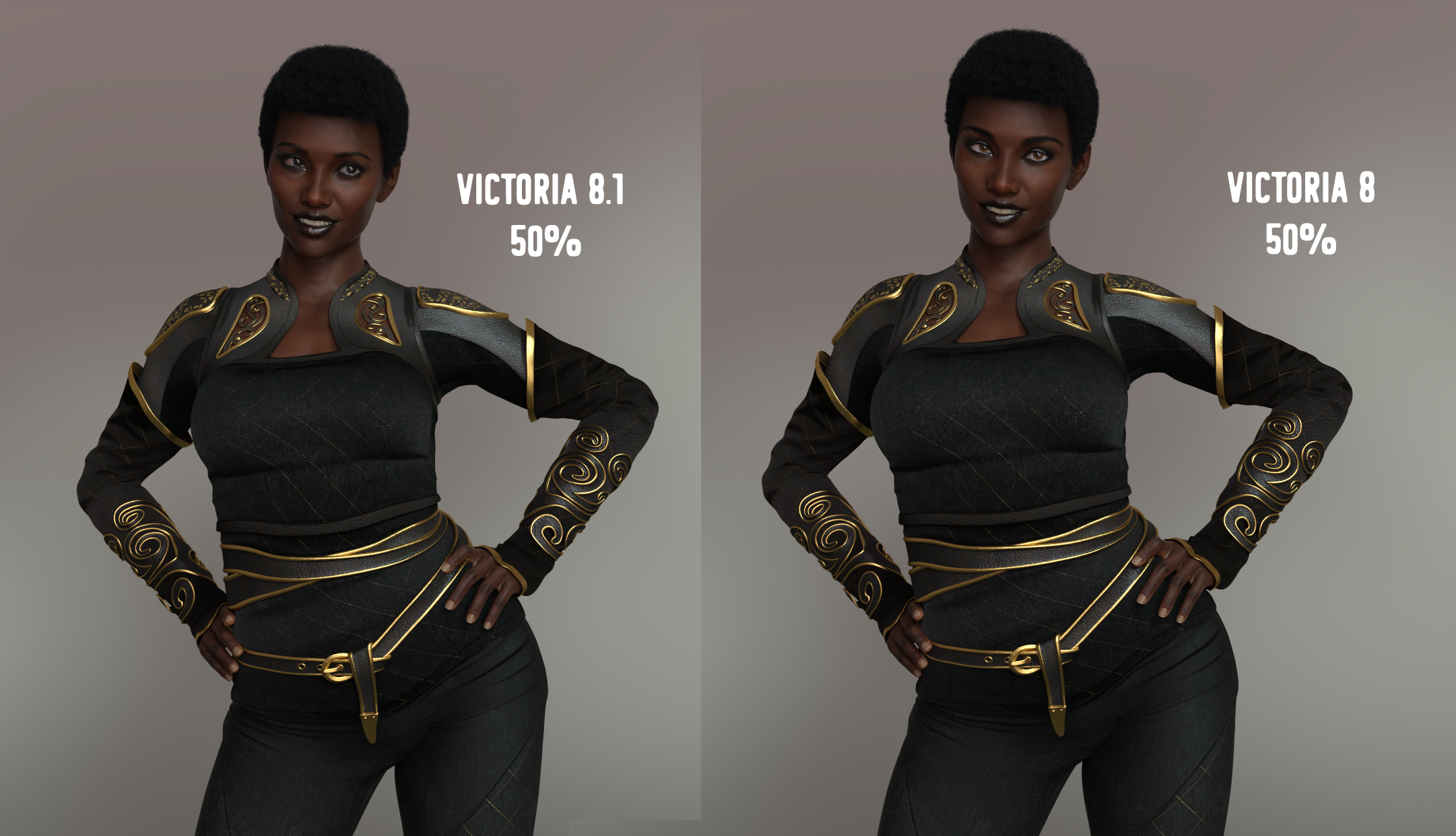
Skin settings? But is the skin texture set on 8.1 the same as that on 8.0? I'm not sure what you mean by skin settings, but I'm not currently experimenting with 8.1. If I were, maybe that would explain it.
Genesis 8.1 / Victoria 8.1Has anyone tried combining Victoria 8.1 with G8 characters? What happens to the new teeth, mouth and eyes? Even if I got the character, I would never use the morph as is...
Genesis 8.1 / Victoria 8.1outrider42 said:
So another thing that is a quickly becoming an irritation; all the expressions for G8 that I can no longer use still show up in the list of dials for 8.1. A few G8 expressions still work, but most do not, and there is no easy way to sort through all of this mess. This is real oversight. It is as if Daz assumed everybody would be using the face rig feature to make expressions and never use dials. I am not a huge fan of that rig. I prefer to at least start with a basic expression and maybe tweak it in the rig if I use the rig at all. But that process is a lot more tedious for 8.1 with all of these dead expressions that no longer work.
Daz also is going to have a problem confusing both PAs and customers with where 8.1 products get listed. For example, where does Victoria 8.1 show up in my Daz??? Why she is listed right along side all my 8.0 characters, and all of the attachments are in the G8.0 folders as well. But some characters might show up in a new Genesis 8.1 folder that is separate from 8. This same issue will happen with poses, expressions, and clothing. Some PAs are going to place products under totally separate 8.1 folders while other continue to make products and list them under 8, even if that product is 8.1. I can certainly understand expressions being set in a new 8.1 folder, since these don't work across the two, but the other products being in different locations on the whim of the PA is not so good.
We need to have a clear method to this, or things will get very confusing for us all very fast. Like I said before, Daz seems to specialize in confusion.
Another annoyance, going back the "features" for 8.1, as I described, is that Daz very easily could have made all of the attachments work out of the box on existing 8.0 models. Again, the geometry is the same here, all they really need to do is fix some IDs so that G8.0 is a compatible base. So the new tear and lash models can all work on 8.0 without any autofitting at all. But IMO they chose not to do that, because...marketing.
The marketing is my biggest issue with this release. The marketing needed to be much more clear about which feature was actually for what. There should have been 3 sections. One section starts off with the new improvements for Daz Studio itself, like the new shader. The next section, and this section is clearly divided from the others, would list the improvements specific to Genesis 8.1. Then the next section would list the improvements specific to Victoria 8.1, and again, this section would be clearly separated from the others.
That way, you do not confuse users into thinking vellus hair is part of Genesis 8.1. Or that Genesis 8.1 has new teeth. Or a lot of things shown on the page that are actually improvements for the new Victoria and have nothing to do with Genesis 8.1.
I don't know why that is so hard for marketing to grasp. There is confusion around almost every Daz event. If these very basic steps had been taken, there would have been less negativity. Oh I am sure there would still be negativity, you cannot please everyone and many of the issues we are discussing would still exist (like vellus hair requiring a bundle was going to set people off no matter what). But a lot of the negativity around the confusion would have been reduced. You guys openly invite this type of reaction with these constantly vague promotions you do. Then people like Richard have to try and calm the crowds and figure out what is going on.
So the first step is to be clear in your marketing. Obviously Michael 8.1 is coming up next, so you guys have a chance to rectify your marketing for him. If you have already designed you web page for his release...uh, scrap it and start over and break these features up like I described.
You could not have said this better. Thank you.
Genesis 8.1 / Victoria 8.1So another thing that is a quickly becoming an irritation; all the expressions for G8 that I can no longer use still show up in the list of dials for 8.1. A few G8 expressions still work, but most do not, and there is no easy way to sort through all of this mess. This is real oversight. It is as if Daz assumed everybody would be using the face rig feature to make expressions and never use dials. I am not a huge fan of that rig. I prefer to at least start with a basic expression and maybe tweak it in the rig if I use the rig at all. But that process is a lot more tedious for 8.1 with all of these dead expressions that no longer work.
Daz also is going to have a problem confusing both PAs and customers with where 8.1 products get listed. For example, where does Victoria 8.1 show up in my Daz??? Why she is listed right along side all my 8.0 characters, and all of the attachments are in the G8.0 folders as well. But some characters might show up in a new Genesis 8.1 folder that is separate from 8. This same issue will happen with poses, expressions, and clothing. Some PAs are going to place products under totally separate 8.1 folders while other continue to make products and list them under 8, even if that product is 8.1. I can certainly understand expressions being set in a new 8.1 folder, since these don't work across the two, but the other products being in different locations on the whim of the PA is not so good.
We need to have a clear method to this, or things will get very confusing for us all very fast. Like I said before, Daz seems to specialize in confusion.
Another annoyance, going back the "features" for 8.1, as I described, is that Daz very easily could have made all of the attachments work out of the box on existing 8.0 models. Again, the geometry is the same here, all they really need to do is fix some IDs so that G8.0 is a compatible base. So the new tear and lash models can all work on 8.0 without any autofitting at all. But IMO they chose not to do that, because...marketing.
The marketing is my biggest issue with this release. The marketing needed to be much more clear about which feature was actually for what. There should have been 3 sections. One section starts off with the new improvements for Daz Studio itself, like the new shader. The next section, and this section is clearly divided from the others, would list the improvements specific to Genesis 8.1. Then the next section would list the improvements specific to Victoria 8.1, and again, this section would be clearly separated from the others.
That way, you do not confuse users into thinking vellus hair is part of Genesis 8.1. Or that Genesis 8.1 has new teeth. Or a lot of things shown on the page that are actually improvements for the new Victoria and have nothing to do with Genesis 8.1.
I don't know why that is so hard for marketing to grasp. There is confusion around almost every Daz event. If these very basic steps had been taken, there would have been less negativity. Oh I am sure there would still be negativity, you cannot please everyone and many of the issues we are discussing would still exist (like vellus hair requiring a bundle was going to set people off no matter what). But a lot of the negativity around the confusion would have been reduced. You guys openly invite this type of reaction with these constantly vague promotions you do. Then people like Richard have to try and calm the crowds and figure out what is going on.
So the first step is to be clear in your marketing. Obviously Michael 8.1 is coming up next, so you guys have a chance to rectify your marketing for him. If you have already designed you web page for his release...uh, scrap it and start over and break these features up like I described.
Step-by-Step: Using the new PBR Skin on Genesis 8Kharma said:
@plasma_ring How do you create an AO map?
The ones I used came with Victoria 8.1, but hers actually look different than the AO maps I've seen before. If you google "ambient occlusion map" you'll see that they generally just have the shadowed areas defined where creases or corners are, but the ones in her AO slots when I load her have way more detail spread out across the face.
If you use a texture painting program like Substance Painter it includes AO when you export your final maps, but I think you can also make them in Photoshop.
Edit: Kicking this over to a dev who actually knows how it works. :V
Step-by-Step: Using the new PBR Skin on Genesis 8gerster said:
plasma_ring said:
aldoraeno said:
gerster said:
The only difference seems to be, that the old uber skin has some highlights in the shadows, which the new pbr skin is missing.Hard to tell if this is better or worse.
The only befenfit of the shader for old skin seems to be, that I can apply these micro displacement.
Or are there other benefits which I don't see. For me it looks like that just appling the new shader to old skins doesn't make the render result autmatically better.This has been my general experience so far, too. The shader looks roughly the same, but makes the skin appear either extra-wet or extra-dry, depending on specular occlusion settings and the surrounding lighting.
I would be interested to see if it looks better with an occlusion map texture (the problem may just be that the specular occlusion is too "flat"), but since I haven't purchased Victoria 8.1, I don't have a texture that was intended for this purpose.
The occlusion seems to make a real difference. While messing around in Substance I was actually wishing that I could try using AO on Daz figures, because it seems like there are some neat things you can do with it. That said, I have no expertise in this area but the AO maps don't look very different from specular maps included with some previous G8 characters.
I've enabled occulsion in my comparsion, but it didn't improve the skin. From what kind of difference are you talking?
What is AO?
AO is ambient occlusion, and it basically lets you use an image map to define how much light reaches parts of your model that should be in shadow. So if you have a building set and use an AO map you can deepen shadows in the corners and where edges meet (this is where I'm most familiar with it). I think the idea was that Iray didn't need AO--please don't quote me--but when I compared a skin straight from the normal material preset to the same one with the shader and an AO map, the latter's facial details were clearer in dim light.
(On a side note it is always kind of scary discussing this stuff from a layperson's perspective as I figure it out, so I would love more information from people who are better versed in it but if I get details wrong I promise I am not intentionally oversimplifying or anything. I'm just sharing what I find as I poke around.)
Genesis 8.1 / Victoria 8.1scheusal242 said:
Victoria 8.1 doesn't look like a woman, she looks much too young, looks like an eco-student character. Especially since Victoria should be the most beautiful character, this is rather insignificant. The notch on the tip of the nose is exaggerated and not really common in mankind. The notch looks awful on some renders. Let's see what follows.
It's all in the eye of the beholder... I remember having a hard time with V4 to get her looking anything else but Julia Roberts whom I still don't think being "pretty"
Step-by-Step: Using the new PBR Skin on Genesis 8aldoraeno said:
gerster said:
The only difference seems to be, that the old uber skin has some highlights in the shadows, which the new pbr skin is missing.Hard to tell if this is better or worse.
The only befenfit of the shader for old skin seems to be, that I can apply these micro displacement.
Or are there other benefits which I don't see. For me it looks like that just appling the new shader to old skins doesn't make the render result autmatically better.This has been my general experience so far, too. The shader looks roughly the same, but makes the skin appear either extra-wet or extra-dry, depending on specular occlusion settings and the surrounding lighting.
I would be interested to see if it looks better with an occlusion map texture (the problem may just be that the specular occlusion is too "flat"), but since I haven't purchased Victoria 8.1, I don't have a texture that was intended for this purpose.
Maybe https://www.daz3d.com/skin-detail-resource-1 is for you?
Daz 3D is part of

Connect
DAZ Productions, Inc.
7533 S Center View Ct #4664
West Jordan, UT 84084Licensing Agreement | Terms of Service | Privacy Policy | EULA
© 2026 Daz Productions Inc. All Rights Reserved.