-
Okay! Cry and you buy it anyway!
Why can't you get it to work on your computer? What is it doing?
It's strange. When I was using it, any time I tried to use a slider, say for a morph, it would take a long time to respond. So I couldn't see the changes being made in real time. It was really frustrating. Then, when I started to preview in iray, if I did certain things, like add lights or shaders my computer would sometimes crash. I know it sounds like an issue with my computer (and for all I know... it could be.) I don't have these problems on the version I was using, everything runs pretty smoothly.
Transfer Utility G3F to G8FI've found the transfer utility is not so good for FBMs, as it's messing with the hands and arms.
This is an alternative, though slower method, with which I've had pretty good results. Tutorial and helper scene/morphs included.
Your link is not working this morning, Redz.......
Updated the tutorial file that (hopefully) sorts out those fingernail issues. Let me know how you get on with it. And huge thanks to everyone providing ideas and feedback, We'll get there together :)
Autofit crashing when applying generation 3 clothing to Vicky an CoTry Sickleyield's method. It avoids the transfer utility altogether and preserves any custom bones in the clothing.
http://sickleyield.deviantart.com/journal/Tutorial-Convert-Clothing-G3-to-G8-G8-to-G3-686682065
Transfer Utility G3F to G8FI've found the transfer utility is not so good for FBMs, as it's messing with the hands and arms.
This is an alternative, though slower method, with which I've had pretty good results. Tutorial and helper scene/morphs included.
Your link is not working this morning, Redz.......
Data Folder ConfusionHi, Jestmart, thanks for joining in.
Your point is valid as far as it goes, though I'm not sure it's exactly what I've been finding. On the other hand I have just found something new that threatens to upset everything else I've learned so far.
A file that has refused to load even though it appears to be using the correct Data path has just loaded for the first time since it was made. I achieved this by ignoring common sense and copying an old data folder for David (blDavid_72712) over the new one. All I can guess is that there was a manipulation, morph or movement in the old file that wasn't in the new one but I doubt that's the complete answer. But it does raise a nasty question: Am I going to archive all the data folders forever? Cos that would swallow up a veritable shipload of storage on my HDD.
Now as to whether the "nesting" notion has wings or not (see what I did there?
 ), while that might simplify the loading of certain older files, my current purpose is not so much to have a way of finding missing data folders, though that has been and may continue to be a major concern (as with that old David file), as to have a way to limit the numbers of places Daz Studio will try to write a new data folder.
So far my latest approach (and again, my thanks to Richard Haseltine for pointing me in this direction) of "Load with as many Data Folders linked in the Daz Directories preferences as you can find on your system; Save with just one" has been meeting with some success .
To the extent that I'm now wondering if I might save some time in the future by creating a new Data folder for each extended project (usually months when it comes to animation, and years in one case that I still haven't finished yet) and collect them together into one location at the completion of the project for archive, recovery and correction purposes. I'm mulling the complications of that one as I continue working on the current project. It might be too late to test this theory on it just yet.
Thanks to all who have contributed here. Updates as, when and if....
S
Morphs from G3 to G8Bethany's fingers are perfect on G8 now after using the update. I even tried them with G8's 'nail length' morph, cranked up to maximum, to see if there would be any adverse effects. There were none. Thank you :)
Morphs from G3 to G8Genesis 8 is happy she can shapeshift to G7 shapes and her fingers are mangle-free ;).
G8 out of the box on the left and a pixie morph for G7 by Xameva on the right on G8
Laurie
How to export a DAZ figure in fbx format preserving high resolution and etc.You can export any morphs that aren't correct morphs pretty easy. But the LOD thing is annoying me too.
You are supposed to be able to export the other resolutions via FBX, that is what support told me. I think we should open a separate support ticket regarding LOD in FBX if that is not working. Currently I am annoyed DS is not saving other levels of LOD in the DUF file. It's related but not the same exact thing and I did open a ticket for that.
I could see why UE would not like subdivision though, using different predetermined LOD is one thing, but sub-d is basically dynamic and game engines typically don't do sub-d since it's applied in "realtime". Realtime not being the best word, but Sub-D isn't a baked LOD is my point. LOD are basically different quality versions of the figure saved into the same file, Sub-D geometry is not saved anywhere. It's not "real" and only stored in memory.
Regarding morphs, that's not hard you just change your export options when you export, you can tell DS to export all morphs if you want but that would result in a HUGE file. However you can make rules to export morphs with certain words in them. However the more common approach is to animate morphs you need on a timeline.
Typical method is to make a short 2 frame animation. Frame zero is the base shape with no additional morphs. (so dial in your character, but nothing else). Then in frame 1 or 2 go ahead and dial in all morphs you want to be able to control in the next software, expressions, muscle flexing, whatever. When you open the FBX in another program (UE/Unity/etc) they will show up as either morph targets or blendshapes respectively.
Corrective morphs that are hidden are tough to export. Those are basically proprietary to DS. I haven't found an easy way to export those. So when you get your FBX into another program, don't expect elbows and things to look as good as they do in DS.
If someone can correct me, that would be fantastic. I would prefer to be wrong about this, but have been doing this pretty regularly for a few months now and haven't overcome these areas.
I tried your method with Cinema 4D, did not work. MAy be there is someting I am doing wrong. What are the speces you are ticking in the Daz FBX export menu ?
Morphs from G3 to G8And the (nearly) full body shots:
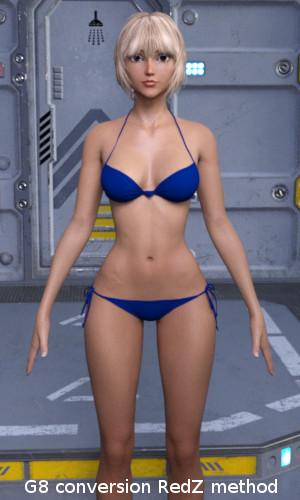
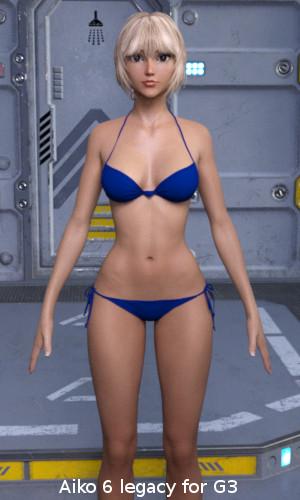
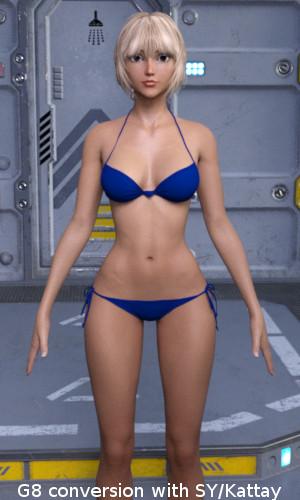
Body conversion unfortunately didn't work as well as the head. The arms are not straight and the body is wider compared to the original. Look at the distance between the legs.This is most probably a result of the different body shapes of G3 and G8. I fear, no conversion method can change this without working on the mesh itself.
But the results are still impressive. Thanks a lot Redz, Kattey, SickleYield and all here on the forum for making this possible.
... but I'm greedy
. While the body conversions most probably wouldn't work in practice, at least for Aiko 6, the head conversions are really great. Hence my question: Is there a way to create head morph conversions only, without changing the body at all? I tried with the Aiko 6 head morph, but the body is still changing a bit, even if I didn't morph anything there.Morphs from G3 to G8Here some results from my tests using both methods, Redz and SickleYields/Katteys. I used the Aiko 6 legacy morphs for Genesis 3 with the Ayumi mats. Here the "Head shots":
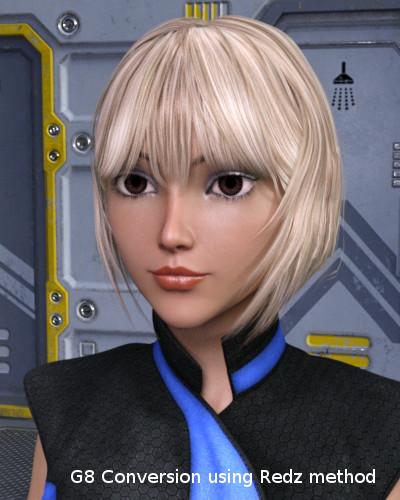
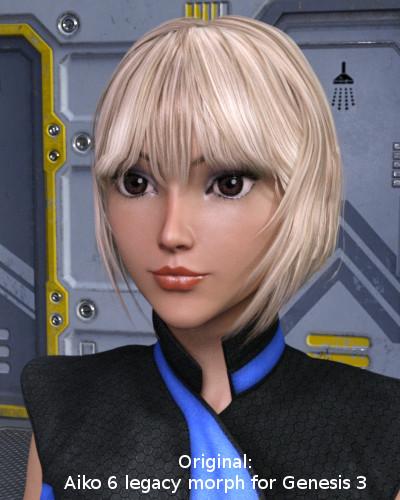
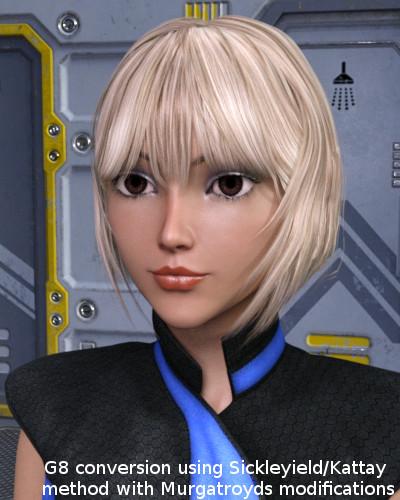
Compared to the original only the eyelashes are clearly different, which is no surprise, as they are not converted at all. Between the two conversions there are minor differences at the eyes.
The specular highlights of the eyes are missing too. But that's a problem with the mats, not a result of the morph conversion.
Morphs from G3 to G8Updated the tutorial file that (hopefully) sorts out those fingernail issues. Let me know how you get on with it. And huge thanks to everyone providing ideas and feedback, We'll get there together :)
I tried your updated file and it works much better now, here is a comparison pick of the same models as I posted before, my Lara morph and Genesis 8 Female:
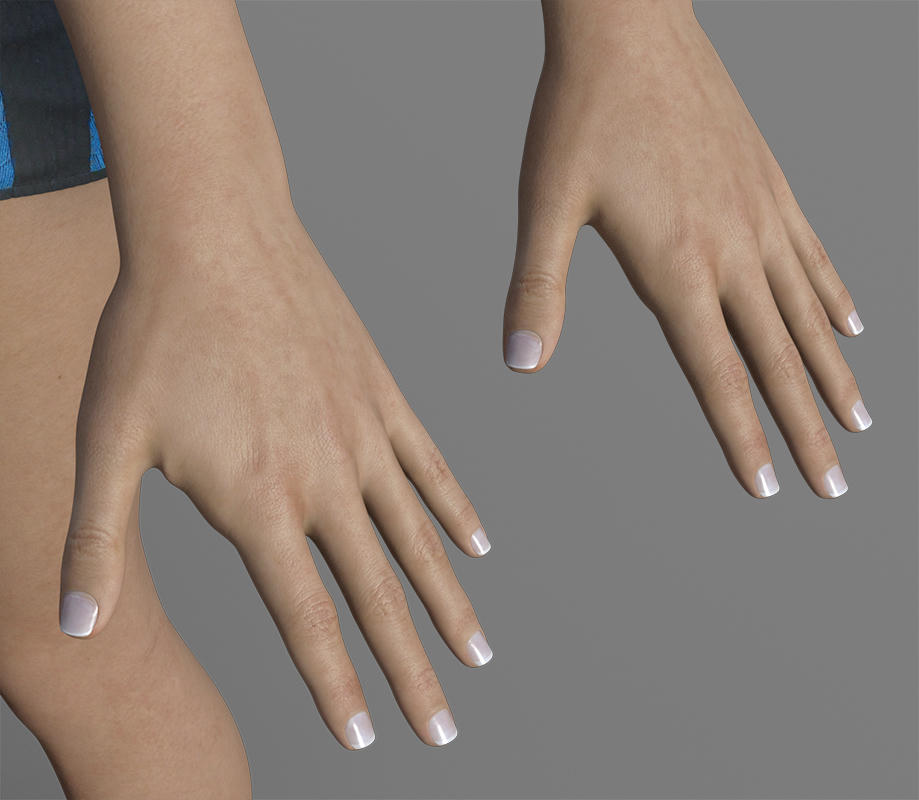
The distortion she had before is gone, now it's just a little bit beside her thumb as you can see. This can easily be hidden I think by posing the hands carefully. I transfered all my custom characters and some official ones and the more realistic model, the less distortion beside the thumb. The only model with deformed fingertips when transfered is the ToonGenerations model.
Thanks again for this awesome tutorial!
 Genesis 8: Some Stats and our Thanks
Well, a huge THANKS TO SICKLEYIELD!!!!
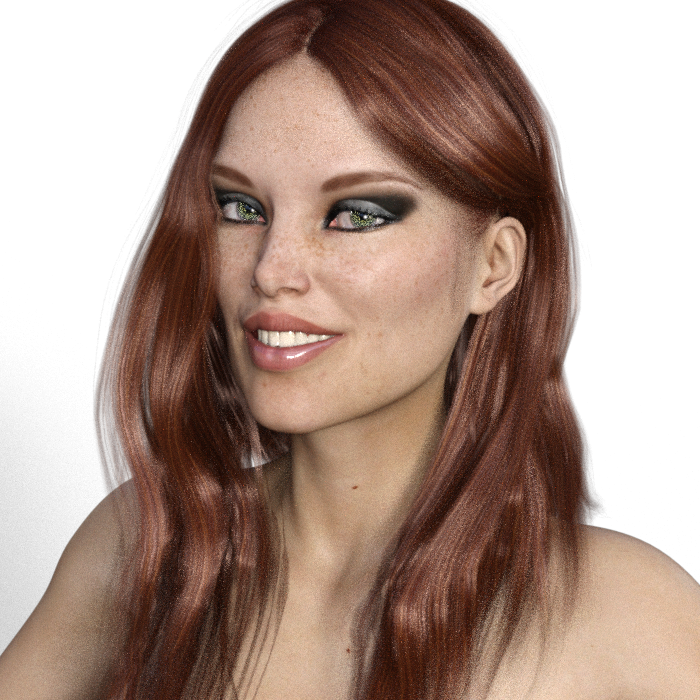
 I was NOT happy with the introduction of G8 because I own probably thousands of merchant resource morphs and was not going to spend that money again. But I followed Sickleyield's tutorial, which is basically a way of doing your own GenX and was able to transfer a G3 character to G8, then made just a few changes. This is the free base G8 with Georgia skin and hair and transferred morphs of a character I created. It took a while, but after I learn it, I can see it going faster.
The original G3 character was actually a lot prettier, but I suppose this is slightly more realistic. When I started to play with expressions, she became less glamorous and more girl next door, but that's fine, variety is good. Not fully rendered, I get impatient with my CPU rendering...
Sickleyield tutorial here: http://sickleyield.deviantart.com/journal/Tutorial-Transferring-Character-Morphs-G1G2G3-409437916
 Projection issues with attached body mesh
I've been trying an experiment with an up-res'ed copy of the Gen3 Body mesh - just the body mesh - not the eyes teeth etc. Brought in in and used the transfer utility to make it a full body attachable wardrobe object. Basically it works but the mouth & eyelids don't quite project right - a little warbly on the eyelids (as if maybe they're projecting to the eyeballs? And the mouth is welded shut as if it's confused about which points upper and lower lips should project to. Is there a way to control what points project to where and to exclude surfaces from the projection?
Thanks
Day 4 of Generation 8 and...The morphs from G7 transfer so easily (even extreme ones) that I plan to get thru them all eventually ;)
This is Josh Crockett's Hag morph for Genesis 7 Female. Love ;).
Laurie
That's amazing! How did you transfer the HD details? I've tried transfering highly detailed morphs but it seams to lose the detailing.
I have the same question. This señorita have HD morphs. How?
Change Bone Parent for specific morph- Set the Parametrs pane to Edit mode, if it isn't (right-click).
- Find the inverse property, right-click on it, and Show In Property Hierarchy.
- Expand the options under the morph to get down to Subcomponents (that is, things the property is controling)>Second stage>mulitply
- Select the head bone, drag the rotation cotnrollers into the Multiple group in the Property Hierarchy.
if you now bend the head on your figure, then set your hood down morph, you should see the rotations cleared. Assuming that works, in the Property Hierarchy expand the options for the rotations you dragged across and make sure that the save with is set to the inverse, not the rotation - right-click to change. Once done, save your inverse property (assuming you want to have it saved as an asset).
AIUTO...CHI CONOSCE L’ITALIANO? PARTE UNDICIRestano da menzionare gli IK rotti... Ti assicuro che non è un dettaglio da trascurare... Magari io solo l'unico in tutto il mondo DAZ a non usare le pose pronte e mi ostino ad usare IK e Pin, ma è necessario che funzionino bene... Non sono passato a Genesis3 proprio a causa degli IK, impossibile usare la figura in modo rapido e mi sarebbe anche piaciuto viste alcune caratteristiche! Non puoi perdere un'ora a posare UN braccio perchè non puoi pinnarlo, pena vedere il gomito partire diagonalmente che nemmeno nei peggiori incontri di Muay Tai...
Trovo utile il preset "Wall Flat" che converte tutto alla classica base 3DLight... Per il resto vedrò solo IRay dappertutto, inutilizabile nelle animazioni... Inoltre non mi piacciono le nuove UV, i seams mi sembrano posizionati male...
Un dettaglio che potrebbe attirarmi in quella direzione è la velocità di risposta al cambio di posa, decisamente rapido... Il ricalcolo dei Clone è velocissimo e la figura si muove in modo fluido anche con molti abiti addosso...
Se un giorno dovessero fixare gli IK e ci fossero dei morph decenti potrei anche pensare a fare un mezzo salto... Per ora utlizzerò solo Genesis1...
Victoria 8She's not exactly a looker, eh?
Also, can someone explain in simple terms what's the appeal of the new G8/V8 generation? As far as I can tell it's just the same as G3?
She can look like anything you want. I just brought over 35+ of my favorite morphs from G3F, including Toon Generations, Legacy Shapes for G3F (the main G2Fs) and various characters (Lilith 7, Olympia 7, V7, etc.) I also brought over Xameva's fantasy shapes from Renderosity (the elf and dwarf ones), which look really good. The ears dial in right on those.
Will be posting test renders of things as I can. If someone wants to see what a particular character looks like on G8 or mixed with V8, let me know. If I have it, I'll move it over and render it. You can also use Redz method to move over items you've ported in to G3 from GenX2 or created with FaceGen. I'm not even sure you need any body or head morphs for these, the morphs are ported over via Morph Loader Pro and dialed straight in. (But I have those packs installed, so I can't verify that.)
The posing and facial rigging are huge steps forward in realism. The autofits work pretty decently. Sometimes Studio has to think a bit if you load entire outfits with lots of items. I'd recommend doing those one piece at a time. Being able to use the skins from G3F is a huge advantage. I managed to get a G3M skin on G8 as well, though there are a few seams. Haven't tried tranferring any G3M morphs over yet. Did try the Centaur for kicks and it didn't work, but I didn't expect it to. Might have to make a V8 centaur the way people were making V7 ones before the female centaur came out.
The possibiities with G8 are pretty endless and you don't have to spend much or anything to enjoy the benefits, just a little time and patience.
Can you test Gwinneli
Thanks, and sure, I can test her next. I already brought her over. Still waiting on this render to finish. Testing a bunch of things at once and it's taking a while.
Victoria 8She's not exactly a looker, eh?
Also, can someone explain in simple terms what's the appeal of the new G8/V8 generation? As far as I can tell it's just the same as G3?
She can look like anything you want. I just brought over 35+ of my favorite morphs from G3F, including Toon Generations, Legacy Shapes for G3F (the main G2Fs) and various characters (Lilith 7, Olympia 7, V7, etc.) I also brought over Xameva's fantasy shapes from Renderosity (the elf and dwarf ones), which look really good. The ears dial in right on those.
Will be posting test renders of things as I can. If someone wants to see what a particular character looks like on G8 or mixed with V8, let me know. If I have it, I'll move it over and render it. You can also use Redz method to move over items you've ported in to G3 from GenX2 or created with FaceGen. I'm not even sure you need any body or head morphs for these, the morphs are ported over via Morph Loader Pro and dialed straight in. (But I have those packs installed, so I can't verify that.)
The posing and facial rigging are huge steps forward in realism. The autofits work pretty decently. Sometimes Studio has to think a bit if you load entire outfits with lots of items. I'd recommend doing those one piece at a time. Being able to use the skins from G3F is a huge advantage. I managed to get a G3M skin on G8 as well, though there are a few seams. Haven't tried tranferring any G3M morphs over yet. Did try the Centaur for kicks and it didn't work, but I didn't expect it to. Might have to make a V8 centaur the way people were making V7 ones before the female centaur came out.
The possibiities with G8 are pretty endless and you don't have to spend much or anything to enjoy the benefits, just a little time and patience.
Can you test Gwinneli
Morphs from G3 to G8Download the zip files and copy/paste the contents into My Daz3D Library.
Open Daz Studio
Under Content Library - People - Genesis 8 Female - Morph Transfer Helper, find and load 'G3F to G8F Morph Transfer'
The above instructions are throwing me. I'm not sure what I am doing wrong but I can't find any of these anywhere. What's more, there is no "People option" when I click on the content library tab. Is it under "G" for Geneis or something of that ilk?
This is my alternative method, but I've found it better than the transfer utility for body morphs especially
Tutorial and helper scene/morphs included
This is my alternative method, but I've found it better than the transfer utility for body morphs especially
Tutorial and helper scene/morphs included
This is working fantastic! Thanks :D
Good to hear :) The tips of the fingernails sometimes come out a little distorted. Not sure that can be helped.
In the content library tab, there should be -Daz studio formats- My Daz 3D Library, and inside that a people folder. The file should be there if you have copied and pasted the contents of the zip to your My Daz 3D folder
G3M Morphs on G8FOkay... Now it doesn't work at all. Was there, perchance something you may have done slightly differently when you used the transfer utility? Abolutely nothing is happening when I follow these instructions... no morph transfers... nothing. I feel like there might be something small missing
Daz 3D is part of

Connect
DAZ Productions, Inc.
7533 S Center View Ct #4664
West Jordan, UT 84084Licensing Agreement | Terms of Service | Privacy Policy | EULA
© 2026 Daz Productions Inc. All Rights Reserved.