-
Need to make a character morph for a piece of clothing.
I have Rhiannon's Saffron Corset and need to make a morph that will apply to any G8 female character. It basicly cinches in the waist and uplifts the bosom. One came with the corset for G3 and I have the values of the body parts I need to reshape.. Just don't know how to create a.duf file that will add these shaping morphs to any G8 character.
Thanks in Advance
Okay! Cry and you buy it anyway!...supposedly, I understand you can set it to update at a specific time. At least that is what I heard. Of course if your computer is off at the scheudled time it will wait until you turn it on.
Yeah I have all the updates I need for W7. I also have a fairly hefty firewall (my workstation is also no longer connected to the net) and good AV/anti malware utilities. A bit of a bother for installing new purchases and driver updates as I have to DL them to a notebook then transfer them to the workstation via USB stick though not umanageable. Sadly I no longer can DL a beta version of Daz programme as The notebook doesn't have the DIM since I no longer do 3D work on it (it actually never did as the last version of Daz I had installed on it was 3.1).
Setting it for specific times is a bit hard for me. I keep strange hours. If I set it for when I'm asleep or at work, it'll probably shut down while rendering, and any other time, I'm likely using my computer. I just try to remember to save as often as possible, that way all I lose is the render time.
That sounds pretty painstaking but, through all of the frustrations and hurdles, it is a very fun and fulfulling experience... when things go right, ha.
Morphs from G3 to G8And the (nearly) full body shots:
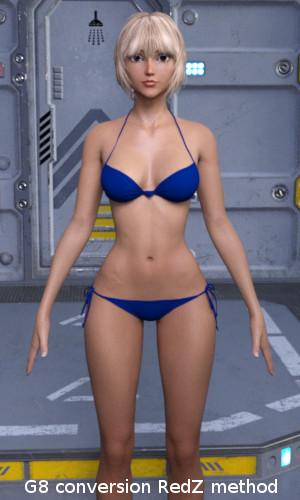
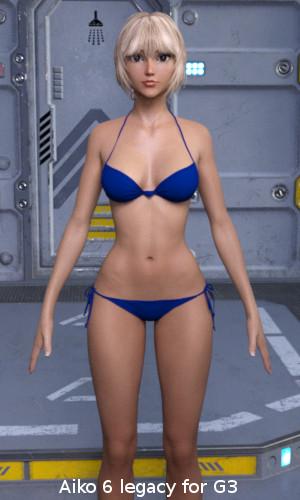
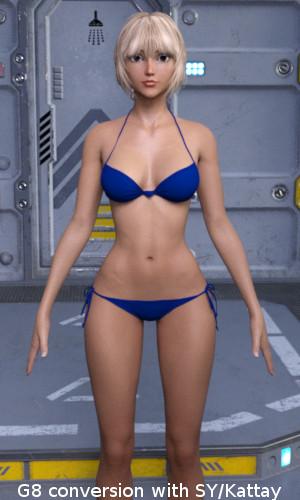
Body conversion unfortunately didn't work as well as the head. The arms are not straight and the body is wider compared to the original. Look at the distance between the legs.This is most probably a result of the different body shapes of G3 and G8. I fear, no conversion method can change this without working on the mesh itself.
But the results are still impressive. Thanks a lot Redz, Kattey, Sickleyield and all here on the forum for making this possible.
... but I'm greedy
 . While the body conversions most probably wouldn't work in practice, at least for Aiko 6, the head conversions are really great. Hence my question: Is there a way to create head morph conversions only, without changing the body at all? I tried with the Aiko 6 head morph, but the body is still changing a bit, even if I didn't morph anything there.
Using Redz's method - My face morphs also affect G8's body - especially the shoulders. I guess our clones are not perfect.
In the Morph Transfer Helper file, the G8F has the Genesis 3 female clone dialled in. This is because the morphs you are transferring were modelled on this base, so for the best fidelity of shape, I dialled it in. However, the base shapes are similar enough that I think you could get away without having the G3F clone dialled in. It's under parameters, hidden- clones. (You may need to enable show hidden properties in the drop down box of the parameters first).
If you dial this Genesis 3 Female to zero before proceeding with the tutorial as normal, then I think you can bring over the head morphs without affecting the G8F body.
Novica & Forum Members Tips & Product Reviews Pt 9That works really well. I don't even need to bother converting them now.
That script is a plain text file. I reversed the numbers (- 6 became + 6 and vice-versa; - 45 became + 45 and vic-versa,) and created a script to apply to G3F after applying a G8F pose. All credit to @DavidGB. I know zilch about scripting. And even though I have no plans on spending money on G8, with the instructions on how to create clones, transfer character morphs and fix poses, I'm pretty sure I'll be using the base. I've been using the Content DB Editor to add Genesis 8/Female compatibility to my G3F poses. Then with Filter by content selected, I'll still be able to see the G3F poses...
Okay! Cry and you buy it anyway!...supposedly, I understand you can set it to update at a specific time. At least that is what I heard. Of course if your computer is off at the scheudled time it will wait until you turn it on.
Yeah I have all the updates I need for W7. I also have a fairly hefty firewall (my workstation is also no longer connected to the net) and good AV/anti malware utilities. A bit of a bother for installing new purchases and driver updates as I have to DL them to a notebook then transfer them to the workstation via USB stick though not umanageable. Sadly I no longer can DL a beta version of Daz programme as The notebook doesn't have the DIM since I no longer do 3D work on it (it actually never did as the last version of Daz I had installed on it was 3.1).
Daz Studio Pro BETA - version 4.9.4.122! (UPDATED)DAZ may need to be re-consider power pose. (though I really DAZ do good job about new template for facial morph)
when I use Joint rotatin for posing, with power pose, it seems not wrok correctly with Pose controllers. At first I suspect, I miss make pose controlelr, but even though I only use default arms up-down, or arm Fromt back, with parameter pose controlelr, then try to adjust each node rotation by power pose, it somehow lock limit, or once jump to pose controller current value.
if I use rotation in parmeter (usuall X, Y, Z )rotation, it work with pose controllered value. but power pose seems confuse ,when pose with pose controller value. or can not distinguish nudge and current value.
Victoria 8Posted a different render of this in the Iray thread but thought someone might get a kick out of her here. Girl7 morph transferred to G8. Had to use Ruby skin as Girl7 wont work on base UV.
I had fun playing with the morph transfer and I can see the advantages of the new model, but I'm going to have to take a hard pass on G8 until someone comes up with a decent foot clone. None of the shoes I have work and I just don't have the patience to re-rig every damn peice of footwear I own.
At any rate, here's the Girl on G8, enjoy :)
 Dracorn's Render Thread
Just discovered another part of PowerPose - with extra points for the face.
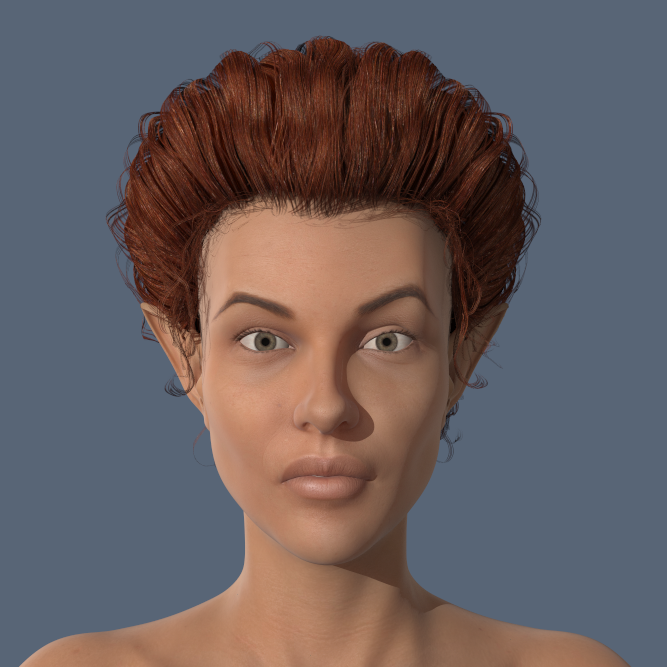
What I like about this is that it's not just for expressions but can be used for face morphs, with more control than the dials. This is great! I was dissapointed to find that the assymetrical face morphs were missing for V8 - they are not missing, they are here. I was able to dial in subtle differences on this face and am really pleased with the results. This is also where the ear angle morph dissapeared to.

 Morphs from G3 to G8
I tried the Sickleyield method and it worked great. But my question is, why not just use the G3 version? So far I see no advantages to G8... Why do we need G8 if we already have all the morphs we want in G3??? The mouth may be a bit more realistic for some expressions but not such a big change. V8/G8 could just be another less attractive G3 character. I'm not seeing the huge advantages...
The majority of my renders are probably head and shoulders shots where the expression on the face of the character does as much to tell the story as everything else in the image put together. The new features (shown below) of the PowerPose tool in Daz offer control of even the smallest detail of G8's expression, something that's just not possible with G3. I'm over the moon with my G8 morph of G3Zarina (and others) because her face can 'say' so much more now, and so much more easily than the G3 version ever could. No more time spent on postwork or even abandoning images altogether just because G3's smile has made her lower eyelids take on a peculiar upward curve and given her a mouth like a letterbox - a few quick tweaks in PowerPose will get rid of any oddities like that, although the G8 base expressions are so much better to start with and it's often not necessary to tweak them at all. Creating my own original expressions isn't that difficult now either.
What with being able to use the character's original texture (if it didn't use a custom UV) or those made with Skin Builder 3, G8 is rapidly becoming my 'go to' figure for female renders and I'm seriously thinking of buying the V8 Pro bundle on the strength of it, even though I've barely scratched the surface of what can be done with G8 alone.
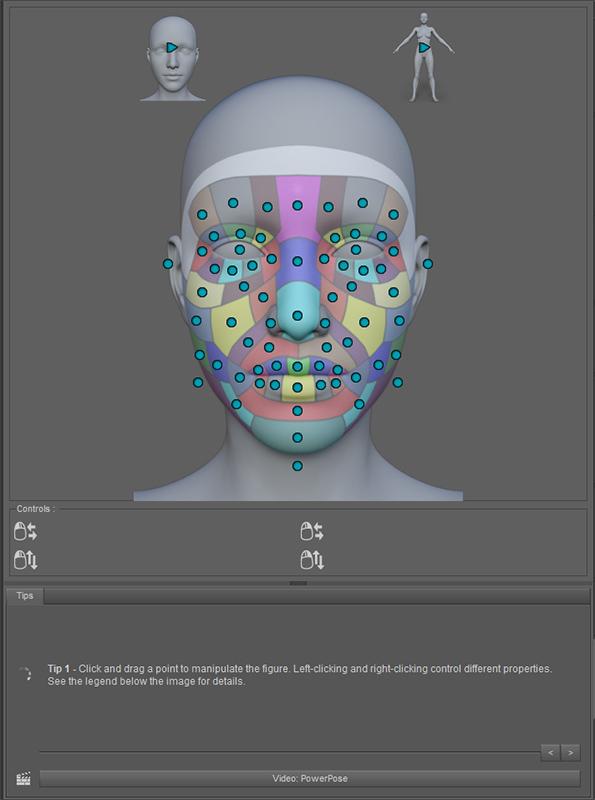
I missed this part of the PowerPose. I started to play around with it - wow, what fun! Beyond expressions, here is a place to make additional face morphs.
I was upset that ear angle was missing from the base morph package, because I use this to make adjustments to my elf ears. I'm glad to see it here.
This is also the place to create an assymetrical face - with much more control than before.
Happy as a clam!
...Anybody have an idea what happy clams do?
Victoria 8So i don't own any of her characters, but I think I'll go check her out now, cos this is awesome support.
For those who own Genesis 3 females made by Cynder Blue she just announced a free G8 morph for all her Genesis 3 females for free! Now that is classy! Also really helps those who own G3 versions of her characters I love the idea.
Where did she announce this? I have several of her characters and would love a G8 version.From CynderBlue with much love x
Due to the release of G8 and after reading comments from customers I would like to let you know that I will be adding a separate G8 morph file to ALL my G3F back catalogue for FREE download update. So if you are an existing customer of mine look out for an update notice from your vendor to re-download your model, for new customers the free G8 morph will be included as soon as possible and Promo's and product info will be updated to reflect the changes. All my G8 morphs are designed to work with your new free G8 figure and will not require ANY additional products to work. I hope this brings a little sunshine to the rain of the past few days for those who have been vocalising there concerns on content, cost and supply. I will as stated earlier, continue to keep G3F content as my main focus until you the customers decide you are ready for the change over and include version morphs until that time you may see the odd G8 thing here and there for those of you that have taken the leap already. As there are quite a few models this will be done over the next few weeks so watch this space for updates and notices on launches. Happy Rendering ppl. Have a great weekend. CBx
reposted with permission from her FB feed
traffic jamMy hazey recollection is that a product has to be made for Poser versions 5 or 6 or below, because around Poser 7 or 8 they changed some of the elements in how stuff is rigged and/or how some of the textures map onto the object. I may be misremembering it slightly, though. Someone else here more knowledgable about this can confirm or refine that info.
. Poser stuff that is textured using the material room and node based shaders won't transfer into D|S, or rather the textures will need tweaking or possible completely redoing.. Poser dynamic clothing will only work in the poser cloth room. THe same goes for Poser native hair. The human figures will not move from Poser to D|S AFAIK. Not the ones that are designed for Poser, due to weight mapping and stuff like that. However, in the main, props should work, apart from the possible shader issue.
The Pontiac that you mention does say in the Readme that it is not tested in DS. What is it that you can't get to work?
I can't even get DAZ to find it :(
Look in Content Library > Poser Formats > [content folder name] > props > Nationale7Props
It was actually under figure but thanks for pointing me in the right direction. I would have never have found it without your help. Thank you.
traffic jamMy hazey recollection is that a product has to be made for Poser versions 5 or 6 or below, because around Poser 7 or 8 they changed some of the elements in how stuff is rigged and/or how some of the textures map onto the object. I may be misremembering it slightly, though. Someone else here more knowledgable about this can confirm or refine that info.
. Poser stuff that is textured using the material room and node based shaders won't transfer into D|S, or rather the textures will need tweaking or possible completely redoing.. Poser dynamic clothing will only work in the poser cloth room. THe same goes for Poser native hair. The human figures will not move from Poser to D|S AFAIK. Not the ones that are designed for Poser, due to weight mapping and stuff like that. However, in the main, props should work, apart from the possible shader issue.
The Pontiac that you mention does say in the Readme that it is not tested in DS. What is it that you can't get to work?
I can't even get DAZ to find it :(
Look in Content Library > Poser Formats > [content folder name] > props > Nationale7Props
traffic jamMy hazey recollection is that a product has to be made for Poser versions 5 or 6 or below, because around Poser 7 or 8 they changed some of the elements in how stuff is rigged and/or how some of the textures map onto the object. I may be misremembering it slightly, though. Someone else here more knowledgable about this can confirm or refine that info.
. Poser stuff that is textured using the material room and node based shaders won't transfer into D|S, or rather the textures will need tweaking or possible completely redoing.. Poser dynamic clothing will only work in the poser cloth room. THe same goes for Poser native hair. The human figures will not move from Poser to D|S AFAIK. Not the ones that are designed for Poser, due to weight mapping and stuff like that. However, in the main, props should work, apart from the possible shader issue.
The Pontiac that you mention does say in the Readme that it is not tested in DS. What is it that you can't get to work?
I can't even get DAZ to find it :(
JamesJAB's Art Studio Full of Renders and Incomplete Projects!Here's a render of Bethany 7 with some extra curves from The Shapeshift morph pack and G3F body morphs.
 Show Us Your Iray Renders. Part VI
Girl 7 morph transferred to Genesis 8. I don't think I'll be bothering with G8 until someone comes out with a decent foot clone since every single pair of shoes I've tried to load on G8 are broken. G2 to G3 shoes worked MUCH better, I'm not impressed with "the most backward compatible" G8 at all. About the only thing I see a use for at the moment is the ease of creating facial expressions with puppeteer. Aaaaaaand lookie there, I'm on a rant...
Never mind, enjoy the render :)
 Novica & Forum Members Tips & Product Reviews Pt 9
Wow, you are way more organized than I am!
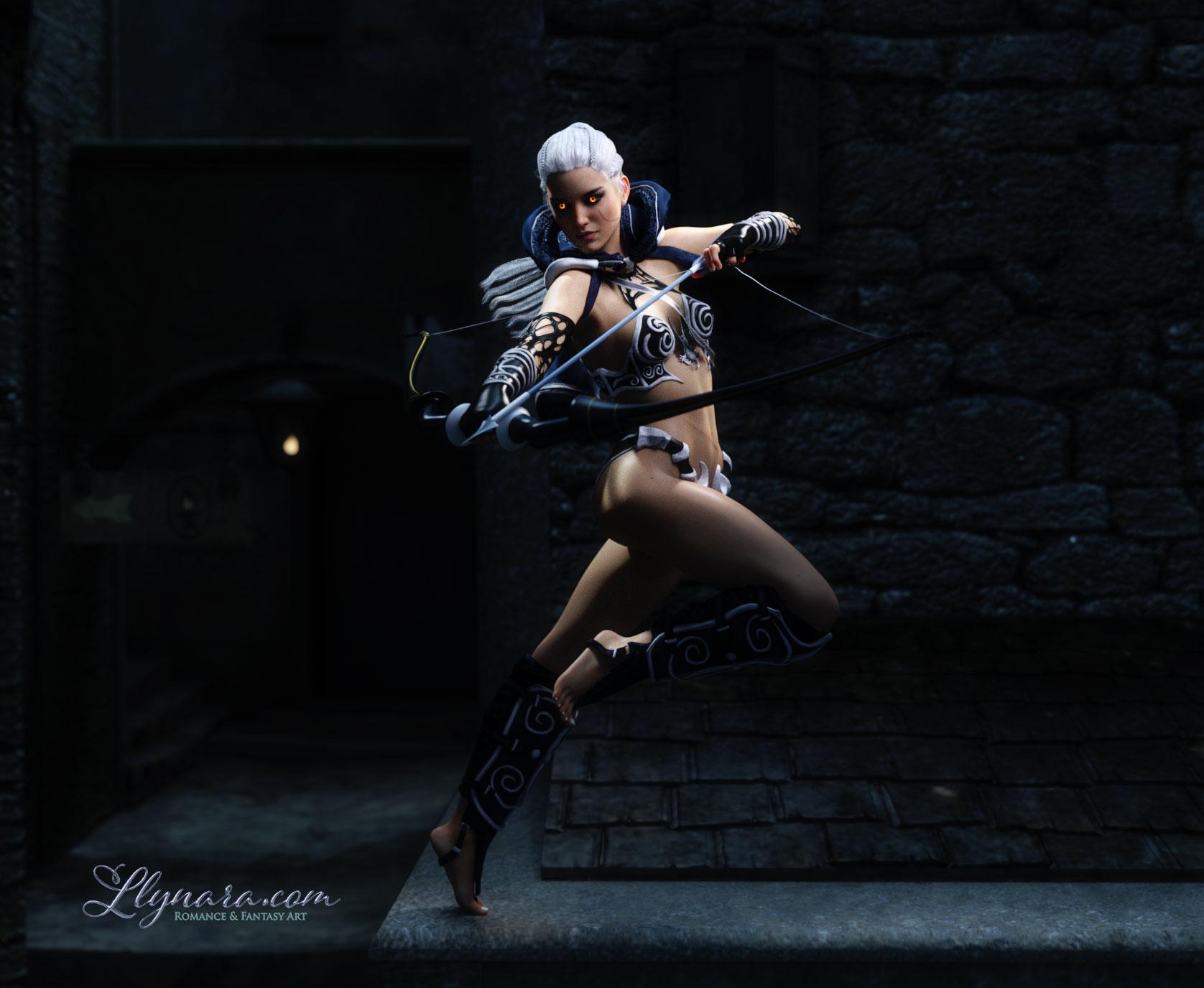
G8 Gwennili
Here's Gwennili for V7 on the base G8F using the Morph Loader Pro method Redz has described here. I've converted a bunch of my favorite G3Fs and am really happy with how they look with the new G8 features and Studio improvements. Loving her skin with the new lobe shader settings. There's a free script here to put them on G3F skins. I need to do a few more posing adjustments on the image, but pretty happy with it.
The set is "Thieves Alley" which says it's optimized for Iray but parts of it looked a bit low rez. That surprised me, as I don't think it's very old. It looked much better once I changed to the night lighting and used a little DOF.
The outfit is two different ones- Hunter Queen for G3F and Midnight Huntress for G2F. The boots on Hunter Queen didn't autofit well and the bodice on Midnight Huntress didn't look right in this pose. So I combined them and matched textures as best I could. The bow and arrow are from Midnight Huntress and would not follow the pose, despite careful positioning and parenting. The pose is adapted from Ensary's ArtemisV7 set.
 Morphs from G3 to G8
And the (nearly) full body shots:
Body conversion unfortunately didn't work as well as the head. The arms are not straight and the body is wider compared to the original. Look at the distance between the legs.This is most probably a result of the different body shapes of G3 and G8. I fear, no conversion method can change this without working on the mesh itself.
But the results are still impressive. Thanks a lot Redz, Kattey, SickleYield and all here on the forum for making this possible.
... but I'm greedy
. While the body conversions most probably wouldn't work in practice, at least for Aiko 6, the head conversions are really great. Hence my question: Is there a way to create head morph conversions only, without changing the body at all? I tried with the Aiko 6 head morph, but the body is still changing a bit, even if I didn't morph anything there.I have the same question. Someone?
Script to better adapt eyes genesis 3 to genesis 8Not only that but an iris morph that pushes the iris back like this one from J cade, http://www.sharecg.com/v/84174/gallery/21/DAZ-Studio/Genesis-3-Iris-Morphs i have this one and use it all the time now as it gives the illusion of depth to eyes. I'm surprised that although we have realistic bends and skin details etc eyes are still flat. I've not the knowledge or the skill to make such a morph myself, and it could be included in the head morphs for the new figures. I'm sure i cant be the only one that would welcome such a morph.
Day 4 of Generation 8 and...Genesis 7!! I definitely missed that release.
The morphs from G7 transfer so easily (even extreme ones) that I plan to get thru them all eventually ;)
This is Josh Crockett's Hag morph for Genesis 7 Female. Love ;).
Laurie
Hehe...Genesis 3...sorry. It's gonna take awhile until my synapses catch up with the number change ;).
Laurie
Don't worry, it's not just you :) I posted mentioning G7 the other day (well, it's the one before G8, right? :) ), but spotted it and edited before anyone noticed!
That's why I will continue to refer to the new generation as G4; so I don't get confused.
I'm going to call it Genesis 3.5, since it's really just a few changes to the same old Genesis 3 figure.
Day 4 of Generation 8 and...timmins has it. I've found some morphs that don't transfer well. I guess the hag looks good because she's essentially a human shaped creature...just a really extreme ugly one ;). If you look closely at the legs along the edges you can see that there are no raised areas like there would be ideally, but for what is is, it's not bad at all ;).
The zombie morphs so far are giving me problems around the mouth where the lips are shrunken back into the face...on G8 the morph smears from the top of the mouth to the bottom like it can't figure out where the vertices in the lips are and what is the top and what is the bottom lip. I'm going to try to take it into Hexagon or 3D Coat and see if I can't smooth and try and fix those areas. If not, it's not a huge deal ;). I'll just use G3 for zombies...hehe. For close ups I'll likely be using the G3 versions of any of these morphs - it's just nice to be able to have things you can mix until the PAs and Daz supply a decent supply of new ones.
Laurie
Daz 3D is part of

Connect
DAZ Productions, Inc.
7533 S Center View Ct #4664
West Jordan, UT 84084Licensing Agreement | Terms of Service | Privacy Policy | EULA
© 2026 Daz Productions Inc. All Rights Reserved.