-
"Brace yourself, my dear wallet! There's always another Sale - and Glitches!"
I remember that. There was a bit of fuss at the time, but obviously they've decided to stick with no bundle for the future. It really bugs me. The head and body morphs for G8 are a necessity. They're not an option like a new outfit or something. You will NEED them for characters, and you need them cos quite frankly, Genesis 8 Female is ghastly.
We had a very successful garage sale yesterday, so I actually have the funds to purchase Victoria 8 Pro bundle. I was really torn - get the Pro which could possibly net you a discount down the line when M8 or Monique or other iconics come out....or not get the Pro because I'm tired of the "new shiny best thing" and that I kinda don't like V8 much. Her face is nice, but I don't like the eyebrows and I'm hearing that peeps aren't keen on the skin shader or her eyes. So after thinking on it overnight, I've decided to pass on V8. I'm simply not interested at this point in time. Yes, she can wear G3F clothing (except shoes) so I really don't need to start a new wardrobe for her.....so that helps. But yeah.....I'm not interested in her. It's a weird feeling to actually be able to safely afford a pro bundle even with australian currency conversion ($59US = $77AUS) and not want it. If my 10% discount for owning one previous Victoria genesis pro bundle could have been applied against JUST the Victoria 8 base, then I might be more inclinded to pick her up. But it doesn't. It only works on the pro bundle which frankly, I don't want.
I can't believe there's no bundle price for the head & body morphs and expressions for G8. I mean, if you're going to get one, you want them all. Ridiculous.
They didn't bundle the morphs for G3F or G3M, either. But I do agree with you...
I am another person pondering about whether or not to get the pro pack. I own all three previous Victoria pro packs, so I get the full additional 30% off, but I am a bit disappointed that 2 of the four outfits are SciFi, a genre I never render, and another one is an impractical fantasy armour, of which I already have many, and almost never use them. I like the V8 base, and one of the characters, but there is no additional discount for picking up individual items in the pack, only for those outside the pack.
However I will pick up the two morph packs and the expressions, which at $20 for the three is a pretty good deal, and gives me a good base for creating characters with G8.
Morphs from G3 to G8I tried Redz version but how do you get the eyelashes to be included? Also, everything works until the final save and restart. Then they all disappear.
G8F has no eyelashes, they are provided as a separate conformer which loads with G8F or can be found under anatomy in the content library, so it's not possible to transfer those.
Have you been saving your morphs as described at the end of the tutorial? Also don't save them to your Connect library as there may be a conflict there.
Morphs from G3 to G8Ki-Jen, Did you use the updated method?
At least, I downloaded and installed the new files from Redz. I hope I didn't accidently use the old version. But I will try again.
Yes, sometimes it helps to try again and crosscheck everything
 . This is, how A6 legacy looks like with Redz method (the left one, right is the original G3 morph):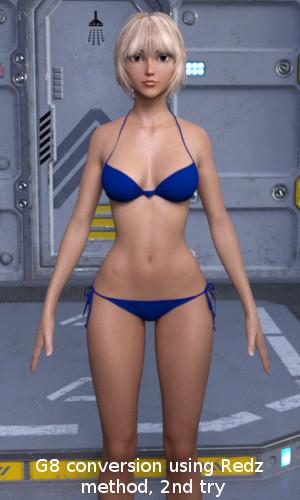
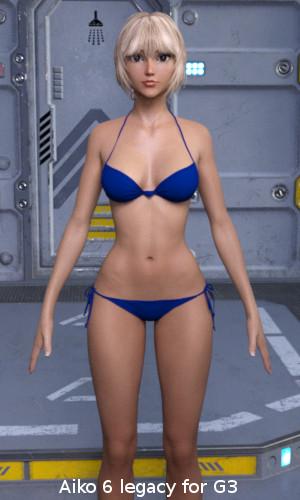
The hip ist still a bit wider and the shoulders are different, but arms and legs are straight now, which is the most important part for posing.
Glad it's working better for you. I have to point out this is not 'my' method. I merely adapted what others here have discovered into a somewhat simplified tutorial. :)
DS 4.9.4?...OK haven't read through the entire thread, so how does one go about downloading 4.9.4.117 and all the G8 essentials without the DIM. My workstation is no longer online so I need to manually DL to a notebook and transfer the files to the workstation so I can install with the DIM in offline mode. That means I need to find where I can download the .zip from. Doesn't work form the main page as when I click Download for the Windows 64 bit version, it takes me to my Product Library.
...and could we please find some way fo get the spell check to flag typos in words that are shorter than 4 letters? Or find a better one (or just go back to using the browser's default spell check)?
Transfer Utility G3F to G8FFirst of all thank you so much for this great way to transfer morphs.
I followed the tutorial to the letter but with every pose the hands/ finger look awful and distorted.
Only now I saw you uploaded a new revised tutorial file, will that help with the finger issue?
Kind regards
Petra
Use a G8F in "T G3F" pose before export to .obj and after apply the transfer utility use an "A G8F" pose and export the .obj it's given me goods success.
note: with the transfer utility you have to chose item Shape: Current in the Target options.
How do you create custom morphs and characters for G8?I was wondering, how do you actually create custom shapes, morphs, and characters for G8? I was thinking of making my own custom character for G8, but I have no idea where to even start.
You should use applications like Blender, Zbrush, Hexagon, etc. After that, you can use the transfer and riggins tools of DS and save all the changes as active figure / accessories, active morphs, .... It is very good idea to make your morph, figures and accessories, but a long way you have left to go in the Force.
G3M Morphs on G8FOk I have edited the tutorial linked above to reflect the workflow I have used succesfuly so far,
This tutorial assumes you have a morph you want to transfer from Daz Genesis3 female shaping parameters or custom morphs to Genesis 8 female.
1. Open Daz Studio 4.9, load Genesis3 female, in parameters set the resolution level from high definition to base and subdivision level to 0 then find the morphs you want to transfer and add to favorites (click thr little heart on the top right of the morph dial)
2. Load Genesis 8 female and start the transfer utility.
Source figure - Genesis3 female
Shape - Default
Target - Genesis 8 female
Shape - Clone>Genesis3 female
Projection Options
Change Use near vertices to 1000%
Uncheck all except for morph targets
In morph targets > extended options use From source - Favourites , uncheck projection templates + overide existing and below uncheck Fit to Source Figure and Smoothing
Click Accept
You can now delete Genesis3 female leaving Genesis 8 female in place. Your morph will have transferred. If you cant find it, open Property Hierarchy and search for the name of your morph, Right click on it and click show in parameters
Your Genesis morph should show up, in this case under morphs>morph loader.Dial up your morph.
Your morphed Daz Genesis character should now look the same on Genesis 8 female , there may be some anomolies but most seem to work OK.
G3M Morphs on G8FSome tips that may help, make sure you start the process by setting gen3 female resolution level from high definition to base and subdivision level to 0 and dont forget to mark all the morphs you want to transfer on gen3 as favorites. good luck, its still working for me very well with both genesis 8 and victoria 8
Morphs from G3 to G8Hi there, will try out those tutorials and hope to be able to start transfering over morphs soon. Some questions as I'm not fully aware what is possible and what not:
- Figures with just a head and body morph. Is it possible to copy over head and body separately? Or just as one figure morph?
- HD Morphs. Either from DAZ original figures or from vendor figures. Those are not possible to transfer, right?
- Single morphs form packs like from Thorne (the various Ressource Kits) or Zev0. Those are possible, right?
- Interconnected morph kits with controllers like Age Control, Growing Up etc. Those are not possible to transfer?
- Various helpers (projection morphs?) like those from SickleYield or Zev0?
- Morphs connected to geografts like tails, horns etc. Possible but makes no sense as the geograft won't fit?Thanks for any info on this. I have a huge morph library for G3F so I might purchase some G8 updates someday nevertheless as long as they'll be reasonably priced (as far as I understand, it might be not that much work for a PA to port a product over) or adding additional features. Maybe a new Age Control or Growing up can make use of the new face posing/expression capabilities.
I had several of those questions in mind too. Hope you get some answers.
Morphs from G3 to G8- Figures with just a head and body morph. Is it possible to copy over head and body separately? Or just as one figure morph?
Yes no problem there
- HD Morphs. Either from DAZ original figures or from vendor figures. Those are not possible to transfer, right?Not possible
- Single morphs form packs like from Thorne (the various Ressource Kits) or Zev0. Those are possible, right?Yes
- Interconnected morph kits with controllers like Age Control, Growing Up etc. Those are not possible to transfer?You can transfer all of the individual morphs or full body settings, but dials linked by ERC, no
- Various helpers (projection morphs?) like those from SickleYield or Zev0?Not sure, perhaps somebody else knows?
- Morphs connected to geografts like tails, horns etc. Possible but makes no sense as the geograft won't fit?The geograft won't work, so not really any point
Morphs from G3 to G8A couple of experiments.
First, showing Izabella 7's head morph using first the Transfer Utility, and secondly the Morph Import method. Tween Julie similarly fares better. Thus, for some of these more extreme eye shapes, the morph import method may be better, though not necessarily perfect.
Second test using Anneka Demon's HD Body morph. Neither method transfers the HD detail, so that is sadly lost. The current morph import method ignores much of the hand and all of the nail detail.
The transfer utility does better, but distorts the nails.
So I made a G8F Clone for G3F using Singular Blues method on page three of this thread. Once I had this clone, I was able to reverse the process to make a new clone of Genesis 3 Female for G8F.
With this clone dialled in rather than the default G3F clone provided, the fidelity of the morph transfer is much better. (See last image)
Dialling in this new G3F clone on top of the Transfer Utility also produces the same result (whereas the default G3F clone provided with Daz Studio does not).
So I'm concluding that it is probably worth the extra effort of making a new G3F Clone using Singular Blues Method, regardless of which method you prefer to use.
Let me know if a step by step tutorial to make the new clones would be helpful. Singular Blues' description is fairly clear. Then once the G8F clone for G3F is saved, you can use it the same way to 'fit' a copy of G8F to G3F and create a new alternate G3F clone for G8F. It adds a bit to the workflow, but for some morphs may give a significantly improved result.
How can I open Property Editor in DazStudio 4.9?you can open it from tope manu, window >panes > property hieralchy
DAZ have up-dated property Editor, now it work with parameter tab>Edit mode. I do not know good tutoriall for you though.
If you have problem about each step ask again please.
====
the tutoriall become old enough , though user who have played each daz studio version, may not confuse each tool change.
but if I first play current daz studio, then try to make morph with this tutoriall, I must ask suport ,,, about many step.
Morphs from G3 to G8Hi there, will try out those tutorials and hope to be able to start transfering over morphs soon. Some questions as I'm not fully aware what is possible and what not:
- Figures with just a head and body morph. Is it possible to copy over head and body separately? Or just as one figure morph?
- HD Morphs. Either from DAZ original figures or from vendor figures. Those are not possible to transfer, right?
- Single morphs form packs like from Thorne (the various Ressource Kits) or Zev0. Those are possible, right?
- Interconnected morph kits with controllers like Age Control, Growing Up etc. Those are not possible to transfer?
- Various helpers (projection morphs?) like those from SickleYield or Zev0?
- Morphs connected to geografts like tails, horns etc. Possible but makes no sense as the geograft won't fit?Thanks for any info on this. I have a huge morph library for G3F so I might purchase some G8 updates someday nevertheless as long as they'll be reasonably priced (as far as I understand, it might be not that much work for a PA to port a product over) or adding additional features. Maybe a new Age Control or Growing up can make use of the new face posing/expression capabilities.
Script to better adapt eyes genesis 3 to genesis 8Not only that but an iris morph that pushes the iris back like this one from J cade, http://www.sharecg.com/v/84174/gallery/21/DAZ-Studio/Genesis-3-Iris-Morphs i have this one and use it all the time now as it gives the illusion of depth to eyes. I'm surprised that although we have realistic bends and skin details etc eyes are still flat. I've not the knowledge or the skill to make such a morph myself, and it could be included in the head morphs for the new figures. I'm sure i cant be the only one that would welcome such a morph.
From what I see, both Genesis 3 and Genesis 8 have a dimple impression in the iris. More so for Genesis 8. They are definitely not flat.
Morphs from G3 to G8I'm getting some pretty significant distortion in the eyes on G8 despite following the steps correctly. I thought it may have been the specific morphs, but I'm not trying to do anything more drastic than what's been demonstrated here. Any thoughts?
Maybe pictures or examples of which morphs? Which method are you using? I've found the transfer utility method doesn't like TeenJulie or Izabella's eyes and messes them up. The morph export method seems better for this. In contrast TU handles things like Anneka Demon's nail shape, which the morph export ignores.
Morphs from G3 to G8<snip>Hence my question: Is there a way to create head morph conversions only, without changing the body at all? I tried with the Aiko 6 head morph, but the body is still changing a bit, even if I didn't morph anything there.
Using Redz's method - My face morphs also affect G8's body - especially the shoulders. I guess our clones are not perfect.
In the Morph Transfer Helper file, the G8F has the Genesis 3 female clone dialled in. This is because the morphs you are transferring were modelled on this base, so for the best fidelity of shape, I dialled it in. However, the base shapes are similar enough that I think you could get away without having the G3F clone dialled in. It's under parameters, hidden- clones. (You may need to enable show hidden properties in the drop down box of the parameters first).
If you dial this Genesis 3 Female to zero before proceeding with the tutorial as normal, then I think you can bring over the head morphs without affecting the G8F body.
Again, thank you for all your great work and support. I will try this later today.
Need to make a character morph for a piece of clothing.I have Rhiannon's Saffron Corset and need to make a morph that will apply to any G8 female character. It basicly cinches in the waist and uplifts the bosom. One came with the corset for G3 and I have the values of the body parts I need to reshape.. Just don't know how to create a.duf file that will add these shaping morphs to any G8 character.
Thanks in Advance
Okay! Cry and you buy it anyway!...supposedly, I understand you can set it to update at a specific time. At least that is what I heard. Of course if your computer is off at the scheudled time it will wait until you turn it on.
Yeah I have all the updates I need for W7. I also have a fairly hefty firewall (my workstation is also no longer connected to the net) and good AV/anti malware utilities. A bit of a bother for installing new purchases and driver updates as I have to DL them to a notebook then transfer them to the workstation via USB stick though not umanageable. Sadly I no longer can DL a beta version of Daz programme as The notebook doesn't have the DIM since I no longer do 3D work on it (it actually never did as the last version of Daz I had installed on it was 3.1).
Setting it for specific times is a bit hard for me. I keep strange hours. If I set it for when I'm asleep or at work, it'll probably shut down while rendering, and any other time, I'm likely using my computer. I just try to remember to save as often as possible, that way all I lose is the render time.
That sounds pretty painstaking but, through all of the frustrations and hurdles, it is a very fun and fulfulling experience... when things go right, ha.
Morphs from G3 to G8And the (nearly) full body shots:
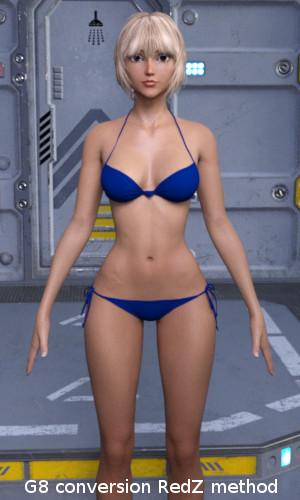
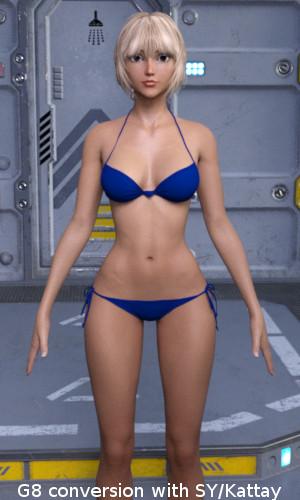
Body conversion unfortunately didn't work as well as the head. The arms are not straight and the body is wider compared to the original. Look at the distance between the legs.This is most probably a result of the different body shapes of G3 and G8. I fear, no conversion method can change this without working on the mesh itself.
But the results are still impressive. Thanks a lot Redz, Kattey, Sickleyield and all here on the forum for making this possible.
... but I'm greedy
 . While the body conversions most probably wouldn't work in practice, at least for Aiko 6, the head conversions are really great. Hence my question: Is there a way to create head morph conversions only, without changing the body at all? I tried with the Aiko 6 head morph, but the body is still changing a bit, even if I didn't morph anything there.
Using Redz's method - My face morphs also affect G8's body - especially the shoulders. I guess our clones are not perfect.
In the Morph Transfer Helper file, the G8F has the Genesis 3 female clone dialled in. This is because the morphs you are transferring were modelled on this base, so for the best fidelity of shape, I dialled it in. However, the base shapes are similar enough that I think you could get away without having the G3F clone dialled in. It's under parameters, hidden- clones. (You may need to enable show hidden properties in the drop down box of the parameters first).
If you dial this Genesis 3 Female to zero before proceeding with the tutorial as normal, then I think you can bring over the head morphs without affecting the G8F body.
Novica & Forum Members Tips & Product Reviews Pt 9That works really well. I don't even need to bother converting them now.
That script is a plain text file. I reversed the numbers (- 6 became + 6 and vice-versa; - 45 became + 45 and vic-versa,) and created a script to apply to G3F after applying a G8F pose. All credit to @DavidGB. I know zilch about scripting. And even though I have no plans on spending money on G8, with the instructions on how to create clones, transfer character morphs and fix poses, I'm pretty sure I'll be using the base. I've been using the Content DB Editor to add Genesis 8/Female compatibility to my G3F poses. Then with Filter by content selected, I'll still be able to see the G3F poses...
Daz 3D is part of

Connect
DAZ Productions, Inc.
7533 S Center View Ct #4664
West Jordan, UT 84084Licensing Agreement | Terms of Service | Privacy Policy | EULA
© 2026 Daz Productions Inc. All Rights Reserved.