-
Genesis 8: Some Stats and our Thanks
I'm in the "don't add modeling to DS" camp, only because it causes even more bloat. DS is a huge program already with lots of things hidden so newer users don't get too overwhelmed, and thus hard to find or even know about in the first place. I would much prefer Hexagon and/or Carara be undated and bridges made even more seamless (if possible, Hex bridge is already really good I think) That being said, I already used d-formers to make the majority of my adjustment morphs, if anything a morph brush like Poser's would be a very nice addition, and of course add dynamic cloth to my wishlist.
+1
Likewise, no modelling.
+0.5
I don't see a need for content creation level modelling in Studio, but some Hexagon style tools for polygon moving would be incredibly useful. Poser has the Morph Brush, and it amazes me that after all this time owning Hex and Cararra tech, DAZ hasn't adopted some of it to develop an equivalent.
Soooo... M8Thanks so much, Lindsey! I checked, and the morph isn't there. Once I reload the Starter Essentials and get that corrected... then G3M should show up in the Wear Them All dialog when loading an item to fit? Because that's the only way I know of to utilize the autoclone feature... I had no idea I was missing something.
Basic tutorial for transferring Genesis3 female morphs to Genesis8 femaleTarget - Genesis 8 femaleShape - Clone>Genesis3 female
I didn't notice until now, but there are also clones for Genesis and Genesis 2 under that Shape options. Which means you can also convert G2 morphs to G8.
And one other thing. After the conversion, the morph limits are always turned off, and the minimum is set to -100. Everyone may want turn the limits on, and set the minimum back to zero.
Possible D-Former Bug in 4.9.4.117?Don't use D-formers on posed figures.
How should this work ?
Hey guys,
I'm having an issue that I haven't seen before and I am wondering if what I'm experiencing is a bug with D-Formers. The issue has happened several times since I upgraded to 4.9.4.117, however I also started using Genesis 3 at the same time, so I'm not sure if it's related to that instead.Whenever I create and set up a D-Former on clothing fitted to Genesis 3 that has a reverse deform morph loaded on it, the transforms of the D-Former field will change after I save / close / re-open the project. To be more precise, the values of the D-Former field's transforms don't change, but for whatever reason the field is not in the same place / scale.
Here's a screenshot I took during testing to show the position of the D-Former field: http://i.imgur.com/d8xiUcv.jpg
And here's a screenshot of the same D-Former field after saving/re-opening the project: http://i.imgur.com/Upv6SLN.jpg
It's getting old pretty fast, so I'm really hoping I'm wrong about it being a bug and there's something I'm missing here. If anyone has any suggestions please let me know!
I had a scene with loads of d-formers attached. All of them on posed objects. With some of the d-formers I had the same problem as you.
My skills whith this tool are very limited, so, after I did it all the 3rd time, I simply made a screenshot of the field and d-former settings. Does not solve the problem, but takes 25 seconds to have the same as before.
DS + Hexagon/Carrara + Bryce3D?Wouldn't it make sense to be able to send DAZ content to a widely used app like Blender? Seems like it would be a smart move for DAZ. Imagine all the Blender users who would buy DAZ content if it was easy to use it.
Not sure I understand why they don't work on something like that. Or maybe its too tough to convert a Genesis to rigging in Blender. Seems like a GoB would be smart. The GoZ for ZBrush is pretty sweet, but it's without all the rigging and stuff. Really just a glorified OBJ transfer I think.
does the g3 morph resource kits work on g8?does the g3 morph resource kits work on g8?
like this 1 https://www.daz3d.com/genesis-3-female-body-morph-resource-kit

ty
 Morphs from G3 to G8
The revised G8 Morph Transfers info is working beautifully. While I was deciding which character morph to create next, I thought I'd see what happened if I dialed in Cross-Figure. I got a very nice looking male, that's what happened.
Here is Anicinabe for G3F combined with Cross-Figure:

This is not a very thought out render, just a quick attempt to showcase the morph. The skin is also Anicinabe for G3F. I used Brow Remover to get rid of the feminine brows, and it works just fine with G8F using the G3F mask, and I added the more masculine brows in Skin Builder 3. I did have to load the skin onto a G3F to use SB3, then copied the modified image files back to G8.
He turned out nicely! I really like his boyish but handsome face! :D
I played around with the G2M and G3M clones that came with Genesis 8 Female. I ended up using the Genesis 2 Male clone to turn Genesis 8 Female in a "Genesis 8 Male":
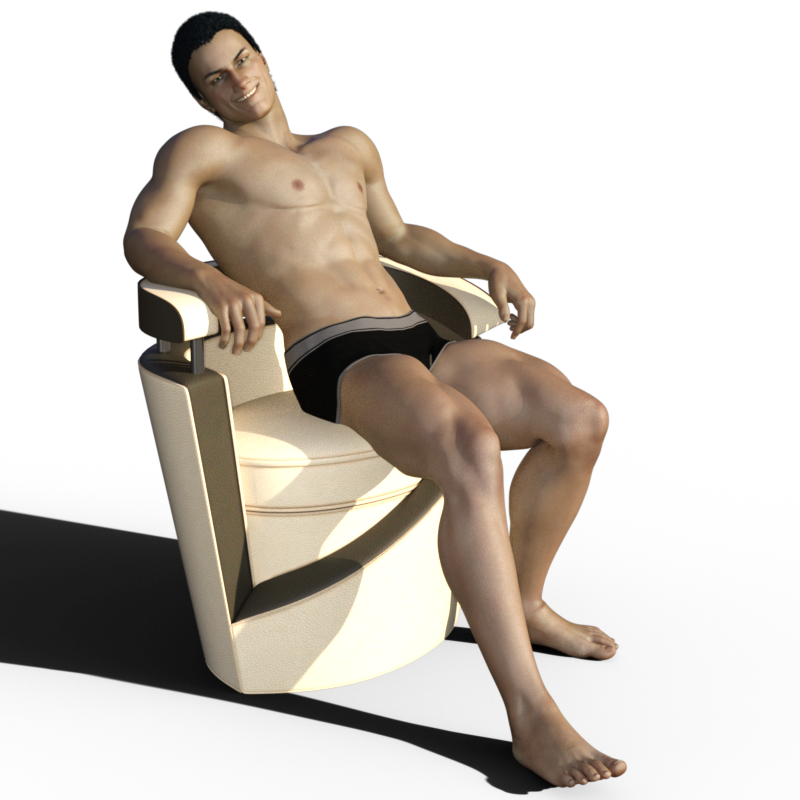
I like how he turned out. Though he looks a little evil. lol I'm going to need to tweak his brows a bit to get him looking a little less sinister.
I suspect any G3F character morph with Cross-Figure will have that "boyish" look. The face morphs could go a long way to making him look more rugged, I suspect, but I'm not planning on buying them any time soon. But now I'm curious to see what happens with the straight Anicinabe and the G3M clone dialed in. Will they be the same, or will "he" look more masculine.
I did pick up OOT's Mega Wardrobe, but only because with the G8F clone I made following Singular Blues instructions on page 3, my G3F's can "wear them all." I have his Mega Wardrobe for the G3 males and it's one of my favorite products. That and the Bone Doctor wiped out my June budget. For the rest of the month, I have to wishlist anything I want. But if they keep releasing G8F stuff, that won't be much of a problem! lol...
Possible D-Former Bug in 4.9.4.117?Maybe once you have the deformer how you like it spawn the morph, which will turn your deform into a morph slider. I know thats not what youre asking for but might serve as a workaround.
does anyone know how to use the poke away i cant figure it outAnd lets not forget the wonders of a simple cloth sim...you can have the sim shrink parts of your clothing (selected vertices) while colliding with the character. And you can fix vertices where you want them. Great ways to make clothing fit more naturally and more lifelike with wrinkles and folds and stretches and stuff.
And I think you can take a rigged conforming clothing, drape it in a cloth sim, and make that draped cloth a morph of the main clothing.
Just sayin...
VWD. It's awesome.
 Genesis 8: Some Stats and our Thanks
I definitely feel I owe Daz an apology for my initial reactions to G8. I was admittedly pissed off at first. I felt it was too soon, G3F hadn't been allowed to just settle for a while. It also felt as if G3F had finally become somewhat of a successor to V4, based on the adoption and amount of product being produced outside of Daz's marketplace. And more importantly, I really wanted to see some features added to Studio (such as a better hair and dynamic clothing system) before we saw G8.
But then I started playing with G8F. I bought her morph packs and expressions and spent some quality time getting to know her all weekend. I love her! I love how easily all of my G3F content transfers over, especially with the generous help of the community creating scripts and tutorials.
My personal point of view, I honestly don't see a reason to hesitate jumping onto this generation, unlike G3 who broke a lot of compatibility. V8 is a nice-to-have but not a necessity for the budget conscious. G8 won't break the bank unless you want her to, and she'll happily raid V7's closet and steal her favourite sweater.
Morphs from G3 to G8I tried a few "pose morph dials", like hand grasp, and hand fist on a character I transferred using Redz tutorial, and it's not working properly, the thumb goes into the other fingers. When I try knees up the thighs collide.
I don't mean this a complaint, I can still use my transferred charcters, I just have to adjust poses, I mean it as feedback.
Edit: I just made the transfer again and I did excactly the same as last time, I followed every instruction and didn't change a thing in the adjust rigging dialog box, I just clicked accept and it worked. I tested the same morphs, hand fist and knees up and it looks perfect.
I have no idea what I did wrong the last time. I will check if I need to remake my other transferred characters (I hope not, my morph loader section is starting to look crowded)
Morphs from G3 to G8could be all three options at the bottom of the transfer utility were checked. only the first two are on by default and I've been leaving it at the default and have had no problems. Someone earlier who WAS checking that last box (orientation I think it is) was having similar problems.
Laurie
Morphs from G3 to G8It's like I did the Rigging to shape first but it happens in the bones. :-(
I'm not exactly sure how you could possibly have done that.
Are you saying this happens every time you attempt to do the transfer?
All I can recomend at this point is reloading and staring over.
Anyway, what version of Studio are you using?
For others, you have to take a look at the screen shot provided. The rigging is completely destroyed, with bone orgins sitting where their end points should be, and orientations seemingly random. This is somewhat unusual, to say the least, and not likely a result of a missed step.
Possible D-Former Bug in 4.9.4.117?Hey guys,
I'm having an issue that I haven't seen before and I am wondering if what I'm experiencing is a bug with D-Formers. The issue has happened several times since I upgraded to 4.9.4.117, however I also started using Genesis 3 at the same time, so I'm not sure if it's related to that instead.Whenever I create and set up a D-Former on clothing fitted to Genesis 3 that has a reverse deform morph loaded on it, the transforms of the D-Former field will change after I save / close / re-open the project. To be more precise, the values of the D-Former field's transforms don't change, but for whatever reason the field is not in the same place / scale.
Here's a screenshot I took during testing to show the position of the D-Former field: http://i.imgur.com/d8xiUcv.jpg
And here's a screenshot of the same D-Former field after saving/re-opening the project: http://i.imgur.com/Upv6SLN.jpg
It's getting old pretty fast, so I'm really hoping I'm wrong about it being a bug and there's something I'm missing here. If anyone has any suggestions please let me know!
Genesis 8: Some Stats and our ThanksYo, SickleYield. YOU ROCK! Thank you for the very clear text based tutorials (and the videos also, but especially for text based).
Of immediate relevance is the morph transfer tutorial to G8, but all the others as well.

.
No way I'll be spending all that money on HD morphs again ;) I'm sure G8's got some new bells and whistles, and I don't mind using displacement nearly as much as others do, but locking end users out from creating their own HD morphs is looking a bit tired and cynical these days after buying HD assets for multiple versions of Genesis so far. There should at least be an upgrade price path available, especially given the information for who has what is readily available. But that's only my opinion and it isn't my company.
Without versioning we have no jobs. Without a certain amount of content that can't be converted, there is no point to versioning. This is not cynicism. It is economic fact.
Critters and beasties?Is there a morph to remove the forelimbs or make them into wings? I could use a better axe-beak than the one I've got now.
Genesis 8: Some Stats and our ThanksI'm in the "don't add modeling to DS" camp, only because it causes even more bloat. DS is a huge program already with lots of things hidden so newer users don't get too overwhelmed, and thus hard to find or even know about in the first place. I would much prefer Hexagon and/or Carara be undated and bridges made even more seamless (if possible, Hex bridge is already really good I think) That being said, I already used d-formers to make the majority of my adjustment morphs, if anything a morph brush like Poser's would be a very nice addition, and of course add dynamic cloth to my wishlist.
+1
Likewise, no modelling.
It would be great to have a bridge to some other apps though.
Guardian for Super Bodysuit rendering problem with cowl ears - Solved ?The Cat & Bat HD ear morphs aren't showing up correctly in the 3DL render.
Tried various resolution settings, and they correctly affect the image in the viewport, but on render the ear morphs deform much smaller, and with no detail. The viewport image looks great, the render isn't even close to the same shape.
Anyone know what's causing this?
Latest 4.9 version
Update - tried rendering with Iray and the HD morph shows up correctly. No idea what's causing this, I'm submitting a support ticket.
Solved ?
I tried again, and this time noticed that the problems was that 3DL was SMOOTHING the Guardian HD ear morphs, even though Smoothing was NOT enabled.
Saw further that this error was affecting ALL HD morphs, not just RawArt's Guardian ears.
Nothing had any effect, not Hi Res, not subd levels. With Smoothing DISABLED, 3DL still smoothed every HD morph I tried, and Iray rendered the HD morphs correctly ! Tried a number of products with HD morphs. Same problem.
Out of desperation, I started fiddling with the Subd Algorithms, and when I changed that from Catmark to Bilinear, 3DL crashed with a Render Error msg. After switching back to Catmark, I tried another render, and got a msg that the renderer was already running, although there was no indication that that was so. No render pop-up, nothing.
I closed Studio, restarted it, and from that point 3DL rendered HD morphs correctly! For some unknown reason 3DL was stuck with smoothing ON, regardless of the UI setting.
No idea what was going on, no idea what fixed it, but the 3DL render engine appears to be fixed now.
Thanks for your help.
Genesis 8: Some Stats and our ThanksI'm in the "don't add modeling to DS" camp, only because it causes even more bloat. DS is a huge program already with lots of things hidden so newer users don't get too overwhelmed, and thus hard to find or even know about in the first place. I would much prefer Hexagon and/or Carara be undated and bridges made even more seamless (if possible, Hex bridge is already really good I think) That being said, I already used d-formers to make the majority of my adjustment morphs, if anything a morph brush like Poser's would be a very nice addition, and of course add dynamic cloth to my wishlist.
does anyone know how to use the poke away i cant figure it outI've forgotten how to get the Xaway parameters into the clothes. In Pokeaway 2, I think I had to start with the figure and dial up the "push" in the area I wanted to control on the clothing; this action would then "push" that morph into all the clothing items already loaded onto the figure. After that, I could select the clothing item in the scene, go to its parameters, and push it away or pull it closer to the figure. But with Pokeaway 3, that doesn't seem to work. I see I can pull the figure away from the clothing, but I can't pull the clothing away from the figure. What am I doing wrong?
Are you having trouble finding the parameters in the clothing? For that you need to enable Show Hidden properties in the pane's option menu. Or have you found them and been unable to make them do anything?
Daz 3D is part of

Connect
DAZ Productions, Inc.
7533 S Center View Ct #4664
West Jordan, UT 84084Licensing Agreement | Terms of Service | Privacy Policy | EULA
© 2026 Daz Productions Inc. All Rights Reserved.