-
Genesis and Victoria 8 Improvements?
I had the same question...and honestly I'm a bit disappointed in DAZ constantly saying in the advertisements that G8 has "extreme compatibility", and "V8 will work with your older content."
That's just not true in many cases, unless you search the forums for workarounds. Poses, morphs, and some shoes don't work without workarounds.
I think for many/most the need to easily work with older content is pretty important. Many of us really need a good reason to buy an entire new character and morphs and clothing and so on.
On the other hand, I previously dismissed D|S as just a low powered engine for content sales, but honestly I'm very impressed at how far it's come, and how amazing the G3 characters and Iray are. And to the extent that G8 improves that I think it's all good. I just not yet convinced the change is worth the investment, especially when G3 is so awesome. I'd love to be able to very quickly transfer my G3 characters (materials, morphs, poses, clothing, etc.) to the new G8, but the hassle-to-benefit ratio seems a bit high right now.
I'm curious to see exactly what others find so awesome about the 8's.
Morphs from G3 to G8Redz, is there anyway you could make 'G3F to G8F Morph Transfer' for G2F? I have a lot of excellent content but it's G2F.
Genesis 8: Some Stats and our ThanksFailing dynamics I would like a morph brush to wrinkle clothing, wrinkle / unwrinkle skin, get clothing to lay on the surface(s) correcty, style hair, directly pose expressions on the face and so on. That would affect geometry normals and geometry size potentially not number of polygons.
Also be nice to have a morph brush that had bump/displacement/normal brushes and surfaces/geometry selection capabilities so I could directly paint unique finger prints, pore patterns, freckles, moles, wrinkles, and so on onto a character models. Same could be done for bed and character clothing and so on. Could paint brick and building and other materials directly on the currectly loaded DAZ model's suface(s) that were currectly selected.
In such a way the customer would be empowered to create unique characters as never before with 100% unique geometry shapes and texture sets by supplying a comprehensive library of PBR compliant material brushes and geometry brushes and programming smart limits into the the way those libraries can be applied to DAZ models in DAZ Studio.
(Script)Apply dual lobe features to pre lobe G3 skinswhat exactly is "dual lobe" and how can it help my characters look better?
LOL I was wondering the same thing myself and kept looking at the model's ears (ear-lobes) I thought it was some kind of morph or tweaked rigging
heh I was doing the same thing, wondered what dual lobe ears would look like
Show Us Your Iray Renders. Part VIWas messing around with G8 to see if I could get Satine's morphs manually instead of having to go through that (GROAN!) morph transfer routine. Still some morphs I need (Aging for G8) and some I want for other purposes (Massive Muscle Morphs) but this took the transfer of Satine's textures really well.
Quite like that
Here's a render that I quite like how it turned out. Bloom is enabled in this render, but set to a very conservitive setting. The very strong lighting effect is from tone mapping settings.
Burn Highlights : 0.30
Crush Blacks : 1.00
Saturation : 1.40
Gamma : 1.00
Nice I am rendering an indoor candle lit scene but I'm not satisfied that my render is 'dramatically lit' the way people expect candle lit scenes to be. I will try the varios tonemapping setting as you have done.
Show Us Your Iray Renders. Part VIWas messing around with G8 to see if I could get Satine's morphs manually instead of having to go through that (GROAN!) morph transfer routine. Still some morphs I need (Aging for G8) and some I want for other purposes (Massive Muscle Morphs) but this took the transfer of Satine's textures really well.
Quite like that
V8 out this month, who are you expecting next ?I'm guessing maybe Fane, as there's a fit for her in the Voss hair.
ETA the morph doesn't say "8" so she may not even be an official figure.
Hiya, Fane is my own promo girl for G8, not a Daz original character, so you don't waste energy thinking that way :)
I do a promo girl for each generation and they are usually luminous pale pinup types - custom character creation is fun in the midst of wig making lol! I started making Fane lips, nose and eye morphs for G3 and then G8 came along so had to restart and make it for G8, it will hit the store soon.
I also packaged her with Fane Hair version for G8. I did the hair rig from scratch before I found out how to do it the easier way by transfer utility on the G3 version lol - so those folks who have the G3 version of the hair probably won't need this product and that's great :) At least my Fane promo girl will be out there hehe, I don't expect it to be a big seller, she was for love, of fun ;)Gah... sorry, really didn't mean this to be a plug for my Fane girl *sigh* I might as well share a preview pic since I've wasted your time blabbing so much already lol
Your Elizabeth Taylor style on I think it is Portia or Harlow or both more or less is still my favorite. I wouldn't mind seeing you do those again for G8F although there is a nice Elizabeth G8F already. If DAZ ever does a dynamic hair system it's be great to see your styles re-created for that dynamic hair system.
I really love Genesis 8!The more I use this figure and morph her the more I fall in love. I especially love how DAZ removed the useless nail bed geometry, and welded the fingernail and toenail geometry to the figure. They kept a bit of geometry under the nail tip which is absolutely what they should have done. Goodbye to those endless hours of shaping nail beds so the geometry doesn't protude through nail geometry and cause hot pixels in Octane. Now shaping fingernails and toenails are a breeze. She bends even better than Gen 3, and her facial expression detail is fantastic!! I would put a DAZ Gen 8/V8 up against any of the so called $600.00 and above professional figures found on other sites! DAZ has a huge winner here. I can't wait to see the HD morphs...I think we are well on the way to hyper realism.
Thanks again DAZ!!
Whoa - that close up of the feet looks amazing! Feet is often such a dead give away and often ruins photorealism. Is that a custom morph? Or a certain figure? It doesn't look that good on my base G8F figure.
Hey divamakeup, thanks so much! Yes, its a custom morph I made in Zbrush....it took about 15 minutes to do with GoZ. To make the same morph with Gen 3 it would have taken hours as Octane shows any poke through with overlapping geometry such as seperate fingernail and toenail geometry on the older figures. Thanks again DAZ for this fantastic new nail geometry! I totally agree about feet. They may not be the most important body part, but often times when ignored they do break the realism if they are fake looking. Another thing I noticed is sometimes HD morphs go light on foot detail because most people may not care. If you get good HD morphs such as Beauty toe (hope he releases a new version for Gen8) it goes a long way in realism. You can usually stuff feet into shoes, and not have to worry about them, but most people (women especially) wear sandles so you have to make them look real.
What texture did you use for the feet in your pic? A custom one? Did you use something off the DAZ store as a base?
Hi Etheral, I used the V8 texture with my Octane Render Material.
Morphs from G3 to G8While I'm breaking my arm (to quote noted pilospher James Tiberius Kirk) patting myself on the back for my ingeniuity, I actually have figured out, and tested, a method for bring over morphs with ERC intact, but it is (to borrow a term from the world of Games Workshop) beardy.
As in super beard.
Basically You copy the dsf files from G3, with their folder structure intact (you don't need to go higer than the vendor folder, but you need the rest or it gets that much more dificult).
You then use mass file editing to replace all references to Genesis 3 with Genesis 8 (Genesis3 becomes Genesis8 and Genesis%203 becomes Genesis%208). I use a program called FAR (Find And Replace, iirc) to do this. This requires renaming all the dsf files as txt because FAR won't edit anything it isn't sure is an ASCII file. For compressed dsfs this means uncompressing them first. Of course, they have to re-renamed to dsf once the edits are done.
Now copy those folders into Genesis 8's folder.
At this point, you proceed as above, but when you get to bit about transfering morphs, make sure "overwite existing" is checked. Also (and this important) at no point should you touch the sliders of the copied morph beofre doing the transfer. Bad things may happen. Until you do the transfer, the morph values are pointed at the wrong vetex order and in the wrong direction.
When TU overwites an existing morph, it does not change that morph's ERC links.
Things then proceed as they would above except if you choose the export and then import via morph loader method, you need to name the export file with the internal name of the morph, and then, when you morph load it, make sure Overwrite Existing is changed from Make Unique to Deltas Only.
This will overwrite the bad vertex ordered morph with the correct order.
Told you it was beardy.Wow this sounds scary. Is ths method instead of the "Redz method" or an addition to it? If additional, where does this fit into the "Redz method". Also, does this help fix the crazy hands that happens with some transfers? I have converted about 30 characters and I'm finding some hit and misses with the hands screwing up. BTW thanks for all the work everyone.
I really love Genesis 8!I'm loving V8, as well. EASILY the best out-of-the-box figure I've seen out of DAZ in my short near-4 years of using it!
The more I use this figure and morph her the more I fall in love. I especially love how DAZ removed the useless nail bed geometry, and welded the fingernail and toenail geometry to the figure. They kept a bit of geometry under the nail tip which is absolutely what they should have done. Goodbye to those endless hours of shaping nail beds so the geometry doesn't protude through nail geometry and cause hot pixels in Octane. Now shaping fingernails and toenails are a breeze. She bends even better than Gen 3, and her facial expression detail is fantastic!! I would put a DAZ Gen 8/V8 up against any of the so called $600.00 and above professional figures found on other sites! DAZ has a huge winner here. I can't wait to see the HD morphs...I think we are well on the way to hyper realism.
Thanks again DAZ!!
Whoa - that close up of the feet looks amazing! Feet is often such a dead give away and often ruins photorealism. Is that a custom morph? Or a certain figure? It doesn't look that good on my base G8F figure.
Ooh. That reminds me, this generation I need to make some feet morphs at least for myself. I always find the defait foot shape wierd lookin (mostly because I'm so used to my own feet, which could be generously described as looking like a greek statue's)
I'd be interested in feet morphs or toe morphs for G8F. Would you consider putting them in the Daz store for sale (or giving them to the community). I'd be happy to pay for good realistic feet or toe morphs. :)
I second the notion!
V8 new skin is a BIG step in the right direction, but...It occurs to me that it'd be nice to have an ear thickness morph... and that I can do that myself without too much trouble.
Let us know if you succeed =) I keep meaning to start making some for my beloved ancient figures, but the amount of eyestrain it will require makes me put the project off again and again.
The key is to get the back of the ear look more like a real ear and not just a smooth lump.
V8 out this month, who are you expecting next ?I'm hoping we see new things rather than re-treading the same old names every generation, especially considering how easy it is to transfer the G3 characters to G8. But if I were to have a wild guess, maybe Stephanie 8, since she skipped a generation and would be a good contrast to the statuesque V8.
Creating Expressions Without Effecting Head Gear? [SOLVED]there is a way to do it. you can set something not be a morph follower.
forget how though exactly.
(Script)Apply dual lobe features to pre lobe G3 skinswhat exactly is "dual lobe" and how can it help my characters look better?
LOL I was wondering the same thing myself and kept looking at the model's ears (ear-lobes) I thought it was some kind of morph or tweaked rigging
Genesis 8: Some Stats and our ThanksI tend to disagree. While I agree, that DS focuses on what it's made for, a morph tool still whould be a nice addition to the workflow. If something's poking through, or some joint don't look right, it whoul be nice to be able to repair those things quickly inside DS.
Yeah no much more advanced. I think poser terminology is coming through with their "morph tool" which is more like a sculpting brush, and soft selection vertex modeling or displacement brush in Carrara. Push modifier although handy for some things is quite primitive, its not something id ever use for making a morph or correcting distortions etc
Genesis 8: Some Stats and our ThanksI tend to disagree. While I agree, that DS focuses on what it's made for, a morph tool still whould be a nice addition to the workflow. If something's poking through, or some joint don't look right, it whoul be nice to be able to repair those things quickly inside DS.
I really love Genesis 8!The more I use this figure and morph her the more I fall in love. I especially love how DAZ removed the useless nail bed geometry, and welded the fingernail and toenail geometry to the figure. They kept a bit of geometry under the nail tip which is absolutely what they should have done. Goodbye to those endless hours of shaping nail beds so the geometry doesn't protude through nail geometry and cause hot pixels in Octane. Now shaping fingernails and toenails are a breeze. She bends even better than Gen 3, and her facial expression detail is fantastic!! I would put a DAZ Gen 8/V8 up against any of the so called $600.00 and above professional figures found on other sites! DAZ has a huge winner here. I can't wait to see the HD morphs...I think we are well on the way to hyper realism.
Thanks again DAZ!!
Whoa - that close up of the feet looks amazing! Feet is often such a dead give away and often ruins photorealism. Is that a custom morph? Or a certain figure? It doesn't look that good on my base G8F figure.
Hey divamakeup, thanks so much! Yes, its a custom morph I made in Zbrush....it took about 15 minutes to do with GoZ. To make the same morph with Gen 3 it would have taken hours as Octane shows any poke through with overlapping geometry such as seperate fingernail and toenail geometry on the older figures. Thanks again DAZ for this fantastic new nail geometry! I totally agree about feet. They may not be the most important body part, but often times when ignored they do break the realism if they are fake looking. Another thing I noticed is sometimes HD morphs go light on foot detail because most people may not care. If you get good HD morphs such as Beauty toe (hope he releases a new version for Gen8) it goes a long way in realism. You can usually stuff feet into shoes, and not have to worry about them, but most people (women especially) wear sandles so you have to make them look real.
What texture did you use for the feet in your pic? A custom one? Did you use something off the DAZ store as a base?
Genesis 8: Some Stats and our ThanksAs someone who only has "Sculptris" and no other 3D sculpting program, I'd love to be able to sculpt morphs in Daz Studio. But having the option to disable/uninstall it for those who don't want Daz to be a "heavier" program would be a good option. :)
Just like modeling features in DAZ Studio, I rather NOT have tools to sculpt; DAZ3D needs to focus on how to manipulate or make imported content better for end users and content developers, this splits their focus unnecessarily, especially when you consider how small their staff is. There are tools that do the job externally much better and for good reason to try to duplicate that within studio, there are sculpting tools such as zbrush core that fall right at the $150 range, as well as tools available in steam for a monthly charge. Those options really need to be explored first. If you can't afford $150, cut back on content purchases until you do, it's not impossible or go with the tools in free tools like blender. DAZ Studio's strength comes from how it handles content, not how it is made.
I tend to disagree. While I agree, that DS focuses on what it's made for, a morph tool still whould be a nice addition to the workflow. If something's poking through, or some joint don't look right, it whoul be nice to be able to repair those things quickly inside DS.
Novica & Forum Members Tips & Product Reviews Pt 9Posted in the Morph thread, but thought I'd share here too. This one, with the bloom and dark setting, took 12 hours to render:
Here's my final G8 Gwennii using Redz' first tutorial, not the revised one. Everything looks good on her. My next render will be with the newer tutorial.
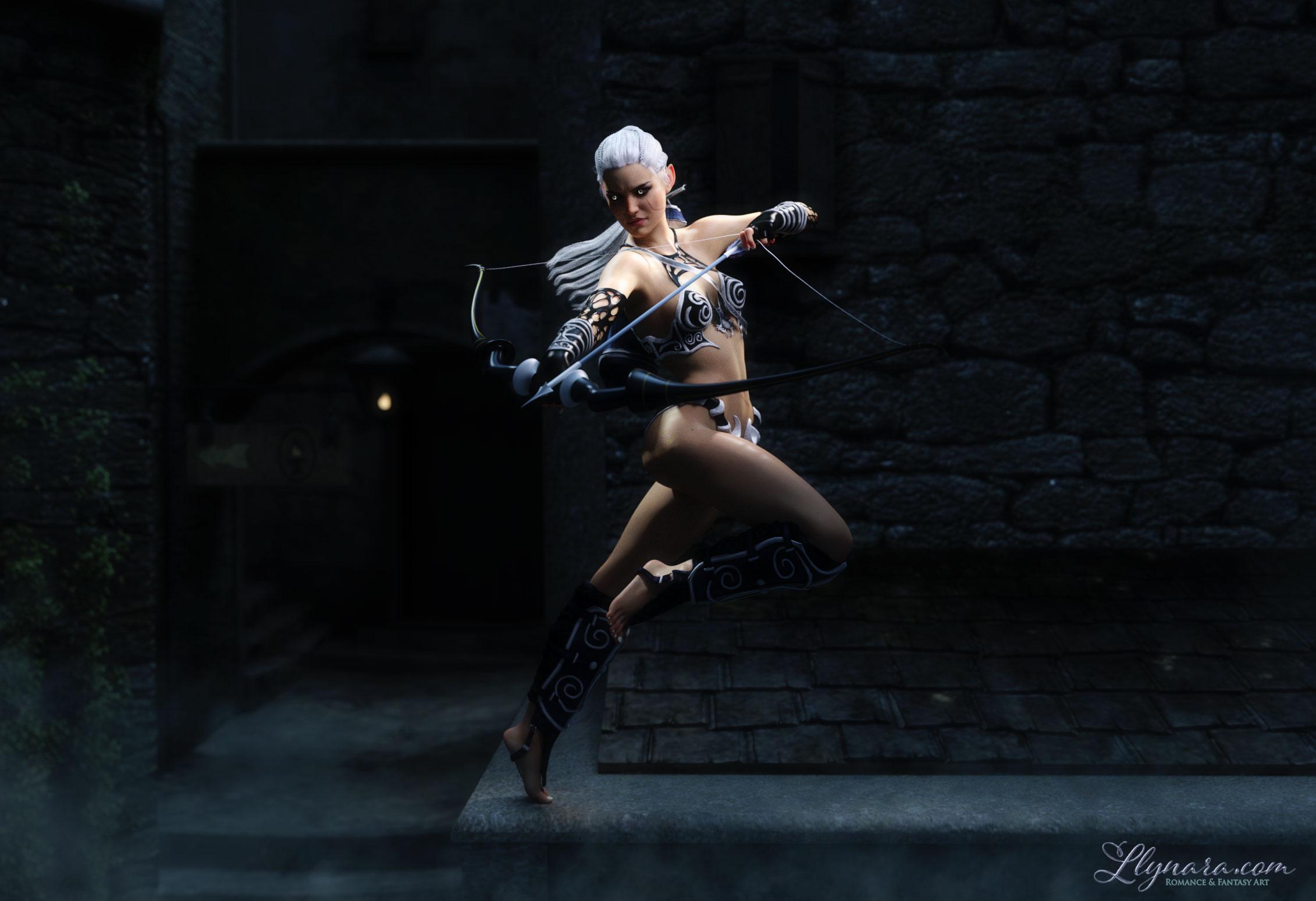
Notes:
- I followed divamakeup's tip to increase the normal maps to 2 in order to get a little more detail on the skin. The bump maps were already at 2.
- I used the free lobe shader script on the skin (there's an update for it, so if you have it, check and make sure you are using the current one.)
- I could not get any bow and arrow to pose right in her hand, so everything had to be positioned manually. Took forever. This one is from Midnight Huntress for G2F, which does come with poses for G2F. I haven't tried converting those yet.
- This is a tweaked Artemis pose for V7 using the free script to adjust G3F poses to G8F (there's an update for this one too.) I worked on this before I got Bone Doctor. Will be interesting to see what that product does on the more difficult poses.
- The outfit is a combo of Midnight Huntress and Hunter Queen for G3F. Both of them have fitting issues. The boots on Hunter Queen don't fit right and the bodice on Midnight Huntress looked odd with this pose, so I just mixed them together.
- The hair is Milen Hair for G2.
- I gave her elf ears from the G8 head morph kit.
- Redid her glowing eyes to match the colors in the scene. I just changed the emission color and temperature or the irises.
- Set is Thieves Alley, which says it's optimized for Iray, but I'm finding parts of it look very low res in closeups. DOF and lighting helps hide some of it.
- I'm really not sure I'm digging the fog or the background. Might redo it with a different set.
DS + Hexagon/Carrara + Bryce3D?Carrara isn't as far behind the times as you think;
I certainly don't want to get into a debate, but have you used Blender, or ZBrush, or Maya, or any of the cutting edge, actively-developed 3D applications out there? Like I said, make a side-by-side list of features, and how well those features work, and it's a no-brainer (IMO). Just as one example, the "physics engine" in Carrara, as I recall, doesnt' even work on moving objects. And that blob thing they use for fluids? Compared to fluids and smoke in Blender it's not even close. And the list goes on....
Of course, whether you need those features is a different issue....
I've never tied ZBrush or Maya for the simple reason that I can't afford them. They are much more expensive than Carrara, all of the commercial cutting edge modelling programs I have heard of are. If you're doing this to make money it may be worth the outlay but it's just a hobby for me.
I keep intending to try Blender, maybe I will one day. I did download it a while ago but haven't actually installed it yet.
https://www.youtube.com/user/DarrinLile/playlists?sort=dd&view=1&shelf_id=0
I'll be doing those starting Friday. Give it a try if you like too.
Thank you for the link nonesuch00. I'm spending a lot of time trying out Genesis 8 and tying to get morph transfers to work right now. I'll bookmark it and try and fit it in soon.
Daz 3D is part of

Connect
DAZ Productions, Inc.
7533 S Center View Ct #4664
West Jordan, UT 84084Licensing Agreement | Terms of Service | Privacy Policy | EULA
© 2026 Daz Productions Inc. All Rights Reserved.