-
Is it possible to autofit clothing to make it look as if it is too small for figure's frame?
I am now tweaking Gen3character in blender,, with swimwear ,, , then if you need I show some pic,,and setting, how I adjust swimwear shape in blender, for my character with posing in daz scene.
I plan to make shirink morph for swimwear, to show tan line , which I made from the swimwear,, then return it as new morph for swimwear in current scene.,
(though I use G3F,,) from DAZ scene,, it seems almost same step which you need to know...
Is it possible to autofit clothing to make it look as if it is too small for figure's frame?Please confirm it. You make morph for pants, not genesis2female mesh. then you need to set resolution lever as zero for pants. (if it sub-D), to make morph.
did you already load pants in your start scene with your genesis2female actor?
and when you export pants (only), the pant mesh need to be visible. (though I believe you could export pants only, but from your pic, if you hide all,, then export, I just afraid so)
Then I do not know, why you need to scale Figure large, when you export pants,, and you may need not , load new pants.. (though it may work,)
to be simple,, you keep Gen2Figure scale , but you can just re-size Pants after you export pants, , and no need to load new scene and new pants,,
you can keep current scene, just select pants of current scene,, and open morph loader pro.. then import morph target obj, which you exported (and you will re-size
or modify, as morph target obj )
though load new scene, and new pant should work,,but it not morphed for current shape actor at all,, ,, then it make delta morph from non character shape. but I suppose you need to make delta morph for current shape pants which fit for your actor. (character shape will be auto generated)
Morphs from G3 to G8I love the examples people are sharing! I'm having more fun transferring my characters to G8F than I ever did using them on G3F. I think it is the sense of accomplishing a technical challenge that thrills me.
Here is a combination of Brita, Frida, and Girl 7 (and a bunch of individual morphs dialed in by the randomizer). I transferred the whole shape as a single morph. The skin is Haven for Girl 7 with surface changes. The eyes were borrowed from V8. The hair is Reyna.
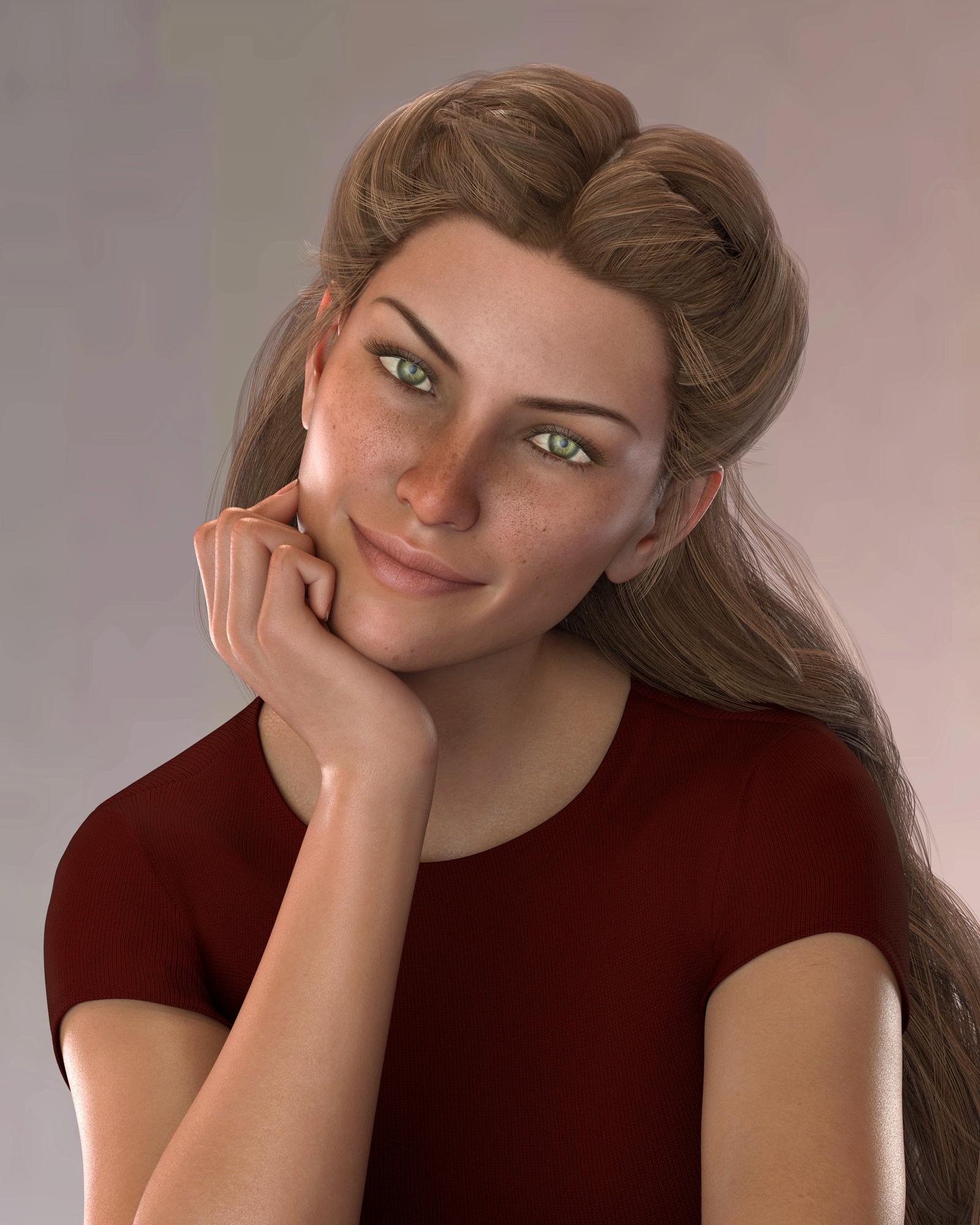
So pretty :)
Morphs from G3 to G82. There's been some discussion about head morphs and how you have to use the vertex editor in order to save them. Does that apply to head-only morphs? Like SickleYield's Faces of Asia, etc.?
Not sure I can clearly answer the rest of your questions, but this one, I can.
In a word, yes. Yes it does.
Basically, G3 and G8 need helper morphs to deal with the way a person should be shaped when they lower their arms vs when they raise them. The T pose requires a lot more help than the A pose, so you end up with slightly different placement of the shoulder areas, even if you line up the bones exactly. This different placement carries through to the morph, even if all you do is a head morph. To get rid of it, on a head morph, you need to exclude the body with facet or vertex selection.Morphs from G3 to G8I love the examples people are sharing! I'm having more fun transferring my characters to G8F than I ever did using them on G3F. I think it is the sense of accomplishing a technical challenge that thrills me.
Here is a combination of Brita, Frida, and Girl 7 (and a bunch of individual morphs dialed in by the randomizer). I transferred the whole shape as a single morph. The skin is Haven for Girl 7 with surface changes. The eyes were borrowed from V8. The hair is Reyna.
Morphs from G3 to G8Yeah. You need a 3d modeling program.
Sorry, but you do. EIther you manually fix the morph or litterally rip the eyes out of both the source and the target and take the eyes apart, making sure they line up between figures.
I thought about making couple of morphs to do it. but that would complicate things even further.
Also, G8's eyes are smaller than G3's due to the magic of sub division. The difference is hard to see as normal scale, but when you get toon eyes, it becomes apparent. Try scaling the eyeballs up to hide the worst of the distortion to the lid. It may be that they are just too smallThank you for the suggestion. I don't know how to morph that part w/o messing up the eye. I guess I'll have to avoid larger eyed characters for now.
I'm working on a fix for that. I've figured out the root of the problem, and have a functioning solution. I'm just trying to work out how to explain it, and how to package the necessary support files.
It doesn't solve the eyes size issue. That's caused by the fact that g3's eyes are open at the back. G8's aren't. With SubD on, this cuases G8's eyes to be fractionally smaller than G3's, because of the way SubD works. At regular size, it's not even notable, though it is detectable. With Toon style, it becomes a thing. The solution is to scale the eyes. Import the morph, dial it on, adjust rigging, then scale the eyes up. so they fit right. Dial up eyes up-down, side-to-side, closed, etc to test that they are fit right. Zero subD and set resolution to base, and export again. Delete G8 from the scene, load a new one fresh and import the morph with eyes fixed. It sounds more complex than it is.
That won't prevent the distortion, but I made a morph for each figure that pulls their eyes out, and separates G3's pupil and both figures' eye moisture. It's the pupil and eye moisture that cause the most distortion, but the way the eyes intersect with the head is also an issue. I also made a morph that helps make a better fitting clone if you make your own G8 Clone for G3, but I'm thinking that's not kosher to share.(Script)Apply dual lobe features to pre lobe G3 skinsI have a couple days yet for a render to finish but I have the head, body, and expression morph packs for G3F & G38 it you want me to test the script. What does the script do? Save a G3F character preset of current G3F character and then load that preset to current G8F?
Or is it actually transferring morphs that G8F doesn't have from current G3F set of applied morphs?
the script doesn't make a morph, nor does it save a preset. basically, i have lots of cool characters whose shaping are just the DO morph packs. rather then do the whole morph creation work flow, the script takes the dial settings from the DO morph packs only of one figure and copies those values to the new figure. it occurs to me i should write a tiny readme to explain how to use it... i will do that tonight and pm you a link
OK, that's what I thought it was. I can test that easy enough.
Super Bodysuit + Superhero Addon for G3F on G8F?Okay, seems like the transfer keeps the morphs but it doesn't keep the HD morphs, that's an issue with this set minorly, and quite a bit with my stuff.. I tried substituting my Leotard for G3F and it fits fine, but all the trim and wrinkles don't work 'cause they're HD morphs. =/
(Script)Apply dual lobe features to pre lobe G3 skinsI have a couple days yet for a render to finish but I have the head, body, and expression morph packs for G3F & G38 it you want me to test the script. What does the script do? Save a G3F character preset of current G3F character and then load that preset to current G8F?
Or is it actually transferring morphs that G8F doesn't have from current G3F set of applied morphs?
the script doesn't make a morph, nor does it save a preset. basically, i have lots of cool characters whose shaping are just the DO morph packs. rather then do the whole morph creation work flow, the script takes the dial settings from the DO morph packs only of one figure and copies those values to the new figure. it occurs to me i should write a tiny readme to explain how to use it... i will do that tonight and pm you a link
Morphs from G3 to G81. I noticed Ears didn't work. I need my elf ears. I've got dozens of elf ears, all the way back to V3. I've already pulled my favorites from V4 into G3F but I couldn't even morph my clone with Izabella's ears. How do I get the ears in?
2. There's been some discussion about head morphs and how you have to use the vertex editor in order to save them. Does that apply to head-only morphs? Like SickleYield's Faces of Asia, etc.?
3. If I create a custom G3F with a whole bunch of partial morphs, you know - dial the eyes, the nose, the mouth, pear shaped hips, give her fangs, whatever. Can all that be transferred as a complete morph?
4. How do I save Favorites? I'd love to have to the morphs that I use the most available with one click every time I load a character (or at least the base characters).
By the way, Dimension-3D has some awsome DUF editor tools - one's called DSON Edit and the other is Morph Organizer. You'll probably want to wait for a sale on those but they're super useful.
Morphs from G3 to G8This is my alternative method, but I've found it better than the transfer utility for body morphs especially
Tutorial and helper scene/morphs included
I'm attempting this right now. First thing I got was this error message:
The following files can not be found: data/daz 3d/genesis 3/female/morphs/3d universe/toongenerations2/base/ctrl3dutoongenerations2_adjustage.dsf
Is that a file I need to be able to do it? Or will it be ok without it?
I think you can ignore that. For some reason it's not set to zero by default, but I don't think it affects G3F unless the toon generations morph is applied.
OH MY GOODNESS! This came out so good! I just transfered Callie 6 to G8F!
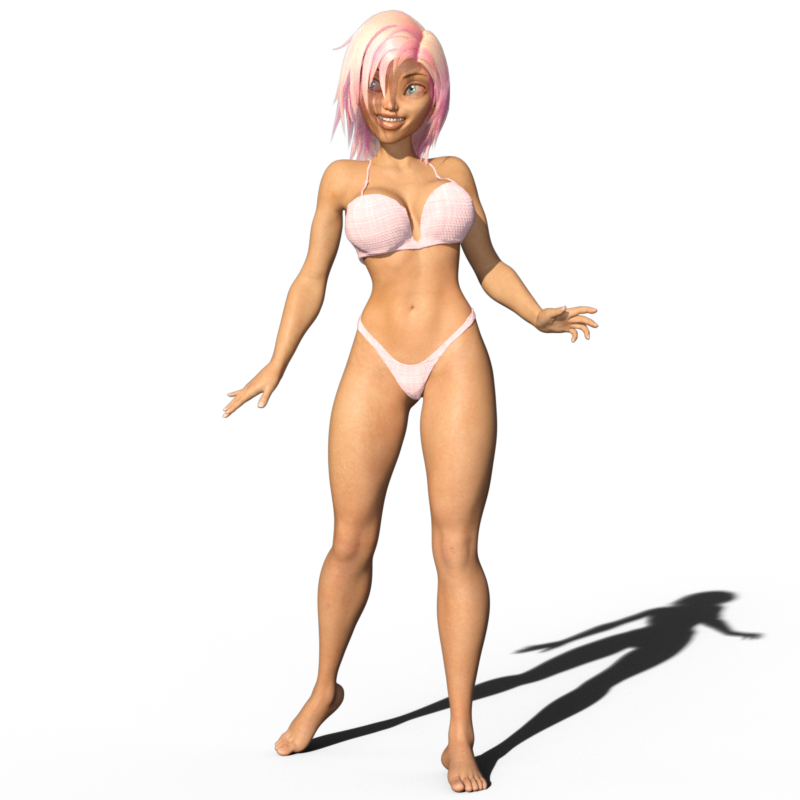
AMAZING! You're my hero, Redz!

Dang! I might have to Callie 6. She's adorable! Nice work, Diva.
Thank you! The GenX2 products are great - helps me move G2F to G3F, then Redz tutorial helps me move them to G8F. :D But seeing as Callie 6 is a toon type character, it really wasn't necessary to transfer really, imo. I just wanted to see if I could do it. lol Toon type characters seem to do just fine on the older gen figures as you don't really need much of the realism improvements that come with the newer figures.
Morphs from G3 to G8Ugh, so frustrated today! A couple of days ago I made a character I liked using Sickleyield's method and everything worked perfectly. Then today, the whole dial morph was gone! I opened a scene with the character and tried to re-save it as a dial morph and it would not save. This is a custom character I created for G3 so I took the obj I had created, that didn't work. I tried to save the G3 version as a shape and that didn't work. I also saved it as a character and that seemed to work in Redz method, but then the hands went all wonky. I still have the G8 version of the character saved in a scene, how can I make a dial morph out of it? Digidot's online method did not work, wouldn't let me save it. What happened to the dial I created with Sickleyield's method? It disappeared. Also all the Facegen characters I created for G3 are no longer there, since I updated DS. Where did they go??? Help!
Edited to add that when I open the scene with the character I created before, the slider is there! But if I open a new scene, the slider is gone! How do I get the slider to appear in new scenes? Thanks to anyone who can help with this.
Did you save it as a Support Asset >> Morph Asset?
(Script)Apply dual lobe features to pre lobe G3 skinsI have a couple days yet for a render to finish but I have the head, body, and expression morph packs for G3F & G38 it you want me to test the script. What does the script do? Save a G3F character preset of current G3F character and then load that preset to current G8F?
Or is it actually transferring morphs that G8F doesn't have from current G3F set of applied morphs?
Wear Them AllThey sure are! I use Wear Them All constantly.
Here's my second attempt at Princess Alex for V4:
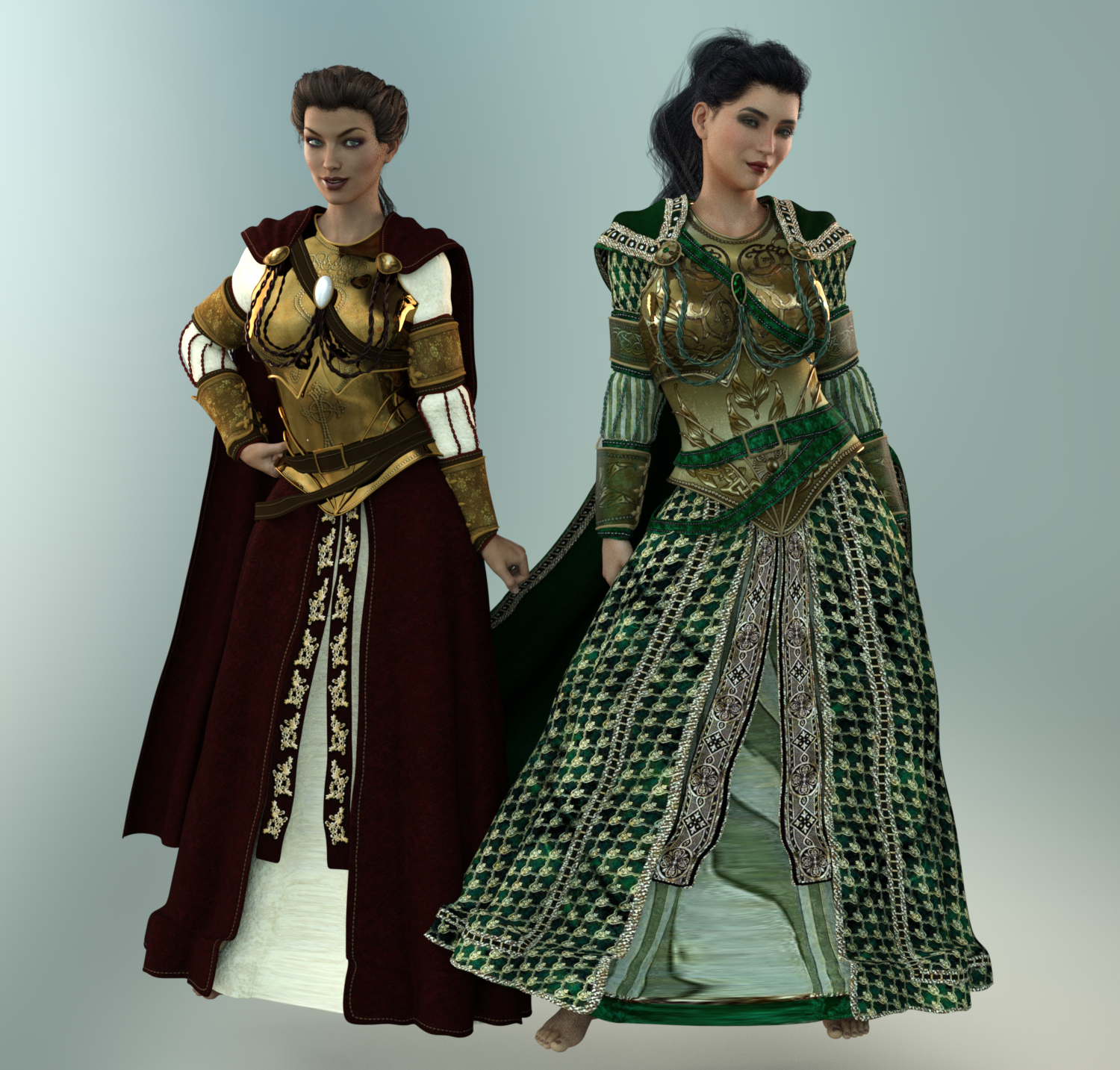
Notes:
- Converted to Sub-D and bumped it up to 2.
- Applied smoothing to everything. That didn't help the hemline. Might have to fit it a different way or try draping the dress with VWD. (Yeah, I'm that crazy.)
- There's still distortion on the front underdress of both dresses. Not sure why, but it's more noticeable on the green one.
- DA's Iray Fabric Shaders did a great job of converting the cloth and leather to more realistic textures on both dresses. You could probably use ParrotDolphin's Iray Fabric Shaders and get a similar result.
- On the metallic parts, I converted to leather then turned the metallicity back up
- Bumped up the green dress, but still needs work. I need to read up on converting Poser textures, I'm sure there's more I could do with it. .
- There are TONS of morphs in these clothes and they transferred just fine. I swung V8's cape and dress a little to the left so you could see an example of the movement options.
Yeah, that hem is weird! Have you tried transferring the dress with SY Templates? Since it adds morphs, you might be able to have more control. Though I'm unsure whether you can then transfer that piece (with the morphs) to G8.
Zev0 Products on its way for Genesis 8 (Commercial)By any chance will you be making a package morph set for men like the breast morphs for women, but for the downstairs area?
I ask because when sitting male characters, there are oddities in the way clothing sits, that make the male figure look unnatural. Some sort of morphs that allow for the movement of a man when lifting their leg, when kicking, or stepping up, climbing stairs, or climbing a ladder are examples.
Morphs from G3 to G8Yeah. You need a 3d modeling program.
Sorry, but you do. EIther you manually fix the morph or litterally rip the eyes out of both the source and the target and take the eyes apart, making sure they line up between figures.
I thought about making couple of morphs to do it. but that would complicate things even further.
Also, G8's eyes are smaller than G3's due to the magic of sub division. The difference is hard to see as normal scale, but when you get toon eyes, it becomes apparent. Try scaling the eyeballs up to hide the worst of the distortion to the lid. It may be that they are just too smallThank you for the suggestion. I don't know how to morph that part w/o messing up the eye. I guess I'll have to avoid larger eyed characters for now.
DS + Hexagon/Carrara + Bryce3D?Wouldn't it make sense to be able to send DAZ content to a widely used app like Blender? Seems like it would be a smart move for DAZ. Imagine all the Blender users who would buy DAZ content if it was easy to use it.
Not sure I understand why they don't work on something like that. Or maybe its too tough to convert a Genesis to rigging in Blender. Seems like a GoB would be smart. The GoZ for ZBrush is pretty sweet, but it's without all the rigging and stuff. Really just a glorified OBJ transfer I think.
Nope, from my experiences many blender users would never purchase content, they would look for it on the web somewhere, for free. I also don't see it as a good idea as many blender users are a different type of user than the many DS users. I am all for a seamless transition from DS to any modeling app and back for specific morph type content creation, but not fully rigged figures.
But the DAZ models themselves are modeled outside of DAZ.
(Script)Apply dual lobe features to pre lobe G3 skinsi threw together a script that copies the g3 shaping to the g8 shaping settings. I made it because making transfer morphs is work and im lazy… so my solution was to spend days writing a script. shhhhh
so, if you have VYK Bessie you can load her up, select her and base G8, then copy bessie's settings to g8. this is my most complex script to date, so if anyone is interested in giving this a shot before i upload it to shareCG/post on the forums, shoot me a pm
:D
Super Bodysuit + Superhero Addon for G3F on G8F?Those actually aren't too bad. Sickle's got a video for a method of transferring clothing to G8 avoiding the TU and preserving custom rigging. As for the ears, theres a thread somewhere around here about transferring morphs from G3 to G8 without GenX that seems pretty straight forward. May give these two tutes a go first, and if they work fine with other things, I may take the plunge on the suit.
Thanks guys!
Oh, here are the links to Sickle's clothing transfer and Redz morph transfer if you're interested.
http://sickleyield.deviantart.com/journal/Tutorial-Convert-Clothing-G3-to-G8-G8-to-G3-686682065https://www.dropbox.com/s/x2vcwnfu7w2wtj9/G8 Morph TransfersR1.zip?dl=0
DS + Hexagon/Carrara + Bryce3D?Wouldn't it make sense to be able to send DAZ content to a widely used app like Blender? Seems like it would be a smart move for DAZ. Imagine all the Blender users who would buy DAZ content if it was easy to use it.
Not sure I understand why they don't work on something like that. Or maybe its too tough to convert a Genesis to rigging in Blender. Seems like a GoB would be smart. The GoZ for ZBrush is pretty sweet, but it's without all the rigging and stuff. Really just a glorified OBJ transfer I think.
Nope, from my experiences many blender users would never purchase content, they would look for it on the web somewhere, for free. I also don't see it as a good idea as many blender users are a different type of user than the many DS users. I am all for a seamless transition from DS to any modeling app and back for specific morph type content creation, but not fully rigged figures.
Daz 3D is part of

Connect
DAZ Productions, Inc.
7533 S Center View Ct #4664
West Jordan, UT 84084Licensing Agreement | Terms of Service | Privacy Policy | EULA
© 2026 Daz Productions Inc. All Rights Reserved.