-
This girl
She I think is just a quick goth makeup job. She looks like they might of started with LY Stormy (who is a 100% dialed in character using G3F body and head morph packages with new skin texture set) I don't think that is a product exactly like that picture in the store.
There are however many like that character sans goth makeup - pale and black hair, in the DAZ Store, the latest being Elizabeth for Victoria 8 / Genesis 8 Female.
Generally you have to buy the hair and clothing seperately.
Morphs from G3 to G8Sorry for asking an obvious question, but what is meant by "zeroing the figure?" I thought that when I load G8F that the base pose IS the zeroed figure?
If I'm wrong, please let me know how to zero a figure. Thanks!
You are correct that G8F loads at zero. G3F doesn't though, as she has navel and mouth realism morphs applied. It's always best practice to make sure all morphs are set to zero before saving out any morphs. Otherwise your G8F will save with those morphs on by default (as happened somebody earlier in this thread) and it's a pain to fix later. With G8F selected in the scrne tab, go to the parameters tab, and in the drop down menu in the corner, there's an option to zero - figure.
Also remember to hide the lashes or use the developer G8F if you at exporting for morphs. Otherwise the vertex count of your morph won't match.
Thanks Redz! Now I have a couple more questions - from your tutorial:
"Zero G8F and click File-Save as- Support Asset- Morph Asset -
Check only your new morph, under Morphs - Morph Loader or your
custom location. Enter a Directory and vendor name and click accept.
Next time you open Daz Studio your new morph should be available."By this do you mean after I complete the morph that I must dial it to zero on G8F? When I save the Morph Asset, D/S automatically knows what I'm saving?
"You can edit your morph dial to customise it's category etc. If you don't it
will show up under Morphs - Morph Loader."How do I customize the category?
To your first question, yes you must zero the morph. Daz will jnow because in the save morph asset you must expand the categories until you find your morph/morphs and check only those to save. Uncheck anything else.
To the second, if you are in edit mode on the parameters pane (an option in the parameters dropdown menu), you can click the gear symbol at the top of your morph slider and choose parameter settings. Under path you can choose where your morph should show up - eg head/full body/people etc.
Thanks. You Rock!
Morphs from G3 to G8Sorry for asking an obvious question, but what is meant by "zeroing the figure?" I thought that when I load G8F that the base pose IS the zeroed figure?
If I'm wrong, please let me know how to zero a figure. Thanks!
You are correct that G8F loads at zero. G3F doesn't though, as she has navel and mouth realism morphs applied. It's always best practice to make sure all morphs are set to zero before saving out any morphs. Otherwise your G8F will save with those morphs on by default (as happened somebody earlier in this thread) and it's a pain to fix later. With G8F selected in the scrne tab, go to the parameters tab, and in the drop down menu in the corner, there's an option to zero - figure.
Also remember to hide the lashes or use the developer G8F if you at exporting for morphs. Otherwise the vertex count of your morph won't match.
Thanks Redz! Now I have a couple more questions - from your tutorial:
"Zero G8F and click File-Save as- Support Asset- Morph Asset -
Check only your new morph, under Morphs - Morph Loader or your
custom location. Enter a Directory and vendor name and click accept.
Next time you open Daz Studio your new morph should be available."By this do you mean after I complete the morph that I must dial it to zero on G8F? When I save the Morph Asset, D/S automatically knows what I'm saving?
"You can edit your morph dial to customise it's category etc. If you don't it
will show up under Morphs - Morph Loader."How do I customize the category?
To your first question, yes you must zero the morph. Daz will jnow because in the save morph asset you must expand the categories until you find your morph/morphs and check only those to save. Uncheck anything else.
To the second, if you are in edit mode on the parameters pane (an option in the parameters dropdown menu), you can click the gear symbol at the top of your morph slider and choose parameter settings. Under path you can choose where your morph should show up - eg head/full body/people etc.
Morphs from G3 to G8Sorry for asking an obvious question, but what is meant by "zeroing the figure?" I thought that when I load G8F that the base pose IS the zeroed figure?
If I'm wrong, please let me know how to zero a figure. Thanks!
You are correct that G8F loads at zero. G3F doesn't though, as she has navel and mouth realism morphs applied. It's always best practice to make sure all morphs are set to zero before saving out any morphs. Otherwise your G8F will save with those morphs on by default (as happened somebody earlier in this thread) and it's a pain to fix later. With G8F selected in the scrne tab, go to the parameters tab, and in the drop down menu in the corner, there's an option to zero - figure.
Also remember to hide the lashes or use the developer G8F if you at exporting for morphs. Otherwise the vertex count of your morph won't match.
Thanks Redz! Now I have a couple more questions - from your tutorial:
"Zero G8F and click File-Save as- Support Asset- Morph Asset -
Check only your new morph, under Morphs - Morph Loader or your
custom location. Enter a Directory and vendor name and click accept.
Next time you open Daz Studio your new morph should be available."By this do you mean after I complete the morph that I must dial it to zero on G8F? When I save the Morph Asset, D/S automatically knows what I'm saving?
"You can edit your morph dial to customise it's category etc. If you don't it
will show up under Morphs - Morph Loader."How do I customize the category?
Morphs from G3 to G8Thanks yet again for all the help - I'll see how I get on. I only want to transfer a few rather than dozens or hundreds - in general, if I need a specific face shape, I use the original figure that it was designed for, I'm all for a simple life that way!
Morphs from G3 to G8I have successfully used Redz tutorial file to transfer a number of G3F characters across to G8F - thanks again! I am almost loathe to ask, as you have been so helpful already, and I think it may have already been covered somewhere, but is there a simple way to transfer head morphs (only really interested in the heads/faces this time) from Genesis or Genesis 2 (or even V4) characters? I don't have GenX, so it the answer is "get GenX" then fine, but if there is a way to do it without that and they isn't too complicated, that would be great.
It's a bit trickier because the head shapes are not the same, as they are for G3F. You could favourite the Genesis head morphs you wish to transfer and use the transfer utility as I described before for Genesis 3 ear/head morphs (see settings in the pic), but you will have two issues - first the body will morph slightly, and secondly, you will only get the correct head shape if you dial the Genesis clone into G8F as well as your transferred morph. The tutorial I posted for making clones and reproducing the tutorial for earlier generations overcomes these problems, but is a lot more time consuming.
I agree with this comment.
If you do a head morph form G3 to G8 you get pretty good results. I've talked about the issues that crop up before, with the worst distortion (fairly minor except in stylized) being in the eyes. Key point being, the eyes (and to a leasser extent, outer upper cheeks) are the only places where G3 and G8 differ. And the cheeks thing can be fixed. The eyes are actually different geometry which means a degree of distortion in transfer is inescapable.
Genesis and G2 are different geometry entirely. Even minor eye stylization cause significant distortion. I know people get good results now, which has to do, I think, with improved options in Transfer Utility, but it can be pretty bad. Distortion will not be confined to the eyes, either. Hands, feet, nails, teeth (ye gods, the teeth). For whatever reason, GenX does not cause this to happen. Mind you, extreme eyes always need fixing, but with GenX it's typically a matter of changing the scale of the eyeball, or using an iris morph.
Bottom line, distortions add up. So even if you aren't making stylized character, each tiny distortion form each transfer will stack if you try to mix and match morphs. Going from G3 to G8, the problem will be so small as be ignored. Going from any other figure, and it's probably worth getting GenX.
Unless you are like me and enjoy fixing 3D models as a passtime. It's not unlike fixing a car. If you like that kind of thing, you do it yorself. If not, most of the time, you're better served paying to have it done for you.Morphs from G3 to G8Had you saved the morph before you changed it?
Looking back there could have been one problem. I kept going into and out of Studio but since I was re-doing the same morph it kept telling me there was already a morph with that name, so I deleted and re-loaded it. This time I did a re-run, first making sure there wasn't a morph already in Studio when I started. Here is the sequence.
First load and zero G8F, load the head morph. Try it out. the shoulder movement is there.
Add morph to favourites, in geometry editor select all vertices except the head and select morph editing->clear selected deltas from favourites. Exit from geometry editor. Try the morph, only the head morphs, the shoulder movement is gone.
With the morph set to 100% do the adjust rigging to shape and erc freeze. Try turning the morph down to 0 and up to 100%, the shoulders still don't move, it's still just the head that morphs.
Zero the figure, save as a morph asset, in the tick boxes only select the head.
Exit from Daz Studio, restart Daz Studio and load G8F.
Set the morph to 100%, the shoulder movement is back again.
In the tick boxes, you're selecting the entire head group? Actor > Head?
Are you changing the morph's Property group to Actor > Head? Using morph loader to add it, it defaults to Morphs > Morph Loader, unless you specify otherwise.
Also, if you checked Actor > then every morph in the Head group was saved out again and you now have two copies of each. Which Daz handles okay, but weird stuff can happen. I made that mistake on one trial run of my method and end up with a morphthat had no deltas but sill had ERC links and was basically stripping the bones ot of the body.
I though I'd fix it by getting rid of the doubled file, and then rerunning things. And it seemed to work. Morph plus ERC working. Saved it. Reloaded, retested, No morph, moving bones. In the end I had to remove all the files and rebuild the morph from first principles.
Sounds like a similar issue. Maybe not the same, but you probably have another file with same morph id in there someplace. Anyway, the property group thin is important, and I don't know if we're just talking past each other here. When you save a morph you should drill down in the check boxes until you get to that morph, unless you know for a fact that every morph in the group you check is new, or is in the same folder as you are going to save to.
The folder you saved to would default to Morphs\[YourVendorName]\Product, in curent Studio. In 4.8 you could get away with not entering a product name. Obviously, if you changed the vendor and product names (For ex, I change the Vendor name to FromG3F for all my transfers, Makes it easy to know which folder they are in) it would cange the above address accordingly. You may need to delete that folder, entirely, if you've be just check boxing the whole head group.Ahh, some light begins to dawn a bit. I thought those check boxes were supposed to say which body parts the morph would apply to, but looking at it again I now think they for me to say which morphs to save. But if that's right then I don't think I actually saved the morph at all, so why was it still there when I re-started Studio? And I did wonder why I couldn't find the product name I'd entered when I tried searching for the morph after the restart.
I dunno, I'll have to go away and think about this for a while. If I have been re-saving the wrong things I could have messed things up completly. Maybe I should de-install G8F and re-install her, or would that actually fix things?
I don't know. Depends on how you did it. You have to get rid of the folder where you saved all those morphs. Uninstall might not do that.
Just getting rid of the folder whouls do it. As for why the morph is still there; at least one time, you actually saved it, and the file is still in the Morphs folder somewhere. It's the only way it can keep showing up.
If you go into the morph's poperties and look at it's internal name, you have something you can use to searche you Morphs folder and see where it is.
Click on the gear icon on the right side of the slider. (Click, not right click) You'll get a men. Select Paramenter Settings.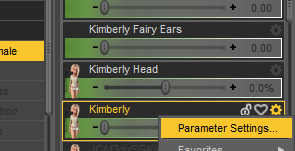
In the window that pops up there will be "name" and "label." Label is what Studio displays. Name is the internal ID of the morph, and usually the file name it is saved under. Copy the name, and seach you Morphs folder.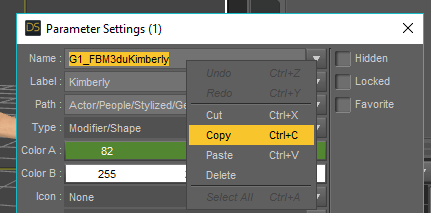
That should get you the location of the file and any more copies of it you have. You have to get rid of them. You probably do need to remove and reinstall G8 because of the saving the head morphs. Not sure. I mean you could try to hunt down all the copies you made, since you did more than once. They might all be ing the same folder. Might not. If they are all in the same folder, then there' won't be too many copies becuase they would have be overwriting themselves on each save. In that case, you just have remove that folder. But if you aren't sure, then you should uninstall G8. The go in and make sure the who G8 Folder inside the data\Daz 3D\ folder is gone. If not, delete it. The reinstall G8.Just to be on the safe side I de-installed G8F, V8 and all their morphs, characters, expressions and poses, then re-installed them all.
With this new understanding of the export process I tried again, and I have finally managed to convert a face morph without distorting the body, and put it in a new folder/category/whatever it's called under Actor->Head. It was a long journey but now I know how to do it. A big thank you the everyone who helped along the way.
Morphs from G3 to G8I have successfully used Redz tutorial file to transfer a number of G3F characters across to G8F - thanks again! I am almost loathe to ask, as you have been so helpful already, and I think it may have already been covered somewhere, but is there a simple way to transfer head morphs (only really interested in the heads/faces this time) from Genesis or Genesis 2 (or even V4) characters? I don't have GenX, so it the answer is "get GenX" then fine, but if there is a way to do it without that and they isn't too complicated, that would be great.
It's a bit trickier because the head shapes are not the same, as they are for G3F. You could favourite the Genesis head morphs you wish to transfer and use the transfer utility as I described before for Genesis 3 ear/head morphs (see settings in the pic), but you will have two issues - first the body will morph slightly, and secondly, you will only get the correct head shape if you dial the Genesis clone into G8F as well as your transferred morph. The tutorial I posted for making clones and reproducing the tutorial for earlier generations overcomes these problems, but is a lot more time consuming.
Out with the old, In with the new V8I'm not getting caught up in any such perception. What I have observed is that when I make a morph in a subdivided figure in Zbrush but then convert that back to base rez necessary for export to DS at the moment. The morph does not look the same on the DS subdivided (high rez) figure in DS. Perhaps there is an incompatability with the way Zbrush and DS do sub-division, I do not know. I just see the difference. I do know that it is possible to make great morphs on a subdivided figure in Zbrush that look the same when loaded on to the figure in DS (provided you have access to the DAZ HD technology). What I would like to see is that facility being made available to all DS users (under licence if necessary), or for DAZ3d to incorporate a set of morph brushes directly into DS to allow on the fly morphing within DS (at high rez). The latter option would be, by far, the most beneficial to the majority of DS users.
Actually you are caught in the perception because you are incorrectly starting with high poly sculpting then trying to go back to a low poly version rather than starting with the proper low poly mesh and subdividing for details. Yes there is a difference in how DS and zbrush does subdivision (as well as the real difference in sculpting in low poly and subdividing that versus starting at high poly and reverting to low in terms of delta positions), so genesis needs to know what the real difference in the morphs are via delta positions.. and how would you do that? By giiving DS a low poly sculpt first based on the actual exported low poly genesis and working from there. That's what we're trying to impress upon you to learn actual low poly sculpting because starting high does not work.
We disagree on just about everything but your still the master at creating characters.. Look forward to seeing what you do next with Genesis 8.. stay brilliant! #BigFan
Morphs from G3 to G8I have successfully used Redz tutorial file to transfer a number of G3F characters across to G8F - thanks again! I am almost loathe to ask, as you have been so helpful already, and I think it may have already been covered somewhere, but is there a simple way to transfer head morphs (only really interested in the heads/faces this time) from Genesis or Genesis 2 (or even V4) characters? I don't have GenX, so it the answer is "get GenX" then fine, but if there is a way to do it without that and they isn't too complicated, that would be great.
Try this thread: https://www.daz3d.com/forums/discussion/24093/transferring-morphs-from-genesis-to-g2m-g2f-and-from-g2m-g2f-to-genesis-now-with-clones
The Genesis 3 comments start on about Page 19.
ETA: But I would definitely recommend GenX2 and the necessary add-ons if you find them in a good sale!
why would a morph work in DS but not Carrara?Possibly because it is not a morph but a controller for bones.
Morphs from G3 to G8I have successfully used Redz tutorial file to transfer a number of G3F characters across to G8F - thanks again! I am almost loathe to ask, as you have been so helpful already, and I think it may have already been covered somewhere, but is there a simple way to transfer head morphs (only really interested in the heads/faces this time) from Genesis or Genesis 2 (or even V4) characters? I don't have GenX, so it the answer is "get GenX" then fine, but if there is a way to do it without that and they isn't too complicated, that would be great.
Dare we Specul8to make a corrective morph, i should stack the morph then dial out the V8 fbm?
is theory at this point
 lolGeForce 1080 Ti and Titan Xp - What the **** were they thinking?
Yeah, I think I'll wait a few months and see what shakes out for prices, then get a new full tower box with better cooling, and new motherboard, and transfer my graphics and 48GB memory and PS over.
why would a morph work in DS but not Carrara?why would a morph work in DS but not Carrara?
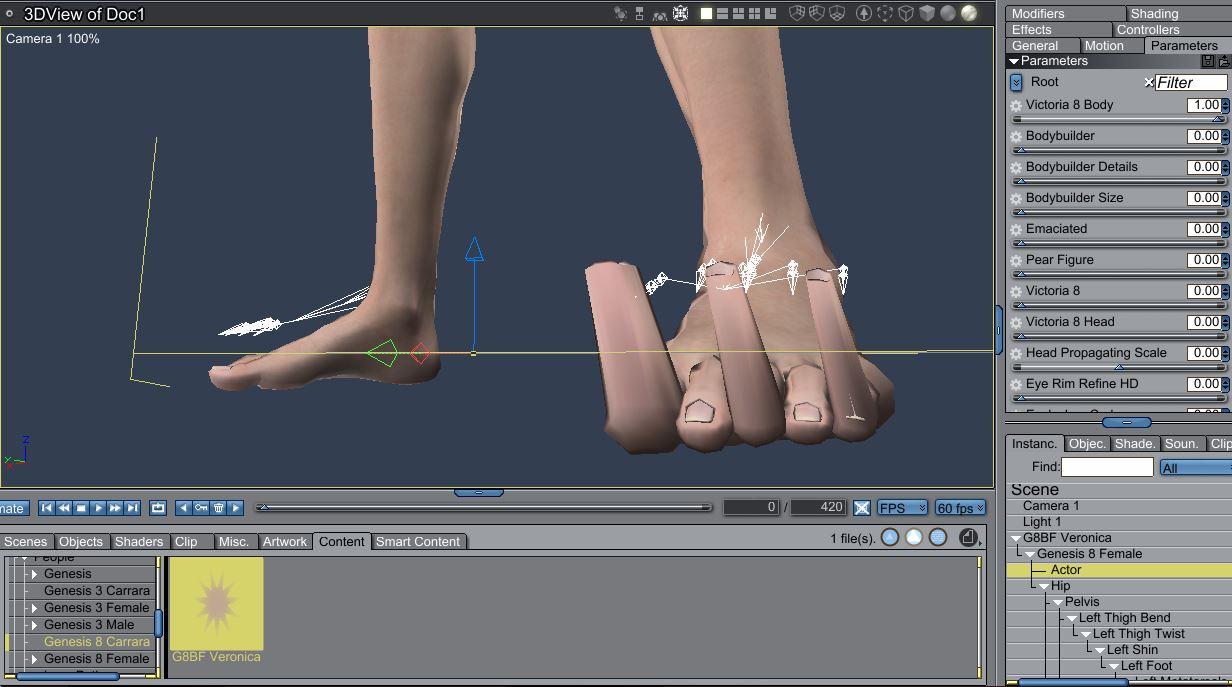
any ideas would be appreciated!!the V8 fbm. works fine for the right foot.
the left foot in carrara is not morphing a couple of edge loops around the toenail bed ???
so relieved i didn't buy the V8 pro bundle. >.<
Does anyone have any example renders using the Faces Factory for G8?I picked it up and am still playing with it.
This is not like the morph kits I have picked up in the past - the partial morphs are presets and not morph dials. That isn't useful for me - I want the functionality of being able to dial the morph, not have it at 100%.
In the Content Library, under My Daz 3D Library / People / Genesis 8 Female / Shapes, you will find the presets for the partial face morphs. The presets don't have descriptive lables, they are just numbered. The thumbnails are overexposed, so it's hard to see the detail. There is no zero morphs preset, so you have to use Undo to remove it.
EDIT: My last statement is wrong, there is a zero preset. Under the Full Faces section of the presets, "Faces Factory Full Faces 00" will zero the morphs.
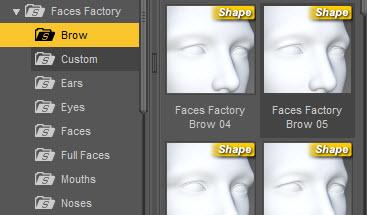
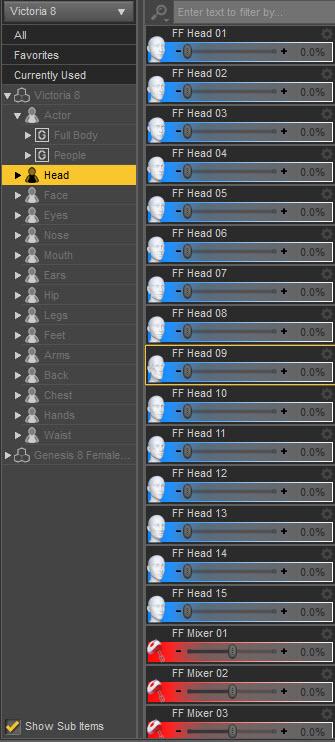
Under the Shaping tab, Head, you will find the morph dials for Head and Mixer. Head does have icons showing the shape but Mixer is just numbered.
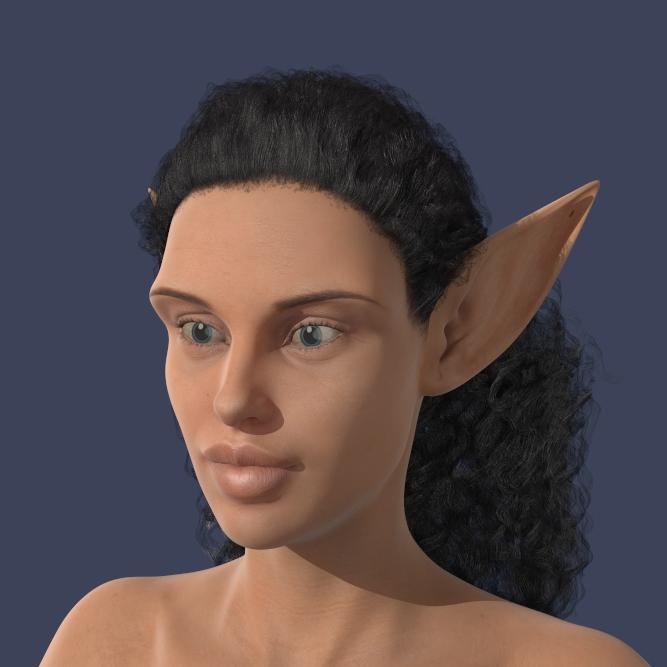
Here is a test render (3Delight) with Victoria 8 base skin and using the following Face Factory presets: Brow 04, Ears 09, Eyes 08, Mouths 04.
 Out with the old, In with the new V8
Just sharing my perspective....
With Genesis 8 out of the bag... an update that caught me totally off guard.. Here I thought it had already gotten as good as it was going to get.. silly me. So now I don't want to spend any money on Genesis 3.. period. It's obsolete this week and while its true that you can put the old wine skins on the new wine, so far in my testing, the results haven't been very nice. The skin has been updated which means even if I can transfer the skins, I loose the added value of sub-surface updates that will go into the new characters... so if you want the best of the best, you have to be willing to wait for it and invest in that.
If you really think Gen3 is obsolete, you are way off the mark. G8 has yet to be established and only time will tell how long that will take.
Thanks for sharing your good opinion. When I compare the two characters side by side... it's no compitition to me. According to Arthur C. Clarke any sufficiently advanced technology is indistinguishable from magic.... so far (and DAZ should take this as a compliment) it appears the new characters are magic and the old ones look flat and dull. The revolution is here, hope you enjoy it. Happy rendering!
LOL, yes Clarke is right, however you do have to accept the word "sufficiently" in it's correct context. G8 is not much more advanced than G3. An improvement in some areas, I will grant. Worse in others such as base resolution. Hardly bedazzeling technology that looks like magic. :)
Less than 400 polys. And it's how the content artists (PAs) can manipulate the polys, with or without access to advanced tools that we can't use, that determines what a given character looks like, not the number of polygons they have available to work with.
"it's how the content artists (PAs) can manipulate the polys... not the number of polygons they have available to work with."
So daywalker, you seem to be suggesting that some people can make wonderful, realistic characters with a 20 poly figure. Have you got any examples? Now that would be magic!
No examples, but that wasn't the point I was trying to make. You're getting caught up in the perception that there aren't enough polygons to work with in the base mesh when you're actually impacting a lot more than the four you see when moving vertices around on a low poly mesh. PAs have reached the point that they understand that each moved vertex is affecting at minimum 16 polygons at the first level of subdivison, depending on the settings of your move tool, for example.
I'm not getting caught up in any such perception. What I have observed is that when I make a morph in a subdivided figure in Zbrush but then convert that back to base rez necessary for export to DS at the moment. The morph does not look the same on the DS subdivided (high rez) figure in DS. Perhaps there is an incompatability with the way Zbrush and DS do sub-division, I do not know. I just see the difference. I do know that it is possible to make great morphs on a subdivided figure in Zbrush that look the same when loaded on to the figure in DS (provided you have access to the DAZ HD technology). What I would like to see is that facility being made available to all DS users (under licence if necessary), or for DAZ3d to incorporate a set of morph brushes directly into DS to allow on the fly morphing within DS (at high rez). The latter option would be, by far, the most beneficial to the majority of DS users.
Actually you are caught in the perception because you are incorrectly starting with high poly sculpting then trying to go back to a low poly version rather than starting with the proper low poly mesh and subdividing for details. Yes there is a difference in how DS and zbrush does subdivision (as well as the real difference in sculpting in low poly and subdividing that versus starting at high poly and reverting to low in terms of delta positions), so genesis needs to know what the real difference in the morphs are via delta positions.. and how would you do that? By giiving DS a low poly sculpt first based on the actual exported low poly genesis and working from there. That's what we're trying to impress upon you to learn actual low poly sculpting because starting high does not work.
Morphs from G3 to G8Sorry for asking an obvious question, but what is meant by "zeroing the figure?" I thought that when I load G8F that the base pose IS the zeroed figure?
If I'm wrong, please let me know how to zero a figure. Thanks!
You are correct that G8F loads at zero. G3F doesn't though, as she has navel and mouth realism morphs applied. It's always best practice to make sure all morphs are set to zero before saving out any morphs. Otherwise your G8F will save with those morphs on by default (as happened somebody earlier in this thread) and it's a pain to fix later. With G8F selected in the scrne tab, go to the parameters tab, and in the drop down menu in the corner, there's an option to zero - figure.
Also remember to hide the lashes or use the developer G8F if you at exporting for morphs. Otherwise the vertex count of your morph won't match.
How to get rid of character morph saved in base genesis 8I did save over the default Genesis 8 female.
I tried reinstalling the Genesis 8 Starter Essentials but ended upp with the same morph. However, I didn't first uninstall, so I will try that.
Thank you, Richard,
Released: Easy Feet - Control Dials for Genesis 3 Female(s) [commercial]ohhhh yeah. This did not happen when I created the product and also not in the Daz testing.
Seems that something has changed there, maybe there was a Genesis 3 Female Update, that broke the morphs. Actually all 3 morphs are affected.
However, I will recreate the morphs and fix this. THe update process will take a little while since it is going through the whole DAZ QAV process.
Please be patient and sorry for the inconvenience. Once the update is live I will let you know here, but you will be informed in DIM as well.
Thanks for the Heads up about this issue.if you need it urgent I can send you the 3 affected morph updated by mail too. Please tell me by PM then.
Daz 3D is part of

Connect
DAZ Productions, Inc.
7533 S Center View Ct #4664
West Jordan, UT 84084Licensing Agreement | Terms of Service | Privacy Policy | EULA
© 2026 Daz Productions Inc. All Rights Reserved.