-
More Non-photorealisitic Renders (NPR II)
PWToon 3DL render, then popped through FotoSketcher.
Yuzuru 8I've had Manga Style Shaders for quite a while but not done anything with them because I started with Visual Style Shaders and PwToon and love working with those products. Manga Style Shaders got forgotten about. So I sat down yesterday with the pdf tutorial and applied the instructions to Yuzuru to get the line and shadows drawing. I coloured the image in with Corel Painter (still learning how to use this) and Photoshop.
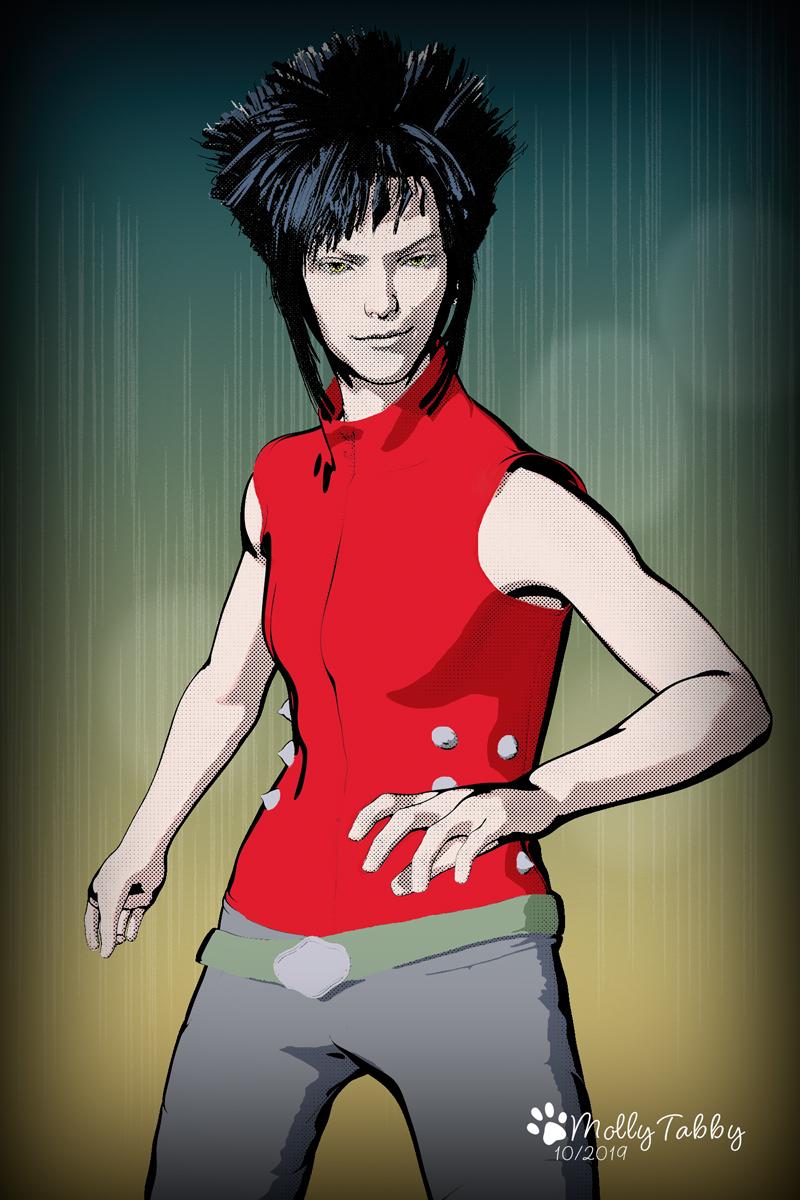
I know very little about how to draw Manga style art but I do have one of Mark Crilley's books (Manga Art) which I was given as a gift. I love looking at the illustrations and keep it on my desk.
I only bought the figure, the two hair products and the expressions as my budget is a bit tight a the moment. But I snapped up Keita as I have both Hana and Rue for Kanade 8 and they are brilliant.
More Non-photorealisitic Renders (NPR II)First is PWToon + LR9K, second is PWToon.
LineRender9000 [FAQ]Inspired to go have some fun with LR9K.
I initially tried this in PWToon and... it was ugly. I still used PWToon for the basic shading/color, but no PWToon outlines.
That's basically what I do. Use PwToon for the shaders with outlines turned off and LineRender for the lines.
LineRender9000 [FAQ]Inspired to go have some fun with LR9K.
I initially tried this in PWToon and... it was ugly. I still used PWToon for the basic shading/color, but no PWToon outlines.
LineRender9000 [FAQ]Fresnel is great at catching edges without the flooding of Normals, and color id is awesome at defining outlined spaces.
The second problem that commonly afflicts comic stuff is that a post filter can't 'understand' that this brown and that brown are different objects that should be separated.
I use pwtoon a lot but a big reason for that is I use a lot of organic figures and pwtoon is much faster.
But some of that speed is lost when you have to tweak surfaces to keep them from flooding.
LineRender9000 [FAQ]PS : « it's possible that the image example you posted was created using both PwToon and LineRender9000. They can compliment each other »
Oso3D writes: « The problem with PWToon and most similar systems is that they rely on Normals to define an outline. But if you have a very shallow or flat surface that’s angled almost perpendicular to the camera, this causes ‘bleed’ of the lines and the surface often fills in. LineRender has the option to base drawing lines on an ID, which results in a much more reliable line. »
I'm making architectural images – flat surfaces with only rarely a figure – do you think it's worth my while to buy pwToon ?
BTW - I like your image ! How did you arrive at that ??
LineRender9000 [FAQ]Hello, I just bought LineRender9000 and am beginning to get the hang of it, but I'm still unable to get the result you show in the attached image.
Could you please tell me how you achieved this? Many thanks.
What cemeras are your using? Are you using the render script? To get that result, I would be using Edge, Frensel, and Shadow Opancy cameras (I'm not home, so I appologize if the names are off) set to 3Delight-LineRender9000. I usually render in high-res, so I set my light thinkness to 4.0 and that other setting to .20. I'm obviously not the creater, but I use LineRender alot. LineRender is not perfect so you have to play with the settings. After I composite the layers in Photoshop or Clip Paint Studio, I usually clean up the lines in one of those programs.
tkdrobert
Many thanks for your reply. « What cemeras are your using? Are you using the render script? To get that result, I would be using Edge, Frensel, and Shadow Opancy cameras (I'm not home, so I appologize if the names are off) set to 3Delight-LineRender9000. » See attached screenshot. The render output is six files (two for each camera) that look nothing like the result I'm after, and I can't see how combining them in PS would make any difference.
What I am not doing?
- Set your cameras to 3delight>LineRender9000 instead of Scripted 3Delight>LineRender9000.
- Add another Shadow Opacity cam and set it as 3Delight. You can this with Frensel as well. Try it and see if those layers interest you at all.
- Expirement with the line width. You might have it set to low depending on the resolution.
- In Photoshop, create a layer that is solid white, then "copy special-->copy in place" each image LineRender created as a seperate layer.
- Compositing the layers in Photshop, GIMP, or some other tool is the key to getting good results.
It would be helpful if I could see your composited results, then I might be able to help better. Also, it's possible that the image example you posted was created using both PwToon and LineRender9000. They can compliment each other. Pwtoon has a camera for creating black and white like that. Only the PA can answer that one for sure.
Here is another example closer to what you want:
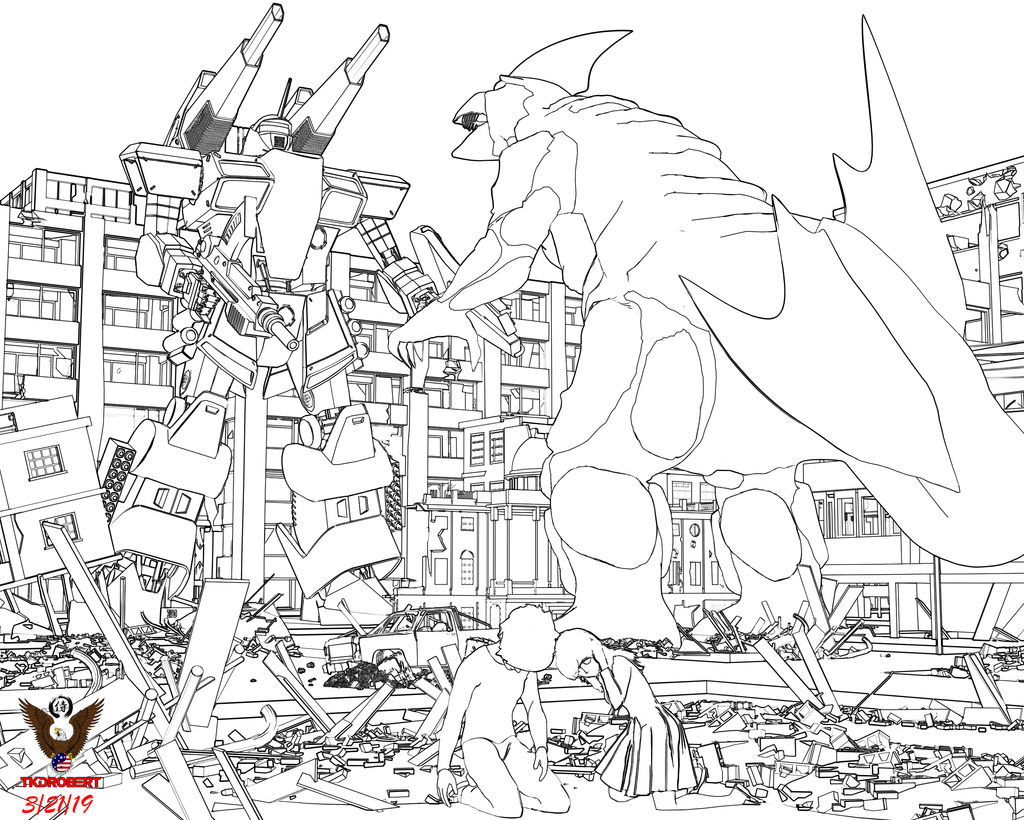 Daz inc. innovating,imitating or stagnating??
I'm pretty satified with Daz. If I could have one wish, I would love Daz to imitate Poser's "Comic Style Render" feature and have it built in. I get good results using PW toon and LineRender9000, but the Poser feature allows for real-time viewing of the line art and real-time adjustments.
I don't have pwToon or Linerender9000, but maybe it's possible to use IPR in the aux viewport? (Interactive Progressive Rendering)
LineRender can't be previewed. It creates line and shadow layers that you can composite in an art program such as Photoshop or GIMP. I use PWToon (or Visual Style Shaders) for a cartoon look and LineRender for linework and shadows (don't always use though). I put it all together in Photoshop, then I may use Clip Paint Studio to clean up the linework. Something like Poser's real time comicbook render would save me a lot of time in post-work. It's a minor thing.
Daz inc. innovating,imitating or stagnating??I'm pretty satified with Daz. If I could have one wish, I would love Daz to imitate Poser's "Comic Style Render" feature and have it built in. I get good results using PW toon and LineRender9000, but the Poser feature allows for real-time viewing of the line art and real-time adjustments.
I don't have pwToon or Linerender9000, but maybe it's possible to use IPR in the aux viewport? (Interactive Progressive Rendering)
Giant Robot Mech - Think Evangelion, or Pacific RimGot this cool looking mecha on one of "general 3d" sites. Author is "senited666" if you need to search.
It's the closest to style of mechs that i discussed before (a-la zone of enders/armored core/gundam), and i'm still not sure if there are closest alternatives here on daz/poser-optimized space.
It's kind of high poly (.obj and .fbx that come with it give you ~2,500,000 size, so it slowdowns daz viewport for me a bit), level of details is amazing though, yeah. It's not rigged, so i need to learn (re)rigging in DS.
Also no materials included (though on vendor promos there are cool materials, maybe they are saved in C4D file it comes with, but i don't have cinema so i only import obj/fbx).
My quick shots just to show it, haven't attempted finding good materials so just default gray and pwtoon (pics are larger than forum previews):


Looks cool
Giant Robot Mech - Think Evangelion, or Pacific RimGot this cool looking mecha on one of "general 3d" sites. Author is "senited666" if you need to search.
It's the closest to style of mechs that i discussed before (a-la zone of enders/armored core/gundam), and i'm still not sure if there are closest alternatives here on daz/poser-optimized space.
It's kind of high poly (.obj and .fbx that come with it give you ~2,500,000 size, so it slowdowns daz viewport for me a bit), level of details is amazing though, yeah. It's not rigged, so i need to learn (re)rigging in DS.
Also no materials included (though on vendor promos there are cool materials, maybe they are saved in C4D file it comes with, but i don't have cinema so i only import obj/fbx).
My quick shots just to show it, haven't attempted finding good materials so just default gray and pwtoon (pics are larger than forum previews):
3D Art Freebie Challenge-September 2019-"Turning a New Leaf" -Entries Thread Only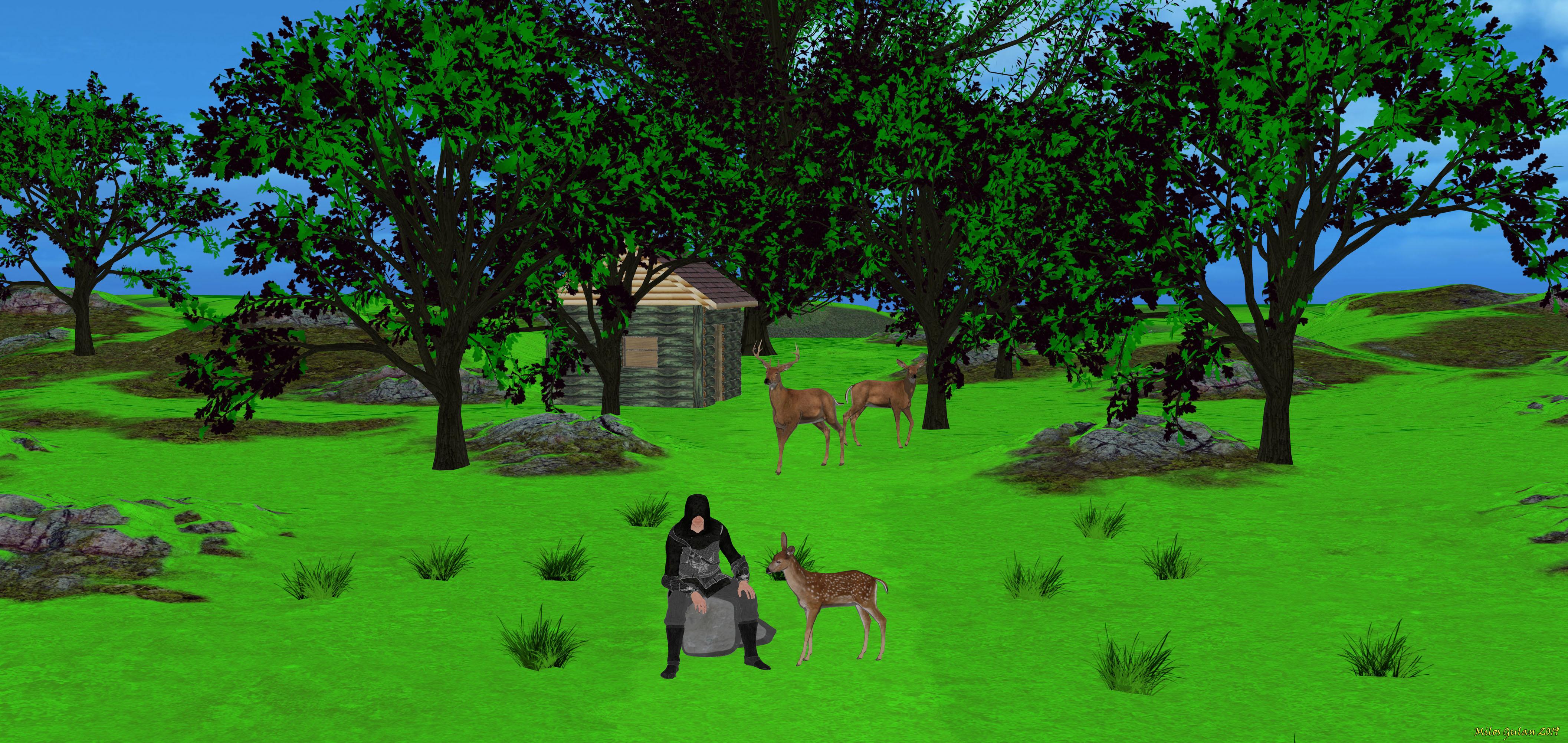
Almost autumn
Done with DAZ Studio 4.11
Freebies:
Charlie for M4 https://sharecg.com/v/57632/related///
Oak Tree https://www.renderosity.com/mod/freestuff/?item_id=72936
Re-Release 1st Anniversary-HoSM Cabins https://www.renderosity.com/mod/freestuff/?item_id=34186
Slicer textures (second one, in the middle of the page) http://chohole.ovbi.org/page_6.htm
Deer Family http://www.lynescreations.com/lynesfree6.htm
Morphable Boulder http://www.sharecg.com/v/46789/browse/11/Poser/Morphable-Boulder
Paid:
pwToon https://www.daz3d.com/shop/pwtoon/
Slicer https://www.daz3d.com/slicer
Supersuit Fantasy Pack (Chainmail shader on slicer outfit) https://www.daz3d.com/supersuit-fantasy-pack
Buck https://www.daz3d.com/buck
Versatile terrain https://www.daz3d.com/versatile-terrain
Story: Here is my character that is looking for adventure, and that is something that should be new for him... His name is Volant Clearwater, local noble (whatever that could mean, but doesn't include too much wealth unfortunately)... He has brother Ral, and sister Thea, and one more brother that they don't like to talk about... We will see what will happen next, for now he works as local area guide...
About picture: This started some time ago with Versatile terrain product I wanted so bad back then and I got it but eventualy were dissapointed as I hope it will include morphs but it didn't. After few months I wanted to do a landscape scene and I have returned to it, and the new thing I got is pwToon shaders which are very good for my srtyle of picture making.
I was still a bit disapointed with this terrain but eventualy when I started working with it I discovered wonderfuly made Oak tree and realized that terrain is very nicely done and it quickly became my favorite (though You can resize it only and there is no morphs but I ended up looking for more of the same vendor as I need good terrains).
I added to it Oak tree made by fictionalbookshelf and oak leaves are smaller then on this starting one (though they have lot of options including autumn versions) so I used first oak tree textures and used on freebie that I added and it turned very good. I got very nice big oak for free :) (though I was looking for a bit better one but it still look nice and tall, but somehow I think trunk is a bit too short). Now I was thinking to do autumn version of the leaves but didn't had time and will leave it for later.
Cabin construction kit is great with lots of options simple and good. Later I played a bit with buck and freebie for it that I got some time ago and completed it finaly and tested it here beside Volant character. They work great. Added free boulder that is nice and morphable and even have M4 pose that I converted for Genesis, and there You go. Oak leaves are cool they remind me of trees around my home.
Thanks for watching and reading this.
3D Art Freebie Challenge-September 2019-"Turning a New Leaf" -Main Thread OnlyOk here is my entry I will first upload picture then I will post links....and I will say that it is ok when I am done :). Here is picture, now links :) ...
Almost autumn
Done with DAZ Studio 4.11
Freebies:
Charlie for M4 https://sharecg.com/v/57632/related///
Oak Tree https://www.renderosity.com/mod/freestuff/?item_id=72936
Re-Release 1st Anniversary-HoSM Cabins https://www.renderosity.com/mod/freestuff/?item_id=34186
Slicer textures (second one, in the middle of the page) http://chohole.ovbi.org/page_6.htm
Deer Family http://www.lynescreations.com/lynesfree6.htm
Morphable Boulder http://www.sharecg.com/v/46789/browse/11/Poser/Morphable-Boulder
Paid:
pwToon https://www.daz3d.com/shop/pwtoon/
Slicer https://www.daz3d.com/slicer
Supersuit Fantasy Pack (Chainmail shader on slicer outfit) https://www.daz3d.com/supersuit-fantasy-pack
Buck https://www.daz3d.com/buck
Versatile terrain https://www.daz3d.com/versatile-terrain
That is it now to story ... not yet done :)
Story: Here is my character that is looking for adventure, and that is something that should be new for him... His name is Volant Clearwater, local noble (whatever that could mean, but doesn't include too much wealth unfortunately)... He has brother Ral, and sister Thea, and one more brother that they don't like to talk about... We will see what will happen next, for now he works as local area guide...
About picture: This started some time ago with Versatile terrain product I wanted so bad back then and I got it but eventualy were dissapointed as I hope it will include morphs but it didn't. After few months I wanted to do a landscape scene and I have returned to it, and the new thing I got is pwToon shaders which are very good for my srtyle of picture making.
I was still a bit disapointed with this terrain but eventualy when I started working with it I discovered wonderfuly made Oak tree and realized that terrain is very nicely done and it quickly became my favorite (though You can resize it only and there is no morphs but I ended up looking for more of the same vendor as I need good terrains).
I added to it Oak tree made by fictionalbookshelf and oak leaves are smaller then on this starting one (though they have lot of options including autumn versions) so I used first oak tree textures and used on freebie that I added and it turned very good. I got very nice big oak for free :) (though I was looking for a bit better one but it still look nice and tall, but somehow I think trunk is a bit too short). Now I was thinking to do autumn version of the leaves but didn't had time and will leave it for later.
Cabin construction kit is great with lots of options simple and good. Later I played a bit with buck and freebie for it that I got some time ago and completed it finaly and tested it here beside Volant character. They work great. Added free boulder that is nice and morphable and even have M4 pose that I converted for Genesis, and there You go. Oak leaves are cool they remind me of trees around my home.
Thanks for watching and reading this. I hope Yoy like it. Now I better add it to the DAZ gallery. My own gallery needs some cool pictures

I am done, I hope I did everything good
 [Released] dForce Thicket for Daz Dog 8
Jonny: It seems like a bit of a stretch, though I've actually considered fiddling with the ghost effect for a cartoon-style dog; if the 'strands' can pass for 'clumps of fur,' it might work, and end up with a fairly fast running effect.
I've experimented a little with PWToon and something like this, though I've run into a few issues (namely, the base of the strands end up sketched around). Still... something to play with.
Getting a transparant outline renderI got a question to ask, regarding creating outlines. Is it possible for me to create outlines of a fully-clothed figure (including edges on the body and clothing - but make the body and clothing transparent otherwise by setting opacity to 0%, but keeping the Draw Outlines and Draw Internal Lines set to on - all in pwToon?
More Non-photorealisitic Renders (NPR II)Great style, Eurocoin.
Could you elaborate more on your workflow, please.
Thanks.
In Studio I did separate render passes for the characters/foreground and the background elements (LineRenderer 9000 was also involved). On the background elements Pwtoon was applied. On the characters I used "Crescent's pwToon Cel Shaders". Then to the rendered background, I applied one of the watercolor-effects on FotoSketcher. After that, I put it all together with Gimp, which I also used to do some additional touch-ups using a watercolor-brush.Thanks a lot for the explanation of your workflow.
More Non-photorealisitic Renders (NPR II)Great style, Eurocoin.
Could you elaborate more on your workflow, please.
Thanks.
In Studio I did separate render passes for the characters/foreground and the background elements (LineRenderer 9000 was also involved). On the background elements Pwtoon was applied. On the characters I used "Crescent's pwToon Cel Shaders". Then to the rendered background, I applied one of the watercolor-effects on FotoSketcher. After that, I put it all together with Gimp, which I also used to do some additional touch-ups using a watercolor-brush.
Thanks for the details. Which LineRender 9000 camera did you use? One of the standard ones, or did you customize the settings?
BTW: The image really is very nice, but the colors on her hair and clothing are very dark; I can barely see the black lines. Although I typically enjoy seeing an artist use a stronger foreground style over a softer background (as is done in many classic illustrations), in this case I think the foreground is a little too strong and heavy. I also would expect to see outlines on the plants near her. I love the addition of the wolf, but wonder if he might seem more menacing if his eyes were a little brighter.
Nevertheless, you've got a great style and I'm looking forward to seeing more!
More Non-photorealisitic Renders (NPR II)Great style, Eurocoin.
Could you elaborate more on your workflow, please.
Thanks.
In Studio I did separate render passes for the characters/foreground and the background elements (LineRenderer 9000 was also involved). On the background elements Pwtoon was applied. On the characters I used "Crescent's pwToon Cel Shaders". Then to the rendered background, I applied one of the watercolor-effects on FotoSketcher. After that, I put it all together with Gimp, which I also used to do some additional touch-ups using a watercolor-brush.More Non-photorealisitic Renders (NPR II)I'm wondering if hunting after outlining might be distracting me from other possibilities... here's my Thicket Man, converted to PWToon.
Daz 3D is part of

Connect
DAZ Productions, Inc.
7533 S Center View Ct #4664
West Jordan, UT 84084Licensing Agreement | Terms of Service | Privacy Policy | EULA
© 2026 Daz Productions Inc. All Rights Reserved.