-
(solved) What is the best way to save and share add-ons/ additional rigs for others people's stuff?
No, this was not intended as a question for a real case. Of course, ''that'' wouldn't be a problem for a DAZ forum :)
I was more interested in what the common interpretation is here. Because I have really never heard before that (as an uninvolved third party who does not touch (let alone distribute) the IP of another) an IP owner can legally (!) restrict my work.
So thank you and I wish you a nice week.
Coupons more frustrating than they are worthI almost never use the $10 off $25 coupons as it hardly ever works without jumping though a great many hoops and search & search & then, sometimes, settling for some antient product on my wishlist. That that coupon is so consistantly a frustration means dropping the monthly membership is easier to decide to do intermitantly.
csaa's NPR AnnexThanks for the generous feedback! As I explained earlier to kenmo, I've been hunkered down in this small patch of the Daz Forum for so long, I didn't realize how others could be following my work. TBH I'm not really used to the following or having to explain myself. Frankly I wonder what the fuss is all about. Heh.
Yes, you're spot on. These days there's little rhyme or reason to my renders, and the reasons behind that are quite simple. Up until last year, I've been working with Genesis 8/8.1, using the Lightnight Boy Shader in Blender. LBS proved to be a wonderful way to achieve non-photorealisic renders (NPR) with "sharp" transitions between light and shade. The image below is a good example:
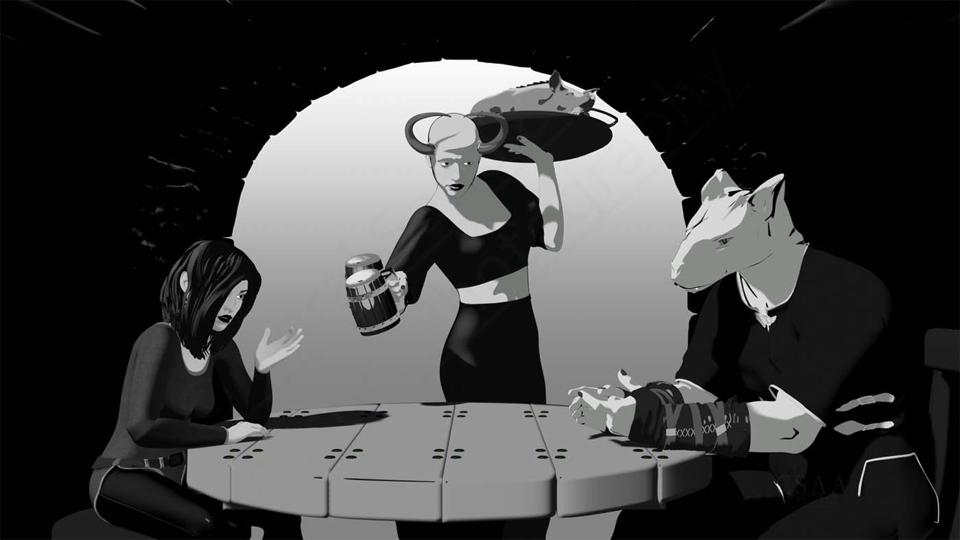
Nice and clean cel shading; something between manga and anime. It's easy on the viewer's eyes, leaving ample room to tell a story.
But the LBS team stopped developing their kit, leaving it buggy for Blender 3.5 and onwards. Since then I've moved on to Genesis 9. I've also been trying out other Eevee shaders with latest Blender releases, parting ways with LBS more than a year ago. (Last I heard, the LBS folks are a Unity shop now, developing NPR tools for video gamers.)
If there's been one constant tool in my Daz-to-Blender workflow, it's Diffeomorphic. For a year now I've been developing my own Python scripts to use after Diffeo brings over a G9 figure from Daz3D. The work has been fascinating; there's a lot of interesting techniques and Daz products to try out.
But it does leave little time to cook up any semblance of story-making in my renders, as you point out. I'm still working towards a few priorities.
1) I think I've got the hang of handling G9 figures. Now I have to learn how to render 3D scenes -- in door, cityscape, wilderness and ocean -- with a suitable NPR style.
2) Apart from achieving the right aesthetic, my goals also include efficiency in terms of CPU and memory usage, along with quick render times. The key lies in a deeper technical understanding of Blender.
3) Learning to put Clip Studio Paint to full use, not jusing in post-editing but also in assembling the panels to form a cohesive story.
Anyhow, that's my status report. Lately I've been thinking about the More Non-photorealistic Renders thread, now dormant. If you, kenmo, or others want to revive that thread for the sake of sharing NPR renders and tips, using Daz3D, Blender or other tools, I'd be happy to join in.
Cheers!
Remixing your art with AIA year ago, I dabbled in using Stable Diffusion to generate AI images. I tried a couple of WebUI's with Stable Diffusion: Automatic 1111 and Comfy Desktop. There was a bit of a learning curve and was getting all sorts of weird images because didn't take the time to learn prompting techniques. I've been using Krita (Krita.org) as a Photoshop replacement and found there was Stable Diffusion plugin and taps into a ComfyUI Server. It integrates AI functionality into Krita. It comes with a selection of checkpoints (models) you can install. I add free checkpoints and loras from Civitai.com. All of this is free you can run on your own PC. Go to Krita.org for the paint program then install the Krita AI Plugin (search for its installer). It all very easy to download and install. When you install the Krita AI plugin you're giving the option of creating a ComfyUI server that is run locally and controlled within Krita, or you can connect to an existing ComfyUI server that is externally managed. The AI plugin can modify your DAZ renders by controlling the strength of applying a checkpoint. One can even select parts of a DAZ image and render in-fills/modifications or render a 100% AI image.
I'm suprised how you can enter a very generalized idea of an image and perform a sequence of renders. I found the prompt shown on the Krita screenshot on the internet. I've attached three pictures. One of the Krita screen with the AI "docker", and two images I picked out from a set of consecutive renders from the prompt. Rendered the images at 3840 x 2160 to make desktop backgrounds. Many checkpoints for realistic renders look best in quite smaller resolutions due to the images they are trained on. I used a digital image checkpoint that was installed with the Krita AI plugin that seem to render ok in a large size renders.
Tip: To display the AI Plugin in Krita if you don't see it, go to Settings>Dockers> and enable the AI Image Generation check box. On the AI docker, select the gear box upper right, then select Connection to setup a local ComfyUI Server controlled within Krita or connect to existing ComfyUI server (didn't try that).
Remixing your art with AI3DIO said:
Ah right, you mean to search from ComfyUI. Can't at the moment since I had to uninstall it some months back because I broke the install through messing with it. Still, you would think that something as important as that would have videos on YouTube about it.
Apparently not, which is very strange!
If you are using the portable, there is a folder called update that has tools to quickly reset comfy to a working version. Try the update stable to get you back to a stable version quickly.
ComfyUI-Prompt-Camera-AssistantLiking the new Site lookcaravelle said:
PLEASE, Daz, remove this oversized 'Game Ready' banner from the Product Library and finally let me go through my purchases undisturbed! By the way, it doesn't make much sense to place this giant ad poster where the things you've already bought are.
I wouldn't mind the filter as, on a theoretical level it might be a good idea to have a search panel option to search by format where game designers would come to that section to search through all of their game ready product. That, of course, presumes that there's actually game ready content, which in the case of glb format is limited to the 53 figures from Multiplex that got dumped into the store a few months ago, while in the case of FBX, the number of products listed is longer but also extremely inaccurate, listing whole bundles as being FBX when only one or two items in the bundle actually comes in the formatt. Also, it really hurts that so many of the products don't have active read-mes and thus lack the proper documentation serious designers would be looking for. And yes, that graphic is not only garish, space-eating, and a terrific eyesore, but the fact that it doesn't even cover all of the other formats that DAZ products come in... little things like Poser, Bryce, as well as the older DAZ formats, takes away a huge portion of the actual functional utility that the filter COULD have had.
Remixing your art with AIAh right, you mean to search from ComfyUI. Can't at the moment since I had to uninstall it some months back because I broke the install through messing with it. Still, you would think that something as important as that would have videos on YouTube about it.
Apparently not, which is very strange!
Remixing your art with AI3DIO said:
Tugpsx said:
Check out Comfyui-prompt-camera-assistant, it should get you going.
PromptCameraAssistant
Inputs
- Mode: Still / Video
- Camera
- Lens type
- Film / Sensor look
- Aperture (f-stop)
- ISO
- Shutter speed
- Bokeh style
- Focus style
- Motion blur preset
Cheers mate, but still no luck here. Can't find a thing about it, but then search for me has been going rapidly downhill for some time now and is pretty much useless.
All I can find are videos about prompts, and nothing whatseover about nodes for controlling shutter speed or ISO. If you know of a specific video that demonstrates "PromptCameraAssistant" in use, please post it so that I can check it out, cause I cannot find a thing about it.
Prompt Camera Assistant is availabel using Comfy Manager node installer. Search for "Camera"
Remixing your art with AITugpsx said:
Check out Comfyui-prompt-camera-assistant, it should get you going.
PromptCameraAssistant
Inputs
- Mode: Still / Video
- Camera
- Lens type
- Film / Sensor look
- Aperture (f-stop)
- ISO
- Shutter speed
- Bokeh style
- Focus style
- Motion blur preset
Cheers mate, but still no luck here. Can't find a thing about it, but then search for me has been going rapidly downhill for some time now and is pretty much useless.
All I can find are videos about prompts, and nothing whatseover about nodes for controlling shutter speed or ISO. If you know of a specific video that demonstrates "PromptCameraAssistant" in use, please post it so that I can check it out, cause I cannot find a thing about it.
Remixing your art with AI3DIO said:
@BarefootUptoMySoul
On the plus side, it means that Evil Onion is safe around Richard!
@Tugpsx
Thanks for the heads-up on that, and I have to say that's the most promising thing I've heard so far in that respect. The moment you mentioned being able to set "Camera Back" as well as lens properties, a huge smile crept across my face!Absolutely, I'm planning to use ComfyUI. In fact I'm learning A.I. faster than I otherwise would be by watching videos about ComfyUI. I've never seen the sort of tool you describe, but man, I'm damn glad to hear that one exists since I think the whole system would be very crude and unprofessional without it.
Do you know the name of the ComfyUI tool that allows you to set that sort of stuff?
Also, is there a term that should be used to search for that specific type of node?Check out Comfyui-prompt-camera-assistant, it should get you going.
PromptCameraAssistant
Inputs
- Mode: Still / Video
- Camera
- Lens type
- Film / Sensor look
- Aperture (f-stop)
- ISO
- Shutter speed
- Bokeh style
- Focus style
- Motion blur preset
(solved) What is the best way to save and share add-ons/ additional rigs for others people's stuff?This is really something you need to talk to an IP lawyer about, but if you can't or won't seek legal advcie then simply work on the assumption that if you need to use someone else's work as scaffolding for your own then you are bound by the license terms of that work. This is basic principle and you should find it with any kind of search. If you want to have undiluted rights then you must start from scratch (aside from the very limited things covered by legitmate use, which cvoers far less than is commonly understood).
Remixing your art with AI@BarefootUptoMySoul
On the plus side, it means that Evil Onion is safe around Richard!
@Tugpsx
Thanks for the heads-up on that, and I have to say that's the most promising thing I've heard so far in that respect. The moment you mentioned being able to set "Camera Back" as well as lens properties, a huge smile crept across my face!Absolutely, I'm planning to use ComfyUI. In fact I'm learning A.I. faster than I otherwise would be by watching videos about ComfyUI. I've never seen the sort of tool you describe, but man, I'm damn glad to hear that one exists since I think the whole system would be very crude and unprofessional without it.
Do you know the name of the ComfyUI tool that allows you to set that sort of stuff?
Also, is there a term that should be used to search for that specific type of node?Looking for "Lovecraftian University" environment piecesIf we exclude medieval castles, I think Victorian architecture would be quite suitable, even though this one isn't a stone building. Of course, it might be a bit small for a university...
https://www.daz3d.com/old-victorian-house-bundle
or
https://www.daz3d.com/the-black-house-base
Or some Gothic building kits, Most products were selected based on impressions of Bloodborne.
https://www.daz3d.com/mick-2-gothic-pack
https://www.daz3d.com/staircase-dark
https://www.daz3d.com/mb-european-architecture
https://www.daz3d.com/the-orangery
Or perhaps find a suitable building from among PW Productions' many estates.
https://www.daz3d.com/pw-castle-restaurant-bar
https://www.daz3d.com/pw-chateau-de-dampierre
There are many bizarre buildings to search for in Jack Tomalin, but collecting them is not easy.
https://www.daz3d.com/purgation
Tips on making scene file smaller?crosswind said:
Viper141 said:
Hey Thanks again for the response
crosswind said:
Ah no, it shows just the geometry data with hundreds or thousands of code lines... to let you know what objects have these geometry data and can be saved as Figure / Prop assets or Modifier assets so as to shrink the DUF file size ~~
I tried it out but I can't well find the objects that need to be put in figure/prop asset. I looked under Geometry Library and well I saw this
Well the DUF file you checked might be more complex e.g. there're morph properties with linked geometry data not saved as assets, or dforced data on timeline, etc. You can search by using a keyword "vertex_count", like the screenshot 1 I attached.
crosswind said:
I ever wrote two scripts for a folk to change Base to High Resolution and vice versa for the items in the scene by content types. You can try and use them or modify them at will. https://www.daz3d.com/forums/discussion/comment/8541796/#Comment_8541796 ;Oh wow, so terms of content types I can make idk, all genesis figures and hair assets to base, then later in render queuer I can have the script running before render is cooked? Or is the script during work?
Well... I removed the content type check and rewrote the scripts, the scripts loop check all figures / props and set their lodlevel to Base or High. Check the screenshot 2 and try the modified scripts in the attached ZIP .
Edit: Pls be noted: if a figure or prop in your scene has not been Converted to SubD, its lodlevel cannot be set to High Resolution. Do Convert to SubD beforehand if needed ~~ (some figures / props may have artifacts after conversion... check 'n do it case by case)
crosswind said:
Because the vendor left this Daz3D store and moved to Rendo ~~
Man such a shame I really think this would've been super useful to me.
First off I have to say, thanks a lot! This has really helped my workflow terms of save file being a lot smaller, though there is still some things I need help with, I've noticed the vertex_count for rigid follower is quite high, like 16000. Idk what rigid follower is.
Also this week has been quite productive since I kept hiding everything except the figure (like everything hair, clothing etc) and the ground. I've done quite a lot terms of renders. But I have a feeling I can do better though with Save files, I tried to read again with my old crowds I created (I have like a lot of crowds of 10-20 models) but I noticed like 76 of th the vertex count terms of search has rigid follower, don't know what it is, I searched and it was the buttons, but the save file went up from 3 MB to 13 MB wit this crowd now, still trying to learn how to optimise it lolShow Us Your Bryce Renders Part 14Horo said:
mermaid - I am not sure the forum would accept it to put on the link here. But just type renderosity on your browser address list to open the site, then click on GALLERY (top row), then move mouse over Galleries and click on Bryce (or any other of the 35 galleries), they are sorted alphabetically. Contrary to Daz 3D, they have a working gallery.
I checked out this site, thanks for the help Horo. I saw some of your work in the Bryce Gallery and also Hansmar’s Vue renders. Nice work Hansmar.
What happened to 3D Universe's HayBilly or other figuresItsAaron said:
What happened to the other figures in this store
When I search HayBilly or Other figures like Sadie, but it's not in here
I wish 3D Universe's HayBilly - The Cowardly Sheriff getting a upgrade for Genesis 9
So does Sadie and Sam
3DUniverse stopped selling their products in the DAZ store last month. They're slowly moving their DAZ products to their new store at Renderosity... though the order so far has been rather random, there are aroundg thirty items there now. Also, they used to have some products available direct at their own website, though currently they're only redirecting to Renderosity.
Note - Edited to correct 3DU store info.
What happened to 3D Universe's HayBilly or other figuresWhat happened to the other figures in this store
When I search HayBilly or Other figures like Sadie, but it's not in here
I wish 3D Universe's HayBilly - The Cowardly Sheriff getting a upgrade for Genesis 9
So does Sadie and Sam
Let's appreciate/discuss today's new releases - ongoinger still further threadbarbult said:
WendyLuvsCatz said:
not easy editing links on iOS but hope this works
to avoid extra characters one should use the link icon in the forum software but I couldn't go to the hair either to use it so had to edit it just to even see what hair it was
 will find out myself after posting this
 https://www.daz3d.com/dforce-casual-bangs-hair-for-genesis-9
When you paste in the URL, don't type anything else after it. Hit Enter to start a new line, then you can continue to type. That will also prevent those link-breaking extra characters from being added. Richard Haseltine taught me this trick.handy to know
 Let's appreciate/discuss today's new releases - ongoinger still further thread
When you paste in the URL, don't type anything else after it. Hit Enter to start a new line, then you can continue to type. That will also prevent those link-breaking extra characters from being added. Richard Haseltine taught me this trick.WendyLuvsCatz said:not easy editing links on iOS but hope this works
to avoid extra characters one should use the link icon in the forum software but I couldn't go to the hair either to use it so had to edit it just to even see what hair it was
will find out myself after posting this https://www.daz3d.com/dforce-casual-bangs-hair-for-genesis-9
The "The Weather Changes More Often than the Thread Title" Complaint ThreadTJohn said:
I seem to have fallen into an alternate universe where the Complaint Thread is in the Software Forums instead of the Commons.

I often find myself out of phase with this forum. Kind of like Ghost in the Marvel movies. While that usually leaves me invisible to everybody, it also makes me able to pass through things. That is useful in the DAZ world where doors don’t always open, and rooms don’t always have doors.
Daz 3D is part of

Connect
DAZ Productions, Inc.
7533 S Center View Ct #4664
West Jordan, UT 84084Licensing Agreement | Terms of Service | Privacy Policy | EULA
© 2026 Daz Productions Inc. All Rights Reserved.