-
Daz-Hexagon welding props to boots.
if you export boots and shield decal , at same time, they are joined as one obj. (not use hexagon bridge, but just export from DS and Re-import)
then use transfer utility , and transfer weight ,rig from Boots not work? if protected to transfer weight about shield area,,
you can keep shield separate, but transfer weight from Base figure mesh to the Shield part only. then can use it individual accessory (rig) I think.
it may bend well along to the rig and keep more better distance, than just parent I think. and JCM morphs will be auto-transfered as same as boots.
Line running through arms of V8 skinI'm using everything preset from DAZ for V8 except the body morphs. I turned V8 body to 0 and used another body morph from another character using the dialers. It also seems to appear in certain lighting or angles or both. Not all renders have the line running through them.
hmm, odd. not sure where that could be from, is the UV still "base female"?
Try turning the body morph from another character off and see if it's still there :)
Saving morph on converted clothing [SOLVED]Did you save auto-fit clothing for G3M as New Figure already?
I beleive, even though you did not save it as morph, after you auto-fit and convert, then make morph for converted figure (export blender and import by morph loader,) then save it as scene, (or subset), it can keep figure, and new morph about the scene.duf . But convert clothing is not original mesh, then clothing and morph can be only appear in current scnene.
if you hope to make morph (parmanently) for converted auto fit Clothing,, you need to save it as new Figure with different name, after convert (auto-fit) G3Fdress to G3Mdress.
To avoid duplicate ID problem,, I change name of Root node Clothings. (eg Dreess for G3F to Dress G3M_convert etc) in joint editor, edit rename node.
then save it as Figure and prop first.
now you can load the convert clothing for G3M. then can make morph and save as morph with usuall procedure, should work.
Yes, it was the save as Figure/Prop that I forgot to do but then I remembered. It works now.
Saving morph on converted clothing [SOLVED]Did you save auto-fit clothing for G3M as New Figure already?
I beleive, even though you did not save it as morph, after you auto-fit and convert, then make morph for converted figure (export blender and import by morph loader,) then save it as scene, (or subset), it can keep figure, and new morph about the scene.duf . But convert clothing is not original mesh, then clothing and morph can be only appear in current scnene.
if you hope to make morph (parmanently) for converted auto fit Clothing,, you need to save it as new Figure with different name, after convert (auto-fit) G3Fdress to G3Mdress.
To avoid duplicate ID problem,, I change name of Root node Clothings. (eg Dreess for G3F to Dress G3M_convert etc) in joint editor, edit rename node.
then save it as Figure and prop first.
now you can load the convert clothing for G3M. then can make morph and save as morph with usuall procedure, should work.
Saving morph on converted clothing [SOLVED]I am sure I've done this before but can't remember how.
I fitted a G3F jacket to a G3M male figure (I have Wear Them All) and then tweaked the fit with a custom morph I made in Blender. All fine so far.
I then saved the morph as I normally do: File>Save As> Support Asset>Morph Asset checking the new morph in the list.
Normally this is all I need to do and the morph will appear in the list the next time I load the clothing. Except that it doesn't this time - because of the G2F to G3M transfer, obviously. I can see the .dsf file in the data folder and it has saved with the name I gave the morph. However, it does not appear in the morph list.
Can some kind soul remind me what steps I have missed out?
Thanks.
Line running through arms of V8 skinI'm using everything preset from DAZ for V8 except the body morphs. I turned V8 body to 0 and used another body morph from another character using the dialers. It also seems to appear in certain lighting or angles or both. Not all renders have the line running through them.
Transferring Morphs from Genesis to G2M/G2F and from G2M/G2F to Genesis (Now with Clones!)Hello,
Very new to this.
Anyway I would like to create a G3F morph from a G2F figure.
I followed the steps until step 9 at which point Morph Loader Pro reported the g2f g3f.obj could not be loaded.
What am I doing wrong?
3Delight Laboratory Thread: tips, questions, experimentsAh, OK. So it is not something like velvet or subsurface. That is an interesting setting I guess with some unique possibilities for some cloud like stuff.
As for trying to get good skin tone color depth with gamma correction without post processing the hell out of renders, I am not the one to be helping the other fellow.
http://maddieman.wordpress.com/2009/06/23/gamma-correction-and-linear-colour-space-simplified/
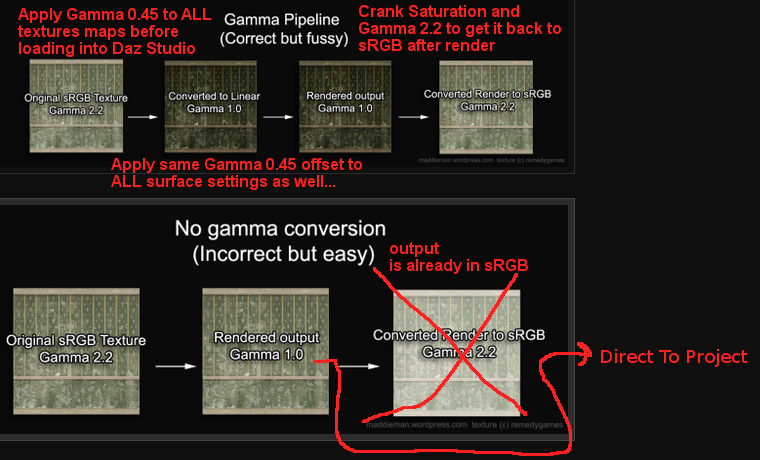
I don't use gamma correction in Daz Studio 3dl for many many many reasons, not to say it is a hell of a lot more work then I'm willing to torment myself with, I'm staying out of that one, lol.
Ya know, that is not that bad looking (I like), I should have done the fingernails as well.
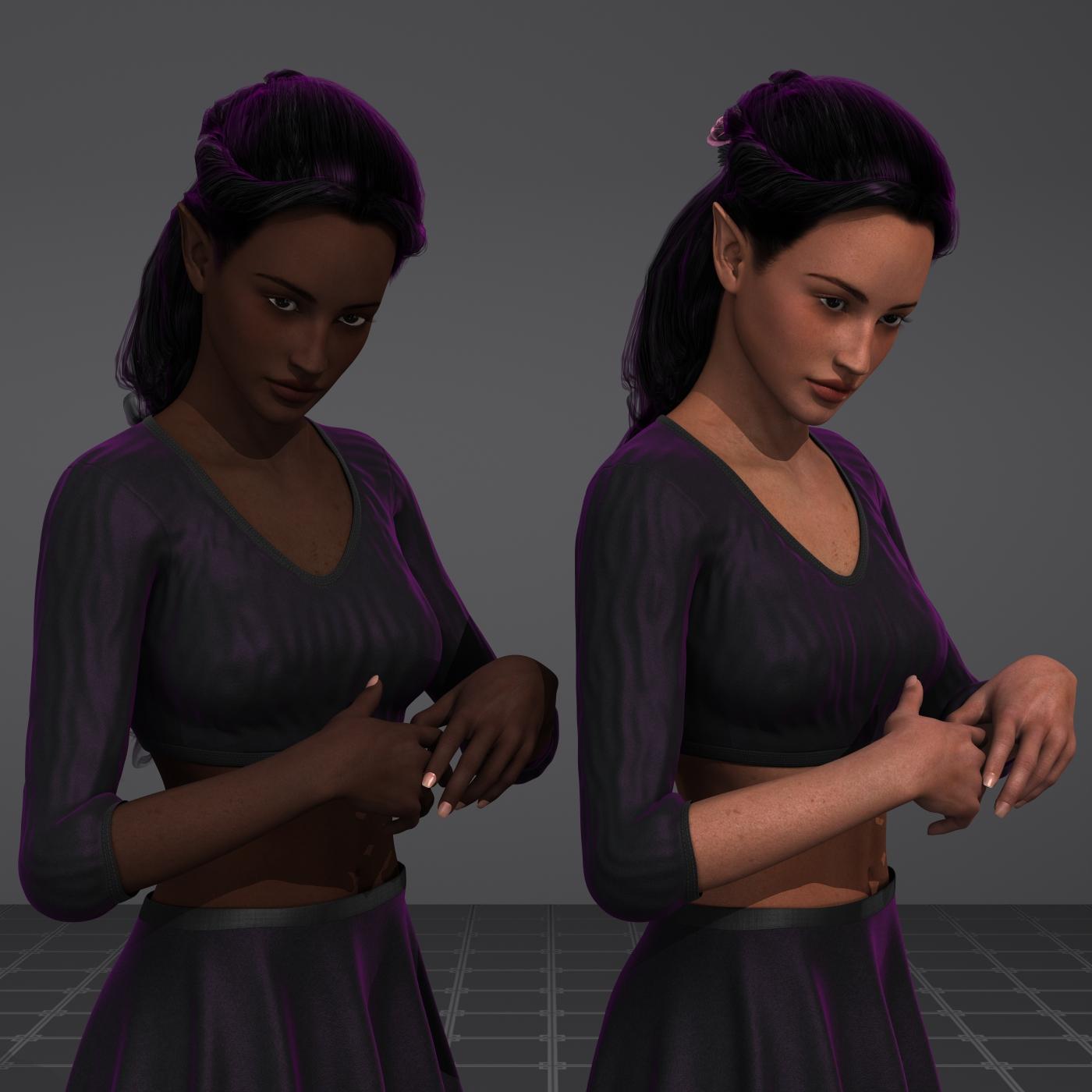
I sort of expected the altered FW Eve one on the left to be a bit more 'Transparent' then that, no pun intended, lol. I wonder if that Translucency is doing anything at all with as dark as it is, hmm.
You bring up a very good question about Color Space and Gamut. You use a color block a lot, have you ever ran it through detection software and found the color space of DAZ Studio? Back in the Mid 90's I took a Class from Apple about Color, ColorSync, and getting your Studio so you could buy color off the screen and not run through a ream of paper getting your images to look right. It actually helped the Ad Agency I worked for at the time, reduce printing cost and made the art department more productive.
I've been thinking about this for a while and recently I watched a very interesting Tutorial from the Blender Guru about The Secret Ingredient to Photorealism; and it brought it all to the forefront of my mind. What is DAZ Studio's Color Space? (Yeah I know that is Blender and this is DAZ Studio, but there are things that transfer.)
Thing is he was talking about how Blender's color space is all wrong and how someone has taken the time to create a New Blender Color Space, so they could move away form sRGB (made to properly view an image on a CRT monitor not meant to be a working color space). It was suggested is to move to the ACES (Academy Color Encoding System) which is a much larger color space, so there wouldn't be as much Clipping of lows or highs due to a limited Dynamic range.
So to give you the down and dirty of it. You have Input devices, Camera, Scanners, 3D Scanners and even your Cell Phone. Each of those has a Profile made by processing a raw image, at a set light. Check the Light you change the Calibration. Hence the reason for the target photographers have to models hold up.
The Raw image, is imported into your computer's color workspace, through a that Profile. When you computer put the Image on the screen it goes through a profile for your screen. You can also overlay another profile to simulate what the image would look like printed in a Newspaper or a Coffee table book. When it got to the Printer it goes through yet another profile.
All those profiles are mapping the abilities of you input device to your working color space. So if you are working with an Cannon D50 as your input device and your are using sRGB, you are Compressing the color data of the D50 and loosing Dynamic Range.
For instance the image below is the Comparison of my Epson Photo Scanner (the white graphic) and sRGB (the color graphic). My Scanner can detect more color than sRGB can hold, So without the Profiles those colors would be Clipped out, either as dark spots and White spots where there shoudl be color. With the Profiles, the color space of my Scanner is compressed to fit in the sRGB color space, Maintaining the color ballance by reducing the Dynamic Range and if not done correctly that color data will be lost.
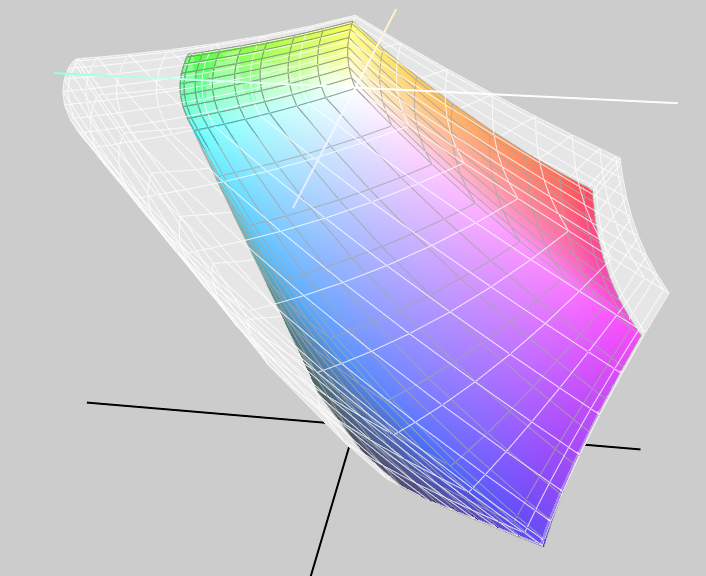
So I thought the first thing we need is a Color Target, just like the one below, which photographers use. They have the model hold the target so they can calibrate the Lighting for the shoot, they change the Lighting the take another picture of the target.

Once we had a color target we needed to get someone who has the software to read it.
But Wait there is a Problem If you put a picture of a Physical target in a scene and render the image of a picture, you don't get the real color, because who know what DAZ Studio does with the Original Photo. What we need is a Target built in the 3D Space. Just like this one:

Wait that looks just like the other one. That is because it is. Neither of them are renders of an image. It is a Render of a 3D model, each square is a Surface and can be tweaked, if we find my math is bad. Oh… How about I give everyone the whole thing: Prop, Sub-Scene, Post NOV-2014 LAB readings, Materials (3DL, Iray, Uber), and we see if it helps everyone. That you will find in the ZIP file below. This is a raw, Docs are limiited, I will flush it out over the week, but the Prop and Materials shouldn't changem unless somone finds it is in error or improves it. If you find my math is all wet, tell me and we'll fixit. (No I didn't to a color suck from the screen, I got my data out of the target data for each square.
Oh there is a difference between the two targets above: One is rendered with 3Delight and the other Iray. There are separate materials for each.
NOTE: I removed the ZIP, as I am cleaning it up a little, putting Block ID's at the Front of the Patch Names. If you have downloaded it, already just Check back later.
Show Us Your Iray Renders. Part VIVictoria 8 (with minor morph mods and my shader settings) relaxing in the great new set by Jack Tomalin - Deco Downtime.

now that is pretty.
Thank you! :)
Victoria 8 (with minor morph mods and my shader settings) relaxing in the great new set by Jack Tomalin - Deco Downtime.
Very nicely done! Love that lighting.
Also, thanks to everyone that liked my render! I'm going to attempt a fantasy render next I think but I'm unsure how to make it look. I'm horrible with open skys and
trees, always looks fake when I attempt it.
Thank you. The lighting was a bit of work but Jack's awesome setting inspired me to put a bit more work into it than I normally would. lol
As for the backgrounds, if you find they tend to look "fake" add a camera and turn on "Depth of Field" to it. That will blur the background and give it more of a natural or more realistic look.
Victoria 8 (with minor morph mods and my shader settings) relaxing in the great new set by Jack Tomalin - Deco Downtime.
Isn't sticking characters in front of windows the funnest? Its such a great way to add some visual depth to the image, and it justifies some nice back lighting
hahah Yeah, I enjoy back lighting and/or rim lighting. Rim lighting is one of my favorites - adds a little bit of "drama", IMO.
..ugh cannot deal with the embedded images while on m the mobile app as they are stretched way out of proportion. Please use attachments.
Thank you.
I can't view attachments while I'm on mobile, so I post them this way. Sorry.
...yeah I notice attachments are not an option. The mobile app is pretty weak in several areas. For one, we can't insert paragraph breaks by just adding another line which makes for huge blocks of text that are difficult to read. To create a paragraph break you need to "code" it into your text. which on a phone is a real bother as you have to toggle back and forth between screens to insert the symbols.to bracket the code. This is why I try to keep the posts I make on my phone as short as possible.
Now that I can see it full size and in the proper aspect ratio, lovely image.
Yes - the mobile needs a lot of work, IMO. When I'm on my Ipad it gives me a headache trying to navigate the forum images and post.
Thank you for the compliment, kyoto kid! :)
Show Us Your Iray Renders. Part VI
This ones an older one I just... Never really bothered posting anywhere? Man is this my favorite character morph for G3 I'm going to have to see about transferring it over.
Awesome! So much personality!!!
Shape Shift for Genesis 8 (Commercial)I have your last two shape shift products and while I love them to bits, it's getting harder to justify spending on a new version (not just this, but everything) for a new figure every two years. I guess I need to have a 3-4 month buying time right after a figure release to get everything so I can have time to actually use my purchases in the future, LOL.
Anyway, great work as usual!
For me, the strategy is to be very selective in the initial phase here. Morph sets are essential so I have to get them. For my money I think morphs are one thing that you absolutely must have to really make a figure usable and I am not going to make my own. I know, you can transfer from older generations but it's not perfect (especially since there is no GenX for G8F and I fear there may never be one now). Besides, certain PAs here deserve the support in my opinion because of the quality and value. Zev0 is one of them.
I'm concentrating on reuse of older content while I get familiar with the model. If I decide I love G8F, once prices drop (like say October when the big annual sale hits) I will begin to spend on other content. So based on that philosophy so far I have only bought V8 and the head and body morphs for G8F. I will buy G8F Shape Shift right away. But no clothing sets as yet, one character only because I really liked the texture and it was priced well. For the time being.
Shape Shift, Growing Up, the base morph packages and a few selected transfers from G3F and I'm good 'til the fall!
I am usually that way also, but then time goes on and I find myself with a new product or two like Aging morphs 3 or Vascularity 3, both of which I haven't had long or even scratched the surface on using and now we have G8, LOL. I just need to stop buying morphing products like this after a year into a figure release, will save me the heartache.
How to Choose Male and Clone for Genesis 8 FemaleI can't figure out how to choose Male for the Genesis 8 Female, nor how to choose Clone. Also, I guess I'd need a little explanation about how to transfer morphs. I've heard all of this is possible, but can't seem to get it done.
Morphs from G3 to G8Here is the base G8F with both custom morph of Aibell for G3F and her material, with makeup and brows via Skin Builder 3. I got a little carried away, and did a complete scene. The original image is 2K wide and can be found from the gallery page, here.
Respite

Beautiful! I commented on your Gallery image, too.
Thank you. I'm glad you like it.
 Morphs from G3 to G8
Here is the base G8F with both custom morph of Aibell for G3F and her material, with makeup and brows via Skin Builder 3. I got a little carried away, and did a complete scene. The original image is 2K wide and can be found from the gallery page, here.
Respite
Beautiful! I commented on your Gallery image, too.
Morphs from G3 to G8anyway you can repost that link?
Which link? For the Morph Transfer? Redz's Tutorial for Morph Transfer G3 to G8
Or for Adding Clones to G8? Redz's Tutorial for Adding Clones to G8
Or something else?
How do you scale down a face?I imagine others may run into the same problem so here's a small tutorial that may help if you use G3F.
This 3GF morph package:
https://www.daz3d.com/catalog/product/view/id/23420
has a "Face Smaller" morph which reduces the size of the face in proportion to the skull. I've set it to 200% here (Limits for the morph turned off) which makes the face look a bit odd, but with the "Mouth Down" morph and a few other adjustment morphs it can be made look quite normal. I have several packages and hundreds of head morphs installed so I just picked some random adjustment morphs which worked and have listed them all. The morphs from the Genesis 3 Female Head Morph Resource Kit 2 and the 200 Plus - Head & Face Morphs for Genesis 3 Female(s) packages however should be enough for a good result, the rest of the morphs from the other packages I've used adds only minor adjustments and are not really needed, and you may find similar alternatives in e.g. the G3F Head Morph package if needed.


 Multi-Man for Genesis 3 Male, Is there a Female Companion in the Works?
Hmmm, can someone point me to where you can morph the body & leave the head alone? I've found the sliders for the head & leave the body alone.
There doesn't seem to be any, so dial the head down, at least thats what I'm doing.
Multi-Man for Genesis 3 Male, Is there a Female Companion in the Works?It has more to do with the characters in that set are very stylized in a way that can't be replicated with morph dials (and at least two of them are "similar" to characters from certain CG Hollywood movies)...
That being said... I hope there is a set for either G3F or G8F that will have female toons that match those male toons.
Promo Pic 1 = similar to Mr Incredible
Promo Pic 2 = similar to Dr Groo
Promo Pic 3 = similar to ?
Promo Pic 4 = similar to ?
Promo Pic 5 = similar to ?Anyone else want to chime in on who the other three are based on?
One of those definitely looks like it was inspired by the Heavy from Team Fortress 2, IMHO.
I wouldn't mind seeing a female version, provided we could get some results that look like Pixar women (i.e. Helen Parr/Elasti-Girl), Sam from 'Cloudy with a Chance of Meatballs', or that one lady from Despicable Me 2 played by Kristen Wiig, lmao. Those are very stylized, non-ideal looking toony females, whereas The Girl and The Guy are both very much in a Disney-esque vein in comparison. I'd be down for that.
Multi-Man for Genesis 3 Male, Is there a Female Companion in the Works?Hmmm, can someone point me to where you can morph the body & leave the head alone? I've found the sliders for the head & leave the body alone.
I Am So Tired But There's So Much To Do Complaint Threadis awfully noisie outside, no point trying to sleep.
need a onesie and a stroller for baby luna. havent seen anyone pushing a baby cariage since the 70's.
a baby tram is prolly a stroller?
I think a tran is a carriage.
Dana
I think Misty means pram.
Short for perambulator, British for baby carriage or stroller.Imeant pram, sorry. One of my very few misspellings. I've been staying up until after dawn the past few days, working on copying my website to move it to a new hosting service. All by myself. They don't offer transfer services for Windows server products. Very tedious work, transferring data. I don't have access to Replication or SSIS, no permissions. So I have to SELECT * from each table, save the results in a CSV file, and then fix the data to be in a format that I can use in an INSERT statement in SQL Server on the new server. Very tedious.
Dana
Daz 3D is part of

Connect
DAZ Productions, Inc.
7533 S Center View Ct #4664
West Jordan, UT 84084Licensing Agreement | Terms of Service | Privacy Policy | EULA
© 2026 Daz Productions Inc. All Rights Reserved.