-
Fingerprints on lower body of Victoria 8.1 HD Add on
Zilvergrafix said:
Anyone knows why is this happen?, I was doing a commision with Victoria 8.1 and my client now is angry due to this issue. meanwhile I can fix using blur in Photoshop or lowering bump and normal maps or any other tricks for not losing my commision the issue is present with this products: Victoria 8.1 HD Add on, Vellus Hair (yep, there is here), was rendered using Headlamp camera only.

are you using only headlamp here or there are other light sources?
Fingerprints on lower body of Victoria 8.1 HD Add onWell, I couldn't reproduce this with V8.1 HD, so I couldn't really test a fix myself. I tried a directly facing camera and also slightly askew camera angle... no "fingerprint" pattern.
The Vellus hair doesn't cover the legs, right? So I doubt it's the Vellus hair.
I still think it's the Detail channel due to the repetitive appearance of the defect. I would try turning off the Detail for all of the Skin surfaces to see if that improves the render/removes the pattern. Turning off Normal maps is not ideal, either... but V81 still has the usual Normal maps. The Detail maps are nice to have, but I'm not sure if I really need all the bumps from it, either.
(It is very interesting to look at the Detail Weight maps for Victoria 8.1. I'll be modifying those for my own experiments...)
Fingerprints on lower body of Victoria 8.1 HD Add onThe Blurst of Times said:
Could the Detail tiling have anything to do with the weird "fingerprint" pattern there? (I'm assuming Victoria 8.1 uses the Detail channel.) I can't think of a good reason for there to be an observable pattern to the skin like that, though.
If were inside that parameter would be a defect in the expensive product, I would like this normals on fingers but not on the entire body!
Fingerprints on lower body of Victoria 8.1 HD Add onI haven't played with V8.1 very much. I've been trying to apply the PBR Shader to Genesis 8 stuff, focusing on the Detail channel.
Could the Detail tiling have anything to do with the weird "fingerprint" pattern there? (I'm assuming Victoria 8.1 uses the Detail channel.) I can't think of a good reason for there to be an observable pattern to the skin like that, though.
Fingerprints on lower body of Victoria 8.1 HD Add onAnyone knows why is this happen?, I was doing a commision with Victoria 8.1 and my client now is angry due to this issue. meanwhile I can fix using blur in Photoshop or lowering bump and normal maps or any other tricks for not losing my commision the issue is present with this products: Victoria 8.1 HD Add on, Vellus Hair (yep, there is here), was rendered using Headlamp camera only.
Genesis 8.1 / Victoria 8.1RoseRender said:
Richard Haseltine said:
RoseRender said:
Hi all!
my experiences so far with Gen 8.1:- The face module with all its arrows keeps crashing after seconds of use (DAZ crashes). No chance to use it so I really hope this will be fixed in the near future especially because there are other users with the same problem.
- I like the new expressions and the new eyes. Much more realistic. Can't tell about the skin as I don't own Victoria.
- how in the hell can you use the "old" geoshell clothes like underwear and stockings etc. which are not "real" clothes. Everytime when applied to the new Gen 8.1 my character looks like a white albino and nothing works. Is there a workaround?
Besides that, I really like 8.1. thank you DAZ!
You can hide the unwanted surface groups in the parameters pane - there are on/off switches for all polygon groups in the Geometry Shell property group. If you need to apply materials to the new groups then it's probably going to work best to apply the base shader and then copy/paste the settings from the Genesis 8 Torso surface.
thank you! I will try it!
Just a summary of what others have said:
Using G8 geoshell based clothing on G8.1 likely requires G8 (source) figure and G8.1 (target) figure side-by-side. UVs are not relevant in this case: both geoshells can use the Base Female UV. Surfaces are the issue and, provided you use Base Female UV on the geoshell, and with the G8 figure’s geoshell having a ‘torso’ surface and G8.1 figure’s geoshell having a ‘body’ and ‘head’ surface, you can copy and paste ‘torso’ surface to ‘body’ and ‘neck’ surfaces. This works equally well using G3 geoshell based clothing on G8 or G8.1. For geoshell based clothing this is simple, repeatable and reliable. Not quick (if you have many styles/MATs for each product and many products. . . ).
These later facts might point to an opportunity for automation but that would be beyond me. BTW the body suit is G8 geoshell on G8 and G8.1 and the bottom bruises are G3 geoshell on G8 and G8.1.
Genesis 8.1 / Victoria 8.1scheusal242 said:
brimstoneomega said:
scheusal242 said:
AllenArt said:
Petra said:
AllenArt said:
Petra said:
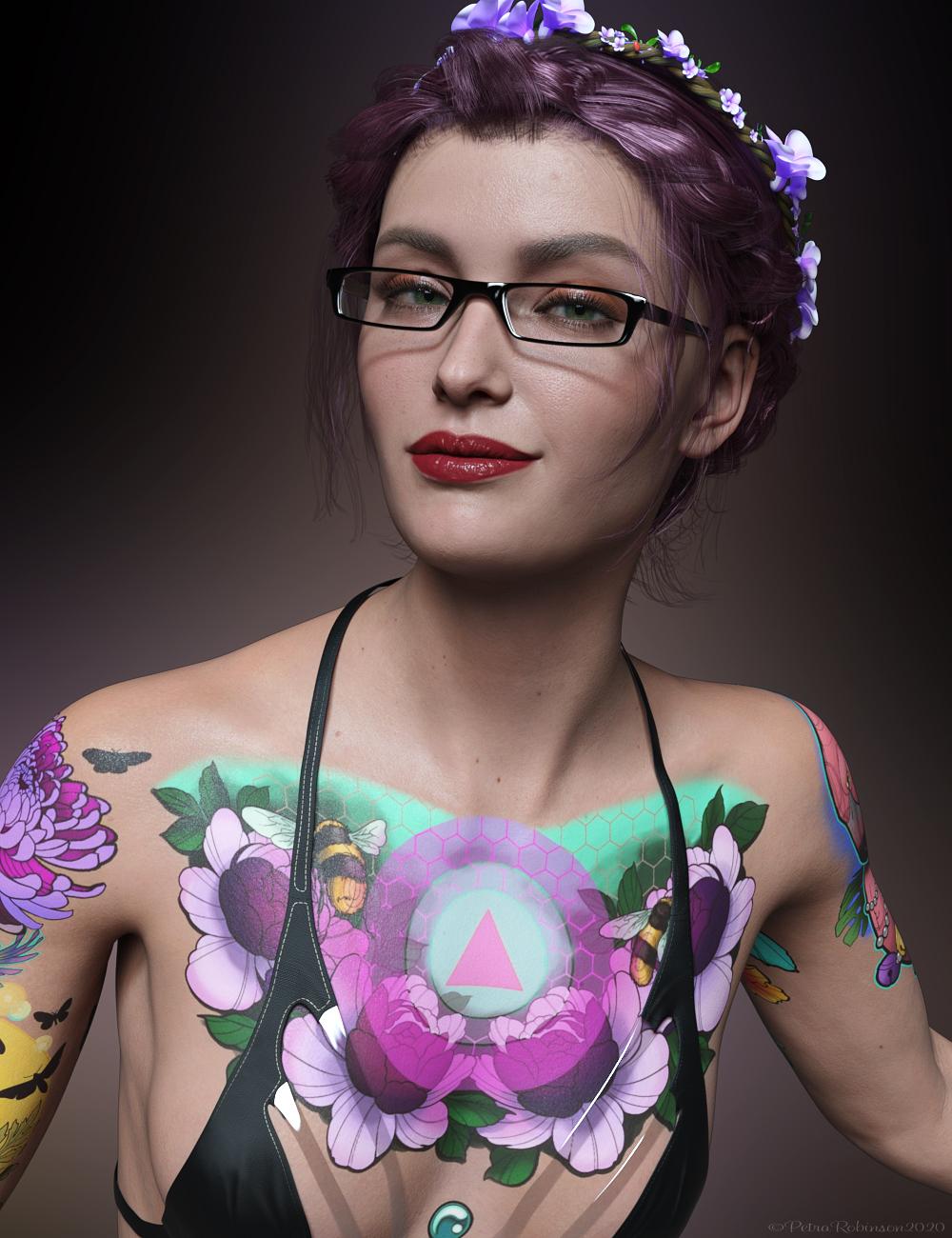 My first render with Victoria 8.1.
I think she is very cute.
She is cute, but gahhhh....those tattoos. Urgh.
Not too much of a fan either. The Skin is amazing though and I wish they had made a realistic-looking tattoo to match it.
Agreed. Love your image tho ;)
screwy, it doesn't look like a tattoo but more like an airbrush painting
The problem is that tattoos aren't decals. Tattoos sit underthe skin, not on top of it. LIE sits on top of your character's skin. Tattoos tend to fade into the skin, too, and these look very crisp. Like she went in and got all these tattoos the same day, and that was a week ago.
Pretty sure that's why it looks so unnatural to people. The images themselves look very nice, and it's really cool how they (Daz) got them though!
then LIE shouldn't be so colorful
Just playing around with the PBRSkin and it occurs to me that one way of making the over-bright tattoos look (and act) more like the real thing is not to place them above the skin like paint but perhaps include them in the Translucency Color channel - use the LIE to add the tattoo image to the body part that's already used in that channel, perhaps dial down the opacity a bit and it seems to produce an effect when rendered that is more faded and 'under the skin' rather than on top of it. This might warrant some further exploration...
Am I remembering wrong?hjake said:
Kharma said:
@shadowhawk1 is this the set your looking for by Cayman studios sold at rendo ... this is from the read me description
Legacy UVs for Genesis 3: V4" is a UV Map and Geograft Kit which
enables the use of Victoria 4 textures on Genesis 3 FemaleI own both of these products and they are for using previous generation textures on a later generation figures. I don't remember them allowing the transfer of morphs:
Legacy UVs for Genesis 3: V4 by CaymanStudios
Legacy UVs for Genesis 3: G2F by CaymanStudios
I have one of the legacy UV sets and they are not what I was thinking of, this was an actual morph much like the Gen 4 legacy morphs available for G2
Am I remembering wrong?Kharma said:
@shadowhawk1 is this the set your looking for by Cayman studios sold at rendo ... this is from the read me description
Legacy UVs for Genesis 3: V4" is a UV Map and Geograft Kit which
enables the use of Victoria 4 textures on Genesis 3 FemaleI own both of these products and they are for using previous generation textures on a later generation figures. I don't remember them allowing the transfer of morphs:
Legacy UVs for Genesis 3: V4 by CaymanStudios
Legacy UVs for Genesis 3: G2F by CaymanStudios
Genesis 8.1 / Victoria 8.1brimstoneomega said:
scheusal242 said:
AllenArt said:
Petra said:
AllenArt said:
Petra said:
My first render with Victoria 8.1.I think she is very cute.
She is cute, but gahhhh....those tattoos. Urgh.
Not too much of a fan either. The Skin is amazing though and I wish they had made a realistic-looking tattoo to match it.
Agreed. Love your image tho ;)
screwy, it doesn't look like a tattoo but more like an airbrush painting
The problem is that tattoos aren't decals. Tattoos sit underthe skin, not on top of it. LIE sits on top of your character's skin. Tattoos tend to fade into the skin, too, and these look very crisp. Like she went in and got all these tattoos the same day, and that was a week ago.
Pretty sure that's why it looks so unnatural to people. The images themselves look very nice, and it's really cool how they (Daz) got them though!
then LIE shouldn't be so colorful
Genesis 8.1 / Victoria 8.1Leana said:
Taoz said:
I don't want to install any 8.1 content right now as I'm not sure what it does to the old 8 content.
Nothing. Your 8 content is still there and won't be modified (at least for the content from starter essentials).
OK, thanks - I think I saw posts from people who had some things mixed up but maybe that was with Victoria 8.1.
Biguana?Miss Bad Wolf said:
Bah...guess I got another one I have to cull from my shop now too
See I don't get this. What if a user that has the original figure decides they need it for a project and goes looking for better textures. It's not like it's taking up shelf space or anything.
Hate to think what would happen if DAZ ever decides to pull Victora 3 and Michael 3 from the store
I think they tried or was it just V1/2 and M1/2?
There was a Victoria Half and Michael Half?...
Step-by-Step: Using the new PBR Skin on Genesis 8The Blurst of Times said:
gerster said:
Isn't there a weight map for the details? I think you can just paint out the details where you not like them?
There's "Detail Weight", but I don't know what a weight map will actually do there.
Does it tile like the other maps? Is it independent of the tiling? I don't know what you can or cannot paint out with a map.
I'm running an experiment, though. I have a simple half-black, half-white JPG. Left side is black, the right side is white. I'll chuck that into the Detail Weight and see what the render looks like. If it tiles/doesn't only apply to half the face/body, then that gives me an answer. If it doesn't tile, then maybe I can work with it.
If I take a look at the Victoria 8.1 skin, my guess would be that you can control with this map, how much the Detail Normal Map will take into effect.
Yes, on Victoria 8.1 it's a map, based on the UV.Need more 8.1 contentalienarea said:
In my opinion Genesis 8.1 and Victoria 8.1 are great products. Now I need more content:
- Genesis 8.1 face and body morphs
- a tanned skin without freckles
- some makeup, fingernails and lip color options
- new, better hair
All G8 content works fine on G8.1 including all the morphs, skin, nails and makeup... The body mesh hasn’t changed at all, just the face and UV.
Need more 8.1 contentIn my opinion Genesis 8.1 and Victoria 8.1 are great products. Now I need more content:
- Genesis 8.1 face and body morphs
- a tanned skin without freckles
- some makeup, fingernails and lip color options
- new, better hair
Genesis 8.1There is a dedicated thread about this question called Victoria 8.1 / Genesis 8.1
Genesis 8.1Today I logged into my Daz account and saw that we now have Ganesis 8.1. I'm a little confused, I didn't find the Genesis 8.1 Base to download. For me to have G8.1 do I just need to buy Victoria 8.1?
Am I remembering wrong?@shadowhawk1 is this the set your looking for by Cayman studios sold at rendo ... this is from the read me description
Legacy UVs for Genesis 3: V4" is a UV Map and Geograft Kit which
enables the use of Victoria 4 textures on Genesis 3 FemaleAm I remembering wrong?I am pretty certain I have purchased every transfer tool offered by DAZ and the only paths I see in my library to move a morph from V4 to G3 is with the following products:
1. https://www.daz3d.com/genesis-generation-x2
The GenX2 plugin includes support for the generation 4 Poser figures (Victoria 4, Michael 4, and Kids 4) as well as for Genesis (version 1). Further figures are supported by add-ons sold separately. To transfer morphs from or to Genesis 2, the GenX2 AddOn for Genesis 2 is required.
2. https://www.daz3d.com/genx2-addon-for-genesis-2
3. https://www.daz3d.com/genx2-addon-for-genesis-3
With both add-ons for Genesis 2 and for Genesis 3, you can transfer morphs in any direction between Genesis, Genesis 2 Male, Genesis 2 Female, Genesis 3 Male, and Genesis 3 Female. It also enables transfer from the generation 4 figures (Victoria 4, Michael 4, and Kids 4) to Genesis 3 Male and Female. Further Poser figures are supported by separate add-ons.
4. https://www.daz3d.com/v4-and-m4-shapes-for-genesis
5. https://www.daz3d.com/generation-4-legacy-shapes-for-genesis-2-female
Novica & Forum Members Tips & Product Reviews Pt 13A hair I got to work is Kenji Hair. The materials are BD Aspen
I didn't touch anything up, you can see you'll have to do a bit of that for the hair on the forehead, right where the part is. I wanted you to see out of the box with only the morph adjustments available.
THIS IS IMPORTANT. Do not assume materials on other characters will be the same when you apply them to Bugga Boo. I wanted to show you Aspen. See how much taller the eyebrows are on BB? Compare to Aspen. Wow, was I surprised. It makes sense with the stretched forehead, but I hadn't thought about it.

Daz 3D is part of

Connect
DAZ Productions, Inc.
7533 S Center View Ct #4664
West Jordan, UT 84084Licensing Agreement | Terms of Service | Privacy Policy | EULA
© 2026 Daz Productions Inc. All Rights Reserved.