-
Clothing Morph Applies Weirdly After Importing From Blender. Straps look Weird too.
Richard Haseltine said:
I don't have time to sit through videos, screen shots of the settings with a verbal summary would help. However, the last comment sounds as if your OBJ export and morph import settings do not match and one of them is chnaging the axis system - or possibly your import and export settings in Blender are doing that. Daz Studio was presets for the otpions, make sure you use the same one in OBJ export and morph import.
How many do you need? I've got a total of 16 screenshots from the vidoes I've posted.
Apologies but I don't exactly remember what I did as i was following another video but I'll try to explain.
Basically I was trying to Export a Suit and Character to Blender. I changed the suit the Base Resolution as a .obj. I was not sure which body morph/s to select. I selected one. After trying again, I selcted the other. Didn't make no difference which I selceted. I copy the name of the morph to save it in the name of the morph.
I open Blender and start smoothing. Save the file again as a .obj. Name it and I unselect some options. Save it on my drive.Then Export. Open Daz. Select Morph Loader Pro. Find saved .obj. Change Reverse Deformations>Yes. Overwrite Existing> Deltas Only.>Accept. Doesn't load properly.
Part 1 of screen shots.
Clothing Morph Applies Weirdly After Importing From Blender. Straps look Weird too.I don't have time to sit through videos, screen shots of the settings with a verbal summary would help. However, the last comment sounds as if your OBJ export and morph import settings do not match and one of them is chnaging the axis system - or possibly your import and export settings in Blender are doing that. Daz Studio was presets for the otpions, make sure you use the same one in OBJ export and morph import.
Clothing Morph Applies Weirdly After Importing From Blender. Straps look Weird too.I've attached some links to some files which are short videos. I've only been learning Daz studio for a couple of months.
@crosswind was kind enough to show me how to smooth out some bumps in some clothing awhile back. It's the Jill Valentine RE5 BattleSuit. Here: https://mega.nz/file/qeg10B5S#YYCh1mmeKcvL4IprIt0UJAP6eJsOZUIm4MRgaw0zU2M
I have several issues.
1: Am I Exporting and Importing the character and Clothing correctly to Blender and back to Daz? I'm asking cause I have 2 Body Morphs and I'm not sure which one to select? Am I following the procedures correctly?
Part 1: https://mega.nz/file/vMN33bCJ#AMlBQn7eNbgrJ0BN0AhLIMa4I3BLRgK--QBkG_gy-Cg
Part 2: https://mega.nz/file/fYUklKBL#ZycSPSN6v651auroH0iUu_XevtgKnbx3zE9HQXieuPk
2: When I apply the suit in Daz, it does not apply correctly. Do I have to rotate Jill 90 degrees or I'm doing something wrong?
Part 3: https://mega.nz/file/2E9yGabK#Az6C47S8F4eznVsvL1-3eiFTZ13kFCCxANZIiNuBuQg
3: Also, there's a lot of tearing or poke through in the suit after the import. I do have a Push Modifier added which I previously used before to adjust the tearing or poke through. There's so much more. See Part 3 link.
4: What is going on with the leg straps? They should not be chipped like that. See Part 3 link.
I get the feeling I have to start again from scratch.
DAZ Horse 3 - will there actually be any support this time?richardandtracy said:
It almost looks as if corrective morphs are being over applied. Possibly a base set and a 'character' morph corrective at the same time. I'm sorry, I don't have Horse3 so can't check for myself.
Regards,
Richard
I will investigate this thanks for the idea
Alternative Shapes for Twosret 8 - Missing files.Those are from the Gensis 8 morph packs, do you have those installed? It isn't the Twosret files it is complaining about, and the path you list is for the user-facing files in the library not the hidden asset files in the data folder.
[SOLVED] Help! How can I get back to Face Transfer 1?Thanks Richard and Leana. I'm old and forgetful.
The problem was with my brain.
I had forgotten that Face Transfer 1 only works on my Windows computer and I was trying to find it on my Mac. I have the two computers side-by-side and some things only work on the Windows one.
I only realised what it was after I'd uninstalled and re-installed several things and was at my wit's end. Then I looked at the web page for Face Transfer Unlimited and noticed that it was Windows only.
Sorry to have bothered you.
How to save new character morphs?yuyu.atem said:
Thank you very much!
 Richard Haseltine said:
No. Aside from the fact that you would not be allowed to share the ersult 9because it breaks the requirement for the other user to have the same morph packs) it also removed all of the links to joint adjustments and corrective shapes, giving inferior posing unless you redo the whole lot.Sorry, I am not sure to undersstand what you mean. Do you mean no, it is not better to have only one morph for the body, or no, it is not possible to have a slider that controlls the body morphs, and that is controlled by another slider controlling the whole character?
I meant it is better not to bake everything down to a single morph, but to keep the original morphs linked to a master controller.
How to save new character morphs?...Not really necessary because you're not making a product other than customizing a char just for the use of your own, so in terms of functionality there's no difference in between a single FBM property or multiple PBMs that you dialed. But if you do need a single FBM dial, you can always make one. .. only the ways you went for was too cumbersome. You can just use the HeadSplit dFormer in G8 Starter Essentials to attenuate a singe FBM property. Check Jay's tut: https://youtu.be/PnPOD_d2GOs?si=MCf1lBSGsCgytQ1b
Thank you very much! I will look at it! So, in my case, it wouldn't be needed to create a corrective morph, would it?
Definitely no ~ If you split Head / Body morphs in the standard / correct way as what Jay showed in his tutorial, you never need to make any corrective morph in this case.
[Released] Bone Minion for DAZ Horse 2 Poses [Commercial]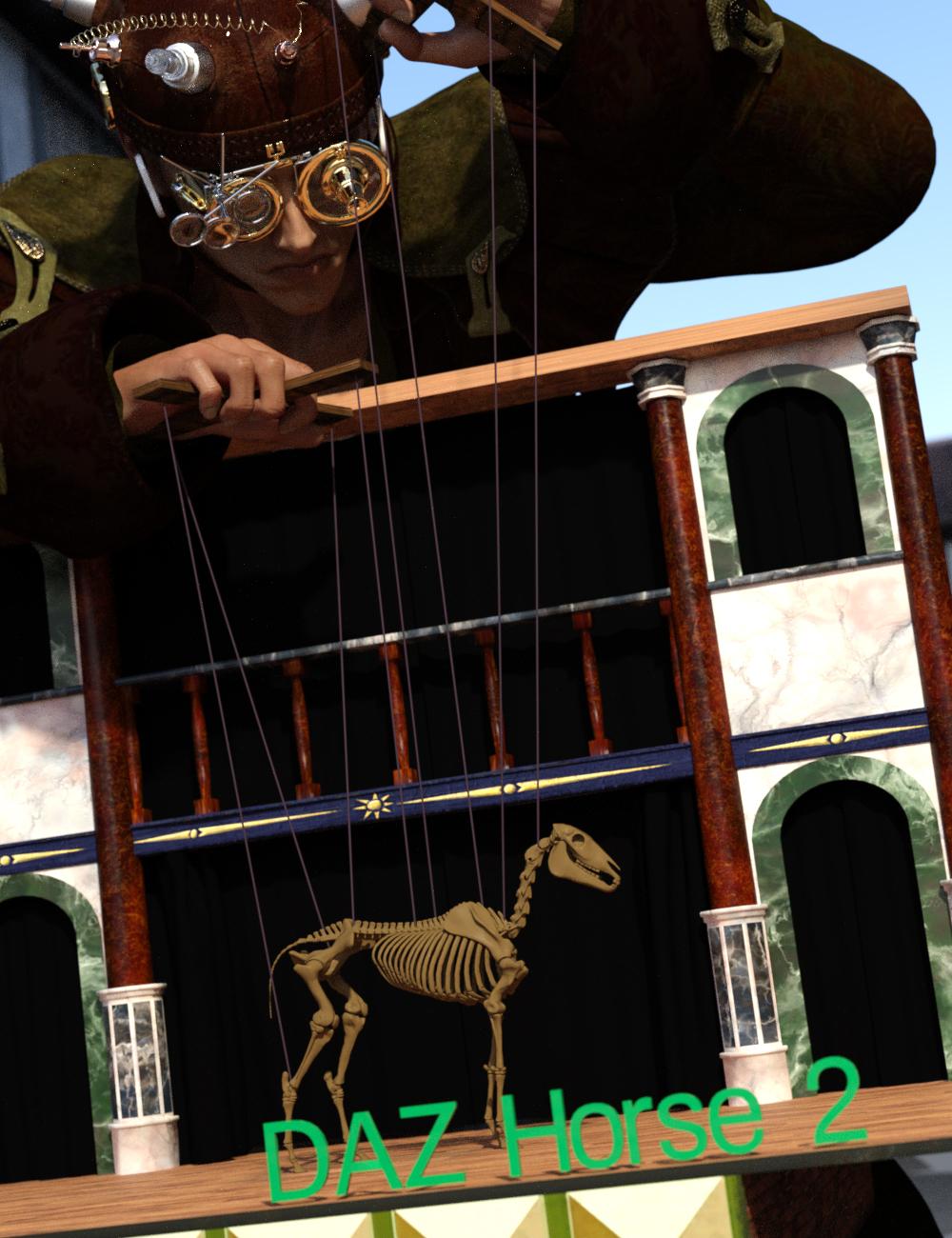 Quickly expand your library of poses for DAZ Horse 3, LoREZ Horse 2, and HiveWire Horse! With Bone Minion, you can directly use poses for DAZ Horse 2 for other Horse figures. Your Bone Minion will do the hard work for you by acting as a bone "catcher" for a pose and then transferring (and converting if necessary) the pose to its parent DAZ Horse 3, LoREZ Horse 2, or HiveWire Horse.* Simply load the Bone Minion on your DAZ Horse 3, LoREZ Horse 2, or HiveWire Horse, select the Bone Minion, and start applying poses!
- On the fly conversion of DAZ Horse 2 poses to DAZ Horse 3
- On the fly conversion of DAZ Horse 2 poses to LoREZ Horse 2
- On the fly conversion of DAZ Horse 2 poses to HiveWire Horse
- Works with DAZ Horse 2 full poses, partial poses*, hierarchical poses**, Horse and Rider hierarchical poses***, and even AniBlocks!
- Automatically applies full poses when they are loaded*
- Supports pose properties (using the Create Heavyweight Bone Minion script)
Note that converted poses (and especially props if they are hierarchical poses) may not be perfect and may require tweaking. Facial Bones (i.e., expressions) except for the eyes are not transferred.
* Any pose that sets the hip of the Bone Minion will be automatically converted on the fly and applied to the target figure. The Apply Changes script can be used to transfer any pose (including partial poses) on the Bone Minion to its target figure.
** Hierarchical poses with props require the props loaded on both the Bone Minion and the target figure. The prop will be properly rotated for the pose but may need to be manually translated to the correct location. DAZ Horse 2 has different bone names than other Horse figures. You will need to manually move the prop to the correct bone on the Target Figure.
*** For Horse and Rider Poses, you must have the correct figure Bone Minion product installed (i.e., if the hierarchical pose is for DAZ Horse 2 and Genesis 3 Female, you must have the DAZ Horse 2 Bone Minion and the Genesis 3 Female Bone Minion), the bone minions must set up as the hierarchical pose expects (e.g., if the Genesis 3 Female is supposed to be on the Abdomen bone of the DAZ Horse 2, the G3F Bone Minion must be on the Abdomen bone of the DAZ Horse 2 Bone Minion), and the Target Figure of the Figure Bone Minion must be set to your Target Figure.
Tutorial
Horse and Rider Poses Tutorial
What's Included and Features
- Bone Minion for DAZ Horse 2 Poses (.DSE/.DSA)
- Bone Minion - Apply Changes
- Bone Minion - Turn Limits Off
- Bone Minion - Turn Limits On
- Bone Minion - Create Heavyweight Bone Minion
- Bone Minion Install Custom Actions
- Bone Minion DAZ Horse 2 Heavyweight
- Bone Minion DAZ Horse 2
- Detailed User Manual
Horse Skeleton Model in Main Promo is by Diego Luján García (Creative Commons Attribution) and is available at https://skfb.ly/6nYOS. No changes were made.
How to save new character morphs?Thank you very much!
Richard Haseltine said:
No. Aside from the fact that you would not be allowed to share the ersult 9because it breaks the requirement for the other user to have the same morph packs) it also removed all of the links to joint adjustments and corrective shapes, giving inferior posing unless you redo the whole lot.Sorry, I am not sure to undersstand what you mean. Do you mean no, it is not better to have only one morph for the body, or no, it is not possible to have a slider that controlls the body morphs, and that is controlled by another slider controlling the whole character?
crosswind said:
Of course ~~ because you ever wrongly ERC Freezed it, then after ERC Bake, you still got that wrong result. So, after ECR Bake, you should've Zerored all then re-dial a Preset. But a clean way is always delete the morph property as well as DSF file in data folder...Ah, ok, thank you very much!
Not really necessary because you're not making a product other than customizing a char just for the use of your own, so in terms of functionality there's no difference in between a single FBM property or multiple PBMs that you dialed. But if you do need a single FBM dial, you can always make one. .. only the ways you went for was too cumbersome. You can just use the HeadSplit dFormer in G8 Starter Essentials to attenuate a singe FBM property. Check Jay's tut: https://youtu.be/PnPOD_d2GOs?si=MCf1lBSGsCgytQ1b
Thank you very much! I will look at it! So, in my case, it wouldn't be needed to create a corrective morph, would it?
DAZ Horse 3 - will there actually be any support this time?It almost looks as if corrective morphs are being over applied. Possibly a base set and a 'character' morph corrective at the same time. I'm sorry, I don't have Horse3 so can't check for myself.
Regards,
Richard
Shockwave/Sonic Boom/vapor cone effects?If you mean a shock cone similar to the attached test piece photo I found on the net, I suspect it could be done with a pair of surfaces close together and a flint glass shader applied. The refractive index, reflectivity and glossiness could then be tweaked to give the right look. Probably just need a ROI of 1.1 or so for it to show, and everything else set to zero.
Might be worth modelling the cone with a morph to change the velocity. The cone in the image seems to have around a 60 degree back sweep, so must be travelling in the order of Mach 3 (which is going some). Mach 1 will be a disc, and Mach 2 a 45 degree cone.
Regards,
Richard
How to save new character morphs?yuyu.atem said:
Yes, but Ithought it was better to have only one morph for the body, isn't it better?
Not really necessary because you're not making a product other than customizing a char just for the use of your own, so in terms of functionality there's no difference in between a single FBM property or multiple PBMs that you dialed. But if you do need a single FBM dial, you can always make one. .. only the ways you went for was too cumbersome. You can just use the HeadSplit dFormer in G8 Starter Essentials to attenuate a singe FBM property. Check Jay's tut: https://youtu.be/PnPOD_d2GOs?si=MCf1lBSGsCgytQ1b
Or else, is it possible to have a slider that controlls the body morphs, and that is controlled by another slider controlling the whole character?
Technically, yes, but I see no necessity of doing so ...
Thank you in advance!
How to save new character morphs?yuyu.atem said:
I don't understand what happen: when I do ERC Bake and try to dial the morphs, they don't recreate the shape I want, they recreate the shape that I obtained by the slider. It looks like ERC Bake had changed the effect of the morphs...
 I tried to do ERC Bake with the slider to 0 and 100%, but it didn't work. Is there something to do before ERC Bake? Or could it be because I have several AV wings in my file? I am working on a new AV wings in the same file to compare to the first one and to be sure that the shapes correspond...
Of course ~~ because you ever wrongly ERC Freezed it, then after ERC Bake, you still got that wrong result. So, after ECR Bake, you should've Zerored all then re-dial a Preset. But a clean way is always delete the morph property as well as DSF file in data folder...
Edit:
I finally succedded by working directly on the first wings, without needing to delete the other. I works much better, now!
However, I saved the slider by Morph Asset, not Save Modified Asset because there was another asset, not only the slider, and I wasn't sure if it was normal: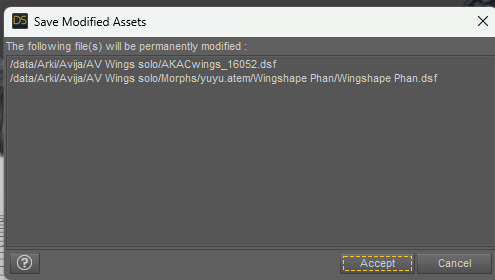
Is it normal that there is not only the slider?
It's normall. Save Modified Asset is safe, you're free to go with it.
By the way, I have the impression that I made a mistake by choosing "Wingshape Phan" as the product name: it is the name of the slider, but I gess "AV Wings" would be better for the product name, right? Is it possible to change that?
Though you can modify the "product folder" name in data folder as well as edit DSF file... but suggest you delete the wrong ones and redo save assets...
Thank you in advance!
How to save new character morphs?No. Aside from the fact that you would not be allowed to share the ersult 9because it breaks the requirement for the other user to have the same morph packs) it also removed all of the links to joint adjustments and corrective shapes, giving inferior posing unless you redo the whole lot.
How to save new character morphs?Yes, but Ithought it was better to have only one morph for the body, isn't it better? Or else, is it possible to have a slider that controlls the body morphs, and that is controlled by another slider controlling the whole character?
Thank you in advance!
How to save new character morphs?I thought your body morph was made up of standard morphs, not a custom sculpt?
KOO Earl Morph Dials are Present but not loading.I recently just bought this item https://www.daz3d.com/koo-earl-hd-for-genesis-9. For some reason the character loads with the materials and the hair just fine, but the morphs don't load or something. Also if I try to adjust his morph dials, nothing changes. The screen shot shows a sample of me moving the dials but no changes to the model.
So far I have tried uninstalling and reinstalling Earl and the genesis 9 essentials, also tried restarting the program and the computer, but nothing worked. All the other morph dials seem to work on this character.
How to save new character morphs?Hi! I am realizing that I have an issue on my character morphs. In fact, I created a morph for the full body without the head. To do that, I first tried to dial the head morph to 0 and create a body morph by exporting it as an obj and re-importing it by Morph loader Pro, but when I applied this body morph, plus the head morph, the neck was too shrink. So, instead of doing that, I exported my shaped charater to Wrap with the head morph to 100%, and I creted a subset for the body, that I applied to the base G8M. Then, I imported back to DS by Morph Loader Pro. The neck was better, but I didn't noticed that I has an issue around the chest:
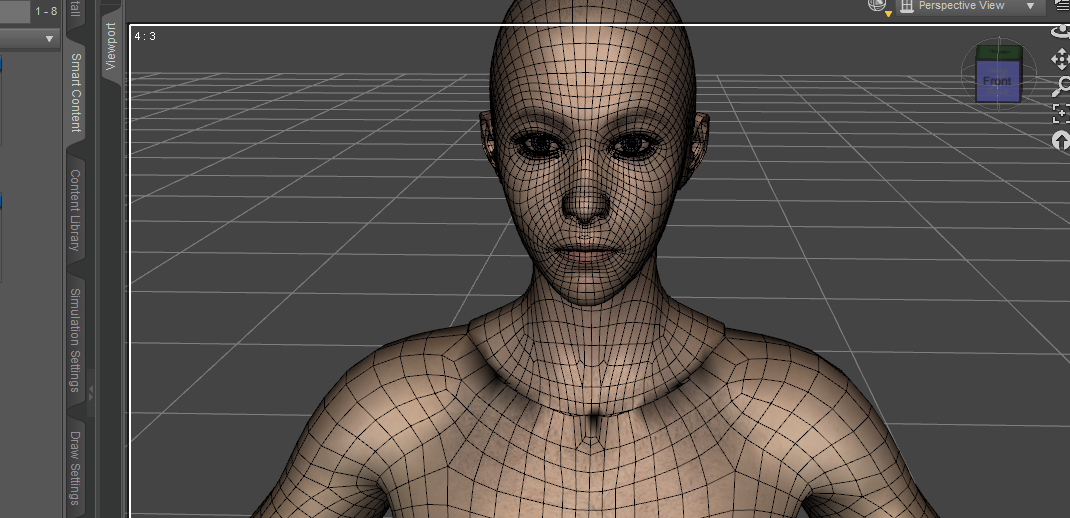
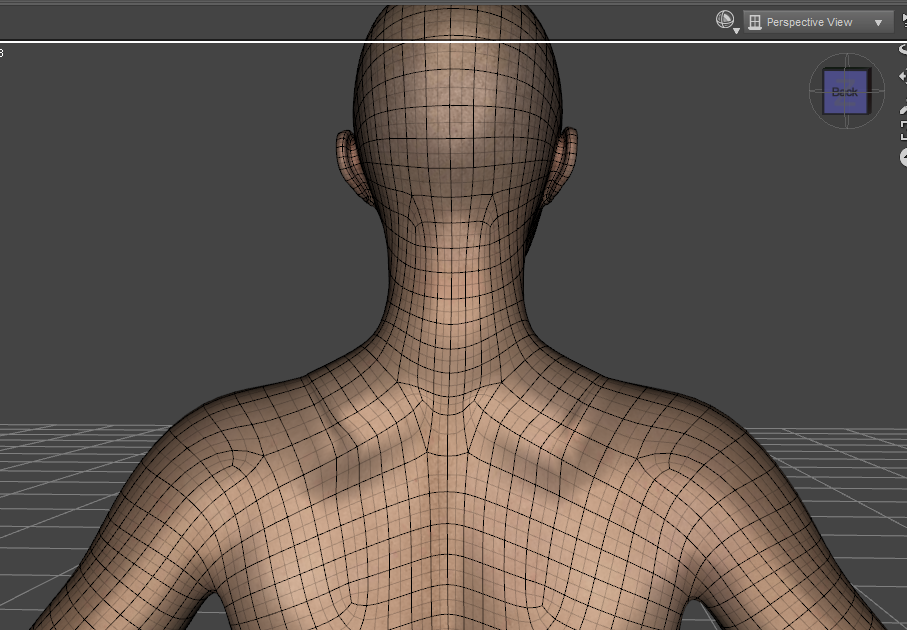
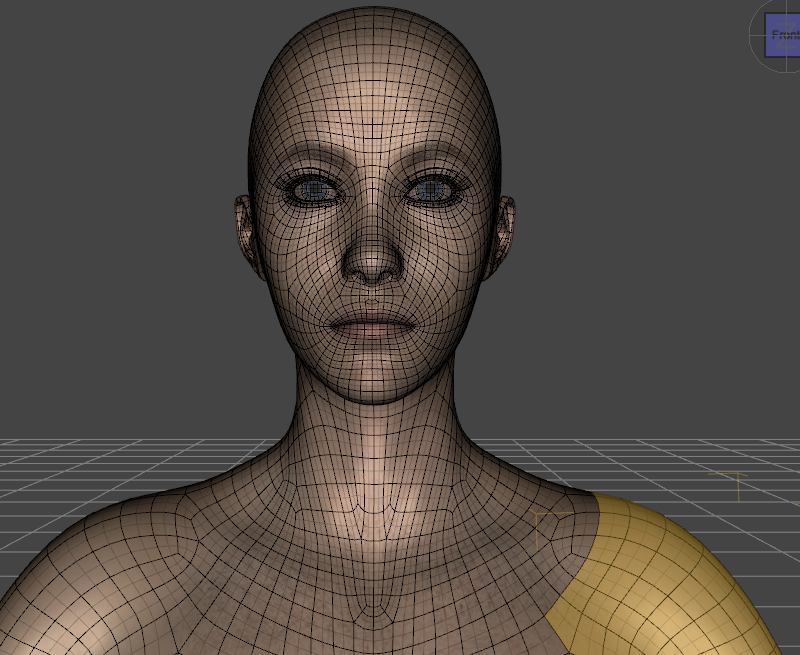
Before doing that, the zone between the neck and the chest was much smoother (on this scree shot, I created one unic morph for the head and the body, with the shape what I want):
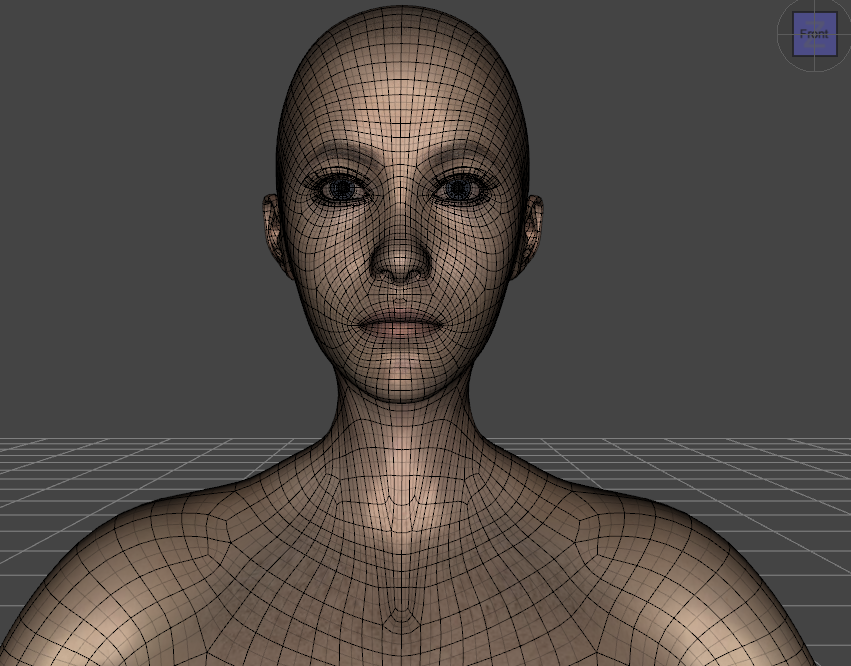
So, I gess that the issue comes from the Wrap AppySubset that I used to create the body morph. I tried to fix it by using a replace node on this part, but when I doing, I get back my first issue on the neck: it is too shink when I apply both the head and the character morphs:
So, I wonder how to create a head and a body morths separated, that recreate together exactly what I obtain when I use only one morph with the head and body shapes...
Could you help me, please?
Thank you in advance!
dForce Meiying Chinese Outfit: Character Morph/Poses Used in Promo Images?Hi,
Can someone please point me to the character morph and pose used in the promo images (the ones featuring the different textures) for https://www.daz3d.com/dforce-meiying-chinese-outfit-for-genesis-9-8-and-81?srsltid=AfmBOorgsRWYTArvsmQ-wLh7RAwQlWS4tvafF-qBnxS8YVYKCqnk6BQf?
Debating whether to get these products but would like to be able to recreate the promo images/get close if possible first.
Thank you,
TM
Daz 3D is part of

Connect
DAZ Productions, Inc.
7533 S Center View Ct #4664
West Jordan, UT 84084Licensing Agreement | Terms of Service | Privacy Policy | EULA
© 2026 Daz Productions Inc. All Rights Reserved.