-
Novica & Forum Members Tips & Product Reviews Pt 13
A hair I got to work is Kenji Hair. The materials are BD Aspen
I didn't touch anything up, you can see you'll have to do a bit of that for the hair on the forehead, right where the part is. I wanted you to see out of the box with only the morph adjustments available.
THIS IS IMPORTANT. Do not assume materials on other characters will be the same when you apply them to Bugga Boo. I wanted to show you Aspen. See how much taller the eyebrows are on BB? Compare to Aspen. Wow, was I surprised. It makes sense with the stretched forehead, but I hadn't thought about it.
 MimicMolly's Renders & WIPs
I was trying to look through my installed G8F shapes to see if there was one that was "close" to Jim Burton's Glamorous Vicki Set for Victoria 3. The two "closest" shapes I had were Mousso's Fan Ling for G8F and DAZ3D's own Mei Lin 8. Both needed "Torso Length" and "Legs Length" adjustment morphs from the DO Body Morphs, and the "Youth Posture" from Zev0's Growing Up morphs, to get close. Since this is a PA shape, it doesn't seem right for me to share my recipe. (But you could try it out yourself with the aforementioned shapes.)
Unfortunately, DS crashed again (less often than 4.14) and my laptop shut down. Fortunately, I saved the scene, so I could try again tomorrow. Kinda late for me anyway.
Interestingly, while making this scene, I discovered that Penny 8's head morph is very, very similar to Victoria 3's head shape. I was considering transferring the V3 shape over to G8F, but I don't have to. All I have to do is dial Penny 8's Head at 100%, and then "Neck Length" at 75%, to get a very close to V3.
Genesis 8.1 / Victoria 8.1lilweep said:
jbowler said:
ChangelingChick said:
s_j_gregory said:
My experience differs but I may not understand. I can make LIE based tattoo products that cross the neck region, that work on perfectly well on G8, work on G8.1 provided I am using a Base 8 UV Map and a G8 skin. If I use G8.1 out of the box (with the Base 8.1 UV) and apply a tattoo that includes the neck region it will not work. (Because the tattoo does not know what to do with the 'neck' surface.) (I can change the UV after, certainly, but then the skin is wrong.) Could be that the devil is in the detail . . .
Yes, LIE is UV dependent. It always has been. Existing G8 LIE products work on G8.1 on existing G8 UV skins. What I meant was that if you have a G8 UV skin and apply an existing LIE preset, it will work.
s_j_gregory said:
I'd be quite interested in knowing how you are making out as my experience is entirely the oppisite: none of the grafts I have tried so far work;
Not working on G8.1: NGV8 (don't load); 3feetwolf HD nipples (don't load); breastacular (loads but MAT copy script does not work); futalicious (loads but MAT copy script does not work); gauged ears (don't load); golden palace (loads but MAT copy script does not work); headlights (loads but MAT copy script does not work); high res nipples (loads but MAT copy script does not work); lickalicious (loads but MAT copy script does not work); lifelike nipple graft (loads but MAT copy script does not work).
The problems seem to be of two types: when the graft does not load at all it could be because the figure it looks for is G8. When the MAT copy script does not work it is looking for the 'torso' surface. There might be a way to 'trick' the graft (in some cases) and fit it from G8 to G8.1, then edit the scene ID and prefered base and save it as a wearable (after making any associated geoshells). In the second case and, if not encripted, you might be able to edit the graft and or the MAT copy scripts to substitute 'body' for 'torso' (genesis8female for genesis8_1female etc) but you'll likely need cases for Iray Uber shader and PBRskin shader if desired (and you may end up with a mix of shaders because of the cutout opacity not being present in the PBRskin shader... and it being used extensively in the geoshells...).
In any event, I would be interested if someone has an easier way or is otherwise being successful. Not being a novice software engineer, I would have to say the grafts, I have tried, don't work.
Geografts work without issue if they were made correctly in the first place. Scripts don't necessarily. My suspicion is that those other stores are using scripts to apply geografts for some reason. And if they use geoshells for coverage on certain zones, that's an issue with geoshells, not geografts. Daz has no dominion over how other brokerages allow things to be made. Any geograft you get here will work other than scripts for copying materials or geoshells.
I can't see any reason why this wouldn't work with the new PBRSkin shader too, although maybe the shader itself has to be set in addition to the copy.pretty sure the copy paste to surfaces doesnt work unless the shader is the same for both the copied surface and destination surface. So they would have to apply PBR skin first before running a script that uses copy/paste.
You are correct. It is necessary to set the impossible to find "Daz Iray PBRSkin" unter-shader first; it's under Shaders/Iray/Skin in "Smart" content, but if you search for "PBRSkin" it disappears. Definately an unter-shader.
In fact it isn't immediately obvious if the PBRSkin on Victoria 8.1F is copied to an Iray "Uber" shader; my understanding is that PBRSkin is just another Iray Uber Shader, although it doesn't show up that way in Smart content. Some stuff isn't set, so maybe this might produce a visible seam with the right lighting and for certain it is better to get it right. I don't know if the updates to the products in question handle this.
Skin Detail Resource 1 What does this do?thd777 said:
certaintree38 said:
Not sure if I should post this here or in a new thread....
But I have a question about using this product with Iray Uber skins:
I got the Skin Detail Resource 1 product recently, and it looks really awesome. But I've been too impatient to learn the new PBR skin shader. A lot of the skins I'm using right now rely on Skin Reflectance tint, so they aren't looking right with the PBR shader. I will definitely take the time to learn the new shader... eventually.
But in the meantime, is there any way to use the skin details with Iray Uber skins?
The Skin Detail Resources require tiling for the detail to be independent of the other texture maps. This is not possibible with the Iray Uber shader as far as I know. So, using them with the old shader will not give good results.
TD
Edit to add: I find the SkinPBR shader very easy to use. I like it much better than the old one. If you have Victoria 8.1, her skin setup is a great start point. Just load it onto your charactewr and then change the diffuse and SSS map to get a decent start point.
I haven't gotten the new Victoria yet, since I'm in the middle of a long term project, and I can't see myself using her for quite some time. She looks great though, so I will be sure to pick her up eventually, along with some other new 8.1 characters.
Edit: I will just hold on to it for later use. Thanks for your answer!
Genesis 8.1 / Victoria 8.1Rev2019 said:
Visuimag said:
Rev2019 said:
Visuimag thats the default Victoria 8.1 eyes nothing changed
I know what you're saying, I'm jut saying that mine don't look that way. Not sure what's going on with yours.
much brighter enviroment probably
you dont have much light in your renderer right?
I've presented a few renders in here with varying degrees of light. No issues. :P
Genesis 8.1 / Victoria 8.1Visuimag said:
Rev2019 said:
Visuimag thats the default Victoria 8.1 eyes nothing changed
I know what you're saying, I'm jut saying that mine don't look that way. Not sure what's going on with yours.
much brighter enviroment probably
you dont have much light in your renderer right?
Genesis 8.1 / Victoria 8.1Rev2019 said:
Visuimag thats the default Victoria 8.1 eyes nothing changed
I know what you're saying, I'm jut saying that mine don't look that way. Not sure what's going on with yours.
Skin Detail Resource 1 What does this do?thd777 said:
Petra said:
thd777 said:
Yes, there is a new switch called "Detail Enable" (in addition to makeup etc). once activayed you can add the micro detail maps there. Very good to enhance G8.0 characters that are transferred to G8.1
This micro detail collection is great in my opinion and very easy to use. Here is an example closeup of one of my characters (based on Emmeline from sangriart) in her 8.1 version after a little tweaking and adding one of the Skin Detail maps {click for full 2K*2K view).
By the way, there are skindetail maps included with Victoria 8.1 that one can use to try this out.
Ciao
TD
Oh, and I love, love , love the eyes in this update. Just wonderful in my opinion.
Unfortunately, the forum compression smudges much of the detail... Boo
I am staring at your image for a while now and can not see any details.
As I stated above the image, the forum image compression trashes a lot of detail. Also for that render the effect was pretty subtle to begin with. Not the best choice as example, I admit that. Here is the same character with lighting set up to emphasize the details and with the effect turned up a bit. There is no overall normal or bump map, everything you see comes from the maps in the details channel. Look at forehead and shoulder/collar region.
Ciao
TD
(Edited for typos...)
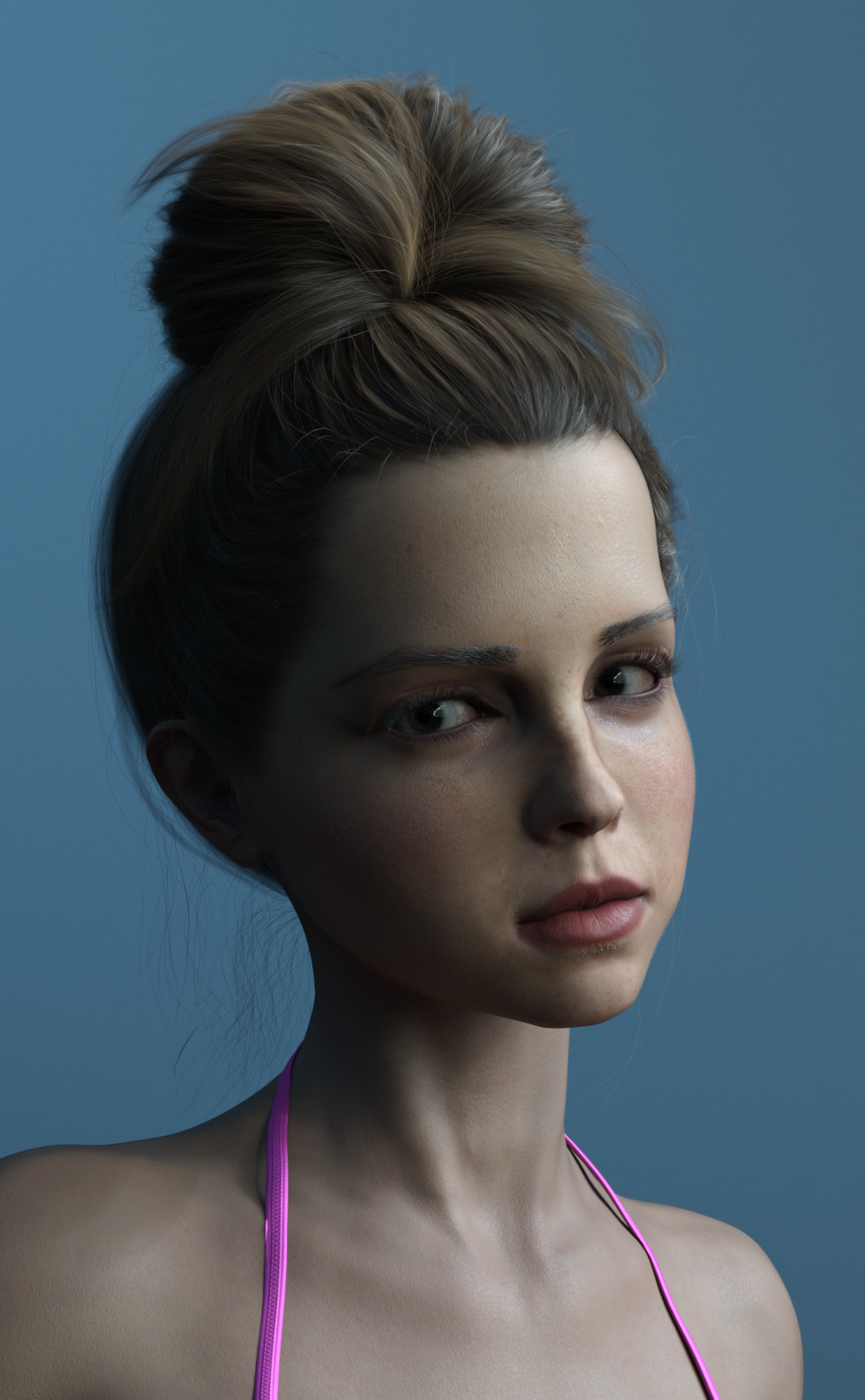
well thanks for gaslighting me earlier then lmao
Genesis 8.1 / Victoria 8.1one more renderer with the new eyes
i think i keep them.
Visuimag thats the default Victoria 8.1 eyes nothing changed
Skin Detail Resource 1 What does this do?certaintree38 said:
Not sure if I should post this here or in a new thread....
But I have a question about using this product with Iray Uber skins:
I got the Skin Detail Resource 1 product recently, and it looks really awesome. But I've been too impatient to learn the new PBR skin shader. A lot of the skins I'm using right now rely on Skin Reflectance tint, so they aren't looking right with the PBR shader. I will definitely take the time to learn the new shader... eventually.
But in the meantime, is there any way to use the skin details with Iray Uber skins?
The Skin Detail Resources require tiling for the detail to be independent of the other texture maps. This is not possibible with the Iray Uber shader as far as I know. So, using them with the old shader will not give good results.
TD
Edit to add: I find the SkinPBR shader very easy to use. I like it much better than the old one. If you have Victoria 8.1, her skin setup is a great start point. Just load it onto your charactewr and then change the diffuse and SSS map to get a decent start point.
Edit to update: It is in fact possible to tile images in the IrayUber shader differently on a per surface base. Thanks to Hellboy for the correction! See his post further down for detail.
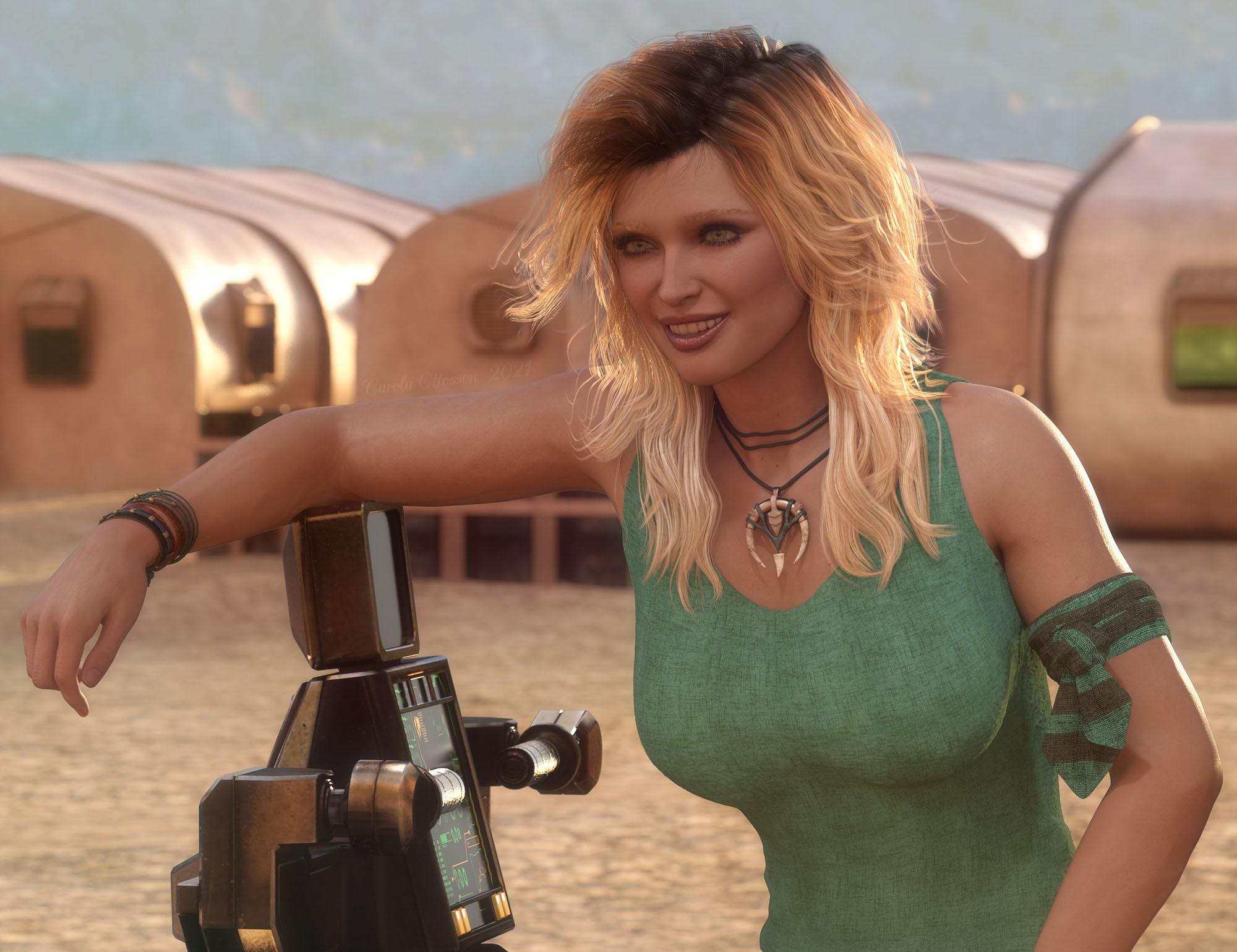
Genesis 8.1 / Victoria 8.1Have only played a little with G8.1f and Victoria 8.1 but I kinda like her, a tad disapointed that the vellus hair did not include arms (atleast not that I have found so far). I hope to see more characters for the 8.1, with different skin colors preferable :) Anyhow, this is one of my little playthroughs with Victoria 8.1. Was planned to be a simple portrait, but it ran away with me and is becoming a full scene instead hahaha
Vicky the smuggler
 Skin Detail Resource 1 What does this do?
thd777 said:
Petra said:
thd777 said:
Yes, there is a new switch called "Detail Enable" (in addition to makeup etc). once activayed you can add the micro detail maps there. Very good to enhance G8.0 characters that are transferred to G8.1
This micro detail collection is great in my opinion and very easy to use. Here is an example closeup of one of my characters (based on Emmeline from sangriart) in her 8.1 version after a little tweaking and adding one of the Skin Detail maps {click for full 2K*2K view).
By the way, there are skindetail maps included with Victoria 8.1 that one can use to try this out.
Ciao
TD
Oh, and I love, love , love the eyes in this update. Just wonderful in my opinion.
Unfortunately, the forum compression smudges much of the detail... Boo
I am staring at your image for a while now and can not see any details.
Asa I stated above the image, the foprum image compression trashes a lot of detail. Also for that render the effect was pretty subtle to begin with. Not the best choice as example, I admit that. Here is the same character with lighting set up to empahsize the details and with the effect turned up a bit. There is no overall normal or bump map, everything you see comes from the maps in the details channel. Look at forehead and shoulder collar region.
Ciao
TD
That looks great, especially for being the detail maps only!
Skin Detail Resource 1 What does this do?Petra said:
thd777 said:
Yes, there is a new switch called "Detail Enable" (in addition to makeup etc). once activayed you can add the micro detail maps there. Very good to enhance G8.0 characters that are transferred to G8.1
This micro detail collection is great in my opinion and very easy to use. Here is an example closeup of one of my characters (based on Emmeline from sangriart) in her 8.1 version after a little tweaking and adding one of the Skin Detail maps {click for full 2K*2K view).
By the way, there are skindetail maps included with Victoria 8.1 that one can use to try this out.
Ciao
TD
Oh, and I love, love , love the eyes in this update. Just wonderful in my opinion.
Unfortunately, the forum compression smudges much of the detail... Boo
I am staring at your image for a while now and can not see any details.
As I stated above the image, the forum image compression trashes a lot of detail. Also for that render the effect was pretty subtle to begin with. Not the best choice as example, I admit that. Here is the same character with lighting set up to emphasize the details and with the effect turned up a bit. There is no overall normal or bump map, everything you see comes from the maps in the details channel. Look at forehead and shoulder/collar region.
Ciao
TD
(Edited for typos...)
Genesis 8.1 / Victoria 8.1scheusal242 said:
AllenArt said:
Petra said:
AllenArt said:
Petra said:
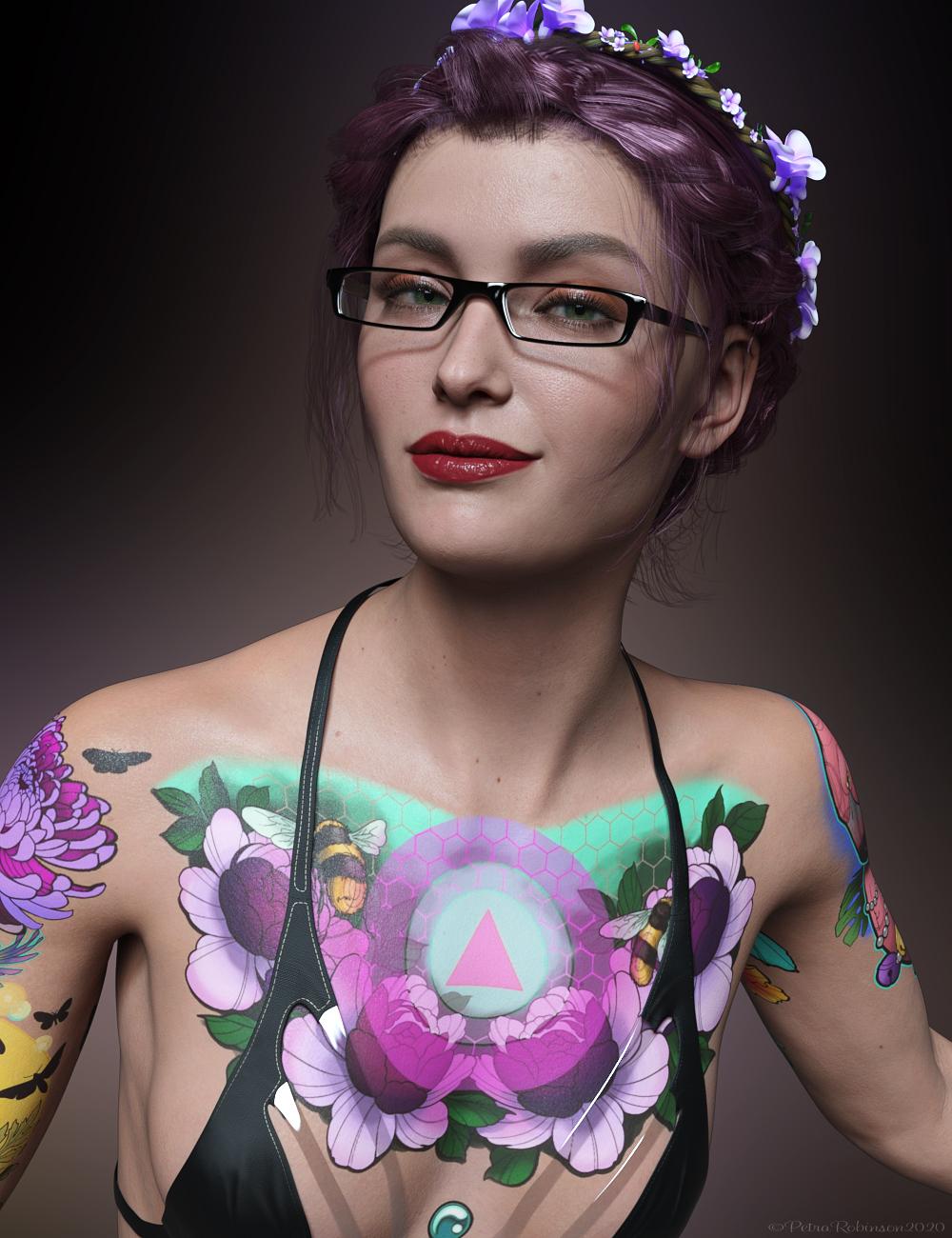 My first render with Victoria 8.1.
I think she is very cute.
She is cute, but gahhhh....those tattoos. Urgh.
Not too much of a fan either. The Skin is amazing though and I wish they had made a realistic-looking tattoo to match it.
Agreed. Love your image tho ;)
screwy, it doesn't look like a tattoo but more like an airbrush painting
The problem is that tattoos aren't decals. Tattoos sit underthe skin, not on top of it. LIE sits on top of your character's skin. Tattoos tend to fade into the skin, too, and these look very crisp. Like she went in and got all these tattoos the same day, and that was a week ago.
Pretty sure that's why it looks so unnatural to people. The images themselves look very nice, and it's really cool how they (Daz) got them though!
Skin Detail Resource 1 What does this do?NylonGirl said:
This product, like so many others, would probably get more sales if it was more clearly explained.
I noticed the Victoria 8.1 character has lots of appeaing skin detail that I can actually see, even in the IRAY preview. I don't know if I've seen anything like that before. Maybe I just don't have the right subdivision setting or something. But anyway, I'd like to know if this Skin Detail Resource product has something that I can use to make older characters have the same detail. If I apply the material settings from a Genesis 8 character, or even Genesis 3 character, to the 8.1 character and then click on some preset from this Skin Detail Resource, would the character magically have a more impressive amount of detail than the G8 version ever did? Or would I have to be some kind of DAZ Studio wizard to know what to do with these files?
And does this product enhance the original skin with more details (normal or bump or whatever they call it) or does it replace the original skin completely (limiting me to just the skins included, which don't seem to include any dark skin)?
The skin details are part of the new Skin PBR Shader, not Genesis 8.1 itself. So if you just apply a G3/8 preset to G8.1, you are just overwriting the shader and then you won't have the detail slot needed for this product. You can still use this to improve your old characters if you manually apply the maps and settings from the Uber Shader to the new skin shader. Then this product can be used to add that nice skin detail texture which is especially useful for closeups.
The included maps in the product are basically pore details, they won't replace your character's skin. Yes, they enhance the textures, not replace or alter them. I am using Victoria 8.1 here, but what it does is basically what you can notice if you click for the full size image.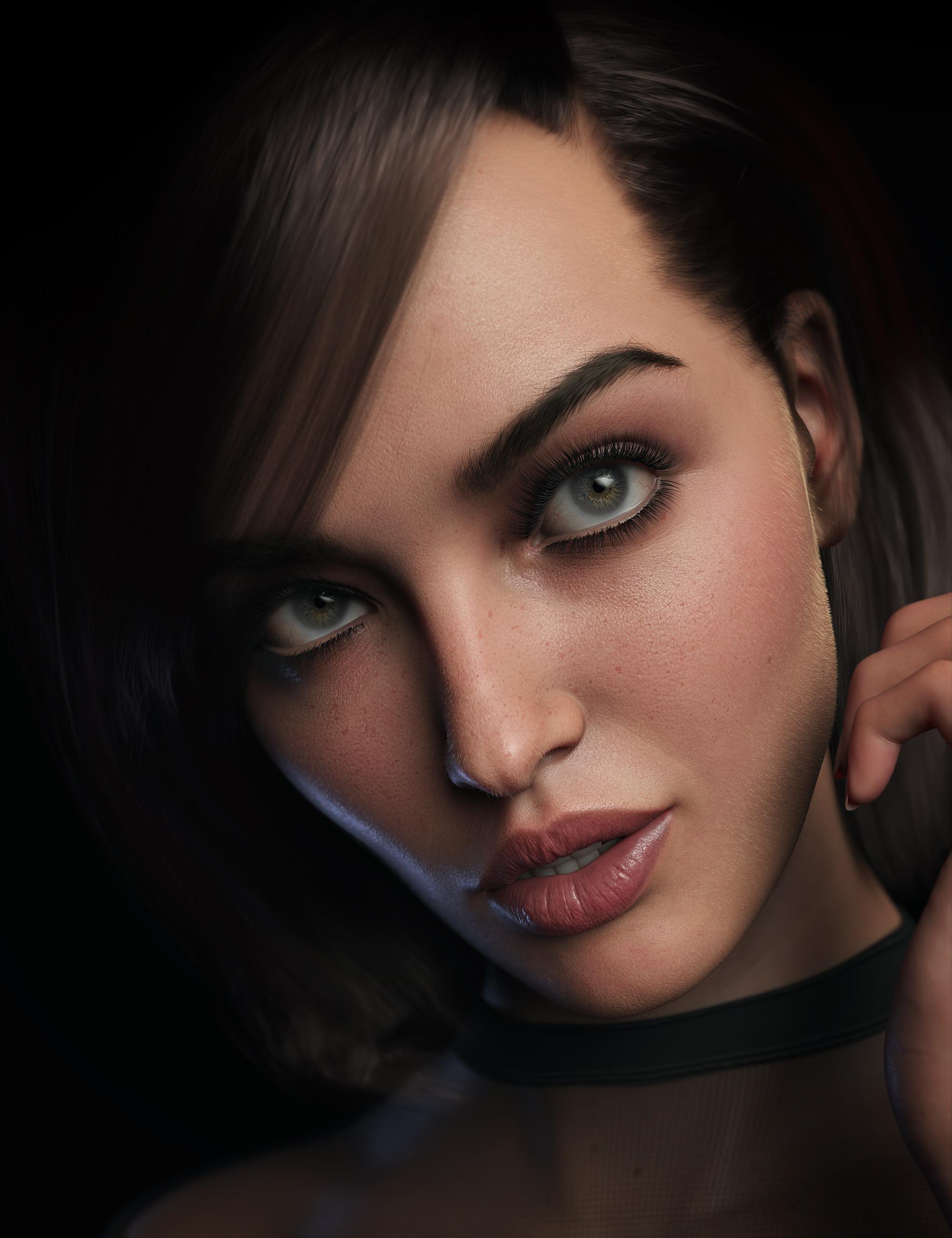
Pakmule said:
Is it possible to add more than one detail normal map to a character? I can't see a way to do it.
No. There is just the normal and detail normal slots.
In normal circumstances, you don't need more than one for detail. You can individually set the tiling number of the detail maps to adjust them to the camera distance ans/or UV scale difference. But it would be nice to have more than one for scars or other things.
Genesis 8.1 / Victoria 8.1AllenArt said:
Petra said:
AllenArt said:
Petra said:
My first render with Victoria 8.1.I think she is very cute.
She is cute, but gahhhh....those tattoos. Urgh.
Not too much of a fan either. The Skin is amazing though and I wish they had made a realistic-looking tattoo to match it.
Agreed. Love your image tho ;)
screwy, it doesn't look like a tattoo but more like an airbrush painting
Victoria 8.1 FBM not symmetricMasterstroke said
So if you are creating morphs, clothes, hair, geo grafts or any other add ons, use the Genesis 8 Female base, not Victoria 8.
If you create geografts, vicky morph will be transfered to the geograft. And if the result isn't good, you have to edit the morph to correct it. With such an asymmetric geometry you can say goobye to mirroring your sculting tool.
Am I remembering wrong?Are you thinking of the one generated by GenX? It's under General --> Generation X --> *** People *** as Victoria 4.
Genesis 8.1 / Victoria 8.1Drip said:
I guess I'll bite for Victoria 8.1 and Michael 8.1, but if Daz is going to *sell* an 8.1 update for all other G8 characters, then they can forget about it.
Would still be interested in Lilith 8.1 and Cat 8.1 though. Lilith 7 was great, so I wanted a Lilith 8 since the beginning of Genesis 8. And a Cat for generation 8 is also loooooong overdue.
Same - I would like a Lilith 8.1 and an Arabella 8.1; as well as a Scott 8.1.
For some reason I don't think we're likely to get them, but that could just be because I'm a natural pessimist. That said, it also seems true that DAZ is going in different thematic directions lately than they were when they were coming out with figures like these. So my confidence we'll get them is low.How does the FG Cabin look from the outside?It probably looks as good from the outside as Victoria X looks from the inside.
Daz 3D is part of

Connect
DAZ Productions, Inc.
7533 S Center View Ct #4664
West Jordan, UT 84084Licensing Agreement | Terms of Service | Privacy Policy | EULA
© 2026 Daz Productions Inc. All Rights Reserved.