-
Confuse! My morph acts unexpectedly
Hmmm... how did you do it exactly?
I only know these steps:
1. I put the hijab in a certain G9 figure. Usually there will be a bit of deformation.
2. Sent it to 3D editor as obj, blender or whatever. Fix it.
3. Import it back through morph loader proConfuse! My morph acts unexpectedlyJames said:
Hai @Catherine3678ab
Thank you for your time testing it.
The lump/bump always happens only when I tried to make a FBM morph.
With or without dforce clearance.
I read a couple of times of crosswind and your writtings.
The steps that both of you didn't do is making an FBM morph.
(I hope I get the technical term correct.)
Basically what both of you did is making a new conforming cloth to a body.
That's why both of you use transfer utility.
Which won't show the problem. As myself didn't find any problem when doing it myself.
If there were 5 bodies and I did steps like both of you did. I'm sure there'll be zero problem.The problem only appears when I'm trying to make a FBM morph (or is it FHM morph?)
So... my steps:
1. I put the hijab in a certain G9 figure. Usually there will be a bit of deformation.
2. Sent it to 3D editor as obj, blender or whatever. Fix it.
3. Import it back through morph loader pro to make the FBM morph.
Both of you didn't use the morph loader pro.
Aren't steps 1-3 how PA makes FBM morph?
Could you... try it with the hijab?
Maybe you could find something wrong, either me or the G9.
If you have the time of course.
Sure, I'll give it a go next round.
Something to watch for with any FBM or for a particular character, is which morph(s) are in play. For eg. There can be a FHM and a FBM - dialing in either one will only affect the Head or the Body - or there is dialing in the "controller" morph which does 2 things, it dials in both the FHM and FBM AND it dials in any additional morphs required for a particular character [i.e. height].
Confuse! My morph acts unexpectedlyHai @Catherine3678ab
Thank you for your time testing it.
The lump/bump always happens only when I tried to make a FBM morph.
With or without dforce clearance.
I read a couple of times of crosswind and your writtings.
The steps that both of you didn't do is making an FBM morph.
(I hope I get the technical term correct.)
Basically what both of you did is making a new conforming cloth to a body.
That's why both of you use transfer utility.
Which won't show the problem. As myself didn't find any problem when doing it myself.
If there were 5 bodies and I did steps like both of you did. I'm sure there'll be zero problem.The problem only appears when I'm trying to make a FBM morph (or is it FHM morph?)
So... my steps:
1. I put the hijab in a certain G9 figure. Usually there will be a bit of deformation.
2. Sent it to 3D editor as obj, blender or whatever. Fix it.
3. Import it back through morph loader pro to make the FBM morph.
Both of you didn't use the morph loader pro.
Aren't steps 1-3 how PA makes FBM morph?
Could you... try it with the hijab?
Maybe you could find something wrong, either me or the G9.
If you have the time of course.
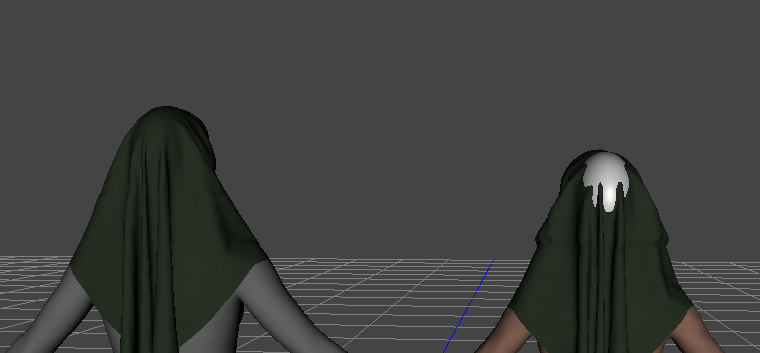
And not to be overly concerned about making a million FBM/FHM morphs ... think you'll find that IF the garment is made to the Default G9, it will auto-follow pretty nicely for many of the available figures. Right now I do not have many to test with, one older woman and one gorilla for example. And in none of the shapes did strange lumps appear in the top of the headdress.
Not really:
 Issue with Content Package Assist !!!
You need metadata. CPA does not create any, so you would have been in this situation all along. Anyway, you can add metadata with a right-click to get you to the Content DB Editor ("Edit Metadata..."). There is a way using drag-and-drop, but I have not tried it. There are many discussions on the subject...
install Attic Bedroom 2 with DIMPeter Wade said:
I installed it a different way. I looked at the installed files in DIM and saw that only the ones in the Environments folder were shown in a different colour which I think means they weren't there. I found the .zip file in DIM's downloads folder, opened it in file expoler and copied the Environments folder into my library.
In this way, there's still no metadata in cms and you still cannot find this product in Smart Content, unless you never use Smart Content...
Sylvia Cutout Platform Heels for Genesis 9 and 8.1 Female with Female G8 Character IssuesThe PA may not have intentionally done so.. well it's easy to use them on G8.0...
1) First load "Sylvia Cutout Platform Heels - G8.1" into the scene without fitting.
2) DS Menu: Edit - Figure - Scene Identification.. change Preferred Base to "/Genesis 8/Female" (SS-1)
3) RMB menu - Fit to G8.0 figure...there'll be no auto-fit pops up... (SS-2)
4) Save them as a Wearable Preset (with feet poses) for just fitting on G8.0, and place the file to the product folder and update the metadata if you'd like...(SS-3)What does Ps and PoserCF mean?inspired_art_86a3f09735 said:
So just to be clear: PoserCF means that it will work in Poser?
I've installed both files in the same directory and it seems this is not the case.. at least for me.
Am I missing something?Which version of Poser (12 and 13 won't work at all), and do you have the (no longer available) DSON Importer installed? The PoserCF has files that go in the Poser library to trigger the import, plus often some native Poser materials, but it doesn't do anything without the importer.
Adding a character shape parameter to clothingcrosswind said:
marble said:
1) I shall revisit that Jay tutorial. I've probably watched it before but my memory is atrocious.
2) My initial question was really to do with the morphs included in the garment and how to add a shape - just like those listed in the screenshot (attached).
Yea, that's great!
3) I use the Darkside style which is a little harder to read than the others. I have adjusted the colours now so that I have a little more contrast in those boxes.
Looks better !
4) Should I be using that Delta Only option each time I adjust clothing with a morph imported by MLP?
Yes, as long as you export an 'existing single morph' for fixing, use 'Reverse Deformations : Yes' + 'Overwrite Existing: Delta Only' when importing with MLP.
When you create a single dial of your character, normally - 'Reverse Deformations : No' + 'Overwrite Existing: Make Unique' ...
Ah - I just did a couple of single dial body shapes before reading this and I did say Yes to Reverse Deformations. Will that be a problem? They shape dial seems to work fine so what would be the consequences?
UPDATE: I discovered that when I tried to apply a pose to the saved morphed figure it distorted horribly. I guess that answers my own question about consequences. I wish I hadn't deleted the original morphed character after I saved the single morph dial.
UPDATE 2: I give up. No matter what I do or how I export/import the morphed figure, it looks fine in zero pose but the moment I try to apply any pose it looks like Miss Elastic having walked through a propeller.
DazStudio only works on Nvidia GPUs????Try diffeomorphic instead of the daz bridge. You will discover a whole new world for daz to blender conversion. Then yes not everything that makes sense in daz studio makes sense in blender, for example I avoid HD and G9 to get better speed in animation and more optimized figures. But with diffeomorphic it is possible to import HD too if you really need to.
Cinema 4D - POSEMORPH TAG PROBLEMHello!
I have an issue with the DAZ Studio program and its integration with Cinema 4D. In DAZ Studio, I downloaded a character and additionally purchased genitalia as a separate object. I also set up controllers for the movement and animation of the genitalia. Everything works fine in DAZ Studio, but the problem arises after importing into Cinema 4D.
The problem is that upon import into Cinema 4D, all the sliders for controlling the genitalia are set to zero. When I try to move the sliders to negative values, it deforms the geometry of the object. This issue prevents me from fully utilizing my settings and controllers in Cinema 4D.
I can attach files but its mature content so. please I don't know what to do anymore. Thank you.
The I Miss the Old Days Complaint Threadhere is that DAZ PostgreSQL laughing at me while after uninstalling, hunting down his CMS nut stash in in app data once again
reinstalling and sitting through metadata reimportation and dying of old age

so much

no luck with Octane render but I sent them a system profiler report
Zbrush I couldn't register so did it offline with a license.zact file they sent me
still many more painful reinstalls of crap to do
and fail
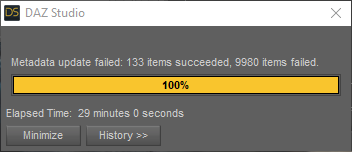
I think I might have to redownload bloody everything if I want to fix it
not today or on my full drive
Oh noes it;s downloading all the crap with connect
Adding a character shape parameter to clothingmarble said:
crosswind said:
marble said:
Ok, thanks although I think I need to dig a little deeper into your answer as there are bits beyond my present understanding.
The character morph I have is the result of a playing with numerous morph dials so I don't have a single parameter to dial-in to change to that shape. I believe it is possible to do that - is that what you are suggesting? I saved my character as a scene subset.
By "fix the FBM" do you mean the process of exporting to Blender and using the Edit/Sculp tools to make it fit nicely? I then re-import it to the original garment using Morph Loader Pro. That creates a morph but I am not sure that's the same thing as FBM, is it (I wish I had a better understanding of these DAZ terms - what on earth is a pJCM??).
Thanks also for the tip on the free scripts - I'll take a look. It was already on my to-do list to scroll through all the Casual scripts too - I bet he has one.
OK, I got it ~ there's no single dial of Full Body Morph (FBM) and Full Head Morph (FHM) of your character, but still you will find lots of 'morph dials' in the hidden properties of the clothing, and most of them shoud be Partial Body Morphs (PBMs) or Partial Head Morphs (PHMs, esp. on headwear etc.) or sth. like those...
In fact you may create single dials of FBMs and FHMs with ERC Freeze for you characters, just like what PAs (who make character products) do. That turns out to be a pretty optimal and clean way, and you still can save it as a Scene Subset or a Character preset.As for 'Fix the FBM' and the process you mentioned, yes, that was what I meant. If you have a single dial of FBM of your character, there'll be a hidden FBM on the clothing, you export the figure + clothing as obj to Blender, sculpt the clothing well with the best fitting result, then export the clothing to obj and import it back to DS 'as a delta' with Morph Loader Pro, so as to 'overwrite' the hidden FBM on the clothing. That's a typical process of 'Fixing FBM' for a piece of clothing.
pJCMs - Pose JCMs which means JCMs triggered by a Pose. You must've known JCMs (Joint Corrective Morphs) --- when a figure's joints rotate (Bend, Twist, Side-Side), the relevant partial body morphs could be automatically corrected by pJCMs (hidden morph dials as well).
All these pJCMs from the figure will be also injected on the clothing. So, for instance, if the figure's upper arms bend, you need to check if the pJCMs around the armholes of the clothing are correct or not. If there're some distortions, you have to fix them. More or less, the process is as same as fixing an FBM.Yes, I thought that (create a single dial) was possible although I am not familiar with the process (ERC Freeze, etc.). Maybe there's a tutorial somewhere.
I do know what JCMs are but I had not heard of pJCMs. Still not sure what the difference is, TBH. A pose is just moving the joints/bones isn't it?
I have seen all those hidden parameters in the clothing - they do a good job of hiding them because, in my viewport, I can't read the labels with highlighting each individual parameter.
Not sure what the Morph Loader Pro "delta" is but I usually say "Yes" to Reverse Deformations - is that what you mean?
1) Yea, Jay ever made a tutorial - how to create 'a single dial' - : https://www.youtube.com/watch?v=mZ1TOAqIzeU&t=323s
2) pJCMs and eJCMs (Expression JCMs) are just the naming convention of those 'hidden corrective morphs' (as SS 1 - 2 down below) The former is driven by poses, the latter by expressions,
3) Oh, for better reading, I think you may tweak the color in menu: Windows - Style - Customize Style...
4) Yes, Delta (or Delta Only) is one of the options of 'Overwrite Existing' in Morph Loader Pro dialogue box. Normally we export a pJCM for fixing, we just make a 'delta' change on the morph with sculpting tools in ZB or Blender, then update the pJCM on the figure or garment with this 'Delta'. (SS - 3)
5) A table of frequently-used abbreviations... (SS - 4)
Adding a character shape parameter to clothingcrosswind said:
marble said:
Ok, thanks although I think I need to dig a little deeper into your answer as there are bits beyond my present understanding.
The character morph I have is the result of a playing with numerous morph dials so I don't have a single parameter to dial-in to change to that shape. I believe it is possible to do that - is that what you are suggesting? I saved my character as a scene subset.
By "fix the FBM" do you mean the process of exporting to Blender and using the Edit/Sculp tools to make it fit nicely? I then re-import it to the original garment using Morph Loader Pro. That creates a morph but I am not sure that's the same thing as FBM, is it (I wish I had a better understanding of these DAZ terms - what on earth is a pJCM??).
Thanks also for the tip on the free scripts - I'll take a look. It was already on my to-do list to scroll through all the Casual scripts too - I bet he has one.
OK, I got it ~ there's no single dial of Full Body Morph (FBM) and Full Head Morph (FHM) of your character, but still you will find lots of 'morph dials' in the hidden properties of the clothing, and most of them shoud be Partial Body Morphs (PBMs) or Partial Head Morphs (PHMs, esp. on headwear etc.) or sth. like those...
In fact you may create single dials of FBMs and FHMs with ERC Freeze for you characters, just like what PAs (who make character products) do. That turns out to be a pretty optimal and clean way, and you still can save it as a Scene Subset or a Character preset.As for 'Fix the FBM' and the process you mentioned, yes, that was what I meant. If you have a single dial of FBM of your character, there'll be a hidden FBM on the clothing, you export the figure + clothing as obj to Blender, sculpt the clothing well with the best fitting result, then export the clothing to obj and import it back to DS 'as a delta' with Morph Loader Pro, so as to 'overwrite' the hidden FBM on the clothing. That's a typical process of 'Fixing FBM' for a piece of clothing.
pJCMs - Pose JCMs which means JCMs triggered by a Pose. You must've known JCMs (Joint Corrective Morphs) --- when a figure's joints rotate (Bend, Twist, Side-Side), the relevant partial body morphs could be automatically corrected by pJCMs (hidden morph dials as well).
All these pJCMs from the figure will be also injected on the clothing. So, for instance, if the figure's upper arms bend, you need to check if the pJCMs around the armholes of the clothing are correct or not. If there're some distortions, you have to fix them. More or less, the process is as same as fixing an FBM.Yes, I thought that (create a single dial) was possible although I am not familiar with the process (ERC Freeze, etc.). Maybe there's a tutorial somewhere.
I do know what JCMs are but I had not heard of pJCMs. Still not sure what the difference is, TBH. A pose is just moving the joints/bones isn't it?
I have seen all those hidden parameters in the clothing - they do a good job of hiding them because, in my viewport, I can't read the labels with highlighting each individual parameter.
Not sure what the Morph Loader Pro "delta" is but I usually say "Yes" to Reverse Deformations - is that what you mean?
Adding a character shape parameter to clothingmarble said:
Ok, thanks although I think I need to dig a little deeper into your answer as there are bits beyond my present understanding.
The character morph I have is the result of a playing with numerous morph dials so I don't have a single parameter to dial-in to change to that shape. I believe it is possible to do that - is that what you are suggesting? I saved my character as a scene subset.
By "fix the FBM" do you mean the process of exporting to Blender and using the Edit/Sculp tools to make it fit nicely? I then re-import it to the original garment using Morph Loader Pro. That creates a morph but I am not sure that's the same thing as FBM, is it (I wish I had a better understanding of these DAZ terms - what on earth is a pJCM??).
Thanks also for the tip on the free scripts - I'll take a look. It was already on my to-do list to scroll through all the Casual scripts too - I bet he has one.
OK, I got it ~ there's no single dial of Full Body Morph (FBM) and Full Head Morph (FHM) of your character, but still you will find lots of 'morph dials' in the hidden properties of the clothing, and most of them shoud be Partial Body Morphs (PBMs) or Partial Head Morphs (PHMs, esp. on headwear etc.) or sth. like those...
In fact you may create single dials of FBMs and FHMs with ERC Freeze for you characters, just like what PAs (who make character products) do. That turns out to be a pretty optimal and clean way, and you still can save it as a Scene Subset or a Character preset.As for 'Fix the FBM' and the process you mentioned, yes, that was what I meant. If you have a single dial of FBM of your character, there'll be a hidden FBM on the clothing, you export the figure + clothing as obj to Blender, sculpt the clothing well with the best fitting result, then export the clothing to obj and import it back to DS 'as a delta' with Morph Loader Pro, so as to 'overwrite' the hidden FBM on the clothing. That's a typical process of 'Fixing FBM' for a piece of clothing.
pJCMs - Pose JCMs which means JCMs triggered by a Pose. You must've known JCMs (Joint Corrective Morphs) --- when a figure's joints rotate (Bend, Twist, Side-Side), the relevant partial body morphs could be automatically corrected by pJCMs (hidden morph dials as well).
All these pJCMs from the figure will be also injected on the clothing. So, for instance, if the figure's upper arms bend, you need to check if the pJCMs around the armholes of the clothing are correct or not. If there're some distortions, you have to fix them. More or less, the process is as same as fixing an FBM.Adding a character shape parameter to clothingOk, thanks although I think I need to dig a little deeper into your answer as there are bits beyond my present understanding.
The character morph I have is the result of a playing with numerous morph dials so I don't have a single parameter to dial-in to change to that shape. I believe it is possible to do that - is that what you are suggesting? I saved my character as a scene subset.
By "fix the FBM" do you mean the process of exporting to Blender and using the Edit/Sculp tools to make it fit nicely? I then re-import it to the original garment using Morph Loader Pro. That creates a morph but I am not sure that's the same thing as FBM, is it (I wish I had a better understanding of these DAZ terms - what on earth is a pJCM??).
Thanks also for the tip on the free scripts - I'll take a look. It was already on my to-do list to scroll through all the Casual scripts too - I bet he has one.
Adding a character shape parameter to clothingYes ~ as long as Auto Follow is checked in the property of your character full body morph / head morph, it'll be injected on the clothing the moment you dial it on the figure (or with auto-fit...) But in most cases, you still have to fix the FBM on the clothing especially with such a 'heavily-morphed' character. I use Blender as well and I rely on it very much for fixing all these morphs / pJCMs, etc. etc.
WelI I believe Shapes Injector can trigger / import FBMs on wearables all together, but there're some free scripts as well, for instance, some good scripts from a PA - MikeD : http://www.mikededes.com/category/3d-section/3d-gifts/free-scripts/
Confuse! My morph acts unexpectedlyJames said:
Since you pointed about the dforce saved simulation result on my hijab.
I made the correction. By hitting the clear button on the simulation pane.
And save it again.
But it didn't work for me.I've already shown the right way and steps above: - clear > export > import > Refit with Transfer Utility > Save figure asset...
Then...
I see something.
Here's the differenceThe image number 3. Step 1-3
If you do that, the hijab will work only for Sarah.The reason why I used a character morph was just because I thought you did not use G9 Base figure, so I just replicated your case so as to reproduce the issue.
You must've known the best way to make a garment is always to use a Base figure other than a custom figure, no matter you're a user or a PA / author...That's the similar process as when I created the hijab for the base model only (with minor differences)
Every morphs, I made afteraward also works flawlessly. No complaint.
So the correct way you mentioned, I already applied it at the beginning.That was great if you've done so from very beginning !

The problem started when I wanted to make the hijab also work on different body,
by making morphs for the intended body. (Dforce simulation cleared as suggested)
for example:
Helena Body,
Sarah Body,
and so on body.Right, no problem for this process since you were creating FHMs / FBMs for the hijab to make it well fit on the figures you use.
Could you make the hijab that you have created for Sarah works on different body,
by making a morph, so it will work on multiple bodies?
Cos here's where I meet my problem.Nope~ extra work will be needed. I also have to go for the above process to make FHMs / FBMs on hijab as needed.
BTW, I recommend Mada's Daz University, you may watch her SOP and tips/tricks... though she nearly doesn't use MD but the process in DS is almost the same.
https://www.youtube.com/watch?v=Ii16tUmLzD8&list=PL2SdKrOTXeXA1qMgNE84AsM8_Wq63gOBF
[Solved!]Issue with Category Classification in Smart Content Tab - DAZ Studio 4.21 Procrosswind said:
Because the metadata was 'wrongly' defined... you either - :
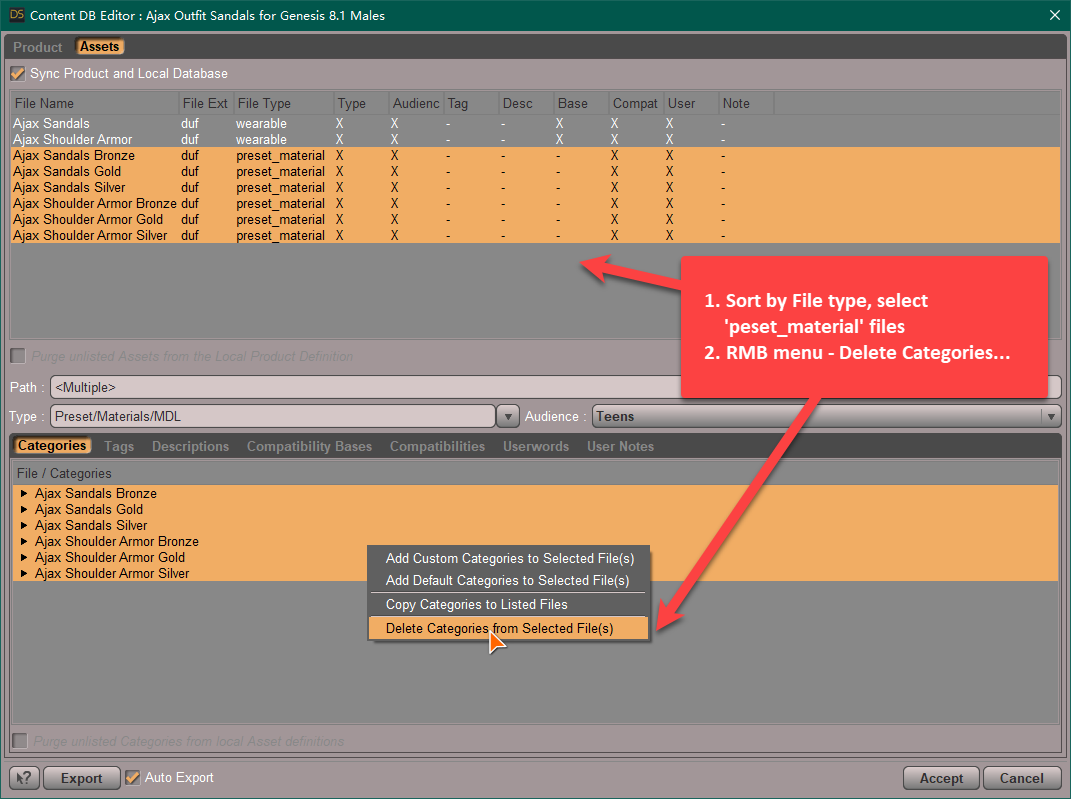
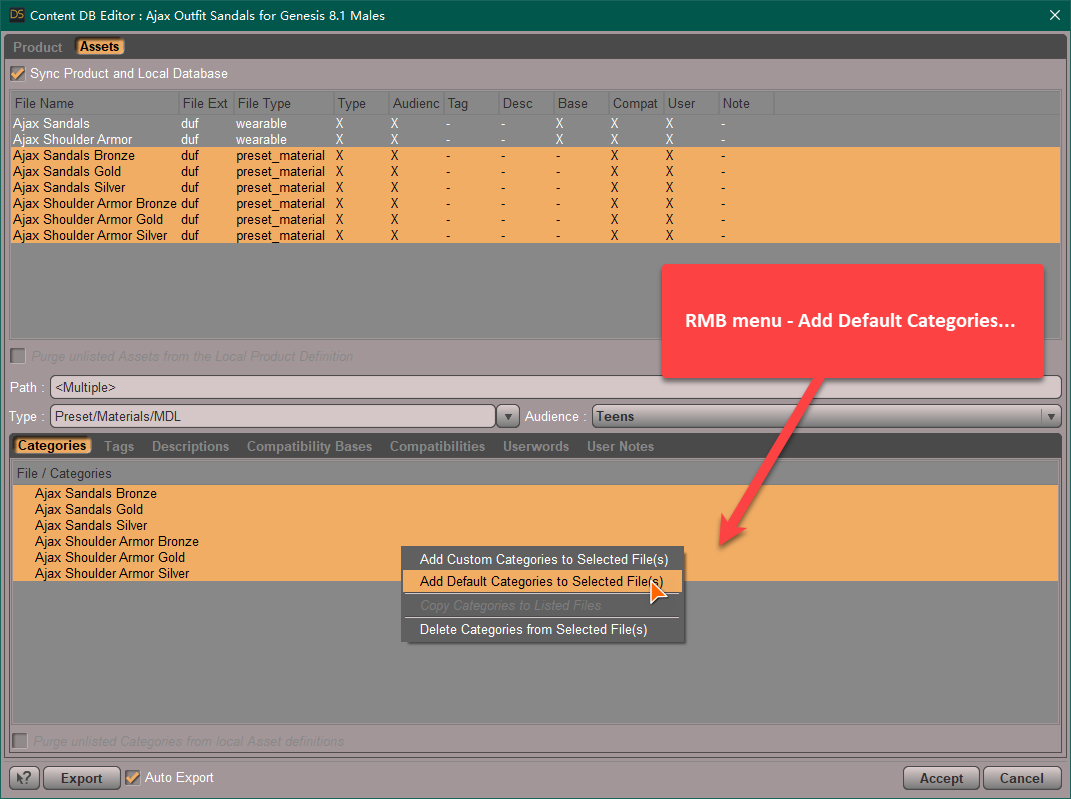
1) Go to the directory: Your Daz Library\Runtime\Support, search dsx file: 'DAZ_3D_87027_Ajax_Outfit_Sandals_for_Genesis_8_1_Males.dsx'. Open it with a Text Editor (EmEditor, Notepad++, etc), replace "/Materials/Iray/Wardrobe" with "/Default/Materials/Iray/Wardrobe", and save...
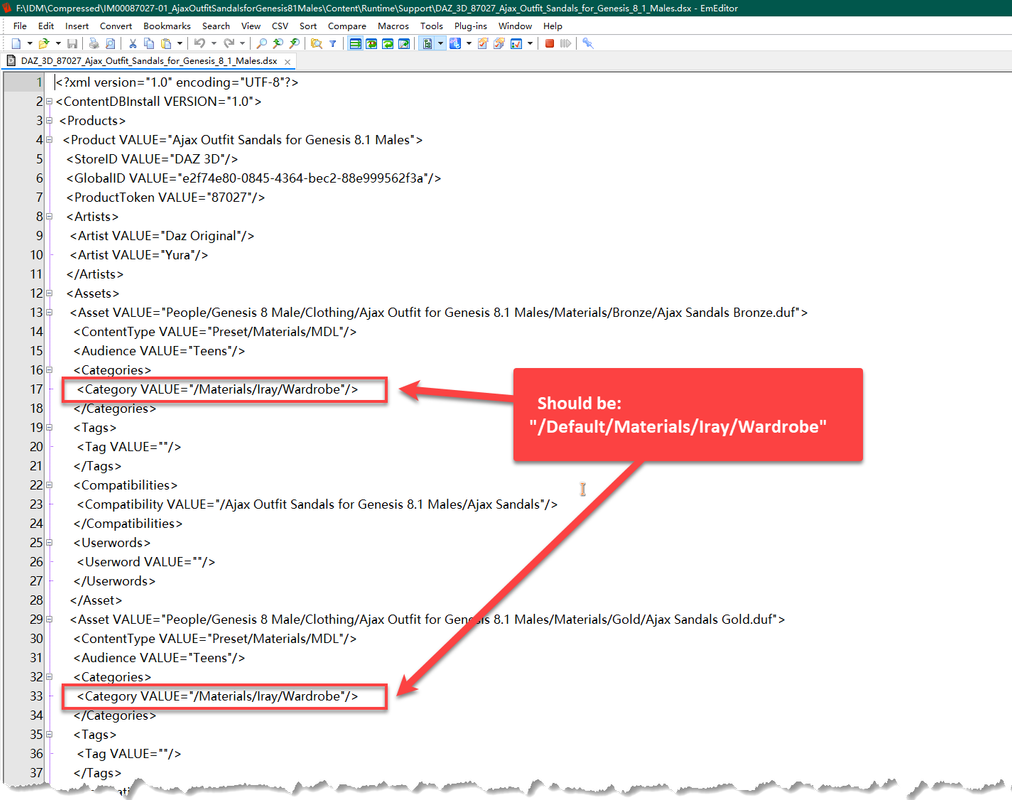
2) Then Re-Import Metadta: Smart Content - context menu (hamburger menu in the upper-right corner) - Content DB Maintenance - Re-Import Metadata...
Or - :
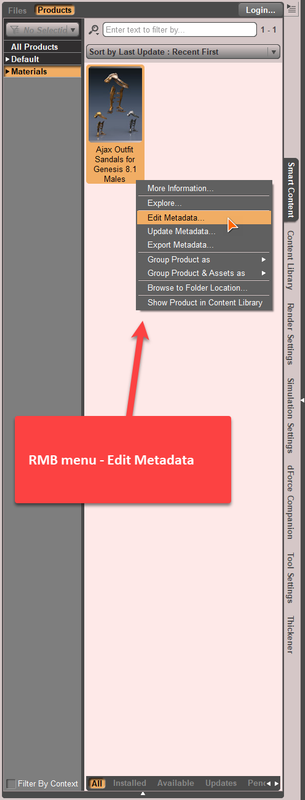
1) Edit Metadata in Smart Content directly, as below:

I would like to express my gratitude for your kind and detailed guidance with accompanying images.
Although I was not successful in editing "DAZ_3D_87027_Ajax_Outfit_Sandals_for_Genesis_8_1_Males.dsx" and executing "Re-Import Metadata," I found success in using "Edit Metadata" in the "Smart Content" tab.
During this process, I learned the importance of checking the "Sync Product and Local Database" option.Your assistance has been greatly appreciated!
Is there an easy way to punch a rectangular hole into a wall ...I'm afraid the only way of 'punching that hole' in DS is to use Gescon plugin. Well another free and easy way is to add subd and make a 'boolean' in Blender... then import back to DS and shade it.
Confuse! My morph acts unexpectedlyI did not use G9 Base, it is JS Sarah... I don't have Helena and your issue is irrelevant to the character morph.
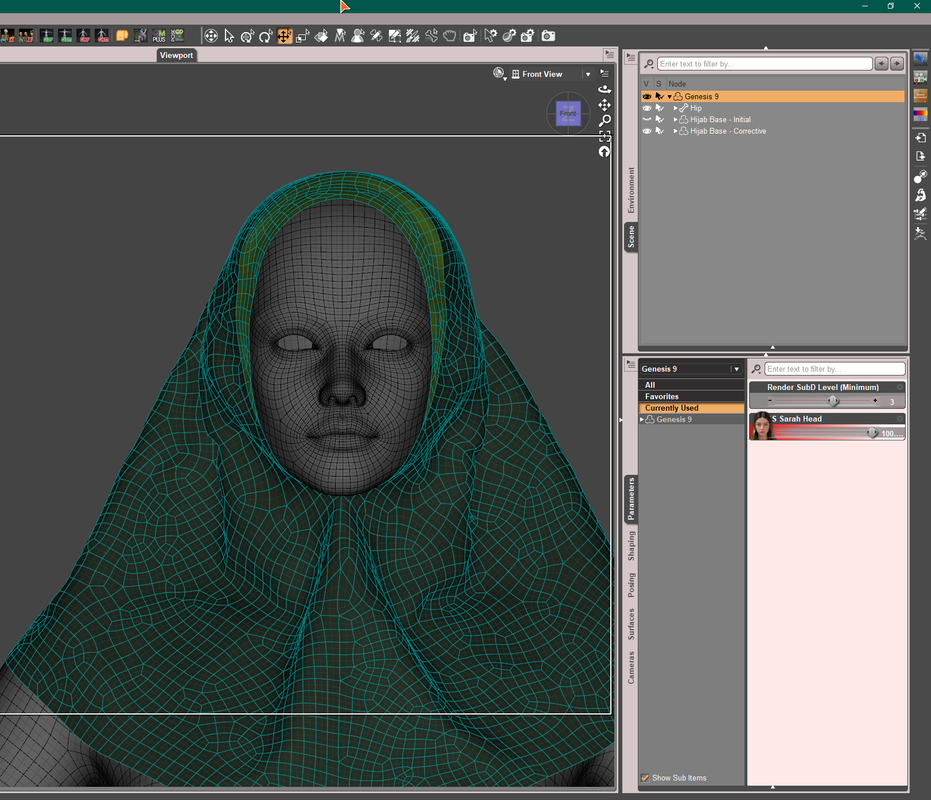
You've not got the point yet... You 'Figure asset of Hijab saved with a dForced sim. result' won't work on any G9 base or character when you go for fixing morph with external application and import back as a delta morphs.
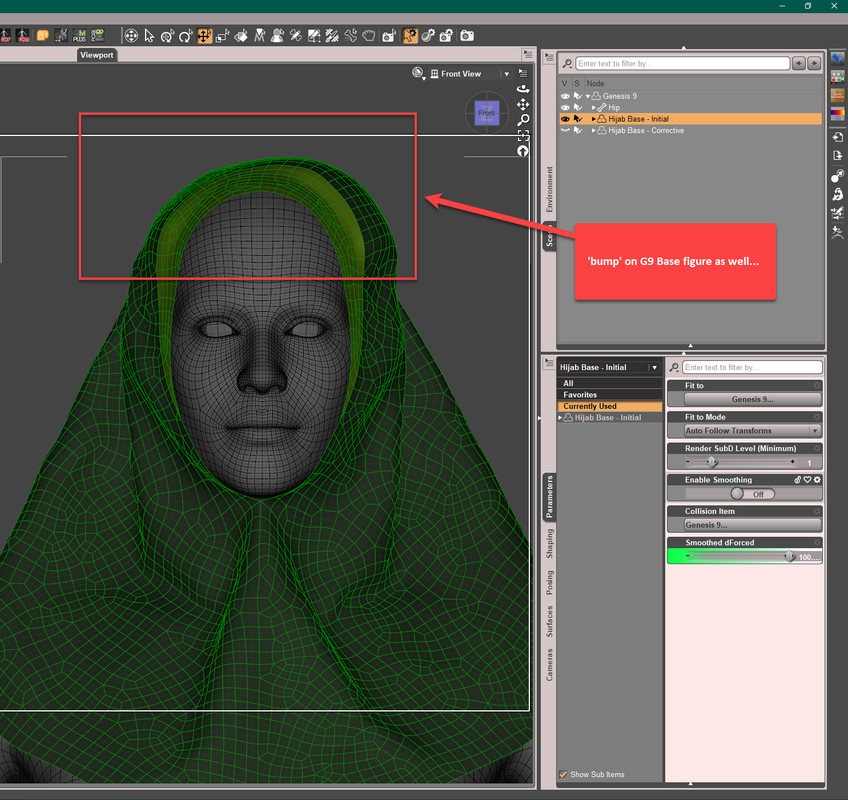
I made and converted lots of clothing w. or w/o dForce but never save Figure asset in that way, my PA friends (who make garments) don't do that either.... so suggest you go for the correct way.
Daz 3D is part of

Connect
DAZ Productions, Inc.
7533 S Center View Ct #4664
West Jordan, UT 84084Licensing Agreement | Terms of Service | Privacy Policy | EULA
© 2026 Daz Productions Inc. All Rights Reserved.










