-
JCM for characters suddenly applying to figure when that character is not applied
but with a different character this time and all fo the character's
if the JCM has incorrect controllers it will not matter what character is used, hence why i said to check the controllers fo the faulty JCM(s).
I feel like if it was an issue from the get-go, this would be consistent and wouldn't happen with almost every character I have
It won't be consistent because the JCM may only misfire under certain poses. It may affect every character if the JCM is not linked correctly to relevant character, and may effect many poses depending on controllers.
to me it almost seems like it's a Daz issue, like it gets confused and thinks something's dialed in when it isn't.
I mean if youre not going to follow the advice suggested and instead keep posting other hypotheses, it's hard to really rule out the obvious. If for whatever reason youre refusing to check updates for the character as suggested, or naming the character as suggested, or checking the parameters as I suggested to see their controllers, then not sure what to tell you.
I don't want to uninstall all of those characters
You uninstall the faulty JCM's character, not the character that the faulty JCM is dialled in on (which may well be all your characters as you have said). When you see a faulty JCM, identify the character it relates to and uninstall that character. Or you could fix the JCM manually and resave it.
Lilweep, as mentioned above, I very frequently check the "currently used" tab and always have everything unhidden, since I create a lot of characters and other things and need to see that stuff and unfortunately it's not the case that it's only applying in obscure poses, the only body part that was bend was the arm and it was bent forward with the limit set (I didn't turn off limits). And it was also 2 different character JCM's that applied, not just 1, despite G2M not having a single morph dialed in, so there was no reason for Daz to think it needed those JCM's.
Screenshots? alt click the parameters to reset to defaults? check the parameters? what are controllers for faulty JCMs? what is the name of the characters of the faulty JCMs?
The Marvelous Designer Threadyou can make pJCMs in Marvelous Designer.
But the reason it may get complicated is because the effect area of the pJCM should usually be quite small to avoid unwanted interactions with other bend morphs and other pJCMs. pJCMs should probably just be used for minor corrections, not necessarily baking simulations. You can of course try to do the latter, but will be complicated. To limit effect size in Marvelous Designer, there is a freeze brush in more recent versions, but not sure if that was in MD8. You can also use something like Blender (shapekey with vertex group) to limit effect of morph.
Honestly, I would just use Blender to make the small corrections for pJCMs using the sculpt brushes, rather than simulating corrections with MD. And then add some optional simulation morphs via MD that users can apply manually.Getting on the 9 train, or notGator said:
I really wanted to switch over to it, like a lot of folks, but the difficultly in migrating stuff over just doesn't seem worth it.I'm not sure migration is necessary or even desirable. I have enough characters of each generation that I don;t necessarily need to move any of them. I sometimes just want to. AFAIK, HD morphs can't be migrated. So, that's a limitation. Some characters work really well within their generation and would not work as well in the later generation. So, it might be better to work with the older characters as they are and work with the newer characters as they are.
I'm still experimenting with transferring characters from one generation to another, but it's not with a goal to make every character fit in the same generation - That may not work, may not be possible for all characters. It's more about seeing what's possible for characters where that seems like a good idea. As example, I can take a V4 character I like and turn it into a G8 character with either V4 UVs and original textures or with G8 UVs and some other textures to get access to other stuff I have for G8. I can do the samewith a G3 character, if there is no HD morph involved. Sometimes it makes sense - Sometimes not! It depends a lot on what you're trying to do and why you're trying to do it.
Getting on the 9 train, or notSerene Night said:
I hope so. Want the gender split to return. Genesis 9 was a fail for me.
I am by far from an expert, but this. It makes no sense to me.
I needed to upgrade a character, a male from Genesis 7 due to shader issues so I thought I would go through the process to convert some clothing.
How it's supposed to be easier makes no sense, there's extra steps. First, you need to model it after the base figure (which is further off from male or female, whichever way you go). Then after you do that and rig it, you need to morph again to the gender's shape you want to use to avoid distortions as much as possible. It seems like just more work.
It was a lot easier to do the scene identification trick for G3 to G8, and many of the JCMs are more or less preserved.
I really wanted to switch over to it, like a lot of folks, but the difficultly in migrating stuff over just doesn't seem worth it.Need help creating an Akita breed for Daz dog 8You need to look up drawings, with the all the measurements in metric or imperial, of "Akita Official Kennel Club" allowed size ranges and shape variations. Add fur variations. You need drawing both with and without fur. I'd do the fur 100% as dForce hair and ot as a sculpt morph shape on the base G8 Dog.
Looking for Goat and/or CapricornGordig said:
Linwelly said:
zombietaggerung said:
Would this suffice? https://www.daz3d.com/capricorn-original-figure
thanks for the link, this would have been a good start if it was the natural capricorn not the starsign/mythological being, but like this unfortunately it's lacking hind legs.
I really wish that Capricorn had been a morph for Horse 2, and the tail a geograft.
that would have been perfect, yes
I am looking for a Brainiac headpieceThank you very much felis. Your instructions were easy to follow and worked very well. I hope you don't mind, I gave you credit on the geometries folder name, on the G8M props folder and on the actual item when saved as a scene asset. I used G8M as the source, then loaded the saved asset onto a G8.1M with standard Holt full body morph to check the follow on properties, as he is scaled to about 106%, and it is magnificent. Thanks once again.
Looking for Goat and/or CapricornLinwelly said:
zombietaggerung said:
Would this suffice? https://www.daz3d.com/capricorn-original-figure
thanks for the link, this would have been a good start if it was the natural capricorn not the starsign/mythological being, but like this unfortunately it's lacking hind legs.
I really wish that Capricorn had been a morph for Horse 2, and the tail a geograft.
Getting on the 9 train, or notZicon said:
All of this, twice, and a third time for the people in the back. Even trying to make specifically attractive characters with G8 was a struggle the moment you wanted to move away from tall/muscular men and tall/big-breasted women. I want a variety of body shapes in my characters! I've put in significant work converting my custom characters from G8 to G9, and they all look so much better for it – even the tall and muscular men! With G8 I was fighting the base shape to get a result that's "close enough", with G9 the shape I actually wanted just slides effortlessly into place. You couldn't pay¹ me to go back.
[1]: This is a blatant lie. You can absolutely pay me to do so, you just wouldn't like the price.
This is the exact experience I had. I was so not looking forward to rebuilding all my G8 characters, especially without all the morphs I was used to. And then I tried it just using combinations of the standard Daz morph packages and the asymmetry morphs, and immediately I was closer to the right look than I'd ever been.
I don't know enough about rigging to know if the difference is in the way it's rigged or in the topology (or both), but what you said about it even having a hard time with variation in attractive features makes me think it might've been at least partially due to the topology not being dense enough to handle changes to facial proportions well, or at least not without adjusting the rig by hand. It still kind of amazes me to put together some large combination of different morphs, dial in a smiling expression, and have the character actually look like they're smiling.
I was looking for an example of what I mean for folks who never encountered the issue, and this is pretty much it. The first pic is G8, and the second is G9.
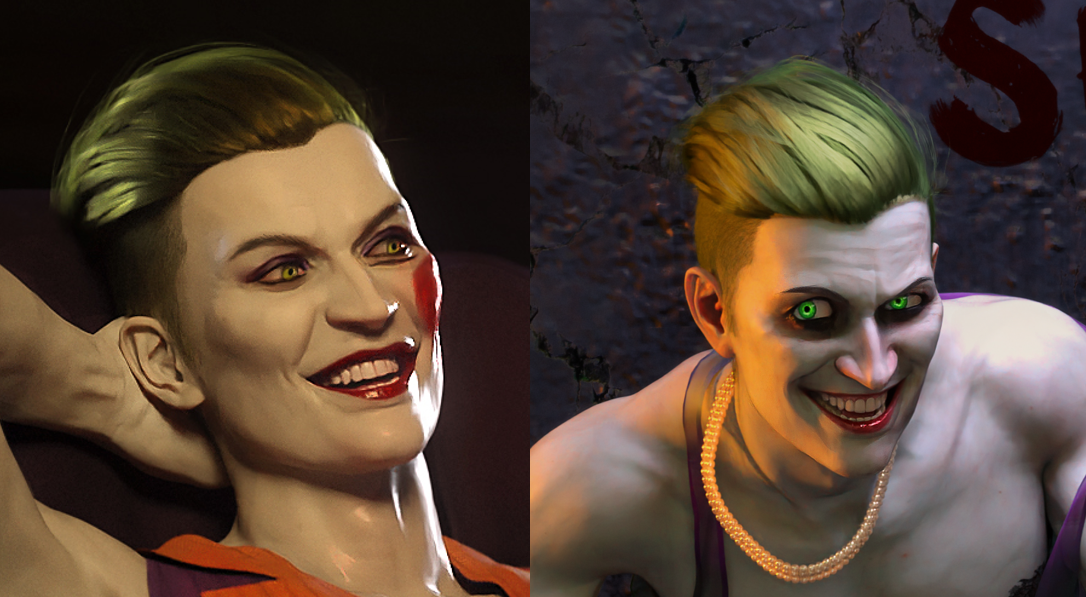
My version of the Joker tends to be on the "he'd be pretty if he wasn't watching you from inside your walls" end of the design spectrum, so he's not even realistic-looking; he's actually very stylized. But it was really, really hard to get him to look animated, for lack of a better term. I still like that G8 pic, but he has the Jack Nicholson smile—like something is artificially forcing the corners of his mouth upward even though he's otherwise very aloof and composed. Which isn't a bad thing for this specific character in certain contexts, but it was a struggle to make him emote at all.'Baking' scale into a characterScale is a Pose property rather than a Morph property, so it can be changed by Pose Presets. The quickest way is to Lock the Scale property in Parameters pane, then Reset Pose action / script or Pose Presets cannot change the Scale value.
'Baking' scale into a characterThey probably use a link from their morph to the scale proeprty - for example muliplying it by 0.95. You can check this by clicking the gear icon on the slider for the character and selecting Parameter Settings, then looking at the Sub components tab. If you want the scale to be differnt you can adjust the settings for the link, or for the 100% figure (which probably doesn't have a link) you can add a new link - if you right-click in the Parameters pane and enable Edit Mode then you can right-click on the morph slider and select Show In Property Hierarchy, then expand down from that to get the Subcomponets, the link, the attributes of the link, and adjust the valuse; or drag the Scale property from the figure into Subcomponents to create a new link which you can thena djust to have the desired results. Save a Character preset and use that to load the figure in future, it should keep the new links.
Bake to Transforms isn't for this kind of thing, rather it is for turning a Pose Control (such as the Hands Grasp control) on a mster node, such as the figure, into separate bends on the individual bones - useful when exporting to another application and for some native features.
Would this work? Converting old morphsGeneration 4 is a "parametric figure", if you want to transfer morph targets in above-mentioned way.... you have to first of all convert a V4 to Weight Mapping (TriAx or General Weight...) otherwise Transfer Utility will not recognize V4.
However, this method turns out to be cumbersome to convert a V4 character... especially for the body morph, as in most of cases, V4 character's body morph consists of multiple partial body morphs. You have to select or mark a lot of properties and finally you probably won't get a correctly-rigged G8/G9 by using this way... there'll be quite a few steps of fixing...
I'm also a user of FaceForm Wrap, so if you have a well-prepared "template project file" for converting V4 to G8/G9, it should be the quickest way for you each time when you want to convert a V4 to G8 or G9, by create a single OBJ then split it to Head and Body morphs by using HeadSplit dFormer.
Alternativly, you can use Fit Suit method from WP Guru (Jay)... how to make a suit and fit: https://www.versluis.com/2022/11/how-to-convert-genesis-8-characters-to-genesis-9-using-the-fit-suit-method/
Would this work? Converting old morphsWell, you can use R3DS wrap to make morphs in the way you describe sure. But there is a way easier way to transfer morphs to new generations.
Just use a clone.favorite all the morphs you want to transfer. Align the genesis figures (e.g., a genesis clone shape for Victoria, or vice versa) such that the figures overlap completely
Use Transfer Utility favorited morphs option to project the favorites morphs to Gen 9.
You need to adjust rigging to shape for each morph though. And then ERC link and save them. Maybe there is a way to do this as a batch processing, but not sure.I am looking for a Brainiac headpieceYou can try else I will convert it to DS format.
Import the attached OBJ, with scale 10000% and standard DS orientation.
Load a G8M character.
Run Transfer Utility Edit > Object > Transfer Utility with G8M as source and the obj as target and default settings (you can add a smoothing modifier, but that can also be done later)
The obj is now rigged to match G8M.
Apply surface settings. There is 3 surfaces: Base plate, lights and wires.
You can save to your library (if wanted) File > Save As > Support Asset > Figure/Prop Asset (you have to choose a path, e.g. People > Genesis 8 Male > Accessories (or Props)).
It is zipped as forum won't allow an obj file.
Render your buys! Use buys from the current month and the previous month of salesAlso, a closeup of Sidra with eyes. The little metallic gewgaws at the temples are neural implant props from the Artemis X for Genesis set. I've used the clothing before but never noticed the implants so just had to add them in. They worked out very well. I did have to parent them, if I remember. The whole outfit autofitted easily with only a few minor adjustments, mostly due to the Sidra morph I think. The G2M outfit I used in the other piece also autofitted well, although making the coattails behave was a pain, because of course I forgot autofitting strips out posing bones/morphs
I am looking for a Brainiac headpieceI know how to import an object. As for transfer utility, the phrase rang a bell and I think it was in this tutorial I bought years ago https://www.daz3d.com/advanced-rigging-in-daz-studio-4-pro and haven't re-visited it since. At that time I primarily using Poser. Now I only use Poser if I need to use it's python scrips for a product prior to using it in Daz Studio.
Looking for Goat and/or Capricornxyer0 said:
This contains a goat morph and materials pack for the Daz Sheep.
Oh that looks promising, thanks a lot! come to a bit of age but that doesn't bother me
Need help creating an Akita breed for Daz dog 8I'm a Blender user so my suggestion is mostly related to Blender ~~ (probably the quickest way...)
As for the shape, an Akita is similar to a Husky, so you can easily sculpt the shape accordingly if you own a Husky for Dog 8 (also doable based on a Dog 8 Base...) in Blender (as per the metrics if needed...). Then create or udpate as an Akita morph as well as the fur morph as needed.
As for the texture, you can then export Akita figure to Blender and paint the color and texture according to a typical ginger + white Akita, especially on the material zone of "Coat", and bake the texture maps. No need to touch UV ! Personally recommend this free but pretty good add-on for texture painting https://github.com/ucupumar/ucupaint/releases
Since the dForce Furs on a Husky for Dog 8 are generated on Target Surfaces, so the painted Akita textures can be well used on both Akita's figure as well as the fur figures. Then you tweak the surface settings on Akita's surfaces to have more realistic and natural lookings, as well as the surfaces on Furs, e.g. increase density, length, etc. to make them more fluffy ~~ yada yada.
Alternatively, you can make specific strand-based furs by using SBH Editor in DS... only that'll take more time and you have no way to add dForce capability...
Need help creating an Akita breed for Daz dog 8Do you want the fluffyness to come from the dforce fur on the model or from a morph on the model?
Daz 3D is part of

Connect
DAZ Productions, Inc.
7533 S Center View Ct #4664
West Jordan, UT 84084Licensing Agreement | Terms of Service | Privacy Policy | EULA
© 2026 Daz Productions Inc. All Rights Reserved.