• Daz 3D
  • Shop
  • 3D Software
    • Daz Studio Premier
    • Daz Studio
    • Install Manager
    • Partnerships
    • AI Training data
    • Exporters
    • Daz to Roblox
    • Daz to Maya
    • Daz to Blender
    • Daz to Unreal
    • Daz to Unity
    • Daz to 3ds Max
    • Daz to Cinema 4D
  • 3D Models
    • Genesis 9
    • Genesis 8.1
    • Free 3D Models
  • Community
    • Gallery
    • Forums
    • Blog
    • Press
    • Help
  • Memberships
    • Daz Premier
    • Daz Plus
    • Daz Base
    • Compare
  • Download Studio
ADVANCED SEARCH
  • Menu
  • Daz 3D
ADVANCED SEARCH
Add image
  • Shop
  • 3d Software
    • Daz Studio Premier
    • Daz Studio
    • Install Manager
    • Partnerships
    • AI Training data
    • Exporters
    • Daz to Roblox
    • Daz to Maya
    • Daz to Blender
    • Daz to Unreal
    • Daz to Unity
    • Daz to 3ds Max
    • Daz to Cinema 4D
  • 3D Models
    • Genesis 9
    • Genesis 8.1
    • Free 3D Models
  • Community
    • Our Community
    • Gallery
    • Forums
    • Blog
    • Press
    • Help
  • Memberships
    • Daz Premier
    • Daz Plus
    • Daz Base
    • Compare

Notifications

You currently have no notifications.

Loading...
Daz 3D Forums > Search
  • Headshop 12

    Yes and yes. You can use DAZ expressions as well as using HeadShop exported Age, Weight and Smile morphs

    By

    info_b3470fa520 info_b3470fa520 December 2019 in Technical Help (nuts n bolts)
  • Headshop 12
    Morning. I'm intrigued by Headshop but the forums here and youtube comments make it seem a little hit and miss. I also have Facegen which is OK but with Headshop does anyone know if once you create your new face if you can then use Daz's inbuilt expressions. I believe you can apply a different Daz material if needed. Also does anyone here have it and recommend it? Many thanks Jay

    By

    Jay Jay_1264499 Jay Jay_1264499 December 2019 in Technical Help (nuts n bolts)
  • New Headshop Plugin Not Displaying Properly

    I bought this version of Headshop  , excited to give it a go. However it is not displaying properly , the dimensions are off and it cuts off the bottom where the apply button is. HELP !!! I really don't want to  have to return this like the last version.

    1. Support ([email protected]) has not received your email.

    2. Maybe changing/reducing your screen resolution would be a good way to resolve. The issue only seem to occur on Retina-type super high-res monitors.

    By

    info_b3470fa520 info_b3470fa520 December 2019 in Daz PA Commercial Products
  • New Headshop Plugin Not Displaying Properly

    I bought this version of Headshop  , excited to give it a go. However it is not displaying properly , the dimensions are off and it cuts off the bottom where the apply button is. HELP !!! I really don't want to  have to return this like the last version.

    By

    EnchantedPixie EnchantedPixie December 2019 in Daz PA Commercial Products
  • weird pose deforms after upgrade to 4.12

    my major bad..  headshop will forgive me for all the nasty thoughts I shot there way. 
    ---
    same for xevo, cause it looked like growing up might be the culprit 
    ---
    Oh, but look ..  brand new right out of the content library ..  gen 2, gen 3, and gen 8 
    same pose (it's a gen 3 pose, so a bit weird on gen 2, pretty good on 8)
    but look the issue is genesis 3
    ---
    took me a while to figure the source of the problem
    ---
    now I guess I have to figure out to fix the problem, 
    any suggestions etc apprecieated I will now uninstall genesis 3 essentials etc. 

    By

    alan bard newcomer alan bard newcomer November 2019 in Technical Help (nuts n bolts)
  • weird pose deforms after upgrade to 4.12

    Okay, it involves characters created in Headshop.. will contact them. 

    By

    alan bard newcomer alan bard newcomer November 2019 in Technical Help (nuts n bolts)
  • Headshop 11 Questions

    You need to have Daz Studio running. Don't use Headshop's exe, you start Headshop from inside Daz. I forget which menu it is under. First have your base character in the scene, then start Headshop from Daz. Do your thing in Headshop, when done it will automatically go on the figure you have in the scene.

    You can also find your texture in the Windows temp folder, if it is still there.


    but I have a mac ... not so if it is the same thing. I tried a rate this way too, but the plug-in fails to start up and tells me that the headshop has closed for me to manage the file

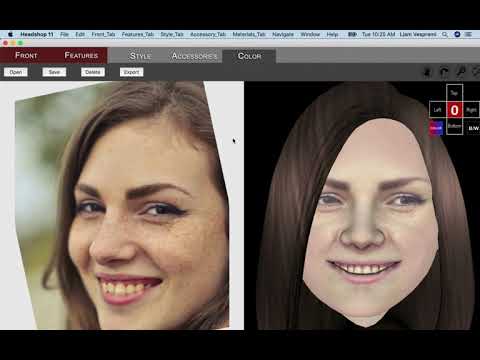
    HeadShop 11 Mac is a Standalone. It DOES NOT start inside DAZ Studio. You simply start the app from the Mac Application Folder and run it. When you finish, you click Export and export OBJ and JPG files in a project folder you create. After opening DAZ Studio and placing the right character on stage (G2, 3 or 8), you import the OBJ files via Morphloader Pro and the JPG files via Surfaces.

    Please watch the "How-to" video or read the manual. They represent valuable information that was developed exactly to help you understand how to use the product.
     

    By

    info_b3470fa520 info_b3470fa520 November 2019 in The Commons
  • Headshop 11 Questions

    Its important to disclose you have a Mac when trouble shooting because they are so different, and sometimes the problem is because it is a Mac. Most people use PC here, and that is going to be the assumption if you don't disclose it.

    There is a video for using the Mac version.
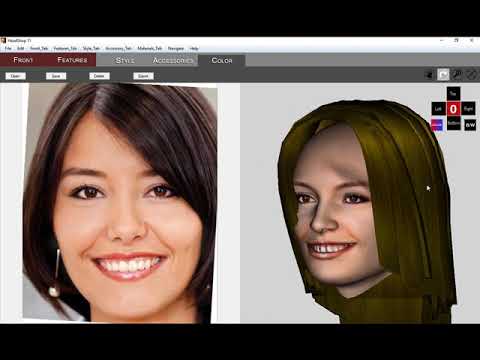
    However, I noticed this video is actually filmed running in a Windows environment, LOL. So I am not sure how helpful it may be.

    So Headshop cannot be run from Daz using a Mac? In my Daz Studio, I can hit the Edit button at the top and "Start Headshop" is at the bottom of the menu. From there everything is automatic.

    Anyway, I don't know Mac, if you keep having trouble, you can try either contacting info_b3470fa520 (the maker of Headshop) or file a support ticket to Daz. 

    Which on that note, info______ should really change their Dazs forum name to Abalone LLC. <.<

    HeadShop 11 Mac does NOT run inside DAZ Studio, period. It was designed as a standalone, that produces files that can be applied to DAZ figures, similar to FaceGen. The video makes it ample clear, sorry if this missed your attentionsmiley

    By

    info_b3470fa520 info_b3470fa520 November 2019 in The Commons
  • Headshop 11 Questions

    Its important to disclose you have a Mac when trouble shooting because they are so different, and sometimes the problem is because it is a Mac. Most people use PC here, and that is going to be the assumption if you don't disclose it.

    There is a video for using the Mac version.

    However, I noticed this video is actually filmed running in a Windows environment, LOL. So I am not sure how helpful it may be.

    So Headshop cannot be run from Daz using a Mac? In my Daz Studio, I can hit the Edit button at the top and "Start Headshop" is at the bottom of the menu. From there everything is automatic.

    Anyway, I don't know Mac, if you keep having trouble, you can try either contacting info_b3470fa520 (the maker of Headshop) or file a support ticket to Daz. 

    Which on that note, info______ should really change their Dazs forum name to Abalone LLC. <.<

    By

    outrider42 outrider42 October 2019 in The Commons
  • Headshop 11 Questions

    You need to have Daz Studio running. Don't use Headshop's exe, you start Headshop from inside Daz. I forget which menu it is under. First have your base character in the scene, then start Headshop from Daz. Do your thing in Headshop, when done it will automatically go on the figure you have in the scene.

    You can also find your texture in the Windows temp folder, if it is still there.

    but I have a mac ... not so if it is the same thing. I tried a rate this way too, but the plug-in fails to start up and tells me that the headshop has closed for me to manage the file

    By

    bartolicristiano_52bc7e73bb bartolicristiano_52bc7e73bb October 2019 in The Commons
  • Headshop 11 Questions

    You need to have Daz Studio running. Don't use Headshop's exe, you start Headshop from inside Daz. I forget which menu it is under. First have your base character in the scene, then start Headshop from Daz. Do your thing in Headshop, when done it will automatically go on the figure you have in the scene.

    You can also find your texture in the Windows temp folder, if it is still there.

    By

    outrider42 outrider42 October 2019 in The Commons
  • Headshop 11 Questions
    hello everyone, I have a problem, I hope you can help me ... I downloaded this program ... everything seemed ok .. I create my model .. I close headshop and open daz. .. when I try to import the texture of the model I created ,it doesn t find any texture folder (lips, face, eyes, etc.) ... not only ... even any file doesn't let me select it anymore .... why?

    By

    bartolicristiano_52bc7e73bb bartolicristiano_52bc7e73bb October 2019 in The Commons
  • Why is it that daz never ...

    Huh. Well, duh. It never occured to me that HeadShop was supposed to be used for character transfers.

    By

    JOdel JOdel October 2019 in The Commons
  • Why is it that daz never ...

    Why is it that DAZ never considers that you might like to use an older character design with newer functionality? Or when they do, they do it poorly or make it near impossible to do?

    What if I am doing a comic or animation and have been using the same character for years? What if I created her as and A3, or an A4?

    Why is it that after spending $100s I still can't succeed?

    All I want to do is use an old A4 design with the advantages of Genesis, and the new outfits etc. and so far the tutorials have let me down. I follow the steps, and something won't be there, or something won't work as advertised, or I have to spend another fortune on another bit Daz left out, and it still won't do it....
    This is after two days of beating my head against this problem, so you maybe you might understand that it isn't just a rant. I would really like it if Daz and other suppliers actually updated things. If I could buy a G8 version of the character I would.
    And why the heck was dance poses for Victoria and Michael (i.e. V1) considered worthy of including in Build A Bundle? Stuff that is that useless should be hidden under a legacy checkbox or something.

    You can use the Face Transfer ability of Daz 4.12 to take the face off your old character and apply it to the latest generation. HeadShop was another way to do this. Simply load your old character, without hair, then take a screenshot, and import that into HeadShop. Apply that face to a G8, and then adjust the shape using sliders until you get the same figure.

    If you made it once, you can make it again. I bleated about G2M for G8M, and it never happened with any kind of script, so I just painstakingly remade the character. It took almost a week of tweaking and changing to get it right, but now I have my favourite character as a G8. The materials were a bit harder, but I explainied it away in my story imagery with my character spending too much time in space; not enough sun! ;p

    By

    Linton Linton October 2019 in The Commons
  • Trouble with HeadShop OneClick Install

    Hi,

    So, after not having Daz installed for a while due to this and that, I finally got my new system built and stable, and presto--back in the saddle with clean install of all content. Except, so far, for one item. HeadShop OneClick. DIM did most things fine up to that point--need to make sure everything else works to be sure. But on this it says, "Could not find local ReadMe for : HeadShop OneClick (WIN)" and "Download Failed!" Uhm... okay.

    I'm running Daz on primary SSD with my user folders (not all of them) and public user folders moved to secondary HDD. I have the link/junction thingy set so that Windows 10 knows where to send my public user files (I did a move for my personal user files). I tried looking at other posts to see if this was already resolved, but I don't see this particular error anywhere. I apologize if I simply missed it somewhere.

    I have a bunch of content waiting to install until I get all of the paths set up (Bryce, Carrara, etc.), but this is the only download failure.

    Any suggestions?

    HeadShop does not use DIM, you have to unzip and install using its own installer. Here's an install video (shows HeadShop 11 but also applies to OneClick).


    By

    info_b3470fa520 info_b3470fa520 October 2019 in Technical Help (nuts n bolts)
  • Trouble with HeadShop OneClick Install

    Hi,

    So, after not having Daz installed for a while due to this and that, I finally got my new system built and stable, and presto--back in the saddle with clean install of all content. Except, so far, for one item. HeadShop OneClick. DIM did most things fine up to that point--need to make sure everything else works to be sure. But on this it says, "Could not find local ReadMe for : HeadShop OneClick (WIN)" and "Download Failed!" Uhm... okay.

    I'm running Daz on primary SSD with my user folders (not all of them) and public user folders moved to secondary HDD. I have the link/junction thingy set so that Windows 10 knows where to send my public user files (I did a move for my personal user files). I tried looking at other posts to see if this was already resolved, but I don't see this particular error anywhere. I apologize if I simply missed it somewhere.

    I have a bunch of content waiting to install until I get all of the paths set up (Bryce, Carrara, etc.), but this is the only download failure.

    Any suggestions?

    By

    Wanderer Wanderer October 2019 in Technical Help (nuts n bolts)
  • DAZ Studio 4.12 ... Face creation abilities????

    I used the morph generated by headshop for the attached images which are intended to resemble Vivien Leigh.
    The morph Headshop generated was a very good starting point; I then tweeked with some additional head/face morphs for the final result. Not a lot of work needed.
    I also replaced the materials headshop generated with fibermesh brows and material surfaces that I already had for other figures, in part because this version is meant to be a fantasy character but also because the final renders seemed to look better.
    (I am not an advanced user but I hardly ever use any figure I get without making adjustments. That experience probably is normal for many if not most users; that's why we have morph packages).


    Anyhow I am pleased with the results. The attached images are headshot busts, each alongside two pictures of Vivien Leigh for comparison purposes, one without any expression and one with a soft smile.

    By

    Porphyrogenitus Porphyrogenitus October 2019 in The Commons
  • DAZ Studio 4.12 ... Face creation abilities????

    "I brought that UV seam problem up a long time. There are workarounds, but that does not make it acceptable when the other apps have no such issue. Plus HS still has other issues which need to be addressed:

    1 Teeth distort from the morph HS makes. Its gets worse as the shape is dialed in. @artini, have you tried opening these characters mouths to see their teeth yet?

    2 On that note, the morph HS creates also effects the entire body. It may look subtle at first, but like the teeth it gets worse the more the morph gets dialed in. This can be a real issue if somebody is using specific body morphs.

    3 Yet another morph issue, the eyelashes for Genesis 8 fail to adjust to the morph at all. If you try to apply them, they will simply take the default G8 shape. But basically the lashes are useless like this. I have found a workaround involving Hexagon...but like before this is a step something that should not be needed at all.

    4 Some features of Heashop are simply broken. I cannot use a different texture in spite of the option being there. I can load a texture, it acts like it might work, but it doesn't. Then in the app itself, if you try using any of the shaping sliders on a face with a smile, the face will distort out of wack. Even just touching the slider. Trying to reset the slider does not work. The only thing to do is to exit Headshop and start over.

    5 Speaking of which, Headshop does not like being exited without finishing an export. The plugin can fail, and require restarting Daz Studio.

    6 Headshop makes no effort to tint the over all skin texture. Try making an African American in Headshop! And because the feature to change textures is broken...you pretty much need to stick to fair skinned people.

    7 You MUST name your character when starting up Headshop. This drives me nuts. I prefer to name it when I have a result, like in Facegen. And if you forget this step, you get a morph with a two letter default name, and it will overwrite any previous morph with that name. This is more annoyance than a problem, but given the other issues, this just gets on my nerves. With Headshop, it basically one workaround after another.

    These items need to be fixed. If they can be fixed, then Headshop could indeed become a genuine go to app for this purpose of using photos to generate Daz faces. But these issues are too much for me. I tried to make it work. I deleted it and reinstalled it multiple times, it just doesn't work.

    And I brought up every one of these problems some time ago, complete with screenshots showing each one of them in detail. So I have pics showing the teeth and body morph distortion, pics showing the app messing up the face when trying to use a slider, and so on. I never once got a response for those posts. And even in this thread right here, notice that info_b has STILL not responded to them. What gives? I am not lying or making false statements here, nor am I being belligerent. I think Headshop can be amazing...if it gets fixed.

    Facegen has its issues, but at least it is easy to use, and I can depend on it not crashing or creating morphs that do weird things. Sometimes it might mess up the eyes a bit, but not the teeth and not the body. Facegen also gives me a full set of color textures for the body, which Headshop does not. You have to manually apply them, yes, but Headshop doesn't even give them to you in the first place. So until Headshop can address the issues I raised, Facegen will continue to be my app of choice for this."

    Outrider, thanks for the comprehensive list. We are in the process to address the majority of these. (#7 is simply not true as I explained to you earlier; you have an option to name a morph, otherwise the default name will be "fs" and will be saved under that name). In regard to "dialing up" - the reason HeadShop has a "smooth" slider is to dial down to the most pleasing morph before exporting. In the same vein there is no point in dialing up if it distorts, which is true for all other photo-to-3Dhead apps. Creating the best head is after all an artistic task and we give you the controll to create the best.

    The issue that many people seem to overlook is that HeadShop can handle faces that most apps can't; rotated heads, poorly lit heads, open-smile heads, 3/4 profiles, etc. (see photo below). It is worth pointing out that unlike other apps we never stop improving or bringing out new versions with new features. Obviously, not all photos can be made to work, but many more than with any other solution.

    See gallery at https://www.daz3d.com/gallery/users/150388

    By

    info_b3470fa520 info_b3470fa520 October 2019 in The Commons
  • DAZ Studio 4.12 ... Face creation abilities????

    I brought that UV seam problem up a long time. There are workarounds, but that does not make it acceptable when the other apps have no such issue. Plus HS still has other issues which need to be addressed:

    1 Teeth distort from the morph HS makes. Its gets worse as the shape is dialed in. @artini, have you tried opening these characters mouths to see their teeth yet?

    2 On that note, the morph HS creates also effects the entire body. It may look subtle at first, but like the teeth it gets worse the more the morph gets dialed in. This can be a real issue if somebody is using specific body morphs.

    3 Yet another morph issue, the eyelashes for Genesis 8 fail to adjust to the morph at all. If you try to apply them, they will simply take the default G8 shape. But basically the lashes are useless like this. I have found a workaround involving Hexagon...but like before this is a step something that should not be needed at all.

    4 Some features of Heashop are simply broken. I cannot use a different texture in spite of the option being there. I can load a texture, it acts like it might work, but it doesn't. Then in the app itself, if you try using any of the shaping sliders on a face with a smile, the face will distort out of wack. Even just touching the slider. Trying to reset the slider does not work. The only thing to do is to exit Headshop and start over.

    5 Speaking of which, Headshop does not like being exited without finishing an export. The plugin can fail, and require restarting Daz Studio.

    6 Headshop makes no effort to tint the over all skin texture. Try making an African American in Headshop! And because the feature to change textures is broken...you pretty much need to stick to fair skinned people.

    7 You MUST name your character when starting up Headshop. This drives me nuts. I prefer to name it when I have a result, like in Facegen. And if you forget this step, you get a morph with a two letter default name, and it will overwrite any previous morph with that name. This is more annoyance than a problem, but given the other issues, this just gets on my nerves. With Headshop, it basically one workaround after another.

    These items need to be fixed. If they can be fixed, then Headshop could indeed become a genuine go to app for this purpose of using photos to generate Daz faces. But these issues are too much for me. I tried to make it work. I deleted it and reinstalled it multiple times, it just doesn't work.

    And I brought up every one of these problems some time ago, complete with screenshots showing each one of them in detail. So I have pics showing the teeth and body morph distortion, pics showing the app messing up the face when trying to use a slider, and so on. I never once got a response for those posts. And even in this thread right here, notice that info_b has STILL not responded to them. What gives? I am not lying or making false statements here, nor am I being belligerent. I think Headshop can be amazing...if it gets fixed.

    Facegen has its issues, but at least it is easy to use, and I can depend on it not crashing or creating morphs that do weird things. Sometimes it might mess up the eyes a bit, but not the teeth and not the body. Facegen also gives me a full set of color textures for the body, which Headshop does not. You have to manually apply them, yes, but Headshop doesn't even give them to you in the first place. So until Headshop can address the issues I raised, Facegen will continue to be my app of choice for this.

    Thanks a lot for the remainding of that. I will check them out, when I will have a time.


    By

    Artini Artini October 2019 in The Commons
  • DAZ Studio 4.12 ... Face creation abilities????

    I brought that UV seam problem up a long time. There are workarounds, but that does not make it acceptable when the other apps have no such issue. Plus HS still has other issues which need to be addressed:

    1 Teeth distort from the morph HS makes. Its gets worse as the shape is dialed in. @artini, have you tried opening these characters mouths to see their teeth yet?

    2 On that note, the morph HS creates also effects the entire body. It may look subtle at first, but like the teeth it gets worse the more the morph gets dialed in. This can be a real issue if somebody is using specific body morphs.

    3 Yet another morph issue, the eyelashes for Genesis 8 fail to adjust to the morph at all. If you try to apply them, they will simply take the default G8 shape. But basically the lashes are useless like this. I have found a workaround involving Hexagon...but like before this is a step something that should not be needed at all.

    4 Some features of Heashop are simply broken. I cannot use a different texture in spite of the option being there. I can load a texture, it acts like it might work, but it doesn't. Then in the app itself, if you try using any of the shaping sliders on a face with a smile, the face will distort out of wack. Even just touching the slider. Trying to reset the slider does not work. The only thing to do is to exit Headshop and start over.

    5 Speaking of which, Headshop does not like being exited without finishing an export. The plugin can fail, and require restarting Daz Studio.

    6 Headshop makes no effort to tint the over all skin texture. Try making an African American in Headshop! And because the feature to change textures is broken...you pretty much need to stick to fair skinned people.

    7 You MUST name your character when starting up Headshop. This drives me nuts. I prefer to name it when I have a result, like in Facegen. And if you forget this step, you get a morph with a two letter default name, and it will overwrite any previous morph with that name. This is more annoyance than a problem, but given the other issues, this just gets on my nerves. With Headshop, it basically one workaround after another.

    These items need to be fixed. If they can be fixed, then Headshop could indeed become a genuine go to app for this purpose of using photos to generate Daz faces. But these issues are too much for me. I tried to make it work. I deleted it and reinstalled it multiple times, it just doesn't work.

    And I brought up every one of these problems some time ago, complete with screenshots showing each one of them in detail. So I have pics showing the teeth and body morph distortion, pics showing the app messing up the face when trying to use a slider, and so on. I never once got a response for those posts. And even in this thread right here, notice that info_b has STILL not responded to them. What gives? I am not lying or making false statements here, nor am I being belligerent. I think Headshop can be amazing...if it gets fixed.

    Facegen has its issues, but at least it is easy to use, and I can depend on it not crashing or creating morphs that do weird things. Sometimes it might mess up the eyes a bit, but not the teeth and not the body. Facegen also gives me a full set of color textures for the body, which Headshop does not. You have to manually apply them, yes, but Headshop doesn't even give them to you in the first place. So until Headshop can address the issues I raised, Facegen will continue to be my app of choice for this.

    By

    outrider42 outrider42 October 2019 in The Commons
Previous Next
Adding to Cart…

Daz 3D is part of Tafi

Connect

DAZ Productions, Inc.
7533 S Center View Ct #4664
West Jordan, UT 84084

HELP

Contact Us

Tutorials

Help Center

Sell Your 3D Content

Affiliate Program

Documentation Center

Open Source

Consent Preferences

JOIN DAZ

Memberships

Blog

About Us

Press

Careers

Bridges

Community

In the Studio

Gallery

Forum

DAZ STORE

Shop

Freebies

Published Artists

Licensing Agreement | Terms of Service | Privacy Policy | EULA

© 2026 Daz Productions Inc. All Rights Reserved.