-
basic set up for FilaToon lighting
Leana said:
There are two big threads on FilaToon with lots of tips:
https://www.daz3d.com/forums/discussion/704951/anime-toons-and-filatoon-shader-q-a/p1
https://www.daz3d.com/forums/discussion/704931/filatoon-cell-shaded-rendering-with-filament/p1
Perfect!! Thank you!!!
basic set up for FilaToon lightingThere are two big threads on FilaToon with lots of tips:
https://www.daz3d.com/forums/discussion/704951/anime-toons-and-filatoon-shader-q-a/p1
https://www.daz3d.com/forums/discussion/704931/filatoon-cell-shaded-rendering-with-filament/p1
Daz Studio 4.24[.0.x], General Release!Imago said:
In 4.21 if I duplicate something, Primitive from DAZ or imported OBJ, they gets their own materials and stuff and I can alter them as much as I want.
What I'm doing extra to make DAZ Studio think I want the duplicated props to perfectly share any changes to any of the duplicates?
They use the same geometry by design, to reduce the memory consumed.
I think you can try by yourself: Just create a sphere and then duplicate it a couple of time using the "duplicate node" command under the Edit menu. Scatter the props around the scene to see them. Then using the Geometry Editor select a portion of the surface of one the duplicated spheres and create a new Surface-> create from selected from the Assignment menu. The Original prop and all the other duplicated spheres will get the same change... Even worse! The selected part are REMOVED, like when using the "Delete selected" from the editing menu, in some of the props.
The removal (actually not-displaying) is a bug, which is being fixed - though if you ave and reload the scene they will all update and display the changes to the geometry. A future build (of DS 2025, new features are for the new version now it is in the process of emerging) will give the option to break the link when creating duplicates, though the default will still be to conserve resources by pointing to a common data set.
Please try this and see if it happens to you too.
And since I'm here, I need to ask: How can I save the selection of Filament drawstyle when saving the scene? Everytime I save a scene with Filament selected and reload it, it reverts again to Texture Shaded, this makes impossible to batch render Filament scenes.
DrawStyle is not saved to the scene file, it is saved to the layout. You could use a Post Load data item script, like http://docs.daz3d.com/doku.php/public/software/dazstudio/4/referenceguide/scripting/api_reference/samples/start#post-load_data_items , to set the drawstyle(s) on loading a scene.
Daz Studio 4.24[.0.x], General Release!In 4.21 if I duplicate something, Primitive from DAZ or imported OBJ, they gets their own materials and stuff and I can alter them as much as I want.
What I'm doing extra to make DAZ Studio think I want the duplicated props to perfectly share any changes to any of the duplicates?
I think you can try by yourself: Just create a sphere and then duplicate it a couple of time using the "duplicate node" command under the Edit menu. Scatter the props around the scene to see them. Then using the Geometry Editor select a portion of the surface of one the duplicated spheres and create a new Surface-> create from selected from the Assignment menu. The Original prop and all the other duplicated spheres will get the same change... Even worse! The selected part are REMOVED, like when using the "Delete selected" from the editing menu, in some of the props.
Please try this and see if it happens to you too.
And since I'm here, I need to ask: How can I save the selection of Filament drawstyle when saving the scene? Everytime I save a scene with Filament selected and reload it, it reverts again to Texture Shaded, this makes impossible to batch render Filament scenes.
Sharp Shadows in Filament with FilatoonAnyone knows if there's a way to obtain sharp shadows like the ones in the picture I posted using Filament and especially with Filatoon shaders?
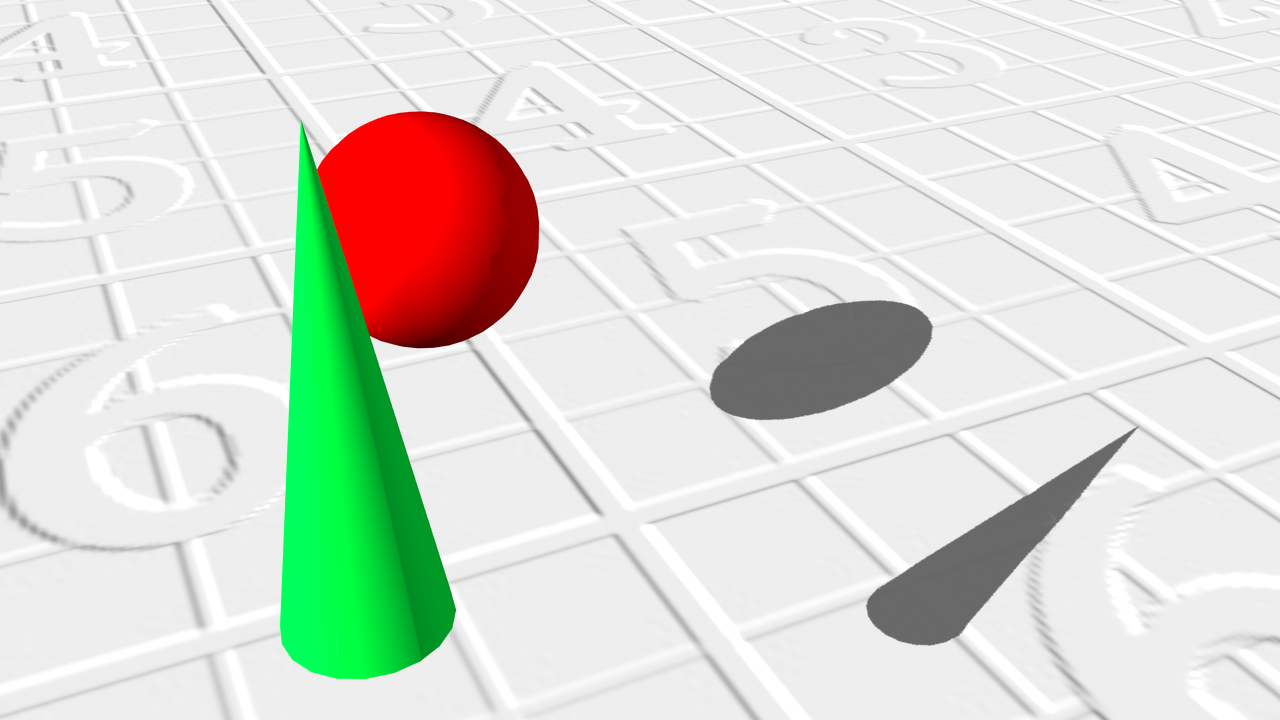 Filament Mirror
Just stopping by to say that I tried the product mentioned in the other thread and I couldn't get it to work, even though one of the promo images (dude with reflection in glasses) makes it seem like it should work.
CNSRD Toon for Lucas 9 [Released]Hey guys! I'm sorry if it's not the place to ask this, I'm super new to DAZ, basically doing my baby steps. I've tried using this skin on a Gen9 model and all was well but at some point (I don't know when bc without this reference plane tha bisecting the character it was hard to notice) part of the chest just disappeared? I've tried different skintones and all have this same result, tried closing and opening DAZ again. If I check "textured view" the model is whole but in Filament and Iray it's this.
I've tried having another Gen9 model and applying it again it worked just fine then but I don't want to start over whenI've done so much work with shaping already
 any ideas how this can be fixed? If this was not the right place to ask I'm so sorry, please tell me the apropriate place then! There's Always Another Sale Thread -- Discussions Only Pt 4
Jumbotron said:
NetherFalcon said:
Jumbotron said:
NetherFalcon said:
tsroemi said:
ArtAngel said:
lorraineopua said:
miladyderyni_173d399f47 said:
Centaur 9 is very much tempting me to restart Premier *right now,* tonight. I've got a lot of use out of the G3 Centaurs and still use them. I never got the G8 centaurs because they didn't seem to be much of an improvement over the G3 version, especially in the human/equine transition zone. Centaur 9 looks somewhat better, enough I want to upgrade. Plus I like the other bundled items. I don't love that it's still only got 4 items, but at least it's 4 items not "3 items plus an HD morph."
$23 will get me 1 month of Premier, the character bundle & both material add-ons.
Related question: should I bother buying Daz Horse 3 for another $2? I am happy with both Daz Horse 2 & Lo-rez Horse 2 (which includes a full resolution model) & think they look much better than Horse 3. So I would only use it if I picked up add-on animals later.
The only thing I've use Daz 3 Horse is the base for AMs Reindeer and possibly for DAs Deer if I get that.
I do appreciate the deer, and I may buy it . . . not sure. I wonder where the forum Synergy has gone? Remember when the forums were full of excited enthusiastic responses for the Mega and Pro bundles and when 4 item bundles were nothing near as special ... just a character with hair an outfit and maybe a prop? Whatever happened to real bundles? Nothing is trying to jump into my cart. Nothing screams OMG BUY ME YOU HAVE TO! I am not a fan of the Lauryn 9 Bundle, which makes the Cervitaur Add-on useless to me. I miss the Mega Bundles. And I miss those Pro Bundles and I really dislike how these current 'Bundles' are marketed/offered. It lacks pizzazz. So for me it is an underwhelming offer even though I have 12 tokens, I think I'll pass. I own DAZ Horse 3 and the toon horse, deer horns/antlers and a truckload of centaurs (7 and 8 and 8.1), and Easy Filatoons. And, I dislike a mega bundle being broken up into multiple small bundles. Shopping here should be simpler, clearer, and more enticing. I get what @daveso finds so discontenting. I can afford the bundles I just don't see the value in them. Why not go back to strater and pro bundles. This feels like mini starter bundles.
I was just now being nostalgic over the same thing, not so much the bundles (they ARE very small these days though, that's quite true) but the forum activity. I guess many people left to do their stuff with AI really, as has been suggested in other threads when the topic came up. I'm glad there still is some interaction, and some people are really so industrious at keeping the forums alive. But I do miss the insane monkey chatter when new figures came out and such, and all the experiments people did and posted about. Ah well. It is what it is.
I believe it's a combination of factors as to why forum activity has been lacking. I participate in the new release threads and they still don't get a lot of activity. Usually only a handful of us even post renders of the new figures.
But the bundle thing is definitely an issue. When they split them up it wasn't a big deal for me but now with us getting 4 products (3 really for the character bundle, the HD Addon is a wasted slot, we should not need to get the HD version with the base figure), it's felt a lot less of a value.I like Lauryn though, she's definitely designed and suited for fantasy renders (that's my bag, baby) and she translates very well into Filatoon.
I agree that these "mini" bundles we are getting now feel a bit lacking. I disagree that the HD add-on is a wasted slot, though. If I want the base figure, I'll also want the HD add-on. It is a basic complement in my humble opinion.
UPDATE: Maybe the ideal solution would be that they made these core figures HD to start with. That seemed to be something they did in the past with Victoria 9 and other figures.
That's what I was referring to. They should all come with an HD version baseline like they used to. And instead of having the addon as one of the featured items, we could get anything else to fill that slot. That's why I feel that spot is wasted, because since they separated the figures from the HD Addons, it's created an illusion of getting more products than we really are. In this case (and several before it) we're really getting 3 items, not 4.
Now I understand the "wasted slot" part. And I agree with you totally.
Maybe a ton of people like it. I doubt it, but who knows? I see some Lauryn fans here, so it seeded the thought: 'what if I bought her? What can she bring to the table?' Then I thought Monday is double tokens, maybe I should wait until then, but lately Mondays have not been like they used to be. I did want the deer, the deeraur or whatever they called it, and the filament toon stuff so I decided to cart all of the bundles and a few non-pose addons, hoping to get the best discount and prices. Then I thought my +membership expires in 2 weeks and I am not going premier, so maybe I should clear out my wish list a little and give the sale a decent shot. So I threw a bunch of DAZ-spaghetti at the wall and ended up with 57 carted skus that worked for me. I am posting my invoice from today in case curious minds wonder how I got the best value for the bundles etc.
Daz Studio 6 Beta - version 6.26.2026.26903! (Updated September 29, 2026)Imago said:
Richard Haseltine said:
Remember that Filament is a Drawstyle, not a render Engine per se.
If you have the Timeline open the playhead will advance as the sequence is rendered, so it functions as a progress bar to an extent.
I know but a lot of people is using that as a "render engine", so why don't make it more easy and user-friendly?
I'm not asking it to become a full-fledged render engine (I'm still wondering why it can't act like IRay
 ), just having it have a progress bar while rendering image sequences since I can't always see the timeline.
That kind of in-this-situation-only thing is unlikely to be done - especially as the OpenGL drawstyles do have the issue with obscuring the Viewport mentioned earlier, so that would need another layer of in-this-situation-only.
Daz Studio 6 Beta - version 6.26.2026.26903! (Updated September 29, 2026)Richard Haseltine said:
Remember that Filament is a Drawstyle, not a render Engine per se.
If you have the Timeline open the playhead will advance as the sequence is rendered, so it functions as a progress bar to an extent.
I know but a lot of people is using that as a "render engine", so why don't make it more easy and user-friendly?
I'm not asking it to become a full-fledged render engine (I'm still wondering why it can't act like IRay
), just having it have a progress bar while rendering image sequences since I can't always see the timeline.Daz Studio 6 Beta - version 6.26.2026.26903! (Updated September 29, 2026)Imago said:
Quick request to the devs: It's possible to give Filament a rendering interface like the other engines, with a progress bar and a settings pane?
Right now if I start an image serie render with Filament on Viewport, it goes without any kind of "progession bar" and the only way to stop it is by pressing ESC.
Also, having a settings pane just for it would make easier set its own domensions and destination path for each engine.
Remember that Filament is a Drawstyle, not a render Engine per se.
If you have the Timeline open the playhead will advance as the sequence is rendered, so it functions as a progress bar to an extent.
Daz Studio 6 Beta - version 6.26.2026.26903! (Updated September 29, 2026)memcneil70 said:
@Imago, a question for you and anyone in the know, on a Mac we can't move any 'progress bar/pop-up' out of the center of the screen, so with Filament, would that mean we would always have an it added to our Filament/toon renders?
Of course I mean only when you press the "render" button, not constantly. Like for IRay, the interface is constantly "re-rendered" but you have no progress bar popup until you press the render button.
I do animations so I often render hundreds of frames and have a progress bar for Filament would help keeping track of the operations.
Daz Studio 6 Beta - version 6.26.2026.26903! (Updated September 29, 2026)Imago said:
Quick request to the devs: It's possible to give Filament a rendering interface like the other engines, with a progress bar and a settings pane?
Right now if I start an image serie render with Filament on Viewport, it goes without any kind of "progession bar" and the only way to stop it is by pressing ESC.
Also, having a settings pane just for it would make easier set its own domensions and destination path for each engine.
@Imago, a question for you and anyone in the know, on a Mac we can't move any 'progress bar/pop-up' out of the center of the screen, so with Filament, would that mean we would always have an it added to our Filament/toon renders?
For developers, is there anyway you can get that pop-up scripted so it can be moved by Mac users? It gets in the way when we do simulations and keeps us from knowing just when an explosion is starting. Very aggravating.
Over 2,400 FREE bespoke BVH animations for Genesis 8!!these are so useful now that i'm using filament to animate, what a great treasure for animators. thank you very much!
Daz Studio 6 Beta - version 6.26.2026.26903! (Updated September 29, 2026)Quick request to the devs: It's possible to give Filament a rendering interface like the other engines, with a progress bar and a settings pane?
Right now if I start an image serie render with Filament on Viewport, it goes without any kind of "progession bar" and the only way to stop it is by pressing ESC.
Also, having a settings pane just for it would make easier set its own domensions and destination path for each engine.
Daz Studio 6 Beta - version 6.26.2026.26903! (Updated September 29, 2026)I tried out the alpha. Looks really good and shaping up nicely. The font is so much more readable. I have it set to city limits. The new texture shaded mode looks sweet. It's better than Filament lol. Animation playback in the timeline works well for me. it's smooth and plays quicker than current Daz. Genesis 8 figures move around so easy! It works like Genesis 2,3 and 9 now and like Genesis 8 on my M1 Mac. I'm so happy about that. It's a dream to pose with the Uni Tool and Active Pose tool. Obviously not all scripts are working. hope they transfer over, like Limbstick, Heels Control, etc., etc. So far I'm having a little trouble selecting the bend, twist, side to side guide circles when I have the universal tool active. Hope to see Animate 2 and aniblocks return for my current backlog. I'll post more feedback as I encounter any bugs, issues, and so on.
My rig is a 2022 ASUS M16 Laptop with 12th Gen Core i9 and RTX 3080Ti w/ 16GB of Vram if that info is necessary. Thanks Daz!
Daz Studio 6 Beta - version 6.26.2026.26903! (Updated September 29, 2026)Was about to write the same, my viewport in ALPHA 2025 is very, very, very laggy, especially compared to old Daz. The difference is like night and day, same scene, same Filament mode, using 5070Ti with newest drivers installed.
Filament transparent shadow catcher ground plane. (SOLVED)I know how to make shadows in Filament traditionally, but there are times when i want to make a looped animation, of say a character running in place and I don't want to render the ground, I just want to render the figure and the shadow, and then I can add that loop over a moving environment later. But I can't figure out how to make a transparent shadow catcher. Has anyone figured this out or is it not possible yet in Filament?
Update: I solved it with a "cheat" by using flattened geoshells.
Daz Studio 6 Beta - version 6.26.2026.26903! (Updated September 29, 2026)marksinister_0f3a44cacc said:
Can we please for the love of all that's holy get support for Intel or AMD cards. PLEASE!
AMD and Intel cards, as much as I know, works fine with Filament and 3Delight. IRay is bound to NVidia cards because it needs CUDA cores to work, that can be found only on NVidia cards.
There is some kind of special driver that emulates CUDA cores on AMD cards but IRay doesn't work on that method.
G9 Shape Preset for SWOLE Garrick mixOn the other end of the spectrum from the head portrait above...
This mix of SUPER, Astaroth Toon, and Drut came out looking nicely stylized. I decided to give the anime/toon add-ons a try to replace the brows, eyes, teeth, and textures. He's rendered with Iray, but I think I put anime and/or filatoon materials on him. Not sure, but when I have more time, I'd like to try this one out using Filament/Filatoon.
Lee
Daz 3D is part of

Connect
DAZ Productions, Inc.
7533 S Center View Ct #4664
West Jordan, UT 84084Licensing Agreement | Terms of Service | Privacy Policy | EULA
© 2026 Daz Productions Inc. All Rights Reserved.