-
Fingerprints on lower body of Victoria 8.1 HD Add on
The Blurst of Times said:
Could the Detail tiling have anything to do with the weird "fingerprint" pattern there? (I'm assuming Victoria 8.1 uses the Detail channel.) I can't think of a good reason for there to be an observable pattern to the skin like that, though.
If were inside that parameter would be a defect in the expensive product, I would like this normals on fingers but not on the entire body!
Fingerprints on lower body of Victoria 8.1 HD Add onI haven't played with V8.1 very much. I've been trying to apply the PBR Shader to Genesis 8 stuff, focusing on the Detail channel.
Could the Detail tiling have anything to do with the weird "fingerprint" pattern there? (I'm assuming Victoria 8.1 uses the Detail channel.) I can't think of a good reason for there to be an observable pattern to the skin like that, though.
Fingerprints on lower body of Victoria 8.1 HD Add onAnyone knows why is this happen?, I was doing a commision with Victoria 8.1 and my client now is angry due to this issue. meanwhile I can fix using blur in Photoshop or lowering bump and normal maps or any other tricks for not losing my commision the issue is present with this products: Victoria 8.1 HD Add on, Vellus Hair (yep, there is here), was rendered using Headlamp camera only.
 Genesis 8.1 / Victoria 8.1
RoseRender said:
Richard Haseltine said:
RoseRender said:
Hi all!
my experiences so far with Gen 8.1:- The face module with all its arrows keeps crashing after seconds of use (DAZ crashes). No chance to use it so I really hope this will be fixed in the near future especially because there are other users with the same problem.
- I like the new expressions and the new eyes. Much more realistic. Can't tell about the skin as I don't own Victoria.
- how in the hell can you use the "old" geoshell clothes like underwear and stockings etc. which are not "real" clothes. Everytime when applied to the new Gen 8.1 my character looks like a white albino and nothing works. Is there a workaround?
Besides that, I really like 8.1. thank you DAZ!
You can hide the unwanted surface groups in the parameters pane - there are on/off switches for all polygon groups in the Geometry Shell property group. If you need to apply materials to the new groups then it's probably going to work best to apply the base shader and then copy/paste the settings from the Genesis 8 Torso surface.
thank you! I will try it!
Just a summary of what others have said:
Using G8 geoshell based clothing on G8.1 likely requires G8 (source) figure and G8.1 (target) figure side-by-side. UVs are not relevant in this case: both geoshells can use the Base Female UV. Surfaces are the issue and, provided you use Base Female UV on the geoshell, and with the G8 figure’s geoshell having a ‘torso’ surface and G8.1 figure’s geoshell having a ‘body’ and ‘head’ surface, you can copy and paste ‘torso’ surface to ‘body’ and ‘neck’ surfaces. This works equally well using G3 geoshell based clothing on G8 or G8.1. For geoshell based clothing this is simple, repeatable and reliable. Not quick (if you have many styles/MATs for each product and many products. . . ).
These later facts might point to an opportunity for automation but that would be beyond me. BTW the body suit is G8 geoshell on G8 and G8.1 and the bottom bruises are G3 geoshell on G8 and G8.1.
Genesis 8.1 / Victoria 8.1scheusal242 said:
brimstoneomega said:
scheusal242 said:
AllenArt said:
Petra said:
AllenArt said:
Petra said:
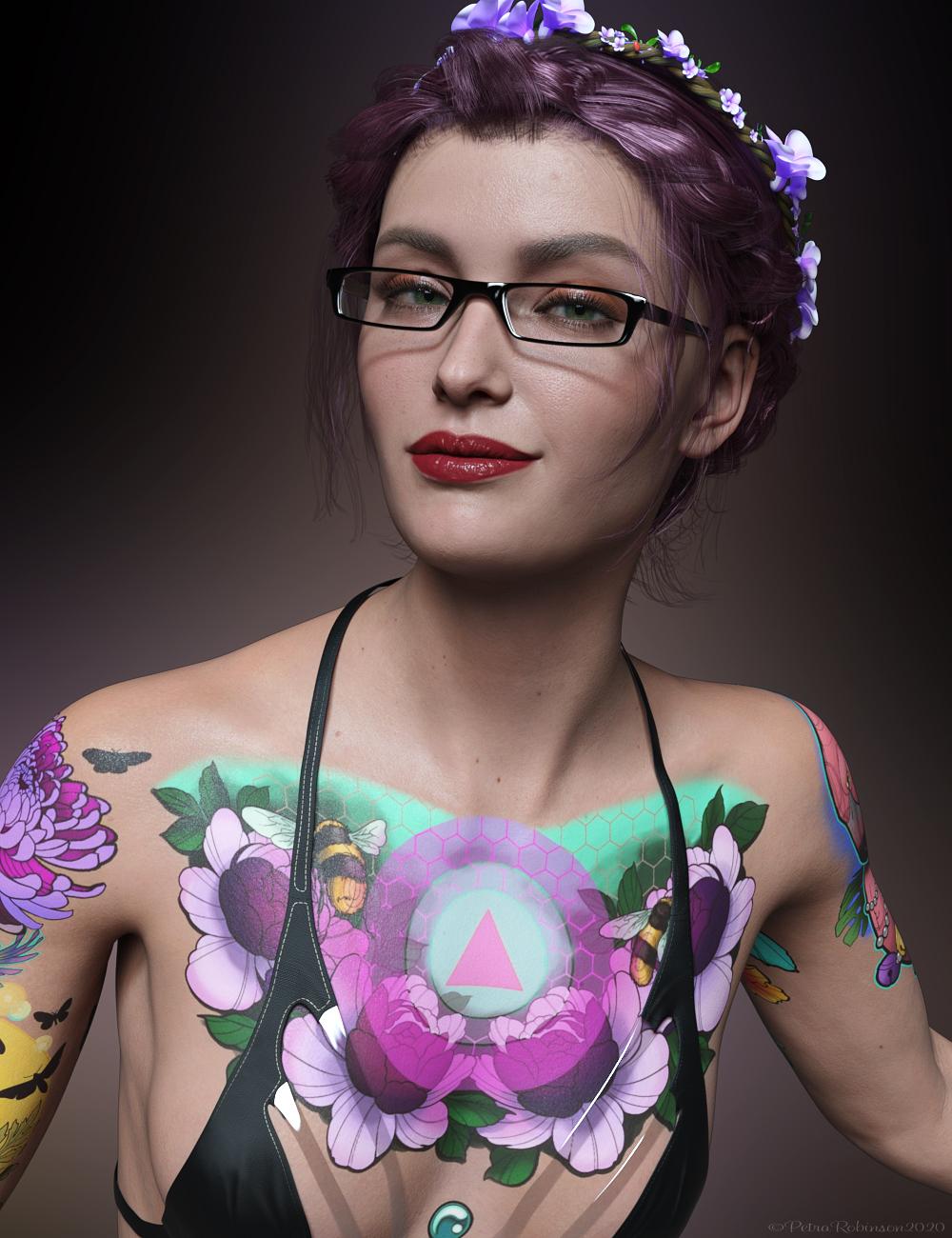 My first render with Victoria 8.1.
I think she is very cute.
She is cute, but gahhhh....those tattoos. Urgh.
Not too much of a fan either. The Skin is amazing though and I wish they had made a realistic-looking tattoo to match it.
Agreed. Love your image tho ;)
screwy, it doesn't look like a tattoo but more like an airbrush painting
The problem is that tattoos aren't decals. Tattoos sit underthe skin, not on top of it. LIE sits on top of your character's skin. Tattoos tend to fade into the skin, too, and these look very crisp. Like she went in and got all these tattoos the same day, and that was a week ago.
Pretty sure that's why it looks so unnatural to people. The images themselves look very nice, and it's really cool how they (Daz) got them though!
then LIE shouldn't be so colorful
Just playing around with the PBRSkin and it occurs to me that one way of making the over-bright tattoos look (and act) more like the real thing is not to place them above the skin like paint but perhaps include them in the Translucency Color channel - use the LIE to add the tattoo image to the body part that's already used in that channel, perhaps dial down the opacity a bit and it seems to produce an effect when rendered that is more faded and 'under the skin' rather than on top of it. This might warrant some further exploration...
Am I remembering wrong?hjake said:
Kharma said:
@shadowhawk1 is this the set your looking for by Cayman studios sold at rendo ... this is from the read me description
Legacy UVs for Genesis 3: V4" is a UV Map and Geograft Kit which
enables the use of Victoria 4 textures on Genesis 3 FemaleI own both of these products and they are for using previous generation textures on a later generation figures. I don't remember them allowing the transfer of morphs:
Legacy UVs for Genesis 3: V4 by CaymanStudios
Legacy UVs for Genesis 3: G2F by CaymanStudios
I have one of the legacy UV sets and they are not what I was thinking of, this was an actual morph much like the Gen 4 legacy morphs available for G2
Am I remembering wrong?Kharma said:
@shadowhawk1 is this the set your looking for by Cayman studios sold at rendo ... this is from the read me description
Legacy UVs for Genesis 3: V4" is a UV Map and Geograft Kit which
enables the use of Victoria 4 textures on Genesis 3 FemaleI own both of these products and they are for using previous generation textures on a later generation figures. I don't remember them allowing the transfer of morphs:
Legacy UVs for Genesis 3: V4 by CaymanStudios
Legacy UVs for Genesis 3: G2F by CaymanStudios
Genesis 8.1 / Victoria 8.1brimstoneomega said:
scheusal242 said:
AllenArt said:
Petra said:
AllenArt said:
Petra said:
My first render with Victoria 8.1.I think she is very cute.
She is cute, but gahhhh....those tattoos. Urgh.
Not too much of a fan either. The Skin is amazing though and I wish they had made a realistic-looking tattoo to match it.
Agreed. Love your image tho ;)
screwy, it doesn't look like a tattoo but more like an airbrush painting
The problem is that tattoos aren't decals. Tattoos sit underthe skin, not on top of it. LIE sits on top of your character's skin. Tattoos tend to fade into the skin, too, and these look very crisp. Like she went in and got all these tattoos the same day, and that was a week ago.
Pretty sure that's why it looks so unnatural to people. The images themselves look very nice, and it's really cool how they (Daz) got them though!
then LIE shouldn't be so colorful
Genesis 8.1 / Victoria 8.1Leana said:
Taoz said:
I don't want to install any 8.1 content right now as I'm not sure what it does to the old 8 content.
Nothing. Your 8 content is still there and won't be modified (at least for the content from starter essentials).
OK, thanks - I think I saw posts from people who had some things mixed up but maybe that was with Victoria 8.1.
Biguana?Miss Bad Wolf said:
Bah...guess I got another one I have to cull from my shop now too
See I don't get this. What if a user that has the original figure decides they need it for a project and goes looking for better textures. It's not like it's taking up shelf space or anything.
Hate to think what would happen if DAZ ever decides to pull Victora 3 and Michael 3 from the store
I think they tried or was it just V1/2 and M1/2?
There was a Victoria Half and Michael Half?...
Step-by-Step: Using the new PBR Skin on Genesis 8The Blurst of Times said:
gerster said:
Isn't there a weight map for the details? I think you can just paint out the details where you not like them?
There's "Detail Weight", but I don't know what a weight map will actually do there.
Does it tile like the other maps? Is it independent of the tiling? I don't know what you can or cannot paint out with a map.
I'm running an experiment, though. I have a simple half-black, half-white JPG. Left side is black, the right side is white. I'll chuck that into the Detail Weight and see what the render looks like. If it tiles/doesn't only apply to half the face/body, then that gives me an answer. If it doesn't tile, then maybe I can work with it.
If I take a look at the Victoria 8.1 skin, my guess would be that you can control with this map, how much the Detail Normal Map will take into effect.
Yes, on Victoria 8.1 it's a map, based on the UV.Need more 8.1 contentalienarea said:
In my opinion Genesis 8.1 and Victoria 8.1 are great products. Now I need more content:
- Genesis 8.1 face and body morphs
- a tanned skin without freckles
- some makeup, fingernails and lip color options
- new, better hair
All G8 content works fine on G8.1 including all the morphs, skin, nails and makeup... The body mesh hasn’t changed at all, just the face and UV.
Need more 8.1 contentIn my opinion Genesis 8.1 and Victoria 8.1 are great products. Now I need more content:
- Genesis 8.1 face and body morphs
- a tanned skin without freckles
- some makeup, fingernails and lip color options
- new, better hair
Genesis 8.1There is a dedicated thread about this question called Victoria 8.1 / Genesis 8.1
Genesis 8.1Today I logged into my Daz account and saw that we now have Ganesis 8.1. I'm a little confused, I didn't find the Genesis 8.1 Base to download. For me to have G8.1 do I just need to buy Victoria 8.1?
Am I remembering wrong?@shadowhawk1 is this the set your looking for by Cayman studios sold at rendo ... this is from the read me description
Legacy UVs for Genesis 3: V4" is a UV Map and Geograft Kit which
enables the use of Victoria 4 textures on Genesis 3 FemaleAm I remembering wrong?I am pretty certain I have purchased every transfer tool offered by DAZ and the only paths I see in my library to move a morph from V4 to G3 is with the following products:
1. https://www.daz3d.com/genesis-generation-x2
The GenX2 plugin includes support for the generation 4 Poser figures (Victoria 4, Michael 4, and Kids 4) as well as for Genesis (version 1). Further figures are supported by add-ons sold separately. To transfer morphs from or to Genesis 2, the GenX2 AddOn for Genesis 2 is required.
2. https://www.daz3d.com/genx2-addon-for-genesis-2
3. https://www.daz3d.com/genx2-addon-for-genesis-3
With both add-ons for Genesis 2 and for Genesis 3, you can transfer morphs in any direction between Genesis, Genesis 2 Male, Genesis 2 Female, Genesis 3 Male, and Genesis 3 Female. It also enables transfer from the generation 4 figures (Victoria 4, Michael 4, and Kids 4) to Genesis 3 Male and Female. Further Poser figures are supported by separate add-ons.
4. https://www.daz3d.com/v4-and-m4-shapes-for-genesis
5. https://www.daz3d.com/generation-4-legacy-shapes-for-genesis-2-female
Novica & Forum Members Tips & Product Reviews Pt 13A hair I got to work is Kenji Hair. The materials are BD Aspen
I didn't touch anything up, you can see you'll have to do a bit of that for the hair on the forehead, right where the part is. I wanted you to see out of the box with only the morph adjustments available.
THIS IS IMPORTANT. Do not assume materials on other characters will be the same when you apply them to Bugga Boo. I wanted to show you Aspen. See how much taller the eyebrows are on BB? Compare to Aspen. Wow, was I surprised. It makes sense with the stretched forehead, but I hadn't thought about it.
 MimicMolly's Renders & WIPs
I was trying to look through my installed G8F shapes to see if there was one that was "close" to Jim Burton's Glamorous Vicki Set for Victoria 3. The two "closest" shapes I had were Mousso's Fan Ling for G8F and DAZ3D's own Mei Lin 8. Both needed "Torso Length" and "Legs Length" adjustment morphs from the DO Body Morphs, and the "Youth Posture" from Zev0's Growing Up morphs, to get close. Since this is a PA shape, it doesn't seem right for me to share my recipe. (But you could try it out yourself with the aforementioned shapes.)
Unfortunately, DS crashed again (less often than 4.14) and my laptop shut down. Fortunately, I saved the scene, so I could try again tomorrow. Kinda late for me anyway.
Interestingly, while making this scene, I discovered that Penny 8's head morph is very, very similar to Victoria 3's head shape. I was considering transferring the V3 shape over to G8F, but I don't have to. All I have to do is dial Penny 8's Head at 100%, and then "Neck Length" at 75%, to get a very close to V3.
Genesis 8.1 / Victoria 8.1lilweep said:
jbowler said:
ChangelingChick said:
s_j_gregory said:
My experience differs but I may not understand. I can make LIE based tattoo products that cross the neck region, that work on perfectly well on G8, work on G8.1 provided I am using a Base 8 UV Map and a G8 skin. If I use G8.1 out of the box (with the Base 8.1 UV) and apply a tattoo that includes the neck region it will not work. (Because the tattoo does not know what to do with the 'neck' surface.) (I can change the UV after, certainly, but then the skin is wrong.) Could be that the devil is in the detail . . .
Yes, LIE is UV dependent. It always has been. Existing G8 LIE products work on G8.1 on existing G8 UV skins. What I meant was that if you have a G8 UV skin and apply an existing LIE preset, it will work.
s_j_gregory said:
I'd be quite interested in knowing how you are making out as my experience is entirely the oppisite: none of the grafts I have tried so far work;
Not working on G8.1: NGV8 (don't load); 3feetwolf HD nipples (don't load); breastacular (loads but MAT copy script does not work); futalicious (loads but MAT copy script does not work); gauged ears (don't load); golden palace (loads but MAT copy script does not work); headlights (loads but MAT copy script does not work); high res nipples (loads but MAT copy script does not work); lickalicious (loads but MAT copy script does not work); lifelike nipple graft (loads but MAT copy script does not work).
The problems seem to be of two types: when the graft does not load at all it could be because the figure it looks for is G8. When the MAT copy script does not work it is looking for the 'torso' surface. There might be a way to 'trick' the graft (in some cases) and fit it from G8 to G8.1, then edit the scene ID and prefered base and save it as a wearable (after making any associated geoshells). In the second case and, if not encripted, you might be able to edit the graft and or the MAT copy scripts to substitute 'body' for 'torso' (genesis8female for genesis8_1female etc) but you'll likely need cases for Iray Uber shader and PBRskin shader if desired (and you may end up with a mix of shaders because of the cutout opacity not being present in the PBRskin shader... and it being used extensively in the geoshells...).
In any event, I would be interested if someone has an easier way or is otherwise being successful. Not being a novice software engineer, I would have to say the grafts, I have tried, don't work.
Geografts work without issue if they were made correctly in the first place. Scripts don't necessarily. My suspicion is that those other stores are using scripts to apply geografts for some reason. And if they use geoshells for coverage on certain zones, that's an issue with geoshells, not geografts. Daz has no dominion over how other brokerages allow things to be made. Any geograft you get here will work other than scripts for copying materials or geoshells.
I can't see any reason why this wouldn't work with the new PBRSkin shader too, although maybe the shader itself has to be set in addition to the copy.pretty sure the copy paste to surfaces doesnt work unless the shader is the same for both the copied surface and destination surface. So they would have to apply PBR skin first before running a script that uses copy/paste.
You are correct. It is necessary to set the impossible to find "Daz Iray PBRSkin" unter-shader first; it's under Shaders/Iray/Skin in "Smart" content, but if you search for "PBRSkin" it disappears. Definately an unter-shader.
In fact it isn't immediately obvious if the PBRSkin on Victoria 8.1F is copied to an Iray "Uber" shader; my understanding is that PBRSkin is just another Iray Uber Shader, although it doesn't show up that way in Smart content. Some stuff isn't set, so maybe this might produce a visible seam with the right lighting and for certain it is better to get it right. I don't know if the updates to the products in question handle this.
Daz 3D is part of

Connect
DAZ Productions, Inc.
7533 S Center View Ct #4664
West Jordan, UT 84084Licensing Agreement | Terms of Service | Privacy Policy | EULA
© 2026 Daz Productions Inc. All Rights Reserved.