-
Michael 8.1
vwrangler said:
A puzzling thing: according to his product page, Michael 8.1 includes 3Delight settings, and Victoria didn't. He also includes an add-on character in his first bundle, and Victoria didn't include a character in either of her bundles.
Beyond that, he's MUCH younger looking than Michael 8, and not nearly as lantern-jawed.
Mostly, I just kind of want Trance, though.
plasma_ring said:
Huh, he doesn't include 3Delight in his materials folder.
It looks like it's an error of some sort. I think the line about the "subsurface settings (3Delight)" probably isn't supposed to be there at all. It only specifically notes Iray materials, and it makes no sense to have 3Delight subsurface settings when you don't have 3Delight materials.
Here he is as he loads, under default settings. Actually much more realistic than in the promos IMO. His skin texture has hair stubble on the scalp.
You've made him look pretty good. Oddly enough, he looks kind of like the midpoint between Michael 7 and Michael 8. Or maybe between Michael 6 and 8. (Actually, I wonder if maybe he uses the texture resource they used for Michael 6. In that lighting, he looks a LOT like Nevio.)
Michael 8.1vwrangler said:
A puzzling thing: according to his product page, Michael 8.1 includes 3Delight settings, and Victoria didn't. He also includes an add-on character in his first bundle, and Victoria didn't include a character in either of her bundles.
Beyond that, he's MUCH younger looking than Michael 8, and not nearly as lantern-jawed.
Mostly, I just kind of want Trance, though.
Huh, he doesn't include 3Delight in his materials folder.
Here he is as he loads, under default settings. Actually much more realistic than in the promos IMO. His skin texture has hair stubble on the scalp.
 Michael 8.1
A puzzling thing: according to his product page, Michael 8.1 includes 3Delight settings, and Victoria didn't. He also includes an add-on character in his first bundle, and Victoria didn't include a character in either of her bundles.
Beyond that, he's MUCH younger looking than Michael 8, and not nearly as lantern-jawed.
Mostly, I just kind of want Trance, though.
Who's Next to Join the G8 Family?And Michael 8.1 just one week after Victoria.
Well, it's better than three months later, or three years later, I suppose.
And unlike Victoria and the university bundle, there's an actual character in Michael's bundle. Curious.
Genesis 8.1 / Victoria 8.1
That looks so much better. For me I always think there should not be a sheen on tattoos, and their colors are somewhat muted. I seldom have problems with tattoos looking really fake with Iran Uber shader, that's why I am not entirely digging the PBR shader: it still needs quite some tweaking to prevent the character looks oily/waxy, otherwise the result would look like a hybrid of 3delight and Iray.InTheFlesh said:Excited to see the changes that come with 8.1, though I still need to test incorporating it into my character creation workflow.
I was asked by a friend about improving the Victoria 8.1 tattoos though, so I gave it a quick go. Before is left, after is right (view full images to see in more detail):
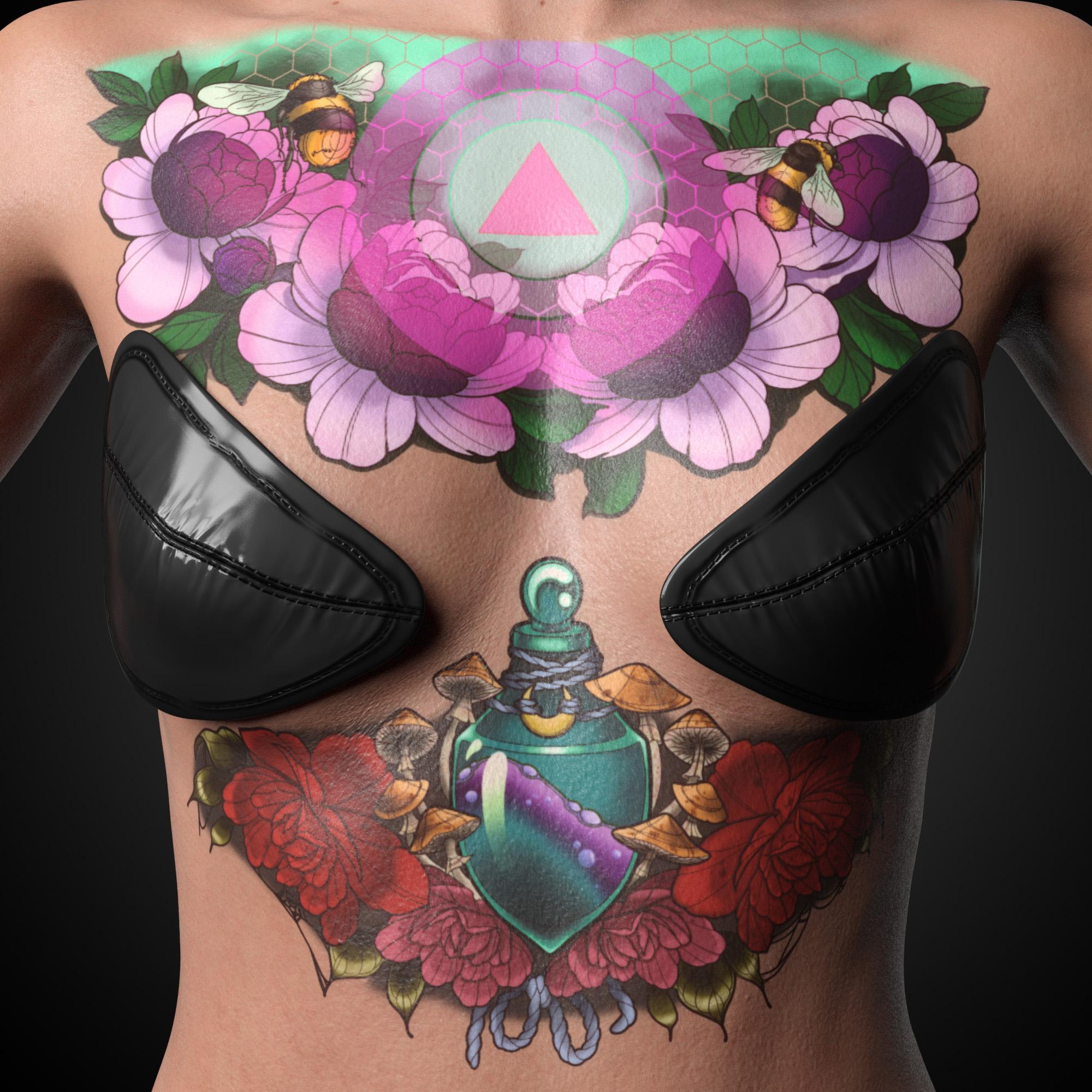
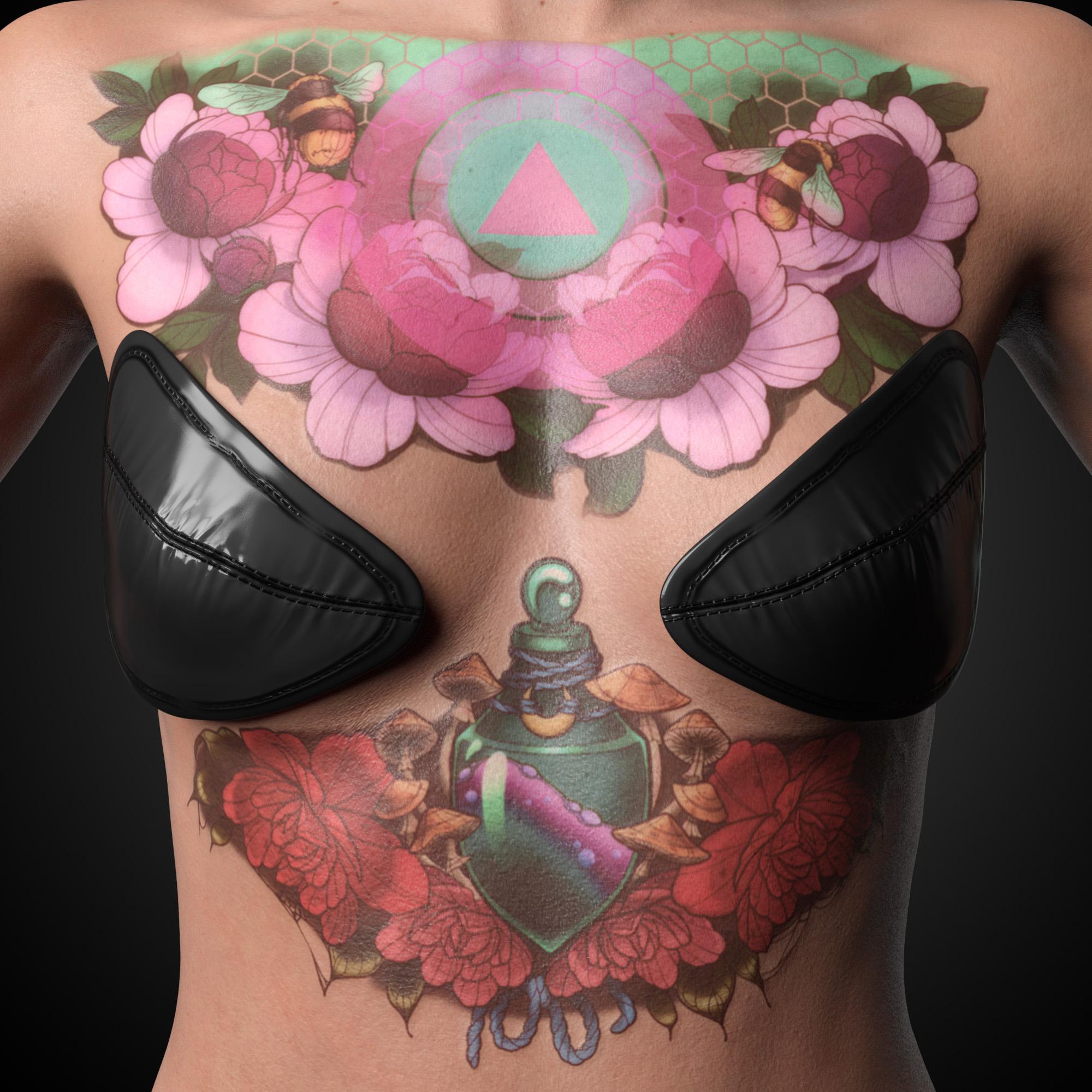
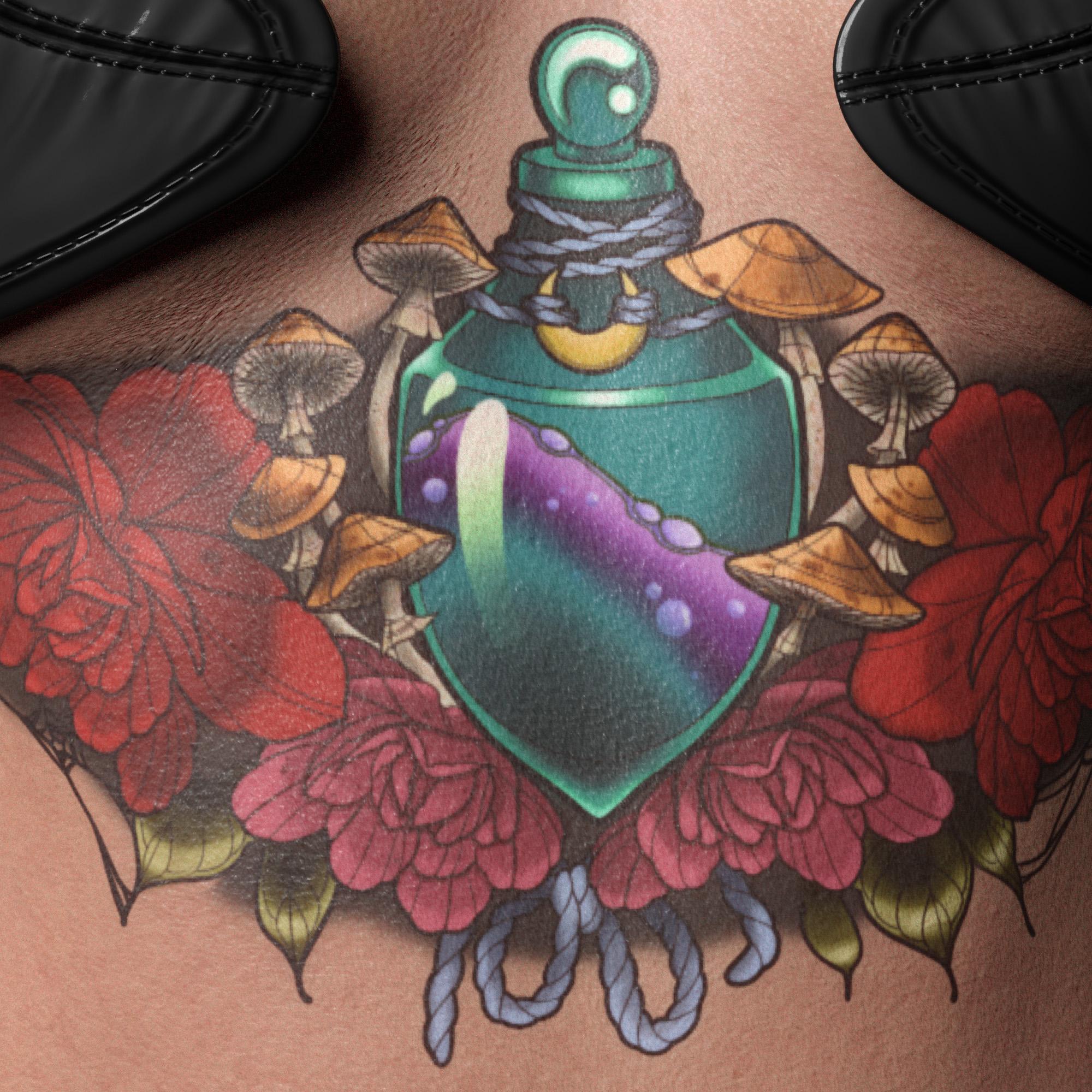
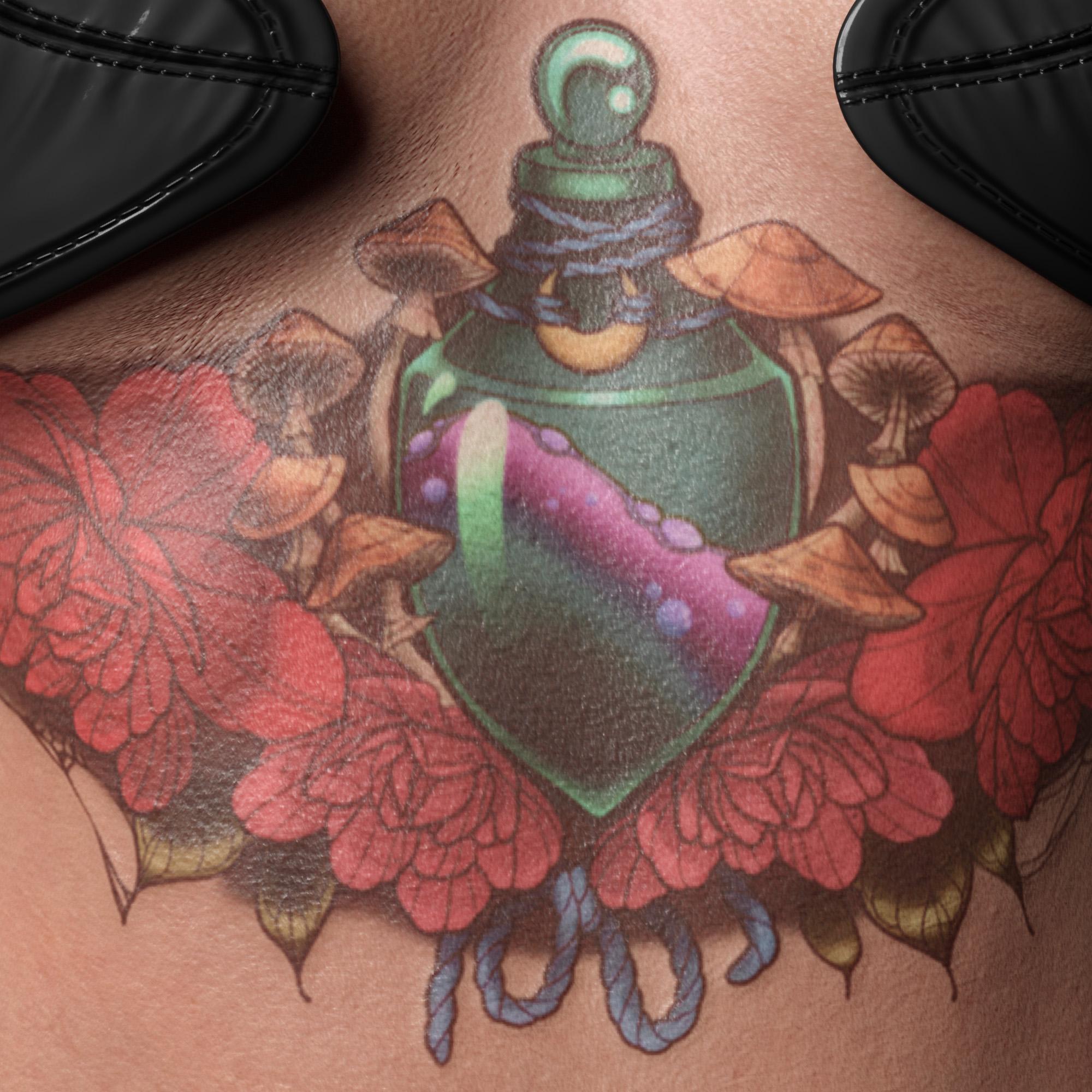
I probably went a bit too far with reducing the colors, but i'm pretty happy otherwise. I've incorporated layered blurring and density variation for the ink under the surface, as well as lightly layered the base skin back over the top to simulate an older tattoo. I then added some of the original skin details back over the top using a highpass filter to break up the solid colors further. A custom normal map gives a slight overall bump with the black outlines being raised higher still, which has been incorportated into the roughness map too. This is because tattoo outlines are usually done with a tight grouping of needles like a pointed paint brush which tends to cause more scar tissue. Large shaded areas are usually done using a wide grouping of needles like a flat paintbrush which allows for smoother blending between colors, and less overall damage to the underlying skin surface.
In general I'm happy with the improvements, and look forward to using it for custom pieces in the future. This process would be much better with access to the original source files to pull the tattoo components apart for individual treatment, but this was just a quick play around.
Because I directly edited the original textures, I cannot share the source files. I had to do this in an image editor instead of using L.I.E, becuase L.I.E is far too slow for multiple layers and doesn't support enough image blending modes to create the same result.
I hope that is something that Daz may improve on in the future.
Cheers,
Daniel
Genesis 8.1 / Victoria 8.1Excited to see the changes that come with 8.1, though I still need to test incorporating it into my character creation workflow.
I was asked by a friend about improving the Victoria 8.1 tattoos though, so I gave it a quick go. Before is first, after is second (view full images to see in more detail):
I probably went a bit too far with reducing the colors, but i'm pretty happy otherwise. I've incorporated layered blurring and density variation for the ink under the surface, as well as lightly layered the base skin back over the top to simulate an older tattoo. I then added some of the original skin details back over the top using a highpass filter to break up the solid colors further. A custom normal map gives a slight overall bump with the black outlines being raised higher still, which has been incorportated into the roughness map too. This is because tattoo outlines are usually done with a tight grouping of needles like a pointed paint brush which tends to cause more scar tissue. Large shaded areas are usually done using a wide grouping of needles like a flat paintbrush which allows for smoother blending between colors, and less overall damage to the underlying skin surface.
In general I'm happy with the improvements, and look forward to using it for custom pieces in the future. This process would be much better with access to the original source files to pull the tattoo components apart for individual treatment, but this was just a quick play around.
Because I directly edited the original textures, I cannot share the source files. I had to do this in an image editor instead of using L.I.E, because L.I.E is far too slow for multiple layers and doesn't support enough image blending modes to create the same result.
I hope that is something that Daz may improve on in the future to allow more complex texture tweaks directly in Daz Studio.
Cheers,
Daniel
Genesis 8.1 / Victoria 8.1The Inner Circle said:
Hi all,
Just trying to get the new process down pat as I have seen a few conflicting ideas.
Victoria 8.1 comes with the pbrshader already applied when she loads or does she still need it applied ?
Victoria 8.1 has the PBR shader already applied. (You can probably convert her skin to the older Iray shader, but it's probably more trouble than it's worth.)
The Inner Circle said:
If I want to load an existing 8.0 asset onto 8.1 then action as follows:
Load 8.1 Genesis 8.1 female base figure.
Apply the shaping for body and head from your desired asset to the 8.1 base.
At this point you apply the materials you want from the desired asset - skin, makeup, eyes etc ?
Then apply the pbr shader - go into the surfaces tab and turn on the options which are disabled - except most people advise against enabling the makeup latyer (unless you are rendering Marcel Marceau ie - it goes all white)
Tweaks may need to be made to the colouring etc but that is about it.
From there you can apply 8.0 or 8.1 clothing hair etc without issues (except for geoshells which have their own workarounds).
Also some expressions etc from 8.0 may or may not work but work arounds have also been discussed in this thread.
Am I basically on the right track or the order broken - if so please advise what works for you.
Any feedback much appreciated as I do like the benefits of 8.1 and would like to take full advantage.
Thanks, David
Yes, Genesis 8.1 is largely the same as Genesis 8 from a compatibility standpoint (including morphs, hair, clothing, etc). You have have issues with Geoshells, but most things apply without issue.
The PBR shader is not really necessary, either. If you like the results from the Iray skin, then don't worry about using the PBR shader. There's extra spots for maps, but unless you start to play with those maps, you're mainly just shifting around what the old Iray shader is doing... for no real extra purpose.
IMO, play with the PBR shader, see if you like it... but I think the best part of 81 is the enhancements to facial expressions. PBR shader is okay, but I'm not convinced that I'll use it... although I am still messing around with it.
Genesis 8.1 / Victoria 8.1lilweep said:
jbowler said:
videoninja719 said:
is the 8.1 pbr shader free or you have to purchase victoria 8.1 for it? is this victoria 8 skin pbr you are using?
It's part of the "Default Resources" product, I think it is this one:
https://www.daz3d.com/downloader/customer/files#prod_16324
You get it when you upgrade to the latest version of the product.
pretty sure 'Default resources' isnt a product ... the update for default resources appears in DIM or wherever else people decide to update from.
That SKU 16324 is for shader product made by a PA.
 Genesis 8.1 / Victoria 8.1
Hi all,
Just trying to get the new process down pat as I have seen a few conflicting ideas.
Victoria 8.1 comes with the pbrshader already applied when she loads or does she still need it applied ?
If I want to load an existing 8.0 asset onto 8.1 then action as follows:
Load 8.1 Genesis 8.1 female base figure.
Apply the shaping for body and head from your desired asset to the 8.1 base.
At this point you apply the materials you want from the desired asset - skin, makeup, eyes etc ?
Then apply the pbr shader - go into the surfaces tab and turn on the options which are disabled - except most people advise against enabling the makeup latyer (unless you are rendering Marcel Marceau ie - it goes all white)
Tweaks may need to be made to the colouring etc but that is about it.
From there you can apply 8.0 or 8.1 clothing hair etc without issues (except for geoshells which have their own workarounds).
Also some expressions etc from 8.0 may or may not work but work arounds have also been discussed in this thread.
Am I basically on the right track or the order broken - if so please advise what works for you.
Any feedback much appreciated as I do like the benefits of 8.1 and would like to take full advantage.
Thanks, David
Genesis 8.1 / Victoria 8.1jbowler said:
videoninja719 said:
is the 8.1 pbr shader free or you have to purchase victoria 8.1 for it? is this victoria 8 skin pbr you are using?
It's part of the "Default Resources" product, I think it is this one:
https://www.daz3d.com/downloader/customer/files#prod_16324
You get it when you upgrade to the latest version of the product.
pretty sure 'Default resources' isnt a product ... the update for default resources appears in DIM or wherever else people decide to update from.
That SKU 16324 is for shader product made by a PA.
Am I remembering wrong?shadowhawk1 said:
hjake said:
Kharma said:
@shadowhawk1 is this the set your looking for by Cayman studios sold at rendo ... this is from the read me description
Legacy UVs for Genesis 3: V4" is a UV Map and Geograft Kit which
enables the use of Victoria 4 textures on Genesis 3 FemaleI own both of these products and they are for using previous generation textures on a later generation figures. I don't remember them allowing the transfer of morphs:
Legacy UVs for Genesis 3: V4 by CaymanStudios
Legacy UVs for Genesis 3: G2F by CaymanStudios
I have one of the legacy UV sets and they are not what I was thinking of, this was an actual morph much like the Gen 4
legacy morphs available for G2
Then I think this is the only "automated" way to do the transfer:
1. https://www.daz3d.com/genesis-generation-x2
The GenX2 plugin includes support for the generation 4 Poser figures (Victoria 4, Michael 4, and Kids 4) as well as for Genesis (version 1). Further figures are supported by add-ons sold separately. To transfer morphs from or to Genesis 2, the GenX2 AddOn for Genesis 2 is required.
2. https://www.daz3d.com/genx2-addon-for-genesis-2
3. https://www.daz3d.com/genx2-addon-for-genesis-3
With both add-ons for Genesis 2 and for Genesis 3, you can transfer morphs in any direction between Genesis, Genesis 2 Male, Genesis 2 Female, Genesis 3 Male, and Genesis 3 Female. It also enables transfer from the generation 4 figures (Victoria 4, Michael 4, and Kids 4) to Genesis 3 Male and Female. Further Poser figures are supported by separate add-ons.
Although, you can always do manual morph transfers.
I am interested if anyone has a better recommendation.
Genesis 8.1 / Victoria 8.1videoninja719 said:
is the 8.1 pbr shader free or you have to purchase victoria 8.1 for it? is this victoria 8 skin pbr you are using?
It's part of the "Default Resources" product, I think it is this one:
https://www.daz3d.com/downloader/customer/files#prod_16324
You get it when you upgrade to the latest version of the product.
Genesis 8.1 / Victoria 8.1Petra said:
videoninja719 said:
Visuimag said:
So, going back to what I said earlier (and as I suspected), my more Zbrush + DAZ oriented projects play much nicer with 8.1's skin. I can finally achieve much of the look that I couldn't with 8 because the skins up close would lose their potency. 8.1's shader does not have this issue.

is the 8.1 pbr shader free or you have to purchase victoria 8.1 for it? is this victoria 8 skin pbr you are using?
You need to update you G8F starter essentials so that you get G8.1 Female and also update your default resources for Daz Studio to get the PBR shader.
Edit: I got your question wrong I think.
Genesis 8.1 / Victoria 8.1videoninja719 said:
Visuimag said:
So, going back to what I said earlier (and as I suspected), my more Zbrush + DAZ oriented projects play much nicer with 8.1's skin. I can finally achieve much of the look that I couldn't with 8 because the skins up close would lose their potency. 8.1's shader does not have this issue.
is the 8.1 pbr shader free or you have to purchase victoria 8.1 for it? is this victoria 8 skin pbr you are using?
You need to update you G8F starter essentials so that you get G8.1 Female and also update your default resources for Daz Studio to get the PBR shader.
Genesis 8.1 / Victoria 8.1videoninja719 said:
Visuimag said:
So, going back to what I said earlier (and as I suspected), my more Zbrush + DAZ oriented projects play much nicer with 8.1's skin. I can finally achieve much of the look that I couldn't with 8 because the skins up close would lose their potency. 8.1's shader does not have this issue.
is the 8.1 pbr shader free or you have to purchase victoria 8.1 for it? is this victoria 8 skin pbr you are using?
Vicky 8.1, but with a little custom work of my own. Also, check the DIM to update the Starter Essentials so you can have the PBR.
Genesis 8.1 / Victoria 8.1Visuimag said:
So, going back to what I said earlier (and as I suspected), my more Zbrush + DAZ oriented projects play much nicer with 8.1's skin. I can finally achieve much of the look that I couldn't with 8 because the skins up close would lose their potency. 8.1's shader does not have this issue.
is the 8.1 pbr shader free or you have to purchase victoria 8.1 for it? is this victoria 8 skin pbr you are using?
Fingerprints on lower body of Victoria 8.1 HD Add onZilvergrafix said:
Anyone knows why is this happen?, I was doing a commision with Victoria 8.1 and my client now is angry due to this issue. meanwhile I can fix using blur in Photoshop or lowering bump and normal maps or any other tricks for not losing my commision the issue is present with this products: Victoria 8.1 HD Add on, Vellus Hair (yep, there is here), was rendered using Headlamp camera only.

The only other place I can think of that might cause something like this is in the Specular Occlusion Enable settings of the new shader. Maybe check that no rogue map has plonked itself in the Ambient Occlusion Weight channel?
Genesis 8.1 / Victoria 8.1felix_nukem said:
I have a question. In the 8.1 page, the new "skin hair" is advertised. Exactly where is this? Even tough I apply PBR Skin shader manually to G8.1 skin, nothing there. Is it enabled somewhere or?
It seems to be a pseudo-product like the anatomical elements; here is the "Description" from the product library page:
This is meant to be distributed with every pro bundle like the anatomical elements are.
Vellus hair page does not go live
It's in the "University" bundle, as that comment implies, but it is also listed as part of the bare Victoria 8.1 product. It consists of "all", "body" and "face" wearables which load specific hairs for "Abdominal" (zip line down the front), "Sacral" (zip line down the back), then on the head "cheeks", "ears", "mouth" and "nose". If it were exactly like the anatomical elements there would be one vellus hair set for G8F, one for G8M and then each skin author will have to provide materials however the vellus hair doesn't have the geograft seam issues of the anatomical elements and the F product does ship with a range of MATs - "default", "more natural" and "whiter".
Fingerprints on lower body of Victoria 8.1 HD Add onThe Blurst of Times said:
Well, I couldn't reproduce this with V8.1 HD, so I couldn't really test a fix myself. I tried a directly facing camera and also slightly askew camera angle... no "fingerprint" pattern.
The Vellus hair doesn't cover the legs, right? So I doubt it's the Vellus hair.
I still think it's the Detail channel due to the repetitive appearance of the defect. I would try turning off the Detail for all of the Skin surfaces to see if that improves the render/removes the pattern. Turning off Normal maps is not ideal, either... but V81 still has the usual Normal maps. The Detail maps are nice to have, but I'm not sure if I really need all the bumps from it, either.
(It is very interesting to look at the Detail Weight maps for Victoria 8.1. I'll be modifying those for my own experiments...)
Ok, thanks for your efforts, and other perspectives related to Detail Channel that I wasn't considered to look
 Fingerprints on lower body of Victoria 8.1 HD Add on
vukiol said:
Zilvergrafix said:
Anyone knows why is this happen?, I was doing a commision with Victoria 8.1 and my client now is angry due to this issue. meanwhile I can fix using blur in Photoshop or lowering bump and normal maps or any other tricks for not losing my commision the issue is present with this products: Victoria 8.1 HD Add on, Vellus Hair (yep, there is here), was rendered using Headlamp camera only.
are you using only headlamp here or there are other light sources?
pffff, nevermind, re-read with brain on
Daz 3D is part of

Connect
DAZ Productions, Inc.
7533 S Center View Ct #4664
West Jordan, UT 84084Licensing Agreement | Terms of Service | Privacy Policy | EULA
© 2026 Daz Productions Inc. All Rights Reserved.