-
Michael 8.1
The character is alright but now without the banners I'm looking at the price of the bundles and am shaking my head, no way. I was alright paying like 46 bucks for pro bundles before, usually under sixty with the three add-ons, but this and the Victoria ones were in the mid to high 80's for everything, and these bundles that are very focused I'm finding very little that I can use or kitbash together so the price is just too much for two or three items I want.
Side note/question. Does anyone else's Daz crash when they have the FAC rig attached and they move the character away from the zero position on the grid? This isn't a 8.1 issue either, it was crashing with the FAC attachment they released for G8 a couple months ago, but I was so saddened when it happened the other day when I had Victoria 8.1 loaded in for my scene and I moved her around. Nothing happens if you don't move the character away from it's starting spot, but every time I move the character it doesn't last.
Michael 8.1vwrangler said:
A puzzling thing: according to his product page, Michael 8.1 includes 3Delight settings, and Victoria didn't. He also includes an add-on character in his first bundle, and Victoria didn't include a character in either of her bundles.
Beyond that, he's MUCH younger looking than Michael 8, and not nearly as lantern-jawed.
Mostly, I just kind of want Trance, though.
Where does it say there are 3DL settings. I looked and didn't see any.
Michael 8.1Barubary said:
Leana said:
Wicked Whomp said:
Leana said:
Barubary said:
I wonder, are the Male and Female Anatomical Elements in the Varsity Bundle the same that are in the Victoria 8.1 Bundles? Or are they the specific versions for only Genesis 8.1 Male?
Geografts are figure-specific, so they would be the version for G8M.
The Genesis 8.1 page that lists the updates specifically mentions that male anatomical elements will now work on females. Conversely, female anatomical elements will work on males.
If this isn't actually the case, then Daz needs to update their page.I read that blurb as "there's now a version of the male elements which works on the female", not "the add-on made for G8M works for G8F too".
I just redownloaded the anatomical elements to check and each of the zips now includes 2 items :
- The G8F Anatomical elements zip includes "Genesis 8 Female Genitalia" and "Genesis 8.1 Female Genitalia for Male"
- The G8M one includes "Genesis 8 Male Genitalia" and "Genesis 8.1 Male Genitalia for Female".
Items for male and female are separate, they're probably made so that the UVs are the same and they can use the same morphs though.
Thanks a lot for checking! That is disappointing, even though it isn't surprising ^^; Though I guess, as an owner of some of the older Pro Bundles, I'm good anyways. Kind of a relief as I am not into the new bundle (except for the wheelchair stuff).
Well they would have had to change how geografts work to get the same one to work on both figures, so that would have meant a DS update too.
I can confirm that you'll get the new anatomical elements as an update for the ones you got from past pro bundles, not only from the 8.1 bundles, as I didn't purchase the new bundles.
Michael 8.1Leana said:
Wicked Whomp said:
Leana said:
Barubary said:
I wonder, are the Male and Female Anatomical Elements in the Varsity Bundle the same that are in the Victoria 8.1 Bundles? Or are they the specific versions for only Genesis 8.1 Male?
Geografts are figure-specific, so they would be the version for G8M.
The Genesis 8.1 page that lists the updates specifically mentions that male anatomical elements will now work on females. Conversely, female anatomical elements will work on males.
If this isn't actually the case, then Daz needs to update their page.I read that blurb as "there's now a version of the male elements which works on the female", not "the add-on made for G8M works for G8F too".
I just redownloaded the anatomical elements to check and each of the zips now includes 2 items :
- The G8F Anatomical elements zip includes "Genesis 8 Female Genitalia" and "Genesis 8.1 Female Genitalia for Male"
- The G8M one includes "Genesis 8 Male Genitalia" and "Genesis 8.1 Male Genitalia for Female".
Items for male and female are separate, they're probably made so that the UVs are the same and they can use the same morphs though.
Thanks a lot for checking! That is disappointing, even though it isn't surprising ^^; Though I guess, as an owner of some of the older Pro Bundles, I'm good anyways. Kind of a relief as I am not into the new bundle (except for the wheelchair stuff).
-----
I have to say, every render in this thread so far has the official promos beat (although the body hair still makes me chuckle when I see it). Not sure what went wrong there.
Also - and please correct me if I'm wrong - we can now celebrate having twice as many Genesis 8.1 Male characters as we have Genesis 8.1 Female ones. What a special day.
Skin Detail Resource 1 What does this do?NylonGirl said:
So if I were to start with Victoria 8.1, apply a material preset from a Victoria 8 character, and then click on one of the presets from Skin Detail Resource 1, would that work or not work?
i mean you dont have to do it in that order, but yes.
It's a material preset, so if you click your G8.1 character with the appropriate skin shader, it will apply the details to the relevant surfaces.
You can use the material on G8M and G8F too, but it wont work on G8 torso surface because the surface name for G8.1 torso changed to 'body' instead of 'torso'. So you would have to manually add it to that G8 surface.
Step-by-Step: Using the new PBR Skin on Genesis 8Tugpsx said:
@melissastjames Thanks with a little adjustment the skin looks a bit better. Will have to adjust the sheen since it looks a bit dry.
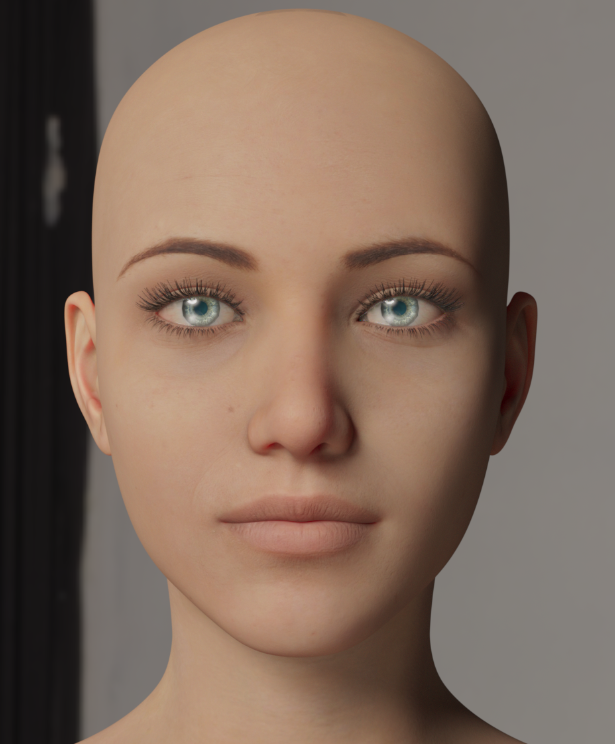
Yes, you might need to tweak around with all of the settings, as mine are dependent upon the maps I'm using. So your specularity (shine) map might be lighter in color, thus needing a lighter touch on the dual-lobe settings. Same goes for bump, etc.
I would honestly recommend trying to play around with something other than the base G8F skin. Like try maybe Babina 8 or any of the newer base figures. I do most of my work with playing around with the base figure skins because those are typically the highest quality in terms of detail. You need to consider good specular and bump maps as well, and they typically provide that (there are a lot of PA skins that while providing good color maps, might not have very good specular and/or bump maps). I've even improved some PA skins by swapping in a specular map from one of the base figures (I love Victoria 7's specular maps so much I use them a lot mixed in with other skins). Raiya is another one that typically has good skins you can play around with starting with my recommended settings.Genesis 8.1 / Victoria 8.1My first render of Victoria 8.1 HD with the vellus hair. I hope, that next characters of Genesis 8.1 series will be more user friendly
and will look better with different light setups.
 Skin Detail Resource 1 What does this do?
So if I were to start with Victoria 8.1, apply a material preset from a Victoria 8 character, and then click on one of the presets from Skin Detail Resource 1, would that work or not work?
Genesis/Michael 8.1 Out and they are Great!Yea Jethal, the seam being around the neck can be an issue, for those cases Gen 8 will have to do.
Thanks for posting your work here. :)
Michael and Gen 8.1 gives us a high quality character when needed.
I am glad that most other stuff works still, I plan to use Michael 8.1 for most scenes.
Please post your Michael 8.1 and Genesis 8.1 scenes here Daz peeps!
Victoria 8.1 is welcome too! :)
Michael 8.1I am not one for male characters as I prefer to make female ones. I will say that I like the new Michael 8.1 though. His look is MUCH better than Michael 8, and the only reason why I picked up the latter was because he was needed as a prerequisite for other characters and I picked him up for free. So far I am liking the look of these new 8.1 characters as I also like Victoria 8.1 BUT, I am a bit partial to Vicky 8 and still like her more.
Genesis 8.1 / Victoria 8.1InTheFlesh said:
Excited to see the changes that come with 8.1, though I still need to test incorporating it into my character creation workflow.
I was asked by a friend about improving the Victoria 8.1 tattoos though, so I gave it a quick go. Before is first, after is second (view full images to see in more detail):
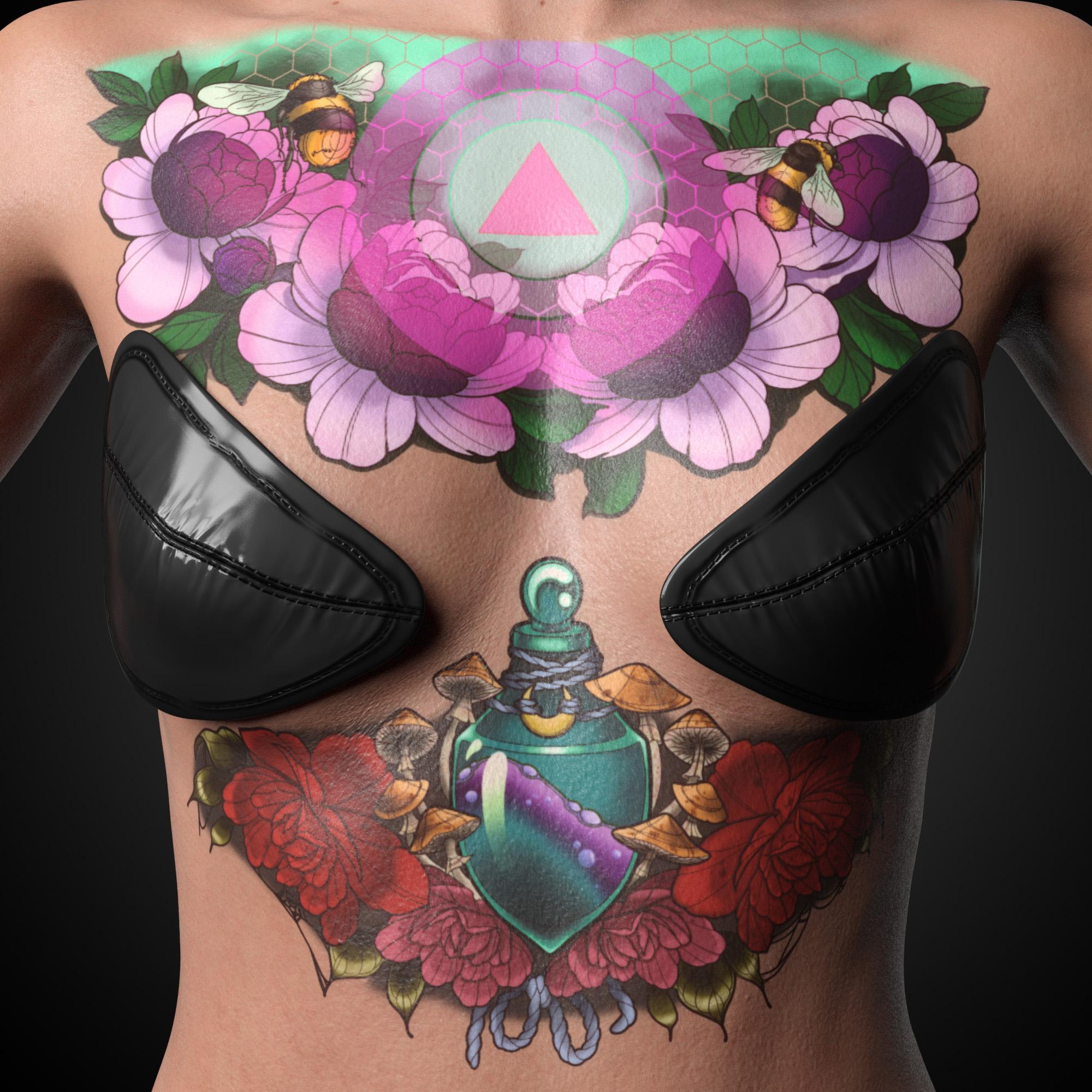
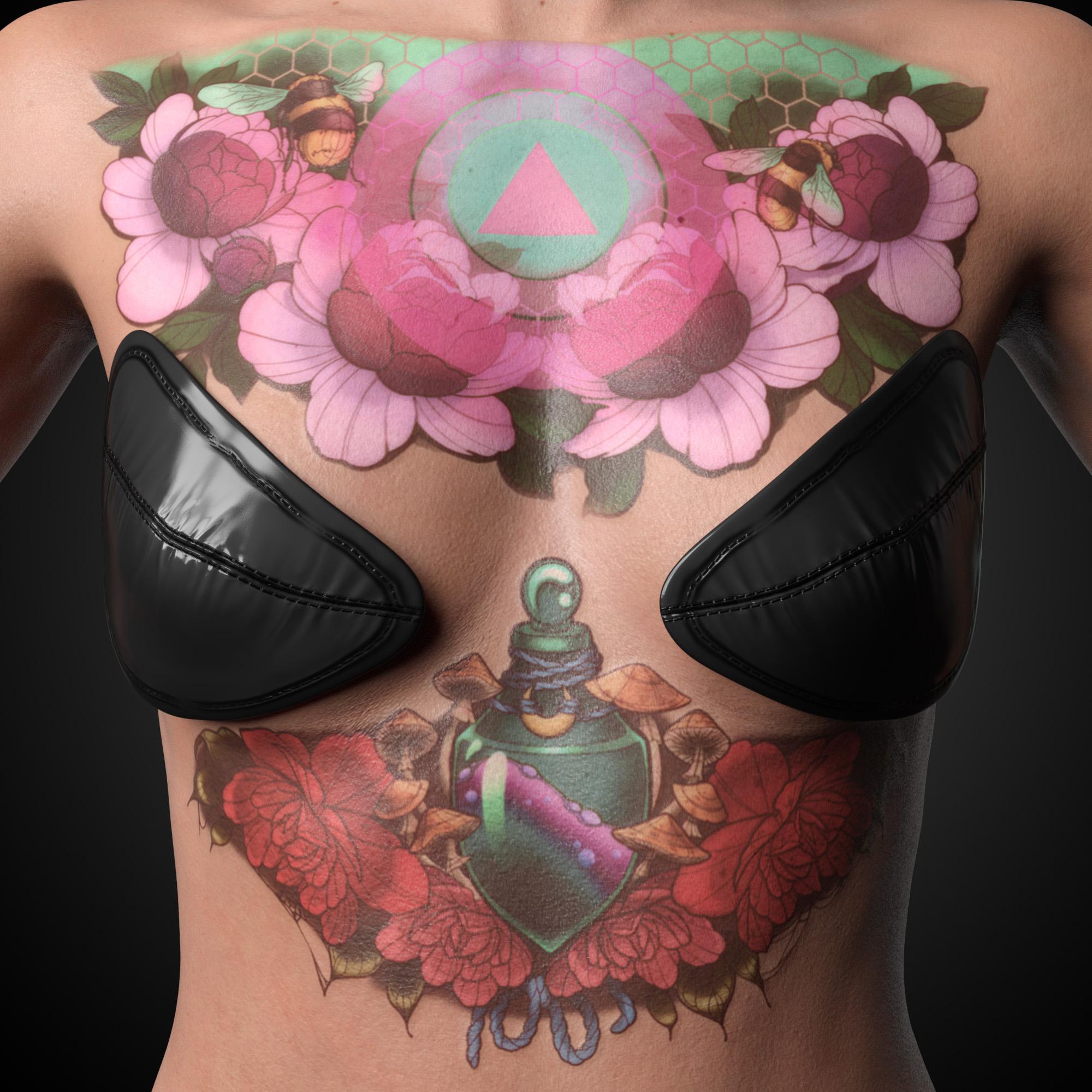
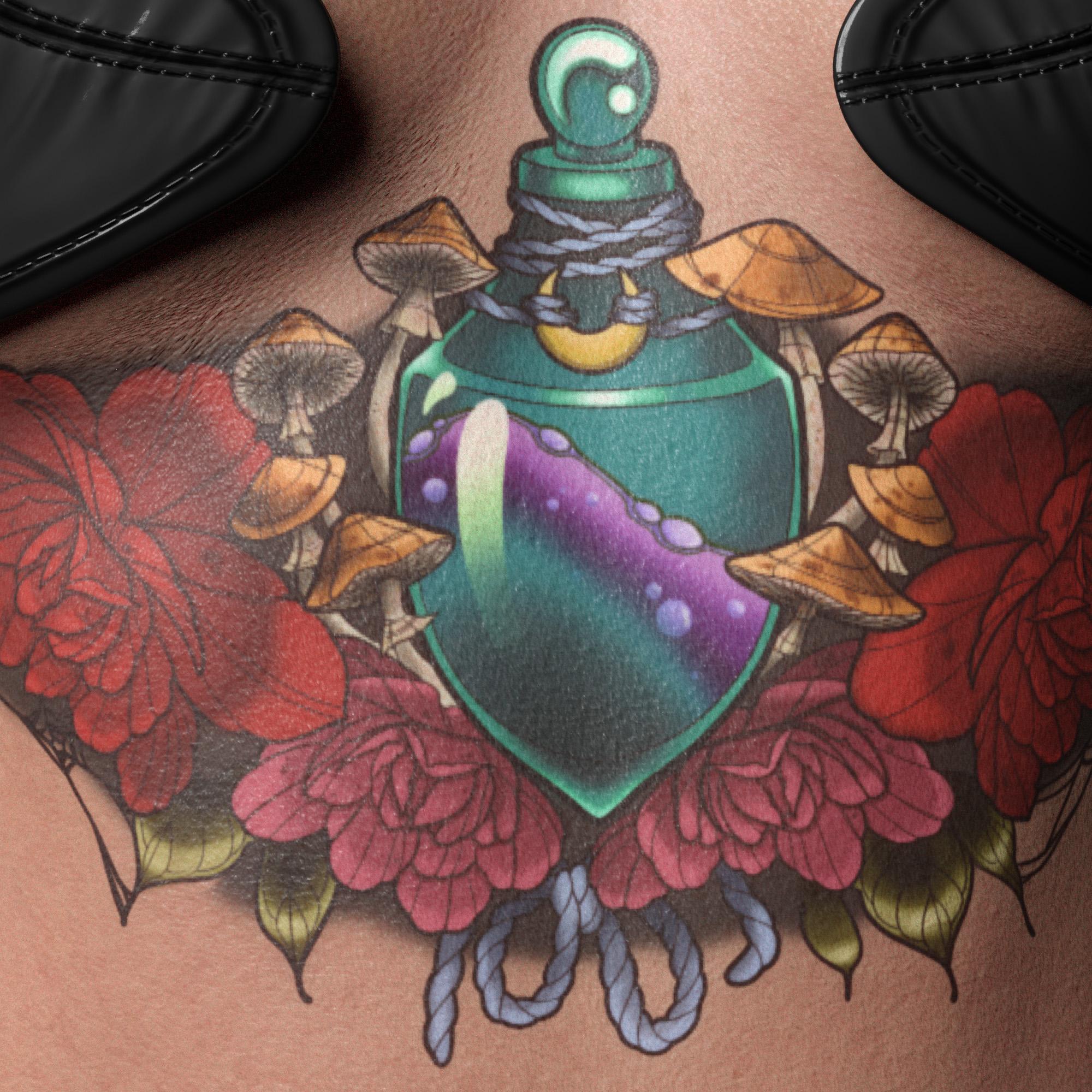
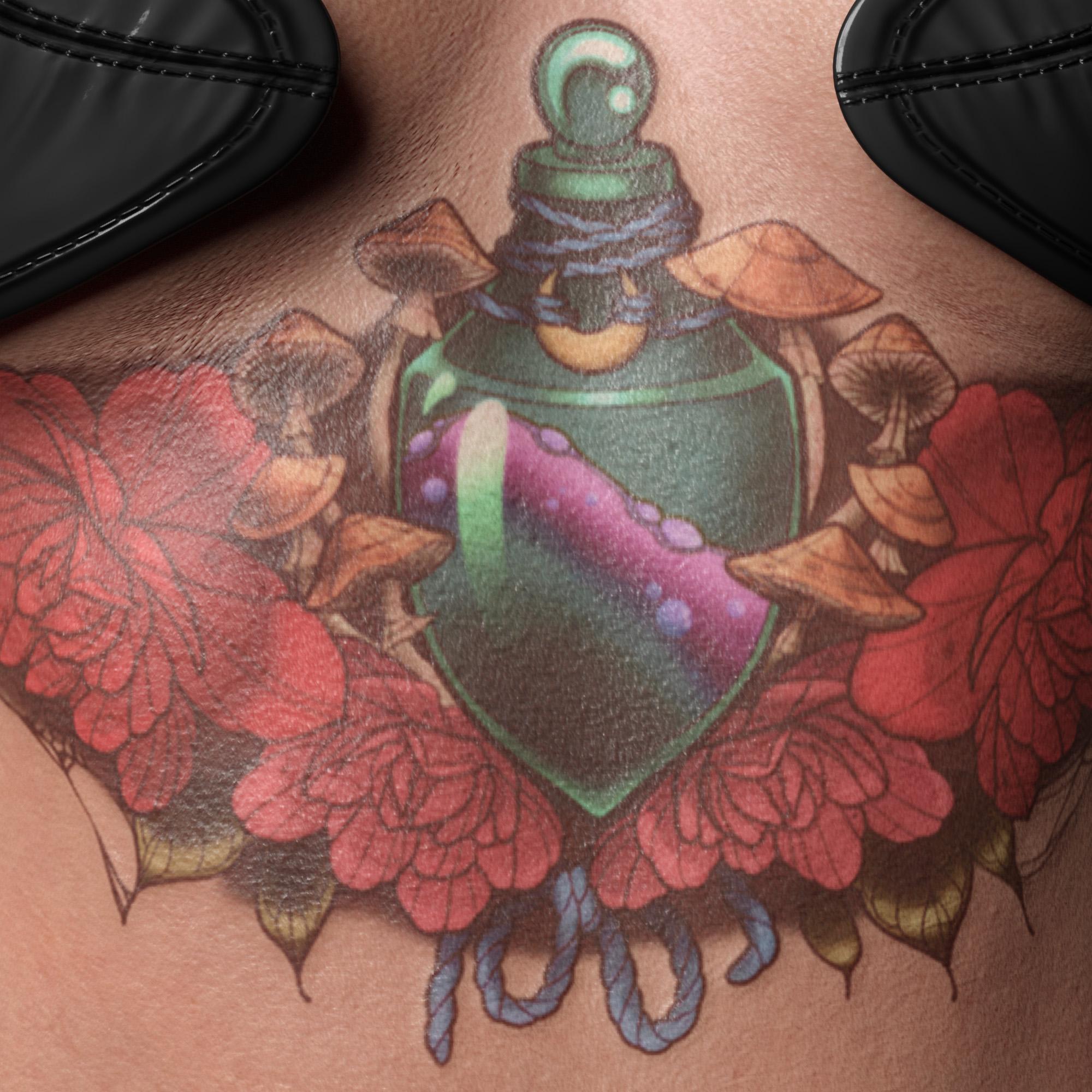
I probably went a bit too far with reducing the colors, but i'm pretty happy otherwise. I've incorporated layered blurring and density variation for the ink under the surface, as well as lightly layered the base skin back over the top to simulate an older tattoo. I then added some of the original skin details back over the top using a highpass filter to break up the solid colors further. A custom normal map gives a slight overall bump with the black outlines being raised higher still, which has been incorportated into the roughness map too. This is because tattoo outlines are usually done with a tight grouping of needles like a pointed paint brush which tends to cause more scar tissue. Large shaded areas are usually done using a wide grouping of needles like a flat paintbrush which allows for smoother blending between colors, and less overall damage to the underlying skin surface.
In general I'm happy with the improvements, and look forward to using it for custom pieces in the future. This process would be much better with access to the original source files to pull the tattoo components apart for individual treatment, but this was just a quick play around.
Because I directly edited the original textures, I cannot share the source files. I had to do this in an image editor instead of using L.I.E, because L.I.E is far too slow for multiple layers and doesn't support enough image blending modes to create the same result.
I hope that is something that Daz may improve on in the future to allow more complex texture tweaks directly in Daz Studio.
Cheers,
Daniel
That is so much better then the original. Actually DAZ should ask you for your altered textures to provide an update. It's probably too much to ask but once you might have done this in Photoshop, would it be possible to share the PSD without the original textures so one who owns the figure can just place them on the correct layers to get similar results by using the blending modes you've applied?
Fun spotting DAZ productsSaffron for Victoria 7 and the bundle that she came with.
https://www.daz3d.com/fwsa-saffron-hd-for-victoria-7
https://www.amazon.com/gp/product/B075V56SLW?ref_=dbs_p_mng_rwt_ser_shvlr&storeType=ebooks
Michael 8.1Honestly I think Michael 8.1 looks more like a high schooler than a university student. He looks extremely young... maybe even too young to have a genital prop included in his bundle, LOL. But nobody cares about that since he is a boy. All this talk about more realistic skin...Daz you can't just claim it, you have to show it. These promos fail to show it. And like I said with Victoria 8.1, these claims of improved skin are not exclusive to 8.1. They are merely textures. Textures that can be used on any model. The singular improvement with 8.1 is the new face rigging.Genesis 8.1 / Victoria 8.1InTheFlesh said:
Excited to see the changes that come with 8.1, though I still need to test incorporating it into my character creation workflow.
I was asked by a friend about improving the Victoria 8.1 tattoos though, so I gave it a quick go. Before is first, after is second (view full images to see in more detail):
I probably went a bit too far with reducing the colors, but i'm pretty happy otherwise. I've incorporated layered blurring and density variation for the ink under the surface, as well as lightly layered the base skin back over the top to simulate an older tattoo. I then added some of the original skin details back over the top using a highpass filter to break up the solid colors further. A custom normal map gives a slight overall bump with the black outlines being raised higher still, which has been incorportated into the roughness map too. This is because tattoo outlines are usually done with a tight grouping of needles like a pointed paint brush which tends to cause more scar tissue. Large shaded areas are usually done using a wide grouping of needles like a flat paintbrush which allows for smoother blending between colors, and less overall damage to the underlying skin surface.
In general I'm happy with the improvements, and look forward to using it for custom pieces in the future. This process would be much better with access to the original source files to pull the tattoo components apart for individual treatment, but this was just a quick play around.
Because I directly edited the original textures, I cannot share the source files. I had to do this in an image editor instead of using L.I.E, because L.I.E is far too slow for multiple layers and doesn't support enough image blending modes to create the same result.
I hope that is something that Daz may improve on in the future to allow more complex texture tweaks directly in Daz Studio.
Cheers,
Daniel
Much better! I always have to shake my head when I see so many sticker tattoos. I look down at the tattoo I've had on the inside of my wrist for 10+ years and then at the sticker-like finish on the screen and just *sighs all around*
Day One for me was a shiny sticker. A very itchy shiny sticker. But that doesn't last long at all.Tattoos will always lose their sharpness and brightness over time, even well cared for tattoos. That's because skin heals. The ink stays there, but the skin still heals around it, thus effecting the edging and overal density of the tattoo. How much the tattoo changes over time depends on the individual's skin composition, the location of the tattoo, and the overall care. Many folks find themselves having to get pieces touched up eventually (thankfully I haven't yet). UV exposure only makes things worse which is why every tattoo artist will tell folks to keep their ink out of the sun!
Genesis 8.1 / Victoria 8.1Everyone can pick up a camera and make snapshots, but the pro's still blow any amateur out of the water. The classical skills of composition, light, framing, conveying mood, etc. etc. are creative endeavours, and as Bob Ross said "a pursuit interest"
Daz Studio is a lovely sandbox where you can endlessly tweak and learn how it comes together. I have no doubt Victoria 8.1 / G8.1F is gonna help deliver great portraits. It also seems a move designed to fall more in line with other pipelines (especially FACS for animation, dedicated head UV for close-ups, and a PBR shader to work better with the PBR system of shading)
Genesis 8.1 / Victoria 8.1Ippotamus said:
Interested in the eyes for sure.
But I doubt this update is going to change the fact that a skilled 3D Artist can make Aiko 3 jump off the screen to life.
While an everyday hack like myself will be able to make Victoria 8.1 look like a lump of high gloss plastic with something resembling a face.
Well, glad to see some people recognize hype. Most people buy upgrades because they think it will allow them to skip developing skills and make them a pro. In some cases in technology that happens, but in most cases you can still differentiate the people who know what their doing with the tools from people who are running on automatic. I'm still seeing people who make Genesis 4.2 characters look as good as the current models.
I'll give the 8.1 a shot, but I still understand that getting the most out of it still requires you to really learn the software, and the other 3D tools out there.Genesis 8.1 Arm Hair?I bought Victoria 8.1, too. And I have all the hair except for arm hair. Probably it's just Daz's typical sloppy ad copy.
Michael 8.1Wicked Whomp said:
Leana said:
Barubary said:
I wonder, are the Male and Female Anatomical Elements in the Varsity Bundle the same that are in the Victoria 8.1 Bundles? Or are they the specific versions for only Genesis 8.1 Male?
Geografts are figure-specific, so they would be the version for G8M.
The Genesis 8.1 page that lists the updates specifically mentions that male anatomical elements will now work on females. Conversely, female anatomical elements will work on males.
If this isn't actually the case, then Daz needs to update their page.I read that blurb as "there's now a version of the male elements which works on the female", not "the add-on made for G8M works for G8F too".
I just redownloaded the anatomical elements to check and each of the zips now includes 2 items :
- The G8F Anatomical elements zip includes "Genesis 8 Female Genitalia" and "Genesis 8.1 Female Genitalia for Male"
- The G8M one includes "Genesis 8 Male Genitalia" and "Genesis 8.1 Male Genitalia for Female".
Items for male and female are separate, they're probably made so that the UVs are the same and they can use the same morphs though.
Michael 8.1Leana said:
Barubary said:
I wonder, are the Male and Female Anatomical Elements in the Varsity Bundle the same that are in the Victoria 8.1 Bundles? Or are they the specific versions for only Genesis 8.1 Male?
Geografts are figure-specific, so they would be the version for G8M.
The Genesis 8.1 page that lists the updates specifically mentions that male anatomical elements will now work on females. Conversely, female anatomical elements will work on males.
If this isn't actually the case, then Daz needs to update their page.
I just checked. I own the Aiko 8 pro bundle, but the anatomical geografts now works on Genesis 8 males (including the 8.1 base male), though without any materials (as far as I can see).Michael 8.1Barubary said:
I wonder, are the Male and Female Anatomical Elements in the Varsity Bundle the same that are in the Victoria 8.1 Bundles? Or are they the specific versions for only Genesis 8.1 Male?
Geografts are figure-specific, so they would be the version for G8M.
Daz 3D is part of

Connect
DAZ Productions, Inc.
7533 S Center View Ct #4664
West Jordan, UT 84084Licensing Agreement | Terms of Service | Privacy Policy | EULA
© 2026 Daz Productions Inc. All Rights Reserved.