-
Dforce Fur/Classic Cape
dragoneyes002 said:
Richard Haseltine said:
Which version of Daz Studio is this? I suspect it's too old to support dForce hair.
That Cubit look happens all the time when textures are missing. the same thing happened with Victoria 8.1 on launch day when DAZ had not rolled out the new starter essential update (unless you happen to use central)
the cape is in the scene the fur colar doesn't have the Material its always possible the version is old but do old versions not load materials and textures even if they can't run D-Force?
to the OP when you loaded the Cape onto the character did you get a pop up window warning you of missing files? or did it just load to the way you screen shot?
Missing textures won't do that, missing geometry will - if the DS version is too old for dForce hair it won't know what to do with the instructions to draw the strands, which will have the same net result as not being able to find the geometry.
Dforce Fur/Classic CapeRichard Haseltine said:
Which version of Daz Studio is this? I suspect it's too old to support dForce hair.
That Cubit look happens all the time when textures are missing. the same thing happened with Victoria 8.1 on launch day when DAZ had not rolled out the new starter essential update (unless you happen to use central)
the cape is in the scene the fur colar doesn't have the Material its always possible the version is old but do old versions not load materials and textures even if they can't run D-Force?
to the OP when you loaded the Cape onto the character did you get a pop up window warning you of missing files? or did it just load to the way you screen shot?
NEW 2021 Sales thread: Report Issues Here "There's Always Another Sale™"The Outdoor Pool and Poses are not getting the triggered extra discounts for buying 2+ Mad items. I tried a couple of sample carts. Still only showing 30% off in cart. Here is an example.
https://www.daz3d.com/outdoor-pool-and-poses-for-victoria-8-and-michael-8
Babydoll 5576 errorOkay, back up a step. If you are using DIM to download and install, don't worry about Connect. You won't need to log in to your account in Studio to get everything you need from DIM. Logging in through Studio will enable Connect-based functions, but you don't need them.
In DIM, you can find products in your account using SKU::nnnnn in the filter box. If your Product Library on the DAZ site shows that you have Babydoll (SKU::5576), it should show in one of the tabs in DIM. If it does not show, then there is a problem. If it is installed, you can find the product with a right-click on the entry in the Installed tab and select Show Installed Files...
This particluar product will be found in Content Library:
Poser Formats -> [yourLibraryName] -> Figures -> DAZ's Victoria 4 Clothing -> Babydoll
Poser Formats -> [yourLibraryName] -> Pose -> MAT BabyDollDynamic Classics - OptiTex???? Does this work as advertised?https://www.daz3d.com/dynamic-classics-for-victoria-7-genesis-3-female-s
"Dynamic Clothing flows with your character's shape in a more natural way. With conforming clothes, even when the creator has included several morphs created using other software's dynamic engines there will be a pose these pre-packaged morphs can't hit in a natural way. Particularly difficult fits are extreme poses or shapes, where animated draping is recommended. Nothing fits more natural than Dynamic Clothing where they flow around your Figure creating exciting visual details with wrinkles and folds that dynamically change depending on your pose - enhancing realism in your renders."
Anyone know about this? It sounds familiar, but I don't remember this being around.
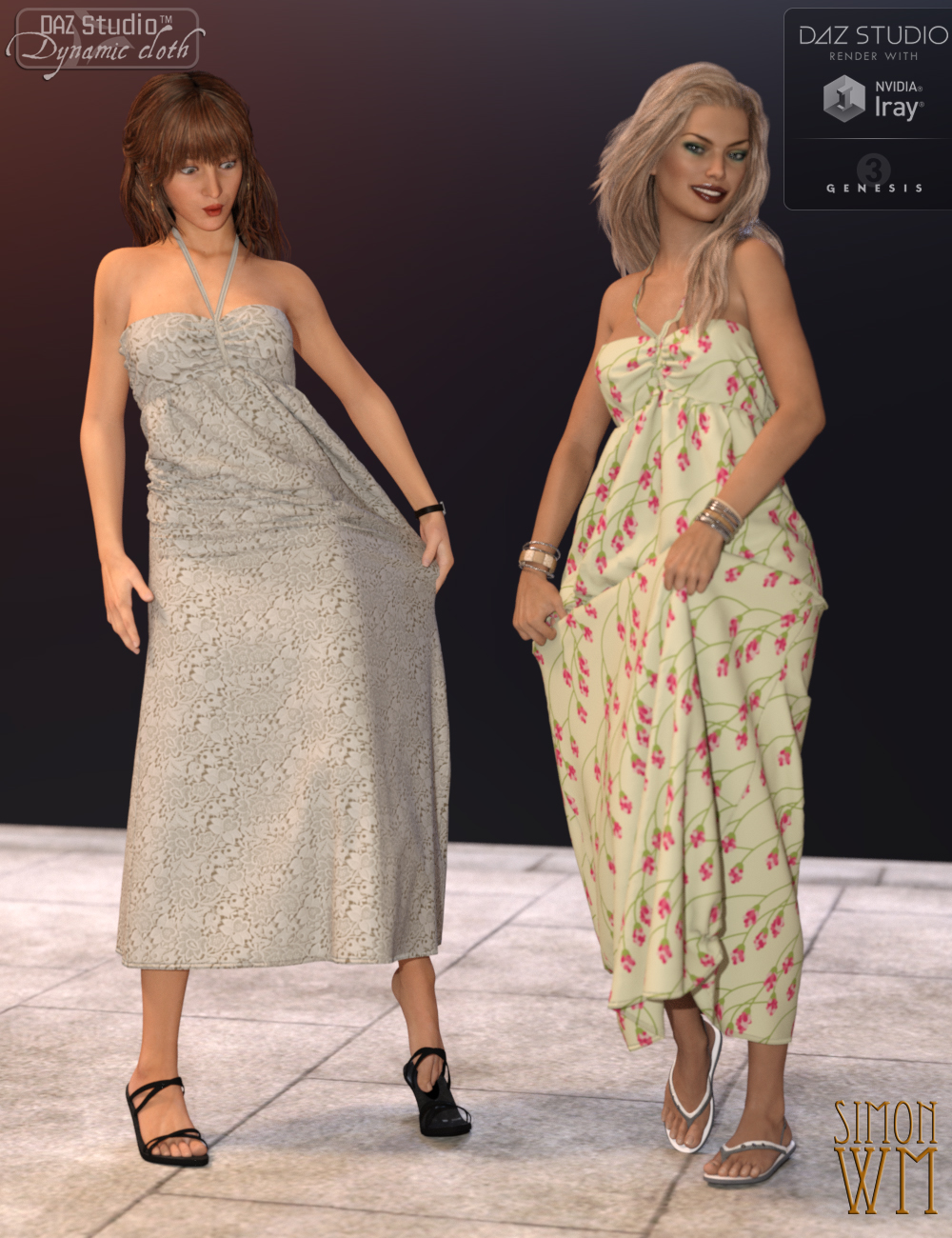
This looks too good to be true...or maybe too simple to use ....
Ultimate Iray Skin Manager [Commercial]V3Digitimes said:
---> The update allowing to use "Ultimate Iray Skin Manager" on Genesis 8.1 figures using Iray Uber as their shader (such as when you apply a Genesis 8 Iray Uber material on it for instance) is now live for a few days.
---> For the ones who wanted an equivalent tool for PBR Skins, this was developped, submitted, and tested by Daz. So far, so good. It is called "Ultimate PBRSkin Manager", is also compatible with any generation of figure from Genesis (and victoria 4) to Genesis 8.1 and there will be within the next few days a specific thread concerning Ultimate PBRSkin Manager, in order not to mix everything.
Will be an instabuy!
Ultimate Iray Skin Manager [Commercial]---> The update allowing to use "Ultimate Iray Skin Manager" on Genesis 8.1 figures using Iray Uber as their shader (such as when you apply a Genesis 8 Iray Uber material on it for instance) is now live for a few days.
---> For the ones who wanted an equivalent tool for PBR Skins, this was developped, submitted, and tested by Daz. So far, so good. It is called "Ultimate PBRSkin Manager", is also compatible with any generation of figure from Genesis (and victoria 4) to Genesis 8.1 and there will be within the next few days a specific thread concerning Ultimate PBRSkin Manager, in order not to mix everything.
Eyes Open Close Michael 8.1Weird thing is, at some point, they updated the expressions for Michael/Genesis Base Male 8.1 to create versions of the 8.0 expression sliders. That hasn't happened for Victoria, which is truly odd; the guys never get major improvements before she does.
It did not, however, restore Eyes Closed or the other Pose Controls for the head, just the Expressions sliders.
E.V.E Enhanced Virtual Entity Hd For Genesis 8 Female Glitch? --- FIXEDHas anyone noticed anything weird happening with all other G8F characters? I installed E.V.E Enhanced Virtual Entity Hd For Genesis 8 Female yesterday and today all my G8F characters are coming in sort of distorted. Their faces, especially around the mouth and eyes, and a sort of bulgy head is happening on all of them since E.V.E. was installed. I've had this happen in the past. I remember installing a male character a couple of years ago who caused all of my male characters to come in all bulked up like the Incredible Hulk. They somehow fixed this. But I'm wondering if anyone else who installed E.V.E. is seeing this happen. Am I just seeing them strangely, or should I put in a ticket?
I've attached images of Victoria 8, Leisa 8, and Bridget 8. They just look weird to me. There's a square bulge under the mouth that wasn't there before. The eyes seem sort of skewed, and the heads seem too large and bulgy. Did the new E.V.E. character cause this? They didn't look like this before I installed her.
V4 for Genesis 8 Female?There is no product that I am aware of that gives you V4 shape onto G8F, however you can transfer it yourself using some of the tools available here.
To move the morph to G3F you need Generation X Version 2 and the Genesis 2 and 3 add ons. There are a couple of products available to transfer the G3F morph to G8F, I used XTransfer (https://www.daz3d.com/xtransfer--genesis-3-to-genesis-8-converter);
To use V4 skins on G8F you need this product: https://www.daz3d.com/legacy-uvs-for-genesis-8-victoria-4
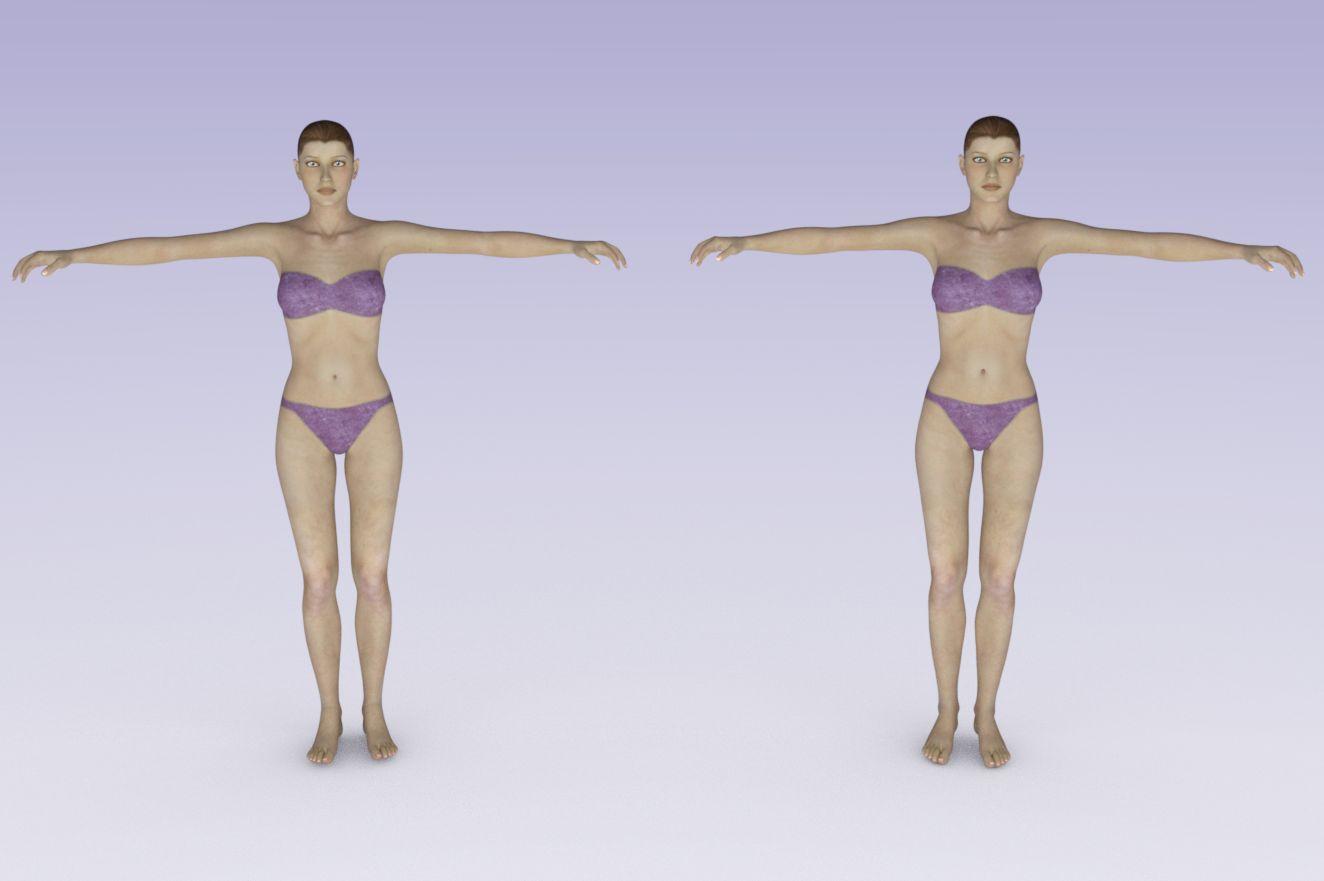
Below is the result. I posed G8F into the default V4 pose. G8F on the left, V4 on the right. Very similar, but not identical.
 What Model From Thorns and Petals?
Yes, they are both Victoria 8.1 with Sefora textures. :)
Bluejaunte appreciationHonestly I don't see how 8.1 can improve the quality of these characters alone. Bluejaunte's gloss maps already provide the effect that the PBR Skin shader strives to do. The PBR Skin simply tiles these maps, which I think is not really the best way to go anyway. Tiling can do nice things and we have seen it with Victoria 8.1, but I believe that comes at the expense of the custom gloss maps which have an entire skin pattern on them. The new neck texture isn't a big deal either because many of bluejaunte's torso maps are already 8K in size. So the pixel density has been higher for a long time in his characters. I rather think that 8K+ textures are needed for these specific kinds of maps.
The main things that can be done for bluejaunte characters IMO would be better teeth. I think they are still just too perfect and white, and this stands out when contrasted with their imperfect skin. They need a bit of detail in them. I think the new 8.1 tear is pretty neat, as it can be used to blend in the lacrimal better than before. But like I also said this tear is super easy to convert to Genesis 8.0, barely an inconvenience. It took me like 60 seconds to do, at most, and I am slow. You just change the Scene ID on the 8.1 tear to 8.0, give it a funky name, and save it is a new prop for 8.0. Done. No high level Blender skills nor ninja magic required. And then there are the smiles, which bluejaunte creates custom HD morphs to do, so the rigging isn't even an issue. So I can't really think of anything that specifically makes 8.1 better. Most of the new features are simply new features of Daz Studio and Iray itself.
I do hope that whatever character is made has both the full classic 8.0 torso map, along with the neck texture. Then people can easily use the skin on 8.0 if they desire.
Carrara Sale Email Message Alert threadSteve K said:
I'm not a PC member, only seeing the clothes for $2.99, the bundle and character are full price. Still a good buy.
https://www.daz3d.com/tres-chic-for-victoria-4-elite-and-aiko-4
Ah yes sorry I should add the $1.99 is a pc member price. It's been a good month for pc members so far.
Carrara Sale Email Message Alert threadI'm not a PC member, only seeing the clothes for $2.99, the bundle and character are full price. Still a good buy.
https://www.daz3d.com/tres-chic-for-victoria-4-elite-and-aiko-4
A Li'l Side Render Fun #2022 - Tuesday is Soylent Green Day editionBunyip02 said:
Stezza said:
Great reading and images by all..
im on my iPad and have no pc access whilst on my dystopian road trip to Victoria.. but enjoying catching up on all the posts.

Look out for those Dystopian Traffic Cops !!
and if you are catching the posts you are fatigued and you better have a bullbar
A Li'l Side Render Fun #2022 - Tuesday is Soylent Green Day editionStezza said:
Great reading and images by all..
im on my iPad and have no pc access whilst on my dystopian road trip to Victoria.. but enjoying catching up on all the posts.
Look out for those Dystopian Traffic Cops !!
A Li'l Side Render Fun #2022 - Tuesday is Soylent Green Day editionGreat reading and images by all..
im on my iPad and have no pc access whilst on my dystopian road trip to Victoria.. but enjoying catching up on all the posts.
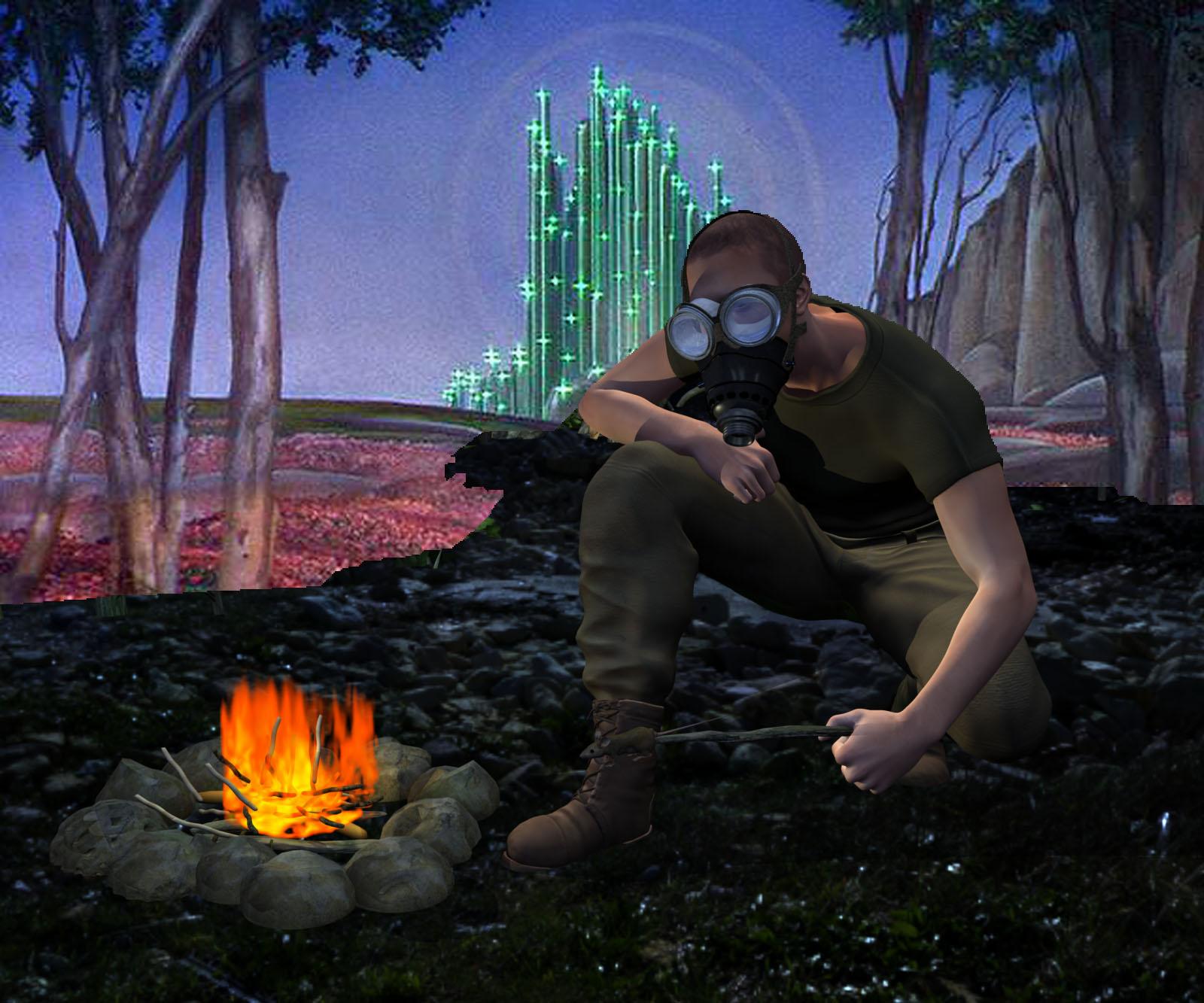
A Li'l Side Render Fun #2022 - Tuesday is Soylent Green Day editionThanks for the comments, SciFiFunk. The basic lighting for the gas mask scene is an HDR from Bob Callawah and Cake One
See https://www.daz3d.com/ultrahd-iray-hdri-with-dof-abandoned-urban-ruins.
That enables the reflection channel of the metal shaders that I applied to parts of the gas mask. Trade-offs. I really wanted the ground from a particular HDR in the pack. I think it is #6. Unfortunately, I was getting the best ground/lighting results using #6 with an angle that showed water that I didn't want and a portion of the sky was all wrong. I experimented with a couple ways to address. I tried placing a building to block out the portion of the sky I didn't like, but that had other results I didn't like. A few experiments later, I decided on the fallen tree and similar trees.
With the basic light coming from the HDR, I placed two additional lights that made sense to me. I placed a yellow-ish bulb light with the fire. I placed a rim light (spot) above and behind the M6 figure to try to separate him from the background. Ironically, I placed the gas mask last. It is a prop for Victoria 4, not a conforming figure for M6. The top strap of the gas mask completely thwarts the rim light on M6's head.

I really should have changed the shaders for M6's clothes and created a rim light for the mouse at the end of the stick.
I can still replace the remains of the sky and the tree props using the multipass renders I included with my base render. For example, here is the depth pass.
How about this?
No Longer the Yellow Brick Road!
 How long does it take you to load G8F?
Female characters still giving me fits. I tried G8F on both 4.15.02 and 4.15.0.15 and also G8.1F on 4.15.0.15 (which has become my preferred working platform now.) I did this on my laptop which has a GTX1080, 32 Gb RAM. Between each test I rebooted the computer. I also have 900 G8F characters, and only G8.1F and Victoria 8.1 and her HD. I also have 84 packages in Shaping for G8F and 161 Expressions and 871 Poses that are found in the Pose files, that would also include clothing pose files.
On 4.15.0.2 - G8F loaded in 9:49 minutes
On 4.15.0.15 - G8F loaded in 10:03 minutes
On 4.15.0.15 - G8.1F loaded in 12:01 minutes.
I had to do a user data reset in November 2020 and only recently finished getting most of the missing metadata and files back into Daz Studio. But after reviewing the comments from everyone, I think my next project will be to comb through the characters and uninstall those I have not used/touched since I did the initial test render. Many of those were included in Pro Bundles, along with pose packs that duplicated many of the same poses from one character to another. I already had to remove one character who caused issues.
My library is kept on a portable Seagate 4Tb external hard drive. It is. also getting full. So is my 8Tb drive on my desktop.
I work to keep my systems updated at all times for software.
A question about BVH animationsI have access to a plethora of BVH animations which I accessed for free one time. I tried to add one of the BVH animations to a Michael 4 figure (the vacuum animation, to be exact), and it animates awkwardly.
I'd like to get clarification: what figures are these BVH animations compatible with? I do not see Victoria 4 listed on the website from which I downloaded the animations, but I do see Victoria 3, if I remember correctly.
Daz 3D is part of

Connect
DAZ Productions, Inc.
7533 S Center View Ct #4664
West Jordan, UT 84084Licensing Agreement | Terms of Service | Privacy Policy | EULA
© 2026 Daz Productions Inc. All Rights Reserved.