-
M3D Horns for Genesis 9 issue
I've seen this happen before, and it's usually a faulty morph. The socket morph most probably modified the nails without the PA noticing. Please submit a ticket with the issue for the PA to fix.
G9 morph problemWell, it's because these corrective morphs have no 2nd Stage Controllers of Charmaine's Head / Body morphs (if you didn't dial them...). You can fix them one by one by adding Charmaine's Body Morph property to the 2nd Stage Controller of each corrective morph in Property Hierarchy... but that'll be a bit cumbersome ~
Better send a ticket and uninstall the product in DIM for the time being.
Let's appreciate/discuss today's new releases - more ongoinger threadpaulawp (marahzen) said:
barbult said:
tsroemi said:
barbult said:
If you bought Cybertenko items, check them carefully. I bought the Retro Biker for G8M, which I used in the image above with Fabianas great new chains. The jacket has unwelded parts that separate and curve unnaturally and make holes in the garment, because of the smoothing that is applied by default when the item is loaded (screenshot). There is only one morph in the jacket (to fit over a thick T-shirt). There are no JCMs to help adjust to posing. I had a horrible time in Blender trying to make this thing look decent for my render. I don't believe this particular item is Daz ready at all. Of course there is no metadata, since it is imported from another store in a big batch of stuff. Buyer beware applies here.
Thanks, that's good to know. I still have some items of his in my wishlist at Rendo, stuff that nobody else seems to make (like accurate nuns' headwear from different orders and such). Will be extra careful with what I choose. Hope you still managed a good render in the end for all your troubles!
I bought it to discount other items in the cart, so I feel morally obligated to keep it. I've now spent most of a day welding the loose pieces in Blender, adjusting some weight mapping, and adding some JCMs to make it more usable for me. The texturing looks pretty nice, I think. This product makes me wonder what, if any, QA checking is done on these imported products, and what their standards are. Are the Rendo items you are interested in advertised as DS items?
Did it load weirdly or did it get wonky after applying a pose?
The jacket loads with Base Shape Matching smoothing enabled, and that leaves gaps between the multiple unwelded seams (a couple are shown in the screenshot I posted before.) It loads with one of the lapel buttons hanging off the edge of the fabric. The buttons are not rigid follow node props, they are just a mesh surface, so they distort with character morphs and poses. With no custom JCMs, poses with arms up are kind of a mess, as is usual when there are no JCMs for loose clothing. The collar of the jacket intersects itself and the underarms are very stretched and jagged. in my opinion, it is just not Daz Store quality. But I do like the texturing and modeled wrinkles. The denim jeans look good to me. I haven't really examined them for problems. I was so struck by the jacket issues.
Let's appreciate/discuss today's new releases - more ongoinger threadbarbult said:
tsroemi said:
barbult said:
If you bought Cybertenko items, check them carefully. I bought the Retro Biker for G8M, which I used in the image above with Fabianas great new chains. The jacket has unwelded parts that separate and curve unnaturally and make holes in the garment, because of the smoothing that is applied by default when the item is loaded (screenshot). There is only one morph in the jacket (to fit over a thick T-shirt). There are no JCMs to help adjust to posing. I had a horrible time in Blender trying to make this thing look decent for my render. I don't believe this particular item is Daz ready at all. Of course there is no metadata, since it is imported from another store in a big batch of stuff. Buyer beware applies here.
Thanks, that's good to know. I still have some items of his in my wishlist at Rendo, stuff that nobody else seems to make (like accurate nuns' headwear from different orders and such). Will be extra careful with what I choose. Hope you still managed a good render in the end for all your troubles!
I bought it to discount other items in the cart, so I feel morally obligated to keep it. I've now spent most of a day welding the loose pieces in Blender, adjusting some weight mapping, and adding some JCMs to make it more usable for me. The texturing looks pretty nice, I think. This product makes me wonder what, if any, QA checking is done on these imported products, and what their standards are. Are the Rendo items you are interested in advertised as DS items?
Did it load weirdly or did it get wonky after applying a pose?
Weird deformingscottferrellnewsletter said:
Richard Haseltine said:
That looks like a corrective morph (JCM/CBS) kicking in when it shouldn't. Apply the minimum pose needed to trigger the issue, to reduce the number of things you need to look at, then open the Parameters pane option menu (the lined/hamburger button in the top corner) and turn on Preferences>Show Hidden Properties. With the figure selected click on the Currently Used group in the Parameters pane - one of the sldiers with the greyed out label (one of the hidden ones) should be the culprit, try zeroing them and restoring them until you find which then note the label on the slider (it may be easier to read if you click the gear icon and open Parameter Settings) - in recent builds of DS the Parameter Settings may give more information than that, but either way you should be able to figure out which character or morph set is the issue. Check you haven't missed an update for that product, if not please rport it to support (if it is sold through Daz) or the artist.
Thanks for the response! I'll bookmark this in case it happens again so I can check these things.
It's just super weird. Its a custom model I created by using the base G8 and dialing in morphs. I've used this model many many times previously and this was the first time this happened. Weird. I have no clue what happened. Like I said, I had posed her in this scene several times before it happened. Only thing I can think of was I wasn't happy with how dforce was handling her shirt in a couple poses, so I exported it to Marvelous Designer to do the work, then imported it back as a morph on the shirt, but that should have only affected the shirt. Dunno. It was just weird and confused me. lol
Thanks again.
Most likely it is a product that was installed between the last time it worked and the first time it failed. This kind of issue, if my suspicion is correct, will affect all characters built on the base figure, even if the actual problem product is not used with them (that is the whole issue - something kicks in when it isn't needed).
Let's appreciate/discuss today's new releases - more ongoinger threadtsroemi said:
barbult said:
If you bought Cybertenko items, check them carefully. I bought the Retro Biker for G8M, which I used in the image above with Fabianas great new chains. The jacket has unwelded parts that separate and curve unnaturally and make holes in the garment, because of the smoothing that is applied by default when the item is loaded (screenshot). There is only one morph in the jacket (to fit over a thick T-shirt). There are no JCMs to help adjust to posing. I had a horrible time in Blender trying to make this thing look decent for my render. I don't believe this particular item is Daz ready at all. Of course there is no metadata, since it is imported from another store in a big batch of stuff. Buyer beware applies here.
Thanks, that's good to know. I still have some items of his in my wishlist at Rendo, stuff that nobody else seems to make (like accurate nuns' headwear from different orders and such). Will be extra careful with what I choose. Hope you still managed a good render in the end for all your troubles!
I bought it to discount other items in the cart, so I feel morally obligated to keep it. I've now spent most of a day welding the loose pieces in Blender, adjusting some weight mapping, and adding some JCMs to make it more usable for me. The texturing looks pretty nice, I think. This product makes me wonder what, if any, QA checking is done on these imported products, and what their standards are. Are the Rendo items you are interested in advertised as DS items?
Weird deformingRichard Haseltine said:
That looks like a corrective morph (JCM/CBS) kicking in when it shouldn't. Apply the minimum pose needed to trigger the issue, to reduce the number of things you need to look at, then open the Parameters pane option menu (the lined/hamburger button in the top corner) and turn on Preferences>Show Hidden Properties. With the figure selected click on the Currently Used group in the Parameters pane - one of the sldiers with the greyed out label (one of the hidden ones) should be the culprit, try zeroing them and restoring them until you find which then note the label on the slider (it may be easier to read if you click the gear icon and open Parameter Settings) - in recent builds of DS the Parameter Settings may give more information than that, but either way you should be able to figure out which character or morph set is the issue. Check you haven't missed an update for that product, if not please rport it to support (if it is sold through Daz) or the artist.
Thanks for the response! I'll bookmark this in case it happens again so I can check these things.
It's just super weird. Its a custom model I created by using the base G8 and dialing in morphs. I've used this model many many times previously and this was the first time this happened. Weird. I have no clue what happened. Like I said, I had posed her in this scene several times before it happened. Only thing I can think of was I wasn't happy with how dforce was handling her shirt in a couple poses, so I exported it to Marvelous Designer to do the work, then imported it back as a morph on the shirt, but that should have only affected the shirt. Dunno. It was just weird and confused me. lol
Thanks again.
Let's appreciate/discuss today's new releases - more ongoinger threadbarbult said:
If you bought Cybertenko items, check them carefully. I bought the Retro Biker for G8M, which I used in the image above with Fabianas great new chains. The jacket has unwelded parts that separate and curve unnaturally and make holes in the garment, because of the smoothing that is applied by default when the item is loaded (screenshot). There is only one morph in the jacket (to fit over a thick T-shirt). There are no JCMs to help adjust to posing. I had a horrible time in Blender trying to make this thing look decent for my render. I don't believe this particular item is Daz ready at all. Of course there is no metadata, since it is imported from another store in a big batch of stuff. Buyer beware applies here.
Thanks, that's good to know. I still have some items of his in my wishlist at Rendo, stuff that nobody else seems to make (like accurate nuns' headwear from different orders and such). Will be extra careful with what I choose. Hope you still managed a good render in the end for all your troubles!
G9 morph problemHi crosswind,
Thank you. I tried this and the cause is a Charmaine Morph "em3dcharmine_body_cbs_shin_x155p_l".
When I set it to zero, the figure looks normal again.
The problem is every time I restart, the wrong Morph is back. I don't like g9 anymore ...
Do you know a way how to fix it?
Thanks in advance.
TomWeird deformingThat looks like a corrective morph (JCM/CBS) kicking in when it shouldn't. Apply the minimum pose needed to trigger the issue, to reduce the number of things you need to look at, then open the Parameters pane option menu (the lined/hamburger button in the top corner) and turn on Preferences>Show Hidden Properties. With the figure selected click on the Currently Used group in the Parameters pane - one of the sldiers with the greyed out label (one of the hidden ones) should be the culprit, try zeroing them and restoring them until you find which then note the label on the slider (it may be easier to read if you click the gear icon and open Parameter Settings) - in recent builds of DS the Parameter Settings may give more information than that, but either way you should be able to figure out which character or morph set is the issue. Check you haven't missed an update for that product, if not please rport it to support (if it is sold through Daz) or the artist.
Wu Kong the monkey kingI love it, the morph looks fanastic. The fact that Sun Wukong is also the direct inspiration for one of my favorite shows when I was younger makes me really want to buy the pro bundle but I'm really trying to figure out what I would do with this.
How to save new character morphs?Thank you very much!
 So if I understand well, the first time, I save the morphs by Spport Asset -> Morph Assete, and if after that, I modify the morphs, I upload them by Spport Asset -> Save Modified Asset, is it that?
By the way, I have also a question about saving morphs for props: I apply the Avija wings to my character today, and I dialed several morphs to make them like I wanted, and now, I would like to create a slider to control them. So, I guess that the silder creation should be like for G8M, but what about saving? In the parameter settings dialogue, should it be in Actor? And for saving by Morph Asset, should I save into the directory where the Avija Wings was intalled, or should I save it in another directory?
I never saved morph asset, yet, so I don't know how it works... If I save a morph in a folder that is not the one where the props was installed, how DS does know that this new morph corresponds to this props, and has to appear in its morph pane?Thank you in advance for your explanation!
the anatomical elements not workinDo you have the (I assume) Daz Anatomical Elements loaded and fitted to the figure? I would expect that the characterincludes only materials, and perhaps a morph, for the set it uses.
How to save new character morphs?yuyu.atem said:
crosswind said:
Yep, perfect understanding ! Head morph goes to Actor/Head/..., Body morph goes to Actor/Full Body/...., characger single control property goes to Actor/People/...
Great, thank you very much!
And if I do that, I have still to save the morphs by Save As -> Support Asset -> Morph Asset, right? It will not be automatically saved? Is the order in which I save them important? Have I to save first the head and the body, or have I to save them with the slider at the same time?Thank you in advance!
Yep, saving morph assets is a must after you make any modification to the morph per se and its Parameter Settings. Just save them all together at the same time ~~
The quickest way is to Save Modified Assets...
How to use hair on another character?yuyu.atem said:
Oh, yes, it's the same icon! Thank you very much!
I have some other question:
- since I parented the hair to the head, when I want to selected it from the scene pane, I have to open G8M's subparts untill to find the hair:
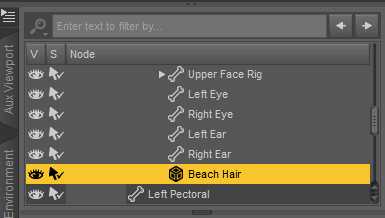
Is it possible to create a shortcut to access easilier to the hair?
You can directly select the parented hair in Viewport... LMB click to select it, or select it in RMB-click menu.
- If I want to be able to use this hair with any G8M character in any file, what would be the best way? Would have I to use the transfer utility? Or maybe after positionning and scaling the hair in one file, would it be possible to create and save a slider that would set the same postion and scale to the hair every times I would use it?
It's a short hair.. so direct parenting may work well in most of the cases. But you can always rig it to the figure with Transfer Utility if you want to. Before rigging, you have to check if the hair really well fit on the figure's head. If it's not, you better scale it or reshape it in external software. Export / import OBJ with baked transforms back to DS for rigging. Then save it as Figure asset.
Thank you in advance!
Thank you in advance!
How to save new character morphs?crosswind said:
Yep, perfect understanding ! Head morph goes to Actor/Head/..., Body morph goes to Actor/Full Body/...., characger single control property goes to Actor/People/...
Great, thank you very much!
And if I do that, I have still to save the morphs by Save As -> Support Asset -> Morph Asset, right? It will not be automatically saved? Is the order in which I save them important? Have I to save first the head and the body, or have I to save them with the slider at the same time?Thank you in advance!
How to save new character morphs?crosswind said:
You don't need to create a folder beforehand.... Just select Actor > Head > People > Real World or Sytlized, then type in "/Vendor Name" after it in Path field, e.g. Actor/Head/People/Real World/yuyu.atem
And it's up to you to add Vendor or Product name in the path... as long as it's easy for you to identify them.
Ah ok! And if I want to create several character, I save every head in the same folder, I don't create one folder by character, is it that?
So, if I create a morph for the body (without the head), I have to save it in Actor/Full Body/People/Real World/yuyu.atem, is it that? And if I create a slider that controls both the head and the body morphs, I have to save it in just Actor?
Yep, perfect understanding ! Head morph goes to Actor/Head/..., Body morph goes to Actor/Full Body/...., characger single control property goes to Actor/People/...
Use G9 skin on G8Well, I didn't save the scene files but I re-created them and re-wrapped the figure with texture conversion... I've found no issue so far.
Pls firstly check the settings in Map Transfer (ss1).
Besides, if you only want Coco G9's texture map to be converted to G8, when you export G8 to OBJ as the floating geometry, use High Resolution rather than Base. (same when export coco g9 as fixed geometry). High resolution will help with getting more accurate converted maps.
How to use hair on another character?Oh, yes, it's the same icon! Thank you very much!
I have some other question:
- since I parented the hair to the head, when I want to selected it from the scene pane, I have to open G8M's subparts untill to find the hair:
Is it possible to create a shortcut to access easilier to the hair?
- If I want to be able to use this hair with any G8M character in any file, what would be the best way? Would have I to use the transfer utility? Or maybe after positionning and scaling the hair in one file, would it be possible to create and save a slider that would set the same postion and scale to the hair every times I would use it?
Thank you in advance!
Thank you in advance!
How to save new character morphs?Oh, thank you very much! It's much more clear, now!
Richard Haseltine said:
- Right-click in the Parameters pane and check Edit Mode, if it isn't already.
- Right-click in the group to which you wish to add the controller>Create New Property
- Use the dialogure to give it a name, st limits, set the type etc. and click Accept
- Set the new property and the ehad and body morphs to 100%
- Right-click on the slider for the new proeprty and select ERC Freeze
- Check that the list of sub-components in the dialogue looks correct, uncheck any that shouldn't be there, if anything is missign cancel and set the missing property, click Accept when done.
I have again some questions to be sure to not make a misake:
- when I create the new property, have I to select "create as empy morph"?
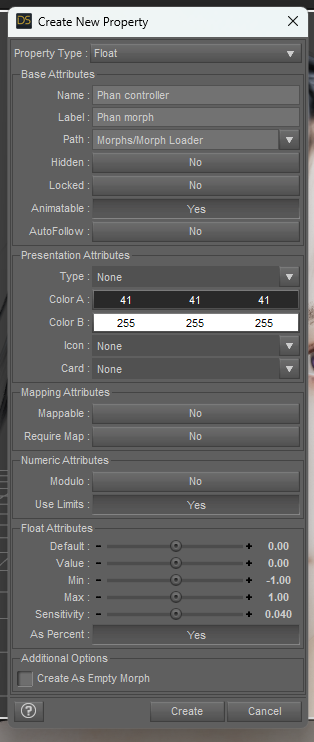
- After freezing it, my slider seems to work correctly, but I don't see any sub-component in the ERC Freeze dialogue:
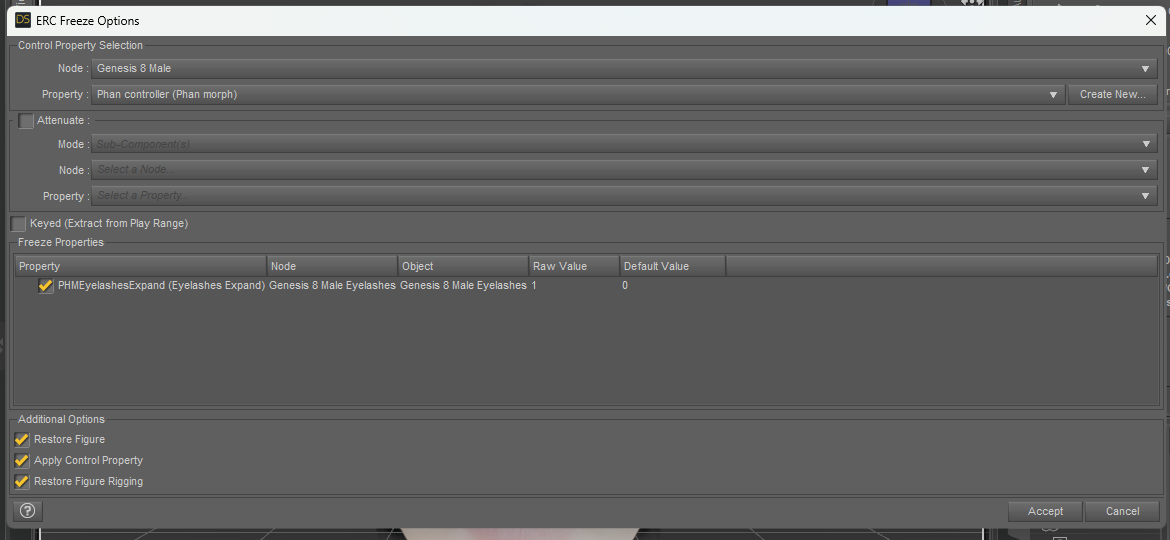
Or maybe it's the PHMEyelashesExpand in the Freeze Properties? But it's not the head morph that I created...crosswind said:
crosswind said:
You don't need to create a folder beforehand.... Just select Actor > Head > People > Real World or Sytlized, then type in "/Vendor Name" after it in Path field, e.g. Actor/Head/People/Real World/yuyu.atem
And it's up to you to add Vendor or Product name in the path... as long as it's easy for you to identify them.
Ah ok! And if I want to create several character, I save every head in the same folder, I don't create one folder by character, is it that?
So, if I create a morph for the body (without the head), I have to save it in Actor/Full Body/People/Real World/yuyu.atem, is it that? And if I create a slider that controls both the head and the body morphs, I have to save it in just Actor?
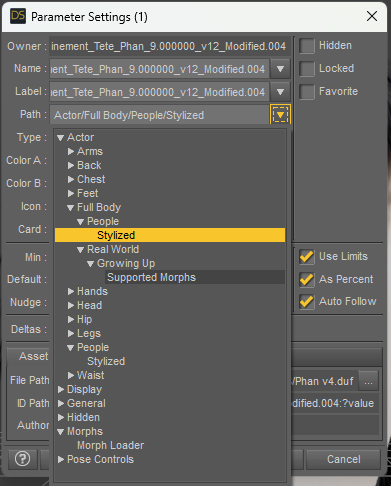
Edit:
How! I don't understand what happened! i created a new slider, and this time, there are more sub-componnents:
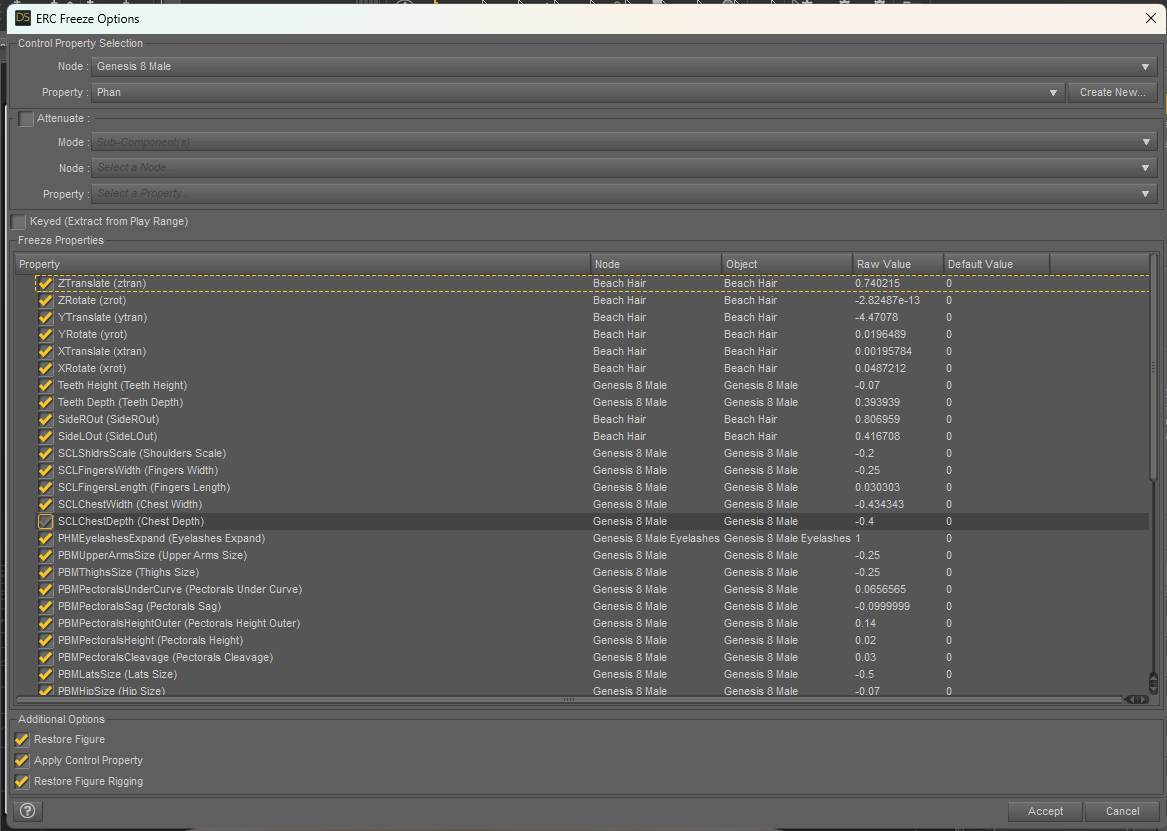
The Beach Hair is an hair from another generation, that I positionned and scaled before parented it to the head. Have I to uncheck it? When I do that, the position and scale I setted seem to be cancelled? Maybe I should create the slider before to parent the hair?
Thank you in advance for your answer!
Daz 3D is part of

Connect
DAZ Productions, Inc.
7533 S Center View Ct #4664
West Jordan, UT 84084Licensing Agreement | Terms of Service | Privacy Policy | EULA
© 2026 Daz Productions Inc. All Rights Reserved.









