-
Very confused about new "game ready pack"
garrett_3d said:
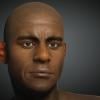
Had a brief look at these game ready characters, purely out of curiosity. I have to say the visual quality is a bit rubbish compared to what mainstream gaming studios are producing. They almost look like the characters you'd see in a game 20 years ago. So I have to ask - what's the point?
can you still morph your game ready figure with G8 or G9 moprh? if it doesn't belong any G8 or G9 do you still have the basic morph option? height and body proportion etc?
There's Always Another Sale Thread -- Discussions Only Pt 6Cybersox said:
daveso said:
it seems weird a program would load all that stuff when in most cases you wont, or dont, even need or use them. Why cant I think to myslef, I would love to morph this head, and then load the need morphs?
Because that would negate the ability to easily dial-spin at a whim, which is one of the key selling points of Genesis. What you describe is basically how V4 and previous generations worked, and it was nowhere near as efficent or effortless. Remember, you're not just adding a morph-shape, but also the required JCMs, etc., so you'd have to load all that and then unload them if you didn't like the result. An ideal option would be to be able to lock a finalized figure down so that it could be reloaded without having to call up all the extra-morphs each time, thereby speeding up reloading of saved characters (and possibly getting around some of issues with the duplicate naming.)
This is also why Turbo Loader isn't really a great solution. If you are constantly creating new figures, you need everything loaded so you can do that twiddling. And changing configurations in TL isn't instant. It can take 10-15 minutes. I never used V4 but I'd like to think computers are faster now. And maybe there are better ways to do lazy loading. Heuristics that say "the user hasn't loaded the demon figure morphs onto a figure in 3 years, maybe delay loading them." That kind of thing. You could even tune the heuristics with configurations "always load these. delay load these if unused for 3 months. Etc."
There's Always Another Sale Thread -- Discussions Only Pt 6daveso said:
it seems weird a program would load all that stuff when in most cases you wont, or dont, even need or use them. Why cant I think to myslef, I would love to morph this head, and then load the need morphs?
Because that would negate the ability to easily dial-spin at a whim, which is one of the key selling points of Genesis. What you describe is basically how V4 and previous generations worked, and it was nowhere near as efficent or effortless. Remember, you're not just adding a morph-shape, but also the required JCMs, etc., so you'd have to load all that and then unload them if you didn't like the result. An ideal option would be to be able to lock a finalized figure down so that it could be reloaded without having to call up all the extra-morphs each time, thereby speeding up reloading of saved characters (and possibly getting around some of issues with the duplicate naming.)
AIUTO...CHI CONOSCE L’ITALIANO? PARTE QUATTORDICIMa, veramente il GLB, può essere caricato solo da Blender, perchè non è un file FBX ma GLB. L'altro tipo di personaggio, quello che non finisce con GLB, è un morph di Genesis 9, pure bruttino, ma senza vestiti.
Mi sono reso conto ora di non aver preso l'FBX, ma se conosco il DAZ, sarà un casino caricarlo in DAZ.
DazStudio To GLB exporter Testers WantedRedDragoon78_dc96eaefcd said:
So i'm creating a DazStudio dsa script that exports from daz to glb formate nothing extra is needed for it to work just the single script and DazStudio which I currently have it running in Daz4.2X and Daz6.0 I have no other versions on my end to test. and what this can do so far is pretty huge in itself, why I need a couple testers I have stuff mainly for G8 and don't use 8.1, 9 or any of the others and i'm curiuse how it will work for other users
I included a list of everything it's currently capable of but the main thing that made me want want to build this is that Daz does not really support exporting merged anatomy with full moph support and this does it really well check out the list below for all the features
This exporter can:
* **Export DAZ models to GLB/glTF**
* `.glb` single file
* **Export character geometry**
* body mesh
* clothing
* hair
* eyelashes
* accessories
* fitted items* **Export props and environments**
* rooms
* furniture
* scene props
* static environment meshes
* grouped/null-parented scene objects* **Export rigging**
* bones
* skeleton hierarchy
* skin weights
* inverse bind matrices
* skinned meshes* **Export morph targets**
* figure morphs
* clothing morphs
* attachment morphs
* anatomy/geograft morphs* **Export animation**
* BVH skeletal animation
* root/hip translation
* DAZ morph animation
* environment mesh animation as morph-cache targets* **Handle geografts/anatomy**
* export grafts separately
* merge grafts/anatomy into the body
* remove hidden/overlapping body faces
* smooth seams
* harmonize skin-like materials* **Handle clothing/body cleanup**
* remove body polygons under clothing
* reduce poke-through
* repair or rebuild fitted clothing weights* **Export materials**
* DAZ/Iray-to-glTF PBR conversion
* base color
* roughness
* metallic
* normal maps
* emissive maps
* opacity/cutout materials
* glass/wet/eye material handling* **Export and process textures**
* embed textures in GLB
* resize textures
* bake opacity maps into PNG alpha
* include or skip character/environment textures separately* **Exclude specific content**
* exact-name exclusion for nodes, meshes, objects, shapes, geometry, materials, and surfaces
* wildcard exclusions when wanted* **Generate helper lists**
* mesh/node/surface name list
* morph target list
* bone hierarchy tree* **Save presets**
* full exporter settings
* morph lists
* exclusion lists
* anatomy merge lists
* environment animation listsUpdated with link to anyones who wants to try it
https://drive.google.com/drive/folders/1bSCZKy6I030F71l56IRMQ7j8qA9FPGnY?usp=sharingThe link only shows the png images not the script or plugin files.
There's Always Another Sale Thread -- Discussions Only Pt 6it seems weird a program would load all that stuff when in most cases you wont, or dont, even need or use them. Why cant I think to myslef, I would love to morph this head, and then load the need morphs?
Let's appreciate/discuss today's new releases - ongoinger still further threadbarbult said:
memcneil70 said:
daveso said:
Sevenly HD looks nice but it appears there is no morph for realistic human ears?
https://www.daz3d.com/sevenly-hd-for-genesis-9I can confirm that, no ear morph and I couldn't find one in my morph library that would do it either.
I made a morph to remove the elf ears from CHT Sevenly. I'm not a PA, so I can't modify the HD morphs, but they make only tiny alterations to the ears anyway, so it still works pretty well with Sevenly HD. The morph is called CHT Sevenly Remove Elf Ears. It only works if you have CHT Sevenly Head dialed in, because otherwise it would make a real mess of the ears. You can drop this zip file into your DIM downloads folder. Then in DIM, you will find it in the Ready to Install tab. Just install it. There are no "user facing files". You will find the morph dial in the Parameters pane. If you prefer, you can unzip the file and install it manually, just like any other Daz manual download.
The attached image is just for reference. It is the image you will see on the morph dial after installation. You don't need to download this png file.
Thank you very much barbult!:)
Buy Something That Doesn't Work in Carrara? Post your Questions and Workarounds here. (please)you could grab a free duf character (just a shaping morph) too so hope you did
not sure if need to be in the same cart, is same code
There's Always Another Sale Thread -- Discussions Only Pt 6Torquinox said:
NorthOf45 said:
Torquinox said:
I have only this to say about all of it: I really love playing with my huge collection of morphs and figures. I use them to make custom figures. There are only a small handful of shapes I'm aching to get rid of. Even those are what I consider unappealing head morphs, and even they can be modified to look more appealing to me. Even so, let's say I wanted to surgically remove a morph. How would I even do that?
Are you familiar with Turbo Loader for Genesis 9? It can do precisely what you want. There are also versions for G1/G2, G3 G8/G8.1
That's two votes for Turbo Loader - You and @Cybersox. Thank you to you both, and I'll look into it.
Also WL'ed it based on the recs. Thanks to those who suggested it!
There's Always Another Sale Thread -- Discussions Only Pt 6NorthOf45 said:
Torquinox said:
I have only this to say about all of it: I really love playing with my huge collection of morphs and figures. I use them to make custom figures. There are only a small handful of shapes I'm aching to get rid of. Even those are what I consider unappealing head morphs, and even they can be modified to look more appealing to me. Even so, let's say I wanted to surgically remove a morph. How would I even do that?
Are you familiar with Turbo Loader for Genesis 9? It can do precisely what you want. There are also versions for G1/G2, G3 G8/G8.1
That's two votes for Turbo Loader - You and @Cybersox. Thank you to you both, and I'll look into it.
There's Always Another Sale Thread -- Discussions Only Pt 6Torquinox said:
I have only this to say about all of it: I really love playing with my huge collection of morphs and figures. I use them to make custom figures. There are only a small handful of shapes I'm aching to get rid of. Even those are what I consider unappealing head morphs, and even they can be modified to look more appealing to me. Even so, let's say I wanted to surgically remove a morph. How would I even do that?
Are you familiar with Turbo Loader for Genesis 9? It can do precisely what you want. There are also versions for G1/G2, G3 G8/G8.1
ETA: I see it has already been mentioned. This thread is changing too fast...
There's Always Another Sale Thread -- Discussions Only Pt 6I have only this to say about all of it: I really love playing with my huge collection of morphs and figures. I use them to make custom figures. There are only a small handful of shapes I'm aching to get rid of. Even those are what I consider unappealing head morphs, and even they can be modified to look more appealing to me. Even so, let's say I wanted to surgically remove a morph. How would I even do that?
There's Always Another Sale Thread -- Discussions Only Pt 6barbult said:
Torquinox said:
Every G9 figure you own slows down every figure you load into Daz.
AFAIK I have not detected this. Please elaborate
It is because every figure you install has associated morphs. When Daz Studio loads a character, EVERY morph of that generation of character is loaded at that time, so Daz Studio can resolve dependencies.
It's actually hooking up the dependencies that causes much of the slow down. Proeprties that didn't liink to others would have much less impact, as I understand it.
Let's appreciate/discuss today's new releases - ongoinger still further threadgenaris said:
I'm really not the target market for this game ready stuff so I'm not clear about the DUF vresions: are these chars dressed and wigged like their thumbnails suggest- or are these just bare g9 chars that have special game friendly material sets but no hair & clothes. I looked to the READMEs for clarification but none of these new mplex DUF chars have readmes. ( ! )
WendyLuvsCatz said:
The duf version of Character Adam wearing his FBX version's clothing and hair roughly scaled to G9 base and converted to props, then Transfer Utility used
BTW, you might have the clothing or can find it in store with better UV mapping and texture
these are atlassed as game ready
the Hair is H...SNIPPED
No. The duf version is a only a charater preset -- no clothing or hair. However, the fbx version has clothing and hair.
Let's appreciate/discuss today's new releases - ongoinger still further threadI'm really not the target market for this game ready stuff so I'm not clear about the DUF vresions: are these chars dressed and wigged like their thumbnails suggest- or are these just bare g9 chars that have special game friendly material sets but no hair & clothes. I looked to the READMEs for clarification but none of these new mplex DUF chars have readmes. ( ! )
WendyLuvsCatz said:
The duf version of Character Adam wearing his FBX version's clothing and hair roughly scaled to G9 base and converted to props, then Transfer Utility used
BTW, you might have the clothing or can find it in store with better UV mapping and texture
these are atlassed as game ready
the Hair is H...SNIPPED
There's Always Another Sale Thread -- Discussions Only Pt 6Torquinox said:
barbult said:
Torquinox said:
Every G9 figure you own slows down every figure you load into Daz.
AFAIK I have not detected this. Please elaborate
It is because every figure you install has associated morphs. When Daz Studio loads a character, EVERY morph of that generation of character is loaded at that time, so Daz Studio can resolve dependencies.
So, I should probably get rid of the character morphs I will never use, right? Ok. But the slowdown only affects the specific generation, so G9 stuff only affects G9, G8 -> G8, etc?
Alternatively, there's also a set of "Turbo Booster" utilities made by RIversoft Art that that allow you to only load specific morphs when loading a figure. There are boosters for Genesis 1 and 2, one for Genesis 3, a combined set for G8 and G8.1, and the Genesis 9 version is here https://www.daz3d.com/turbo-loader-for-genesis-9 There's also a utilities set that adds additional abilities here https://www.daz3d.com/turbo-loader-booster-utilities Note - I have no idea if these work with DS6.
There's Always Another Sale Thread -- Discussions Only Pt 6Torquinox said:
barbult said:
Torquinox said:
Every G9 figure you own slows down every figure you load into Daz.
AFAIK I have not detected this. Please elaborate
It is because every figure you install has associated morphs. When Daz Studio loads a character, EVERY morph of that generation of character is loaded at that time, so Daz Studio can resolve dependencies.
So, I should probably get rid of the character morphs I will never use, right? Ok. But the slowdown only affects the specific generation, so G9 stuff only affects G9, G8 -> G8, etc?
That's my understanding.
There's Always Another Sale Thread -- Discussions Only Pt 6barbult said:
Torquinox said:
Every G9 figure you own slows down every figure you load into Daz.
AFAIK I have not detected this. Please elaborate
It is because every figure you install has associated morphs. When Daz Studio loads a character, EVERY morph of that generation of character is loaded at that time, so Daz Studio can resolve dependencies.
So, I should probably get rid of the character morphs I will never use, right? Ok. But the slowdown only affects the specific generation, so G9 stuff only affects G9, G8 -> G8, etc?
There's Always Another Sale Thread -- Discussions Only Pt 6Torquinox said:
Every G9 figure you own slows down every figure you load into Daz.
AFAIK I have not detected this. Please elaborate
It is because every figure you install has associated morphs. When Daz Studio loads a character, EVERY morph of that generation of character is loaded at that time, so Daz Studio can resolve dependencies.
There's Always Another Sale Thread -- Discussions Only Pt 6frank0314 said:
Torquinox said:
WendyLuvsCatz said:
miladyderyni_173d399f47 said:
Grrr, all those "wonderful" new assets at the beginning of the store page. The first thing I thought was "Great, something else I need to filter out!" Speaking of which, the filters don't want to go away when you're done with them and want to see the page. But Daz finally gave us a price filter!
So, is there any reason I should bother with that free DUF version of a game ready character when I don't make games? Can I mix it with standard assets & use it in the background? Does it come with clothing and hair shown?
you also can get a free G9 shape which is just a shape
the FBX does have the clothing and hair
so you could actually import that and use the transfer utility I suppose
So once more for the slow person, the fbx includes everything shown and the duf is a shape-only bare human figure?
Yes, both FBX and GLB are baked in. DUF is base character only
see https://www.daz3d.com/forums/discussion/comment/9564726/#Comment_9564726
where I play with mine
duf just a character morph but FBX clothes and hair all can be bought, I found all but one in store (I own none of them)
Daz 3D is part of

Connect
DAZ Productions, Inc.
7533 S Center View Ct #4664
West Jordan, UT 84084Licensing Agreement | Terms of Service | Privacy Policy | EULA
© 2026 Daz Productions Inc. All Rights Reserved.