-
More Non-photorealisitic Renders (NPR II)
Forgot I had Toonycam Pro, and apparently that's a thing which is no longer for sale.
Anyway, here it is mixed with PWToon, instead of using PWToon's internal outlines. Honestly, the extra rigmarole and render time isn't getting me a much different result than just using PWToon by itself, save for visible outlines on the hair.
Cool. I remember ToonCamy but I never picked it up.
More Non-photorealisitic Renders (NPR II)Forgot I had Toonycam Pro, and apparently that's a thing which is no longer for sale.
Anyway, here it is mixed with PWToon, instead of using PWToon's internal outlines. Honestly, the extra rigmarole and render time isn't getting me a much different result than just using PWToon by itself, save for visible outlines on the hair.
More Non-photorealisitic Renders (NPR II)I used to be a die hard Poser user, but once Daz3D reeled me in with Genesis, I found it incredibly hard to go back to Poser. Mainly for two reasons: Lack of flagship figures that content creators supported, and the fact that while Daz3D is free, Poser stayed on the expensive side. Honestly, the one major feature I miss from Poser, was its easy-to-use material room. I could cook up crazy custom shaders much easier with it.
If Daz incorporated a Real-Time-Comic-Renderer like Poser has, I'd never touch Poser again.
Yeah that would be awesome !!
And how about camera synchronize like mjCasual did with his teleblender ? I believe that would be "possible way " to getting super impose render layer between PwToon( or any DAZ toon shader solution) with cool Poser Real Time Comic Renderer than having hope DAZ studio will incorporating same thing in preview .
I was talking to some Poser scripters and they were working on this issue, but said it's actually very difficult because Poser and Daz treat cameras in such a very, very different manner. Too bad, the ability to jump from app to app would create wonderful opportunities to get really creative.
More Non-photorealisitic Renders (NPR II)I used to be a die hard Poser user, but once Daz3D reeled me in with Genesis, I found it incredibly hard to go back to Poser. Mainly for two reasons: Lack of flagship figures that content creators supported, and the fact that while Daz3D is free, Poser stayed on the expensive side. Honestly, the one major feature I miss from Poser, was its easy-to-use material room. I could cook up crazy custom shaders much easier with it.
If Daz incorprated a Real-Time-Comic-Renderer like Poser has, I'd never touch Poser again.
Yeah that would be awesome !!
And how about camera synchronize like mjCasual did with his teleblender ? I believe that would be "possible way " to getting super impose render layer between PwToon( or any DAZ toon shader solution) with cool Poser Real TIme Comic Renderer than having hope DAZ studio will incorporating same thiing in preview .
help with storyboardsI'll have to mention that to my friends. Hmm, gotz a poker game coming up with them so might be have to bring the laptop with me this time & give a demo.
Frankly, their mindset coming from traditional art & thinking in 3D is sort of akin to the Neanderthals first seeing fire, i.e although they have high end Macs, they're technological savy is, well..., challenged. But, they keep busy & are in demand, so what da hey!
Also, I'll need to research PWToon (or PW Shader Bundle) I guess.
If you want to do cheap & fast without changing shaders then as Gordig said, openGL Basic is what you want (don't do openGL Intermediate though as it locks up my PC).
help with storyboardsI'll have to mention that to my friends. Hmm, gotz a poker game coming up with them so might be have to bring the laptop with me this time & give a demo.
Frankly, their mindset coming from traditional art & thinking in 3D is sort of akin to the Neanderthals first seeing fire, i.e although they have high end Macs, they're technological savy is, well..., challenged. But, they keep busy & are in demand, so what da hey!
Also, I'll need to research PWToon (or PW Shader Bundle) I guess.
help with storyboards
I've done storyboards using Daz and it is an amazing tool on set when you render exactly what you see in your head with the lighting and all so that the DP knows the kind of lighting you want. The last feature I did, there was zero questions on set, everyone had the boards and knew how the look was supposed to be, you can't get that with a pencil or even the toon filter. Wish I could help though, I'm trying to finish post on said feature in the next couple of weeks. The way I got it done quicker though was rendering the images at like 720x486 and using manfridays render queue because then I was able to move the camera around quickly in-between every still and not have to worry about weird movements from frame by frame. Good luck!Just reaching out to the community and don't know if anyone would be looking to help me out with this.
I'm producing a film, yes low budget, and I could really use some help with storyboards. I'm working on them but it's taking me a heck of a long time to make them and render.
Was seeing if anyone might be willing to help me out on this.
Let me know,
Rich
Well do the storyboards on pen & paper with stick figures or buy the PWToon (or PW Shader Bundle) and use PWToon shaders with 3DL renderer instead of the default iRay renderer to make your storyboards.
help with storyboardsJust reaching out to the community and don't know if anyone would be looking to help me out with this.
I'm producing a film, yes low budget, and I could really use some help with storyboards. I'm working on them but it's taking me a heck of a long time to make them and render.
Was seeing if anyone might be willing to help me out on this.
Let me know,
Rich
Well do the storyboards on pen & paper with stick figures or buy the PWToon (or PW Shader Bundle) and use PWToon shaders with 3DL renderer instead of the default iRay renderer to make your storyboards.
More Non-photorealisitic Renders (NPR II)just found my old render in rendo post . I believe this image used same pwToon setting I`ve posted in this thread
Another image is my new experiment using IRAY render and giving Toon FX via Photoshop
3D Art Freebie Challenge-February 2020-Winners Announced"Natural Love" -Entries Thread OnlyLove And Understanding
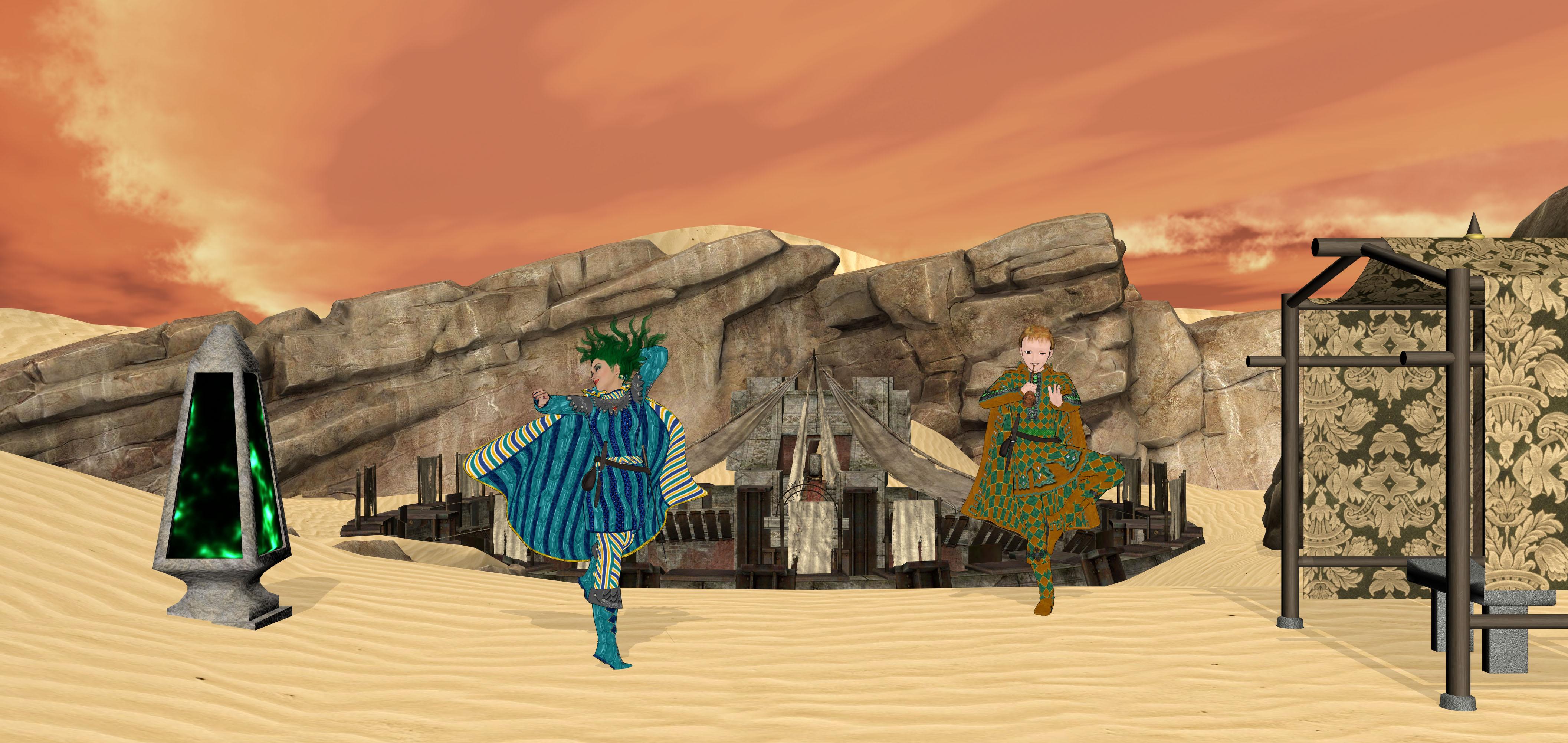
Click on the picture to see it in full size
Rendered in DAZ Studio 4.7
Paid:
Aiko 5 and Hiro 5
pwToon Shaders
https://www.daz3d.com/m3-tunic-pack
https://www.daz3d.com/adventurer-for-genesis-male
Freebies:
Montero Hair http://shop.aprilsvanity.com/classics/montero-hair.html
Fly Away hair http://shop.aprilsvanity.com/classics/fly-away-hair.html
Arena http://freedom-of-art.ucoz.com/publ/3d_products/poser/the_desert_arena/2-1-0-42
Pied piper https://www.renderosity.com/mod/freestuff/pied-piper/73521
Valentine heart http://www.snowbyte.de/g/free-valentine-heart-for-v4/
Obelisk https://www.renderosity.com/mod/freestuff/the-obelisk/83615
Pole house and bench http://fantasiesrealm.com/market/-Designers/NGArtPlay-Designs/Pole-House-and-Bench-Exclusive?cPath=52&;
3D Art Freebie Challenge-February 2020-"Natural Love" -Main Thread OnlyLove And Understanding
Click on the picture to see it in full size
Rendered in DAZ Studio 4.7
Paid:
Aiko 5 and Hiro 5
pwToon Shaders
https://www.daz3d.com/m3-tunic-pack
https://www.daz3d.com/adventurer-for-genesis-male
Freebies:
Montero Hair http://shop.aprilsvanity.com/classics/montero-hair.html
Fly Away hair http://shop.aprilsvanity.com/classics/fly-away-hair.html
Arena http://freedom-of-art.ucoz.com/publ/3d_products/poser/the_desert_arena/2-1-0-42
Pied piper https://www.renderosity.com/mod/freestuff/pied-piper/73521
Valentine heart http://www.snowbyte.de/g/free-valentine-heart-for-v4/
Obelisk https://www.renderosity.com/mod/freestuff/the-obelisk/83615
Pole house and bench http://fantasiesrealm.com/market/-Designers/NGArtPlay-Designs/Pole-House-and-Bench-Exclusive?cPath=52&;
I hope that I did everything good... Inspired partly by this song

All Links Check Out Plz Move To Entries Thread
Using DAZ to create line drawing modelshttps://www.sharecg.com/v/69733/view/21/daz-studio/crescents-pwtoon-cel-shaders
These are freebie shaders used with PWToon. (3 line width presets and either Cel Shading or Soft Shading)
edit: theese render in seconds

If you need more detail you can keep the original texture. This is PWToon Snazzy render holding the Ctrl key to keep the texture.
 Using DAZ to create line drawing models
There are several toon and other non-photoreal shaders, mostly for 3Delight (but if you don't want photoreal renders Iray isn't going to eb much of a benefit). pwToon is literally toons.
3D Art Freebie Challenge-February 2020-"Natural Love" -Main Thread OnlyLove And Understanding
Click on the picture to see it in full size
Rendered in DAZ Studio 4.7
Paid:
Aiko 5 and Hiro 5
pwToon Shaders
https://www.daz3d.com/m3-tunic-pack
https://www.daz3d.com/adventurer-for-genesis-male
Freebies:
Montero Hair http://shop.aprilsvanity.com/classics/montero-hair.html
Fly Away hair http://shop.aprilsvanity.com/classics/fly-away-hair.html
Arena http://freedom-of-art.ucoz.com/publ/3d_products/poser/the_desert_arena/2-1-0-42
Pied piper https://www.renderosity.com/mod/freestuff/pied-piper/73521
Valentine heart http://www.snowbyte.de/g/free-valentine-heart-for-v4/
Obelisk https://www.renderosity.com/mod/freestuff/the-obelisk/83615
Pole house and bench http://fantasiesrealm.com/market/-Designers/NGArtPlay-Designs/Pole-House-and-Bench-Exclusive?cPath=52&;
I hope that I did everything good... Inspired partly by this song
Welcome to Hatsune Miku Anime Manga Cafe ☕Oh, PWtoon, I just can't seem to quit you!
It is VERY difficult to figure out how to install pluginsThanks for the help!
First, there is no serial number required for pwToon, it is a shader, not a plugin, so it will not be in the list of plugins.
THAT EXPLAINS EVERYTHING!! It says DAZ studio plugin on the bottom left image displayed on the store page, so I thought it was a plugin! Thanks for the help!!
It is VERY difficult to figure out how to install pluginsFirst, there is no serial number required for pwToon, it is a shader, not a plugin, so it will not be in the list of plugins. Installing with DAZ Install Manager has not changed, although there is the option to install with DAZ Connect (if you have never done that, or don't know what it is, stick with DIM for now). There are two versions of pwToon (for DAZ Studio 3 and DAZ Studio 4), so make sure you install the correct one. If you are setting up a new system, ensure that DIM and DAZ Studio are properly configured. DIM needs to know where to install things, and Studio needs to know where to look for it. I believe the default settings for all that will work. Let's assume for the moment that it is.
Installing with DIM gives you the ability to track down the location of the installed products if you can't find them. From the "Installed" tab, find the pwToon product (just type pwtoon in the filter box if you have a long list). Right-click on it and select "Show Installed Files..." The popup list will show you the location of all the files included in the product. The content you will be using (so-called "User-Facing files") will be listed in the first section (Content). Not all files are visible in the Content Library, but in this case, the shader itself will be under "DAZ Studio Formats/[your Library]/Shader Presets/pwToon_DS4" and an assortment of presets under "Shader Presets/pwToon_DS4/pwToon Resources".
Does your system correspond with this, so far?
It is VERY difficult to figure out how to install pluginsI just got a new computer an am reliving the horror that is trying to figure out how to install plugins again. :( The documentation is as hard to navigate as I remember and I wonder if anyone here can help me.
In particular, I'm trying to reinstall pwtoon. The item does not show up under my account --> serial numbers, even though it is in the product library. I can't find the serial number, and even if I couldn't I can't figure out where I would put the darn thing. I installed the daz install manager to manually install it, but after restarting, it still isn't in my plugins list.
Within the app, under Installed plugins, I see I have a number of them pre-installed, but not this particular one.
I remember having this exact problem last time, and can't remember where I found the answer. Does someone have a link to step-by-step instructions for the latest version of DAZ?
Thanks a bunch.
Need help in reinstalling pwToonI reluctantly took the advice, and pwToon works like a charm.
It sounds like it needed to go in the DAZ 3D Library in the public documents folder on my PC. Glad this problem is now taken care of.
The ptresets need to be a content library, but the shader files go in the application folder itself (like a plug-in). Newer sahders don't work that way, they install as any content, but these older sets don't - which means if you install a distinct version of DS (different bit architecture or release channel) after initially installing the shaders you will need tore install them to add the files for the new version.
Need help in reinstalling pwToonI reluctantly took the advice, and pwToon works like a charm.
It sounds like it needed to go in the DAZ 3D Library in the public documents folder on my PC. Glad this problem is now taken care of.
Daz 3D is part of

Connect
DAZ Productions, Inc.
7533 S Center View Ct #4664
West Jordan, UT 84084Licensing Agreement | Terms of Service | Privacy Policy | EULA
© 2026 Daz Productions Inc. All Rights Reserved.