-
Gaming PC for DS rendering?
I now see that my MB does not support PCIe 3.0 ... it is 2.0 . the ram is damn slow.
Are you sure the RAM speed will make much of a difference in real life?
not sure, but its 1600 Mhz .. which is real slow compared to todays ram ..but what is that in reality? zing instead of super zing ... nano seconds or less probably ...
but the pcie slot is the real killer for the video cards today..1070 requies pcie 3.0 which my MB does not have. even the 1050Ti requires 3.0.
pretty much a done deal as far as upgrading. its a no go.PCI-e is backwards compatible.
My rendering computer is running PCI-e 2.0 with a GTX 1080 ti with no issuesThe only effect this has on render times, is that it will take a little longer to initially transfer the render job over to the card. Oncs the render starts the GPU runs as a self contined unit. (For gaming this machines still maxes out all the settings at 4K resolution dispite the PCI-e 2.0)
Your machine will fit any GPU up to 9 inches long (or 228mm)
Looking at the Service manual for your machine that looks like a standard size Power Supply, and the motherboard has all the standard plugs.
I would just measure it's length (or see if there is anything preventing you from puting a longer one in if the size turns out to be smaller than standard)Petition: Bethany 8 pro bundle to embrace Alphonse Mucha styleI mean the face morph, the clothes, the hair wind morphs....
Commercial image usage of rendered modelsRendered images? ie 2d Images are fine, THere is one or maybe 2 store items that have special licenses regarding commercial work, but apart from them anything from the Daz 3D store has the staanndard EULA which allows
Terms of Use. Two Dimensional Works. Subject to the terms and conditions of this Agreement, User may (i) access, use, copy and modify the Content in the creation and presentation of two-dimensional animations and renderings, (ii) incorporate two dimensional images (including two dimensional images that simulate motion of three dimensional objects) derived by User from the Content in User’s other works, and (iii) publish, market, distribute, transfer, sell or sublicense User’s two-dimensional animations, renderings and other works; provided that User may not in any case publish, market, distribute, transfer, sell or sublicense any renderings, animations, software applications, data or any other product from which any Content, or any part thereof, or any substantially similar version of the Content can be separately exported, extracted or de-compiled into any re-distributable form or format.
Sincere thanks!
Novica & Forum Members Tips & Product Reviews Pt 10Ooh, I love me some accents!
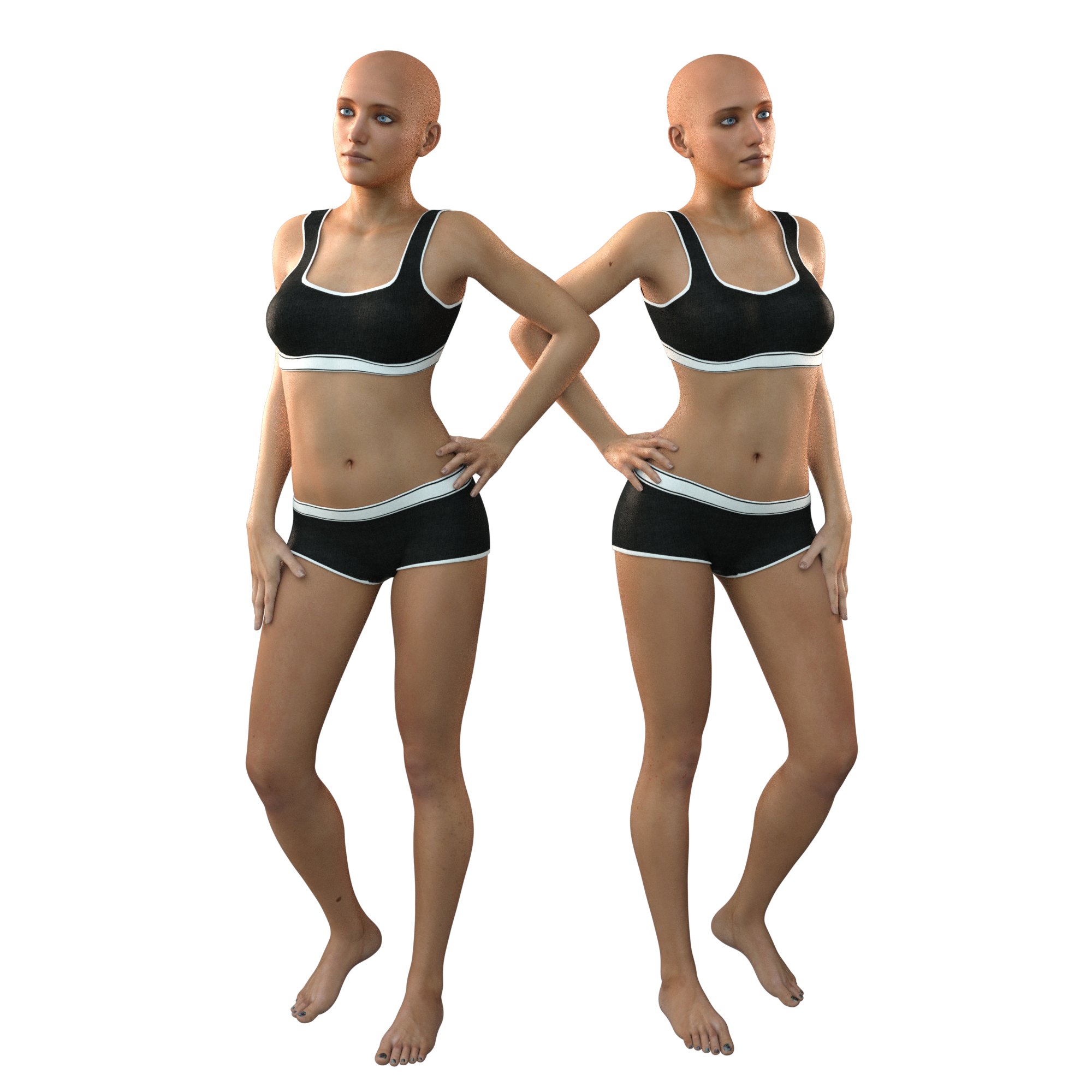
@Novica - I have tested Ekaterina side by side with default G3F and you're right, the morphs change very little when added. I sat there and removed them, then readded them several times to see the change. It's only slight. The waist gets bigger when applying the body. The figure it a smidge taller. The head morphs don't appear to change at all. I also played with the sliders in the shaping tab and got the same results.
Note: I'm testing these on a new computer with not much else loaded, so there's nothing to interfere with this character.
Her skin is very nice, but the morphs are barely there. She would look good using morph packs, but that's besides the point. When we're buying a character, we expect significant changes from the default base figure. That isn't the case here. (click and zoom in for more detail.)
Ekaterina next to G3F:
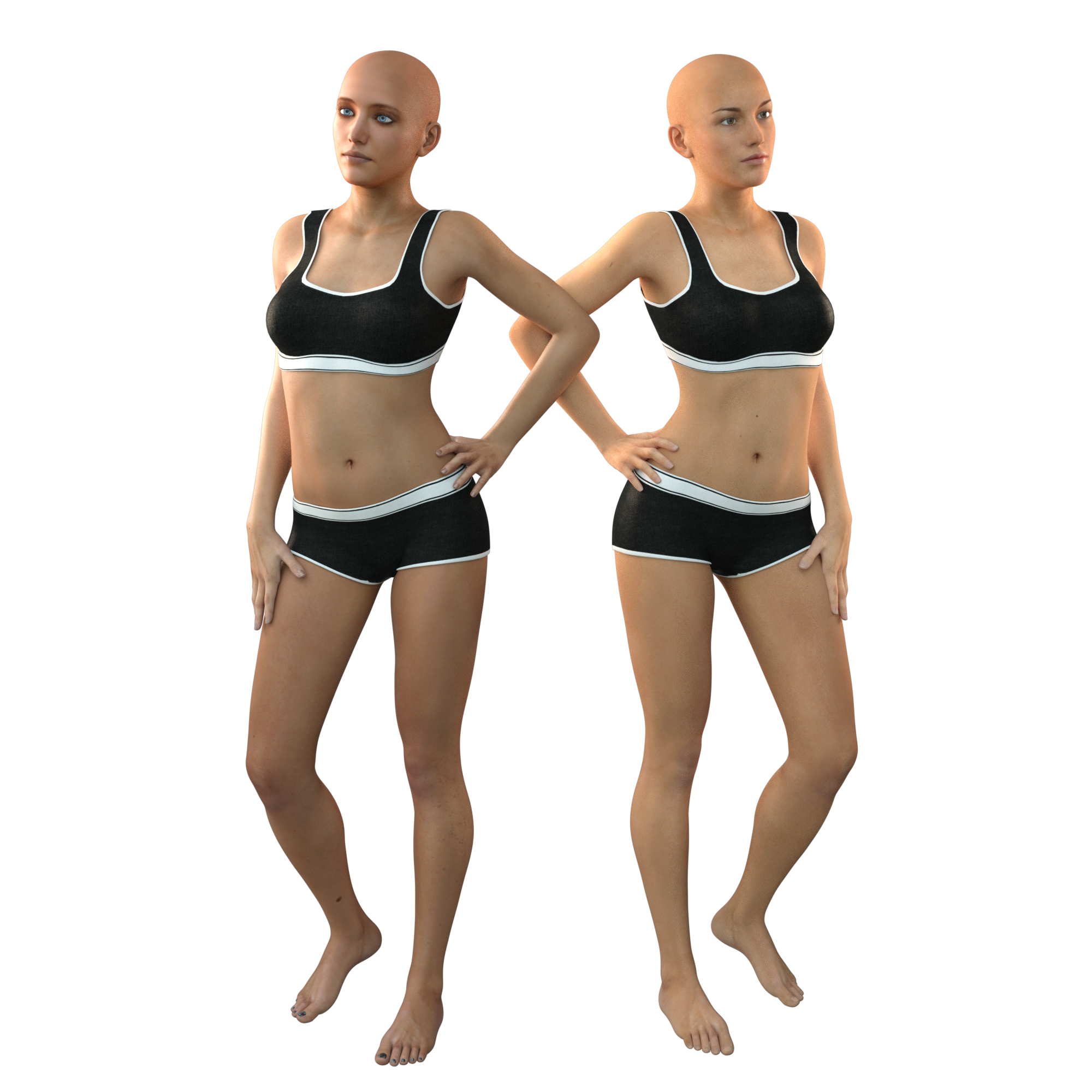
EKaterina next to G3F wearing Ekaterina's skin (but not the morphs)- can't tell the difference!
 Commercial image usage of rendered models
Rendered images? ie 2d Images are fine, THere is one or maybe 2 store items that have special licenses regarding commercial work, but apart from them anything from the Daz 3D store has the staanndard EULA which allows
Terms of Use. Two Dimensional Works. Subject to the terms and conditions of this Agreement, User may (i) access, use, copy and modify the Content in the creation and presentation of two-dimensional animations and renderings, (ii) incorporate two dimensional images (including two dimensional images that simulate motion of three dimensional objects) derived by User from the Content in User’s other works, and (iii) publish, market, distribute, transfer, sell or sublicense User’s two-dimensional animations, renderings and other works; provided that User may not in any case publish, market, distribute, transfer, sell or sublicense any renderings, animations, software applications, data or any other product from which any Content, or any part thereof, or any substantially similar version of the Content can be separately exported, extracted or de-compiled into any re-distributable form or format.
New Install - Help with Gen 4 & Genesis Please?Okay, also...
Once I figure out how to transfer the morphs to Genesis, will I be able to uninstall V4 and her morphs and still have them available for Genesis? I'm trying to remember how this worked. Sorry.
New Install - Help with Gen 4 & Genesis Please?Clothes are easy, just load them, click on "Fit to" and when the dialogue comes up, select Victoria 4 as the figure it was originally designed for and the type of clothing it is. (Disclaimer: skirts only sort of work, although I think we're going to find DForce helpful for fixing some of those problem, shoes work very poorly, and armor doesn't work at all.
There's several options on the morph thing, which other people could probably describe better than me. This is the paid option: https://www.daz3d.com/genesis-generation-x2
Because the maker of GenX2 has passed away, there's been a proliferation of DIY morph transfer threads, but computer's running slow because of something I have it doing, and searching is not very doable right now.
New Install - Help with Gen 4 & Genesis Please?You would need to covnert the morphs, there isn't a tool that will load them as-is. GenX if you have it, though it can be done through the Transfer Utility.
New Install - Help with Gen 4 & Genesis Please?You will need the G4/A4 shapes for Genesis found in the store, I don't know if you can transfer V4 morphs easely to the Genesis figure? V4 and M4 clothing can be fitted directly to G1 right out of the box using autofit. Same goes for M4/V4 skins as Genesis can use the said characters uv maps along with V5/M5.
Daz to Maya Plugin QuestionI wish to transfer a pose from Daz to Maya using the new Daz to Maya plugin. No matter what the original pose in Daz, the imported figure in Maya arrives in the standard T pose when using this plugin. Question: How do I get the original pose back ?
Notes: FBX export from DAZ and subsequent FBX import into Maya does not have this problem, but that workflow does result in a deformed mesh at the joints for many poses, which I was hoping this plugin will overcome. Interestingly, that same FBX file imported into Maya via the plugin defaults to the standard T pose despite the FBX file containing the original pose information. While the T pose is useful for animation, that is not of interest to me at the moment. I just want to get the original pose and then automate texture reassignment and the plugin is currently only doing the latter for me.
This question has not been addressed in the previous recent thread on this plugin and thus this new thread. Thanks in advance for any tips.
Export your pose from DAZ in .obj format. Import into Maya and use the obj as a blendshape to your T-posed rigged version. Activate the blend shape and you have an HD posed character.
Terradome 3 Iray do you use it - do you like itThanks a lot everybody! This gives me a much better idea. The renders I've see are really nice, and do more convincing than the promos for me
The way to think of Terradome is like thinking of it as a big flat character. You can’t really sculpt new shapes but each morph pack comes with a number of dialed ‘faces’ and mixing those can sort of generate new ‘characters.’ But you won’t ever be able to decide ‘I want a hill right here’ and just make that happen. I have at least one of the texture addons and use it often when I use Terradome. Pumping up the default displacement can help quite a bit.
This surely helps to imagine how it works, that was one thing I was wondering about. thanks a lot for that
I bought it and I really don't use it. Results are only okay for me, but the product is slow to render on my machine.
Same here. I found it to be resource heavy and useless when adding mulitple figures into the scene also. I actually returned it because of this. The product idea itself is great and it does work as advertised, it just didn't work for my uses as a background for a larger scene without killing my PC.
This is what I was a bit afraid of, and I know that in my scenes I will have some other resource heavy stuff already, so that would make the whole process a bit over the top.
Thanks for all the feedback, I guess I skip for now and piece my scenes together from other terrains I have
dForce Verified Functional Clothing [Out of the Box]I couldn't get a rope or belt to stick so I gave up on that. the rips are transparency maps which you can turn off or on. Not easy when it one of the first there nothing to go by.
Hmm might do a morph to hide the blade and make it into a staff
In another thread there was talk of taking things like belts and turning off dynamics on them. Select the belt, then dial down Dynamic to 0 instead of 1.0 so it's not part of the sim.
dForce Verified Functional Clothing [Out of the Box]Never tried morphs before this is the weight morph, and dare I try him George. I did turn on smoothing for the wieght morph. So there are some limits to DForce !
Is there a way to make a transmap option so that the 'skirt' part in the middle front is all one solid fabric instead of split open? It would make it look more like the robe I usually see on these guys. Plus....it would eliminate any 'peek a boo' from down below. A good solid one piece robe would be a great product with the staff. Maybe the traditional rope belt too?
dForce Verified Functional Clothing [Out of the Box]I couldn't get a rope or belt to stick so I gave up on that. the rips are transparency maps which you can turn off or on. Not easy when it one of the first there nothing to go by.
Hmm might do a morph to hide the blade and make it into a staff!
Awesome, thank you!
Terradome 3 Iray do you use it - do you like itThe way to think of Terradome is like thinking of it as a big flat character. You can’t really sculpt new shapes but each morph pack comes with a number of dialed ‘faces’ and mixing those can sort of generate new ‘characters.’ But you won’t ever be able to decide ‘I want a hill right here’ and just make that happen. I have at least one of the texture addons and use it often when I use Terradome. Pumping up the default displacement can help quite a bit.
Terradome 3 Iray do you use it - do you like itI'm thinking about getting terradome for some scenes I will do in the future where I need a bit of landscape. I never had the older version and have no experience with that system.
So I would like to know do you have terradome3 for Iray? Do you use it and like it?
Show me some of the renders you made with it, please
Thanks a lot!
Hi,
I love Terradome 3 and use it in many of my renders. I have purchased all of @mortemvetus add-ons during various sales throughout this past year and I try to pick Colm Jackson's add-ons when they are on sale, particularly his HDR Skies for Terradome 3 because they can be used without Terradome as IBL lighting.
I've included a link to a recent render using some Terradome 3 elements in my gallery at https://www.daz3d.com/gallery/#images/458071. Hope this information helps.
Trish
Edit: As for the questions you asked @Scorpio -- for me I use it frequently without any add-on packs (which I do have) and it is easy to create landscape morphs with the morph dials. Colm has a great YouTube video on how to use it at https://www.youtube.com/watch?v=ptMvYfkwAH8.
dForce Verified Functional Clothing [Out of the Box]Never tried morphs before this is the weight morph, and dare I try him George. I did turn on smoothing for the wieght morph. So there are some limits to DForce !
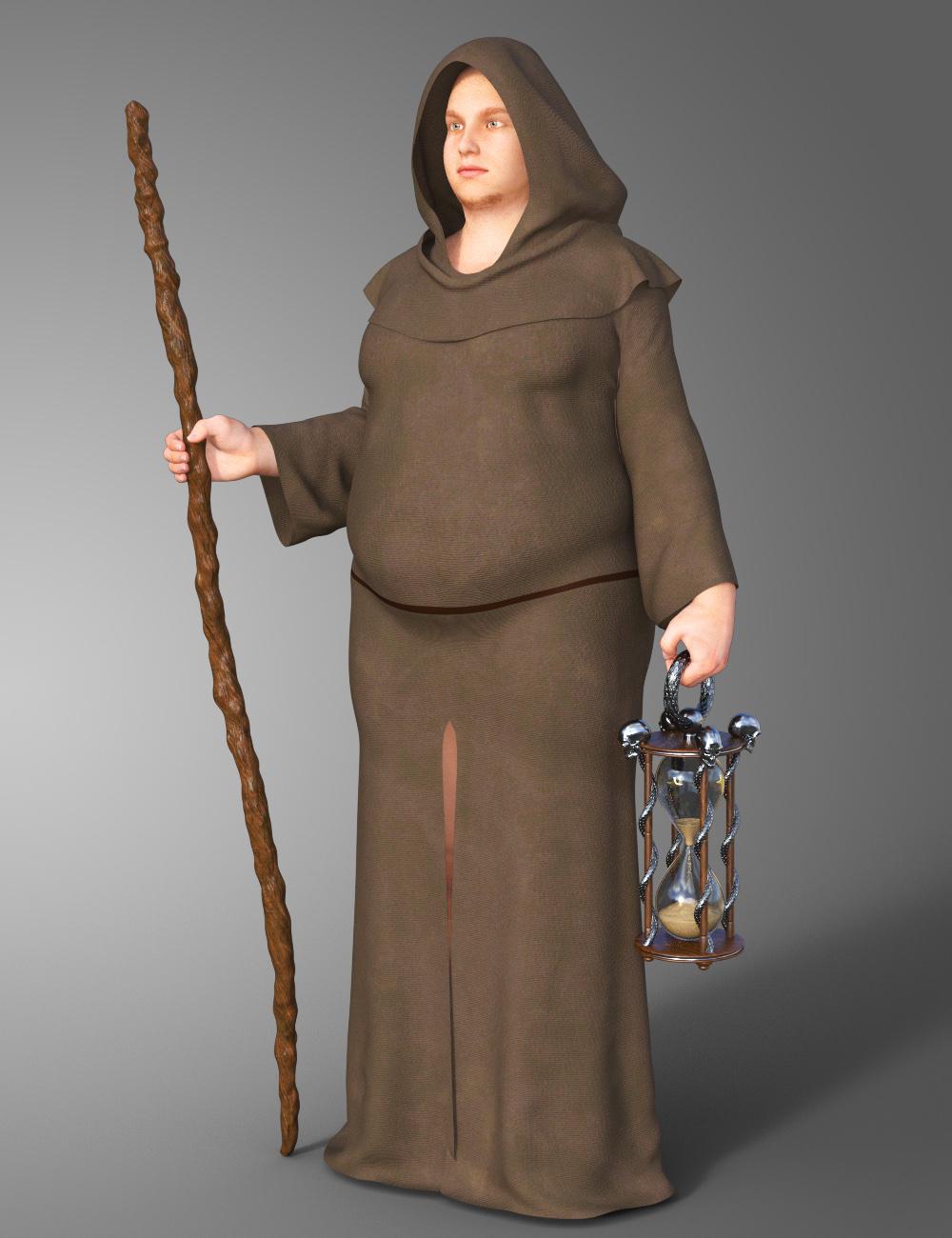

Friar Tuck! heheh I like it! :D Does it fit females? I'd love to see a sexy female reaper! :D
Just curious, is there a way to turn the hourglass into a lamp/emissive for the monk version? Just a thought. If it's too much work, then ignore what I said. :D
The concept of this is quite cool! You get monk (the light) vs reaper (the dark). It's a really cool concept!
dForce Verified Functional Clothing [Out of the Box]Never tried morphs before this is the weight morph, and dare I try him George. I did turn on smoothing for the wieght morph. So there are some limits to DForce !
Novica & Forum Members Tips & Product Reviews Pt 10She doesn't look like she changes at all! I wonder if she requires some other morph that wasn't mentioned on the page or something....and I REALLY don't like the lipsticks at all. They look like they've missed half the upper lip. Are you going to return her?
I want you to see this. The Genesis 3 Female Base and Ekatrina without materials.
dForce Verified Functional Clothing [Out of the Box]I couldn't get a rope or belt to stick so I gave up on that. the rips are transparency maps which you can turn off or on. Not easy when it one of the first there nothing to go by.
Hmm might do a morph to hide the blade and make it into a staff!
Ohhh That would be cool! It would definitely appeal to more people. While someone might pass up a reaper set, they might be interested in a munk set - or vice versa. :)
Daz 3D is part of

Connect
DAZ Productions, Inc.
7533 S Center View Ct #4664
West Jordan, UT 84084Licensing Agreement | Terms of Service | Privacy Policy | EULA
© 2026 Daz Productions Inc. All Rights Reserved.