-
Dracorn's Render Thread
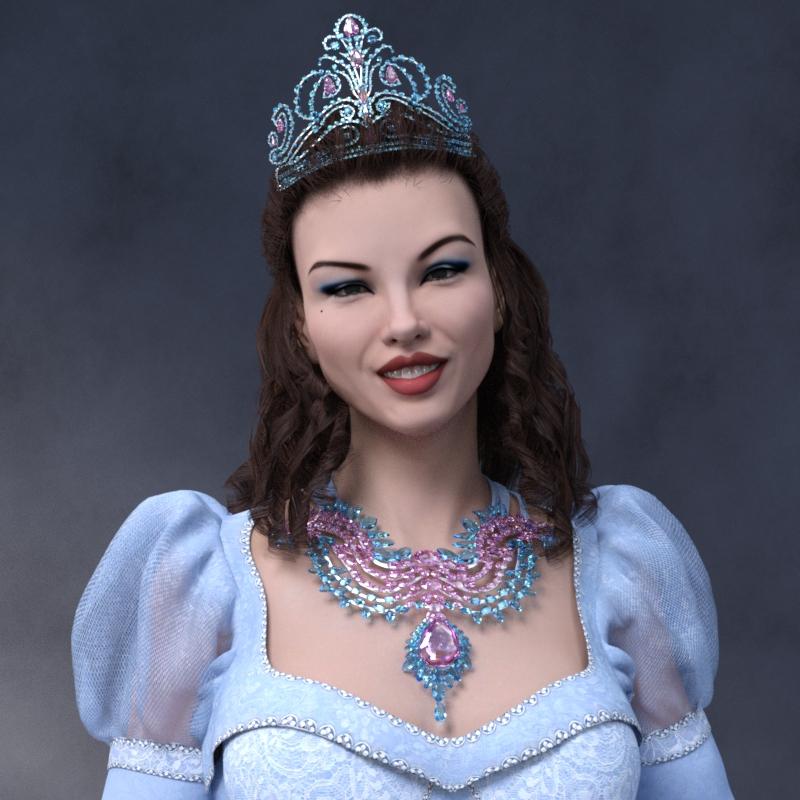
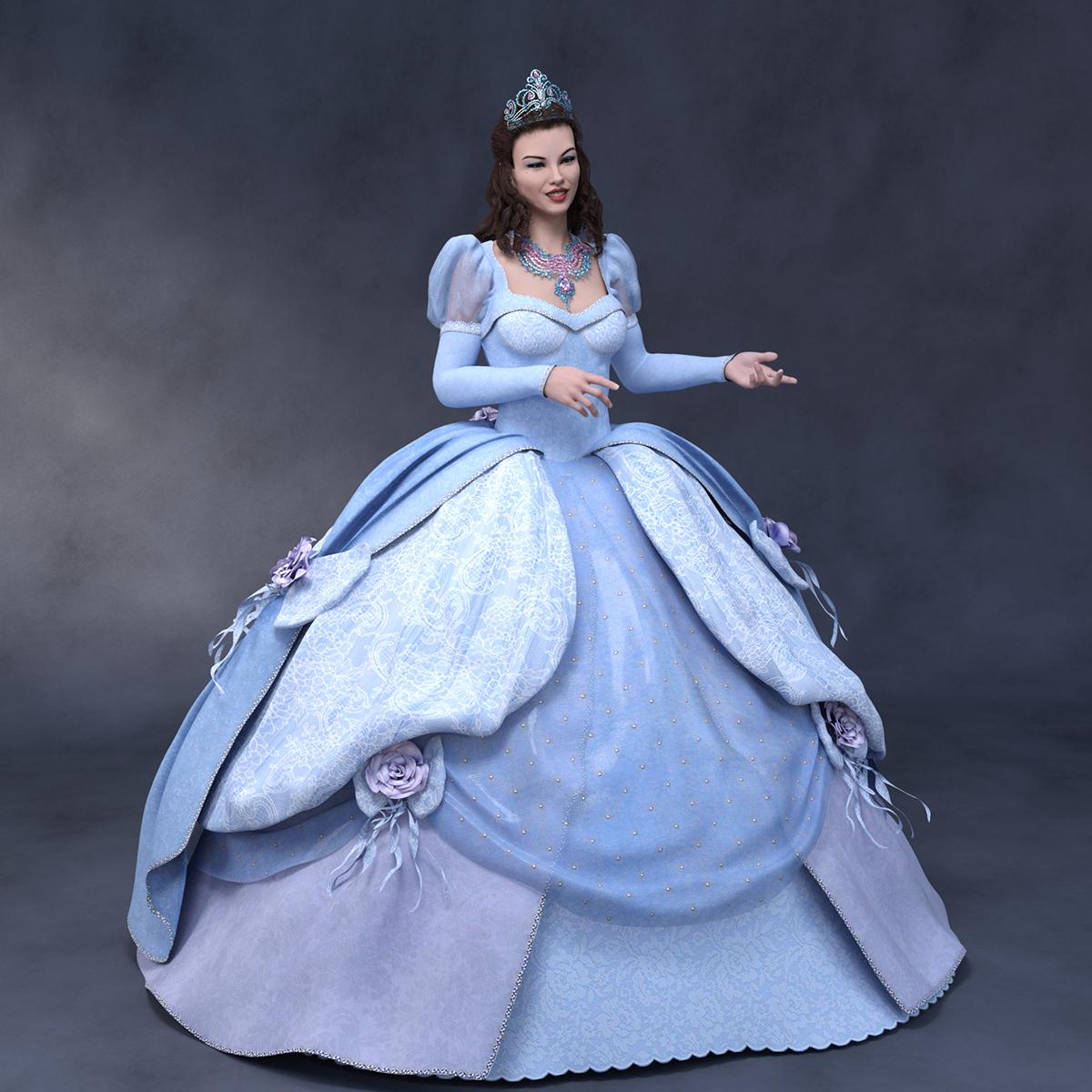
So here's a Victoria 8 and Iray conversion of Enchanted Dreams, with a morph conversion of G1's Mina morph for the face. Boss Pro Light Set.
Note that the skirt had to be loaded without the autofit, then parented in place. When I tried auto fit, somehow it connected to the movement of her arms, and warped.
I used Allen Art's free gemstone materials - they really are beautiful.
 anyone recommend a Vampirella V4 character?
Well then, it boils down to what you personally like. With a nearly 50 year history, she's been drawn "just about every which way". The only thing I might recommend are upswept, almond shaped eyes (thus hinting at a predatory animal) accented with thick border of "goth" eyeliner and mascera. The atrist who drew her most for the original Warren Magazin run, Jose Gonzalez, usually gave her a "triangular" face, her high cheekbones leading to a delicate chin.
I hope you don't mind a personal example. Here's what I did using Aiko 3 with Thorne & Sarsa's "Mila" morph enhanced by various dials from Beth Capsces' "Kioki for A3" set. the "bikini" is actually a texture using transparency and displacement maps made by sam Therapy.

Sincerely,
Bill
OOT Hair for Genesis 3 converting to Genesis 8I have these two products. Is it possible to make them work on a Genesis 8 characters?
https://www.daz3d.com/sporty-ponytail-hair-and-oot-hairblending-2-0-for-genesis-3-female-s
https://www.daz3d.com/everyday-updo-hair-and-oot-hairblending-2-0-for-genesis-3-female-s
They seem to lose all the morph presets?
Thank you for any advice.
Trying to create skin textures for specific outputAssuming you have the correct licenses you'd probably want to do soemthing fairly simple like use a modeller or UV editor to move entire blocks around (say scale to 33% centred on the origin and then move by 33% or 66% to arange them in a single square), then you coudl do the same to the textures in an image editor to make a combined map that would fit. More elaborate schemes might be more efficient, but woudl be fiddlier. A complete remap loaded as a UV set and then using Map Transfer to covnert the maps would be more awkward.
CCMP - Learning animation thread.Hi Mat :)
the process of attaching rigging to a mesh in every program i've used,. creates an "area of influence" (for the mesh defomation) ,.around the bones,. automagically..
if the user then want's to re-define, or adjust those weights,.(by manually weight painting) ... that is optional..
Carrara does a pretty decent job of creating the mesh weights based on the bones. but those can be adjusted or changed easily (using Bone influence slider controls,.. or painting by hand) in the weightpainting area.
As for an established system,.
Ideally,. you'd make the mesh for your figure,. then add bones to allow deformation of the mesh,. then attach those bones to the mesh.
whether you do the bones in Carrara, Poser, or even daz studio would depend on the intended use for that model,. EG: personal use, limited use EG: a single animation project
, for commercial profit, (mass retail) etc
In carrara,. you could simply make a mesh,. export it as an OBJ,. and use Poser or Daz Studio to "Transfer" the rigging from an existing figure (eg Victoria/Michael/Genesis) onto your imported OBJ mesh from carrara. ...this is ideal for creating clothing "figures" for Genesis etc..
(note) this will automagicallly create weights for your mesh based on the bones.
In Daz Studio,. there's a function called "Transfer Utility" under Assets,. which allows the user to select a "Source" figure, and "Target" mesh, and auto transfers the rigging and creates weights from that rigging to fit the mesh.
Hope it helps :)
GenX2 with ConnectGenX is for transferrign morphs, Michael 4 as Michael 4 is the base shape so there's nothing for GenX to transfer (also I don't think GenX supports Genesis 8)
Morphing Fantasy Dress issue - anyone else?I just installed the update. While the MFD seems to fit Olympia 8 without any pokethru now, is the overskirt meant to do this? Huge pokethru at back and thigh, and it gapes at the waist. I looked for a morph called "fit dress" or something like that, but there's nothing of that ilk.
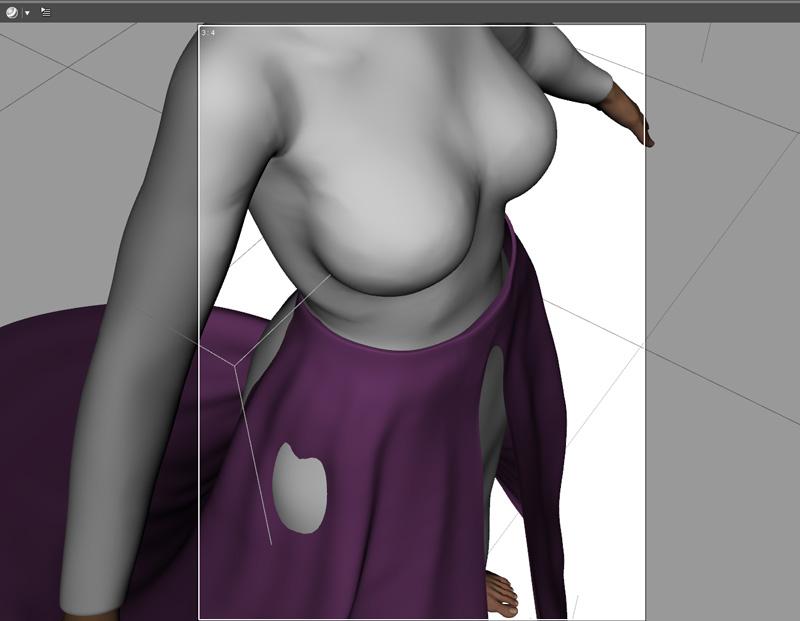
Setting the overskirt to collide with the MFD should work. You'll still get a minor poke near her butt but that is easily fixed by increasing the smoothing and/or colision iterations a little bit.
Hey, at least the overskirt looks fine with Olympia 8. It still has issues with small bodies like Moxie and the extra small ones like Faye and Young Lyra.
Morphing Fantasy Dress issue - anyone else?I just installed the update. While the MFD seems to fit Olympia 8 without any pokethru now, is the overskirt meant to do this? Huge pokethru at back and thigh, and it gapes at the waist. I looked for a morph called "fit dress" or something like that, but there's nothing of that ilk.
Monique 8I know that I've had to drastically change my iray lighting when using the 8 line with the 8 skins. Using G3 skins on the 8 figures, no problems. But use the G8 skins.....hoooo boy. It's no secret that Olympia 7 is my all time favourite G3 character, with Monique 7 coming an extremely close second. I was devastated when I bought Olympia 8 to see her skin - I have one iray light setup that stops the orange of her skin. Just one. I am REALLY worried about Monique 8 - while her morphs will work well in my library, I am pretty much biting my nails in anxiety over what her skin will be like. And her eyes. Honestly, I am not happy at all with the G8 skins. The figures/morphs, they are fine. But the skins.......ugh. Half of me is THRILLED to see Monique 8 coming out shortly - the other half is curled up in a ball, sucking my thumb in terror at what she will look like.
I'm with you, mate. Monique and Darius have been great skins for both G2 and G3 (though so distinctive that they look like their namesakes regardless of the morph); so, it would be sad if they wax them up. I want Daz to promote whoever is making the Genesis 8 shader settings to a position where they no longer set those parameters. Even joelegecko can't make them look good.
GenX2 with ConnectI want to create a Shaping morph for Genesis 8 that will turn him into M4. I watched a couple of videos on youtube and I ended up with a few questions. In the video (that was for GenX), he located M4 and then drug him over to the GenX panel. Then he located the body morphs (not sure if you have to do the head morphs too?) and drug them over. Then he located the figure he wanted create a morph for (I think it was a special character for V4). Then he did the transfer. I think that it transferred the figure Elaine over to Genesis.
But I'm not sure. I've never had to load the morphs for M4 before. I just click on the icon and he loads into the scene, with the morphs I presume. So do I have to copy the morphs over to the GenX2 panel?
And if I decide to do other characters that are based on M4...like the elite characters, do you have to drag M4 over to the GenX2 panel every time?
And how did it know that the figure was being transferred to to Genesis. (I was thinking that it was transferring the morphs from V4.2 over to Elaine, but Elaine was the figure he ended up with. So the morhps just needed to be there to make the Elaine character, I think.
And do you have to do anything special, if your content was all installed with connect? I thought I saw somewhere where someone said that you had to do something with the directories.
Thanks.
Celebrity Look-a-Likes for 3D figures Part 2There can be no doubt with this one. I'm kinda surprised that it's so exact. Not complaining though.
I present to you Jared Padalecki aka Sam Winchester:
https://www.renderosity.com/mod/bcs/phx-sean-for-michael-8/123391/I wonder if Jensen/Dean is on the way (not counting earlier generation figures), maybe Misha/Castiel too? I hope so.
Whoa! Phoenix1966 pretty much nailed him! Most impressive!
Thanks, folks. If you look at the last promo image, you catch a glimpse of the next two in the unofficial series.
Awesome! I'm so glad to see you doing characters for Genesis 8! :D
Thanks.

Coming back at this point, it made sense to move forward with the most recent incarnation of figures. I have to admit I do like the Iray render engine quite a bit in Daz Studio, too.
Sean's skin texture looks amazing as does the morph. I've only made two purchase from Rendo but dang you make it tempting! lol I hope we see more of your new work here at Daz as well. :)
Wecome Back!

Thanks so much!
Sean's got some handy fibermesh options, too. Expect to find the rest of the "family" over there and original characters here.
Celebrity Look-a-Likes for 3D figures Part 2There can be no doubt with this one. I'm kinda surprised that it's so exact. Not complaining though.
I present to you Jared Padalecki aka Sam Winchester:
https://www.renderosity.com/mod/bcs/phx-sean-for-michael-8/123391/I wonder if Jensen/Dean is on the way (not counting earlier generation figures), maybe Misha/Castiel too? I hope so.
Whoa! Phoenix1966 pretty much nailed him! Most impressive!
Thanks, folks. If you look at the last promo image, you catch a glimpse of the next two in the unofficial series.
Awesome! I'm so glad to see you doing characters for Genesis 8! :D
Thanks.
Coming back at this point, it made sense to move forward with the most recent incarnation of figures. I have to admit I do like the Iray render engine quite a bit in Daz Studio, too.
Sean's skin texture looks amazing as does the morph. I've only made two purchase from Rendo but dang you make it tempting! lol I hope we see more of your new work here at Daz as well. :)
Wecome Back!
Is there a way to fit makeup from cross-characters?You will have to find the characters that have individual make up parts - lips, eye make up, etc. There are more than you might think, but a lot of the earlier stuff, like Richard said, are a whole new face, this is usually found most often in V4 and Genesis. Of course, you could just transfer the whole skin over for the make up you want to use- I.e move Elizabeth's skin to Victoria if you really want to use the make up
Lucas 8Had some fun with Lucas 8, a dash of M8 and some morph packages. Than continued the fun with postwork in Topaz Studio (the free version). This be the result, posting two of the pictures I ended up doing.
Male model -1 Topaz 1 and 2
That looks really good! I particularly like the bottom one! :)
"New" V4 / Genesis Figures on Store Page?Ok, this might be noob question, but do i need anything else to transfer 4v, g2 and g3 skins to g8 than uv maps. I haven't tried transfering surfases maps before and there is so many beautiful characters i would like to try.
To transfer maps between generations you'll likely need products by Cayman Studios: https://www.daz3d.com/cayman-studios
He also has some at the other store, Renderosity.
I really like the products, I have three of them. I have the "Genesis 3 UVs for Genesis 2 Female", "Legacy UVs for Genesis 3: V4", and "Legacy UVs for Genesis 3: G2F". I kind of wish I had held off on the G3F ones though, as I'm mainly using G8F now.
Lucas 8Had some fun with Lucas 8, a dash of M8 and some morph packages. Than continued the fun with postwork in Topaz Studio (the free version). This be the result, posting two of the pictures I ended up doing.
Male model -1 Topaz 1 and 2

 Michael and Friends Appreciation Association [Lots of images, please.]
Had some fun with Lucas 8, a dash of M8 and some morph packages. Than continued the fun with postwork in Topaz Studio (the free version). This be the result, posting two of the pictures I ended up doing.
I'm not sure if others like this guy as much as I ended up doing, but list the morph tweaks I did if so :) RSM is the RareStone's face morphs for genesis 8 male. Otherwise it is the Genesis 8 male body and head morphs that I have used. Plus Lucas and Michael of course.
M8 - body: 70% face: 75%
Lucas 8 - body: 45% face: 30%
Body size: 5%
Body Tone: 35%
Bodybuilder: 15%
Bodybuilder details: 80%
Bodybuilder Size: 15%
Fitness: 20%
Fitness Details: 50%
Fitness Size: 20%
Stocky: 10%
---
Lip Top Peak: - 100%
Lips Thin: 10%
Mouth Height: 20%
Mouth Realism HD: 50%
crows Feet HD: 25%
Eyes Angled: 40%
Nose Depth: -10%
Nose Flesh Size: 5%
Nose Ridge: 15%
RSM Lip Peak Distance: - 50%
RSM Lip Peaks Gone: 20%
RSM Face Starter Diamond: 70%
RSM Eyelids Upper Detail Stronger: 50%
RSM Eyelids Upper Fold Down 1: 15%
RSM Eyelids Upper Rotate: -2%
RSM Eyes Full Set 03: 8%
RSM Eyes Full Set 04: -5%
RSM Eyes Full Set 05: 5%
RSM Eyes Full Set 09: 5%
Male model -1 Topaz 1 and 2
Is .DUFF conversion possible?You need a Game Dev license if you're exporting the 3D mesh into a 3D format that can be used in anything other than Daz Studio, unless you're exporting it for your own personal use with the intent to re-import into Daz Studio.
For example, exporting in a 3D format that can be read by Blender, Maya, 3D Studio Max, and the like for the purposes of modifying the 3D mesh or making 3D mesh assets for it (clothes, shoes, hair, etc), which will then be imported into Daz Studio as a prop or clothing figure.
2D renders, including still images and movies, from which a 3D mesh cannot be extracted do not require a Game Dev license.
I think I understand, and until I thought about transfering a 3d figure to an outside interface, I was just going to transfer video (animation and/or stills) that I created in DS, and upload them as a video or JPEG (picture) file.
That will work, anyway, so I'll stick to that.
"New" V4 / Genesis Figures on Store Page?Ok, this might be noob question, but do i need anything else to transfer 4v, g2 and g3 skins to g8 than uv maps. I haven't tried transfering surfases maps before and there is so many beautiful characters i would like to try.
Cloning G2 to G3 and G8The potential issue with amalgamating morphs like that si that you lose any corrective morphs associated with the constituent morphs that kick only when some other property is set - a bend, for example, or an expression morph.
Daz 3D is part of

Connect
DAZ Productions, Inc.
7533 S Center View Ct #4664
West Jordan, UT 84084Licensing Agreement | Terms of Service | Privacy Policy | EULA
© 2026 Daz Productions Inc. All Rights Reserved.