-
Is Carrara a good alternative to Blender?
Are the socks separate clothing, or part of the suit?
If they're part of the suit, it would be better to just lift them in the texture rather than a morph, in my opinion.
Looking Great, ny the way! ;)
The socks are technically boots. Seperate clothing piece that comes with Smay's SHS. The mask is JoeQuick's for M4 and actually on top of the mask that comes with SHS. I was able to hide the actual soles of the boots using opacity in the Surfaces. But they are actually a bit short compared to all official Spidey images I have seen. They should come up to his mid-calf. Another 2 or 3 webbing sections. I couldn't do any scaling to achieve that either.
The only other option is to texture the bottom calf of the Suit itself, but it is a serious pain to try and get that to line up, and on a close-up image you would see the top of the boot ending much shorter.
I assume that if I tried to import just these boots to Carrara, I would have same problem I am already having with displacement maps not working for SHS?
Is Carrara a good alternative to Blender?Are the socks separate clothing, or part of the suit?
If they're part of the suit, it would be better to just lift them in the texture rather than a morph, in my opinion.
Looking Great, ny the way! ;)
Superheroes Rebooted - Ready to Rrrrrender?Ok, so the insanity of trying to make Spider-Man using Smay's SHS for G2M continues... Quite a bit I am not all that happey with here. Been struggling to get the seams to line up in a bunch of places and wish I could figure out a way to morph the boots and make them taller. Also not happy that I can't get JoeQuick's mask to fit a little better so it could be a bit more seamless with the neck. I also need to airbrush out the original seams on the bump map and add my own.
Daz to Maya questionIn the video it shows facial rigging being used in the Maya Shape Editor. I can not seem to follow the steps (it is a VERY fast video) to get this option in the Shape Editor. Can anyone point me in the right direction?
Thanks!
So after:
- installing the plugin
- making sure plugin was enabled in maya (windows / setting preferances / plugin manager / daztomaya.py - tick on loaded.
- modelling tab - top menu - 3DtoAll - >> import from Daz Studio - click and enter serial from daz3d (found under serials in your account)
- Load model in daz studio > top menu - scripts > 3Dtoall > DaztoMaya
- In Maya - DaztoMaya window ( modelling tab - top menu - 3DtoAll - >> import from Daz Studio) click auto import and . . .
Success. Sort of. The model came in fine with the rig and textures and poses no problem with Human Ik. However there are no Blend shapes in the shape editor, like in the totally useless video from the producer (if you can even tell that the face controls should be in the shape editor (maya > windows > animation editors > shape editor), due to the speed of the video.
On further investigation it appears that which morphs are brought from Daz to Maya is controlled by the FBX export options from Daz. So .
- In Daz Studio with a model loaded choose file > export > pick fbx and a file name > save to get the options up.

There is a list of morphs for each model in the scene and what you need to do is create an export rule for the ones you want. Click Edit Morph Export Rules.

Here I have added a rule for head.eCTRL and set this to export. I've also added one for anything starting with OBMG3F and set it to bake because without this (in my case, with this model) Maya keep running out of memory and crashing (possibly worth exporting to FBX once). Once your rules are set up use the DaztoMaya script again.
- top menu - scripts > 3Dtoall > DaztoMaya
- In Maya - DaztoMaya window ( modelling tab - top menu - 3DtoAll - >> import from Daz Studio) click auto import
It's fiddly and you want to set up rules to only include the morphs you need - have a good look through the morph names in the FBX export options. Trying to export everything will crash maya unless you have a massively powerful system.
Peresumably not mentioned in the manual because it would damage the 2 click off you go claim.
Hope this is helpful to someon.
That was my problem! Now to figure out how to just get the ones I want and not 150 others that I don't. :)
Thanks!
Monique 8
Thanks, yes looks already great! Waiting for next Tuesday then... :)there's a picture of her face morph in the Bedhead Hair, the 8th pop up promo. Not her skin, but at least you can see her face.
Daz to Maya questionIn the video it shows facial rigging being used in the Maya Shape Editor. I can not seem to follow the steps (it is a VERY fast video) to get this option in the Shape Editor. Can anyone point me in the right direction?
Thanks!
So after:
- installing the plugin
- making sure plugin was enabled in maya (windows / setting preferances / plugin manager / daztomaya.py - tick on loaded.
- modelling tab - top menu - 3DtoAll - >> import from Daz Studio - click and enter serial from daz3d (found under serials in your account)
- Load model in daz studio > top menu - scripts > 3Dtoall > DaztoMaya
- In Maya - DaztoMaya window ( modelling tab - top menu - 3DtoAll - >> import from Daz Studio) click auto import and . . .
Success. Sort of. The model came in fine with the rig and textures and poses no problem with Human Ik. However there are no Blend shapes in the shape editor, like in the totally useless video from the producer (if you can even tell that the face controls should be in the shape editor (maya > windows > animation editors > shape editor), due to the speed of the video.
On further investigation it appears that which morphs are brought from Daz to Maya is controlled by the FBX export options from Daz. So .
- In Daz Studio with a model loaded choose file > export > pick fbx and a file name > save to get the options up.
There is a list of morphs for each model in the scene and what you need to do is create an export rule for the ones you want. Click Edit Morph Export Rules.
Here I have added a rule for head.eCTRL and set this to export. I've also added one for anything starting with OBMG3F and set it to bake because without this (in my case, with this model) Maya keep running out of memory and crashing (possibly worth exporting to FBX once). Once your rules are set up use the DaztoMaya script again.
- top menu - scripts > 3Dtoall > DaztoMaya
- In Maya - DaztoMaya window ( modelling tab - top menu - 3DtoAll - >> import from Daz Studio) click auto import
It's fiddly and you want to set up rules to only include the morphs you need - have a good look through the morph names in the FBX export options. Trying to export everything will crash maya unless you have a massively powerful system.
Peresumably not mentioned in the manual because it would damage the 2 click off you go claim.
Hope this is helpful to someon.
Good explanation. If you have a whole lot of morphs and expressions, you will need a lot of RAM to use this plugin without editing the export rules. It would be nice if we could favorite the morphs we want to export and the script could recognizer them. I mentioned this to the developer and he said he was looking into it.
You can export your morph export rules so they can be loaded. Still can be tricky to work out exactly which morphs are which.
Getting Victoria 4 Shape/Morph onto Genesis 8Does anyone know how to get the Victoria 4 shape/morph onto Genesis 8? Is there a product someone has created like Generation X or is there a tutorial I am missing?
Thanks so much!
Daz to Maya questionIn the video it shows facial rigging being used in the Maya Shape Editor. I can not seem to follow the steps (it is a VERY fast video) to get this option in the Shape Editor. Can anyone point me in the right direction?
Thanks!
So after:
- installing the plugin
- making sure plugin was enabled in maya (windows / setting preferances / plugin manager / daztomaya.py - tick on loaded.
- modelling tab - top menu - 3DtoAll - >> import from Daz Studio - click and enter serial from daz3d (found under serials in your account)
- Load model in daz studio > top menu - scripts > 3Dtoall > DaztoMaya
- In Maya - DaztoMaya window ( modelling tab - top menu - 3DtoAll - >> import from Daz Studio) click auto import and . . .
Success. Sort of. The model came in fine with the rig and textures and poses no problem with Human Ik. However there are no Blend shapes in the shape editor, like in the totally useless video from the producer (if you can even tell that the face controls should be in the shape editor (maya > windows > animation editors > shape editor), due to the speed of the video.
On further investigation it appears that which morphs are brought from Daz to Maya is controlled by the FBX export options from Daz. So .
- In Daz Studio with a model loaded choose file > export > pick fbx and a file name > save to get the options up.
There is a list of morphs for each model in the scene and what you need to do is create an export rule for the ones you want. Click Edit Morph Export Rules.
Here I have added a rule for head.eCTRL and set this to export. I've also added one for anything starting with OBMG3F and set it to bake because without this (in my case, with this model) Maya keep running out of memory and crashing (possibly worth exporting to FBX once). Once your rules are set up use the DaztoMaya script again.
- top menu - scripts > 3Dtoall > DaztoMaya
- In Maya - DaztoMaya window ( modelling tab - top menu - 3DtoAll - >> import from Daz Studio) click auto import
It's fiddly and you want to set up rules to only include the morphs you need - have a good look through the morph names in the FBX export options. Trying to export everything will crash maya unless you have a massively powerful system.
Peresumably not mentioned in the manual because it would damage the 2 click off you go claim.
Hope this is helpful to someon.
Good explanation. If you have a whole lot of morphs and expressions, you will need a lot of RAM to use this plugin without editing the export rules. It would be nice if we could favorite the morphs we want to export and the script could recognizer them. I mentioned this to the developer and he said he was looking into it.
Daz to Maya questionIn the video it shows facial rigging being used in the Maya Shape Editor. I can not seem to follow the steps (it is a VERY fast video) to get this option in the Shape Editor. Can anyone point me in the right direction?
Thanks!
So after:
- installing the plugin
- making sure plugin was enabled in maya (windows / setting preferances / plugin manager / daztomaya.py - tick on loaded.
- modelling tab - top menu - 3DtoAll - >> import from Daz Studio - click and enter serial from daz3d (found under serials in your account)
- Load model in daz studio > top menu - scripts > 3Dtoall > DaztoMaya
- In Maya - DaztoMaya window ( modelling tab - top menu - 3DtoAll - >> import from Daz Studio) click auto import and . . .
Success. Sort of. The model came in fine with the rig and textures and poses no problem with Human Ik. However there are no Blend shapes in the shape editor, like in the totally useless video from the producer (if you can even tell that the face controls should be in the shape editor (maya > windows > animation editors > shape editor), due to the speed of the video.
On further investigation it appears that which morphs are brought from Daz to Maya is controlled by the FBX export options from Daz. So .
- In Daz Studio with a model loaded choose file > export > pick fbx and a file name > save to get the options up.
There is a list of morphs for each model in the scene and what you need to do is create an export rule for the ones you want. Click Edit Morph Export Rules.
Here I have added a rule for head.eCTRL and set this to export. I've also added one for anything starting with OBMG3F and set it to bake because without this (in my case, with this model) Maya keep running out of memory and crashing (possibly worth exporting to FBX once). Once your rules are set up use the DaztoMaya script again.
- top menu - scripts > 3Dtoall > DaztoMaya
- In Maya - DaztoMaya window ( modelling tab - top menu - 3DtoAll - >> import from Daz Studio) click auto import
It's fiddly and you want to set up rules to only include the morphs you need - have a good look through the morph names in the FBX export options. Trying to export everything will crash maya unless you have a massively powerful system.
Peresumably not mentioned in the manual because it would damage the 2 click off you go claim.
Hope this is helpful to someone.
Presave bons lengthIf I understand the question you want the Edit>Figure>Rigging>Adjust Rigging to Shape command, which will move joint centres to account for the new shape. Having done that, and with only the riging changes and your shape applied, you can use ERC Freeze so that the centres adjust automaticvally with the morph: right-click on the parametrs pane and enable Edit Mode, then right click on the shape slider and select ERC Freeze - makle sure that nothing other than the bone adjustments is in the list of Sub Components, click Accept, and test the result..
Limited functionality for the price on just about everythingWell, I can see the points you are bringing in. When you look at new games, you think "Whoa, that's cool, if they can reach that realism in games in realtime, it should be easy to do in DAZ as well". But what you don't see is the amount of research, trial and error and work before you reach that look.
I do modelling as a hobby. so it's not important if I bring out a piece of clothing one month early or not. I bring it out when i think it deserv's to be spread. If you do modelling for a living, you have to calculate how much time can i Invest, that I still earn something and that i can pay my bills at the end of the month. Then time matters, and mabe you say "thats ok for me" instead of "ok, lets do that piece a 3rd or 4rth time to see if it gets better.
Modelling the cloth (in my case for example) takes the least part of the developement. It still takes a lot of time as you have to think of "what materieal zones do i need, do i want to "hide" some parts later (like long / short sleeves that can be made with transparencies). Then there comes the hard part: I export it to DAZ and convert it to a clothing object, finetune the Maps. Then it's going back to MD to create the morphs. Sometimes it takes you 3 hours to "fold" a shirt, just to find out that the poly's don't match anymore after importing the morph to daz, because you untied a button or something like that. So, you can either: redo the morph (another 3 hours) or repose the shirt you have now and redo the creating of the cloth in DAZ at least 1.5 hours as well). If time doesn't matter, you can do either. If you are PA that has to live from the income of your models, mabe both are inacceptable and you say: ok its great piece of clothing, so forget about that exat morph.
I try to bring my morphs in no matter how long it takes, but its a hobby and i use that as learning process. (and i am happy for all every single good rate or like i get, but i think not even 10% of the people downloading your packs care about rating as well). But even if you give them away for free, you could end in rather unfriendly mails or comments if somethink does not seem to work in the way somone wanted it). I love doint it and I will go on with creating new stuff, no matter how long it takes, but I understand it could be quite frustrating if you have to do it on a time shedule.
Another point: Clothing does look good, if you drape it to a certain pose. The same piece of clothing can look very very bad, on other poses. There are so many possible Poses and wishes from the users, how should you know what is needed or wanted? Like mentioned before, Aave does great poses and drapes, it looks fantastic. But then again, you can not animate that. If you want cloth that fit most of the poses at least in a acceptable quality, you have to skip some details or it won't work. But you can be sure, people find that one pose that doesn't look good...
So: I think, DAZ does a great job for beeing a free software, still improving in long waited new tools (dforce for example, that just came out and instead of saying "wow cool, thats an imporvement", there is already a huge "i want more, thats still not enough" mentality. Come on give that tool a chance to settle first). Of course it hast not the comfort or level of a maya cloth oder MD simulation. But I think' there is alos a different price tag. And I know blender is free as well, but blender has a huge learning curve compared to daz, that is a real easy and still cool way to get into 3d.
What i wanted to say in short:
- I am sure most of the PA listen to you and care what you say: Still it's just not possible to match all needs with one product. (And for sure they would love to hear a "good job"
as well as "suggestions for improvements"
- Mabe sometimes the expectations are bit too high sometimes? It should be cheap, still have the quality of a high end solution? That just can't work. In my opinion most PA do a great job in finding their gap in between "need to have" and "nice to have" and still matching a greater part of all needs.
- DAZ Studio is free and stil evolves and brings in new features. So instead of taking that as given and already asking for more, mabe we also should try to say: Ok, how can we help daz to take out flaws and still just enjoy what we have.I am happy that there are so many content creators out there, and i am sure they do their best to bring you good but still afordable content. And if you compare some of the older props still in the store to the new stuff coming out recently, at least I can see a huge difference. If you want more than that, then you should take the sept to the next level, but then you also accept that you have to invest into higher hard and software.
HFS Ultimate Shapes for G8FAre all the morphs from the G3F pack included in the G8F pack? I didn't see te 4 breast morph listed in the G8F product detail.
Monique 8there's a picture of her face morph in the Bedhead Hair, the 8th pop up promo. Not her skin, but at least you can see her face.
She's a beauty! And I see no Joker lips... ;-)
Morphs from G3 to G8Ok, so uninstalled dazstudio and all content aswell as redownloading them again just to be sure.Deleted everything with daz from the hard drive. Installed dazstudio and only the basic and only one G3 character but still recive warnings when loading G8 after running the script. Could it be something connected to daz been updated to 4.10?
This is the complete process from loading G3, running the script and then loading G8:
2017-11-07 10:20:01.636 File loaded in 0 min 3.4 sec.
2017-11-07 10:20:01.636 Loaded file: genesis 3 female.duf
2017-11-07 10:20:01.745 Loaded Morph Deltas in 0 min 0.0 sec.
2017-11-07 10:20:01.745 Loaded file: PHMMouthRealismHD.dsf
2017-11-07 10:20:01.745 Loaded Morph Deltas in 0 min 0.0 sec.
2017-11-07 10:20:01.745 Loaded file: PBMNavel.dsf
2017-11-07 10:20:02.041 Loaded image RyJeane_arms_1004.jpg
2017-11-07 10:20:02.119 Loaded image RyJeane_mouth_1005.jpg
2017-11-07 10:20:02.307 Loaded image RyJeane_face_1001.jpg
2017-11-07 10:20:02.494 Loaded image RyJeane_torso_1002.jpg
2017-11-07 10:20:02.681 Loaded image RyJeane_legs_1003.jpg
2017-11-07 10:20:02.775 Loaded image RyJeane_eyes01_1007.jpg
2017-11-07 10:20:02.821 Loaded image RyJeane_eyerefl01_1008.jpg
2017-11-07 10:20:02.884 Loaded image RyJeane_lashes_1006.jpg
2017-11-07 10:20:10.776 Loaded image FBMBodybuilderSize.png
2017-11-07 10:20:10.777 Loaded image FBMBodybuilderSize.png
2017-11-07 10:20:10.865 Loaded image FBMEmaciated.png
2017-11-07 10:20:10.870 Loaded image FBMEmaciated.png
2017-11-07 10:20:10.952 Loaded image FBMPearFigure.png
2017-11-07 10:20:10.953 Loaded image FBMPearFigure.png
2017-11-07 10:20:30.465 Loading script: C:/Users/Rebecca/Documents/DAZ 3D/Studio/My Library/Scripts/G3 to G8 Morph Transfer/G3F to G8F Morph Transfer.dsa
2017-11-07 10:20:30.637 DEBUG: C:/Users/Public/Documents/My DAZ 3D Library/data/DAZ 3D/Genesis 3/Female/Morphs/DAZ 3D/Sunny 7/CTRLSunny7.dsf
2017-11-07 10:20:30.716 DEBUG: - Target path: C:/Users/Rebecca/Documents/DAZ 3D/Studio/My Library/data/DAZ 3D/Genesis 8/Female/Morphs/DAZ 3D/Sunny 7 created
2017-11-07 10:20:30.825 DEBUG: C:/Users/Public/Documents/My DAZ 3D Library/data/DAZ 3D/Genesis 3/Female/Morphs/DAZ 3D/Sunny 7/CTRLSunny7.png
2017-11-07 10:20:30.825 DEBUG: - Target path: C:/Users/Rebecca/Documents/DAZ 3D/Studio/My Library/data/DAZ 3D/Genesis 8/Female/Morphs/DAZ 3D/Sunny 7 created
2017-11-07 10:20:30.840 DEBUG: C:/Users/Public/Documents/My DAZ 3D Library/data/DAZ 3D/Genesis 3/Female/Morphs/DAZ 3D/Sunny 7/ECMSunny7EyesClosedL.dsf
2017-11-07 10:20:30.842 DEBUG: - Target path: C:/Users/Rebecca/Documents/DAZ 3D/Studio/My Library/data/DAZ 3D/Genesis 8/Female/Morphs/DAZ 3D/Sunny 7 created
2017-11-07 10:20:31.342 DEBUG: C:/Users/Public/Documents/My DAZ 3D Library/data/DAZ 3D/Genesis 3/Female/Morphs/DAZ 3D/Sunny 7/ECMSunny7EyesClosedR.dsf
2017-11-07 10:20:31.342 DEBUG: - Target path: C:/Users/Rebecca/Documents/DAZ 3D/Studio/My Library/data/DAZ 3D/Genesis 8/Female/Morphs/DAZ 3D/Sunny 7 created
2017-11-07 10:20:31.856 DEBUG: C:/Users/Public/Documents/My DAZ 3D Library/data/DAZ 3D/Genesis 3/Female/Morphs/DAZ 3D/Sunny 7/FBMSunny7Body.dsf
2017-11-07 10:20:31.856 DEBUG: - Target path: C:/Users/Rebecca/Documents/DAZ 3D/Studio/My Library/data/DAZ 3D/Genesis 8/Female/Morphs/DAZ 3D/Sunny 7 created
2017-11-07 10:20:57.633 DEBUG: C:/Users/Public/Documents/My DAZ 3D Library/data/DAZ 3D/Genesis 3/Female/Morphs/DAZ 3D/Sunny 7/FBMSunny7Body.png
2017-11-07 10:20:57.633 DEBUG: - Target path: C:/Users/Rebecca/Documents/DAZ 3D/Studio/My Library/data/DAZ 3D/Genesis 8/Female/Morphs/DAZ 3D/Sunny 7 created
2017-11-07 10:20:57.648 DEBUG: C:/Users/Public/Documents/My DAZ 3D Library/data/DAZ 3D/Genesis 3/Female/Morphs/DAZ 3D/Sunny 7/FHMSunny7Head.dsf
2017-11-07 10:20:57.650 DEBUG: - Target path: C:/Users/Rebecca/Documents/DAZ 3D/Studio/My Library/data/DAZ 3D/Genesis 8/Female/Morphs/DAZ 3D/Sunny 7 created
2017-11-07 10:21:10.364 DEBUG: C:/Users/Public/Documents/My DAZ 3D Library/data/DAZ 3D/Genesis 3/Female/Morphs/DAZ 3D/Sunny 7/FHMSunny7Head.png
2017-11-07 10:21:10.364 DEBUG: - Target path: C:/Users/Rebecca/Documents/DAZ 3D/Studio/My Library/data/DAZ 3D/Genesis 8/Female/Morphs/DAZ 3D/Sunny 7 created
2017-11-07 10:21:10.380 DEBUG: C:/Users/Public/Documents/My DAZ 3D Library/data/DAZ 3D/Genesis 3/Female/Morphs/DAZ 3D/Sunny 7/MCMSunny7Lashes.dsf
2017-11-07 10:21:10.382 DEBUG: - Target path: C:/Users/Rebecca/Documents/DAZ 3D/Studio/My Library/data/DAZ 3D/Genesis 8/Female/Morphs/DAZ 3D/Sunny 7 created
2017-11-07 10:21:10.616 DEBUG: C:/Users/Public/Documents/My DAZ 3D Library/data/DAZ 3D/Genesis 3/Female/Morphs/DAZ 3D/Sunny 7/MCMSunny7Navel.dsf
2017-11-07 10:21:10.616 DEBUG: - Target path: C:/Users/Rebecca/Documents/DAZ 3D/Studio/My Library/data/DAZ 3D/Genesis 8/Female/Morphs/DAZ 3D/Sunny 7 created
2017-11-07 10:21:10.835 DEBUG: C:/Users/Public/Documents/My DAZ 3D Library/data/DAZ 3D/Genesis 3/Female/Morphs/DAZ 3D/Sunny 7/MCMSunny7Nipples.dsf
2017-11-07 10:21:10.835 DEBUG: - Target path: C:/Users/Rebecca/Documents/DAZ 3D/Studio/My Library/data/DAZ 3D/Genesis 8/Female/Morphs/DAZ 3D/Sunny 7 created
2017-11-07 10:21:11.351 DEBUG: C:/Users/Public/Documents/My DAZ 3D Library/data/DAZ 3D/Genesis 3/Female/Morphs/DAZ 3D/Sunny 7/PHMSunny7ElfEars.dsf
2017-11-07 10:21:11.351 DEBUG: - Target path: C:/Users/Rebecca/Documents/DAZ 3D/Studio/My Library/data/DAZ 3D/Genesis 8/Female/Morphs/DAZ 3D/Sunny 7 created
2017-11-07 10:21:11.992 DEBUG: In C:/Users/Public/Documents/My DAZ 3D Library/data/DAZ 3D/Genesis 3/Female/Morphs/DAZ 3D/Sunny 7/: Processed 12 files.
2017-11-07 10:21:11.992 Script executed successfully: C:/Users/Rebecca/Documents/DAZ 3D/Studio/My Library/Scripts/G3 to G8 Morph Transfer/G3F to G8F Morph Transfer.dsa
2017-11-07 10:21:26.362 *** Scene Cleared ***
2017-11-07 10:21:33.456 *** Scene Cleared ***
2017-11-07 10:21:34.891 WARNING: fileinput\dzassetdaz.cpp(5737): Could not find output property for formula: lHeel:/data/DAZ%203D/Genesis%208/Female/Genesis8Female.dsf#lHeel?center_point/x in file : /data/DAZ%203D/Genesis%208/Female/Morphs/DAZ%203D/Sunny%207/FBMSunny7Body.dsf
2017-11-07 10:21:34.891 WARNING: fileinput\dzassetdaz.cpp(5737): Could not find output property for formula: lHeel:/data/DAZ%203D/Genesis%208/Female/Genesis8Female.dsf#lHeel?center_point/y in file : /data/DAZ%203D/Genesis%208/Female/Morphs/DAZ%203D/Sunny%207/FBMSunny7Body.dsf
2017-11-07 10:21:34.891 WARNING: fileinput\dzassetdaz.cpp(5737): Could not find output property for formula: lHeel:/data/DAZ%203D/Genesis%208/Female/Genesis8Female.dsf#lHeel?center_point/z in file : /data/DAZ%203D/Genesis%208/Female/Morphs/DAZ%203D/Sunny%207/FBMSunny7Body.dsf
2017-11-07 10:21:34.891 WARNING: fileinput\dzassetdaz.cpp(5737): Could not find output property for formula: lHeel:/data/DAZ%203D/Genesis%208/Female/Genesis8Female.dsf#lHeel?end_point/x in file : /data/DAZ%203D/Genesis%208/Female/Morphs/DAZ%203D/Sunny%207/FBMSunny7Body.dsf
2017-11-07 10:21:34.907 WARNING: fileinput\dzassetdaz.cpp(5737): Could not find output property for formula: lHeel:/data/DAZ%203D/Genesis%208/Female/Genesis8Female.dsf#lHeel?end_point/y in file : /data/DAZ%203D/Genesis%208/Female/Morphs/DAZ%203D/Sunny%207/FBMSunny7Body.dsf
2017-11-07 10:21:34.907 WARNING: fileinput\dzassetdaz.cpp(5737): Could not find output property for formula: lHeel:/data/DAZ%203D/Genesis%208/Female/Genesis8Female.dsf#lHeel?end_point/z in file : /data/DAZ%203D/Genesis%208/Female/Morphs/DAZ%203D/Sunny%207/FBMSunny7Body.dsf
2017-11-07 10:21:34.907 WARNING: fileinput\dzassetdaz.cpp(5737): Could not find output property for formula: rHeel:/data/DAZ%203D/Genesis%208/Female/Genesis8Female.dsf#rHeel?center_point/x in file : /data/DAZ%203D/Genesis%208/Female/Morphs/DAZ%203D/Sunny%207/FBMSunny7Body.dsf
2017-11-07 10:21:34.907 WARNING: fileinput\dzassetdaz.cpp(5737): Could not find output property for formula: rHeel:/data/DAZ%203D/Genesis%208/Female/Genesis8Female.dsf#rHeel?center_point/y in file : /data/DAZ%203D/Genesis%208/Female/Morphs/DAZ%203D/Sunny%207/FBMSunny7Body.dsf
2017-11-07 10:21:34.907 WARNING: fileinput\dzassetdaz.cpp(5737): Could not find output property for formula: rHeel:/data/DAZ%203D/Genesis%208/Female/Genesis8Female.dsf#rHeel?center_point/z in file : /data/DAZ%203D/Genesis%208/Female/Morphs/DAZ%203D/Sunny%207/FBMSunny7Body.dsf
2017-11-07 10:21:34.907 WARNING: fileinput\dzassetdaz.cpp(5737): Could not find output property for formula: rHeel:/data/DAZ%203D/Genesis%208/Female/Genesis8Female.dsf#rHeel?end_point/x in file : /data/DAZ%203D/Genesis%208/Female/Morphs/DAZ%203D/Sunny%207/FBMSunny7Body.dsf
2017-11-07 10:21:34.922 WARNING: fileinput\dzassetdaz.cpp(5737): Could not find output property for formula: rHeel:/data/DAZ%203D/Genesis%208/Female/Genesis8Female.dsf#rHeel?end_point/y in file : /data/DAZ%203D/Genesis%208/Female/Morphs/DAZ%203D/Sunny%207/FBMSunny7Body.dsf
2017-11-07 10:21:34.922 WARNING: fileinput\dzassetdaz.cpp(5737): Could not find output property for formula: rHeel:/data/DAZ%203D/Genesis%208/Female/Genesis8Female.dsf#rHeel?end_point/z in file : /data/DAZ%203D/Genesis%208/Female/Morphs/DAZ%203D/Sunny%207/FBMSunny7Body.dsf
2017-11-07 10:21:34.938 Begin Loading Character Addons...
2017-11-07 10:21:35.000 File loaded in 0 min 0.0 sec.
2017-11-07 10:21:35.000 Loaded file: Genesis 8 Female Eyelashes.duf
2017-11-07 10:21:35.016 Loaded Morph Deltas in 0 min 0.0 sec.
2017-11-07 10:21:35.016 Loaded file: PHMEyelashesLengthUpper.dsf
2017-11-07 10:21:35.016 Loaded Morph Deltas in 0 min 0.0 sec.
2017-11-07 10:21:35.016 Loaded file: PHMEyelashesLengthLower.dsf
2017-11-07 10:21:35.016 Loaded Morph Deltas in 0 min 0.0 sec.
2017-11-07 10:21:35.016 Loaded file: PHMEyelashesCurl.dsf
2017-11-07 10:21:35.016 Loaded Morph Deltas in 0 min 0.0 sec.
2017-11-07 10:21:35.016 Loaded file: PHMEyelashesLengthUpper.dsf
2017-11-07 10:21:35.031 Loaded Morph Deltas in 0 min 0.0 sec.
2017-11-07 10:21:35.031 Loaded file: PHMEyelashesLengthLower.dsf
2017-11-07 10:21:35.031 Loaded Morph Deltas in 0 min 0.0 sec.
2017-11-07 10:21:35.031 Loaded file: PHMEyelashesCurl.dsf
2017-11-07 10:21:35.031 Loaded Morph Deltas in 0 min 0.0 sec.
2017-11-07 10:21:35.031 Loaded file: PHMEyelashesExpand.dsf
2017-11-07 10:21:35.078 File loaded in 0 min 0.0 sec.
2017-11-07 10:21:35.078 Loaded file: Base MAT Eyelashes.duf
2017-11-07 10:21:35.094 Finished Loading Character Addons
2017-11-07 10:21:35.094 File loaded in 0 min 1.6 sec.
2017-11-07 10:21:35.109 Loaded file: genesis 8 basic female.duf
2017-11-07 10:21:35.234 Loaded image CTRLSunny7.png
2017-11-07 10:21:35.234 Loaded image CTRLSunny7.png
2017-11-07 10:21:35.250 Loaded image FBMEmaciated.png
2017-11-07 10:21:35.250 Loaded image FBMEmaciated.png
2017-11-07 10:21:35.250 Loaded image FBMPearFigure.png
2017-11-07 10:21:35.250 Loaded image FBMPearFigure.png
2017-11-07 10:21:35.250 Loaded image CTRLSunny7.png
2017-11-07 10:21:35.250 Loaded image CTRLSunny7.png
2017-11-07 10:21:35.515 Loaded image G8FBaseLegsMapD_1003.jpg
2017-11-07 10:21:35.562 Loaded image G8FBaseEyes01_1007.jpg
2017-11-07 10:21:35.765 Loaded image G8FBaseArmsMapD_1004.jpg
2017-11-07 10:21:35.827 Loaded image G8FBaseMouthMapD_1005.jpg
2017-11-07 10:21:36.014 Loaded image G8FBaseFaceMapD_1001.jpg
2017-11-07 10:21:36.186 Loaded image G8FBaseTorsoMapD_1002.jpg
2017-11-07 10:21:36.233 Loaded image G8FBaseEyelashes_1006.jpgInteractive License?Those of you who have existing licenses should still be able to view the terms by going to the license's page in your Product Library.
You're wrong (again :) ). These terms were never displayed in Product Library previously nor they're displayed now. They always were stated in EULA like this (good that I have a habit of archiving important parts), additional conditions like 100000$ limit were stated on store pages (now gone):
3.0 DAZ Commercial Real-time Addendum
The terms of this addendum 3.0 are in force only when User has purchased one of the following products from the online DAZ store:
Indy Game Developer License (sku: 12113)
Commercial Game Developer License (sku: 12479)
RawArt Commercial Game Developer License (sku: 12618)The terms of this addendum 3.0 apply to all products the User has purchased via their online DAZ store account that can be identified in the online DAZ store using the following criteria:
In the description field for the product, the DAZ icon appears: DAZ Icon
When the User moves the mouse pointer over the icon, a text box appear with the words “DAZ Original”
And if User has purchased RawArt Commercial Game Developer License (sku: 12618)
View the product page in the online DAZ store, under the title of the product a field appears labeled “Shop more by:” and the field must be populated with the term “RawArt” and only the term “RawArt”All Content that can be identified according to the above criteria shall hereinafter be referred to as “CRT Content”. The terms of this addendum 3.0 do not apply to any other Content the User has licensed via their online DAZ store account.
Modified Terms of Use. This section replaces Section 1.0 Paragraph E “TERMS OF USE” for CRT Content ONLY. User may also (i) incorporate, copy and modify the CRT Content which they have purchased from the DAZ online store in the creation and presentation of animations and renderings which may require access to the CRT Content by the User’s customer during electronic execution of the User’s application, and (ii) incorporate two dimensional images (including two dimensional images that simulate motion of three dimensional objects) derived from the Content in other works and publish, market, distribute, transfer, sell or sublicense such combined works; provided that User may not in any case: (a) separately publish, market, distribute, transfer, sell or sublicense any CRT Content or any part thereof; or (b) publish, market, distribute, transfer, sell or sublicense renderings, animations, software applications, data or any other product from which any CRT Content, or any part thereof, or any substantially similar version of the CRT Content can be separately exported, extracted, or de-compiled into any re-distributable form or format. Subject to the foregoing limitations, and the rights, if any, of third parties in or to the objects represented by the CRT Content, User may copy, distribute, and/or sell User’s animations and renderings derived from the CRT Content. All other rights with respect to the CRT Content and their use are reserved by DAZ and its PAs. User warrants and is responsible to ensure that the CRT Content used in the User’s application are not available to end users in their native formats and that every effort is made to protect the CRT Content from theft or copyright infringement by employing technology, asset protection, encryption or any other resources at User’s disposal.
Notwithstanding the foregoing, DAZ wishes to encourage user expansion of the catalog of CRT Content available to users. Therefore, User may also access, use, copy, and modify the CRT Content stored on such computers in the creation of one or more derived or additional works provided that:
any derived or additional works are designed to require or encourage the use of Content available through the online DAZ store either by (i) requiring the use of such Content to function, or (ii) allowing only limited function when not used in conjunction with Content from the online DAZ store; and
User hereby agrees that upon receipt of a written request from DAZ, to cease any and all distribution of the User’s art that User has created from the CRT Content if DAZ has determined, at its sole discretion, that (i) the art User has created from the CRT Content is substantially similar to or is a clone of existing Content; or (ii) the derived or additional works fail to require the use of Content available through the online DAZ store.Physical images (3D-print, molded copy, CNC-routed copy, and the like) of Content or any art derived from the Content is permitted only by User’s purchase from DAZ, via the User’s online DAZ store account, permission to deliver User’s derived works (art), including necessary Content, to an entity that creates 3D-images in a physical medium. User may then deliver User’s art in file format to the 3rd-party to have physical images printed or created, up to the limitations set forth in the online DAZ Store delineated on the purchase page associated with the permission product. These limitations govern (i) personal and/or commercial use of the physical, printed images; and (ii) the quantity of 3-D printed images allowed.
Restrictions on separate sale of content within other works While incorporation of the Content into User’s applications is authorized as set forth above, User expressly agrees and acknowledges that any discrete sale of CRT Content separate from a purchase of the User’s application is allowable ONLY with express written consent of DAZ. Thus, for example, within the context of a game, the sale or purchase of the CRT Content, portions thereof, or either 2D or 3D derivatives thereof as a separately-purchased commodity or upgrade using items of actual or virtual worth is prohibited without prior written consent of DAZ. Written consent of DAZ may be sought at the address set forth herein.Monique 8there's a picture of her face morph in the Bedhead Hair, the 8th pop up promo. Not her skin, but at least you can see her face.
Celebrity Look-a-Likes for 3D figures Part 2I apologise if this has been asked before, but is there any lookalike morph for Daisy Ridley? I've tried my hand at creating one, but I'm not overly satisfied with it.
Best Regards,
Jason
Is Carrara a good alternative to Blender?I did confirm with Smay that the outfit uses Displacement maps so you have to somehow adjust that in whatever app you import to. And according to him, the displacement settings are not migrated during DAZ export. Whatever all that means, I don't know.
Well, each software handles materials in at the very least slightly different ways, so materials don't often translate in an easy to transfer way.
In our case of Carrara, we can do what most other software offerings cannot - we can bring in Poser/Daz3d figures complete with morphs and rigging, etc., and in the case of Generation 4 (M4, V4, etc.,) and earlier figures, even the supplemental files, like Poses, MAT pose, smart prop, etc., also work as if we're in Poser or Daz Studio, which is immaculately handy.
However, the materials are never as expected, so we need to learn how to correct those early on in our learning Carrara phase (at least those of us that use it for that).
Displacement is a whole new ball game. Yes, we have displacement and it works great, but it adds a whole bunch of extra data deciphering that can REALLY bog down our system. It sounds strange to me to use Displacement as a means to fit the suit - especially on a Genesis figure, which has all of these amazing non-displacement ways to fit things to a character. But I'm sure there was a good reason for it.
Texturing can be a real bugger to learn. Especially on someone else's UVs.
I just grabbed this image from the web. It's a UV Template. You should be able to download a free template of that suit. The way I learned to texture models was to paint onto these templates.
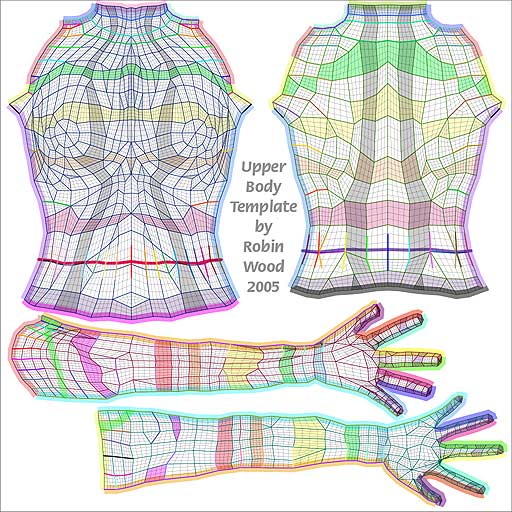
But if that suit has difficult UVs to paint upon, why not try just doing your texture directly onto the main figure and not even use the suit? Just an idea.
I use Predatron's LoRez Masked Hero, which has very nice and easy UVs to paint onto. In that case I just open the actual texture and edit that - then save under a new name.
Limited functionality for the price on just about everythingIt's 2017 and DAZ figures in the most recent generation are still low poly. And the polygons aren't aligned with the body muscles and structures causing staircase effects in close-ups (and sometimes far away) and requiring boatloads of corrective morphs that still can't correct mis-designed polygon alignments. So before we start stepping up the game, we need higher poly meshes for the figures.
On the flip side, I've seen clothing with nearly a million polygons for no good reason. lol
Daz Studio has and uses Pixar's OpenSub Dev to sub divide the figures. The setting is found in the Parameter Tab. Set the figure to high resolution and set your subd level. It will look much better when using detailed morphs.
At the time I posted this, I was trying to pose a figure on the Flight Of The Swan furniture prop. It's a beautiful piece. The top of the seat cushion is 2 polygons. Have you tried to morph that with the Deformer? You know where it flexes? At the center.I "fixed" it by exporting it as an Object and using Poser's intuitive tools to reverse the normals of the top, then took Poser's high-res square primitive, using the built-in tools to cut it to size, and parented that to the cushion, then imported that to DS to render in Iray. But, as I said, I was not (and still am not very) familiar with Daz' built-in editing tools.
That is an old piece. Well designed for its day. Since you are more familiar with Poser, it was better for you to export it and use what you are familiar with.
DS primatives can be made very high res plus subdivided. When you go to make the primative, there is an option for "Divisions". This tells Daz Studio how many times to it should divid each face (polygon). So a plane would be 12 polys and a cube would be 72 poly
How to Use dForce: Creating a Blanket, Draping Clothes on Furniture, and Much More [Commercial]what I ended up doing was having it slide down another plane. came out nice, but it would be nice to either continue a simulation, or save as a morph and resimulate.
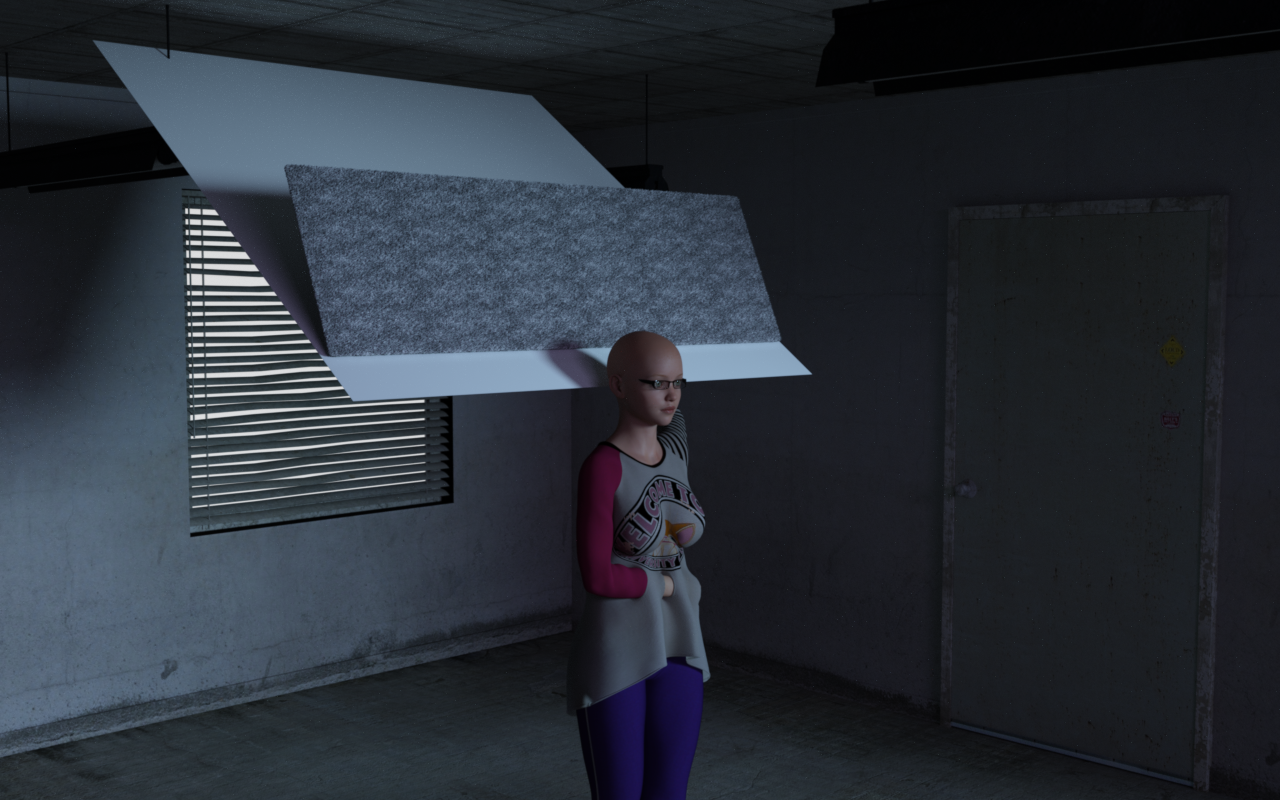
That was clever! Can you export it as an obj and reimport it, then simulate?
For the bed test, what settings were you using?
Daz 3D is part of

Connect
DAZ Productions, Inc.
7533 S Center View Ct #4664
West Jordan, UT 84084Licensing Agreement | Terms of Service | Privacy Policy | EULA
© 2026 Daz Productions Inc. All Rights Reserved.