-
The Sky is Falling Complaint Thread
McGyver said:
Amusing discovery... Go to O'Reilly Auto Parts website and in the search bar type in "121G"... Let me know what you find.
Ah, been looking for one of those. Too bad they're listed as "not available". Oh well, no need for a DeLorean now either.
 Looking for modern-day highway onramps and offramps
Actually, the bit I was calling an offramp in that scifi road pack wasn't really an offramp, and was more of a sort of roadway where a raised section of road, say for a bridge, is descending down towards ground level from that... but is then curving off to the side as it does... but it doesn't split off into two roadways, it continues as the same two lanes the whole while. It isn't really what I need, since what I'd want is something that forks off from a straight section of road, and where the part that forks off fom that straight section then curves off to the side to then merge into a side road somewhere... such as you'd see when getting off the highway to get to a gas station or to where the fast-food places are.
It's strange that I haven't found any obvious examples of that sort of splits-off-diagonally highway exit road for Daz or Poser anywere, but maybe I'm plugging the wrong search words in.
The Sky is Falling Complaint ThreadMcGyver said:
Amusing discovery... Go to O'Reilly Auto Parts website and in the search bar type in "121G"... Let me know what you find.
...nice, I ordered two, one for backup in case I forgot where I parked
[Released] ManFriday's Render Queue 3 [Commercial]barbult said:
arrrtie said:
JJ said:
Hi, I have two major bugs with Render Queue 3:
1. If I select for example 3 scenes (each with 3-5 cameras) and choose "Fully render scene" and "All visible cameras" in the settings for all these scenes, the queue is rendering all cameras from the first scene, but for the others just the perspective view. This bug is permanent.
2. If I select just 1 scene (with 3-5 cameras) and choose "Fully render scene" and "All visible cameras" in the settings for this scene, the queue sometimes, saves just the first render of the first camera, then the queue renders all the other cameras too, but doesnt save them in the same folder. They are renedered according to the queue, but they simply doesnt exist in the destination path. This is so annoying...
Render Queue 1.0 there werent any problems. But with Daz 4.22 on Win11 it doenst work anymore for me.
Same problems here. I was *so* excited to see an update Render Queue. I'm also using Daz 4.22 on Windows 11, and the product just doesn't work. For such an expensive software update, I'm a little frustrated that it looks like it hasn't been addressed. I'll give it some time, but I might need to refund this one </3. Back to 1.0 for now.
You only have 30 days from date of purchase to request a refund. Don't wait too long. There have been no updates to this product for a long time, and ManFriday has not been active in this forum thread lately. I think the chance of a quick resolution to your problem is very small. I hope I am wrong.
I only bought it two days ago, so I'll give it another week or two to see if *anything* happens, and head for refund road from there. Thanks for confirming that this product has been sort of abandoned as it looks though, I use render queue as an essential part of my workflow for my income, so I don't have a lot of time to hope for updates.
The Sky is Falling Complaint ThreadMcGyver said:
Amusing discovery... Go to O'Reilly Auto Parts website and in the search bar type in "121G"... Let me know what you find.

Great to see you back! How are you?
[Released] ManFriday's Render Queue 3 [Commercial]arrrtie said:
JJ said:
Hi, I have two major bugs with Render Queue 3:
1. If I select for example 3 scenes (each with 3-5 cameras) and choose "Fully render scene" and "All visible cameras" in the settings for all these scenes, the queue is rendering all cameras from the first scene, but for the others just the perspective view. This bug is permanent.
2. If I select just 1 scene (with 3-5 cameras) and choose "Fully render scene" and "All visible cameras" in the settings for this scene, the queue sometimes, saves just the first render of the first camera, then the queue renders all the other cameras too, but doesnt save them in the same folder. They are renedered according to the queue, but they simply doesnt exist in the destination path. This is so annoying...
Render Queue 1.0 there werent any problems. But with Daz 4.22 on Win11 it doenst work anymore for me.
Same problems here. I was *so* excited to see an update Render Queue. I'm also using Daz 4.22 on Windows 11, and the product just doesn't work. For such an expensive software update, I'm a little frustrated that it looks like it hasn't been addressed. I'll give it some time, but I might need to refund this one </3. Back to 1.0 for now.
You only have 30 days from date of purchase to request a refund. Don't wait too long. There have been no updates to this product for a long time, and ManFriday has not been active in this forum thread lately. I think the chance of a quick resolution to your problem is very small. I hope I am wrong.
The Sky is Falling Complaint ThreadMcGyver said:
Amusing discovery... Go to O'Reilly Auto Parts website and in the search bar type in "121G"... Let me know what you find.
Too bad it is not available for purchase. I think there are a few DeLoreans around I could use it on
The Sky is Falling Complaint ThreadAmusing discovery... Go to O'Reilly Auto Parts website and in the search bar type in "121G"... Let me know what you find.
Let's appreciate/discuss today's new releases - ongoing threaddoubledeviant said:
ainm.sloinneadh said:
Gordig said:
It looks transmapped to me, and there are maps in there that wouldn't be needed for SBH. As far as I know, FESoul has yet to make any SBH.
I swear I bought a FESoul hair recently that mentioned the Omni shader. I went to use it a few days ago and couldn't find it in the store description of any of my recent purchases. I remember thinking "wow - FESoul has given stand-based a go" and sticking it straight into my cart purely from curiosity.
Am I going crazy or does anyone else remember that too? Maybe it was a different vendor? It's been annoying me for a few days now that I can't identify which hair it was. I hope a store description hasn't been changed somewhere after purchase, because that wouldn't be cool.
Not that one, but it looks fabulous and is on my wishlist!
Did some forum sleuthing and I finally found the hair(s)/vendor in question: OOT, who has recently started doing strand-based hair, which makes me incredibly happy.
https://www.daz3d.com/dforce-strand-based-top-wave-long-bob-hair-for-genesis-9
https://www.daz3d.com/dforce-strand-based-messy-low-ponytail-hair-for-genesis-9
https://www.daz3d.com/dforce-strand-based-everyday-updo-3-hair-for-genesis-9
Glad I wasn't going crazy - just made a mistake on which vendor had made the switch. No wonder I couldn't resurface the hair!
I love the new omni shader, so much so that my shopping habits have completely changed since I've started using stand-based hairs with it. I've got so many lovely hairs from various artists in my library, but whenever I use them now, I take a note to replace them with strand-based porducts before going into production mode with those characters. The new omni shaders not only look fantastic, the stand-based hairs are super quick to render on my system. At the quality I render at and my the workflow I use, strand vs other types can be the difference between a 20 minute and 3 minute render. I simply won't buy non-strand-based hair going forward, although that's from the fortunate position of already having a rather large library of hair.
Will we ever see FESoul strand-based hair too? I think I'd wet myself with glee if that happens.
The Sky is Falling Complaint Threadkyoto kid said:
...interesting, I also only use the free version and seems to be working for me. Just checked an older item in the store and everything is there, the "Pricing History", the "Recent Best" price and the notification link. The filters in the upper left hand corner on the main store pages, all work fine.
Wonder if it my be a Google thing (if you use Chrome) and some kind of update broke it Still on W7 Pro here and I no longer get the latest Google updates. This might also be the reason I never got hit by adverts like everyone else here did.
Of course YouTube is a bit "wonky" now as I have to go to my desktop and back to the video I was on before I can reply to comments. Don't get adverts there either though unless the creator of the video includes a plug for a service they use and that is easy to bypass.
No, it's DAZ fooling with the pages. Probably rolling them out on just certain people, test groups. It will probably catch up with you eventually. There's been talk about it in the DAZ Deals forum. It broked the add-on pretty badly, but Ati or actually Overdrawn made a fix...hasn't propagated to the app stores for Chrome and others yet.
Where I can find Vo Xiao Hua HD ArmourHalcon Bluesky said:
@ suffo85 Thanks for answering my post.
I don't use the Smart Content, I am accustomed to the Content Library.
Anyway, I will try your suggestion, wish me luck.
Godspeed, soldier.
As a bonus, once you locate it in Smart Content you can right click on the product icon and then get it to show you where it is in your Content Library. This method should work for anything you have metadata for. Searching the Content Library imho sucks pretty badly using text search. I can literally type the name of something I'm looking for and Content Library can't find it, so I got used to doing it this way as a bit of a work around. Hope this helps.
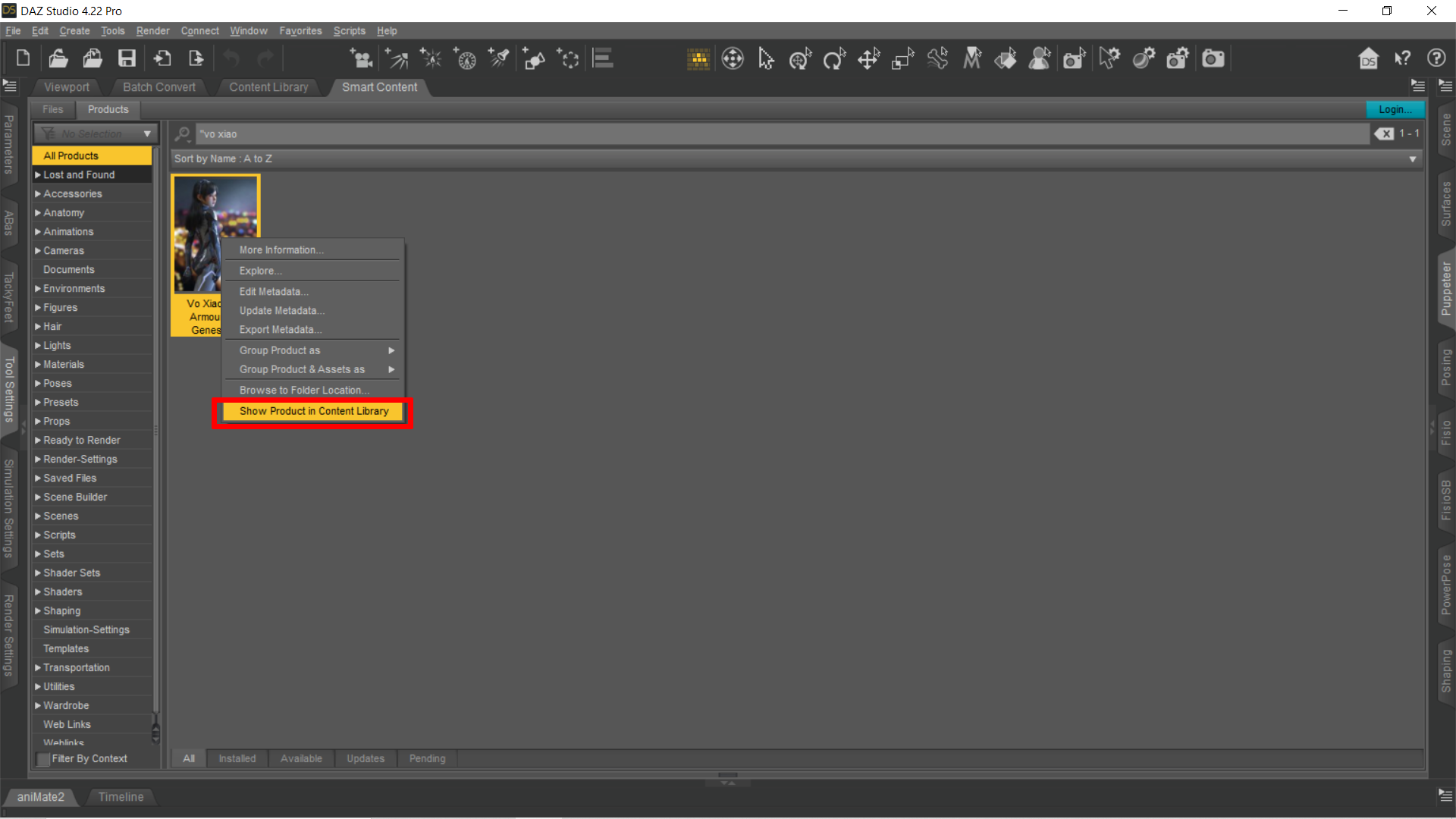 Where I can find Vo Xiao Hua HD Armour
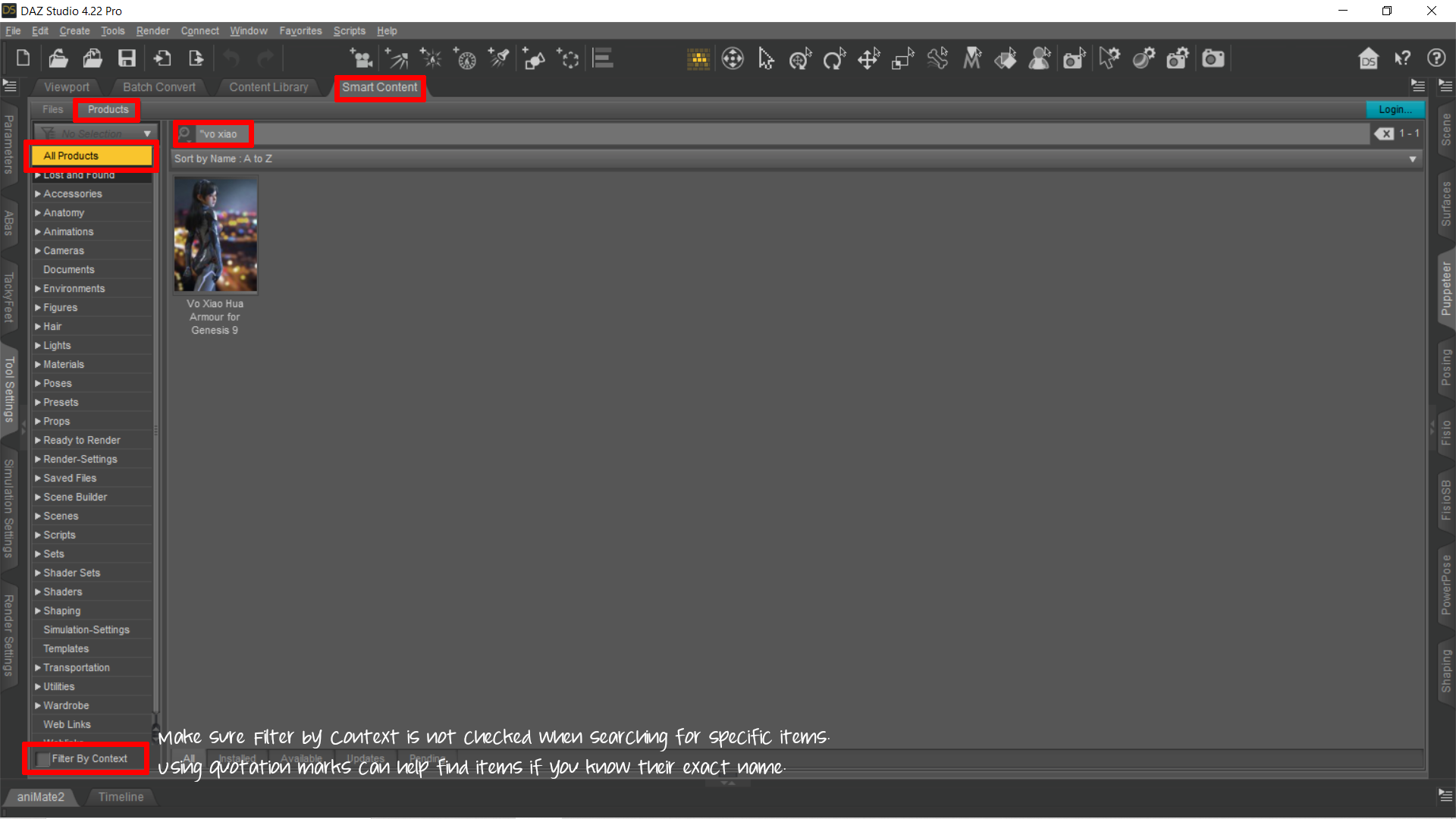
Search for "vo xiao
And make sure filter by context is not checked.
 Hand in hand walking poses
Moved to Product Suggestions - the PA Commercial forum is for announcing/supporting your own products.
VDBs not rendering ...Not sure if you ever figured this out, but did you try changing the color(s) of "Scattering Multiplier" and "Absorption Multiplier?"
I found this solution in another forum post, and it worked for me.
Where can I find good cityscape HDRI's?Might be something in amongst this lot that would work.
Let's appreciate/discuss today's new releases - ongoing threadcolumbine said:
I prophecied you were going to do that, Matt.
Or, more specifically, I thought this morning "Someone's going to try to put a bunny outfit on one of these bunnies ... and, if I had to bet, I'd say it was likely to be Matt Castle."
Damn it, I'm becoming predictable.
I guess it was pretty likely it would be me, seeing as I've already got the workflow for fitting clothes to different figures. That said, although I'd seen the previous on the forum and knew the product was coming, the idea only struck me earlier.
Magazine Project / Printing PosterHi people,
I tried to search on google, here etc.. i "find" how to get 300dpi i made render to disk and i choose 300dpi but im not sure is good way..
for example this is my render with 300dpi but the quality still blury :/and how to switch CMJN format ?
second option
is go photoshop and play with some effect but for me is cheat ^^ i would to use only bryceNeed Outfit Identification Older ItemI have searched my whole computer trying to find the zip file for this outfit, I search Xena's catalogue and I can not find this outfit. The only Identification I have is Xena 005 Suit. At first I thought it was a holiday freebie, but then it should have shown up in my library and it doesn't. I have no idea if Xena has offered stuff at other stores, I've only known them at Daz.
Any help would be appreciated...Oh and that texture is one I put on, not one that came with the outfit.
DAZ Crashing Like Crazy While RenderingNo, that's not 12GB total, that's 6GB on each card. DS doesn't pool VRAM unless you use SLI (and only for textures), and AFAIK 2060 doesn't have SLI.
edit: DS log file should be accessible from %AppData%\Roaming\DAZ 3D\Studio4 under Windows, I don't think uninstalling removes it.
And you should be able to download an installer for manual install of the general release from the Product Library in "My account" section of the site (search for "4.x" in the product list). Betas can only be installed via DIM.
Vo Xiao Hua Armour Drastic Change Why?I did a Google search on the original image and wow! There are a potful of 'cyber-armor' outfits similar or near copies of it or not quite close. No clue who or what is the original source or if image made with this product at some point.
When I looked at the second version posted, I thought it might be a texture set that somehow got made into an outfit.
Daz 3D is part of

Connect
DAZ Productions, Inc.
7533 S Center View Ct #4664
West Jordan, UT 84084Licensing Agreement | Terms of Service | Privacy Policy | EULA
© 2026 Daz Productions Inc. All Rights Reserved.