-
Octane Plugin Install Problems with DazCentral
Check DIM/Explorer (or DAZ Central if it has that information, but I don't know as I don't use it) to see where your DAZ Studio is installed, and point the Octane installer there.
dForce Car Girl Outfits Textures>Update doesn't move already installed textures from the wrong place (in this case main directory My Daz 3D Library) to right place ( Runtime/textures/Linday/Car Wash Girl Outfits), it is only installing new textures in the right place. Textures from wrong path should be deleted.
I anticipated that problem. It's a somewhat general problem; it implies that DIM and, presumably, Daz Central updates are just additive and leave cruft lying around forever. There appears to be a list of all the installed files in /Runtime/Support/DAZ_3D_71835_dForce_Car_Girl_Outfits_Textures.dsx, but it is an XML file. I loathe the use of XML for this purpose; lists, however I can see an easy way to parse this XML.
The problem is that there seems to be no record of files *previously* installed by DIM for a package; I can see the misplaced files in packages 2 and 5 in the DIM installed files list, but that is because my download of the update hasn't completed yet. Consequently there are only two ways to clean up "My Daz3D Library". Tthe first is to know that nothing should be there; I had the misplaced files, a couple of others, and InstallManagerFileRegister.json which seems to, ironically, list the misplaced files plus some others. The second is to write a program to parse the dumb XML file, build a list of all the files that *should* be in "My Daz3D Library" and then scan the whole directory structure for extra files which are candidates for deletion.
The vast majority of Daz users who buy this or indeed any other with a misplaced file error will not read this thread. I suspect there is an opportunity for a PA to write a "clean up" app. Given the recommendation I've seen elsewhere to simply delete the whole library directory and re-install everything there is probably a use for such an app, but I doubt anyone would buy it.
Wouldn't it be easier, when you see an update to an asset with this type of issue, to uninstall the old version and then install the new version from scratch? That should remove everything from where it was put originally.
This is generally the best way to handle an update of this sort. It gets complicated when multiple updates are involved but if you have previous installers that know where everything is they should be able to find their files and clean up after themselves. But as we all should know by now that doesn't always work.
But for non executable files this should be fine. If it leaves the odd texture laying around does it really matter, besides wasting some drive space?
dForce Car Girl Outfits Textures>Update doesn't move already installed textures from the wrong place (in this case main directory My Daz 3D Library) to right place ( Runtime/textures/Linday/Car Wash Girl Outfits), it is only installing new textures in the right place. Textures from wrong path should be deleted.
I anticipated that problem. It's a somewhat general problem; it implies that DIM and, presumably, Daz Central updates are just additive and leave cruft lying around forever. There appears to be a list of all the installed files in /Runtime/Support/DAZ_3D_71835_dForce_Car_Girl_Outfits_Textures.dsx, but it is an XML file. I loathe the use of XML for this purpose; lists, however I can see an easy way to parse this XML.
The problem is that there seems to be no record of files *previously* installed by DIM for a package; I can see the misplaced files in packages 2 and 5 in the DIM installed files list, but that is because my download of the update hasn't completed yet. Consequently there are only two ways to clean up "My Daz3D Library". Tthe first is to know that nothing should be there; I had the misplaced files, a couple of others, and InstallManagerFileRegister.json which seems to, ironically, list the misplaced files plus some others. The second is to write a program to parse the dumb XML file, build a list of all the files that *should* be in "My Daz3D Library" and then scan the whole directory structure for extra files which are candidates for deletion.
The vast majority of Daz users who buy this or indeed any other with a misplaced file error will not read this thread. I suspect there is an opportunity for a PA to write a "clean up" app. Given the recommendation I've seen elsewhere to simply delete the whole library directory and re-install everything there is probably a use for such an app, but I doubt anyone would buy it.
Wouldn't it be easier, when you see an update to an asset with this type of issue, to uninstall the old version and then install the new version from scratch? That should remove everything from where it was put originally.
dForce Car Girl Outfits Textures>Update doesn't move already installed textures from the wrong place (in this case main directory My Daz 3D Library) to right place ( Runtime/textures/Linday/Car Wash Girl Outfits), it is only installing new textures in the right place. Textures from wrong path should be deleted.
I anticipated that problem. It's a somewhat general problem; it implies that DIM and, presumably, Daz Central updates are just additive and leave cruft lying around forever. There appears to be a list of all the installed files in /Runtime/Support/DAZ_3D_71835_dForce_Car_Girl_Outfits_Textures.dsx, but it is an XML file. I loathe the use of XML for this purpose; lists, however I can see an easy way to parse this XML.
The problem is that there seems to be no record of files *previously* installed by DIM for a package; I can see the misplaced files in packages 2 and 5 in the DIM installed files list, but that is because my download of the update hasn't completed yet. Consequently there are only two ways to clean up "My Daz3D Library". Tthe first is to know that nothing should be there; I had the misplaced files, a couple of others, and InstallManagerFileRegister.json which seems to, ironically, list the misplaced files plus some others. The second is to write a program to parse the dumb XML file, build a list of all the files that *should* be in "My Daz3D Library" and then scan the whole directory structure for extra files which are candidates for deletion.
The vast majority of Daz users who buy this or indeed any other with a misplaced file error will not read this thread. I suspect there is an opportunity for a PA to write a "clean up" app. Given the recommendation I've seen elsewhere to simply delete the whole library directory and re-install everything there is probably a use for such an app, but I doubt anyone would buy it.
Daz Studio Pro BETA - version 4.12.2.60! (*UPDATED*)Just wanted to leave a note that DAZ Studio 4.12 Pro, 4.12 BETA, and DIM all crash on launch due to a missing dylib and dylib cache on the just released macOS BETA of Big Sur. Let me know if you need a tester for that platform. DAZ Central appears to be unaffected, but I don't use it. DAZ Central works but crashes after entering password to install anything.
In case it helps:
Process: DAZ3DIM [69409]
Path: /Applications/DAZ 3D/*/DAZ3DIM.app/Contents/MacOS/DAZ3DIM
Identifier: com.DAZ.DAZ3DIM
Version: 1.0 (1.4.0.58)
Code Type: X86-64 (Native)
Parent Process: ??? [1]
Responsible: DAZ3DIM [69409]
User ID: 501Date/Time: 2020-08-18 20:10:34.426 -0500
OS Version: Mac OS X 10.16 (20A5343j)
Report Version: 12
System Integrity Protection: enabled
Crashed Thread: 0Exception Type: EXC_CRASH (SIGABRT)
Exception Codes: 0x0000000000000000, 0x0000000000000000
Exception Note: EXC_CORPSE_NOTIFYTermination Reason: DYLD, [0x1] Library missing
Application Specific Information:
dyld: launch, loading dependent librariesDyld Error Message:
dyld: No shared cache present
Library not loaded: /System/Library/Frameworks/Cocoa.framework/Versions/A/Cocoa
Referenced from: /Applications/DAZ 3D/*/DAZ3DIM.app/Contents/MacOS/DAZ3DIM
Reason: image not foundBinary Images:
0x100000000 - 0x10060efff +com.DAZ.DAZ3DIM (1.0 - 1.4.0.58) <3050F87B-9F65-2D41-B729-EB4E43EAC0ED> /Applications/DAZ 3D/*/DAZ3DIM.app/Contents/MacOS/DAZ3DIM
0x1009ee000 - 0x100b58fff +libdzcmsconnector.dylib (1) <ADE57172-9DAD-20D7-55FF-0A42B7E226FC> /Applications/DAZ 3D/*/DAZ3DIM.app/Contents/Frameworks/libdzcmsconnector.dylib
0x100cca000 - 0x100f7afff +QtCore (4.8.7) <4CA3C606-A089-F187-979B-7B48C41EC059> /Applications/DAZ 3D/*/DAZ3DIM.app/Contents/Frameworks/QtCore.framework/Versions/4/QtCore
0x10100e000 - 0x1019d8fff +QtGui (4.8.7) <83428699-BE40-1D52-E6DE-D119AFD0A1B1> /Applications/DAZ 3D/*/DAZ3DIM.app/Contents/Frameworks/QtGui.framework/Versions/4/QtGui
0x101c51000 - 0x101d7dfff +QtNetwork (4.8.7) <F29D5129-3E68-4C08-CA75-73C7E6CEA40D> /Applications/DAZ 3D/*/DAZ3DIM.app/Contents/Frameworks/QtNetwork.framework/Versions/4/QtNetwork
0x101ddb000 - 0x101e20fff +QtXml (4.8.7) <CC4B6377-A95B-8DC7-A3E0-1A482D1531CD> /Applications/DAZ 3D/*/DAZ3DIM.app/Contents/Frameworks/QtXml.framework/Versions/4/QtXml
0x101e38000 - 0x10200bfff +QtScript (4.8.7) <81DA01E2-08A0-7463-58A6-E4DBC275DAC0> /Applications/DAZ 3D/*/DAZ3DIM.app/Contents/Frameworks/QtScript.framework/Versions/4/QtScript
0x7fff663f2000 - 0x7fff66489fff dyld (828) <0F674766-D96E-3668-8705-324A53FA816A> /usr/lib/dyldHow to Make a Beam from a Lighthouse?No problem.
Hope it helps.
I rented a lighthouse/lighthouse keepers house on an island in the middle the St. Lawrence River for a week. The appearance of the beam depends on the weather. The lamps in lighthouses are mostly all controlled by computer from some central lighthouse control center and the beams may be controllable according to the conditions - I don't know. I could live in the lighthouse, and go up into the dome with the lamp, but of course not at night when the hatch would lock before the light was turned on. If the caretaker saw me up there too late he'd run in and yell at me in French until I came down. The video was incredibly informative and I'm going to try some of the products you used. Thanks again!
Daz Barn InstallationThe first doesn't relate to the barn, the second shows that the .duf files are present but Daz can't read the thumbnail (hence the framed exclamation mark). My suspicion would be that you installed usibng Connect (within Daz Studio) and that the files did not decrypt properly. The Daz Connect version will be used in preference to a manual (or Central/Install Manager) install. If uninstalling and reinstalling In DS doesn't fix the issue then please open a support ticket - in the meantime you can open the zip from Install manager, then the Content folder inside the zip, and drag the folders from there into /data/cloud/1_17045/ so that they overwrite the files placed by Connect and you should be good for now. I do suspect, though, that you may have other products with the same issue.
DAZ Central not workingI don't get it either. What in the world is happening there?! At beginning 2020 i had still my old machine with win7 (still miss it), an i5, 16GB Ram, ordinary, really. But he got old and even slow in the web.
Now, with a Ryzen7 3700x, 32 GB ram, even crazy fast NVMe M.2 with reading capabilities of 3.400 MB/s and windows 10 it is with DAZCentral like i would start by far to new game on a machine where i have to create a configuration file that sets everything to a minimum that is possible. How is this possible?! My paths are correct, i even set them back to default in some cases. Nothing changes!
The dblog.txt in - C:\Users\MYUSERNAME\AppData\Roaming\DAZ 3D\cms\ContentCluster - says something about:FATAL: role "MYUSERNAME" does not exist
But it seems to make no difference in the install manager nor Daz3d. Both work like they should; as far as I know of. Daz3D also has only two errors, that I can't fix. He first one is about setting GPU0 & 1 to TCC instead of WDDM, to render faster. And by the way, my cards don't support TCC. A simple if/else would make sure of that, if someone would write a check for supported cards that run with it.
The second one is about: WARNING: ..\..\..\..\..\src\pluginsource\DzIrayRender\dzneuraymgr.cpp(474): Could not add path: "C:/Users/MYUSERNAME/AppData/Roaming/DAZ 3D/Studio4/temp/shaders/iray". Due to unknown error -2Adding the folder manually just leads to → it get's deleted at the start of Daz3d
Anyways, back to DAZCentral.
If I start it, i wait for it to open. This takes an incredible time for the power and ressources my computer offers. Something in between 1-3 minutes! Daz install Manager needs something around 10-30 seconds. Daz3d 5-10 Seconds. As far as I understand it BOTH, when set to it, connect to a database with the assets and meanwhile connect also to the web and the user account too. So why needs Central up to 3 minutes?!
Then, when I try to put in the password, only the first letter in the password field takes up to 20-30 seconds to show a point in the text field. (loading circle inclusive...) In the task manager are two processes with the same name. One is like using 2-7 MB ram, the other one around 30-60 MB. If you would kill the smaller process, it just starts again, and again and again... Kill the big one:Error:
Render process killed
Render Process exited with code: 1
Do you want to reload the page?
What rendering process we talk about here?!
When I am logged in and see assets and the user interface it's also very strange. If i try to minimize the program, it shuts down for at least 2-3 seconds, then it pops up again. At this time it's not even listed on the taskbar anymore. Same happens with the windowed mode function. It just pops up again, full screen mode with exact the same behavior. If i try to do something, like scrolling, it "waits" 5-10 seconds, and then it scrolls a little. Impossible to do something with this thing.
I really would recommend to cancel this project, because as long as things like this happen, this only leads to massive complications and a user that thinks to just delete everything of DAZ. I cannot find anything that may change these things, since everything is all over the place or highly cryptic. It's a mess. I can't even find a configuration file and i am not "learning" to manipulate a part of a program, that makes no sense at all.
Why don't you just put one icon for each installed product element next to the product name inside of the DAZ Install Manager and be done with it?! This program works FINE!!! Nobody needs fancy nice looks, oversized images as a background and way to big elements in it, that i guess slow also down something at some point. At least for older computers.Not received my purchased item.Is it in your Product Library here, and does it have downloads? https://www.daz3d.com/downloader/customer/files#prod_35701
Thanks man....got it.
Everything I have bought before from the Daz store always immediately showed up on my Daz Central account for download. Not sure why this one didn't. Did the manual install from the zip file download from that link you provided and now all is good. Thanks again.
Not received my purchased item.Yesterday I bought the "Messy Laundry Mega Set" from the Daz shop.....it's not showing up for download in my Daz Central account. I checked my bank and the transaction went through ok as far as I can tell.
If I go to the product page....it says I have purchased the item. But there is no way for me to download it.
DAZ Studio 4 Installation Guide Windowshi,
hoping for some installation help.
Had Daz on my machine ages ago and uninstalled it. so i thought, was a lot of Daz stuff left despite WIn10 telling me it had been removed, it seems this is a known issue, from a quick google.
anyway, i zaped what i could, website says now to get Dez central which will get the daz product. all seemed fine, i clicked in DC to get Daz Studio, and it said intalling, then the percentage kept dropping etc, at it appeared it was trawling through a lot of my assets and downloading them too. killed it, wiped everyting, tried under a new email, but somehow DC still picks up the downloads/purchases from my other email account.
simply, how do i get a clean install of DS?
TIA
Scene Subset can't find morphs despite them being downloadedLately I've completely deleted DAZ and redownloaded it through Daz Central to start fresh and now I'm having trouble loading in characters I saved as scene subsets. The morph set in question is the SY 200 free morphs by SickleYield and even though they are present in the side bar, when I try to load in my custom characters, I get this message saying that they couldn't find the related sliders. Is there a way I can tell Daz where they are - similar to how you can locate textures if those go missing?

Silly question, but did you actually reinstall that SY 200 free morph set? It's not a DAZ Product, so DAZ Central would not have reinstalled it for you. If you did reinstall it, then where did you put it and is it in a content library known to Daz Studio?
I reinstalled it manually by dropping the files into the "My Daz 3D Library folder.
[Released] RSSY Clothing Converter from Victoria 4 to Genesis 8 Female [Commercial]Hey! I'm trying to convert this dress using this converter:
https://www.daz3d.com/renaissance-romance
I have it selected in the covnerter, I'm clicking "force convert" and it will not convert. I have restarted DAZ multiple times to no avail.
Here is the log:
15:06:13 GMT-0500 (Central Daylight Time): WARNING: Forcing Conversion of Clothing Items
15:06:13 GMT-0500 (Central Daylight Time): Executing Script
15:06:13 GMT-0500 (Central Daylight Time): Selecting Preset: D:/Downloads/rromancegown.cr2
15:06:13 GMT-0500 (Central Daylight Time): Input Filename does not have "clothing" in its path: D:/Downloads/rromancegown.cr2
15:06:13 GMT-0500 (Central Daylight Time): Input Filename does not have "accessories" in its path: D:/Downloads/rromancegown.cr2
15:06:13 GMT-0500 (Central Daylight Time): Input Filename does not have "character" in its path: D:/Downloads/rromancegown.cr2
15:06:13 GMT-0500 (Central Daylight Time): Input Filename does not have "props" in its path: D:/Downloads/rromancegown.cr2
15:06:15 GMT-0500 (Central Daylight Time): Execution Complete.
First @horse1412000, I apologize. I have this thread bookmarked but got no notification.
The script requires the item to be installed in a path that includes "Clothing", "Accessories", "Character" or "Props", e.g., D:\Documents\My DAZ 3D Library\Runtime\Libraries\Props or something like that. You can probably add one of those and copy the gown there, i.e., D:/Downloads/Clothing/rromancegown.crw
Haydina hair shapes not working.Well, I tried making a fresh install of everything: DAZ Studio, Haydina Hair and DAZ Central, and the morphs seem to work now. Still unsure what was causing the issue in the first place, I'll investigate further and update if I somehow figure it out.
How do I fix file locations?Installed using DAZ Central
Haydina hair shapes not working.Yes, no Daz content installer should be defaulting to the Program Files folder - that will almost certainly fail as it is a protected location.
Since he changed the path from C:/ to E:/, is it still a protected location?
Have you tried Daz Central? I have not, so I don't know how it handles file path configurations.I am not certain, but I believe Windows is protective of Program Files regardless of which drive it is on.
Haydina hair shapes not working.Yes, no Daz content installer should be defaulting to the Program Files folder - that will almost certainly fail as it is a protected location.
Since he changed the path from C:/ to E:/, is it still a protected location?
Have you tried Daz Central? I have not, so I don't know how it handles file path configurations.Haydina hair shapes not working.So I'm trying to manually install Haydina hair to troubleshoot it further, and I know you're probably gonna smack your palm against your head reading this but what's the proper place to put the 'Contents' folder? Is it E:\Program Files\DAZ 3D\Applications\Data\DAZ 3D\My DAZ 3D Library ?
As for your theory on the pathname, the only thing I changed while installing DAZ Studio was to change it from default C:\ drive to E:\ drive due to space limitations, so I don't really understand how the total pathname could be too long since it should be default. I'm also not getting any warning/error messages when I try dragging in the preset shapes.
I'm gonna give a help request a go if manual installation doesn't fix the issue.No palm smacking necessary. Every new user struggles with the same thing. You don't put the Content folder anyplace. You open it and merge the data folder inside of it with the data folder in your Content Library. You merge People, etc. Then you can discard the Content folder. It is just a holder to consolidate the folders inside of it. Just be careful when copying the files, to put them in the right location. Never nest a Content folder inside your Content Library!
I've never used Daz Central, but that is a surprising default location.
Haydina hair shapes not working.So, Toulouse Hair morphs show up in Parameters, but Haydina morphs don't. You could try manually downloading the Haydiina Hair from your Daz account online Product Library. Then unzip the file and put the contents into the correct folders in your Content Library. That would be reinstalling, but cutting Daz Central out of the loop, in case Daz Central is just buggy on this product.
Another thought. Your Content Library path name is kind of long (E:\Program Files\DAZ 3D\Applications\Data\DAZ 3D\My DAZ 3D Library). I wonder if the total pathname to the final morph file level is getting too long. (I don't know if Daz Studio even has a limit independent of the OS). The whole path would be E:\Program Files\DAZ 3D\Applications\Data\DAZ 3D\My DAZ 3D Library\data\WindField\Haydina Hair\Haydina Hair Genesis 8 Female\Morphs\WindField\Base\Adjust ForeheadDepth.dsf for example.
Does the Daz log file have any warnings or error message that look related to this problem? You can find the log file from within Daz Studio in the menu Help>Troubleshooting>View Log File. It will be huge. The latest info is at the bottom.
Richard Haseltine is the forum Daz Studio guru. I will try to get his attention to take another look at this, now that we have eliminated a lot of potential problems.
You could submit a help request to Customer Service and see if they can help. I am running out of ideas.
 Haydina hair shapes not working.
Thanks for posting the information. I've never tried Daz Central. I use DIM. Daz Central is designed for new users, so since you are new, it might be the right choice for you.
Haydina is a really nice looking hair, so we need to get this fixed!
It sure looks like the shaping presets got installed, but the morphs that those presets use, did not get installed (or did not get installed correcty to the right place, or Daz Studio isn't looking in the right place for them). Let's go look and see if they are installed at all:
- In your OS file explorer, open your content library folder.
- If you are in the right place, you should see subfolders like data, People, Props, Runtime, among others.
- Open the data folder.
- You should see a WinField folder (the name of the PA that created Haydina Hair). Open the WinField folder.
- You should see a Haydina Hair folder. Open the Haydina Hair folder.
- You should see a Haydina Hair Genesis 8 Female folder. Open the Haydina Hair Genesis 8 Female folder.
- You should see a Morphs folder (among other things). Open the Morphs folder.
- You should see a WinField folder. Open the WinField folder.
- You should see a Base folder. Open the Base folder.
- Now finally you have drilled down to the level where the morphs should be stored. You should see over 100 files with the dsf extension. Those are the actual morph files that define the way the hair vertices should move when one of the shaping presets is applied.
Do you have those files? If not, we have to figure out why not. If you do have them, we have to figure out why Daz Studio doesn't see them.
By the way, what operating system are you using? What version of Daz Studio are you using (go to Help>About Daz Studio to get the exact version)?
Do you own any other hair products with shaping presets? Do those work?
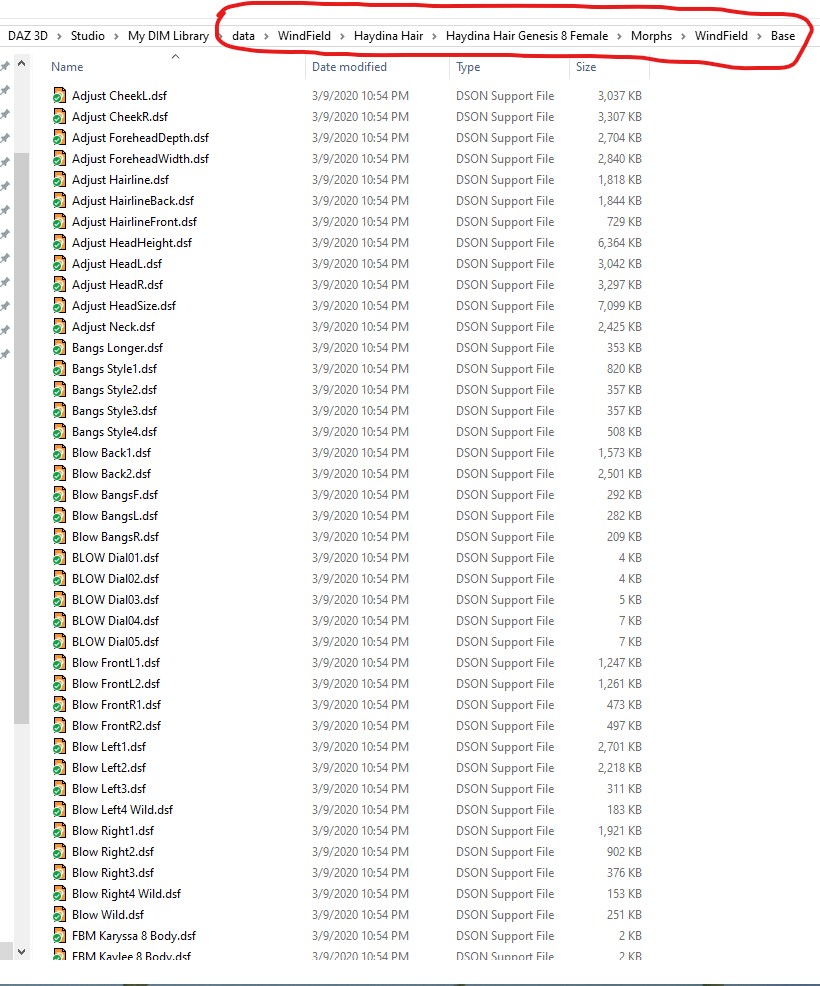
Okay, so I found all of the .dsf files just like they're displayed in your screenshot, I think we're getting somewhere. I've also found the morph preset files that are displayed in my content library, but they're in a different directory (E:\Program Files\DAZ 3D\Applications\Data\DAZ 3D\My DAZ 3D Library\People) than where the actual morph files are (E:\Program Files\DAZ 3D\Applications\Data\DAZ 3D\My DAZ 3D Library\data\WindField etc). I'm not sure if this is what's causing the issue.
OS is Win 10 build 17763.1339 and my DAZ Studio version is 4.12.1.118.
So the morphs files are installed and seem to be in the right place.
It is correct for the presets to be in the People folder (People\Genesis 8 Female\Hair\WF Haydina Hair\Presets) and the morphs to be in the Data folder. So that is not the issue. Since you can see the presets and the material presets even work, it seems like your content library is properly mapped in Daz Studio. This is a puzzle!
Let's see if it is only Haydina hair that is the problem or if it is a broader problem. If you load the Toulouse Hair from Genesis Starter Essentials, do those morph show up in the Parameters pane? They would be in the Actor section.
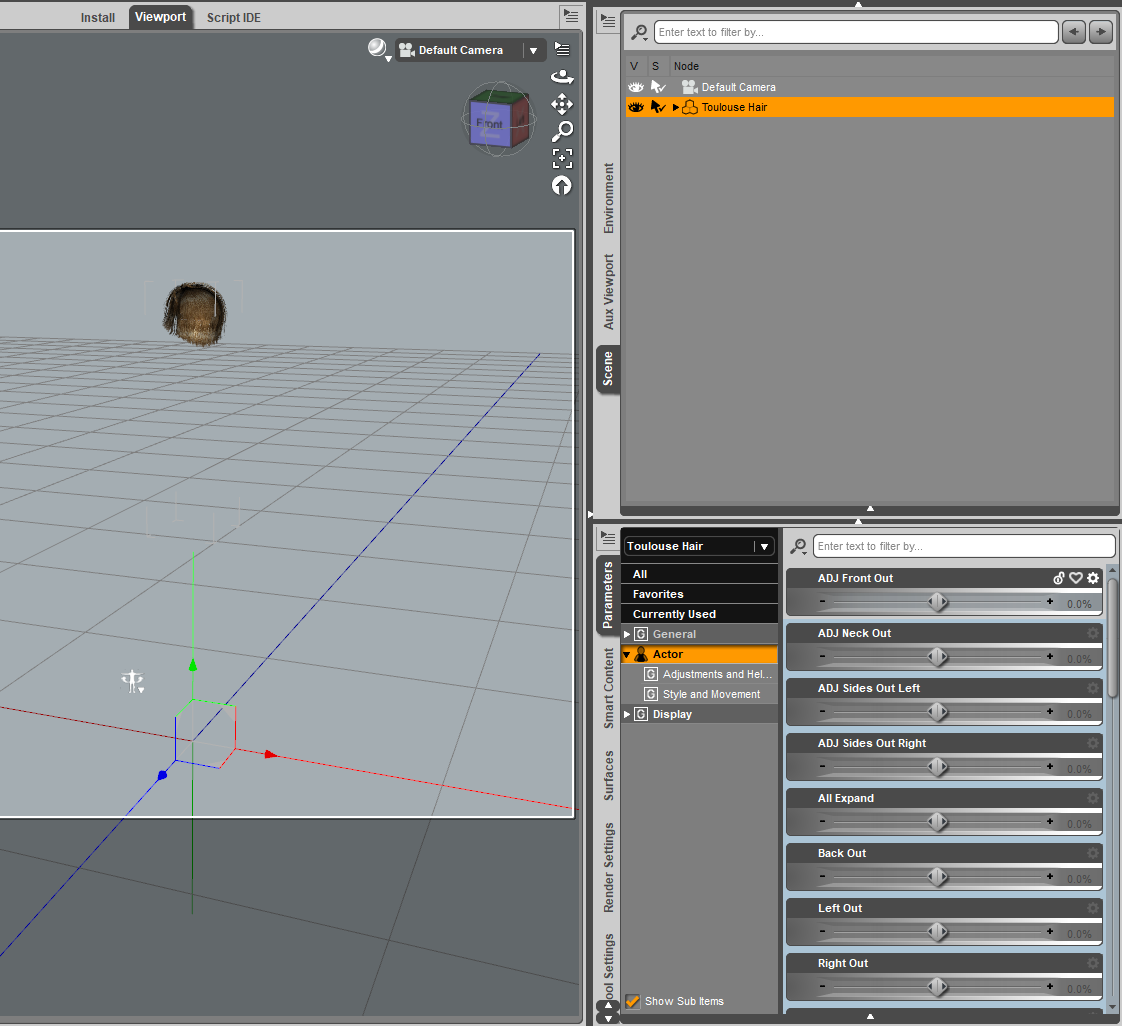
Yup, they do.
This thread shows a similar problem with another Windfield hair: https://www.daz3d.com/forums/discussion/comment/5825226
The solution was to uninstall and reinstall it.
Tried that, didn't work.
Daz 3D is part of

Connect
DAZ Productions, Inc.
7533 S Center View Ct #4664
West Jordan, UT 84084Licensing Agreement | Terms of Service | Privacy Policy | EULA
© 2026 Daz Productions Inc. All Rights Reserved.