-
adjust rigging to shape for my geograft.
Padone said:
Unless you support the specific FBM, the extra bones will not follow. You need to adjust rigging to shape separately for the extra bones.
steps:
- apply the figure FMB
- select only the extra bones in your geograft for adjust rigging to shape
- eventually ERC freeze and save as support asset to support the FBM for the geograft
Maybe you didn't understand me.
I have a problem with bones that have the same name.
I have a figure of the character DAZ Female 8 and a Geograft that replaces some parts in the model.
And a morph that changes the shape of the mesh and the position of the bones. Both for the Figure and for the Geograft.
I can change the position of the bones on the Figure. But the geometry that hides the Geograft does not change because it is hidden and I do not need it.
The Geograft also changes shape, but I can not move the bones in any way.before using the morph

After using the morph

After applying adjust rigging to shape

adjust rigging to shape if it is separated from the figure
 [Solved] Character Preset: How to set Eyelashes color using a Post Load script ?
Bejaymac said:
One thing to check is what's in the H-MAT, are there material settings for other items in it, if so then that's why it's not working as Post Load wont use the MAT if there is.
I'm not sure if I checked the right section, but the scene section in the H.mat file is very similar to the one in Victoria 8.1 Mat file (with Eye brow instead of Eyelashes referenced in the later).
Here the scene section from my H.mat file:
"scene" : {
"nodes" : [
{
"id" : "Genesis8_1Female",
"url" : "name://@selection/Genesis8_1Female:",
"geometries" : [
{
"id" : "Genesis81FemaleGeom",
"url" : "name://@selection#geometries/Genesis81FemaleGeom:"
}
]
},
{
"id" : "Genesis8_1FemaleEyelashes",
"url" : "name://@selection/Genesis8_1FemaleEyelashes:",
"parent" : "#Genesis8_1Female",
"geometries" : [
{
"id" : "EyelashesCollapsed",
"url" : "name://@selection#geometries/EyelashesCollapsed:"
}
]
}
],crosswind said:
Post Load script works with both Mat and H.Mat presets. I see no issue from the settings in the screenshot that you posted... but in DS log you pasted, it tells another preset file : "Eyelashes.duf" rather than "Eyelahses (H.Mat).duf" that was set in Post Load script ...
I wonder if the character preset with Post Load scritp has been correctly saved... Can you open the character peset DUF file with Notepad++, and check if the path + file of the H.Mat Preset is correct (at the bottom of the file...) ?
Eyelashes.duf is the standard material file, I tested both but I initially looked at the log only when it was loading the standard materials preset. I also tested with a wrong file to see what was different in the log.
The log with the H.mat file is not very different (test done a couple of minutes ago):
[INFO] :: Prepare asset load (merge): /Presets/Characters/Materials/Eyelashes (H.Mat).duf
[INFO] :: Locking viewport redraw...
[INFO] :: Viewport redraw locked.
[INFO] :: Processing morph projection queue: Genesis 8.1 Female << Genesis 8.1 Female Eyelashes
[INFO] :: Morph projection queue processed: Genesis 8.1 Female << Genesis 8.1 Female Eyelashes
[INFO] :: Native format content directories: 23
[INFO] :: Poser format content directories: 4
[INFO] :: Other import format content directories: 0
[INFO] :: Begin asset load (merge): /Presets/Characters/Materials/Eyelashes (H.Mat).duf
[INFO] :: Determining missing assets...
[INFO] :: Setting textures...
[INFO] :: Creating materials...
[INFO] :: Applying animations...
[INFO] :: Setting up follow targets...
[INFO] :: Finished asset load (merge): 0m 0.23s - /Presets/Characters/Materials/Eyelashes (H.Mat).dufStandard mat file:
[INFO] :: Prepare asset load (merge): /Presets/Characters/Materials/Eyelashes.duf
[INFO] :: Locking viewport redraw...
[INFO] :: Viewport redraw locked.
[INFO] :: Processing morph projection queue: Genesis 8.1 Female << Genesis 8.1 Female Eyelashes
[INFO] :: Morph projection queue processed: Genesis 8.1 Female << Genesis 8.1 Female Eyelashes
[INFO] :: Native format content directories: 23
[INFO] :: Poser format content directories: 4
[INFO] :: Other import format content directories: 0
[INFO] :: Begin asset load (merge): /Presets/Characters/Materials/Eyelashes.duf
[INFO] :: Determining missing assets...
[INFO] :: Setting textures...
[INFO] :: Creating materials...
[INFO] :: Applying animations...
[INFO] :: Finished asset load (merge): 0m 0.27s - /Presets/Characters/Materials/Eyelashes.dufhow do i make strand hair scale with a figureWhen you say Strand hair, what do you mean? Did you make it in SBH Editor? What I am about to say applies to SBH made with the SBH Editor and I can only fathom a guess what you mean by strand hair, so ignore this if it does not apply to your situation. You can export SBH as curve/polyline by setting render tesselation sides to 1 under the Parameters tab before exporting. Then reimport and use transfer utility to fit to figure. That way the SBH will scale with the parent figure it is fitted and parented to. The problem with this method is you will lose the UVs, which you may need if you are trying to apply a texture map that uses the parent's surface UV.
adjust rigging to shape for my geograft.Richard Haseltine said:
If the bones are named to match the bones of the original figuer then they should already match. Having bones with the same name but diffrent centres would break the item.
Yes, they match and work, but when I apply the morphs, the bones stay in one place.
I can't change their position.
I tried to load the geograft after applying (adjust rigging to shape) and after (Fit to)
But then the position of the bones returns to the initial oneOriginal morph

after (Fit to)

 adjust rigging to shape for my geograft.
Richard Haseltine said:
I would think then that you need to cretae a "shadow" version of the morph for the base figue and use that to guide the rigging adjustment.
Can I somehow copy the position of all the bones from one object to another?
But only for the bones of the tongue
adjust rigging to shape for my geograft.I would think then that you need to cretae a "shadow" version of the morph for the base figue and use that to guide the rigging adjustment.
[Released] Turbo Loader for Genesis 9 [Commercial]RiverSoft Art said:
*snipped*
You are misunderstanding the log messages. It HAS to look for the morphs to make sure they are on. It prints out a message that the looking is started. And then looks for the off morphs. If it cannot find the off morphs, great, it just goes on. After that is done, it opens the morph file to find out if this morph needs any other morphs to work (as it doesn't help to turn on a morph if all of its morphs aren't on). I will look to see if facs_cbs_buil_bdl.dsf contains something that causes an infinite loop.
I'm sure it's supposed to. It doesn't, which was the problem originally reported almost three months ago. Quite frankly, if it got difficult to parse because you enjoy arguing the semantics of the terms I used to describe processes, that's on you. And if it's taken this long for you to get around to doing any actual investigation, I suppose don't bother. I paid for a thing because I assumed I would receive support. I won't make either mistake again. Apologies for disturbing you, and good luck with whatever you do moving forward.
Peace.
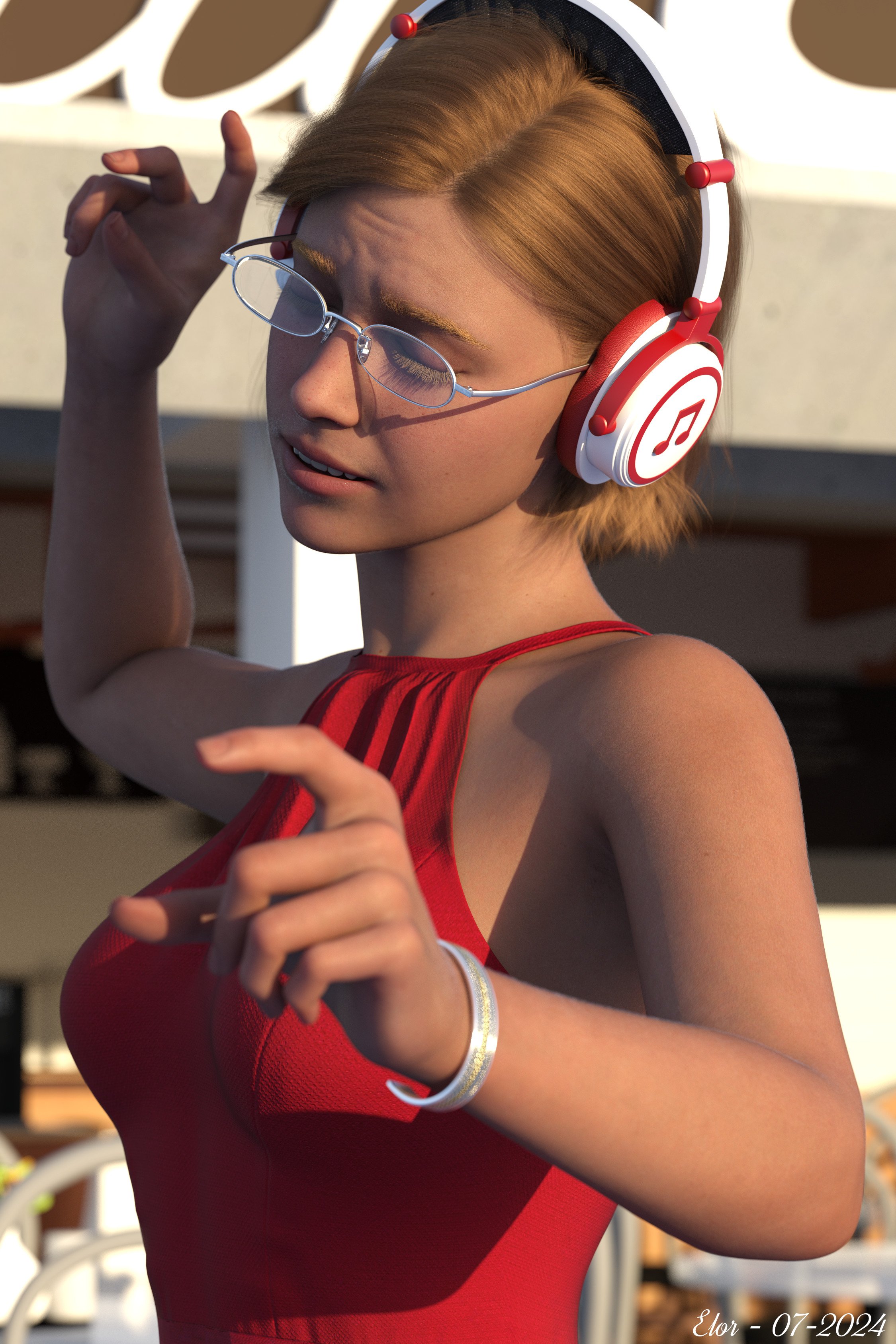
Freebie Challenge July-August 2024 - "Take a Break" - Entries ThreadKeeping the world at bay, one note at a time:
Just a woman enjoying herself, taking a break while listening to music she loves, dancing, humming and playing conductor at the same time.
Free items used:
- ’Brandy Character Morph for Genesis 9' by CGSerpent
- ‘Braid Bracelets for G3M, G3F, G8M, and G8F’ by Fisty & Darc
- ‘Simple Glasses for Genesis 8 Male/Female’ by GEOmetalics
- ‘Headphone cat ears’ by tuketama
- ‘dForce Dancing Queen Outfit for Genesis 9' by Daz & fefecoolyellow (link below)
- ‘Little Cafe’ by inLite Studios & TruForm
- Skyset 001 by AgentUnawares
Neutral items:
Paid items (list also available on the gallery):
- Genesis 9 Starter Essentials Expansion
- FE Ashlee Hair for Genesis 9
- Vellus Horizon 2.0 for Genesis 9
- Subtle Expressions Olympia 9 Edition
- Tavern Dining Hall Poses (I got them when they were free, but it was in Februar 2024, so I counted them as a paid item)
I did some postwork as explained in the gallery.
Here the final result:
 adjust rigging to shape for my geograft.
I decided to replace the tongue and teeth.
I tied them to the bones of the daz femele 8.
And I loaded morphs for this figure, but the problem is that when I use "adjust rigging to shape", it's not the bones that change, but the shape of the teeth.What should I do to change the location of the bones?
Some morphs have the same names on both their figure and teeth.
So when I put teeth on the figure the morph with the same name disappears.
[Released] Turbo Loader for Genesis 9 [Commercial]sikotik13 said:
Tried adding the unknown product to filters. Does nothing, but even removing the morphs entirely/re-scanning the directory so they aren't ever in the script's list, then re-adding them after does not solve the problem.
Steps I took:
I cleared the morphs list, removed the FACS folder entirely, scanned for morphs, and saved a new morph list manually. Turbo Loader Manager does not show the FACs morphs now. Unchecked all morphs and executed. While the folder was entirely missing, no issues. Loaded multiple characters with merge, and only got one shared facs file missing error across each.
Replaced FACs folder with all in .dsf form. Turbo Loader Manager still does not show them. Merging a character immediately throws the error.
This script/generation alone insists it has to enable the FACS morphs by changing .tlOff(s) to .dsf(s), if those .dsf(s) exist at all. And it has to do so each time a character references them. If it can't find the required .tlOff file(s) when triggered (again for no reason, as far as I can tell, if the folder/facs morphs exist at all, this script insists it has to go through this process), regardless of how or why they aren't there, it goes into that forced loop. Even if as far as I can tell, there's no reason the script should even be aware of/attempting to locate them at all.
So, like, I'm open to the idea that, somehow, something is borked on my end, but if I go through all the means available to me to never have these morphs recognized by the script, and they are still causing an issue that works unlike every other script... that feels like a not "me" problem... For example, I typically realize I forgot to re-scan/add a new G3/8F morph because it just loads up with any new character merged if it's not in the managed list... this one does not do that, which I gather is what it should do, at least, it does not do that with very specifically the facs_cbs morphs. If these G9 FACs morphs exist in any way and are not in .tlOff form, the merge script fixates on them incorrectly and fatally.
If that's in the merge script itself, then it's weird it only does it for G9 FACs morphs. If it's reading some table/function parameter somewhere in an encrypted script in the G9 stuff, that makes more sense, but I am equally unable to do anything to solve the problem. If there's some super-secret hidden config somewhere that is/is not correctly being read/written, cool, but I can't find it to remove/edit/fix it myself.
As a simple end-user request issue: I just need the script (whichever of the two it has to be, or both, I suppose) to stop hard locking to perform a function it can't do, shouldn't even by trying to do, and most importantly doesn't need to do in a way that loops until crashing studio. If it can't find a tlOff file, it should never lock Studio up until it crashes. It should skip it, like it does in every other script combination for any other missing thing. It doesn't. Please make it do that. That would fix my issue.
You are misunderstanding the log messages. It HAS to look for the morphs to make sure they are on. It prints out a message that the looking is started. And then looks for the off morphs. If it cannot find the off morphs, great, it just goes on. After that is done, it opens the morph file to find out if this morph needs any other morphs to work (as it doesn't help to turn on a morph if all of its morphs aren't on). I will look to see if facs_cbs_buil_bdl.dsf contains something that causes an infinite loop.
[Released] Turbo Loader for Genesis 9 [Commercial]sikotik13 said:
I mean that whether you intended it as a function or not, i.e. opening a turbo loader script (i.e. TL for G8F) scans the morphs list, and tells me what's enabled/disabled for that character base. Always has. Genesis 9 does the same scan, but does not correctly display what is enabled/disabled after doing that opening scan, and nothing except explicitly refreshing will cause it to do so. The scan on open is not reading the current morphs, nor is the one when you double-click to load a configuration from within the script. This functionally changes nothing, I was just informing you of a behavior that does not match with every other TL script in case that helps narrow down what my core issue is.
This is NOT a feature in any of the Turbo Loader Manager scripts. The FIRST time the Turbo Loader Manager script is run (or the morph list is empty), it will ask to scan. After that though, when you start the script, it just loads the morph list (which can take a long time and so has a progress bar).
In case my actual problem is getting lost in the details: As of right now, I HAVE to turn them off for the script not to crash Daz Studio. Every character that tries to turn them on when they are not off is what causes the error. As far as I can tell, this should not happen, as it should not try to enable a morph that is already enabled. It is trying to, and that is the problem. As a reminder, this is the offending error:
0 /data/Daz 3D/Genesis 9/Base/Morphs/Daz 3D/FACS/facs_cbs_BIUL_BDL.dsf
2024-07-29 07:58:15.792 [INFO] :: facs_cbs_BIUL_BDL2024-07-29 07:58:15.792 [DEBUG] :: Enabling data/Daz 3D/Genesis 9/Base/Morphs/Daz 3D/FACS/facs_cbs_BIUL_BDL.dsf
2024-07-29 07:58:15.792 [DEBUG] :: data/Daz 3D/Genesis 9/Base/Morphs/Daz 3D/FACS/facs_cbs_BIUL_BDL.tlOff NOT FOUND.
2024-07-29 07:58:15.794 [DEBUG] ::
The Merge script has determined that facs_cbs_BIUL_BDL.dsf is one that is needed by this character. The "Enabling" message is letting you know that it is going to look for the morph. It does this by looking for OFF morphs because there can be multiple locations for the morph (with Daz Connect). The next messages mean that the off morph was not found so everything is good. This is normal.
If you wrote anything after your end quote, it was cut off in your post, just fyi.
Yeah, it is getting hard to parse everything so I was ruthless here.
Claws for G8FAre there any morph products that morph only fingers and toes into claws for Genesis 8 Female without deforming hand or feet into non-human? For example toe claws can look like Dragonborn morph for G9 (from renderhub store, attached picture) Need only G8F (maybe G8.1F too, but not necessary)
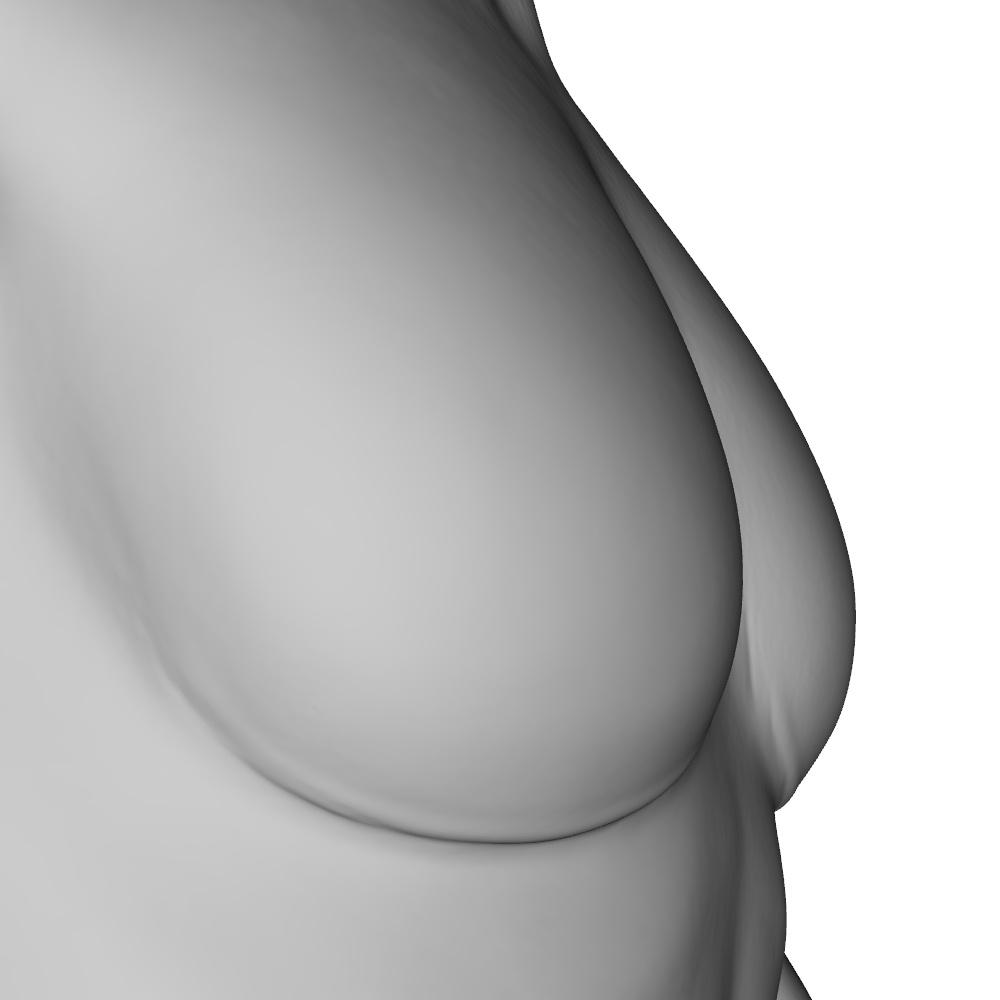
Lianna 9 - looking goodI have attached a set of two morphs (zip file in attachment) I made for her that turns her breasts into the default G9 shape, and another that turns them into the base feminine shape. Unfortunately her body HD morph has a contour that was not meant to be used with differently shaped breasts. You can always use the HD morph from some other character.
My morphs assume you have Lianna 9's body dialed in - they are not complete body morphs. Her body + either of these morphs will let you dial in the shape you want much more easily than trying to fix them from scratch with regular morphs.
Hope it helps someone =)
Morph Sliders
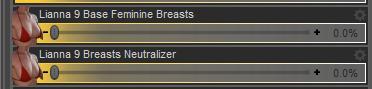
Default Shape
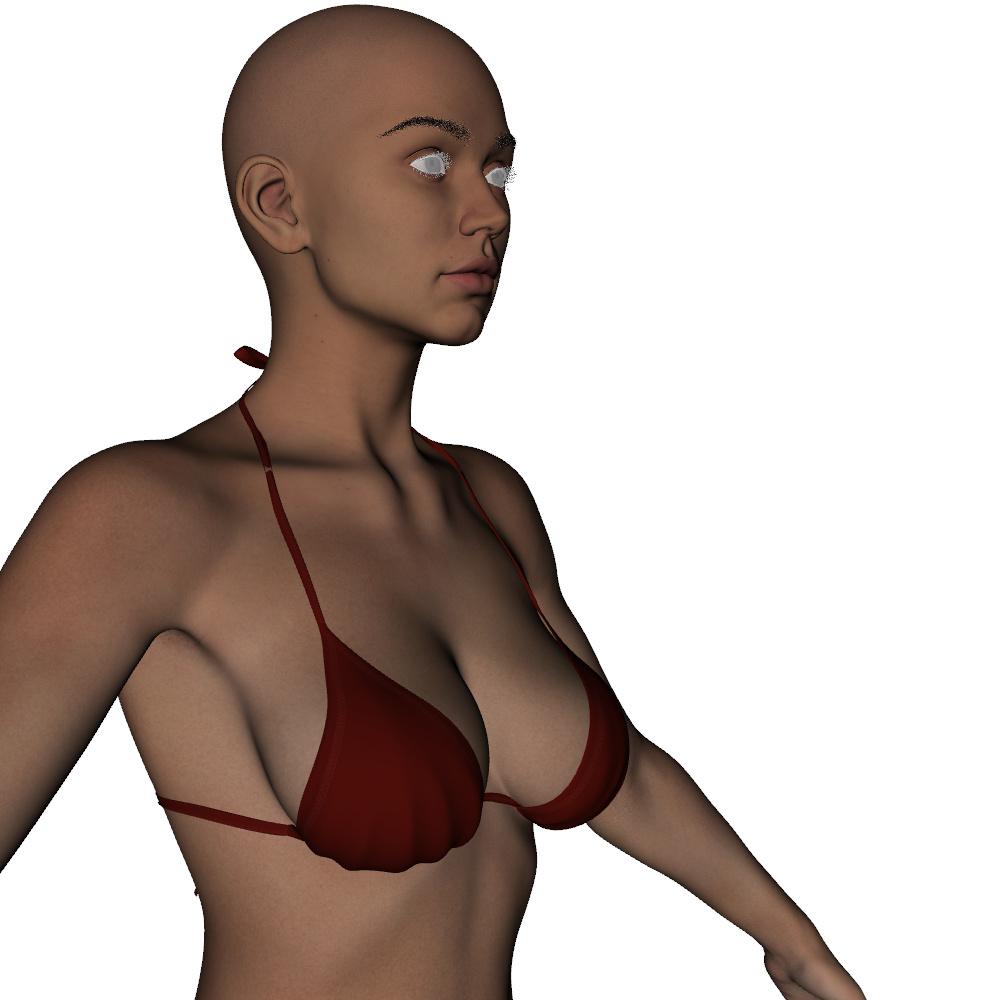
Lianna 9 Breasts Neutralizer (base G9 shape)
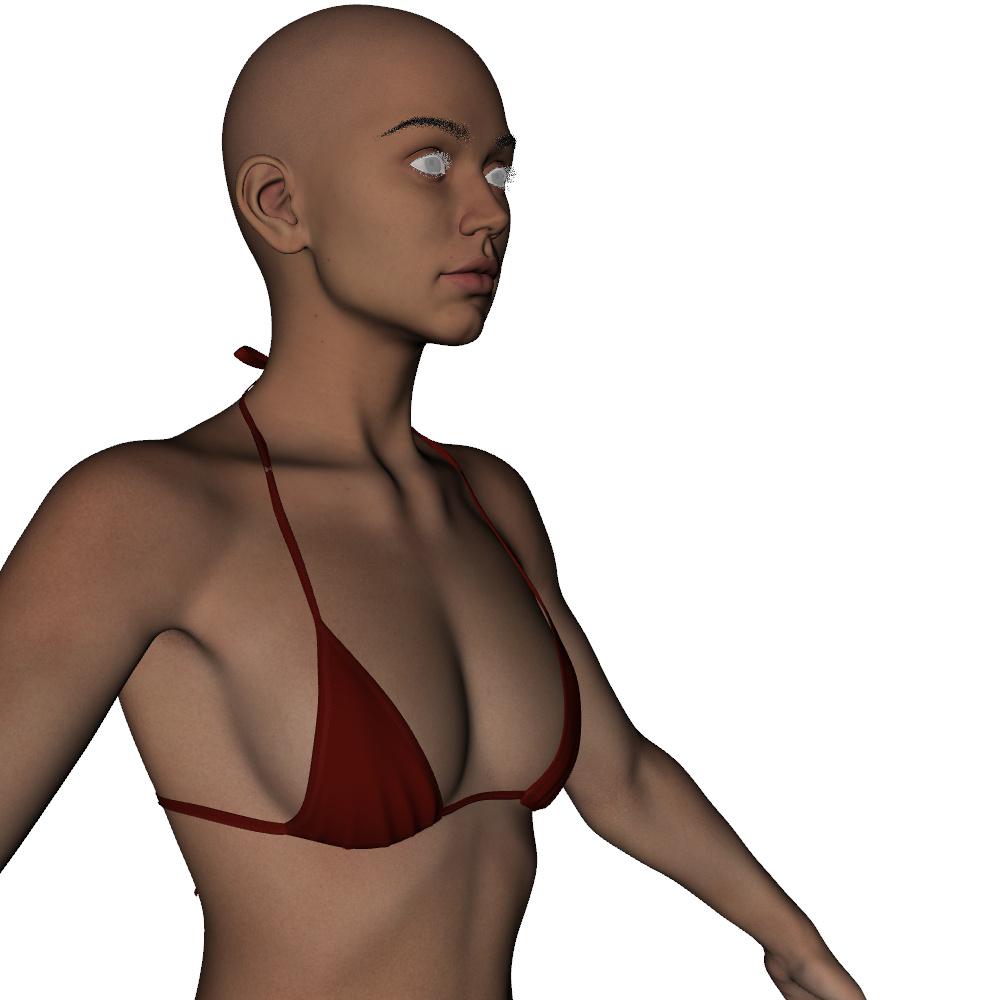
Lianna 9 Base Feminine Breasts
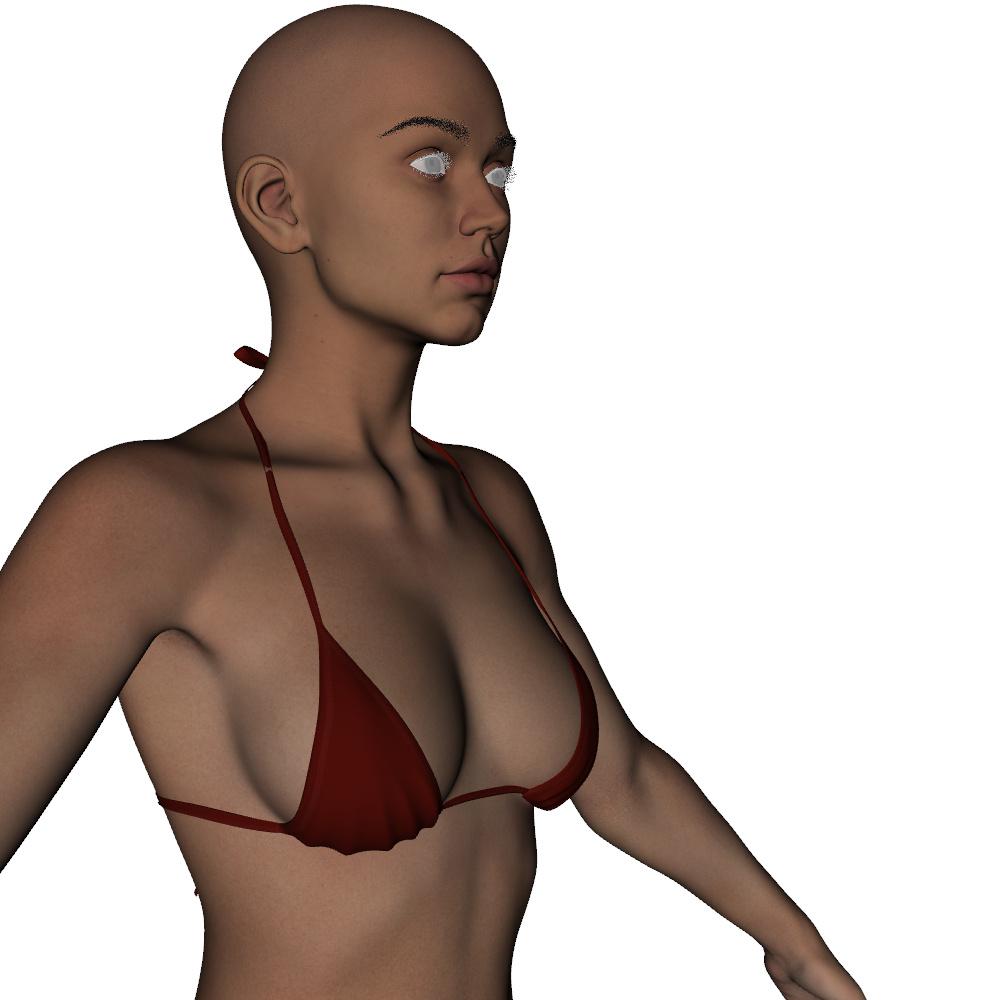
Lianna 9 Body HD Details breast contour issue
 [Released] Turbo Loader for Genesis 9 [Commercial]
Tried adding the unknown product to filters. Does nothing, but even removing the morphs entirely/re-scanning the directory so they aren't ever in the script's list, then re-adding them after does not solve the problem.
Steps I took:
I cleared the morphs list, removed the FACS folder entirely, scanned for morphs, and saved a new morph list manually. Turbo Loader Manager does not show the FACs morphs now. Unchecked all morphs and executed. While the folder was entirely missing, no issues. Loaded multiple characters with merge, and only got one shared facs file missing error across each.
Replaced FACs folder with all in .dsf form. Turbo Loader Manager still does not show them. Merging a character immediately throws the error.
This script/generation alone insists it has to enable the FACS morphs by changing .tlOff(s) to .dsf(s), if those .dsf(s) exist at all. And it has to do so each time a character references them. If it can't find the required .tlOff file(s) when triggered (again for no reason, as far as I can tell, if the folder/facs morphs exist at all, this script insists it has to go through this process), regardless of how or why they aren't there, it goes into that forced loop. Even if as far as I can tell, there's no reason the script should even be aware of/attempting to locate them at all.
So, like, I'm open to the idea that, somehow, something is borked on my end, but if I go through all the means available to me to never have these morphs recognized by the script, and they are still causing an issue that works unlike every other script... that feels like a not "me" problem... For example, I typically realize I forgot to re-scan/add a new G3/8F morph because it just loads up with any new character merged if it's not in the managed list... this one does not do that, which I gather is what it should do, at least, it does not do that with very specifically the facs_cbs morphs. If these G9 FACs morphs exist in any way and are not in .tlOff form, the merge script fixates on them incorrectly and fatally.
If that's in the merge script itself, then it's weird it only does it for G9 FACs morphs. If it's reading some table/function parameter somewhere in an encrypted script in the G9 stuff, that makes more sense, but I am equally unable to do anything to solve the problem. If there's some super-secret hidden config somewhere that is/is not correctly being read/written, cool, but I can't find it to remove/edit/fix it myself.
As a simple end-user request issue: I just need the script (whichever of the two it has to be, or both, I suppose) to stop hard locking to perform a function it can't do, shouldn't even by trying to do, and most importantly doesn't need to do in a way that loops until crashing studio. If it can't find a tlOff file, it should never lock Studio up until it crashes. It should skip it, like it does in every other script combination for any other missing thing. It doesn't. Please make it do that. That would fix my issue.
[Released] Turbo Loader for Genesis 9 [Commercial]RiverSoft Art said:
sikotik13 said:
Amala and Fabrice are included with the Genesis 9 Starter Essentials, hence they were easy and fast to test with eliminating other variables.
Ah! That was my problem. I was looking for products in Smart Content! I can load both no problem.
Glad you found them (I had to go to my downloads to figure out what came with the essentials myself, lol).
*snipped*
If you mean, using TurboLoader Booster Utilities and its merge script, you expect the morph list in the Turbo Loader Manager to update, this is NOT a feature I have added to any of the Turbo Loader products. If you mean when you click Execute Selected in the Turbo Loader Manager, you expect the settings to be automatically saved, this is again NOT a feature done by any of the scripts. You have to click Save Settings or Execute.
I mean that whether you intended it as a function or not, i.e. opening a turbo loader script (i.e. TL for G8F) scans the morphs list, and tells me what's enabled/disabled for that character base. Always has. Genesis 9 does the same scan, but does not correctly display what is enabled/disabled after doing that opening scan, and nothing except explicitly refreshing will cause it to do so. The scan on open is not reading the current morphs, nor is the one when you double-click to load a configuration from within the script. This functionally changes nothing, I was just informing you of a behavior that does not match with every other TL script in case that helps narrow down what my core issue is.
Also, apparently every single morph in my product list shows as UNKNOWN PRODUCT, including the Daz native ones. Again, though, I never noticed it as a possible problem, because that is across all of the TLs. None of the others have issues.
This means the filtered products list is not working for you. The script goes through the morphs and removes products whose NAME is in the filtered products list. Since all of yours have *** UNKNOWN PRODUCT *** in the name (as well as being slightly different names), nothing will get filters. For example, if YOU added "FACS *** UNKNOWN PRODUCT ***" (I think), this product and all of its morphs would never be in the list anymore so you could never accidentally turn them off. ONLY DO THIS AFTER ENABLING ALL MORPHS FIRST.
I shall give this a try. Will let you know if that fixes it for me. I am becoming increasingly aware this seems to be a "me" problem, but I do very much appreciate all the tips and help :)
so you could never accidentally turn them off.
In case my actual problem is getting lost in the details: As of right now, I HAVE to turn them off for the script not to crash Daz Studio. Every character that tries to turn them on when they are not off is what causes the error. As far as I can tell, this should not happen, as it should not try to enable a morph that is already enabled. It is trying to, and that is the problem. As a reminder, this is the offending error:
0 /data/Daz 3D/Genesis 9/Base/Morphs/Daz 3D/FACS/facs_cbs_BIUL_BDL.dsf
2024-07-29 07:58:15.792 [INFO] :: facs_cbs_BIUL_BDL2024-07-29 07:58:15.792 [DEBUG] :: Enabling data/Daz 3D/Genesis 9/Base/Morphs/Daz 3D/FACS/facs_cbs_BIUL_BDL.dsf
2024-07-29 07:58:15.792 [DEBUG] :: data/Daz 3D/Genesis 9/Base/Morphs/Daz 3D/FACS/facs_cbs_BIUL_BDL.tlOff NOT FOUND.
2024-07-29 07:58:15.794 [DEBUG] ::
It is looking for a .tlOff file (disabled morph) that does not exist because it is enabled because the script just enabled it. This is the entire issue I have. Anything that leaves these morphs on/enabled causes this error. It doesn't matter if they were never off, it doesn't matter if I or the script itself enabled them. If they are enabled, and I attempt to use scripts to merge/open a character/actor that enables the FACS while they are already on/enabled, this is the error I get. I need the script to stop insisting on looking for a file that does not exist... Like it does for any/every other circumstance.
As I mentioned previously, despite all of the other supposed errors I have, every other Turbo Loader script functions just fine.
If my Unknown Products thing is an issue, it's not affecting anything else in any other script. Only Turbo Loader Manager Genesis 9 behaves slightly differently, and merging using the same method I do across every other TL script generation does not have this issue with any other script/combination. It is just G9, so as far as troubleshooting as an end user goes, something seems to be wrong here, or every script should have a similar (or indeed any) issue. They don't. It's just this one. If it stops looking for file(s) it has to know don't exist and stops crashing Daz Studio insisting it/they must exist, I would have no functional problem. If it would just skip missing files (like every other script is happy to), I would have no functional problem, and would gladly chalk the listup to QT UI being buggy. It locks me in the above loop instead. That is the issue I need resolved/bypassed. Enabling the files is the problem, not a solution.
*long snip*
If you wrote anything after your end quote, it was cut off in your post, just fyi.
KOO Earl Morph Dials are Present but not loading.Assuming the product is correctly installed, then everything you have shown here points directly to bad "Parent data".
No morphs showing with the base figure is normal as Studio will have blocked them from being loaded.
The Control slider showing when using a character preset is also normal, the morph call in the preset has a "Parent" line which forces DS to load the file, but the control slider doesn't work as none of the other morphs were called by the preset.The problem with all of that is that Richard says his works, which means something else is going on.
I'd recommend clearing the DSON cache as your first step, it's something I'd recommend everybody gets used to doing on a regular basis, especially when your installing/uninstalling content.
To clear it go "Edit > Preferences" in DS, under the "General" tab you will find "DSON Cache Files" near the bottom, to the right of it you will see two buttons "Default" and "Clear".
After clearing the cache try loading the character again and see if anything has changed, if it still doesn't work then it's time for a support ticket.
[Released] Turbo Loader for Genesis 9 [Commercial]sikotik13 said:
Amala and Fabrice are included with the Genesis 9 Starter Essentials, hence they were easy and fast to test with eliminating other variables.
Ah! That was my problem. I was looking for products in Smart Content! I can load both no problem.
On reviewing my Filtered Products list, yours includes "Genesis 9 Essentials" while mine by default does not. Reset also removes it, so I may have done that and not noticed it. I have tried adding it and saving settings, will test again once I post this.
Path to the problem morphs is "R:\My Library\data\DAZ 3D\Genesis 9\Base\Morphs\Daz 3D\FACS", got rid of all symlinks/redirects about a year ago I think, because that caused issues across all loaders and some other plugins.
I can manually do all kinds of stuff, no they aren't read-only, and as I said with the latest update, TL does enable/disable them if I explicitly do so with it (i.e. Execute Selected or Execute). The morph list just does not update their state. Like if I disable them, load a model that enables them, and reopen TL, the G3 and G8 TLs will have the list of enabled disabled updated. Only the G9 one does not. Crashing is not required, the list does not update unless I manually tell it to with Refresh Status, and is the only one that requires me to do so.
If you mean, using TurboLoader Booster Utilities and its merge script, you expect the morph list in the Turbo Loader Manager to update, this is NOT a feature I have added to any of the Turbo Loader products. If you mean when you click Execute Selected in the Turbo Loader Manager, you expect the settings to be automatically saved, this is again NOT a feature done by any of the scripts. You have to click Save Settings or Execute.
Also, apparently every single morph in my product list shows as UNKNOWN PRODUCT, including the Daz native ones. Again, though, I never noticed it as a possible problem, because that is across all of the TLs. None of the others have issues.
This means the filtered products list is not working for you. The script goes through the morphs and removes products whose NAME is in the filtered products list. Since all of yours have *** UNKNOWN PRODUCT *** in the name (as well as being slightly different names), nothing will get filters. For example, if YOU added "FACS *** UNKNOWN PRODUCT ***" (I think), this product and all of its morphs would never be in the list anymore so you could never accidentally turn them off. ONLY DO THIS AFTER ENABLING ALL MORPHS FIRST.
For the record, I appreciate your patience. I genuinely love the Turbo Loader system, and really just want this one to work like the rest do, cuz I kinda use them all the time, and it feels weird to do it different for just this one.
Gonna give it another shot with the added G9 Expressions filter, and see if that little thing is the whole problem... will update with an edit shortly.
Update: My filter list matches yours exactly, did a re-scan and clean restart to make sure I wasn't missing something somewhere. No dice. I am kinda at a loss as to what, where could be causing this behavior, honestly. It feels like there's a config file hidden somewhere that's storing errant data or something, and that is reading instead of what should be. Can't find anything like that though. It's honestly only vexing because it's only happening to one script out of 5. I would think that if my whole setup was wrong, and they're all in the same place, accessing the same data, the same way, from the same place, they'd all have the same, similar, or even any issues. But it's just the one. Although, G9 has now surpassed G3 in number of morphs finally, so at least it isn't still the one with the least morphs having all the problems. :)
I suppose for clarity's sake, was your question about renaming the facs files as a means of eliminating them from the morph list? Because yes, I can, but again my issue is I just want them on. If I wanted them off, I'd just zip them and be done with it, since I know that works. My whole issue is that only Genesis 9 seems to force this request to find a missing .tlOff it shouldn't be looking for, and that nothing I can seem to do will stop it from doing so. Every other Genesis will, at worst, just pop a list saying some morph or other couldn't be loaded/found. So why does this one lock itself in a hard loop retrying a task it shouldn't even be running?
Since I'm out of other ideas, and I can't dig through encrypted scripts to compare, I'll just have to adapt, at least I can manually toggle with the loader now, which is still markedly faster than doing it by hand.
Wacky Eyes on Genesis 9Thanks for the tips. I finally threw this model away and started over. I do keep a close watch on every morph I add or the likes.
[Released] Turbo Loader for Genesis 9 [Commercial]Amala and Fabrice are included with the Genesis 9 Starter Essentials, hence they were easy and fast to test with eliminating other variables.
On reviewing my Filtered Products list, yours includes "Genesis 9 Essentials" while mine by default does not. Reset also removes it, so I may have done that and not noticed it. I have tried adding it and saving settings, will test again once I post this.
Path to the problem morphs is "R:\My Library\data\DAZ 3D\Genesis 9\Base\Morphs\Daz 3D\FACS", got rid of all symlinks/redirects about a year ago I think, because that caused issues across all loaders and some other plugins.
I can manually do all kinds of stuff, no they aren't read-only, and as I said with the latest update, TL does enable/disable them if I explicitly do so with it (i.e. Execute Selected or Execute). The morph list just does not update their state. Like if I disable them, load a model that enables them, and reopen TL, the G3 and G8 TLs will have the list of enabled disabled updated. Only the G9 one does not. Crashing is not required, the list does not update unless I manually tell it to with Refresh Status, and is the only one that requires me to do so.
Also, apparently every single morph in my product list shows as UNKNOWN PRODUCT, including the Daz native ones. Again, though, I never noticed it as a possible problem, because that is across all of the TLs. None of the others have issues.
For the record, I appreciate your patience. I genuinely love the Turbo Loader system, and really just want this one to work like the rest do, cuz I kinda use them all the time, and it feels weird to do it different for just this one.
Gonna give it another shot with the added G9 Expressions filter, and see if that little thing is the whole problem... will update with an edit shortly.
Update: My filter list matches yours exactly, did a re-scan and clean restart to make sure I wasn't missing something somewhere. No dice. I am kinda at a loss as to what, where could be causing this behavior, honestly. It feels like there's a config file hidden somewhere that's storing errant data or something, and that is reading instead of what should be. Can't find anything like that though. It's honestly only vexing because it's only happening to one script out of 5. I would think that if my whole setup was wrong, and they're all in the same place, accessing the same data, the same way, from the same place, they'd all have the same, similar, or even any issues. But it's just the one. Although, G9 has now surpassed G3 in number of morphs finally, so at least it isn't still the one with the least morphs having all the problems. :)
I suppose for clarity's sake, was your question about renaming the facs files as a means of eliminating them from the morph list? Because yes, I can, but again my issue is I just want them on. If I wanted them off, I'd just zip them and be done with it, since I know that works. My whole issue is that only Genesis 9 seems to force this request to find a missing .tlOff it shouldn't be looking for, and that nothing I can seem to do will stop it from doing so. Every other Genesis will, at worst, just pop a list saying some morph or other couldn't be loaded/found. So why does this one lock itself in a hard loop retrying a task it shouldn't even be running?
Since I'm out of other ideas, and I can't dig through encrypted scripts to compare, I'll just have to adapt, at least I can manually toggle with the loader now, which is still markedly faster than doing it by hand.
Wacky Eyes on Genesis 9As it says, you must pust Paramaters in Edit mode (right click over the values) and select the generated morph from face transfer, before Adjust Eye Rigging.
Daz 3D is part of

Connect
DAZ Productions, Inc.
7533 S Center View Ct #4664
West Jordan, UT 84084Licensing Agreement | Terms of Service | Privacy Policy | EULA
© 2026 Daz Productions Inc. All Rights Reserved.