-
off topic thread
I actually have a 3D printer but I have issues with it's DRM filament
Spending your pension having fun... good for you!
Mystarra said:
lost track of the topic
Misty...I've lost track of life....and my big machine has been in te shop while I have been away so ryping on Kindle. Need to get back to work here.
 Silene
I have little money to spend but lots of time
the printer I bought several years ago when I was working
off topic threadI actually have a 3D printer but I have issues with it's DRM filament
Spending your pension having fun... good for you!
Mystarra said:
lost track of the topic
Misty...I've lost track of life....and my big machine has been in te shop while I have been away so ryping on Kindle. Need to get back to work here.
Sileneoff topic threadI actually have a 3D printer but I have issues with it's DRM filament
Anyone here using a 3D printer? ? on DS export settingsOh, and one of my prints got featured by a major 3D printing filament manufacturer (albeit with a little censorship to make it more widely acceptable!)
It got top billing at https://fillamentum.com/blogs/news/best-3d-prints-15 in July last year.
Anyone here using a 3D printer? ? on DS export settingsUnless you are wanting large statues, the resolution of a filament printer is not really very good. With small prints, .05mm is reasonable and will need a minimum of post work. That, at the moment, can only be achieved with a UV cure liquid resin printer. Maybe it can be achieved in a few years with a filament printer, but not yet. The filament printer at work gives about 10x that resolution and looks pretty poor in comparison to the liquid resin prints I have at home.
As for the exact feed & head speed, all I can suggest is that you experiment in your conditions - cold, heat and humidity will all affect the print.
I have to disagree. Of course, the output of a resin printer is far higher than that of an FDM printer but that does not mean that some perfectly acceptable prints can’t be achieved on a cheap printer like the Ender 3. It all depends on how much effort you want to put into learning how to converting the exported OBJ file into a single mesh, watertight STL file than be printed successfully without confusing the slicer software. I have documented the process in a blog at 3dprintednudes.blogspot.com
Here is a sanitised photo of one of my recent prints (hopefully naked hands and feet won’t offend) which does show the level of detail I routinely get. The rectangular blocks are experimental support pillars I am trying out to prevent the scarring on the surface of the model caused by default support material. The hair was sculpted in Blender by me and prints very nicely.
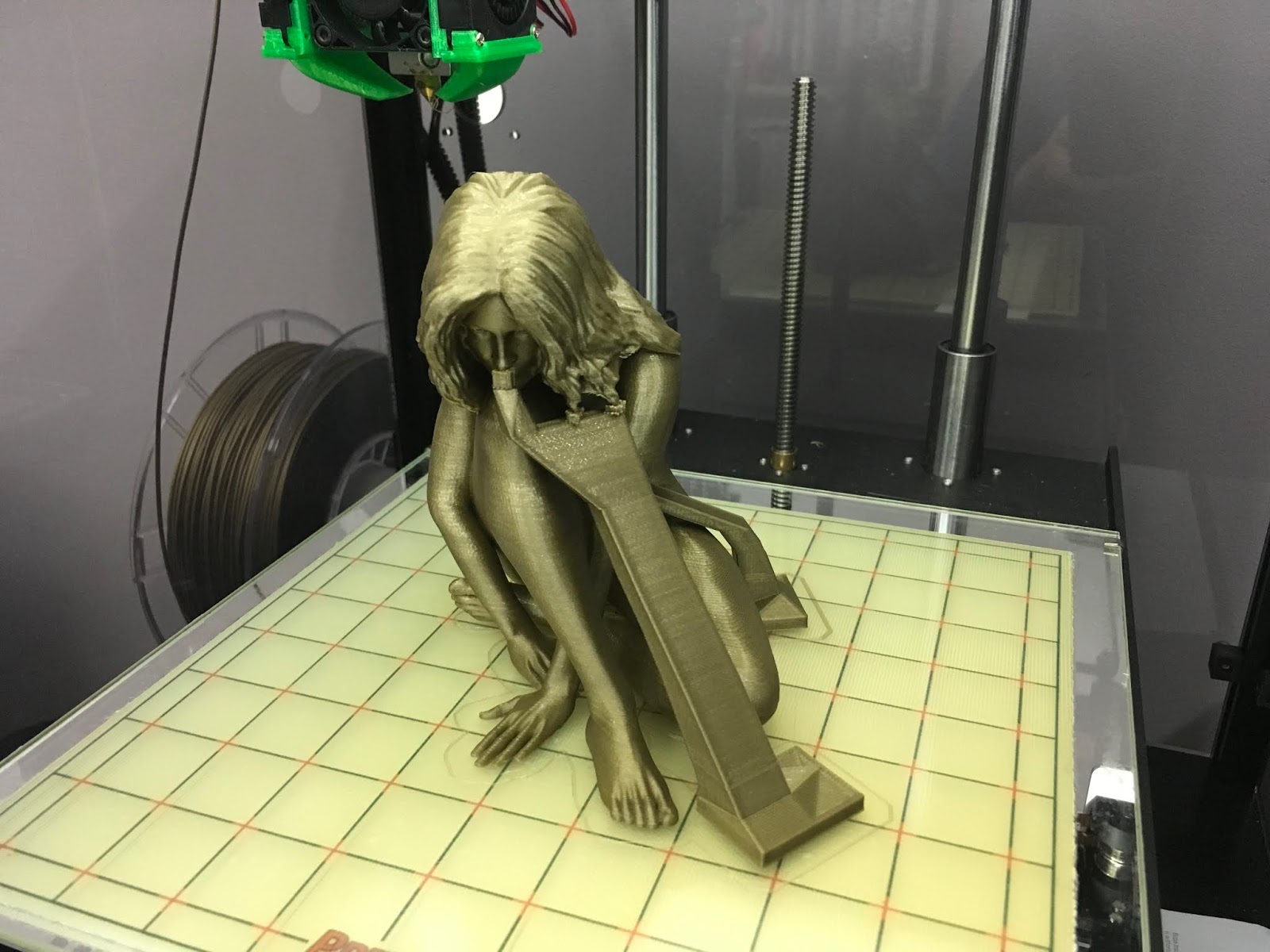 Anyone here using a 3D printer? ? on DS export settings
Unless you are wanting large statues, the resolution of a filament printer is not really very good. With small prints, .05mm is reasonable and will need a minimum of post work. That, at the moment, can only be achieved with a UV cure liquid resin printer. Maybe it can be achieved in a few years with a filament printer, but not yet. The filament printer at work gives about 10x that resolution and looks pretty poor in comparison to the liquid resin prints I have at home.
As for the exact feed & head speed, all I can suggest is that you experiment in your conditions - cold, heat and humidity will all affect the print.
Anyone here using a 3D printer? ? on DS export settingsYou usually resize the model to fit the volumne of your printer in your slicing software
I have one but it was a bad choice with DRM filament cartridges that get flagged as fake even though I paid for the overpriced genuine ones.
Its been gathering dust for 3 years
XYZ Da Vinci stay way from that brand
your model needs to be watertight too without unsupported overhanging bits as built from base up
unless you make it in bits to glue together afterwards
my thread with my 3D prints got locked sadly
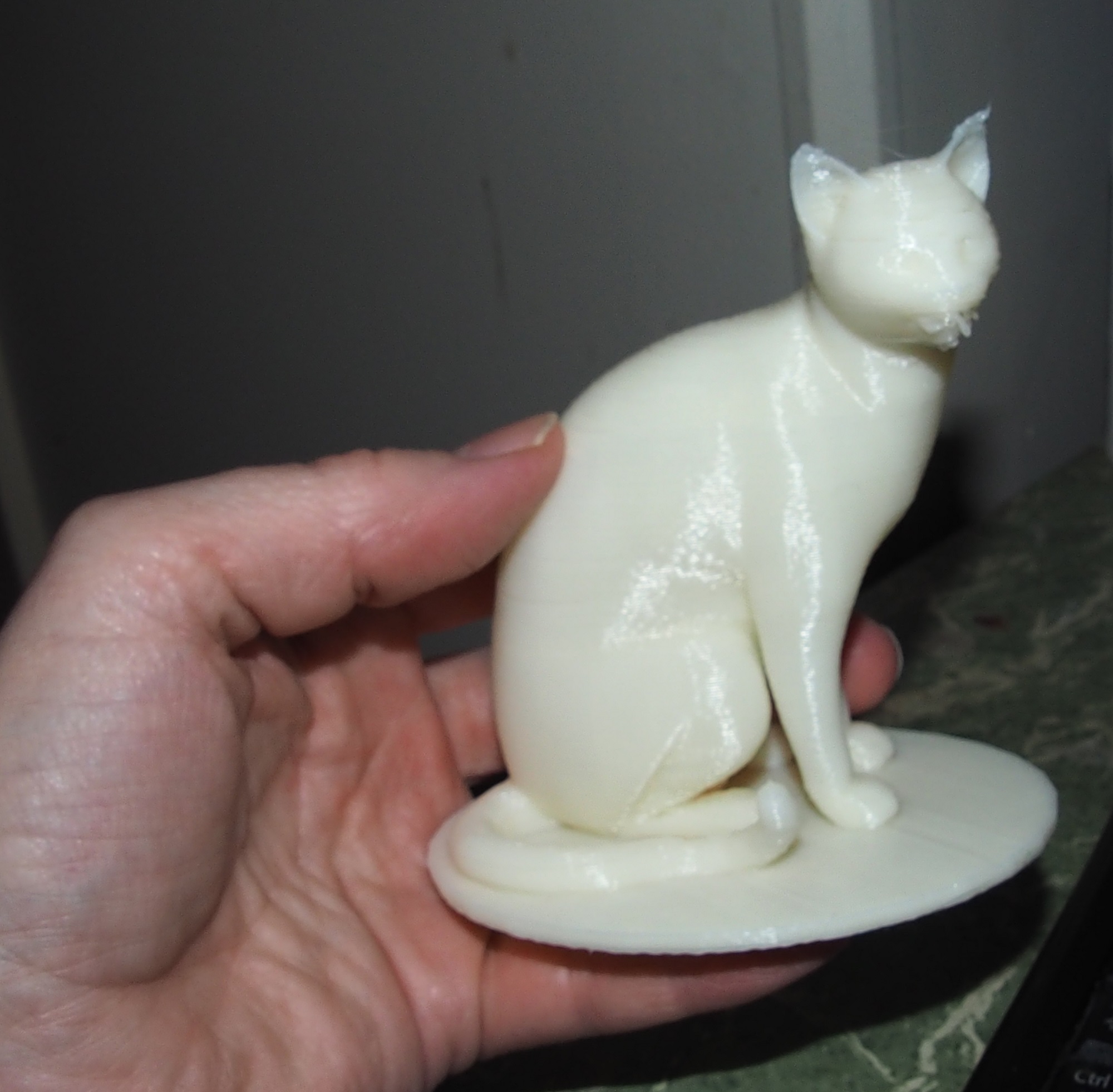
thanks ..bumme ron the thread being locked. I managed to print one item from DS ... but it lacking detail, partly from printer set up[ but also the export settings. They're really tiny going into slicer ... sometimes barely to be seen. 10,000x enlargement to create 2.5 inch character
Anyone here using a 3D printer? ? on DS export settingsYou usually resize the model to fit the volumne of your printer in your slicing software
I have one but it was a bad choice with DRM filament cartridges that get flagged as fake even though I paid for the overpriced genuine ones.
Its been gathering dust for 3 years
XYZ Da Vinci stay way from that brand
your model needs to be watertight too without unsupported overhanging bits as built from base up
unless you make it in bits to glue together afterwards
my thread with my 3D prints got locked sadly
My phone will not charge complaint threadComplaint... actually Complaints...
Who was the imbecile who first decided that cars need clear lens over the brake and reverse lights?
I need to find out so I can smack them with a herring.
The worst is walking through a parking lot on a sunny day... On older cars the lens was a diffuser, and looked dull in sunlight when it was off, but you could see it go on... Now you can’t tell if the reverse lights come on when someone is about to back up because the clear lens makes the reflector glare brightly in the sun... it looks “on” all the time. Walking along all the cars look like they have the reverse lights on and suddenly one starts going backwards...
Not that it matters, most imbeciles just get in the car and go: Sit > Start > Reverse, in one move... you literally hear the door close, engine start, transmission engage in sequence... and away they go.
Same goes for directional signals... the friggin’ things look like they are on all the time... depending on the angle and lighting it’s barely discernible if it’s blinking unless you can see the filament in the center of the bulb... a bare amber bulb in a mirrored reflector with a clear lens in direct noon sun... yeah, that’s gonna be useful.
I remember the first time I saw that becoming a thing in the late 90s, I was like “Brilliant, let’s see how long that dumb idea lasts”... Yeah.
...I'm with you on turn signals,
Along with the fact I believe, that at least here in Oregon, they apparently seem to be optional equipment, on a lot of the new cars they are difficult to see for two reasons, those blindingly super bright headlamps many new cars have, and the design of the front end of many new cars which makes them impossible see from the side because they are buried amongst all the other lights or often on the inside portion of the light housing. The latter is important when dealing with cars turning from the same street you are walking along while you are in a crosswalk at an intersection. A number of times I chastised someone who almost blindsided me only to see after they passed did have their turn signal on, it just wasn't visible from the side. I remember cars in the late 60s early 70s had those extra lights on the front and rear fenders which functioned as side turn signals. Cadillacs of that era even had a fairly bright white light that lit up when the turn signal was engaged.
The other common situation here which annoys me is even though by law you are supposed to signal your intent to turn at least a half block before the intersection, so many times I'll see a car approach, and figuring they are going straight I start to cross, then at the last minute the driver begins tuning towards me before he or she engages the turn signal. I mean, why bother with the effort to even use it when you are almost halfway into the turn? Those people still get an earful from me.
My phone will not charge complaint threadComplaint... actually Complaints...
Who was the imbecile who first decided that cars need clear lens over the brake and reverse lights?
I need to find out so I can smack them with a herring.
The worst is walking through a parking lot on a sunny day... On older cars the lens was a diffuser, and looked dull in sunlight when it was off, but you could see it go on... Now you can’t tell if the reverse lights come on when someone is about to back up because the clear lens makes the reflector glare brightly in the sun... it looks “on” all the time. Walking along all the cars look like they have the reverse lights on and suddenly one starts going backwards...
Not that it matters, most imbeciles just get in the car and go: Sit > Start > Reverse, in one move... you literally hear the door close, engine start, transmission engage in sequence... and away they go.
Same goes for directional signals... the friggin’ things look like they are on all the time... depending on the angle and lighting it’s barely discernible if it’s blinking unless you can see the filament in the center of the bulb... a bare amber bulb in a mirrored reflector with a clear lens in direct noon sun... yeah, that’s gonna be useful.
I remember the first time I saw that becoming a thing in the late 90s, I was like “Brilliant, let’s see how long that dumb idea lasts”... Yeah.
Broadway Light Bulbs Letterings - On/Off mat probThat actually helped a great deal... in letting me know that I won't have the control I'd like in DS. So, will continue on translating to Lightwave.
The materials CAN'T be assigned individually it seems, or at least not w/o a great deal more work. The Masters are at the bottom and arrows indicate what was applied. With those separated, you can now individually toggle bulbs on or off, but those are the only choices. You can't have just one bulb out, another dim, etc.
Too bad. Gorgeous model but hobbled in potential. Oh, discovered another DUF that needs editing; 4 - ONLY Bulb Filament Low Intensity ON.duf.
Thanks for your help NorthOf. I really appreciate it since I can't seem to find any useful docs or tut's on this stuff.
Broadway Light Bulbs Letterings - On/Off mat probSince there's been ZERO response from the author & Tech Support, I just cut to the chase & reverse engineered things via Lightwave. I tried the Instances to Objects script on the Daz scene and it would fail; basically just goobered the scene with rogue willy-nilly placed sockets & bulbs.
Although I could go with an instancing approach in LW, cloning the hierarchy gives me much more control for the moment. Perhaps when many more copies are needed I'll look into that.
I broke the bulb geometry out to separate layers. There was a lot of "why'd they do it that way" with the Daz model so I could simply get rid or just hide much of it. By breaking out the filament, I turned it into an actual light rather than just luminous polys so shadows will be different. I can now individually change color, make globes flicker, etc.
Still fine tuning some surfaces such as the glass but they're pretty much in the "season to taste" realm. Using a Dielectric material for that. This test is just an HDR enviro with a shadow catch ground plane and volumetrics set & enabled.
Broadway Light Bulbs Letterings - On/Off mat probWell, after making the DUF edit, I made some progress in that I no longer get the error, and after a couple wasted hours of testing, all I can get are Frosted globes with light On, clear globes Off, but can't get a clear globe with filament On High, etc.
Nor have I figured out how to get a mixture of on & off. I'm sure it's stupidly simple, once you've seen it.
Also, where might I find a Legend of sorts as to what the Node hieroglyphics in the Scene tree refer to? An eyeball or camera is kinda obvious, but most of the rest ...
My render is blackIn Iray you have to set light intensies to very high numbers. I often have them set in the hundreds of thousands. The default settings for an Iray light don't even show up in a render, which seems very silly to me.
Yeah. The Iray default luminance setting is measured in candelas/sqare meter. A "candela" is the SI unit of luminous intensity, which (in theory) is roughly equivalent to a single candle, so the basic idea is that a cd/m^2 would be about the amount of light that a candle would emit over an area of 1 square meter. But there is some "math crunching" in the Iray engine that applies that number to the shader's surface. By this, I mean that Iray emitters are mesh objects with a shader applied, and changing the mesh size will obviously change the brightness. (Even photometric Iray lights act this way -- you can actually change the shape/size of the emitter in them.) Ergo...
You need really big numbers if you leave the Luminance unit as cd/m^2.
If you change the dropdown for Luminance Units to kcd/m^2, you can shave 3 zeros off of your number, making it feel slightly less mammoth. Or, if you think in "lightbulbs" you can change the setting to Watts. Since watts are a measure of power (not light emission), Iray has to do one more calculation to determine how much energy is actually converted to light for that emitter. Good news is that Iray defaults to a luminous efficacy of 15, which is about what a standard filament lightbulb emits. (My advice is to pick one unit, get used to it, and then use that scale for pretty much everything!)
What are the numbers and units for your Luminance and Luminance Units?
It's My Party and I'll Complain If I Want To Complaint Thread...years ago had a friend who was a landscape technician. Helped him with compiling, editing, and typing the documentation from his handwritten notes for his case against a company that makes glyphosate herbicides and organophosphate insecticides. It was concluded that both contributed to him becoming highly sensitised to toxins (and he wore the recommended protective clothing/masks as well as followed the proper handling procedures). He no longer can stay in a city for more than a day or two, or even small towns (particularly near rural areas where these and other chemicals are routinely used on fields). Granted he was exposed to them far more than the average home owner but over time they can present a hazard to one's health.
First of all, Gryphon needs to decide if the danger posed by the unkempt weeds (snakes, fire ants if they are near where he lives, rats, or other rodents/predators that might be nesting nearby) are worth making waves with his landlord.
I inferred that he doesn't want to be "that renter". His next step might be to call his county or code enforcement hotline to report the situation...but sometimes, government bureacracies won't do anything unless the complainant gives their name. See above about "making waves".
So the next question for him is whether or not this is a problem that can be self-solved, given ALL of the risks (exposure to a chemical, being discovered by the landlord, neighbors, etc.). I am firmly in the self-solving category. If I lived in his apartment complex, I'd probably just do it and then there's no more complaining. A treatment takes a week to kill the weeds, then it's probably good for another month. Personally, I would buy a gallon jug of Roundup and apply it right around the house or patio going out only as far as necessary to restore safety to the area. My impression is that he only has a few square yards to treat. The risk is vanishingly small, but the benefits are potentially huge. I'd do it early in the morning before anybody wakes up. The sprays will be dried by the time anybody comes out to walk their dog.
As to "dangers" of Glyphosate, I don't believe any of that. I've been using the stuff for 20 years. Just be careful with chemicals! Don't breathe it, don't eat or drink it, don't roll around in it while it's wet, wear your eye protection, keep your damned mouth shut when you're applying it, wash up with soap and water when you're done, and launder your clothing too. Most of those are the same precautions you'd use when putting gas in your car or truck.
Also, Roundup does NOT kill bees or any other insects. It can't. Roundup is an HERBICIDE, not a PESTICIDE. I do use some pesticides on occasion, because I live in the real world. The sod webworm can denude certain types of turfgrasses in just a month or two, the tomato cutworm and the corn catepillar can DEVASTATE garden crops in less than a month. The key to not killing bees is to apply pesticides BEFORE the plants go to seed, or wait until after the flowers have dropped.
But Roundup is an herbicide, so although it might remove a pollen source, it certainly won't kill the bee population. Bees are pretty smart. I've never ever seen a bee trying to get pollen from a dead plant or from an area where there are no blooms on the plants.
The upshot is, if you have tall weeds in your outdoor living space, you could cut them down with a machine, pull them by hand, kill them with a simple salt solution (that's what Glyphosate is), or get somebody else to use one of those methods. Gryphon has options. It just comes down to his personal calculations. Cost, risk, hassle; these must be balanced. He can decide.
Personally, I'd write to the landlord first, but if nothing is done, I'd take action myself. I once painted the bathroom and kitchen in an apartment that I lived in. Had to remove the ugly wallpaper first. But then I kept the place for a few years before I moved out, so it was worth it. The landlord never complained that I had left the place in better condition than I had gotten it.

[opens closet door]
... extensive use of herbicides to control milkweeds in the Midwest has been devastating Monarch habitats. Similarly wild flowers which bees often gather pollen and nectar from, are often susceptible as well.
This may be possible, but then there are people like me who actually grow the milkweed, purely BECAUSE it brings the Monarchs. The milkweed is basically a Florida weed; as are most plants that serve certain species of butterflies either as a host plant, nectar plant, or (as in the case of the milkweed), serves both functions. And for the Monarch, it is the only plant they will use.
I am also an avid gardener. A few years ago, I started growing bee-attracting flowers AMONG my tomatoes, peppers, and pumpkins. If you build it, they will come. Being a homeowner does afford me some pretty cool advantages.
And let's not just assume that all people will indiscriminately kill everything in their path. Many communities now have nearby greenspaces that were DESIGNED into the community. Mine does! These homes were built 30 years ago, so this kind of thinking is not really new.
Industrialised farming relies heavily on these compounds to control unwanted plants and insects and these chemicals don't suddenly stop at the field's edge, but are often carried off downwind of the treated area. There are towns which have higher rates of respiratory ailments in areas where the industrilaised agriculture is present.
This may hold some truth, but this all started because I suggested somebody might be able to solve their safety problem with a gallon of Glyphosate for control around his domicile. There are safety reasons and other legitimate purposes for it in this case, and it is not part of the problem of industrialized agriculture to which you refer.
I have NEVER had an accident where Glyphosate killed my wanted plants in my garden or landscape. Neither from either a pump sprayer (which is very easy to control tightly) nor from a hose-end sprayer (which basically BLASTS mass quantities of solution across much larger areas). "Overspray", at least in a consumer setting such as mine does happen. But at the concentrations I'm using, it's NOT an environmental problem, and never has been. My roses and hibiscus grow just fine next to the weeds I just killed with Roundup. Of course, it does pay to figure out how to work your equipment properly.
Glyphosate has been linked to cases of non Hodgkins-lynphoma in people who have worked in the lawn care/gardening/landscaping industry. True, a one time use will not endanger you unless you neglect to take any precautions as mentioned above.
"Has been linked".
Did you know that broccolli "has been linked" to death? It's all in the language used, of course; which can often be shaped (misshaped?) by the underlying agenda of the article-writers. By the way, I am a broccolli lover. Grilled over fire with a little bit of real butter on it; yum!
My personal solution would be a weed whacker once a month or as needed.
For very small or young weeds, this may be fine. But for weeds the size that Gryphon is up against, this is the way to wear out a weed whacker for all but the smallest jobs. Wacking green plants that have grown to any substantial size wears outs equipment quickly because the thing that makes plants plants (cellulose) is very very tough when green. The motors get clogged/overheated, batteries wear down, and you use a lot more filament and fuel.
I find that proper control is a 2 part plan. First, kill the plants and wait for them to turn crispy brown. Dry plants will be very brittle and will make short work for even the weakest weed whacker. Even though dead plants are drier, they will produce less overall dust (because they require less work to return them to the soil). If you're especially unmotivated, you could even leave them alone and let normal traffic break off the dead plant parts and return that organic matter directly to the soil. Everything lasts longer, including the operator's lungs.
Indeed always consult with the landlord/property owner first.
In an ideal situation, I would agree. Gryphon's situation may not be ideal, and therefore may require creativity. And a midnight spraying or two.
Spent several years proofing medical journal articles and along with the work I did for my friend, learned a few things that make me look for other solutions than using dangerous chemicals whenever possible.
I suppose it comes down to one's own definition of "dangerous" and "whenever possible". I still think the medical reasons for doing/not doing something can be way too easily overblown, and then overblown beyond all reasonableness, simply because that's what humans do best.
Look at the bad rap given to things like butter and coffee over the years. Supposedly, the researchers and proofreaders were really good at their jobs back then too, but now we learn that real butter is much healthier than the margarine that we were all pushed to in the 60s/70s. may actually be good for us long term. And we've also now learned that coffee is no longer evil, and may actually be able to slow down demntia and/or some cancers.
Were the nay-saying researchers really that incompetent? I don't know, but at the rate of incorrect info we've been getting from researchers for the last 40+ years, I wouldn't be surprised if they next tell us we should start drinking Glyphosate directly from the container! And Pepsi will come out with a "juice-pak" version of it, with a little straw that you poke through the foil sealed hole! Hey, it could happen!
 How do I improve this Iray rendering?
Just a follow-up...
This is a 12' x 12' x 10' room, with a sphere as the light-source, 2.5" in diameter, like a standard lightbulb. The surface was set to emission pure white, 6500K temp, single-sided, no profile, luminance 1600 (100 watt bulb), Luminance units "Watts", Luminous Efficacy (lm/W) 17.50 {100 watt filament light}
The pictures show that the "default scale" of Daz is horribly inaccurate. The 100 watt bulb, without a cover, barely lights-up the ceiling. The room paint is off-white, and setup with actual paint-like "flat" surface. (Nearly no gloss and gloss-diffused heavily.)
The following pictures are scaled by 50% (Scaled everything in the whole scene) Light-falloff is getting more realistic and luminance is becoming more realistic...
The following is 25%, and just about there... Still a little dim for a 100-watt, uncovered lightbulb.
Next is 15% scale of the daz-world... Perfect... That is what you expect a 100 watt bulb to look like, uncovered, in a 12x12x10 foot room. However, people use 60-watts standard, covered with something. Two or three, if they like it super-bright.
The last two are 15% scale, and a 60-watt bulb. One with a person in the room, which looks correct and has the expected soft shadows.
How do you get the whole daz-world scaled correctly? Put it all in one "GROUP" and scale the group. Now all your lights will look correct and behave like they should, when you punch-in real-world numbers for the settings. (Wiki is a great resource for real-world values, since Daz doesn't supply standard settings and they don't even use lights correctly themselves, as per IRAY doccumentation.)
Before you ask... NO, you can't just make the light brighter, because that doesn't change the "Real world light decay" (falloff), of the light. It will always look too bright at the source and like laser-light at a distance. Like your models are giants and the lights you are using are from another alternate reality. (Falloff, the "glow strength" decay, seen on the ceiling and walls.)
Tricks for speeding up Iray rendering? Let's hear 'em!Here are a few things I've learnt over the past few days:
1. Light. LOTS OF IT - The emissive shader uses cd/m^2, which means that the smaller your light source (say a led spotlight prop), the less light comes out of it. As an example, an average clear sky is 7000 cd/m^2, but you have to remember that the sky is big. The small filament of a 100 watt bulb, by comparison, is 7,000,000 cd/m^2. So if you just have a few point style light sources, crank them up!
2. Turn off the Architectural sampler unless your scene is in a small room with a single light - Anything more than that and your iteration rate will tank. Better to turn it off and run more iterations to get rid of noise than to keep it on.
3. If you're getting decent speed, but there's noise you just can't get rid of, try using something like Topaz DeNoise (full disclosure - I can provide a referral link to this product that will get you $20 off).
These three things dropped my render time from 3-5 hours to 20-30 minutes (using a 1070ti)
Also, regarding dark scenes... I haven't tested this, but I think that an interior dark scene with a single weak light should render pretty quickly with the architectural filter on. Exterior dark scenes should never take too long to render because less of the light gets reflected off of anything.
Licensing: Now it's confusing and I feel disenfranchised. Help me understand!Thank you all for adding to the conversation. It is very much appreciated.
DZFIRE: In my opinion, the PAs should make more money, not less. But I must admit that I don't know who makes what, or even how much work they do, how hard their jobs are, or how long they've worked to become good at their skillsets.
I definitely recognize that there are artists at every stage of the pipeline here. For example, the DAZ devs; the ones who write the code for the applications, these folks are artists in their own right. The marketing, website, and store teams are awesome. Then there are the in-house artists, who may play around in many different roles. And the PAs, from all around the world, even! And finally, but not least, the customers who literally pay for everything.
My questions are not intended to point a finger of shame at any of these good people. Not at all. I am just thinking of possibly doing 3D products for sale, and I'm just trying to figure out if that would work as a model, given the prices that DAZ (and others) charge for things. I'm just trying to decide if all this would be doable, given my own fixed costs such as keeping, maintaining, and upgrading a modern computer, 3D printer (which I haven't purchased yet), models, textures, accessories, software, and consumables such as filament, ink, and yes, license fees.
If the model allows me to make some money and even get a pizza or two for me from time to time, then I might make a go of it! I don't want to take your pizza away from you, but the fact is that while my day job funds everything I do here now, I may have to make some hard decisions, such as outsourcing some things or insourcing others. For example, maybe obtaining the figures and licenses from DAZ and PAs is doable, but I might have to insource some texturing via my SLR camera or insource the accessories by making those with Blender or (hopefully) the new Hexagon.
This is a math problem. Many of life's decisions turn out to be math problems. Like how much salt to add to a bread recipe, or deciding which pack of paper towels to buy.
I'd be curious to learn what things showed up in movies and the artist only made $4.98 for it. I would not be surprised, however. I feel that Hollywood is very corrupt and I can't bear to watch much in the way of television or movies anymore.
FSMC Designs and AlienRenders:
I am still not certain what a Merchant Resource (MR) allows and doesn't allow. And I even asked a question some years ago.
BeeMKay:
One small clarification. I never said anything about making "the most" profit. That would come later. I agree with your point about making things myself (I call that "insourcing"). I'm not thinking in an "all or nothing" way, however. I'm just thinking about how best to leverage the things I'm good at (or efficient at), and paying for the rest.
We do this in our everyday lives already. For example, I know how to work on cars; I just hate it. So I pay somebody else for that service, even though I could do that cheaper in most cases. Some of my neighbors have a lawn service, but I love working on my own landscape, so I do that myself.
I too am glad DAZ is addressing this and like you, I think it's a good thing that DAZ isn't stuck in the "no 3D printing allowed at all" way of thinking from a few years ago. But then, if they didn't come forward with options, there could have been a competitor in the wings.
Richard Hasseltine:
Thank you, I did see that clause in the license text. I had just forgotten about it.
Daywalker Designs:
Yep, precisely what is going through my mind now; figuring out fixed costs and the cost of consumables. As long as I have my day job, I don't have to worry about the cost of healthcare, insurance, and my retirement contributions. Doing this full time would raise my cost exponentially, so I'm not sure I could ever do that.
Thank you all; great conversation.
3D Printing Plugin for Daz Studio - GamePrint [Commercial]Several years ago I had a 4 inch vase of my design printed using an Objet printer (which uses an ink jet print head with UV curable resin and has sub-50 micron resolution). I supplied an STL file but there was still work needed on the printer's end to finalize the file, print, clean, polish, and ship the vase. No painting. The cost was $200. Although expensive, I have not seen a home filament-based printer give the same quality. Besides the material and processing cost, there's also the cost of amortizing the printer. The pricing shared so far for a painted 7 inch figurine with what appears to be very good surface quality seems to be a good price for a custom-made product.
Thanks, glad to hear that

I think the prices quoted so far are extremely good value for a one of kind, quality printed and hand painted figure. The samples shown so far look amazing. The fact that you would discount the cost of the plug-in from the first order is excellent. Please also add my vote for one that would be very interested in purchasing unpainted figures as well.
Thanks a lot! I think we might have the unpainted option sooner than later
I would be interested in unpainted figurines as well as I can also do my own painting. In fact, I think that more people than you think here are capable of doing their own painting. LOL
Laurie
I guess so :D
If the plugin included some models that could be generally used in Daz, it would definitely entice me to pick it up way before I'm ready to purchase a model, but I'd worry that providing that kind of value might also lead to the 'too much cloud time wasted' problem you quite reasonably want to curtail. Though I guess at that point the cost of the plugin might subsidize that.
This is something that we are considering now given the feedback, will keep you posted
Sorry if its already been asked, i dont recall seeing it, but how well or is it even possible using figures with tattoos? I do alot of my characters with body art or fantasy makeups and am wondering how well that would transfer to print or if it can even be done currently?
We did models with Tattoos before and we can do it quite well but I'm not sure whether your models will fall under standard quality or collectible quality zone, it depends on how much effort is going to be spent into getting all the details and tattoos are tricky especially on smaller scales
3D Printing Plugin for Daz Studio - GamePrint [Commercial]Several years ago I had a 4 inch vase of my design printed using an Objet printer (which uses an ink jet print head with UV curable resin and has sub-50 micron resolution). I supplied an STL file but there was still work needed on the printer's end to finalize the file, print, clean, polish, and ship the vase. No painting. The cost was $200. Although expensive, I have not seen a home filament-based printer give the same quality. Besides the material and processing cost, there's also the cost of amortizing the printer. The pricing shared so far for a painted 7 inch figurine with what appears to be very good surface quality seems to be a good price for a custom-made product.
Daz 3D is part of

Connect
DAZ Productions, Inc.
7533 S Center View Ct #4664
West Jordan, UT 84084Licensing Agreement | Terms of Service | Privacy Policy | EULA
© 2026 Daz Productions Inc. All Rights Reserved.