-
So, AW's Chloe - Genesis 3 only?
And the install method is DAZ Central only. She doesn't show up in DIM- Install Manager. Mind you so are some of the other releases today so I'm hoping it's an oversight and will be fixed.
Be Advised: Bad Girls Poses = only DazCentral Installer (RESOLVED!!)This probably isn't a Daz Central Only product. Recently there's been several instances where ALL of a product's installers (DIM, Daz Central, manual) are missing & this is probably the latest. For some reason, when this happens, only the Daz Central option is listed, even thou that won't work either.
Daz3D will get it fixed but not sure how long it will take; it's been reported in the "There's always another sale" thread.
Be Advised: Bad Girls Poses = only DazCentral Installer (RESOLVED!!)RE: FF's Bad Girls Poses for Maeve and Genesis 8 Female
I liked some of the poses in this set and picked it up and THEN noticed it only has DAZ Central as an installer. I happily plug along with just DIM, and never tried DazCentral after reading the horror stories in these threads.FWIW though, there is a Manual Install download option and I am fine with that. Took me a minute in DIM scratching my head in confusion "Seems like I had more in my cart...:" And so I DID.
Edit: Tried using the Manual Download button and it only takes me to the product page with no download link. May have to put in a ticket, perhaps even a refund request if not available any other way than D-Central. Stay sharp out there shoppers!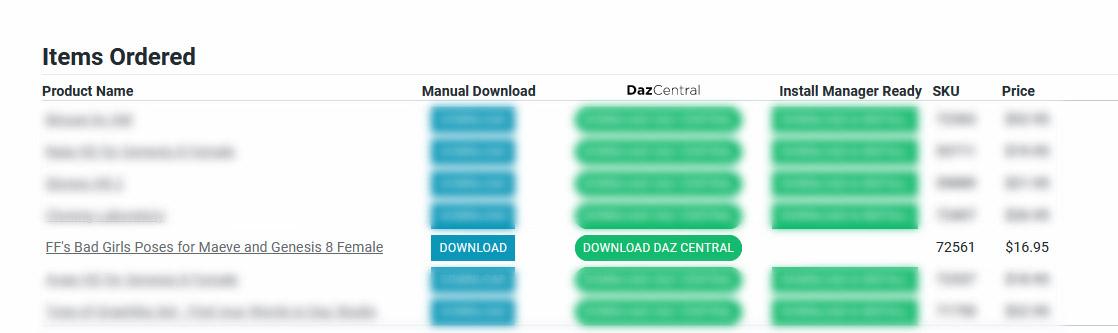 "There's Always Another Sale™" (Report sales issue here.)
Chloe lists only DazCentral as install type.
Same for Maeve and Maeve poses
Ahh, the explains why she doesn't appear in DIM or on the manual downloads page... So they are forcing us to use Daz Central... Last time I used it it messed everythig up.
Not happy
Steve.No, the install files are likely not there at all. This has happened several times over the past few weeks and one has to wait until the install files are fixed/added.
"There's Always Another Sale™" (Report sales issue here.)Chloe lists only DazCentral as install type.
Same for Maeve and Maeve poses
Ahh, the explains why she doesn't appear in DIM or on the manual downloads page... So they are forcing us to use Daz Central... Last time I used it it messed everythig up.
Not happy
Steve.Yep, it's doing the same thing, it says I need to install Daz Studio even though it works perfectly...
I told it to install Daz Studio and a second later it said it was installed, still no sign of Chloe...
This is pants...
Holt 8: The West Gone Wild / WeirdCould somebody who has made the purchase kindly confirm that all the earlier install/usage issues have been resolved? I really don't want to get involved in writing up any post-purchase support tickets, let alone messing up DIM and/or Central.
Well, just started DIM and DAZ Studio, to see if there are any updates. But NO! Still wrong / missing Icons/Images, wrong Filetypes / Metadata? Products in "Lost and Found" and so on.
Maybe i'll see updates the next day? https://images.app.goo.gl/o48oZLQXJPihq78T7
Shopping experience = "Little Shop of horror"
Holt 8: The West Gone Wild / WeirdCould somebody who has made the purchase kindly confirm that all the earlier install/usage issues have been resolved? I really don't want to get involved in writing up any post-purchase support tickets, let alone messing up DIM and/or Central.
"There's Always Another Sale™" (Report sales issue here.)https://www.daz3d.com/tara-8 Download fails for 2nd day in DAZ install mannager
Same with DAZ Central...
Fails to work or actually gives an error?
Download failed according to DAZ install manager. I start Queue and get back the message in the product line that "Download Failed!" I downloaded other products without problems yesterday and today too.
"There's Always Another Sale™" (Report sales issue here.)I posted this in the Holt 8 thread, but I think it should have gone here.
I bought both of today's western bundles, but there seen to be bits missing. Daz Central is showing:
No Sunset Rider outfit
No Western Brawler outfit
No Banker's outfit
No Wild West accessoriesNo Holt HD add on.
@markgoode77 Has this been rectified? Otherwise I ain't buying - too much of a hassle writing up a support ticket etc
I just bought both bundles and all the items showed up fin DIM or me.
Have you tried loading them? They don't show in Daz Central at all, they do show in Dim and Connect, but attempting to open them just produces an error:
2020-08-26 17:03:24.378 K:/Users/Mark Goode/Documents/Daz 3D/Studio/My Daz Connect Library/data/cloud/1_72243/people/genesis 8 male/clothing/banker outfit/banker outfit !load all.duf (1,1): Syntax error - expected '{' or '['
This might just be me though, I've seen this error before, and raised a support ticket. This was back in December, but I've had no response yet.
I installed all of them with DIM. I tested the Bankers Outfit and it opened OK in DS. Haven't tested the others yet
Okay folks, don't do this:
Find the products missing in Central, so install with Connect.
Find Connect installation broken so try installing with Dim.
That doesn't work, no matter how many times you try to uninstall/install.
After uninstalling once again, manually removing everything Connect had squirrelled away, updated the metadata before starting again and installing with Dim. I've got no icons in Smart Content, but I can live with that.
"There's Always Another Sale™" (Report sales issue here.)https://www.daz3d.com/tara-8 Download fails for 2nd day in DAZ install mannager
Same with DAZ Central...
Fails to work or actually gives an error?
"There's Always Another Sale™" (Report sales issue here.)I posted this in the Holt 8 thread, but I think it should have gone here.
I bought both of today's western bundles, but there seen to be bits missing. Daz Central is showing:
No Sunset Rider outfit
No Western Brawler outfit
No Banker's outfit
No Wild West accessoriesNo Holt HD add on.
@markgoode77 Has this been rectified? Otherwise I ain't buying - too much of a hassle writing up a support ticket etc
I just bought both bundles and all the items showed up fin DIM or me.
Have you tried loading them? They don't show in Daz Central at all, they do show in Dim and Connect, but attempting to open them just produces an error:
2020-08-26 17:03:24.378 K:/Users/Mark Goode/Documents/Daz 3D/Studio/My Daz Connect Library/data/cloud/1_72243/people/genesis 8 male/clothing/banker outfit/banker outfit !load all.duf (1,1): Syntax error - expected '{' or '['
This might just be me though, I've seen this error before, and raised a support ticket. This was back in December, but I've had no response yet.
I suspect that the files are not decrypting - it can happen, especially when things are busy. often uninstalling and reinstalling will fix it. If not please open a support ticket, then as a workaround either unisntall and use DIM or download the DIM zip and copy everything from its Content folder to the K:/Users/Mark Goode/Documents/Daz 3D/Studio/My Daz Connect Library/data/cloud/1_72243/ folder to make the Connect isntall work pending an update.
"There's Always Another Sale™" (Report sales issue here.)https://www.daz3d.com/tara-8 Download fails for 2nd day in DAZ install mannager
Same with DAZ Central...
"There's Always Another Sale™" (Report sales issue here.)I posted this in the Holt 8 thread, but I think it should have gone here.
I bought both of today's western bundles, but there seen to be bits missing. Daz Central is showing:
No Sunset Rider outfit
No Western Brawler outfit
No Banker's outfit
No Wild West accessoriesNo Holt HD add on.
@markgoode77 Has this been rectified? Otherwise I ain't buying - too much of a hassle writing up a support ticket etc
I just bought both bundles and all the items showed up fin DIM or me.
Have you tried loading them? They don't show in Daz Central at all, they do show in Dim and Connect, but attempting to open them just produces an error:
2020-08-26 17:03:24.378 K:/Users/Mark Goode/Documents/Daz 3D/Studio/My Daz Connect Library/data/cloud/1_72243/people/genesis 8 male/clothing/banker outfit/banker outfit !load all.duf (1,1): Syntax error - expected '{' or '['
This might just be me though, I've seen this error before, and raised a support ticket. This was back in December, but I've had no response yet.
I installed all of them with DIM. I tested the Bankers Outfit and it opened OK in DS. Haven't tested the others yet
"There's Always Another Sale™" (Report sales issue here.)I posted this in the Holt 8 thread, but I think it should have gone here.
I bought both of today's western bundles, but there seen to be bits missing. Daz Central is showing:
No Sunset Rider outfit
No Western Brawler outfit
No Banker's outfit
No Wild West accessoriesNo Holt HD add on.
@markgoode77 Has this been rectified? Otherwise I ain't buying - too much of a hassle writing up a support ticket etc
I just bought both bundles and all the items showed up fin DIM or me.
Have you tried loading them? They don't show in Daz Central at all, they do show in Dim and Connect, but attempting to open them just produces an error:
2020-08-26 17:03:24.378 K:/Users/Mark Goode/Documents/Daz 3D/Studio/My Daz Connect Library/data/cloud/1_72243/people/genesis 8 male/clothing/banker outfit/banker outfit !load all.duf (1,1): Syntax error - expected '{' or '['
This might just be me though, I've seen this error before, and raised a support ticket. This was back in December, but I've had no response yet.
"There's Always Another Sale™" (Report sales issue here.)I posted this in the Holt 8 thread, but I think it should have gone here.
I bought both of today's western bundles, but there seen to be bits missing. Daz Central is showing:
No Sunset Rider outfit
No Western Brawler outfit
No Banker's outfit
No Wild West accessoriesNo Holt HD add on.
@markgoode77 Has this been rectified? Otherwise I ain't buying - too much of a hassle writing up a support ticket etc
I just bought both bundles and all the items showed up fin DIM or me.
"There's Always Another Sale™" (Report sales issue here.)I posted this in the Holt 8 thread, but I think it should have gone here.
I bought both of today's western bundles, but there seen to be bits missing. Daz Central is showing:
No Sunset Rider outfit
No Western Brawler outfit
No Banker's outfit
No Wild West accessoriesNo Holt HD add on.
@markgoode77 Has this been rectified? Otherwise I ain't buying - too much of a hassle writing up a support ticket etc
Those showed up for me. Perhaps it is fixed.
I think the Banker's outfit might still have an issue or two (smart content won't filter in the materials)... but I'll reload and see if it's just some kind of temporary issue.
"There's Always Another Sale™" (Report sales issue here.)I posted this in the Holt 8 thread, but I think it should have gone here.
I bought both of today's western bundles, but there seen to be bits missing. Daz Central is showing:
No Sunset Rider outfit
No Western Brawler outfit
No Banker's outfit
No Wild West accessoriesNo Holt HD add on.
@markgoode77 Has this been rectified? Otherwise I ain't buying - too much of a hassle writing up a support ticket etc
"There's Always Another Sale™" (Report sales issue here.)I posted this in the Holt 8 thread, but I think it should have gone here.
I bought both of today's western bundles, but there seen to be bits missing. Daz Central is showing:
No Sunset Rider outfit
No Western Brawler outfit
No Banker's outfit
No Wild West accessoriesNo Holt HD add on.
DS 4.12.1.118 does not recognize Nvidia Titan RTXHello everybody! On a new computer with a Nvidia Titan RTX I installed DS 4.12.1.118 with DAZ Central and made sure to have the newest Nvidia Driver 452.06 installed. The windows device manager reports that the video card is working properly.
Now in the hardware tab of advanced render settings no GPU shows up (after restart of course), only the CPU is listed. In Troubleshooting „About Your Video Card…“ also only the Intel UHD Graphics 630 is shown, noNVIDIA Card is displayed.
Thanks for any help.
Please help me, I can't get rid of itThe exe file is in this path "C:\Daz 3D\Applications\64-bit\DAZ 3D\DAZStudio4" and the Daz Central is also in the same DAZ 3D directory, but I don't know about the uninstaller. If you mean Daz Central by saying uninstaller, I think it never asked me anything like that. Otherwise, there is no uninstaller as far as I know.
Daz 3D is part of

Connect
DAZ Productions, Inc.
7533 S Center View Ct #4664
West Jordan, UT 84084Licensing Agreement | Terms of Service | Privacy Policy | EULA
© 2026 Daz Productions Inc. All Rights Reserved.