-
Why is DAZ search so singularly awful?
Exactly why I won't dump my humongous and unweildy wishlist. I'd never find that material again if I had to rely on the store search.
Why is DAZ search so singularly awful?They could sort in order of match.
Today when you search you get a total mix.
Announcing: Daz Deals Browser Add-on II@ati or whoever happens to know the answer. I am brand new to Daz Deals; just learned about it yesterday and added a monthly pro sub today to check out all features. One thing that is not clear to me: do my hidden items and comments sync across multiple browsers? To be more specific, I switch frequently between a Mac and PC (using Brave on both). I already did a lot of customizing on the Mac. If synchronizing comments and hidden flags between the two computers is possible, I have not yet discerned how to do that. I suspect this has been asked and answered before, but could not find an answer just by browsing through the forum. Please advise, and thanks!
No Men's Clothing?It took me awhile to catch onto Genesis 8. But when I did it was because I saw an abundance of clothing for males. Also I delighted at the sight of so many mature characters, hair, etc.
So that's a major let down from Genesis 8 to Genesis 9.
Oh, and I don't search for anything. I select available options from drop down menus. Last time I looked, there is no option to select male clothes.
Why is DAZ search so singularly awful?It's a known (and annoying) issue. If your search term gets an exact match, it doesn't return anything else.
Why is DAZ search so singularly awful?There are at least half a dozen products in the store with "everyday" in the name. Mostly G8 but even G9. Yet when I search for them I get this:
 No Men's Clothing?
It may be less prevalent, but 'none' is definitely ... a bit off.
I did a search for 'suit' limited to Genesis 9 and got at least 7 clearly masculine-oriented modern outfits, plus a few more that have feminine promos but could easily adapt to masculine. (Plus scifi and fantasy stuff, of course)
It would be nice if it was easier to filter for mostly masculine or feminine items, though.
Hey DAZ, why not make it easier to shop?Ron Knights said:
Why should I pay anyone to find deals at DAZ?! Why does DAZ make things so hard?!
Guess that's why I haven't shopped here for a long time.
Personally, I don't find it hard to navigate and shop here. I look at products, if something interests me, I wishlist it if not on sale. If on sale I add to the cart and checkout, it's pretty straigtforward IMO. I do use the free version of Daz Deals, have for years., The search option isn't as accurate as I would like, but I can usally find what I want with the right keyword.
Collision and Poke Through Question...There are various converter products to go between different generations (clothes, hair, characters, etc). For example: https://www.daz3d.com/clothing-converter-from-genesis-8-female-to-genesis-3-female and https://daz3d.com/clothing-converter-from-genesis-8-male-to-genesis-3-male convert clothes from Genesis 8 to 3 (female and male, respectively).
A store search for 'converter' throws up 4 pages to sift through if you want pose/hair-converters too.
Lighting - not sure. I tend to use HDRI or emissive surfaces rather than Daz default lights. Perhaps someone with more expertise there can weigh in.
Getting started with animation: tutorial suggestions?A lot is going to depend on your computer and graphics card, the older they are, the longer they take. You will also hear things along the lines of optimization, which can reduce the load on your computer and on Daz, making it faster.
As for tutorials, there are many. If you check the store for animations, many of them come with tutorials that can give you a starting point idea of how things work.
When on youtube do a search for DAZ3D animation, that should give you a pretty good starter list. Depending on if youtube behaves, you might get a lot of older video's, which is frustrating. One person to look up is WPGuru, he has a few video's on animation.
Vram of all figuresWas curious if there's a forum covering all poser/daz figures for vram size. If someone could link or has how much each figure chews up? Looking for v1? And up. Someone on another pointed out using really old figures as background figs to save on vram, waiting on the lowpi to go on a better sale -_-Render your buys! Use buys from the current month and the previous month of salesCrossposted from Daz+ forum.
The Priestess
New items used: FN Eleanor for G9, TF Mystic Moon Tiara, Gothic Lace Shaders, SY Magic Portals (partially invisible because of all the postwork
 ), and Ron's Antique Glass Plate Textures (partially responsible for the amount of postwork). Other items and original render for comparison in the gallery.
 Hands and feet are crippled in UE 5.4 when imported using DTU! HEEEEELP!
milliethegreat said:
crosswind said:
If you exported assets to UE with Daz official DTU plugin, better firstly try with the ones from here - https://github.com/David-Vodhanel/DazToUnreal or https://github.com/daz3d/DazToUnreal/releases
I have no idea how "crippled" the imported figure looks... better post a screen shot.
how to post a screenshot on daz forum ????
Image uploading seems to be broken on the forums right now, but you could host it somewhere else like imgur and embed/link it from there.
I just downloaded the latest bridge from GitHub and it sent a G8 to Unreal without issue. Try a G8 to see if that works better, and maybe the problem is just G9. If the G8 is also munched, then the problem is something else.
Hands and feet are crippled in UE 5.4 when imported using DTU! HEEEEELP!crosswind said:
If you exported assets to UE with Daz official DTU plugin, better firstly try with the ones from here - https://github.com/David-Vodhanel/DazToUnreal or https://github.com/daz3d/DazToUnreal/releases
I have no idea how "crippled" the imported figure looks... better post a screen shot.
how to post a screenshot on daz forum ????
Aviatrix for G8FSorry, I have found it. I did a search of my DIM. It is a product no longer shown on DAZ3D.com. It's Aviatrix for Genesis 8.1 Females.
Use G9 skin on G8yuyu.atem said:
Thank you very much!
This product doesn't convert G9 textures into G8F ones, it modifies your G8F figure so it accepts G9 textures. To do that, it needs to replace parts of the figure's geometry with geografts, because it needs to redefine G8F surface boundaries in those areas and there aren't polygons in the right place for that.
Couldn't it make some issue when I use clothes, hair or wings for G8 with it?
In my experience, nope, it won't bring issues to wearable ~~ not relevant.
It's worth noting that there might be a few problems if you're using morphs (especially HD morphs) which would alter the areas with the geografts a lot, as the geografts may not be able to react in the same way as the original figure's geometry.
Would it ocurs when the morph was used before using the G9 UVs for G8, or only if I want to use a morph after using it?
It's a well-known issue that geo-graft cannot perfectly support HD morph especially with high SubD Level, no matter you dial HD before or after... Like the screenshot attached, it's a V8.1 HD using V9's textures with this product. If you view or render SubD Level 4, the issue can be apparently seen.
But I know there're some alternatives:
a) convert G9F's texture to G8M in FaceForm Wrap; b) convert them in Blender with UV projection than bake the maps. However, I myself haven't done them before 'cause the process requires even more domain knowledge, while the steps turn out to be cumbersome...
Do you know some tutorials that explain how to do?
Rarely ~~ You may search on youtube / internet.
c) you may convert your G8M figure to G9. (by using SkinSuit method or FaceForm Wrap which you've already known how-to...) That'll be much easier. Then you may freely use any G9's texture maps on it.
I would like to use the Avija Wings (https://www.daz3d.com/avija-wings-and-tail-for-genesis-8-and-81-males) on my character; do you think I could use it on a G9 character, even if it created for G8? Wouldn't it create some isses?
Nope, you cannot, this Wings product is a geo-graft for G8.X which cannot be used on G9. Besides, this Wings cannot adopt G9's Body texture either, you have to convert G9's body textures as well so as to apply on the head / body surfaces on the Wings.
Thank you in advance for your answers!
Vo Julie, Young, and Male HD for Genesis 9 BundleI did one, but the forum seems to be having issues with attachments again.
The Sky is Falling Complaint Thread...I'd almost want one without the thermostat as that is likely what went wrong with the one I have.
As Chief Engineer Montgomery Scott said after he, Kirk and the rest of the bridge crew stole the Enterprise in The Search or Spock...
 buyimg a new computer
...depends on where you get it according IBuyPower a 4TB (WD Blue) is around 98$ The one caveat with many build houses as they can have limited selections For example IBuyPower offers the Western Digital Blue as their only 4 TB HDD, I would prefer a WD Black or Seagate Barracuda [the latter I have which has been reliable for years]).
Below ie what I cobbled together at AVA Direct. The price is a litttle higher than the one at Amazon, however, it includes the RTX 4060 16 GB and 64 GB of DDR5 5200 memory. The two changes to keep it below 2,000$ are this system is built on the I7 13700KF (a step down form the i7 14700KF) and it has active air cooling for the CPU rather than a liquid cooling system (however it is more than capable to handle that CPU).
This is just to give an idea of what can be done under the 2000$ budget limit Of all the build houses I surveyed, AVA appears to offer the widest selection of components.
It is sad that EVGA stopped producing GPUs after the 3xxx series as I would definitely have gone with them for the 4060.
ETA:
Ugh, seems the old "Attach a file" bug is back as it just sits there sayiing "Uploding" without attaching the file selected.
As the original is a web page and not an image I cannot import it through the froum Image function so had to jump through some hoops to send it to one of my gallery sites to be able to import it as a "url" image through the Image funciton above..
ETA2
A pox on the forum software, spent more time than I should have taken, first gettting it into a folder on the gallery site that wouldn't post it on my main gallery and then being unable get the image to post without it gong over Daz the forum page size so I had to go back edit it down to get it to fit and resubmit to teh gllery gallery site befoire importing it in here.. If I could have simply attached it you could click on the image to expand it to full size so it would be eaier to read.. It probably would have taken less time to manually type everything in from the on screen summary.
...pardon my ire but not very pleased with all the time this took out of my afternoon for something that should have been so simple.
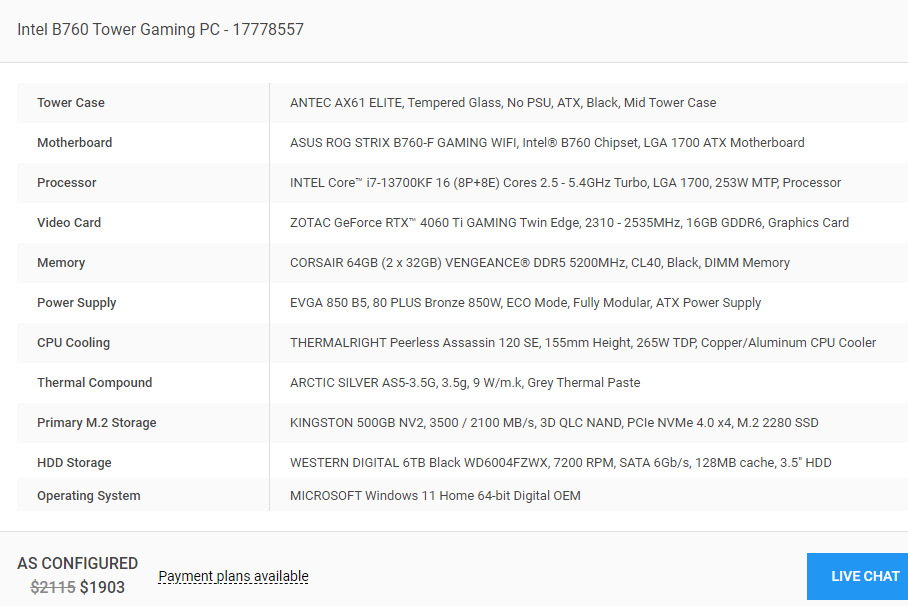
:
Use G9 skin on G8Moved to Product Suggestions as it is a search for an add-on tool, not a post related to the Daz Studio application itself.
Daz 3D is part of

Connect
DAZ Productions, Inc.
7533 S Center View Ct #4664
West Jordan, UT 84084Licensing Agreement | Terms of Service | Privacy Policy | EULA
© 2026 Daz Productions Inc. All Rights Reserved.