-
Create or transfer "Open Fly" morph for G8 Male Mega Wardrobe Jeans
Hi Daz Experts!
I'm wondering if it's possible to create (and or copy) a morph for the G8 Male Mega Wardrobe jeans (https://www.daz3d.com/genesis-8-male-mega-wardrobe) to unzip and open the fly without undoing the top button?
The boxers from the Simply Casual Boxers and Shirts for Genesis 2 Male(s) (https://www.daz3d.com/simply-casual-boxers-and-shirts-for-genesis-2-male-s) have the exact shape of the morph I want, but so far I haven't been able to copy or transfer it (entirely possible I'm just not skilled enough to understand the process).
Is it possible to copy that morph? Or if not, how would I go about attempting to recreate it if that's even possible?
Thanks!
Freebie Challenge July-August 2024 - "Take a Break" - Main ThreadHalcon Bluesky said:
I have been unconvinced about the first render posted above.
Now I believe this one is much better in my humble opinion.
This is the updated list for the items used into this render.
Free Items
Zhi - Beautiful Chinese Female Character Morph by warloc (G8F)
https://www.renderhub.com/warloc/zhi-beautiful-chinese-female-full-character-morph
G8 Female Sifi Outfit (Simple) by Moonlight001
https://www.renderosity.com/freestuff/items/77682/g8-female-sifi-outfit-simple
Meena For Genesis 8 Female by zaap
https://www.renderhub.com/zaap/meena-for-genesis-8-female
Side Swept ROse Hair (G3F , G8F) Part 1 and 2 by zoro_d
https://www.renderosity.com/freestuff/items/79533/side-swept-rose-hair-g3f-g8f-part-1
https://www.renderosity.com/freestuff/items/79534/side-swept-rose-hair-g3f-g8f-part-2
dForce_Belly Dance Nights Outfit for Genesis 8 Female(s) by zoro_d
Pretty Look for Genesis 8 Female(s) by zoro_d
https://www.renderosity.com/freestuff/items/83823/pretty-look-for-genesis-8-females
Mukta For Genesis 8 Female by zaap
https://www.renderhub.com/zaap/mukta-for-genesis-8-female
Candy Braids Hair for Genesis 8 Female(s) by zoro_d
https://www.renderosity.com/freestuff/items/88062/candy-braids-hair-for-genesis-8-females
(dForce) Nisia's Romper for Genesis 3 and 8 Female by freylaverse
https://www.renderosity.com/freestuff/items/92846/dforce-nisias-romper-for-genesis-3-and-8-female
Leather Boots for G8F by yomiuri
https://sharecg.com/v/94464/gallery/21/DAZ-Studio/Leather-Boots-for-G8F
G8M Walther 2.0 DAZ Studio by Ruslanomar
https://sharecg.com/v/97276/view/21/DAZ-Studio/G8M-Walther-2.0
New Walther 2.0 tanned skin + hair system for G8M by Ruslanomar
https://sharecg.com/v/98463/browse/21/DAZ-Studio/New-Walther-2.0-tanned-skin-%2B-hair-system#cmntL2
Update package for G8M Walther 2.0 by Ruslanomar
https://sharecg.com/v/99012/browse/21/DAZ-Studio/Update-package-for-G8M-Walther-2.0
Scottish Captain Model for Genesis 9 Male by KuraiKya (Mohawk Hair)
https://www.renderhub.com/kuraikya/scottish-captain
Fast Food Set by kalhh
https://www.renderhub.com/kalhh/hamburger-set-for-dazstudio-free
Delicious Cake Prop by Teknology3d
https://www.renderhub.com/teknology3d/delicious-cake-ds-prop
Coffee Urn Set by Richabri
https://www.renderosity.com/freestuff/items/92571/coffee-urn-set
Ghettoblaster by kalhh
https://www.renderhub.com/kalhh/ghettoblaster-for-dazstudio-free
Camilla Table by BoBo3D
https://www.renderhub.com/bobo3d/camilla-table
GTX-Luxury Area by GraphistX
https://www.renderhub.com/graphistx/luxury-area
Urban Street 04 from PolyHaven
https://polyhaven.com/a/urban_street_04
No Count Items:
(*) Esha Small Earrings for Genesis 8 Female and Genesis 9
Obtained free on 2022-12-05 Daz Christmas Freebie
(**) M3D Versatile Short Hair for Genesis 9, 8, and 8.1 Males
Obtained free on 2023-12-31 Daz Christmas Freebie
(*) (**) These items are no longer available
- Genesis 8 Starter Essentials
Base figure (Female) used
- Fabrice for Genesis 9 Character Preset
- Matt for Genesis 9 Character Preset
Included in Genesis 9 Starter Essentials
Paid items:
Chameleon ROse for Genesis 8 Female by zoro_d (Lingerie panty only)
https://www.renderosity.com/marketplace/products/126597/chameleon-rose-for-genesis-8-female
dForce Soho Swag Clothing Set for Genesis 8 Males
Part of “Blast From the Past Bundle”
https://www.daz3d.com/blast-from-the-past-bundle
Belly Dancer Poses for Genesis 8 Female
https://www.daz3d.com/belly-dancer-poses-for-genesis-8-female
Z Ultimate Dance Collection - Poses and Partials for Genesis 3 and 8
https://www.daz3d.com/z-ultimate-dance-collection--poses-and-partials-for-genesis-3-and-8
Genesis 3 and 8 to 9 Pose Converter
https://www.daz3d.com/genesis-3-and-8-to-9-pose-converter
So It's up to the judging members to decide which of the renders like most.
It took over 2 hours for the render to be done.
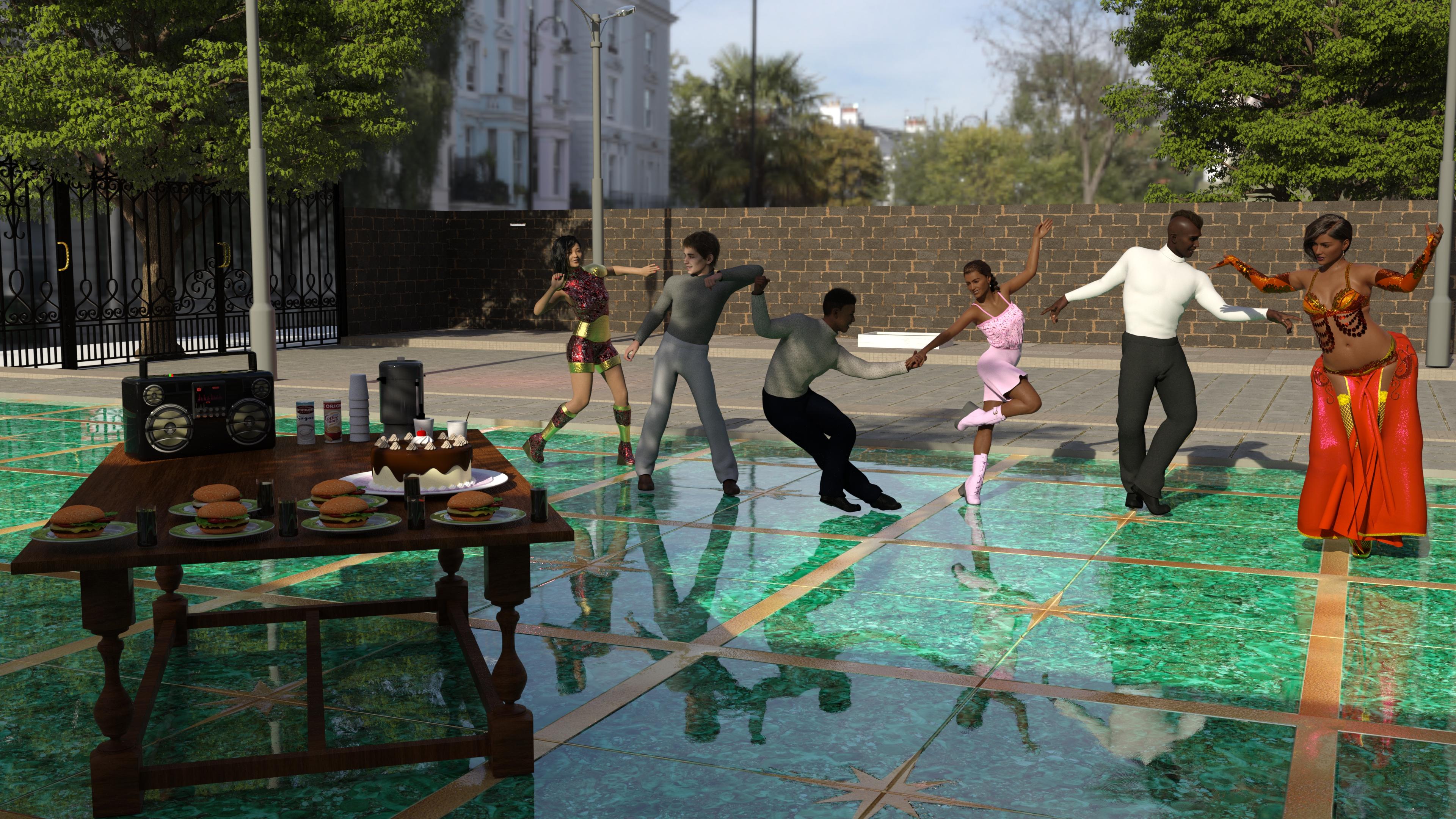

all freebies approved, you can now chose which one to post to the entries
Face and morph swap after I reload a save[Face and morph swap after I reload a save] I know that the reason is because 2 models have the save name, how do I fix the problem.
Thank you in advance.
Is Daz studio useful in any way?
Luckily I didn't really get going until after iray was introduced, so 99% is all G3 or newer. I stopped buying new characters awhile back, so really just clothes, hair, and props which I only use maybe 5% of what I have. I think Daz needs to create an "in-house" reason to give a little more purpose and incentive, like a digital art league. Sounds crazy but heck, Video games did it.kyoto kid said:CASINC said:
background said:
If you could get permission to transfer your DAZ assets, which you say are about 40K, do you know anyone who would be willing to pay a significant amount for them? Some of them must be 10 year old assets. Someone new to DAZ is unlikely to want to commit to hundreds of dollars of content. Someone who is heavily 'into' DAZ may already have a lot of the same assets.
Just brainstorming options, whether or not I could find a buyer and for how much is up in the air. That would be very subjective to the buyer. I wouldn't expect to get full retail value, type of thing. I would rather be able to sell access to my account based on monthly subscriptions, but.....indeed. over the 16+ years I've been at this I've accumulated a total of (retail value) 1.145 million USD in content software (also have Carrara Hexagon and Bryce), plugins, & such.. Current Value is a little over 61,000 USD (enough for a down payment on a nice house). A large portion is old pre-Genesis content so it likely is worth even less.today.
Freebie Challenge July-August 2024 - "Take a Break" - Main ThreadI have been unconvinced about the first render posted above.
Now I believe this one is much better in my humble opinion.
This is the updated list for the items used into this render.
Free Items
Zhi - Beautiful Chinese Female Character Morph by warloc (G8F)
https://www.renderhub.com/warloc/zhi-beautiful-chinese-female-full-character-morph
G8 Female Sifi Outfit (Simple) by Moonlight001
https://www.renderosity.com/freestuff/items/77682/g8-female-sifi-outfit-simple
Meena For Genesis 8 Female by zaap
https://www.renderhub.com/zaap/meena-for-genesis-8-female
Side Swept ROse Hair (G3F , G8F) Part 1 and 2 by zoro_d
https://www.renderosity.com/freestuff/items/79533/side-swept-rose-hair-g3f-g8f-part-1
https://www.renderosity.com/freestuff/items/79534/side-swept-rose-hair-g3f-g8f-part-2
dForce_Belly Dance Nights Outfit for Genesis 8 Female(s) by zoro_d
Pretty Look for Genesis 8 Female(s) by zoro_d
https://www.renderosity.com/freestuff/items/83823/pretty-look-for-genesis-8-females
Mukta For Genesis 8 Female by zaap
https://www.renderhub.com/zaap/mukta-for-genesis-8-female
Candy Braids Hair for Genesis 8 Female(s) by zoro_d
https://www.renderosity.com/freestuff/items/88062/candy-braids-hair-for-genesis-8-females
(dForce) Nisia's Romper for Genesis 3 and 8 Female by freylaverse
https://www.renderosity.com/freestuff/items/92846/dforce-nisias-romper-for-genesis-3-and-8-female
Leather Boots for G8F by yomiuri
https://sharecg.com/v/94464/gallery/21/DAZ-Studio/Leather-Boots-for-G8F
G8M Walther 2.0 DAZ Studio by Ruslanomar
https://sharecg.com/v/97276/view/21/DAZ-Studio/G8M-Walther-2.0
New Walther 2.0 tanned skin + hair system for G8M by Ruslanomar
https://sharecg.com/v/98463/browse/21/DAZ-Studio/New-Walther-2.0-tanned-skin-%2B-hair-system#cmntL2
Update package for G8M Walther 2.0 by Ruslanomar
https://sharecg.com/v/99012/browse/21/DAZ-Studio/Update-package-for-G8M-Walther-2.0
Scottish Captain Model for Genesis 9 Male by KuraiKya (Mohawk Hair)
https://www.renderhub.com/kuraikya/scottish-captain
Fast Food Set by kalhh
https://www.renderhub.com/kalhh/hamburger-set-for-dazstudio-free
Delicious Cake Prop by Teknology3d
https://www.renderhub.com/teknology3d/delicious-cake-ds-prop
Coffee Urn Set by Richabri
https://www.renderosity.com/freestuff/items/92571/coffee-urn-set
Ghettoblaster by kalhh
https://www.renderhub.com/kalhh/ghettoblaster-for-dazstudio-free
Camilla Table by BoBo3D
https://www.renderhub.com/bobo3d/camilla-table
GTX-Luxury Area by GraphistX
https://www.renderhub.com/graphistx/luxury-area
Urban Street 04 HDRi by Andreas Mischok
https://polyhaven.com/a/urban_street_04
No Count Items:
(*) Esha Small Earrings for Genesis 8 Female and Genesis 9
Obtained free on 2022-12-05 Daz Christmas Freebie
(**) M3D Versatile Short Hair for Genesis 9, 8, and 8.1 Males
Obtained free on 2023-12-31 Daz Christmas Freebie
(*) (**) These items are no longer available
- Genesis 8 Starter Essentials
Base figure (Female) used
- Fabrice for Genesis 9 Character Preset
- Matt for Genesis 9 Character Preset
Included in Genesis 9 Starter Essentials
Paid items:
Chameleon ROse for Genesis 8 Female by zoro_d (Lingerie panty only)
https://www.renderosity.com/marketplace/products/126597/chameleon-rose-for-genesis-8-female
dForce Soho Swag Clothing Set for Genesis 8 Males
Part of “Blast From the Past Bundle”
https://www.daz3d.com/blast-from-the-past-bundle
Belly Dancer Poses for Genesis 8 Female
https://www.daz3d.com/belly-dancer-poses-for-genesis-8-female
Z Ultimate Dance Collection - Poses and Partials for Genesis 3 and 8
https://www.daz3d.com/z-ultimate-dance-collection--poses-and-partials-for-genesis-3-and-8
Genesis 3 and 8 to 9 Pose Converter
https://www.daz3d.com/genesis-3-and-8-to-9-pose-converter
So It's up to the judging members to decide which of the renders like most.
It took over 2 hours for the render to be done.
Marahzen's Musings on Creating Characters (and other matters)A lot of my summer has been hijacked by non-art-related things, but I had some time this weekend to tinker a bit, and I decided to put the recently released Young Victoria shape to the test for my purposes - that is modification of my custom characters.
https://www.daz3d.com/young-victoria
Because a significant part of my story involves parallel story-telling of events that occurred when my main character was a young teen, contrasted with a "present day" in which she's a young adult - literally, a four-year gap for much of it - I was game to try out a new product offering a "14-year-old" version.
Here, I am testing with a character I've been doing recent G9 product testing with, essentially the same character as from my July 4 post. Specifically, she's actually a Man Friday conversion of a G8.1 character created by the original Face Transfer.
So I set up a test scene with this recently acquired High School Bathroom so I could compare the overall impression, and then also did a close-up of the face. Young Victoria offers a one-click option for Age 14 and Age 18, or new dials - Victoria 9 Young and Victoria 9 Young Proportions. The one-click applies the Victoria 9 shapes - my test only includes the new Victoria 9 Young dials dialed at 100%, which is what the one-click for Age 14 applies. (The one-click for Age 18 applies differing values closer to 50%.) In my case, I'm not working with Victoria 9 - I'm working with a custom character, so I only wanted the "Victoria 9 Young" shaping.
Here are the results:


Custom G9 Franken-character: No shaping, left; Same character with Victoria 9 Young and VIctoria 9 Young Proportions = 100%, right.


Same character. (Ignore the lip texture issue, which isn't related to this experiment.
 ) No shaping, left. VIctoria 9 Young shapes as noted above, = 100%, right.
I'm pretty satisfied with this, actually. Presuming they make a "Young Michael" version, I'll probably pick it up. (I didn't test this one with a G9M custom character, but I wouldn't expect it to do that - there are some female-specific considerations to "de-aging" an adult female to a young teen female.) Of course I do have all of the other G9 age/shape products, but I like having an assortment of tools to choose among.
As a footnote, for anyone who wanders across this thread, as I mentioned in a previous post somewhere, I've generally had good success using G9 character "shapes" on my custom G9 characters, though sometimes you can't crank them to 100%.
Karateka Pants Black Belt for FEMALE GENESIS 8Update:
1) I added a separte "Back" surface to avoid the words appear on the back of the belt. (ss1)
2) The installation ZIP is attached. I've saved the figure and morph assets. You just extract the folders in ZIP file to your Daz Library (overwrite!). Then find 2 wearable presets in : Your Daz Library\Figures\!BlackBelt\ Then load them as needed. (ss2)Is Daz studio useful in any way?CASINC said:
background said:
If you could get permission to transfer your DAZ assets, which you say are about 40K, do you know anyone who would be willing to pay a significant amount for them? Some of them must be 10 year old assets. Someone new to DAZ is unlikely to want to commit to hundreds of dollars of content. Someone who is heavily 'into' DAZ may already have a lot of the same assets.
Just brainstorming options, whether or not I could find a buyer and for how much is up in the air. That would be very subjective to the buyer. I wouldn't expect to get full retail value, type of thing. I would rather be able to sell access to my account based on monthly subscriptions, but.....indeed. over the 16+ years I've been at this I've accumulated a total of (retail value) 1.145 million USD in content software (also have Carrara Hexagon and Bryce), plugins, & such.. Current Value is a little over 61,000 USD (enough for a down payment on a nice house). A large portion is old pre-Genesis content so it likely is worth even less.today.
Karateka Pants Black Belt for FEMALE GENESIS 8foxyfoxfurries said:
crosswind said:
All, right ~ The attached ZIP file is for G8F version. It's dForce ready. There're 4 morphs on Belt, Bend Front morphs are used for some extreme poses before simulation (ss 1 ~ 2). And Waist Down morph is on Pants ! (ss 3)
Everything is in Scene file, so you can freely save Belt as whatever Figure asset or Wearable Preset as well as save Waist Down morph on Pants as a Morph Asset. Texture maps, OBJ file, UV template and a Phtoshoshop template are all included. Extract Runtime folder to your Daz Library first before opening Scene file.
Only I had no time to make all pJCMs on Belt 'cause that'll take more time. Since it is dForce Ready, so it should work well in most of the cases. Have fun ! Also check PM in your Inbox.
Edit: The words on the belt uses Diffuse Overlay with a Mask image... so you can see the words only when Preview or Render. Add whatever you want by opening included PSD or the UV template file in GIMP or Ps to edit the Text layer. (ss4)
Sended you back a DM :)
Thank you for your generosity ! Have fun and feel free to let me know if there's any issue.
How to adjust dforce simulation manually?crosswind said:
or if you know Blender, send the simulated item to Blender, tweak it there, then import it as a delta morph with Morph Loader Pro.
I'd second this method.
The original post highlights one of the major shortcomings of dForce. Some other cloth simulation alternatives are able to adjust the drape while it is simulating - that's why a lot of people buy Marvelous Designer but either exporting to Blender or simulating in MD should not be necessary.
Karateka Pants Black Belt for FEMALE GENESIS 8crosswind said:
All, right ~ The attached ZIP file is for G8F version. It's dForce ready. There're 4 morphs on Belt, Bend Front morphs are used for some extreme poses before simulation (ss 1 ~ 2). And Waist Down morph is on Pants ! (ss 3)
Everything is in Scene file, so you can freely save Belt as whatever Figure asset or Wearable Preset as well as save Waist Down morph on Pants as a Morph Asset. Texture maps, OBJ file, UV template and a Phtoshoshop template are all included. Extract Runtime folder to your Daz Library first before opening Scene file.
Only I had no time to make all pJCMs on Belt 'cause that'll take more time. Since it is dForce Ready, so it should work well in most of the cases. Have fun ! Also check PM in your Inbox.
Edit: The words on the belt uses Diffuse Overlay with a Mask image... so you can see the words only when Preview or Render. Add whatever you want by opening included PSD or the UV template file in GIMP or Ps to edit the Text layer. (ss4)
Sended you back a DM :)
Karateka Pants Black Belt for FEMALE GENESIS 8All, right ~ The attached ZIP file is for G8F version. It's dForce ready. There're 4 morphs on Belt, Bend Front morphs are used for some extreme poses before simulation (ss 1 ~ 2). And Waist Down morph is on Pants ! (ss 3)
Everything is in Scene file, so you can freely save Belt as whatever Figure asset or Wearable Preset as well as save Waist Down morph on Pants as a Morph Asset. Texture maps, OBJ file, UV template and a Phtoshoshop template are all included. Extract Runtime folder to your Daz Library first before opening Scene file.
Only I had no time to make all pJCMs on Belt 'cause that'll take more time. Since it is dForce Ready, so it should work well in most of the cases. Have fun ! Also check PM in your Inbox.
Edit: The words on the belt uses Diffuse Overlay with a Mask image... so you can see the words only when Preview or Render. Add whatever you want by opening included PSD or the UV template file in GIMP or Ps to edit the Text layer. (ss4)
Repackaging(?) Morphs in character product saved as injectable Properties PresetSo a little update, the morphs are in fact in the list but only when searched on the Parameters tab, not the Shaping tab. The author left the Type field blank. Fixing that doesn't seem to solve the issue though because any preset of any type (character, shaping, etc) saved with them dialed does not register that they were dialed when the preset is loaded.
As for your question Richard, the morphs have a /data/Daz 3D/Genesis 8/Female/Morphs/ path like all my other morphs, the only thing that appears non-standard is the ID Path. Instead of the standard Genesis8Female#FBMVictoria8:?value format it's just a verbatim repeat of the Morph's name/label parameter.
Also, the Owner parameter is Node : Genesis8Female as opposed to Morph : FBMVictoria8 etc but I don't really know if that's an issue or not.
PMD Inject by Deltatax 15Skin injection? PMD are Poser's external binary morph files, so used for morphs on Poser figures (which should work in Poser, so I assume this is for Daz Studio). Unfortunately the PMD code was not very stable, which is why Daz Studio stopped trying to support it - as a result it may well be that the injecor would fail with some files, and it may well have been dropped by its developer for that reason (although DeltaX has not been active for a long time anyway). Unless the readme allows redistribution no one who has a copy will be able to give you one.
Repackaging(?) Morphs in character product saved as injectable Properties PresetA properties preset won't add new morphs to an existing item, only a scene/scene subset or a Character preset used to load a new figure can do that (as far as I know). If you click the gear icon on the morph slider and select Parameter Settings do the details rfer to an external file?
can I import curve based hair from blender to daz(particle or extrapolated)UncannyValet said:
crosswind said:
UncannyValet said:
To add, the only PA tool is the dForce Hair Modifier, which enables all of the good things that come with dForce Hair. Like using Surface UVs, SBH generation from guide strands, simulation properties, and so on.
But is not needed to simply import hair that was built in other software like Blender or Xgen.
We know that Daz manipulates "polyline hair" with the way of dynamically generating PR/PS hairs by using SBH techniques rahter than using a static mesh which may bring challenge even disaster to some user's DS Viewport.
Generating the child hairs with dForce modifier would be ideal as there are numerous functionalities that are provided through that process, not only dForce functionality but the ability to generate child hairs similar to SBH Editor. But given that is only for PA's, then the challenges of polyline hair need to be accepted. Perhaps some users will struggle with very high vert count of polyline hair, but I don't think it is any more demanding than turning Preview PR Hairs on. Personally, when I have 1-2mil polyline hair in viewport it is fine, but something like 6mil does slow it down noticeably. I dont presume to know how best to optimise for users with "potato" PCs other than reducing the vert count.
For morphs, the deltas for every strand needs to be saved in the morph, not just changes to guide strands, so i suspect that will increase the load time of the morphs and size dsf files.
Actually SBH's morphs are loaded pretty quickly and DSF files are normally with small sizes even uncompressed.
We know users have no way to add dForce capability to SBH as well as make morphs on SBH since only dFormers work statically on SBH in the Scene only. But additionally I was told that Daz gives some tools to PAs to efficiently convert, import/export SBH as well as make morphs on them... isn't that true ?
The process I described above would be similar to the process Daz PAs likely follow, except they would, as a final/intermediate step, add a dForce Hair Modifier to the imported lines. There used to be a video here explaining the process that PAs follow but the uploader appears to have made it private in the last few days.
Im not sure what PAs can/cannot do or the extra functions they have (and maybe i was wrong to say their only tool is the dForce Hair modifier), all I can address is the things we can do as non PA. We can:
- add morphs to polylines/splines/curves
- export SBH made in SBH Editor (anyone can export at any Render Tesselation Sides value)
- import SBH that was made in SBH Editor (exported at any Render Tesselation Sides value)
- import Curves from other software
- Import mesh from other softwaare and convert to lines
Yes I was told some workflows can be workaround but may be time-consuming as well as with some limitations. I've never tried any but just learned to make transmapped ones or directly render in Blender by using Diffoe on the hairs made with HairTools.
I'll try them when having time and further check with my PA friends. Thank you.
can I import curve based hair from blender to daz(particle or extrapolated)crosswind said:
UncannyValet said:
To add, the only PA tool is the dForce Hair Modifier, which enables all of the good things that come with dForce Hair. Like using Surface UVs, SBH generation from guide strands, simulation properties, and so on.
But is not needed to simply import hair that was built in other software like Blender or Xgen.
We know that Daz manipulates "polyline hair" with the way of dynamically generating PR/PS hairs by using SBH techniques rahter than using a static mesh which may bring challenge even disaster to some user's DS Viewport.
Generating the child hairs with dForce modifier would be ideal as there are numerous functionalities that are provided through that process, not only dForce functionality but the ability to generate child hairs similar to SBH Editor. But given that is only for PA's, then the challenges of polyline hair need to be accepted. Perhaps some users will struggle with very high vert count of polyline hair, but I don't think it is any more demanding than turning Preview PR Hairs on. Personally, when I have 1-2mil polyline hair in viewport it is fine, but something like 6mil does slow it down noticeably. I dont presume to know how best to optimise for users with "potato" PCs other than reducing the vert count.
For morphs, the deltas for every strand needs to be saved in the morph, not just changes to guide strands, so i suspect that will increase the load time of the morphs and size dsf files.We know users have no way to add dForce capability to SBH as well as make morphs on SBH since only dFormers work statically on SBH in the Scene only. But additionally I was told that Daz gives some tools to PAs to efficiently convert, import/export SBH as well as make morphs on them... isn't that true ?
The process I described above would be similar to the process Daz PAs likely follow, except they would, as a final/intermediate step, add a dForce Hair Modifier to the imported lines. There used to be a video here explaining the process that PAs follow but the uploader appears to have made it private in the last few days.
Im not sure what PAs can/cannot do or the extra functions they have (and maybe i was wrong to say their only tool is the dForce Hair modifier), all I can address is the things we can do as non PA. We can:
- add morphs to polylines/splines/curves
- export SBH made in SBH Editor (anyone can export at any Render Tesselation Sides value)
- import SBH that was made in SBH Editor (exported at any Render Tesselation Sides value)
- import Curves from other software
- Import mesh from other softwaare and convert to lines
- rig polyline hair using transfer utility
with those functions available to all users, it is sufficient to make polyline hair.
Repackaging(?) Morphs in character product saved as injectable Properties PresetMorning folks.
I bought a character on one of the third party sites, and I do not like the way it was packaged. Everything works, it's just not saved as ideal asset types. The character is saved as a Properties Preset (which I almost never use) that injects the morphs into an already loaded G8F. I suppose I can see the benefit of this as it doesn't add morphs to the default G8F morph list, thus keeping bloat and load times down, but it's just a hassle not having access to the morphs for blending with other characters and needing to take the extra step of loading a generic G8F first etc.
Is there a safe way to add the morphs to the G8F morph list without the risk of dupes? Perhaps save as>morph assets with them loaded, then just never use the Properties Preset again (as that would inject the morphs a second time)? Would that work?
Just looking for guidance before I do something wrong and break it lol.
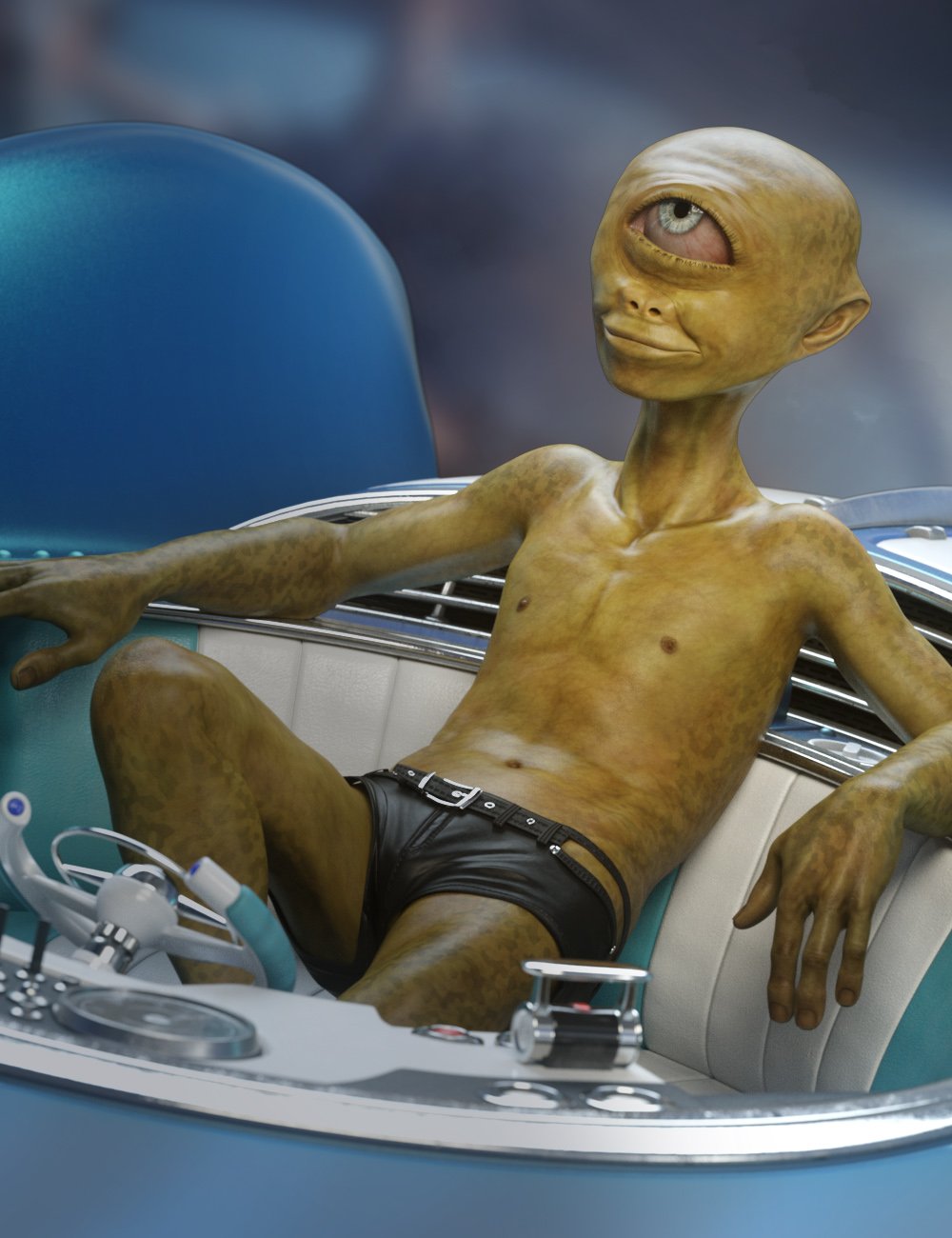
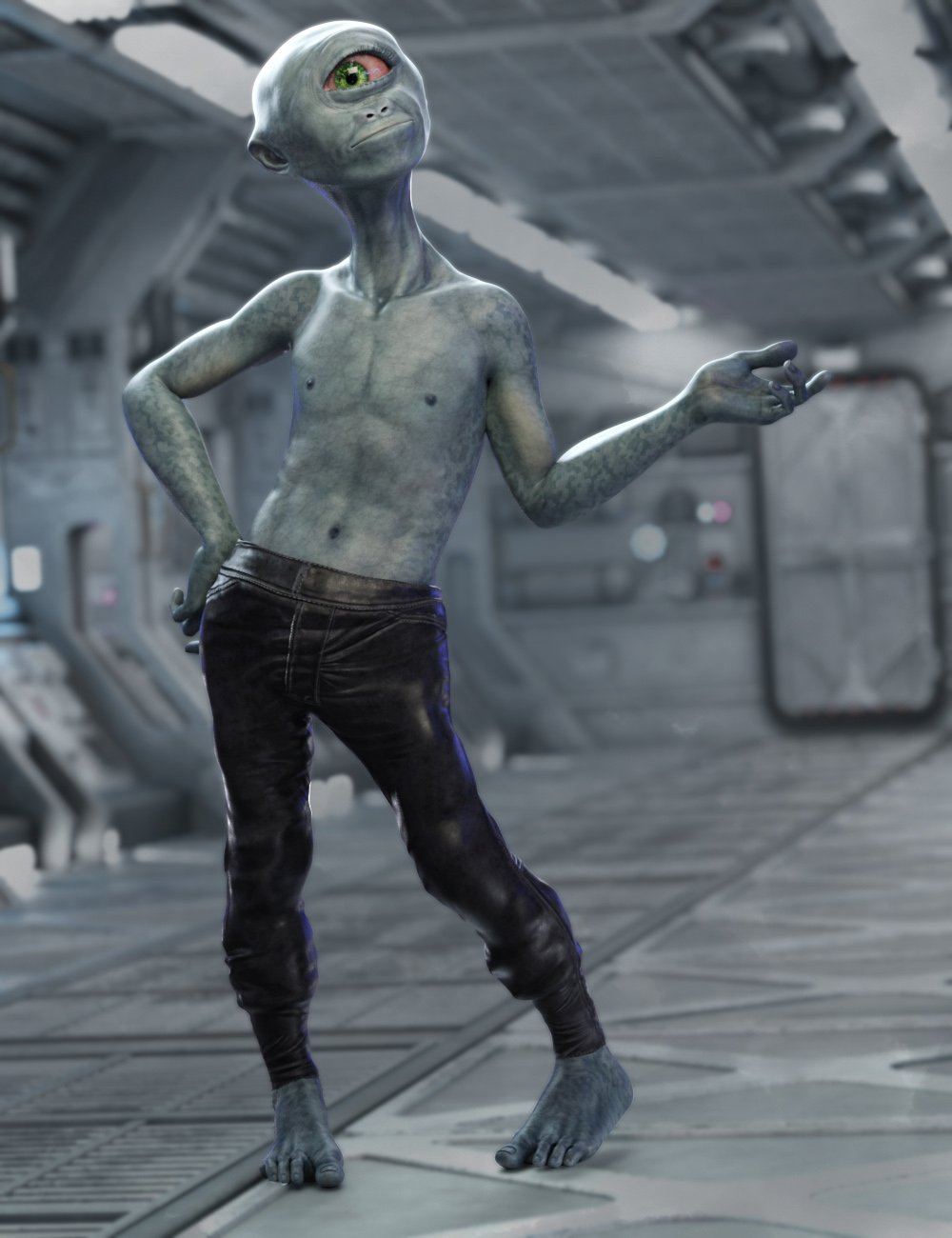
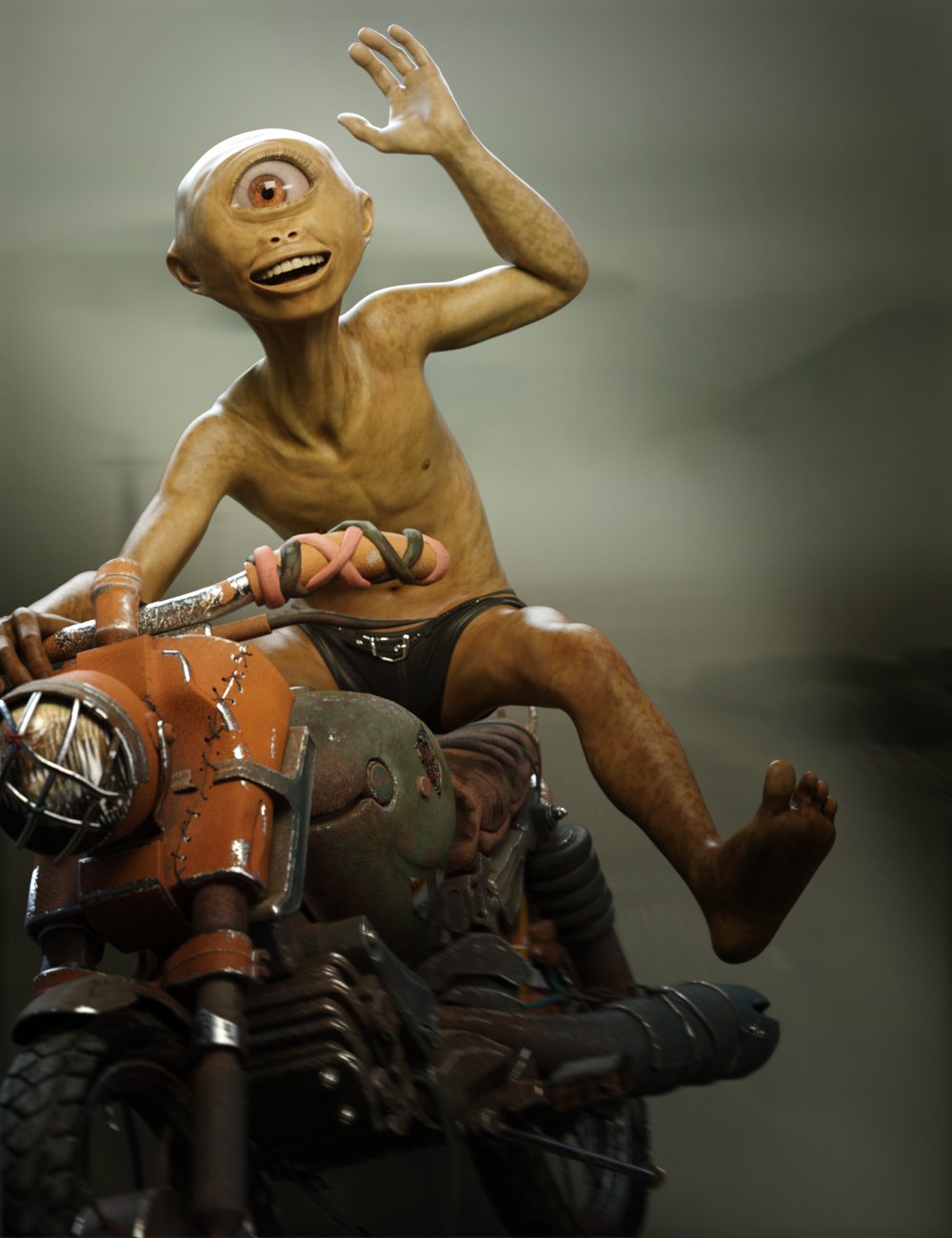
Ocularian for g9 [commercial]Ocularian Clops
https://www.daz3d.com/ocularian-clops-for-genesis-9
The Ocularian is a happy little Imp, searching the galaxy for adventure.
Artfully sculpted onto Genesis 9, this character is crafted to exacting standards of poseability in body and expressions, giving her loads of personality. While care was taken to ensure most expressions work smoothly some expressions may distort due to the extreme facial morph.
This set was designed with ultra-realistic PBR texture techniques. The High Definition morphs, High Quality textures really bring this character to life for your renders.
What's Included and Features
- Ocularian for Genesis 9: (.DUF)
- Ocularian Character Preset
- Ocularian Shaping Preset
- Material Options:
- 03 Full Male Skin Mat with Male anatomical Elements
- 05 Eye Material Presets
- 01 Face Graft for Single Eye
 Is Daz studio useful in any way?
Good info, thanks! Yes definitely wouldn't be asking for a refund or anything like that, I'm not that clueless to the situation, besides what this thread may suggest. Ya It may depend on who one gets in contact with on any given day. My interactions with Daz over the years has been very up and down.rcourtri_789f4b1c6b said:CASINC said:
Question 2, is there anyway to sell a (my) Daz account without Daz going all ape sh@t over terms and conditions?
Kindest answer: You could write Daz a letter requesting an amendment (either for you as an individual or for anyone in the world) to a longstanding and rather industry-typical End User License Agreement, allowing for you to transfer your licenses to a third party (or multiple parties) for your monetary gain. This doesn't violate any law of physics that I'm aware of, so if Daz/Tafi agrees, you're good to go!
Best answer: Apesh*t? Probably depends on whether the good folks at Daz/Tafi are in a good or bad mood, whether they've had a lot of coffee or energy drinks, and how often they get requests to completely disregard the terms of the EULA to their financial disadvantage. They may get enough such requests that they are a routine matter and nothing to get excited about. They may find the request hilarious--You'll be giving them a moment of genuine levity in an otherwise stressful or boring day. I think those outcomes are more likely than an enraged reaction. Their response might be a polite but terse variation on "NO", or a non-profane reminder of the legally binding EULA you agreed to, which clearly states that your licenses are non-transferable, and a promise to pursue legal remedies should you attempt to transfer licensed content to third parties.
I can't imagine Daz seriously considering a refund for anything not covered by a rather generous 30-day refund policy, much less giving you the go-ahead on selling your licenses.
I genuinely sympathize with those who have spent a lot of money and time on stuff or ventures which didn't work out. If it were possible to remedy every poor or unlucky decision I've made in my professional life, I'm going to have to go through multiple sizable volumes of error or misfortune. But, rather than indulge in fantasy, it's probably better to chalk it up to experience and move on as best we can.
Daz 3D is part of

Connect
DAZ Productions, Inc.
7533 S Center View Ct #4664
West Jordan, UT 84084Licensing Agreement | Terms of Service | Privacy Policy | EULA
© 2026 Daz Productions Inc. All Rights Reserved.