-
Welcome to Hatsune Miku Anime Manga Cafe ☕
Yeah, I think you've got a pretty good handle on PWtoon!
More Non-photorealisitic Renders (NPR II)PWToon remains one of my favorite toon approaches.
It has it's flaws, but on the whole it balances speed and ease with quality results. And then you can learn approaches to minimize the flaws.
Agree !!
BTW what best practices for Background ? My effort seem hit and miss in those area .
 It seems really depend on how geometries constructed than textures ?More Non-photorealisitic Renders (NPR II)
PWToon remains one of my favorite toon approaches.
It has it's flaws, but on the whole it balances speed and ease with quality results. And then you can learn approaches to minimize the flaws.
More Non-photorealisitic Renders (NPR II)"Trying to" use PWToon? I'd say you succeeded, quite decisively.
Thanks for courages . Lately I`ve been experimenting using IRAY and Toonize via Photoshop . But after found several cool models in devianart , I`d tried again using PW Toon .

This one PwToon render and postworked in Photoshop ( color correction -enhance plus BG). Hope you al like it ;)
This looks really good. I'm very curious about your work flow.
Thanks again
Honestly I`m re-learning again about PWToon since my old presets and data gone after HD failure . Thats why I tend to use IRAY lately .
My workflow in DAZ studio really simple , Just applying Crestcent Shadow/shading preset to all materials ( it doesnt matter if they`d had texture or not) and play with Glossiness - specular sharpness - specular strength value . For Lighting I`m using Distant light with light blue and Omnifraker Uber environments ( Soft Oclussion and low intensity to help smoothing dark area) .
In photoshop , im generating several outline via duplicate image > desaturate and filter galery (Photocopy and Cutout) and change layer blend to multiply . If I think not enough I`m duplicating those line 3 times and merge down with PwToon Render .
After that I`m doing Dodge and burning and finalize with color balance or color lockup
Hope this help and yeaahh , Im also still learning about NPR stuff in DAZ Studio and Photoshop
More Non-photorealisitic Renders (NPR II)"Trying to" use PWToon? I'd say you succeeded, quite decisively.
Thanks for courages . Lately I`ve been experimenting using IRAY and Toonize via Photoshop . But after found several cool models in devianart , I`d tried again using PW Toon .
This one PwToon render and postworked in Photoshop ( color correction -enhance plus BG). Hope you al like it ;)
This looks really good. I'm very curious about your work flow.
More Non-photorealisitic Renders (NPR II)"Trying to" use PWToon? I'd say you succeeded, quite decisively.
Thanks for courages . Lately I`ve been experimenting using IRAY and Toonize via Photoshop . But after found several cool models in devianart , I`d tried again using PW Toon .
This one PwToon render and postworked in Photoshop ( color correction -enhance plus BG). Hope you al like it ;)
More Non-photorealisitic Renders (NPR II)"Trying to" use PWToon? I'd say you succeeded, quite decisively.
Thanks for courages . Lately I`ve been experimenting using IRAY and Toonize via Photoshop . But after found several cool models in devianart , I`d tried again using PW Toon .
This one PwToon render and postworked in Photoshop ( color correction -enhance plus BG). Hope you al like it ;)
More Non-photorealisitic Renders (NPR II)"Trying to" use PWToon? I'd say you succeeded, quite decisively.
Welcome to Hatsune Miku Anime Manga Cafe ☕PWToon with a gaussain blur postwork. I get a constantly excellent anime look out of it.
Nice
Welcome to Hatsune Miku Anime Manga Cafe ☕PWToon with a gaussain blur postwork. I get a constantly excellent anime look out of it.
Daz Defaults shader | toon doens't apply properly , an idea ?They are not a lot... I did not test the pwToon for 3Delight yet....
Welcome to Hatsune Miku Anime Manga Cafe ☕Hi t here, and thank you for inviting me! I just got caught up reading a couple of the old post pages, so I'm gonna just jump right in with responding to some of the convos from earlier.
Been doing anime/toon rendering for years, working on my technique. I use a mix of PWtoon (and I've released a few of my settings for people to use) and Visual Shaders. Both are important for what I do. Sometimes I'll use Manga shaders on the side, but I havent decided what I'm going to do with that exactly yet. It will come to me. I also used to use the free toon render shaders out there - had to because PWtoon was broken for a while and yes the folks at DAZ Studio heard it from me loud and clear. LOL.
The models I prefer are Gen3 - Aiko Kioki and Hiro Hitoro. But the latest Genesis8 model has proven to be workable. I had to tweak her eye settings for greater expression mobility, but it works. And I've been able to get male models from her quite nicely. When we were using Genesis and 2, I wasn't very happy with it. Genesis 3 was workable but Sakura 8 was what helped kick my projects back into being.
That being said, though, I spend a lot of time converting things down to Aiko and Hiro. Including Genesis 8 stuff if I can manage it. I wish they'd do legacy shapes for Genesis 8 because that would make it easier, rather than converting Genesis 8 to 3, then 2, then ground zero, then Aiko.
Here's a sneak peek of something that's eventually going to happen in my webcomic, Akashik. The hair had to be partially drawn to do like I wanted. DeForce is amazing but with the latest changes things don't always flow as well as I need.
Welcome to Hatsune Miku Anime Manga Cafe ☕PWToon remains my favorite way to do cartoon/anime style renders, but the included Toon shader hidden in D|S's Shader Presets is pretty darned good too, if you know how to coax it.
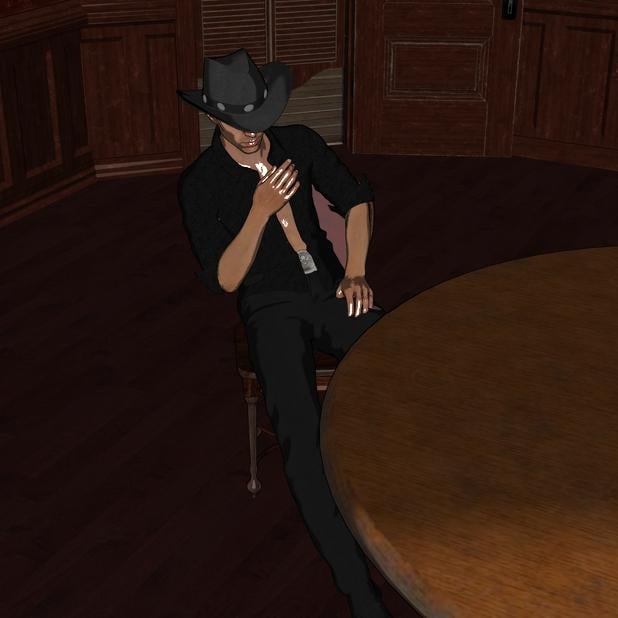
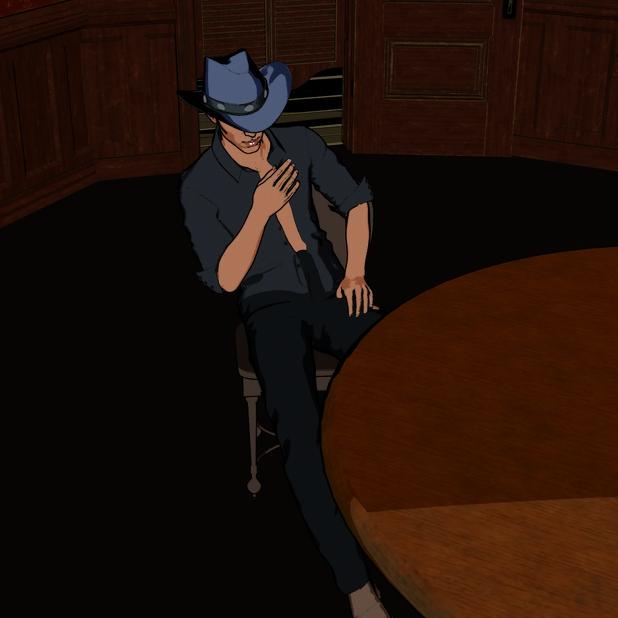
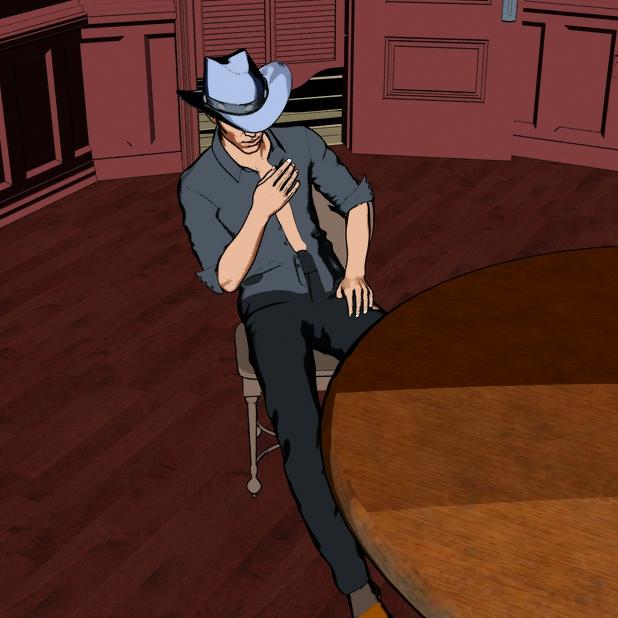
How to obtain Cartoon shaded like in ViewportLineRender 9000 is amazing specifically because of the ability to draw lines by colorID rather than Normals.
To back up...
MANY outline filters use Normals. That is, they draw an outline when the surface is at right angles, or close to right angles, to the camera. For human figures and other rounded shapes this works pretty well. But when you have a flat surface, like a table or floor, and it's oriented almost perpendicular to the camera (which happens fairly often), you end up with large segments of the surface flooding black.
There's no easy way around this. I often just don't bother using outlines on tables and floors, and sometimes just skip outlines on background elements generally, if I'm going to be using PWToon.
But LineRender9000 has options that sidestep this, by drawing outlines around each item with a unique colorID (like MaterialID). I used this idea in Oso Toon, to create render passes based on Material ID so you can outline in an image editor.
Personally, when I'm working with toon styles, I often use PWToon and take pains to avoid using outlines when it's inconvenient, and put up with slight oddness with Normal outlines on figures (sometimes even rounded surfaces will have dodgy outlines), mainly out of a desire for a fast process. If I'm willing to put the time in, I'll use LR9K or my Oso Toon.
How to obtain Cartoon shaded like in ViewportI was going to also suggest pwToon. Very versatile, I've gotten a lot of use out of it.
There's a somewhat long-running thread about achieving "non photo realistic" renders in the forums here https://www.daz3d.com/forums/discussion/227541/more-non-photorealisitic-renders-npr-ii#latest not restricted to DAZ Studio, but many people in the thread use it and could give advice and feedback if you wanted.
How to obtain Cartoon shaded like in ViewportWow, thanks! I already had PWToon and didn't even know it.
I bought it at the beginning of January and forgot about it before I had a chance to test it.
Unfortunately I haven't gotten the hang of it completely yet but it's a good starting point.
Line Render is now added to my wishlist for when it gets a decent discount.
How to obtain Cartoon shaded like in ViewportI agree with Silent Winter pwToon is quick and easy. I turn off the interior line to get a smoother render and keep all existing maps to resemble the viewport. Or use Crescent's cell shaders if you want more cartoon.
 How to obtain Cartoon shaded like in Viewport
https://www.daz3d.com/pwtoon and 3DL render - there are also free presets for pwToon (some that do cell-shading) - but the outliner in pwToon itself is the best cartoon outliner I've found (NB: I haven't tried linerender9000 - that looks like a good solution for Iray, even if it involves combining layers in post (which is easy enough)).
More Non-photorealisitic Renders (NPR II)At the end of the day PWToon and some Photoshop postwork ends up outdoing everything else I try.
More Non-photorealisitic Renders (NPR II)Forgot I had Toonycam Pro, and apparently that's a thing which is no longer for sale.
Anyway, here it is mixed with PWToon, instead of using PWToon's internal outlines. Honestly, the extra rigmarole and render time isn't getting me a much different result than just using PWToon by itself, save for visible outlines on the hair.
Cool. I remember ToonCamy but I never picked it up.
Honestly, its super fiddly and not worth using on stuff where you need to change scenery and figures out, like if you're rapidly producting panels for a webcomic, because adding new stuff after you've implemented the system screws up the outlines. I wonder if that's why it eventually got pulled.
Daz 3D is part of

Connect
DAZ Productions, Inc.
7533 S Center View Ct #4664
West Jordan, UT 84084Licensing Agreement | Terms of Service | Privacy Policy | EULA
© 2026 Daz Productions Inc. All Rights Reserved.