-
Mac OS M4?
You'll not have access to Filament (so no Filatoon renders), Iray will be CPU only (so slower than you could get with a Nvidia GPU) and some plugins only exist for Windows, but yes, it does work on Apple M chips, including the most recent: @memcneil70 shared her experience with her Mac Mini M4 recently.
Installing DS on new laptop.SteveM17 said:
felis said:
Only if you have saved an installer for that.
I still have that version of DS on my old laptop, would that have the installer?If you only have the program installed then no. You would need the download files from DIM, or the manual installer downloaded from your product library.
Honnestly though DS 4.8 is now really old. There have been many major features relased since then that you might want to try, like dForce, strand based hair, VDB, Filament/filatoon.... And if you ever want to use newer figures like G8 and G9 you will need to a more recent version as they will not work in 4.8.
DAZ via AMDRichard Haseltine said:
and the enxt major version will, as has been stated, break plug-ins - I am not sure where the debate is? They have been trying not to do so before it is required, hopefully both allowing them to refine their work on the next major version and delaying the moment when people will have to juggle which version they use for what unless/until all their tools are updated.
No debate, and my apologies, it's totally my misunderstanding.
I have wrongly thought that not releasing the next major version because broken plug-ins was a problem they were trying to fix, but you're explained clearly that this is not the case, that no matter when the next major release comes out plug-ins will all break. That's totally on me, and again, my misunderstanding, my apologies.
For years, giving Mac users improved performance, the use of Apple's Metal in the user interface and Filament and Filitoon hasn't been important enough to release a version that will break plug-ins, even if people could still use DAZ Studio 4.x too.
Hopefully giving owners of newer nVidia cards faster rendering will be enough of a reason.
After having spent over $65k here at DAZ over the years, I started holding myself back after a few years without the next major update having come out and it wasn't until this month that – for no good reason – I felt a bit of optimism and fell back into my old spending habits and dropped over $500 this month, mainly on Filatoon items and licences. I think I'm cured now, and I'm going to try hold back on any purchases until the next major version comes out and only if it proves worth waiting all these years for. I'm going to hold off on griping on the forums as well; as cathartic as it sometimes is for me personally, I recognize that it's not all that helpful for everyone else.
As always, Richard, thanks for your patience and help explaining things, you're easily one of the best and most reliable assets DAZ has.
Off to more creative endeavours...
DAZ via AMDwsterdan said:
Richard Haseltine said:
wsterdan said:
Richard Haseltine said:
I don't think it can be laid at Daz' feet - changing compiler version mid vresion (between 2024.0 and 2024.1) is an nVidia decision, given that 2024.0 had bugs (which is why we are not getting it) would sugest to me that it was a change forced on nVidia by circumstances, and certainly not soemthing daz could have anticipated (and not soemthing they can address without changes that would break all existing plug-ins, hence waiting for the next major version).
It's late on Friday night here, so I'm in my whiny mode, please take that into account.
I'm not sure how well the "upgrading would break all existing plug-ins" excuse still flies at this point.
Four years ago (at least) they began transitioning to the new Qt libraries. At *that* time, just upgrading would break "all existing" plug-ins.
I assume – perhaps wrongly – that they would have warned all 3rd party plug-in makers of what would be happening as they started upgrading their Dev kits and their own plug-ins.
Assuming – maybe I'm wrong – that every time they upgraded their Dev tools they let 3rd party plug-in makers know and provided them with the upgraded tools as they updated DAZ plug-ins.
Rinse, repeat, maybe every 6 months or every year.
At this point – four years later – you're saying it's still the case that "all" the plug-ins still won't work. It would mean that with four years of development time neither DAZ nor 3rd party plug-in makers have updated their plug-ins to work.
If – unbelievably – this is in fact the case, then "all" the plug-ins will *never* be updated and if it's the plug-ins that are holding back the next big upgrade, then it's never going to come out.
On the other hand, I would think that it's safe to say that after four years of development time any plug-ins thare are ever going to be updated before a final release have been updated.
I understand that some 3rd party developers might not want to update their plug-ins until after a stable release is out, but if that's the case, again, it's a Catch-22 problem where DAZ won't release the next big version because the plug-ins won't work and the plug-ins won't work until the big DAZ Studio release comes out.
At any rate, I can no longer accept that the next major version of DAZ Studio isn't being released because "it will break all existing plug-ins".
I'd like to see the next major release come out and people will be able to see if they want to use it based on whatever plug-ins work or don't work; they may decide that using newer nVidia cards is more important than some plug-ins they may not own or use. Rip the frigging band-aid off already.
Unless there's something else, some other reason? I mean, they had a bare-bones version of DAZ Studio 5 working in August, 2021...
It will break all existing plug-ins (and at least some scripts) doesn't mean it will be impossible, where the developer is still alive and active, to update - possibly for free, possibly as a paid-for upgrade - and produce a version compatible with the next major version. I have no idea how much information, beyond what is in the change log, developers who work with Daz have been given but I find it hard to believe that sole-developers, which I believe most are, needing to keep working on new products to maintain their income will feel able to dedicate the time to thoroughly updating until they are fairly confident they have a close to final version.
Daz used to let the ABI change with most incremental updates (in DS 1 and earlier DS 2) and people hated and complained about having to install, or worse wait for, updated plug-ins (to the point where it kept being a source of complaint throughout the later stages of DS 2, through DS 3, and into DS 4) so I don't think it is at all surprising that Daz has delayed breaking the ABI for as long as possible. I have no idea whether nVidia gave them advance notice that this particular breakage was going to occur - though given that they supplied 2024.0 with support for 50x0 cards I suspect it was not planned (unfortunately that release was found to have issues and so it makes only a brief appearance in the chnage log before being removed). I am sure Daz is acutely aware of the problem, and I am sure they were aware of it as a future issue at some point, but it seems that the actual timing was unexpected and/or unhelpful.
Okay, then if it was going to break all existing plug-ins 3.5 years ago, and it's still going to break all existing plug-ins today... then I don't see any time in the future when it won't break all existing plug-ins, so I have to ask what the benefit is -- if all existing plug-ins are going to break whenever "The Future DAZ Studio beyond version 4.x" is released anyway? Waiting another year, for example, isn't going to make the problem go away, there'll just be more plug-ins that will break. The problem is slowly getting worse, not better by waiting.
and the enxt major version will, as has been stated, break plug-ins - I am not sure where the debate is? They have been trying not to do so before it is required, hopefully both allowing them to refine their work on the next major version and delaying the moment when people will have to juggle which version they use for what unless/until all their tools are updated.
That said... 3.5 years ago DAZ was willing to release a bare-bones, almost-nothing-worked version to allow Mac users to use DAZ Studio with the then-year-old OS. Since then, you've said that DAZ has been adding new features to that version whenever one was added to the released version of DAZ Studio. That means that by now much, if not most of the missing features in the pre-Beta should be working 3.5 years later (most, that is, if not all) and all *new* features that were added to the releae version of DAZ Studio 4.x.
True, though one may hope that the next major vrsion will also have new stuff to get people (other than the captive audiencs like 50x0 owners of Mac users wanting Fialement) to use it to give the (likely) Public betas a good going-over.
I propose that they release a DAZ MAC-ONLY FILAMENT VERSION OF DAZ "NEXT GEN", so that Mac users can work with Filament and Filitoon while DAZ continues work on a version that works with newer nVidia cards. I'd be willing to pay for that.
DAZ via AMDRichard Haseltine said:
wsterdan said:
Richard Haseltine said:
I don't think it can be laid at Daz' feet - changing compiler version mid vresion (between 2024.0 and 2024.1) is an nVidia decision, given that 2024.0 had bugs (which is why we are not getting it) would sugest to me that it was a change forced on nVidia by circumstances, and certainly not soemthing daz could have anticipated (and not soemthing they can address without changes that would break all existing plug-ins, hence waiting for the next major version).
It's late on Friday night here, so I'm in my whiny mode, please take that into account.
I'm not sure how well the "upgrading would break all existing plug-ins" excuse still flies at this point.
Four years ago (at least) they began transitioning to the new Qt libraries. At *that* time, just upgrading would break "all existing" plug-ins.
I assume – perhaps wrongly – that they would have warned all 3rd party plug-in makers of what would be happening as they started upgrading their Dev kits and their own plug-ins.
Assuming – maybe I'm wrong – that every time they upgraded their Dev tools they let 3rd party plug-in makers know and provided them with the upgraded tools as they updated DAZ plug-ins.
Rinse, repeat, maybe every 6 months or every year.
At this point – four years later – you're saying it's still the case that "all" the plug-ins still won't work. It would mean that with four years of development time neither DAZ nor 3rd party plug-in makers have updated their plug-ins to work.
If – unbelievably – this is in fact the case, then "all" the plug-ins will *never* be updated and if it's the plug-ins that are holding back the next big upgrade, then it's never going to come out.
On the other hand, I would think that it's safe to say that after four years of development time any plug-ins thare are ever going to be updated before a final release have been updated.
I understand that some 3rd party developers might not want to update their plug-ins until after a stable release is out, but if that's the case, again, it's a Catch-22 problem where DAZ won't release the next big version because the plug-ins won't work and the plug-ins won't work until the big DAZ Studio release comes out.
At any rate, I can no longer accept that the next major version of DAZ Studio isn't being released because "it will break all existing plug-ins".
I'd like to see the next major release come out and people will be able to see if they want to use it based on whatever plug-ins work or don't work; they may decide that using newer nVidia cards is more important than some plug-ins they may not own or use. Rip the frigging band-aid off already.
Unless there's something else, some other reason? I mean, they had a bare-bones version of DAZ Studio 5 working in August, 2021...
It will break all existing plug-ins (and at least some scripts) doesn't mean it will be impossible, where the developer is still alive and active, to update - possibly for free, possibly as a paid-for upgrade - and produce a version compatible with the next major version. I have no idea how much information, beyond what is in the change log, developers who work with Daz have been given but I find it hard to believe that sole-developers, which I believe most are, needing to keep working on new products to maintain their income will feel able to dedicate the time to thoroughly updating until they are fairly confident they have a close to final version.
Daz used to let the ABI change with most incremental updates (in DS 1 and earlier DS 2) and people hated and complained about having to install, or worse wait for, updated plug-ins (to the point where it kept being a source of complaint throughout the later stages of DS 2, through DS 3, and into DS 4) so I don't think it is at all surprising that Daz has delayed breaking the ABI for as long as possible. I have no idea whether nVidia gave them advance notice that this particular breakage was going to occur - though given that they supplied 2024.0 with support for 50x0 cards I suspect it was not planned (unfortunately that release was found to have issues and so it makes only a brief appearance in the chnage log before being removed). I am sure Daz is acutely aware of the problem, and I am sure they were aware of it as a future issue at some point, but it seems that the actual timing was unexpected and/or unhelpful.
Okay, then if it was going to break all existing plug-ins 3.5 years ago, and it's still going to break all existing plug-ins today... then I don't see any time in the future when it won't break all existing plug-ins, so I have to ask what the benefit is -- if all existing plug-ins are going to break whenever "The Future DAZ Studio beyond version 4.x" is released anyway? Waiting another year, for example, isn't going to make the problem go away, there'll just be more plug-ins that will break. The problem is slowly getting worse, not better by waiting.
That said... 3.5 years ago DAZ was willing to release a bare-bones, almost-nothing-worked version to allow Mac users to use DAZ Studio with the then-year-old OS. Since then, you've said that DAZ has been adding new features to that version whenever one was added to the released version of DAZ Studio. That means that by now much, if not most of the missing features in the pre-Beta should be working 3.5 years later (most, that is, if not all) and all *new* features that were added to the releae version of DAZ Studio 4.x.
I propose that they release a DAZ MAC-ONLY FILAMENT VERSION OF DAZ "NEXT GEN", so that Mac users can work with Filament and Filitoon while DAZ continues work on a version that works with newer nVidia cards. I'd be willing to pay for that.
soft shadows on filamentHi realhuman
Get the 'Filament Draw Options' from Create in Main Menu:
Willow 9CES3D said:
You are using Iray rendering.
If you intend to use Iray rendering, try switching "Render Settings Pane > Editor Tab > Optimization > Instancing Optimization" to either "Memory" or "Speed."
If you don't want to use Iray rendering, set the Viewport drawing style to Filament and then set "Render Settings Pane > Engine" to "Viewport" before rendering.Ah, thanks for the reply, I'll try this.
Willow 9AbrahamRockwell said:
Question: So, what am I doing wrong here?
Did a 'test render' to see how Willow 9 would look, and for some reason the eyes seem to render 'invisible' instead of white.
I don't use G9 much, or any 'toon' textures/morphs, so is there some setting for the render I have overlooked?
You are using Iray rendering.
If you intend to use Iray rendering, try switching "Render Settings Pane > Editor Tab > Optimization > Instancing Optimization" to either "Memory" or "Speed."
If you don't want to use Iray rendering, set the Viewport drawing style to Filament and then set "Render Settings Pane > Engine" to "Viewport" before rendering.FilaToon / Cell shaded rendering with Filamentjuvesatriani said:


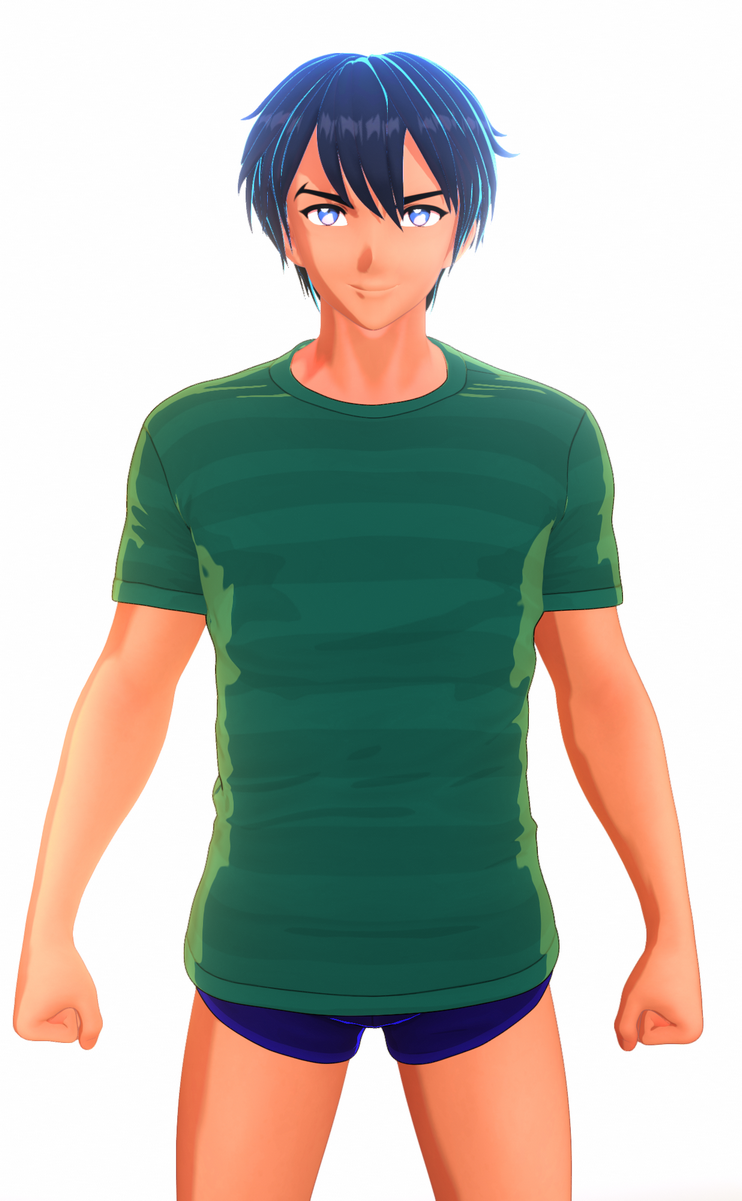
Filatoon and filament drawing options seem easier to handle than my old method using pwToon and photoshop . Here my first test using these new features . Using Linear than reinhard mode , so I can tweak it just like using photoshop . Still need digging how to make better shadow though . And it`s maybe the right time back using DAZ studio again
Yeah, in many ways it feels like a sucessor to PWToon! Your tests look fantastic with it.
soft shadows on filamentprixat said:
There's a 'Shadow Type' setting in the 'Filament Draw Options'. Anything other than the default 'PCF' will soften the shadows a bit.
I've touched everything, but I don't see any changes. How do you do it?
soft shadows on filamentjbowler said:
realhumanartists said:
In filament you can't modify the shadows, you only get hard shadows.
Use emissive surfaces if you can't get the "built in" lights to work.
Guys, DAZ3D is difficult. Could you make it simpler? I don't understand what you're talking about. I've already tried the settings as you said, and there's no change.
FilaToon / Cell shaded rendering with Filamentjuvesatriani said:
Filatoon and filament drawing options seem easier to handle than my old method using pwToon and photoshop . Here my first test using these new features . Using Linear than reinhard mode , so I can tweak it just like using photoshop . Still need digging how to make better shadow though . And it`s maybe the right time back using DAZ studio again
Look amazing.
Great to see you posting again in Daz forums.
How do I set the filatoon render engine?playersteve19 said:
I can't find the filament viewport draw style anywhere, it isn't Windows-exclusive is it?
Unfortunately it is. Apparently on the Mac Filament can't be implemented with the version of Qt framework DS4 uses (not sure why but I suppose the Mac version of the library is missing some features Filament would need), it requires the Qt upgrade that will come with the next major version of DS.
How do I set the filatoon render engine?playersteve19 said:
I can't find the filament viewport draw style anywhere, it isn't Windows-exclusive is it?
Yes it is, as far as I'm aware at the moment Macs don't have access to it.
FilaToon / Cell shaded rendering with FilamentFilatoon and filament drawing options seem easier to handle than my old method using pwToon and photoshop . Here my first test using these new features . Using Linear than reinhard mode , so I can tweak it just like using photoshop . Still need digging how to make better shadow though . And it`s maybe the right time back using DAZ studio again
soft shadows on filamentThere's a 'Shadow Type' setting in the 'Filament Draw Options'. Anything other than the default 'PCF' will soften the shadows a bit.
Where do I find Filament?Leana said:
felis said:
In your viewport, upper right corner, you have a menu. Left of that a square button where you can select 'perspective view', 'cammera' etc, and left of that a small icon called drawstyle. There you can select Filament.
I would suggest to also Create > New Filament Draw Options Node, so you can adjust some settings.
That’s assuming you're using Windows, as Filament is not yet available in the Mac version (the Qt framework upgrade which will be included in DS5 is required for Filament to work on a Mac)
Ah, that explains why I'm getting errors with the EasyFilatoon product. Typical Mac stuff :P
How do I set the filatoon render engine?I can't find the filament viewport draw style anywhere, it isn't Windows-exclusive is it?
soft shadows on filamentrealhumanartists said:
In filament you can't modify the shadows, you only get hard shadows.
Use emissive surfaces if you can't get the "built in" lights to work.
AI as render engineAi image generation tech, such as stable diffusion, does not simulate light bounces like Iray, or have a 3d reference of the scene. So it's more like post processing on an already-rendered image.
You can give stable diffusion extra information about 3d space using ControlNets. That can help reduce the divergence from your original input image as the ai reimagines it.
For example, you can use a normal map to indicate surface directions, and a depth map to show each object's distance from the camera, canny or lineart to preserve detail areas, and tile to maintain overall composition. Other tools can do object recognition or body parts recognition, like automatically detecting and detailing eyes, or style transfer to completely change the look and feel.
Daz Studio can already render some of the maps useful as input for ControlNet. (Depth and Normal in particular.) So somebody could definitely make a plugin to help smooth the workflows. Some future iteration of Daz Studio could also push a scene into the cloud, render it in Iray or Filament, and help apply some ai post processing without the user needing a powerful PC or fiddling with a complicated stable diffusion setup. ie There's some opportunity to make tools like stable diffusion more accessible to 3d artists.
Daz 3D is part of

Connect
DAZ Productions, Inc.
7533 S Center View Ct #4664
West Jordan, UT 84084Licensing Agreement | Terms of Service | Privacy Policy | EULA
© 2026 Daz Productions Inc. All Rights Reserved.