-
Rigidity groups and keeping hard surfaces hard... not working!
A Rigidity Groups has nothing to do with posing, it is to protect the area from defomration due to projected morphs (morphs set in the figure it is fitted to and which are not explicitly placed in the fitted item already). A Rigid Follow Node will maintain itself for both poses and morphs. Editing the weights so theya re uniform across the item will also preserve it. Of course making the item rigid by either method may then require adding a morph to keep it from getting buried in the figure in certain poses.
Use full body morph on one body part (geometry did not match)In Scene tab select your new dForm - after that you will be able to get to Influence weights map. After painting weight map switch selection back to load morph and attenuate it by new weight map (1/-1 would work as accept/reject based on your map). After your morph is set up and tested save it as save as/save supported asset/morph asset - be carefull with names and author so you don't save over something wital.
Thank you Richard - this little bit of knowledge about weight maps - it was exactly what I needed :)
Morphs from G3 to G8Jardine,
By the log, I see you ran the script several times on the same morph packages. I can't see why you did that. (EDIT: Not that you arent supposed to. The script shouldn't care. I just can't see anything in the log to explain it.) All of the times you ran it, the script logged success, except one case you ran it without the correct number of nodes selected.
There's only two ways that comes to mind to see a morph file added with limits off. A) you played with the dials without reloading the figure. In my experience, Studio caches morph data but not ERC data, so even if things were buggy, reloading should have set the value limits. B) the final morph adjustment step did not occur. However, in that case, the base morph would be correct. The only way to get the result you describe out of the script is for the transfer not have happened at all. in which case the script would atempt to perform the morph adjustment step, find no data, and write the source figure vertex order. However, in that instance, the resultant morphs would have the same limits as the original, because the script does not rewrite any of that data. It copies it directly from the source.
Based on your log, if you restart studio and just load genesis 8, the problem morphs will load correctly. However, nothing in your log indicates they should have transfered incorrectly.
There is a possibility C in which you somehow loaded a malformed version of the morph, and dialed it, then attempted to run a transfer. I've seen this, but that was a case of morph transfered from a morph that had been transfered by my old scripts, and the original morph was malformed (I kept telling people it wasn't ready to sell and it was because of things like that). It worked on the first figure, but there were places where there were too many tabs, and that seemed to throw Studio for a loop. However, that issue was a problem only because, after discovering that problem with source, I also dicovered that the actual morph transfer was erroring out. Thus wrong vertex order, a problem that persisted over 4 new scenes despite what turned out to have been a successful transfer. It was only after resarting studio that the morph dialed in correctly. However again, with each new scene, the limits were on.Sakura 8I'm just waiting for Giselle's other Sakura male character. XD
Oh, don’t remember if I added it here, but you can find links to download Aoshi and Sojiro in this thread. :)
Since Singular Blues' script to transfer morphs between G3-G8 now works for me, I've been transferring content across both generations. I'm next going to attempt transferring Sakura's head to a G8M, then on to a G3M. If all goes well and I manage to parent the eyes properly, I may be able to get a male figure closer in look to Sakura. We will see how it goes :D.
Morphs from G3 to G8Since the Prototype.dse was used and not PrototypeVerbose.dse, there's not a lot in the log file. That said, I don't think it would make much difference because the script completed successfully. So that tells me the files were created.
Further, the log shows that Studio is reading the created files, however the error is "Cannot find parent." This tells me that parent data line for the modifiers is not as Studio expects.
My first recommendation is to make sure you have all of the most current files. First install the package in my signature, then replace the Prototype.dse script with the scripts found here.
Beyond that, I wonder if perhaps you've modified your Genesis 8 Female, which might also cause this issue. In all of my tests, only Genesis 3 Female is picky about exactly what the parent data line says, however you are clearly having parent mismatch. Since it seems to be just you, this is the first thing that comes to mind.
Baring in mind, I could completely wrong since this is inferred from the logs (and again, while the Verbose script might help, I know what it prints, and it's likely it wouldn't add much to this case as the script appears to have done what it should do). Perhaps someone else could attampt to move Arabella 7 to Genesis 8, and report if the have similar issues. I'd not expect it, but it could happen.I can confirm I was able to successfully transfer Arabella7 to Genesis 8. Here's a quick render:
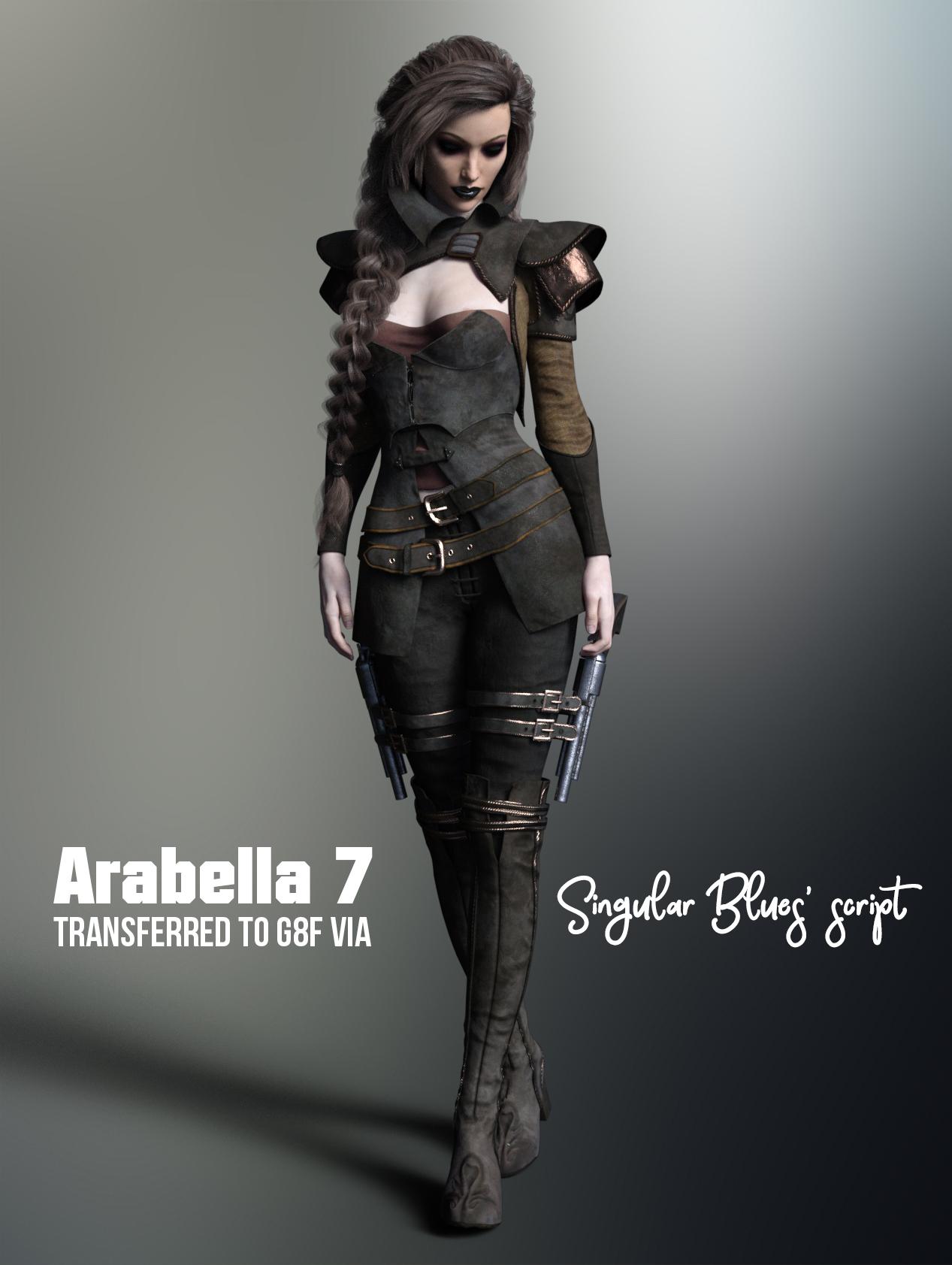 Morphs from G3 to G8
hi, singular...
so here's an anomaly i ran into last night. i've reproduced the error twice today to verify (or try to verify) that it wasn't due to a mistake on my end.
i encountered it transferring some of 3anson's Creative MR morphs from g3f to g8f. this log file covers the transfer of two sets (product subsets, really) of breast morphs.
for some reason, the first set transfer logged yielded g8 morphs that have switched from an original parameter range of 0.00 - 100.00, limits on, to a range of -100.00 to 100.00, with limits off. they don't seem to affect the figure at all within values up to 1000 or so. (last night i entered something insane in the value field and finally did get some effect that looked like g8's chest had sprouted a dog's head on a tiny neck. but i didn't try that today.)
the second set transferred produced g8 morphs that reproduced the g3 shapes quite nicely, maintaining the original parameter range of 0.00 - 100.00 and keeping limits on.
hope this is useful...let me know if i can provide any additonal info, or run something again for you. i will try to keep an eye on the thread today, but i'm DM'ing you my email if you'd like to contact me more directly.
j
Morphs from G3 to G8OK, thanks to everyone for their input, really appreciate the support.
Revised process below. I tried it with a new morph so as not to get mixed up with previous attempts.
1) Start Studio
2) Load Genesis 3 Female
3) Favourite Gia 7 head morph (under actor-head-people (see attached Gia01)
3) Load Genesis 8 Female
4) Deselect both figures
5) Click to select Genesis 3 Female then Ctrl click to also select Genesis 8 Female
6) Run the script (installed today from the package in Singularity Blues signature)
6) A tab opens showing the transfer
7) Delete both figures and restart Studio
8) Load Genesis 8 Female and check for morphs. No luck (see Gia02)
I have run this process now with three different morphs without any luck. I even tried deselecting Genesis 3 Female before loading Genesis 8 Female in case that made a difference, sadly no. If anyone has Gia 7 could they try the above process and see if it works so I can at least test if it is the process I am following that is at fault.
When the tab says it is 'Writing assets' what and where is it writing to please? I am guessing that it should be updating the Genesis 8 Female dsf in the data-DAZ 3D-Genesis 8-Female folder or putting some morphs somewhere for it to read, none of which appears to be happening. These are guesses of course as I don't know what the script is attempting to write.
Whitney hair soft look morphWhitney hair soft look morphDon't Thank me, thank cdpro_2831bbd990 for the great morph! :)
Morphs from G3 to G8Thanks for this script it is fantastic. I have successfully transferred Bethany 7 character morphs to Genesis 8 Female as a test.
Rookie question. How do I now save this so the morphs are preserved on the next load of Genesis 8?You don't. In fact, if you are using the morphs right after running the script, they aren't loaded correctly.
The morphs are already saved to the figure when script completes. Saving them afterward will either do nothing but waste disk space if you're lucky or break them entirely if you aren't.Interesting.
A few failed attempts later. Following the process as I see it worked above.
1) Load Genesis 3 Female
2) Favourite Arabella 7 morph (under actor-people)
3) Load Genesis 8 Female
4) Ctrl click to highlight Genesis 8 Female (Genesis 3 Female already highlighted)
5) Run Prototype script (dated 9th February)
6) A tab opens showing the transfer (screenshot attached)
7) Delete both figures and reload Genesis 8 Female. No new morphs are present.
I have attached the log file. Any help in trackng down why this is not working would be appreciated.
It works for me and the only thing I'm doing differently from you is:
1 - I selected as favorite a body or a head, not the actor.
2- After selecting the morph as a favorite, I deselected Gen3. Then I loaded Basic G8. I selected Gen3 first, then Gen8.
@Singular Blues did mentioned before to make sure to "deselect Gen3" before selecting both G3 and G8 (in that order if you're transferring from G3 to 8).
Might be a shot in the dark, but you can always try if it fixes it. Also, remember to download the package (that contain the data folder with the clones) in Singular Blue's signature, not just the latest script.
Morphs from G3 to G8Thanks for this script it is fantastic. I have successfully transferred Bethany 7 character morphs to Genesis 8 Female as a test.
Rookie question. How do I now save this so the morphs are preserved on the next load of Genesis 8?You don't. In fact, if you are using the morphs right after running the script, they aren't loaded correctly.
The morphs are already saved to the figure when script completes. Saving them afterward will either do nothing but waste disk space if you're lucky or break them entirely if you aren't.Interesting.
A few failed attempts later. Following the process as I see it worked above.
1) Load Genesis 3 Female
2) Favourite Arabella 7 morph (under actor-people)
3) Load Genesis 8 Female
4) Ctrl click to highlight Genesis 8 Female (Genesis 3 Female already highlighted)
5) Run Prototype script (dated 9th February)
6) A tab opens showing the transfer (screenshot attached)
7) Delete both figures and reload Genesis 8 Female. No new morphs are present.
I have attached the log file. Any help in trackng down why this is not working would be appreciated.
I think you are supposed to extra DAZ Studio and then start it again for the transfers to show. At least that is the case when I install new products via DIM.
Thanks, but during my attempts I have shut down and restarted Studio several times with no effect on the status of the available morphs.
You should add then then as step 8 and check the morph availability as step 9
Yes, tried that with no result.
Do what Barbult said - others have had similar problems.
Morphs from G3 to G8Thanks for this script it is fantastic. I have successfully transferred Bethany 7 character morphs to Genesis 8 Female as a test.
Rookie question. How do I now save this so the morphs are preserved on the next load of Genesis 8?You don't. In fact, if you are using the morphs right after running the script, they aren't loaded correctly.
The morphs are already saved to the figure when script completes. Saving them afterward will either do nothing but waste disk space if you're lucky or break them entirely if you aren't.Interesting.
A few failed attempts later. Following the process as I see it worked above.
1) Load Genesis 3 Female
2) Favourite Arabella 7 morph (under actor-people)
3) Load Genesis 8 Female
4) Ctrl click to highlight Genesis 8 Female (Genesis 3 Female already highlighted)
5) Run Prototype script (dated 9th February)
6) A tab opens showing the transfer (screenshot attached)
7) Delete both figures and reload Genesis 8 Female. No new morphs are present.
I have attached the log file. Any help in trackng down why this is not working would be appreciated.
I think you are supposed to extra DAZ Studio and then start it again for the transfers to show. At least that is the case when I install new products via DIM.
Thanks, but during my attempts I have shut down and restarted Studio several times with no effect on the status of the available morphs.
You should add then then as step 8 and check the morph availability as step 9
Yes, tried that with no result.
Morphs from G3 to G8Just guessing - Try favoriting the Arabella 7 Head or Arabella 7 Body morph instead of the Actor/People Arabella 7. The Actor/People "morph" is just a controller to dial head and body morphs, not a "real" morph.
Morphs from G3 to G8Thanks for this script it is fantastic. I have successfully transferred Bethany 7 character morphs to Genesis 8 Female as a test.
Rookie question. How do I now save this so the morphs are preserved on the next load of Genesis 8?You don't. In fact, if you are using the morphs right after running the script, they aren't loaded correctly.
The morphs are already saved to the figure when script completes. Saving them afterward will either do nothing but waste disk space if you're lucky or break them entirely if you aren't.Interesting.
A few failed attempts later. Following the process as I see it worked above.
1) Load Genesis 3 Female
2) Favourite Arabella 7 morph (under actor-people)
3) Load Genesis 8 Female
4) Ctrl click to highlight Genesis 8 Female (Genesis 3 Female already highlighted)
5) Run Prototype script (dated 9th February)
6) A tab opens showing the transfer (screenshot attached)
7) Delete both figures and reload Genesis 8 Female. No new morphs are present.
I have attached the log file. Any help in trackng down why this is not working would be appreciated.
I think you are supposed to extra DAZ Studio and then start it again for the transfers to show. At least that is the case when I install new products via DIM.
Thanks, but during my attempts I have shut down and restarted Studio several times with no effect on the status of the available morphs.
You should add then then as step 8 and check the morph availability as step 9
Morphs from G3 to G8Thanks for this script it is fantastic. I have successfully transferred Bethany 7 character morphs to Genesis 8 Female as a test.
Rookie question. How do I now save this so the morphs are preserved on the next load of Genesis 8?You don't. In fact, if you are using the morphs right after running the script, they aren't loaded correctly.
The morphs are already saved to the figure when script completes. Saving them afterward will either do nothing but waste disk space if you're lucky or break them entirely if you aren't.Interesting.
A few failed attempts later. Following the process as I see it worked above.
1) Load Genesis 3 Female
2) Favourite Arabella 7 morph (under actor-people)
3) Load Genesis 8 Female
4) Ctrl click to highlight Genesis 8 Female (Genesis 3 Female already highlighted)
5) Run Prototype script (dated 9th February)
6) A tab opens showing the transfer (screenshot attached)
7) Delete both figures and reload Genesis 8 Female. No new morphs are present.
I have attached the log file. Any help in trackng down why this is not working would be appreciated.
I think you are supposed to extra DAZ Studio and then start it again for the transfers to show. At least that is the case when I install new products via DIM.
Thanks, but during my attempts I have shut down and restarted Studio several times with no effect on the status of the available morphs. My log file above is from a fresh start of Studio having attempted to transfer three different character morphs on three seperate occasions.
Morphs from G3 to G8Thanks for this script it is fantastic. I have successfully transferred Bethany 7 character morphs to Genesis 8 Female as a test.
Rookie question. How do I now save this so the morphs are preserved on the next load of Genesis 8?You don't. In fact, if you are using the morphs right after running the script, they aren't loaded correctly.
The morphs are already saved to the figure when script completes. Saving them afterward will either do nothing but waste disk space if you're lucky or break them entirely if you aren't.Interesting.
A few failed attempts later. Following the process as I see it worked above.
1) Load Genesis 3 Female
2) Favourite Arabella 7 morph (under actor-people)
3) Load Genesis 8 Female
4) Ctrl click to highlight Genesis 8 Female (Genesis 3 Female already highlighted)
5) Run Prototype script (dated 9th February)
6) A tab opens showing the transfer (screenshot attached)
7) Delete both figures and reload Genesis 8 Female. No new morphs are present.
I have attached the log file. Any help in trackng down why this is not working would be appreciated.
I think you are supposed to extra DAZ Studio and then start it again for the transfers to show. At least that is the case when I install new products via DIM.
Morphs from G3 to G8Thanks for this script it is fantastic. I have successfully transferred Bethany 7 character morphs to Genesis 8 Female as a test.
Rookie question. How do I now save this so the morphs are preserved on the next load of Genesis 8?You don't. In fact, if you are using the morphs right after running the script, they aren't loaded correctly.
The morphs are already saved to the figure when script completes. Saving them afterward will either do nothing but waste disk space if you're lucky or break them entirely if you aren't.Interesting.
A few failed attempts later. Following the process as I see it worked above.
1) Load Genesis 3 Female
2) Favourite Arabella 7 morph (under actor-people)
3) Load Genesis 8 Female
4) Ctrl click to highlight Genesis 8 Female (Genesis 3 Female already highlighted)
5) Run Prototype script (dated 9th February)
6) A tab opens showing the transfer (screenshot attached)
7) Delete both figures and reload Genesis 8 Female. No new morphs are present.
I have attached the log file. Any help in trackng down why this is not working would be appreciated.
Headlee Shrunken Head [commercial]Headlee
https://www.daz3d.com/headlee-for-genesis-8-male-s
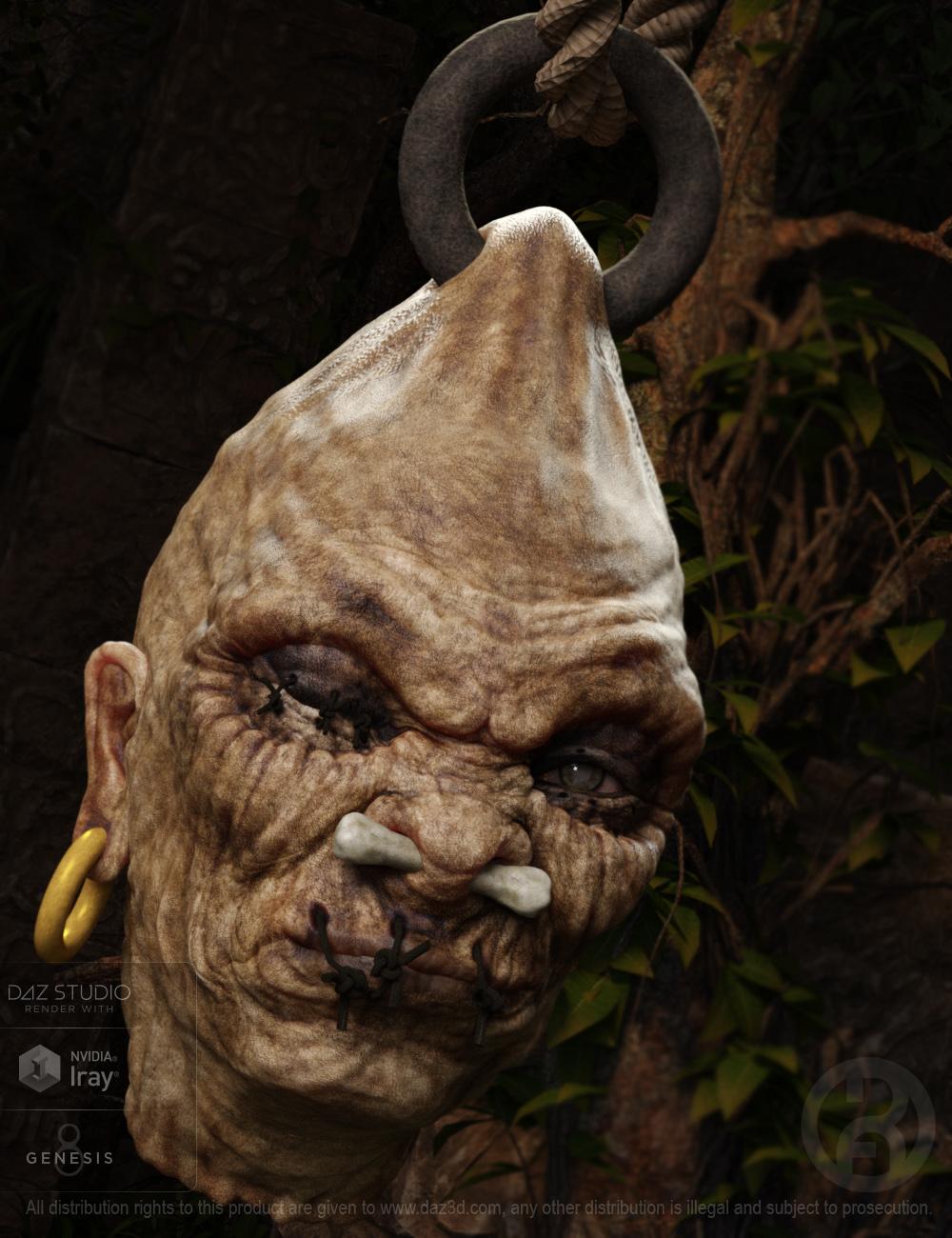
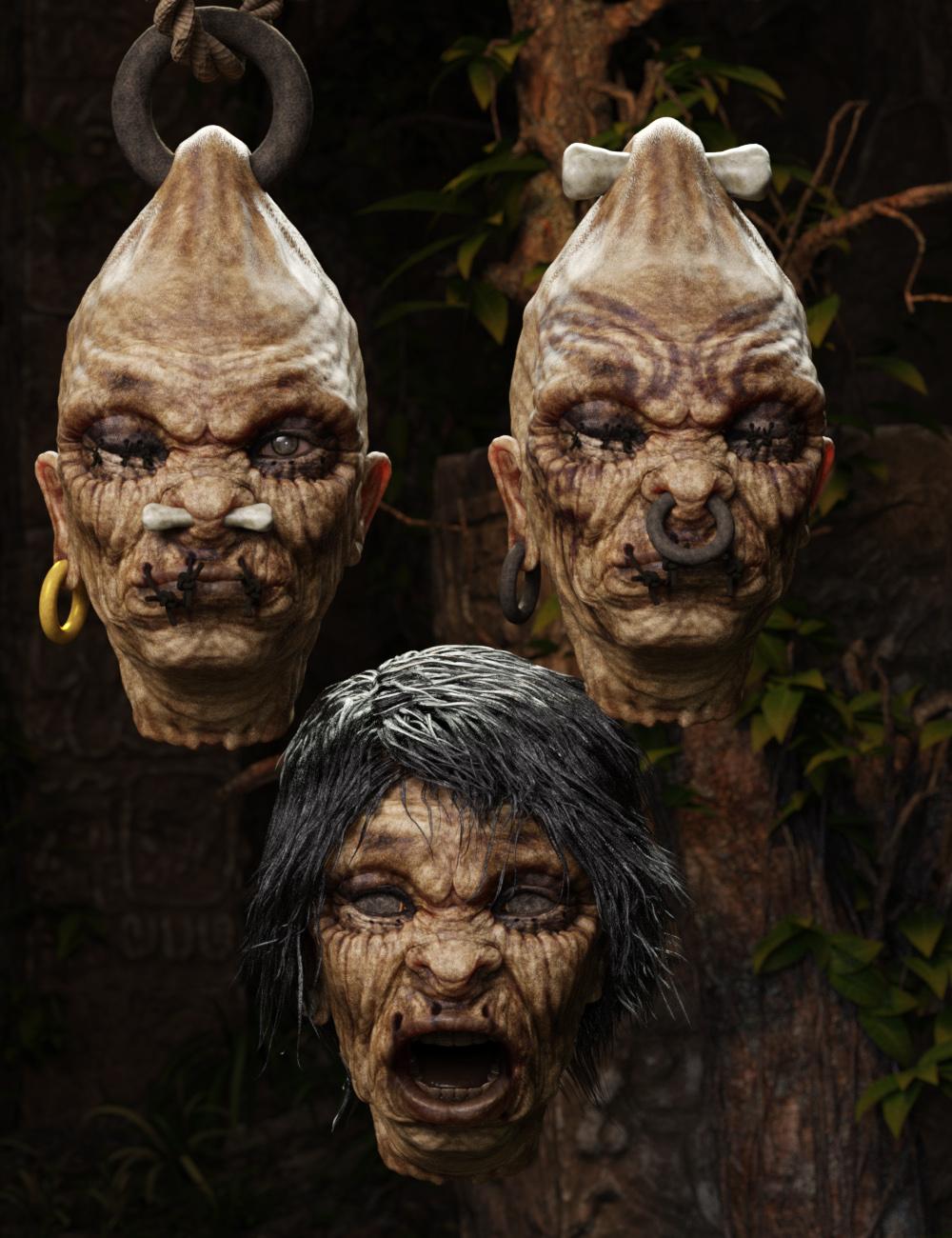
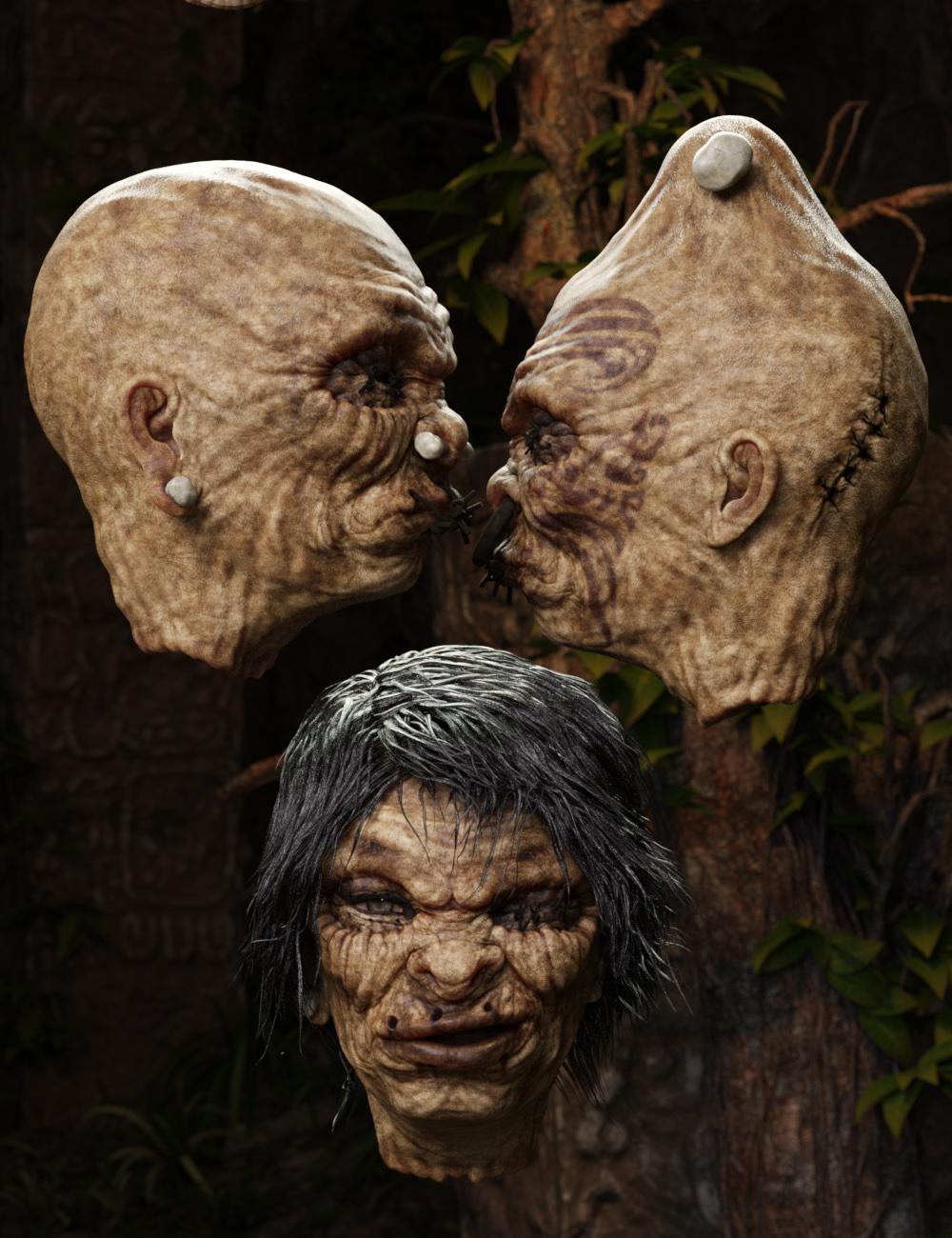
Sometimes you may find it hard to get a-head in this world, but the corporate headhunter may have just the thing for you. Headlee is a richly detailed shrunken head character for Genesis 3 males is designed to be both creepy and fun. Able to use all Geneis 8 male shaping morphs and emotions (to varying degrees), you can create a variety of looks for him.
The set comes complete with custom crafted High Definition Morphs, and Highly detailed Textures for the utmost realism.
- Product Includes
- One Headlee Neck Graft
- One Headlee High Definition Morph
- One Headlee Shaping Preset
- One Headlee Character Preset
- Two Face Material Presets
- Three Eye Material Presets
- One Earbone (with Iray and 3delight Mat Presets)
- Ear Ring (with Iray and 3delight Mat Presets)
- One Left Eye Stitch (with Iray and 3delight Mat Presets)
- One Right Eye Stitch (with Iray and 3delight Mat Presets)
- One Lip Eye Stitch (with Iray and 3delight Mat Presets)
- One Nose Bone (with Iray and 3delight Mat Presets)
- One Nose Ring (with Iray and 3delight Mat Presets)
- One Top Bone (with Iray and 3delight Mat Presets)
- One Top Ring (with Iray and 3delight Mat Presets)
- Includes both Iray and 3Delight Material Presets
 Celebrity Look-a-Likes for 3D figures Part 2
So, I finished up this morph and put it up on ShareCG, if you are interested. No textures, just the morph.
Thanks! Love it.
Celebrity Look-a-Likes for 3D figures Part 2Does anyone know of a good Gal Gadot morph for V4? (NOT the
forenderone!)I'm guessing you didn't like that version of her either. I looked around to see if there was a good Gal's morph out there but couldn't find one. So I gave a shot on creating her morph myself.
Daz 3D is part of

Connect
DAZ Productions, Inc.
7533 S Center View Ct #4664
West Jordan, UT 84084Licensing Agreement | Terms of Service | Privacy Policy | EULA
© 2026 Daz Productions Inc. All Rights Reserved.