-
Sakura 8
Transfering brows is non-intuitive. The trick is do not use projection templates if using Transfer Utility, which is the same as not setting the "what type of Item is this" in autofit.
Basically, a template is a figure the target figure wears, but it often has different bones. This allows you to have special templates to give bones to skirts rather than having them use the figure legs. In the case of the full body and hair templates, they do not have the face rig bones, and the brows of G3 and higher are bone controlled.
So not setting a template should cause the brows to be affected by the face rig.So I tried this and something incredibly weird happened.
- I loaded Kenshin then used the autowear function to get the eyes, eyebrows and eyelashes in place. It worked for the eyelashes and eyebrows, but the eyes weren't as successful.
- Deleted the eyes and parented them instead. Everything looked good, so I saved and attempted to render it... except that DAZ crashed on me.
- Reloaded the scene and the eyelashes had these two weird lines going down. I did a quick viewport render and you can see the black lines. (Look below)
- Figured that by deleting them and loading new ones the problem would be fixed... I did that, using autowear to get them back into place... but things got even weirder.
- As long as the eyelashes were there and unhidden, I couldn't get the figure to render. Not in the viewport (with iray preview) and not in the actual render.
- BUT if I hid the eyelashes, then I could render the figure just fine.
- Conclusion: I've no idea what's going on with those eyelashes. Eyebrows seem fine, though, and they do follow the facerig now.
I'm stumped too, frankly. I've never tried fitting lashes. I've tried making them, and that worked out okay (could be better), but it takes some thinking about the way the lashes work, which is a bit weird. I'm not sure if the S8 lashes work like the base lashes but if they do, try loading them without a figure, and then zero figure them. They should fold up into tiny lines.
I think they are like this because they won't properly take the morph projection otherwise. Since they stick out from the mesh but need to move with the eyelids, their base shape is rolled up so that morph projection from the lids is what sould first impact them.
It looked like you go a good fit without using this specific method, and the thing about autofit is, what works for one type of thing may not work for another. I know the thing about fitting brows work, but obviously there's issue with lashes. It might be that to autofit, you need to make sure that the lashes are zeroed first. It could be auto fit uses "current" shaping which would tend to mess up the lashes.
Bear in mind, I'm just making this up as I go, but recall that's what I had to do with lashes I made, in the end. In fact, I didn't even load the "default shape" morph until after getting them fitted, though that probably wouldn't make a difference as long as the morph isn't active. Bottom line is, I really don't have clue what's happening.Well the strange thing is that every time I save the image (with the eyelashes on), close and reload the scene, I get those two thin lines coming down the eyelashes and across the face. When those lines are there, I can actually render the figure. But when they aren't there (when I autofit and try to render straight away), the figure just doesn't show in the Iray render. Haven't tried 3DL yet, though. Might even be that it's something Iray related.
Outfit helpPossible for the hair: https://www.daz3d.com/simple-elegance-hair-for-genesis-3-female-s
Oh yeah, that might be a good starting off point - perhaps I could morph the front a bit to get it to do the high "arches". Thank you for the suggestion! :)
Morphs from G3 to G8Made a change to the support files. Should fix that.
It was related to the pesky Genesis3Female-1 issue.
Can confirm it works now :). I've managed to transfer Aiko7 to G3M without problems!
Morphs from G3 to G8No, it's fine. This is a foolish mistake on my part.
I could explain, but that would giving away some "secrets." Basically, the thing I'm doing, anyone could potentially do, but it wouldn't really work to really transfer all of complicated bits of morphs between figures. This is a conceptual error in the bit of script that one could say is the real intellectual property in it.
Anyway, all of that you described is something I failed to fully think through. But I can deal with it, now that realize what was happening.Morphs from G3 to G8hey again, singular...
so i went to check those values in the exported g8f morphs last night, and...well, let me just summarize what i wound up figuring out last night and today; it'll be a lot easier to follow than an explanation of how i got there. :) but i have repeated the experiment several times...to confirm that i was being consistent, at least.
the g3f morph that i was favoriting is subfoldered in the original morph package. running the script produces two different versions of the set's morph files in the g8f data folder--one at the base directory of the package, and one in a correctly-named subfolder thereof. the files created in the base directory and the subfolder have different parameter values (as per your note above). png files appear only in the subfolder. the morph files in the base directory have limits off, and their dials can be set to + or - thousands without affecting the figure. these are the values that studio seems to be reading when both the base and subfoldered versions of the morphs are loaded. quitting studio and replacing the files in the base directory with the subfolder files and relaunching gives morph dials that display at the correct values of 0-100%, and have limits on...but dialing these morphs in distorts the entire figure. the breasts themselves are distorted, and weird flanges of flesh appear elsewhere.
call that run transfer01.
for transfer 02, i went into the g3f source directory, transferred the breast morphs up one level from their subfolder and into the base folder, and deleted the subfolder i'd taken them from. then i restarted studio, used the utility script to purge memory, set up the g3f and g8f and ran the script. this gave me breast morphs that all worked perfectly, and also translated the four other subfolders in the base directory...body, ear, head, and nose. and this is where things get weird. the morphs from the body and head subfolders showed up correctly as 0-100% dials, were limits on, and worked like a charm. the morphs from the nose and ear folders had the same off range i'd seen in transfer01, and had limits off. (i should have checked to see if those subfoldered morphs had also generated evil twins, as the breast morphs did in transfer01. but i forgot to. sorry...)
for transfer03, i went back into the g3f source directory, dumped all of the subfoldered morphs into the main folder, and deleted the empty subfolders. then et cetera et cetera, ran the script. the morphs all transferred perfectly.
i saved logs and sample files and a ton of window captures while i was doing this, but i'm not uploading them at the moment...for one thing, half of my window captures include unclad base figures. and i'm not sure what my ref folder would zip down to, sizewise. but i would be happy to set up a dropbox for you, if you like--just DM me if that sounds good.
yt,
j
Once Again - The Importance of BackupsI have Macrium Reflect (free) do daily backups. It gives a lot of ease of mind, even just knowing that I can overwrite a file like a morph and know I can get the previous version easily.
I hadn't heard of that program, but I just Googled it and bookmarked the page ready to take a look at the weekend. Thanks for mentioning it.
Once Again - The Importance of BackupsI have Macrium Reflect (free) do daily backups. It gives a lot of ease of mind, even just knowing that I can overwrite a file like a morph and know I can get the previous version easily.
(Free comission) what clothes do you want?Congratulations Alarconte ! That is looking fabulous!
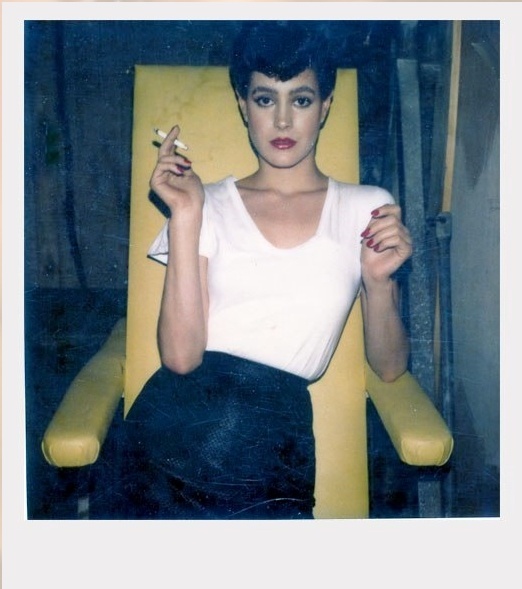
I would say that is a pretty close depiction of that iconic Sci-Fi Noir-Film dress.
Looks like I have to start working faster in finishing up a face morph for a "Nexus-7 Replicant" of the lovely Rachel for us
to use that dress. I know Sean Young will look gorgeous in it

- Here is some more interesting information//ideas for you.... ( watch the cool video )
 RareStone is KILLING ME
Wow, me too! I was totally thrown off by the main promo. This emphasizes the importance of a good main promo image to represent the product. I probably never looked inside to see the other promos. I have several other RareStone items and all have been good. This is now on my wishlist for a future sale.
Greetings,
Yeah, the first item I saw of theirs was the somewhat misnamed School Sports Outfit which contains a jacket, a shirt, sports shorts, TWO one piece swimsuits, THREE socks (including a pair of loose socks), a solid dozen PROPS, and a ton of textures. Not to mention a really spectacular set of promo pictures. I had almost skipped over it, but when I dug in, I was downright SHOCKED at how much there was. I think I dug in because I was curious if it listed where it got some of the japanese school props from...and then I realized they were part of the 'outfit' package.
O_O¡
I don't own the face morph collections, but otherwise yeah...I have 11 of their 13 items, and they're on my list of folks to always look at their items, because the titles and first promo pictures don't always do them justice.
-- Morgan
Oh holy smokes. I thought that outfit set was just a leotard this whole time.
It's a great product and includes several clothing items, shoes, props, etc. It's one of my favorites and is really a great deal considering how much you get with the product. The main promo image is definitely misleading.
RareStone is KILLING MEWow, me too! I was totally thrown off by the main promo. This emphasizes the importance of a good main promo image to represent the product. I probably never looked inside to see the other promos. I have several other RareStone items and all have been good. This is now on my wishlist for a future sale.
Greetings,
Yeah, the first item I saw of theirs was the somewhat misnamed School Sports Outfit which contains a jacket, a shirt, sports shorts, TWO one piece swimsuits, THREE socks (including a pair of loose socks), a solid dozen PROPS, and a ton of textures. Not to mention a really spectacular set of promo pictures. I had almost skipped over it, but when I dug in, I was downright SHOCKED at how much there was. I think I dug in because I was curious if it listed where it got some of the japanese school props from...and then I realized they were part of the 'outfit' package.
O_O¡
I don't own the face morph collections, but otherwise yeah...I have 11 of their 13 items, and they're on my list of folks to always look at their items, because the titles and first promo pictures don't always do them justice.
-- Morgan
Oh holy smokes. I thought that outfit set was just a leotard this whole time.
Error message when I load up G8FTo expand, something you added has that malformed line in it. The line is not case sensitive. So it down to change you made between the last time you loaded without the error and now. That should narrow the possible targets. If you ran my script, it experiemental and I keep find new ways it trips over itself. If you did not, then some product you added has that malformed code in at least one morph or property.
Unless you were running a script meant to do something else, I suppose.What morphs/textures were used to create this look (Classy Cover Photo Light by The Philosopher)?Thanks for the replies! What settings have you applied to these morphs? 100% or 120%? Or have you turned off the limits and raised it up even more?
Thanks a lot,
Me
Look for morphs that have HD in their name relevant to the character models you are using & dial in at 100%. There is often a combined slider morph dial that will dial in all the HD morphs at one and also often HD presets that effectively do the same.
Alexandra 8I agree about her needing a bit more sagging options. She should be the aging base...not needing another add on to make her look older. Of course I could tweak or remorph any character. But the point of buying a mature looking model is to not have to do that. I'm just saying that an additional aged body morph and preset would be a nice inclusion. Otherwise, I like her. Good on Daz for bringing something new.
Morphs from G3 to G8So I've been testing transferring between genders, especifically G3F to G3M. I was successful with transferring Sakura 8 to G8M > G3M > G3F, but results vary when I try to transfer other figures between males and females. For example, I transferred Aiko 7 to G3M. I ran the script successfully, but the morphs won't show up when I clear the scene, close Daz, restart and load a G3M.
- So I looked up the path for Aiko 7 morphs: W:\DAZ RESOURCES\My DAZ 3D Library\data\DAZ 3D\Genesis 3\Female\Morphs\DAZ 3D\Aiko 7
- And compared them to the Aiko 7 transferred morphs: W:\DAZ RESOURCES\My DAZ 3D Library\data\DAZ 3D\Genesis 3\Male\Morphs\DAZ 3D\Aiko 7
The 66 morphs did get transferred (or at least they show up in G3M data folder), but they just don't show up like Sakura 8 did. I also checked in the Parameters tab (since I did manage to get Aiko 6 & Keiko6 (from Gen2 legacy shapes) transferred to G3M, but they only shows up in the parameters tab, not the shaping tab). However, Aiko 7 wasn't there either. I then tried to transfer Victoria 7 to G3M, but it's the same as Aiko 7. The folder is there inside the \data\DAZ 3D\Genesis 3\Male\Morphs\DAZ 3D\Victoria 7, but the morphs themselves don't show up inside DAZ. The names for each morph transferred over in small caps, but even replacing them to match didn't make them appear. Will try with other non "flagship" Daz characters next.
G8F's left foot toenail beds?No standard shells. I don't know about rigidity, but I don't think so. None of my tests has shown any particular issues in that area, but they aren't exhastive.
G8's nails are like previous Genesis nails and unlike G3's. They are a part of base mesh, not separate. Thus no nail bed. If you are having an issue with G3 morph, this is probably going to be factor.issue with verts around 3 of her toenails, to various degrees with her every character FBM.
rigidity is something to explore, no idea how it works.Head shot and genesis questionYou can transfer G3 morphs to G8 using this script https://www.daz3d.com/forums/discussion/comment/3309101/#Comment_3309101 G8 can wear G3 materials, but this might be helpful anyway https://www.daz3d.com/genesis-3-character-uvs-for-genesis-8-femaleAlexandra 8Would someone that got https://www.daz3d.com/kellyn-for-alexandra-8-and-genesis-8-female mind doing a quick test to see how she looks without Alexandra dialed in?
Sorry if its not obvious but she comes with 2 morphs, one of which does not use Alexandra.
Oh awesome, thanks! I guess I looked at that wrong and didn't pick up on that. That morph is exactly what caught my eye about her, along with the bodypaint. Kellyn is definitely going in my cart today, still on the fence about Alexandra herself though. She's a great character, just not sure I'd use her enough to justify spending the extra cash right now.
G8F's left foot toenail beds?No standard shells. I don't know about rigidity, but I don't think so. None of my tests has shown any particular issues in that area, but they aren't exhastive.
G8's nails are like previous Genesis nails and unlike G3's. They are a part of base mesh, not separate. Thus no nail bed. If you are having an issue with G3 morph, this is probably going to be factor.G8F's left foot toenail beds?could a rigidity setting interphere with a morph?
Clothes from MD appear stretched out when posing in DAZ3DBeat578, I wish I knew of some tutorials I could point you to, but I don’t. I use zbrush for my JCMs. It’s a matter of importing the pose into zbrush and then adjusting the garment to fit the joint rotation smoothly by moving and smoothing vertices into a decent shape, then importing the corrections back into Daz Studio as a morph (JCM) and linking it to the joint rotation through the Property Hierarchy. I really don’t know any tutorials that teach that. I’m sorry
Daz 3D is part of

Connect
DAZ Productions, Inc.
7533 S Center View Ct #4664
West Jordan, UT 84084Licensing Agreement | Terms of Service | Privacy Policy | EULA
© 2026 Daz Productions Inc. All Rights Reserved.