-
Shiny Lips / Lipstick
How do you create very Shiny Lips / shiny Lipstick on Victoria 4 and Genesis 3 ?
[Closed] RRRRR - Coming Late Excuses - Render Contest!Totte Pull #9
#4337 Milena for Victoria 6 (19105)
#7080 Tithe Barn (17767)
#3964 Luminous Melody (11844)
#6895 The Magical Forest (58085)Random numbers generated May 6 2021 at 18:31:9 by psychicscience.org
Free educational resources for parapsychology and psychical research.How do I convert Genesis 8F characters to the new 8.1 shader?1. How do I convert Genesis 8F characters to the new 8.1 shader?
2. What extra textures do Genesis 8F characters need for the new 8.1 shader? An Occlusion map, correct? Anything else?
Let's say I wanted to convert Leisa 8 to 8.1's new skin shader. What steps do you forsee in that process? I'm about to dive into this, but was hoping someone else has already formed a list of what needs to be done, OR BETTER YET, something I can buy that does this entire process for me automatically?
Here's my current thought process:
- Load Victoria 8.1F
- Replace Head & Body Morphs with Leisa 8.
- Replace all of Victoria 8.1F textures with Leisa 8's textures, however there are some differences, and there's no occlusion map for Leisa 8 that I'm aware of. What else?Victoria 8.1F brows are too bushy. Is there brow fibermesh that looks like V7's supermodel brows?Masterstroke said:
Does it have to be a V7 eyebrow, or is a G3F eyebrow o.k. as well?
https://www.daz3d.com/catalogsearch/result/?q=fibermesh+eyebrowsG3F is fine as long as it looks similar in style to V7. V7 has that very sleek, model like eyebrows, as if it was done by a professional, that's what I'm looking for. Victoria 8.1's eyebrows have high technical quality, but look absolutely terrible with how bushy they are, it's not good.
I was forced to send CJ 8 Eyebrows Zbrush via GOZ, and had to sculpt the brows myself to match V7's style. I wasted 3 hours of time. I would've much rather just spend $25.00, and been done with it. *sigh*
I hope a content creator out there seizes this opportunity to make a Genesis 8 Eyebrow mesh that's totally morphable, and can be morphed into MODEL like eyebrows, in which its ends are higher, and can be made thinner. (Genesis 8 Female eyebrows don't look right IMO, or I could've used those.)
Hmmm, I wonder if I should make morphs for Genesis 8.1 Eyebrows and sell them as a content creator? Hmmm.
I've seen so many renders where everything looks amazing, but the eyebrows are complete and total fail, because there isn't a good eyebrow solution for Genesis 8 Female.
Genesis 8.1 F eyebrows are the best damn bushy eyebrows I've ever seen. They are INCREDIBLE in that regard. They are professional in the fact that they capture the very essence of BUSHY EYEBROWS. Hell, they might as well have just forced her to have a unibrow.
How to increase Victoria 8.1 eyelashes length?j cade said:
Cora Regina said:
j cade said:
Cora Regina said:
I'm not sure whether you actually can. In general to exceed a parameter, you would click on the gear next to the parameter that you want to change (in this case some variety of eyelash length), and select "Parameter Settings." In the popup, uncheck the box next to "Use Limits."
Victoria 8.1's lashes, or technically Genesis 8.1 Female's lashes (i.e. this would be an issue with any character built on 8.1), don't seem to work like that, though. It's weird. I gave it a try and even with the limits turned off and the length dials cranked to 1000%, nothing happens. I'd be interested to find out why, it's something I've never run into with lash attachments.
If you need lashes that can reach low Earth orbit, then in the meantime (or maybe forever if they really can't be adjusted), I would suggest Soto's very excellent Lash Utilities. Attached you'll find the G8F lashes fitted to Vicky 8.1, using the "Spoiled" material for fun. The first one has the length set to the natural limit of 100%. In the second, I disabled that and set it to 500%.
They could probably get you to Jupiter if you really wanted.
did you make sure the limits were off on the lashes themselves as well as the figure? the previous lashes may have only had the limits on the figure, but 8.1 has them on both the figure and lashes, so they'll need to be turned off in both locations.
Waaaaaait, what?! My lashes don't have that! I have the controls on the figure, but the lashes have zero controls on them at all apart from the usual transforms, mesh resolution, etc. They never have, and I've never really paid attention until now because I still use almost exclusively 8.0 instead of 8.1, and pretty much always load up either the Lash Utilities or the ones from Maia.

Well shoot, that explains a lot, then! Thanks for letting me know, I was probably gonna end up real frustrated down the line somewhere, lol. I had no idea the lashes were even supposed to have their own controls. Time to reinstall the Essentials package and see if that fixes things, I suppose.
you might just need to turn on "show hidden properties" I should have mentioned that as well, but I forgot because I never have it off
They were just straight up not there, I tend to keep that ticked as well. Tried the old "turn it off and back on again," still squat, but I reinstalled things and now they're showing up. Phew! Sometimes I have controls just... disappear, or the checkbox will get inverted (checking show properties hides them and unchecking it shows them), but restarting DS usually clears that up.
I do remember that my DS install was being even more weird than it usually is around the time that I was installing G8.1 in the first place. Whenever I build a new machine (damn crypto miners), I need to do a totally clean install and rebuild my library from the ground up, apart from manually bringing over stuff that I've saved out myself. Things have been a complete disaster ever since last year, when Connect commandered a whole bunch of stuff it shouldn't have been able to touch (and confused the hell out of tech support). Screwed everything up terribly and even though I'm not logged in via DS, I've had frequent and recurring problems with products getting taken over again even after being uninstalled, deleted, having all the Connect-related folders scrubbed, and reinstalled with DIM, plus having completely new stuff hijacked. Poor RSA had to make me a custom fixed interface for one of his products because the adjustable one was behaving so chaotically for me and only for me.
I've scoured the thing for viruses or malware and there's nothing, DS is the only thing that misbehaves. Installation problems and things blowing up after are pretty normal around here so IDK why I should be so surprised that something went wrong.
Thanks for clueing me in, however, it's very much appreciated! We are now operating on all thrusters, ready for launch in three... two... one...
How to increase Victoria 8.1 eyelashes length?Cora Regina said:
j cade said:
Cora Regina said:
I'm not sure whether you actually can. In general to exceed a parameter, you would click on the gear next to the parameter that you want to change (in this case some variety of eyelash length), and select "Parameter Settings." In the popup, uncheck the box next to "Use Limits."
Victoria 8.1's lashes, or technically Genesis 8.1 Female's lashes (i.e. this would be an issue with any character built on 8.1), don't seem to work like that, though. It's weird. I gave it a try and even with the limits turned off and the length dials cranked to 1000%, nothing happens. I'd be interested to find out why, it's something I've never run into with lash attachments.
If you need lashes that can reach low Earth orbit, then in the meantime (or maybe forever if they really can't be adjusted), I would suggest Soto's very excellent Lash Utilities. Attached you'll find the G8F lashes fitted to Vicky 8.1, using the "Spoiled" material for fun. The first one has the length set to the natural limit of 100%. In the second, I disabled that and set it to 500%.
They could probably get you to Jupiter if you really wanted.
did you make sure the limits were off on the lashes themselves as well as the figure? the previous lashes may have only had the limits on the figure, but 8.1 has them on both the figure and lashes, so they'll need to be turned off in both locations.
Waaaaaait, what?! My lashes don't have that! I have the controls on the figure, but the lashes have zero controls on them at all apart from the usual transforms, mesh resolution, etc. They never have, and I've never really paid attention until now because I still use almost exclusively 8.0 instead of 8.1, and pretty much always load up either the Lash Utilities or the ones from Maia.
Well shoot, that explains a lot, then! Thanks for letting me know, I was probably gonna end up real frustrated down the line somewhere, lol. I had no idea the lashes were even supposed to have their own controls. Time to reinstall the Essentials package and see if that fixes things, I suppose.
you might just need to turn on "show hidden properties" I should have mentioned that as well, but I forgot because I never have it off
How to increase Victoria 8.1 eyelashes length?j cade said:
Cora Regina said:
I'm not sure whether you actually can. In general to exceed a parameter, you would click on the gear next to the parameter that you want to change (in this case some variety of eyelash length), and select "Parameter Settings." In the popup, uncheck the box next to "Use Limits."
Victoria 8.1's lashes, or technically Genesis 8.1 Female's lashes (i.e. this would be an issue with any character built on 8.1), don't seem to work like that, though. It's weird. I gave it a try and even with the limits turned off and the length dials cranked to 1000%, nothing happens. I'd be interested to find out why, it's something I've never run into with lash attachments.
If you need lashes that can reach low Earth orbit, then in the meantime (or maybe forever if they really can't be adjusted), I would suggest Soto's very excellent Lash Utilities. Attached you'll find the G8F lashes fitted to Vicky 8.1, using the "Spoiled" material for fun. The first one has the length set to the natural limit of 100%. In the second, I disabled that and set it to 500%.
They could probably get you to Jupiter if you really wanted.
did you make sure the limits were off on the lashes themselves as well as the figure? the previous lashes may have only had the limits on the figure, but 8.1 has them on both the figure and lashes, so they'll need to be turned off in both locations.
Waaaaaait, what?! My lashes don't have that! I have the controls on the figure, but the lashes have zero controls on them at all apart from the usual transforms, mesh resolution, etc. They never have, and I've never really paid attention until now because I still use almost exclusively 8.0 instead of 8.1, and pretty much always load up either the Lash Utilities or the ones from Maia.
Well shoot, that explains a lot, then! Thanks for letting me know, I was probably gonna end up real frustrated down the line somewhere, lol. I had no idea the lashes were even supposed to have their own controls. Time to reinstall the Essentials package and see if that fixes things, I suppose.
How to increase Victoria 8.1 eyelashes length?Cora Regina said:
I'm not sure whether you actually can. In general to exceed a parameter, you would click on the gear next to the parameter that you want to change (in this case some variety of eyelash length), and select "Parameter Settings." In the popup, uncheck the box next to "Use Limits."
Victoria 8.1's lashes, or technically Genesis 8.1 Female's lashes (i.e. this would be an issue with any character built on 8.1), don't seem to work like that, though. It's weird. I gave it a try and even with the limits turned off and the length dials cranked to 1000%, nothing happens. I'd be interested to find out why, it's something I've never run into with lash attachments.
If you need lashes that can reach low Earth orbit, then in the meantime (or maybe forever if they really can't be adjusted), I would suggest Soto's very excellent Lash Utilities. Attached you'll find the G8F lashes fitted to Vicky 8.1, using the "Spoiled" material for fun. The first one has the length set to the natural limit of 100%. In the second, I disabled that and set it to 500%.
They could probably get you to Jupiter if you really wanted.
did you make sure the limits were off on the lashes themselves as well as the figure? the previous lashes may have only had the limits on the figure, but 8.1 has them on both the figure and lashes, so they'll need to be turned off in both locations.
How to increase Victoria 8.1 eyelashes length?EDIT: Go check out j cade's comment, you've gotta turn off the limits on both the figure and the lashes. My lashes are missing all of the shaping control dials that they're supposed to have, for some reason, so I didn't even know that was a thing. You totally can change the length if the lashes are installed correctly, which mine evidently aren't so naturally they don't work right. OTL
EDIT 2, ELECTRIC BOOGALOO: You'll need to turn on the "show hidden properties" option if it isn't already. Mine was and the controls had evidently just up and gone for a walk, but after a reinstall the lashes now work as expected.
I'm not sure whether you actually can. In general to exceed a parameter, you would click on the gear next to the parameter that you want to change (in this case some variety of eyelash length), and select "Parameter Settings." In the popup, uncheck the box next to "Use Limits."
Victoria 8.1's lashes, or technically Genesis 8.1 Female's lashes (i.e. this would be an issue with any character built on 8.1), don't seem to work like that, though. It's weird. I gave it a try and even with the limits turned off and the length dials cranked to 1000%, nothing happens. I'd be interested to find out why, it's something I've never run into with lash attachments.
If you need lashes that can reach low Earth orbit, then in the meantime (or maybe forever if they really can't be adjusted), I would (ETA: absolutely still) suggest Soto's very excellent Lash Utilities. Attached you'll find the G8F lashes fitted to Vicky 8.1, using the "Spoiled" material for fun. The first one has the length set to the natural limit of 100%. In the second, I disabled that and set it to 500%.
They could probably get you to Jupiter if you really wanted.
How to increase Victoria 8.1 eyelashes length?How do you increase the length of Victoria 8.1 eyelashes? They're already at 100% maximum length?
Jazz 8.1 discussionNot in a hurry myself to get him. I liked the Victoria 8.1, but so far that is the DO 8.1 I like. He looks like they took a female body made it male-ish. Not my preference. I would like more male things, if the people look male and the clothes actually have detail and quality to them like the female clothes do and not look plastic and basic. On a side note, did anyone else see that the main picture for the car says "80 mph" and it's a residential area!Selling base characters without their additional morphsTorquinox said:
They used to be a couple years ago (2019, it seems) in a bundle. When I went to buy it in early 2020, the bundle was gone. When I made a ticket to ask, I was told there was a naming problem and the product would not be coming back to the store.
Oh well... They've lost out on two sales then.

y3kman said:
Personally I would ask for a refund if I can't fully use a product I bought.
On a similar note, Daz still sells textures for vaulted items.
What's the point... He only cost the UK equivalent of £2.50. Plus, the Victoria 3 in my Library now has some (male) company ^^'
I didn't know that.
It's a pity the morphs that I'm after, never had a chance to be vaulted.
 Duplicate Formulas - possible solution
Ron Knights said:
In 20+ years of using DAZ products, I haven't encountered any Duplicate Formulas. Am I lucky, or what?! It seems this problem has existed for decades. Any such problem should be easily fixed in a very short time. What's going on here.
Most of the time it's a clash between two properties with the same name - usually two characters from different stores. The issue doesn't show up unless both are installed. it doesn't affect older figures (if a similar issue happened in Victoria 4 the second morph injected would simply replace the first) and it obviously does require two characters with the same name - since Genesis 8 has already had a longer life than previous Genesis generations it's more likely to crop up - and it also depends on there being ERC links. Fixing the issue is a matter of renaming one or both of the character properties involved.
Victoria 8.1F brows are too bushy. Is there brow fibermesh that looks like V7's supermodel brows?nakamuram002 said:
I don't like bushy eyebrows either. I load G8 and G8.1 in the same scene and parent G8's eyebrows to G8.1. That way, you can select the one you want to use and make the other invisible.
I wasn't aware G8F had its own eyebrows fibermesh. Are you talking about Victoria 8 eyebrow fibermesh? If so, I don't like Victoria 8's eyebrow fibermesh either unfortunately, it lacks the contour that I was looking for in V7's eyebrow style.
Victoria 8.1F brows are too bushy. Is there brow fibermesh that looks like V7's supermodel brows?Masterstroke said:
Just apply your favorite V7 eyebrows to G8.1. It works with that usual dialog. Select from the roll downs and it's done. Easy
V7 has no eyebrows fibermesh that I know of. Does it have one?
V7 has no preset that lets you apply only eyebrows. Genesis 3 Female -> Materials -> Victoria 7 -> ??? There is no eyebrow setting to apply here.
Masterstroke said:
It works with that usual dialog. Select from the roll downs and it's done. Easy
I'm not sure what usual dialog you're talking about. Are you saying DAZ has a built in conversion process, that can automatically convert V7's eyebrow textures to be compatible with G81.F's textures?
Which rolldowns are you talking about?
Victoria 8.1F brows are too bushy. Is there brow fibermesh that looks like V7's supermodel brows?Anyone know where I can find a supermodel eyebrows fibermesh for Victoria 8.1F, that looks like Victoria 7's eyebrows? Victoria 8.1F eyebrow look way too thick and bushy. The only good thing about V8.1F seems to be the skin shader, but everything else is unimpressive. It's going to take so much effort to make V8.1F look like a supermodel. I wish she could just look as good as V7 right out of the box. *sigh*. In all fairness, her skin shader and eye shader is fantastic, truly amazing, 100% professional, but my god, her brows look terrible. V8.1F brows are of high technical quality, but the style is just meh.
Is there any way to shape the brows? Make them thinner, longer, you know, MORPHS?
 Selling base characters without their additional morphs
I'm not "sounding off". It's just something that doesn't make any sense to me.
I bought Michael 3 last night, as there were a couple of character morphs that I wanted to update to G8M/F. A part of me was hoping that they wouldn't need the Head and Body morphs, but they do.
I get that Michael and Victoria 3 are old. But they're still available on the store. So why aren't their morphs?
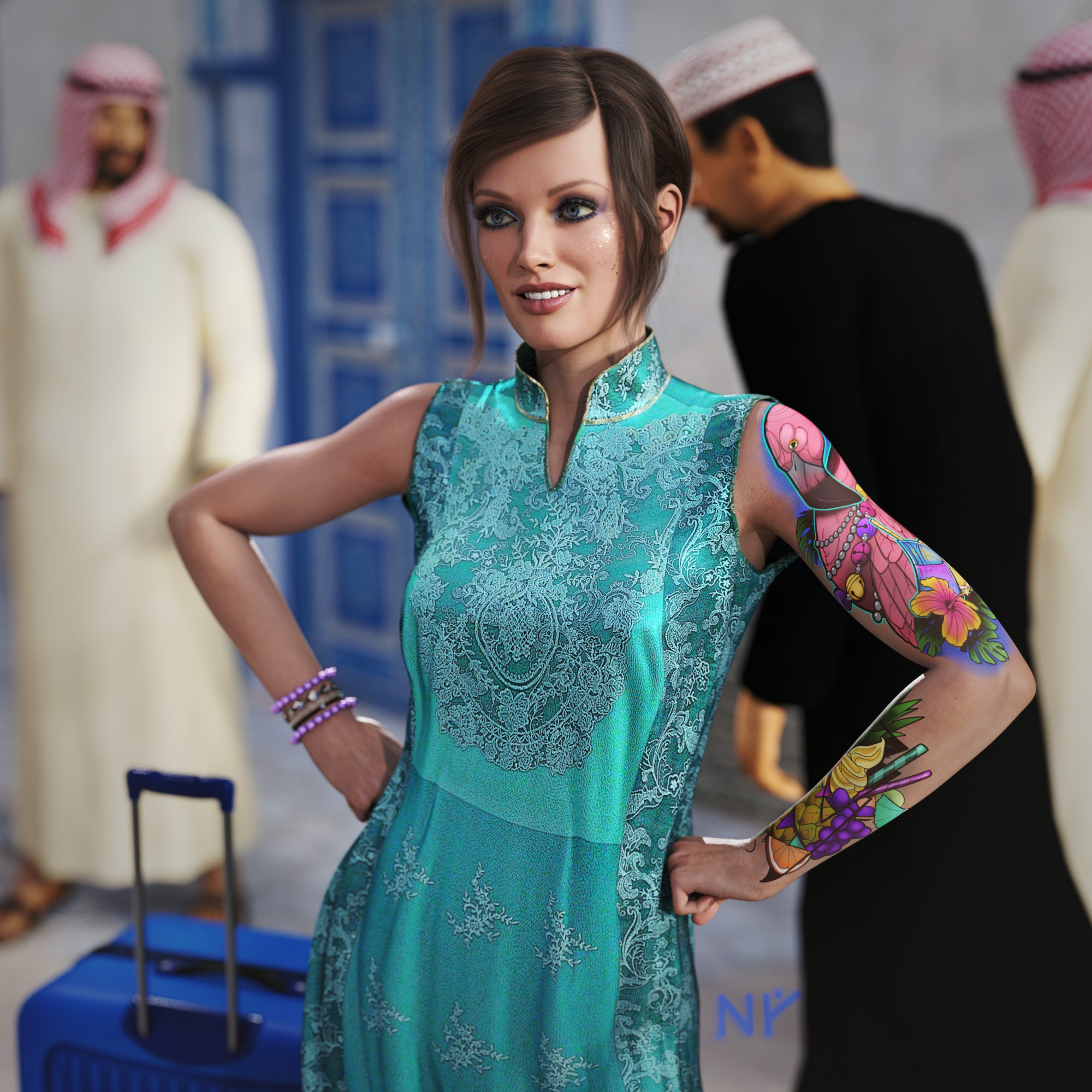
Early Access to Jacqueline 8.1?Okay... slightly modified version of my contest entry (this with a signature, which the entry does not have). Technically, a different image LOL.
Totally used a lot of ideas from the webinar just because. Also, went much more literal for this entry (relative to the theme/parameters).
Kind of inspired by the "Fearless Girl" statue on Wall Street.
Problems? Well, I borrowed the makeup overlays and the tattoo LIE from Victoria 8.1 even though the underlying textures are Jacqueline 8.1. (If there's a case for the 8.1 female bases, it's stuff like the makeup channel and the LIE options, which are applicable to more figures than the ones they came with.) It's not explicitly against the rules, and I think the LIE tattoo from VIctoria 8.1 really adds something to her.
 Does DAZ give up the Pro Bundles?
gfdamron1 said:
I've been having fun with DAZ for about a year now (even bought a new computer specifically for my DAZ hobby). I have a lot to learn, including the pricing and the logic of "deals".
Here's an example of a current sale (or promotion) that I don't understand. I have the bare bones Victoria 8 character. I see the starter bundle listed at full price in the bundles deal. How is this is deal? Can't I buy this bundle any day of the week for full price? Obviously I'm missing something here...
Sometimes you have to add stuff to your cart to see what price Daz wants you to pay. If Walmart worked that way, they'd never have gotten past their first store.
Does DAZ give up the Pro Bundles?I've been having fun with DAZ for about a year now (even bought a new computer specifically for my DAZ hobby). I have a lot to learn, including the pricing and the logic of "deals".
Here's an example of a current sale (or promotion) that I don't understand. I have the bare bones Victoria 8 character. I see the starter bundle listed at full price in the bundles deal. How is this is deal? Can't I buy this bundle any day of the week for full price? Obviously I'm missing something here...
Daz 3D is part of

Connect
DAZ Productions, Inc.
7533 S Center View Ct #4664
West Jordan, UT 84084Licensing Agreement | Terms of Service | Privacy Policy | EULA
© 2026 Daz Productions Inc. All Rights Reserved.