-
Celebrity Look-a-Likes for 3D figures part 3
derezz119 said:
https://www.most-digital-creations.com/g3_g8_celebrity_series_88.htm
No idea who this is. Anyone know?
Victoria Justice, perhaps?
Looking for a particular figureAhh. Thanks. Right, the hair is probably Voss Hair. The character doesn't jump out at me as one I instantly recognise. Looks a bit like Victoria 8, but with a different texture and morph. If the character appears in several places, probably a ready made one not generated by several graphic novel authors independently. I am sorry, but I don't recognise it. I feel I should. This is going to niggle.Is there a Freja 8.1 version?ioonrxoon said:
Sevrin said:
CHWT said:
ioonrxoon said:
Freja comes with both g8 and g8.1 versions, the one in the promos is probably the 8.1 version.
Really? From the product page I can't see it somehow.It's true, except for the part about it being true.
It's Freja applied to 8.1.
Maybe it was updated since you got it, bought the bundle 2 days ago with the Drago sale and I have both 8 and 8.1 duf files in there.
Yeah, it was updated with an 8.1 version shortly after the 8.1 base character and Victoria were released. One day I opened up my DIM and was surprised it was there.
ANIMATION CONVERTER V4 TO G1 FemaleHi,
I was also having the same problem. I loaded victoria 4.2 and genesis via smart content. I get the "victoria 4.2 is not loaded in the scene. Be sure you are working with the Base Victoria 4.2 figure." error.
What was happening is that a lower case v was being used for victoria 4.2's name. I was about to post here when I noticed the caps were different, so I post here just in case someone else has the same issue. The fix then is to capitalise the leading v so "victoria 4.2" is "Victoria 4.2"
Cheers.
Daz Original 8 Figures - Most Photorealistic Skin?I say Jada 8.1 and Victoria 8.1. There are others like Babina and etc. but for me those two are the most realistic base skins I have seen.
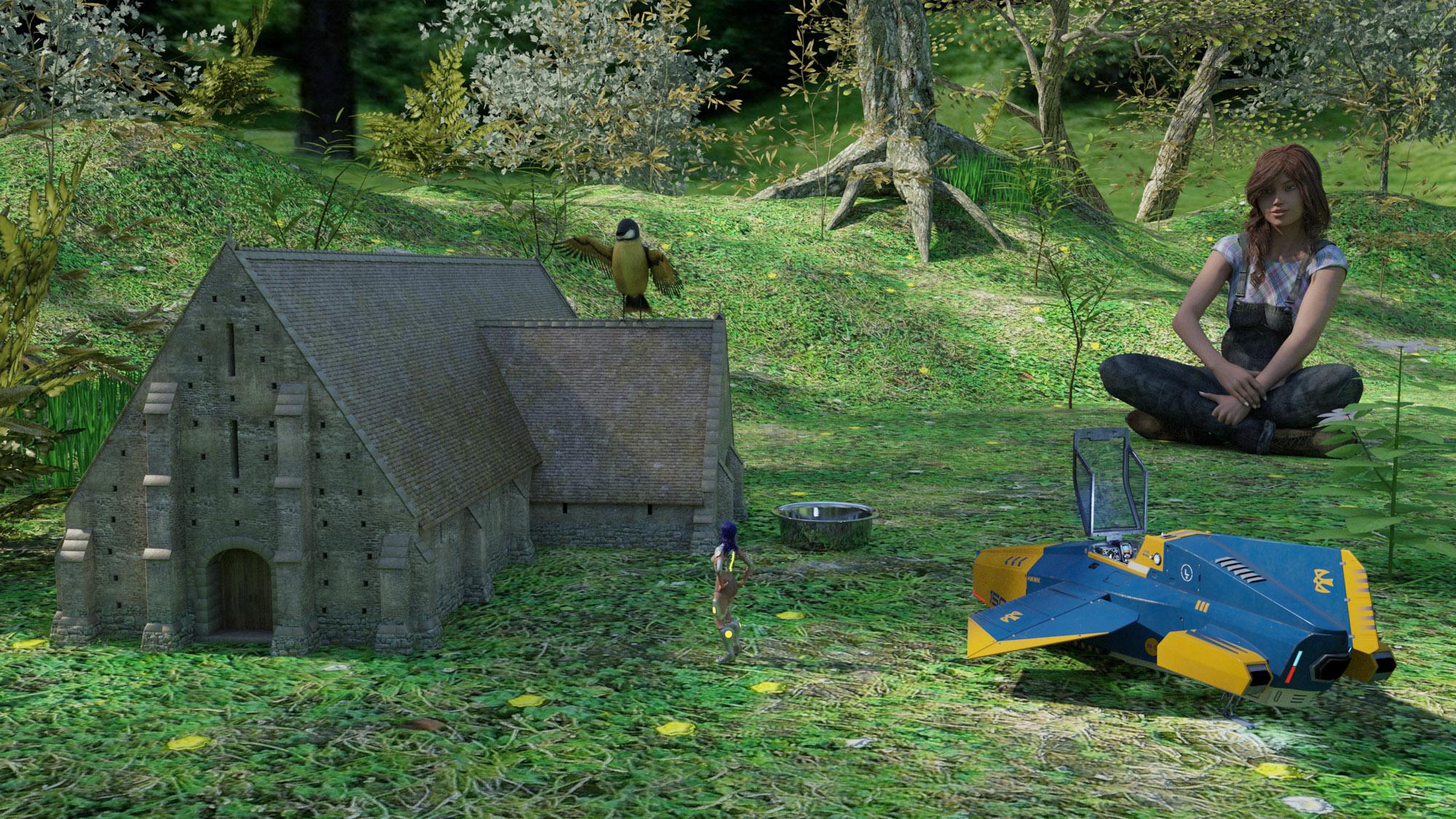
[Closed] RRRRR - Coming Late Excuses - Render Contest!Tag:Totte#9
#4337 Milena for Victoria 6 (19105)
#7080 Tithe Barn (17767)
#3964 Luminous Melody (11844)
#6895 The Magical Forest (58085)Also used:
Susan Hair + CW Overall + Sitting Vicky Poses
V4 + Amy Elite Textures + SciFi Hunter + V4 Acasia
Aircraft Hawk
Songbird
Dog 8 AccessoriesShaders and scripts used:
RSSY 3Delight to Iray
JM Human Shaders
UHT2 Ultra SalonThe little forest birdhouse
Lucy was late for school, and when her teacher asked her why, she said that when she was checking the birds at the little birdhouse in the forest, a small alien spaceship landed and a girl with blue hair climbed out of it started to talk with one of the birds.
 Aurore not incompatible with New Anatomical Elements for V 8, Please help me to solve this problem.
Please don't post nude images. The anatomical element set is not from the Daz store, you may need to ask on the vendor's site. In general, anything for Victoria 8 should work with Genesis 8 Female. Genesis 8.1 Female may have issues with surface names or if the 8.1 character uses the new 8.1 UV set. Assuming you are using this Aurore https://www.daz3d.com/aurore-for-genesis-3-and-8-female that shouldn't be an issue, but if you are using a character preset to load the figure make sure it is the Genesis 8 version.
Aurore not incompatible with New Anatomical Elements for V 8, Please help me to solve this problem.Aurore do not incompatible with New Genitalia for Victoria 8, Please help me to solve this problem. What can I do?
(Inactive) and Missing orders from 2001 forward.I was looking for a specific purchase I made long ago, and I noticed that a lot of my Order numbers lead to a page not found.
I also see a lot of (Inactive) stuff from Mike and Victoria 1.
I should have all these files ona DVD burm. (Yeah I'm THAT old)
As I'm trying to get back into the hobby, I would like to know if this is a temporary issue, or if us old timers have just been dismissed
When a $120+ order turns up a "page note found" it feels kind of wrong.Announcing: Daz Deals Browser Add-on IIKnittingmommy said:
jbowler said:
"Only show owned" seems to be working correctly for me; I just scanned the first page of the store but all the products listed had the "download" icon. I also turned on "hide items I own" at the same time and, indeed, the store only showed the gift card and platinum annual membership products.
The function seems to work fine on the main pages, but if you do a search for a particular item and then try to use the "Only show owned", it doesn't work properly with the search function. It used to work with a search before the store upgrade.
That never worked for me; the "search" list always comes up with "Hide items I own" checked and unchecking it doesn't help (regardless of "Only show owned"). Behavior does seem to have changed; I think clicking the pretty much useless check boxes used to cause a refresh of the search result, now it doesn't and neither do the drop down filters. I suspect that problem is on the DAZ Productions side.
I always had to combine a search on my "Product Library" page to find matching things I own with a search in the store "Search" box for un-owned things. Even that doesn't seem to work as I would expect because the search matching in the product library seems to behave differently. E.g. a store search for "victoria dress" gets me the RY Martha Character and Hair Bundle, which doesn't seem to have either "victoria" or "dress" in it; it looks like the store search uses product filter keys as well as the product names whereas the product library search (which gets me no matches) seems to require an identical string match on the. "mid victorian outfit" gets me matchs in my product library and the store, "outfit victorian mid" gets nothing in my library but returns the identical matches from the store. Clearly this aspect of the behavior is all down to DAZ Productions.
Shout out to the creators of more realistic body typescertaintree38 said:
I love Beverly's look. But as j cade pointed out, that relatively small waist is a bit unusual for someone her size. She could be a plus sized model. But, yes, she is closer to what I usually see in my neighborhood than Victoria. I will definitely be picking her up at some point.
I imagine she's wearing a corset for that look, the waist worked really well in that picture of Mechasar with the suit thingy on I thought. Otherwise, no, not very natural, but she does look rather muscular and firm overall, so a slack belly wouldn't have fitted her well either I guess. Maybe one can achieve a happy middle in combination with some other morphs.
i just wish I didn't need Brooke for her, I really don't like that character's face at all.
Shout out to the creators of more realistic body typesI love Beverly's look. But as j cade pointed out, that relatively small waist is a bit unusual for someone her size. She could be a plus sized model. But, yes, she is closer to what I usually see in my neighborhood than Victoria. I will definitely be picking her up at some point.
Is it possible to get Leony's head on G8.1F?Rod Wise Driggo said:
Sure, why not, just see attached image:
- left is Leony character normally loaded (on G8)
- right is G8.1F with leonyAll you need to do is
- load G8.1F
- apply Leony Head and Body shape - either HD or not (the headshape needs Victoria 8 which is automatically dialed in at 100%)
- then apply Leonys custom Eyes, Lacrima and Lashes
- then apply Leonys h.mat
- then hide or delete the G8.1F default lashesThanks!
Is it possible to get Leony's head on G8.1F?Sure, why not, just see attached image:
- left is Leony character normally loaded (on G8)
- right is G8.1F with leonyAll you need to do is
- load G8.1F
- apply Leony Head and Body shape - either HD or not (the headshape needs Victoria 8 which is automatically dialed in at 100%)
- then apply Leonys custom Eyes, Lacrima and Lashes
- then apply Leonys h.mat
- then hide or delete the G8.1F default lashes
Is it possible to get Leony's head on G8.1F?Is it possible to get this head: https://www.daz3d.com/leony-hd-for-victoria-8, on G8.1F? Dialing the head morph is not enough, I think RY uses some custom eyes or some kind of custom morph. Is there a way to get all that working on G8.1F?
Importing old Poser props to DAZ Studio - is it possible?The same Victoria 4 was, and still is, used for Poser and DAZ Studio. Most Poser format products can be used directly in Studio without the need to manually import them (Poser products started to diverge at some point, but I do not know what makes the distinction. It is pretty safe to say .cr2, .pp2, .pz2 and some .mc6 files are okay, but most .pmd, and all .mt5 will not load in Studio), but they do install to a different part of the Content Library. In the Content Directory Manager, make sure you have both DAZ Studio Formats and Poser Formats configured. If you install everything in the same place, then the path for each one will be the same.
Studio can automatically import from the Poser Formats area without any intervention on your part when using the Millennium Generations 1-4 figures and their associated clothing, materials, props, etc. Getting them to work with Genesis-level figures will require a little more effort. Auto-fit will handle simple figures (standard skeleton rigging) with little trouble, but it isn't always perfect. Any fancy items with extra bones will lose that functonality when using Auto-fit.
Each generation has the previous generation's projection templates, but to skip more than one or go backwards, there are products that provide clones of figures for a particular generation of Genesis. There's Victoria 4 for Genesis 2, SY Victoria 4 And Michael 4 Clones For Genesis 8, and pretty much any product with the word Clone in it.
There are a number of products that attempt to make the transfer easier. Much has been written about them, but to start, here are some things to look for:
Ultra Templates (for various Genesis versions)
Fit Control (also for various Genesis versions)
Wear Them All (for Genesis 3)
Ultimate Clothing FixerEventually, products that can convert (avoiding Auto-Fit) clothing, hair and props were made to transfer between Genesis generations, not just from Victoria 4. Look for products from Riversoft Art and Sickleyield, like RSSY Clothing Converter from Victoria 4 to Genesis 8 Female (there's one for Michael 4, too) among several others. Results may vary.
Then there is always the manual approach (with which I am not really familiar) where you have more control over the results, but will take more time.
Genesis 8 vs 8.1 OpinionI loaded Gen 8 Basic Female and Gen 8.1 Basic Female, added the same hair to both, and clicked Render. I really don't see a difference. Am I missing something? See attached photo. Gen 8.1 is on the left, Gen 8 is on the right. Daz says "The Genesis 8.1 skin shader introduces improvements for Subsurface Scattering (less waxy skin), resulting in incredibly lifelike skin." I literally see no difference in the two.
Also, wondering why Victoria 8.1 is $44.95, while other new 8.1 characters are only like $18.95. Why is Victoria more than twice the price? And you have to spend another $39.95 to get the Victoria 8.1 HD Add On.
Anyway, what is your opinion of the 8.1 model.?
PS. Using Daz 4.15 and latest NVIDIA Studio Drivers that were released this month.Importing old Poser props to DAZ Studio - is it possible?Hello.
I started to work in DAZ few days ago, so beare with me please.
I'd like to know (my main question) if there's a way to import and above all - USE in DAZ3D things made for Poser (old props made in 2013).
For the first question I found solution (at least I think I have imported stuff to DAZ - some clothes)
Unfortunately from that point things are getting confusing for me...
The props I found and imported to DAZ were made for Poser - Victoria 4 model...
Is it universal type of model used in a past in both programs or completly different figure apart from genesis used now in DAZ?
Does the problem I have with the props (the are not loaded into scene) is caused by the fact I don't have proper model in my DAZ instance (or scene) for this prop? After dobuble click clothes don't load into the scene (nothing happens).
Is there any way to convert these props (Poser Victoria 4 to newer figure like G3 or G8) and if its possible what steps should I take, what kind of additional soft should I use?21 Years, a search in time3dLux said:
It seems that there was no big announcement for the Genesis 3 base figures. This is what I found from something written in June 24, 2015
Some readers may be wondering: “What?! I only have Genesis 2, where do I get Genesis 3?” Good question — none of the Victoria 7 DAZ Store pages have any indication of how you get Genesis 3. The latest version of DAZ Studio states clearly that it only ships with Genesis 2. DAZ’s main Genesis 3 information page has no links to any G3 downloads or product.
So the process of getting G3 seems a real mystery. It took me 40 minutes of searching until I found the following aside, buried in a Forum thread:
“You can select it [the new G3 Female icon] in your Library [inside of DAZ Studio 4.8 beta only] then click the Download & Install button”
The same observation was made in an article from the same source written on November 17, 2015. In both cases the articles were written after the official launch dates of Vickie and Mike 7 as cited my @MelanieL. The low key rollout of the Genesis 3 base may be the reason why there was no big announcement. @Ghosty12 do you have a link or image to the Genesis 3 promo page?
Here is a part of the original Genesis 3 promo blurb from way back in 2015.. It will be six years since the release of Genesis 3 next month..
Scooby-Doo characters?RKane_1 said:
Well, there is this but it for V4 although there Riversoft has aqwoneerful convertor that would open up some possibilities. :)
https://www.deviantart.com/terrymcg/art/Daphne-costume-for-v4-and-A4-610012903
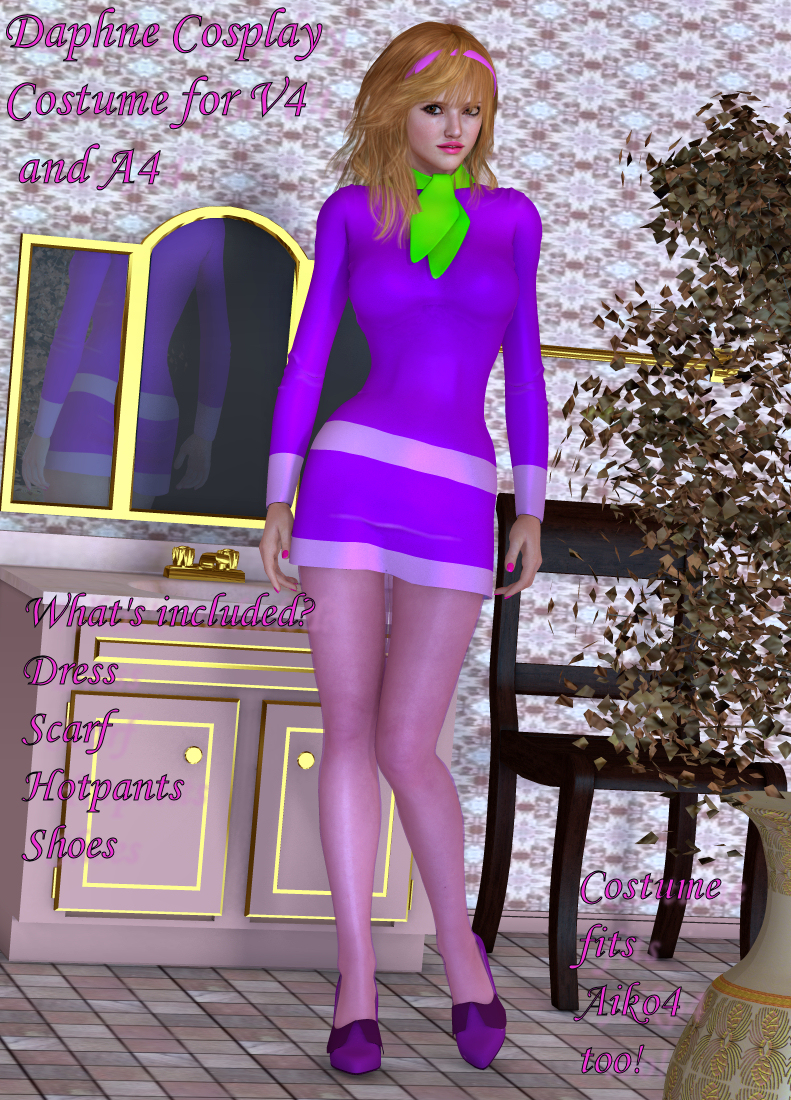
I can verify that Riversoft and Sickleyield's clothing converter does an amazing job of converting terrymcg's clothes from V4 to G8F. The cothing morphs are intact and functional. There may be issues with gloves, but that's it.
Daz 3D is part of

Connect
DAZ Productions, Inc.
7533 S Center View Ct #4664
West Jordan, UT 84084Licensing Agreement | Terms of Service | Privacy Policy | EULA
© 2026 Daz Productions Inc. All Rights Reserved.