-
Like a Phoenix from the Ashes, Who Wants to Render a Superhero?
chazcc69 do you know how to use the surface tab?
If you are using DS4 if you go into the materials tab under the libraries you can use them from there.
On any other version of studio I believe you may have to apply them manually
make sure you have the right files
http://www.sharecg.com/v/41804/gallery/11/Poser/M4-Comic-Style-Mask-and-Textures
http://www.sharecg.com/v/50203/gallery/11/Poser/M4++-Spidey-Socks
here are a couple of ones I have done by tweaking Joes texture
http://www.renderosity.com/mod/gallery/index.php?image_id=2244974&user_id=424381&np;&np;
http://www.renderosity.com/mod/gallery/index.php?image_id=2201271&user_id=424381&np;&np;
http://www.renderosity.com/mod/gallery/index.php?image_id=2185969&user_id=424381&np;&np;
http://www.renderosity.com/mod/gallery/index.php?image_id=2175403&user_id=424381&np;&np;
Hey guys I finished my last render with captain americahttp://www.renderosity.com/mod/gallery/index.php?image_id=2357014&user_id=424381&np;&np;
Joes original texture was for this set
http://www.renderosity.com/mod/bcs/bodywears-for-michael-4/68718
"For my Summer Vacation I went to...". August Freebie ChallengeSo, here I'yam ons vacation...Yester Island...big whoop. Spent a whole week dere an' dinni't find one damn egg. Wotta rip...
1.) Shawn for M4++ Character Morph. Registration Required.
2.) Moustache 19th from Top.
3.) Mitch Hair
4.) Gritty Bar Props Cigar Ony. Registration Required.
5.) The Fedora Registration Required.
6.) Have A Drink for M4 and V4 Registration Required. Beer Bottle (with textures altered for color).
7.) Tree and Limb Registration Required.
8.) Parrot
8.) 12 Poser Bark Materials 22 Registration Required.*
10.) Fallen Tree 04 InfCove4 Textures Registration Requried.*
* Indicates required item(s) for this Challenge. Used for Backdrop and bark texture on tree. InfCove Item not used, backdrop picture only.
Non-countable items: Michael 4. Paid For: Michael 4 Morphs++ and M4 Casual Wear. Enchanted Island is a DAZ Freebie for the week of August 7 thru August 14 (I'd guess). As always, figure and prop set-up in Studio 2.3 and final render in Bryce 5.5. Postwork limited to adding photo border, paper corners and drop shadow (all in Photoshop) and adding signature. Original render available on request.
Noobie question. Imitate a person in DAZ ??? is it possible?Hi there.
I-m new to Daz (I'm an old maya generalist and so...)I have to imitate a person in Daz. I'm having problems with face and clothing.
I've downloaded michael 4 and then 5.But I'm kinda lost here.For example I didn't manage to change the lips width. Or a specific modifier for the chin.
I mean, in general, I feel that the only tool I have are sliders to mix the faces of predefined characters and by that way it's being very struggling to achieve any similarities with the person I'm trying to imitate.
I tried with shaping parameters and then I found some "called "Jamie morphs"' (for face expressions) but i guess they're not enough at all for this work. The render doesnt have to be realistic at all, the problem is the face not the final look of the render.I didn't find any tutorial over there on how to imitate a person in daz. is it convinient?? I thoght that michael 5 would be the most versatile... ??
Any suggestions, tips, advices are most welcome!!! Thanks and forgive me for the SO-NOOBIE questions!
I'm attaching my disaster results until now, jeje!
PRobelm with clothing part displaying properlyRichard Haseltine said:Does it do that if you render it on its own, not fitted to a figure? Which version of Major Cache is this - as i recall it's available for at least a couple of figures?It is Major Cache For Michael 4 -
When rendered alone it keeps its shape.
When using autofit to genesis, it looks good too almost like it will work. (picture on left is the preview mode)
.. But in rendering it does that super deformed thing you see in the picture. I tried it with a new genesis too, and it did the same thing I tried hiding the chest underneath and stuff, but it still looks warped. . Its a very stunning model. I hope I can get it to work on genesis.
I have attached a picture of how it looks in preview vs. how it renders. This is on a new model
Where is my content installed? why i can find it at Daz Studio.ThinMick has covered the basics of the issue with your saved scenes but it sounds like you aren't completely clear on the installation process and content libraries and there are some complications of that which may be affecting your saved scenes.
The first question is whether you have reinstalled all of the content used by your saved scenes. Saved scenes stored as .DAZ need to access the information stored in the /DATA sub-folder of your DAZ Content folder, and need the same information to be in /DATA as when they were created.
From the screen capture you have three DAZ content libraries, the first being C:\Documents and Settings. If this first folder isn't meant to be a content folder, and it would be a little odd for it to be one, then it might cause you issues and you would be advised to remove it from the list of content folders. I believe C:/Archivos de Programa/DAZ is the Spanish version of C:/Program Files/DAZ and depending on your version of Windows this may cause an issue, it certainly isn't an advisable location for content. If you have any content actually installed under it, then I would advise dragging them to your content library on H:/ and removing it as both a DAZ and a Poser content library. Your H/:Programas/Base/DAZ 3D/Studio/My Library content library should be fine and given the issues with the other two locations specified I would advise dragging all other content into it.
I understand i can find M4 and other products under poser librarys at the content, but my main issue is that my content still isnt appearing under Daz Studio FormatsWhether an item appears under DAZ Studio Formats or Poser Formats depends on the contents of that individual item. Poser format files: .CR2, .PP2, .PZ2 etc will go into the Poser Runtime folders, DAZ format files DAZ, DUF, DS* (where * is any of several different characters) will go into the DAZ content folders. It's perfectly possible for an item to install and only place content into Poser Format, in fact most items prior to Genesis will place the majority of their files into Poser Format.
When you install content you should specify the content folder, and DAZ content should then load into the DAZ Content Folder, with Poser content dropping down into the Runtime folder below that. If you can't find content after installing it, check in the neighbouring folders, the most common issue is files being installed one level too low, or one level too high. If they're in the wrong place, just drag and drop them into the right folder. Some items are sensitive about being installed in the first content folder listed, the Gen 4 figures like M4 being one of them, so if H/:Programas/Base/DAZ 3D/Studio/My Library is your current main folder and the one you installed M4 into then you need to rearrange things so it is the first content folder listed instead of the last.
If you look at the M4 page http://www.daz3d.com/shop/michael-4-base-male-3d-model/ you'll find the What's Included tab lists the included files as Michael 4 (.CR2 & .OBJ), P5+ Material Presets (.PZ2), P6+ Material Presets (.MC6), DAZ Studio Material Presets (.DS). What this means is that under Poser Formats you should find the M4 CR2 installed in the figures folder (and in H:/<>My Library/Runtime/Libraries/Characters/(M4 folder) on your disk), while the PZ2s will be under Poses (and in My Library/Runtime/Poses/(M4 Folder)) and the .MC6s will be in Materials (and in My Library/Runtime/Materials/(M4 Folder)). The only files that should be under DAZ Studio Formats are the DAZ Material Presets. There may also be an Update M4 batch file you need to run, with a shortcut to it placed on desktop which you need to run before being able to use the figure (I can't remember if that is needed for M4, or just for K4 and H4 and the M4 morph packs).
FastGrab Alert thread5 items today:
http://www.daz3d.com/shop/m4-elite-texture-jeremy/
http://www.daz3d.com/shop/epsilon-for-michael-4/
http://www.daz3d.com/shop/v4-elite-texture-maya/
http://www.daz3d.com/shop/hermione-blue/
http://www.daz3d.com/shop/diahme-hair/Problem with Michael 4 - doesn't appear anywhereHi!
I have downloaded Daz Studio 4 Pro and tried to install Michael 4 on my iMac, but it doesn't appear nowhere in my Content Library. I read all tutorials and tried different ways to point the installed files, but nothing works.
Please, could anyone help me?
And is it possible that Michael 4 is not compatible with my iMac version of LION OS 10?Will there be an Auto-Fit Tool for Victoria 4 and other characters?theone20 said:especially since Genesis doesn't even have all the morphs that the Victoria 4 and Michael 4 characters have.Au contraire. Practically speaking, Genesis has more than either (even discounting the fact that it has male, female and child morphs in one figure). With V4 or M4, many of the PBMs are useless because no one will support them in clothing. You can only use them on a figure that's basically naked. With Genesis, autoconform ensures that PBMs are supported no matter what the clothing creator does, and even 3rd party sets like this one that could never practically be used for V4 because no clothes contained the morphs.
I echo the Wardrobe Wizard suggestion. There's a Genesis plugin for it also.
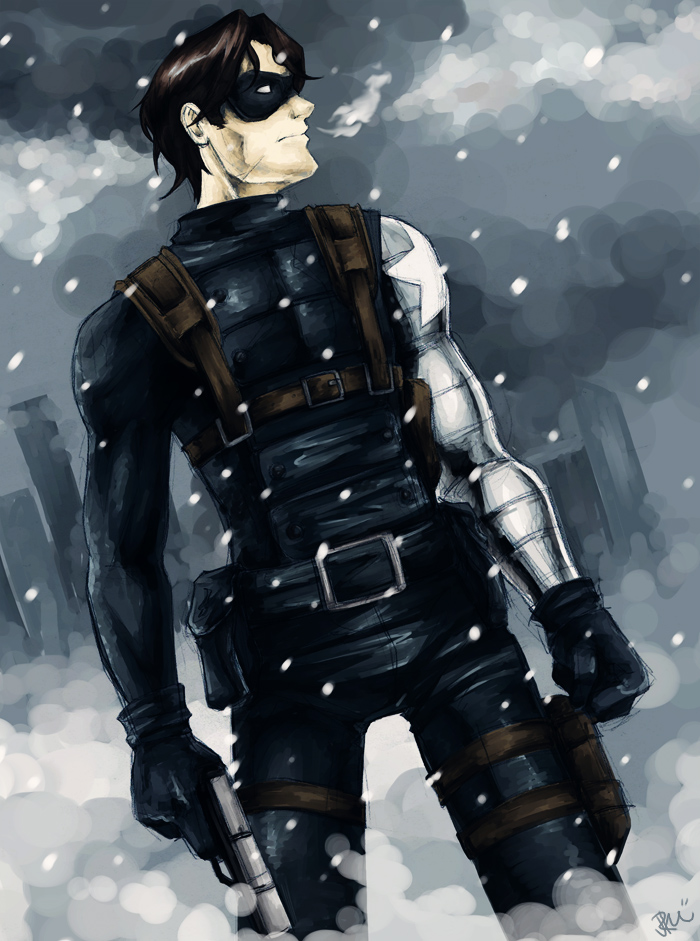
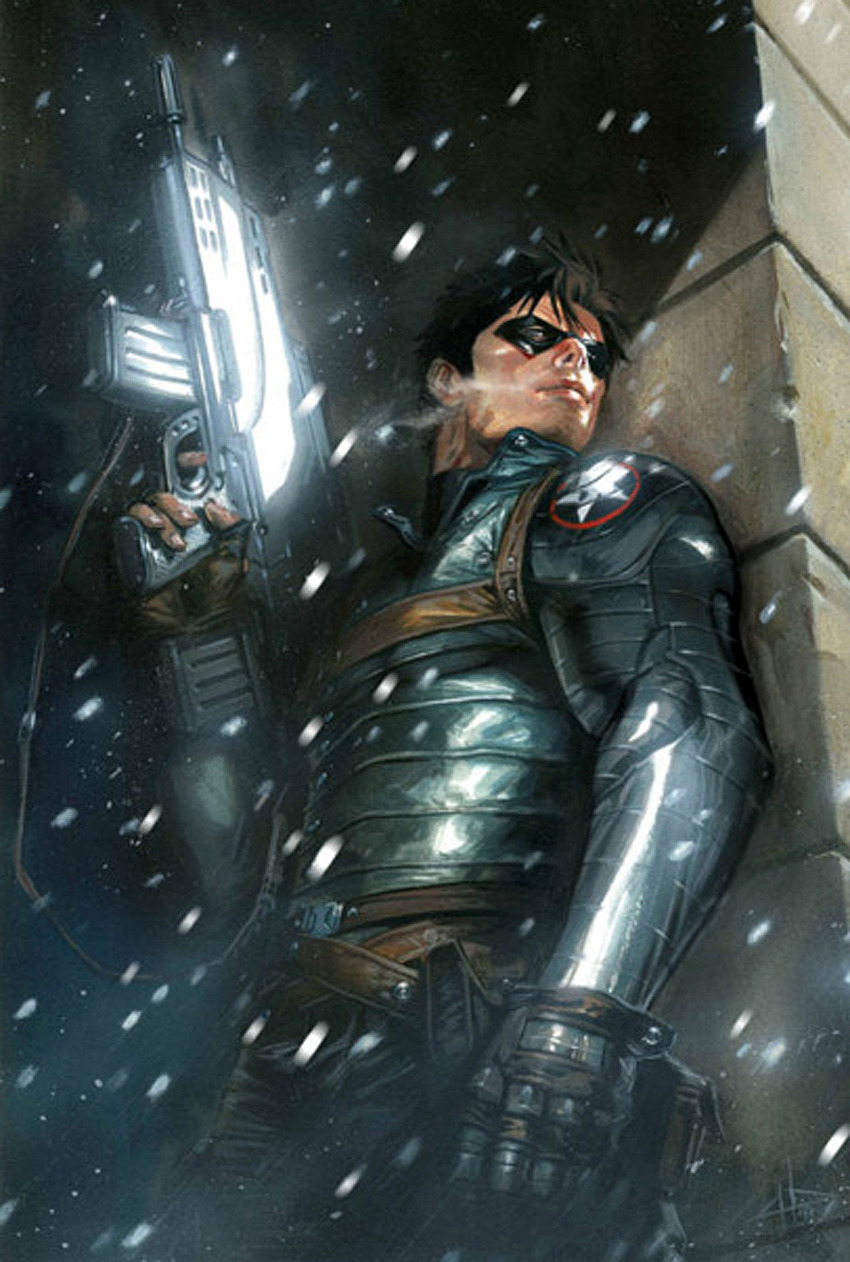
Like a Phoenix from the Ashes, Who Wants to Render a Superhero?JohnDelaquiox said:Is this the character you want to do, Winter Soldierhttp://fc04.deviantart.net/fs25/f/2008/158/5/b/winter_soldier_by_orcasaurus.jpg
http://24.media.tumblr.com/tumblr_lu5jk4jtgI1qhpx4lo1_1280.jpg
Yep, that's him. Some of the pictures show ammo packs and/or grenades on his chest harness, which is why I was looking at Ghost Agent M4/H4 (yeah, the same problem's happening on the Unimesh).JohnDelaquiox said:
http://www.daz3d.com/shop/bad-guy-for-genesis/http://www.renderosity.com/mod/freestuff/details.php?item_id=63279
Let me also plug a piece from a very good friend of ours that should take care of the cyber arm
http://www.renderosity.com/mod/bcs/classic-banded-cyberarms-for-m4/87777
The Cyberpunk arm is snazzier, but joequick's Classic Banded CyberArm is far more accurate! Thanks for rec'ng it. Much as I like the Bad Guy's shoulder holsters, they're more cop-looking than super-agent IMHO.maybe you can find what you need in this set or at least something similar its one of my favorite period clothing sets for M4 http://www.renderosity.com/mod/bcs/m4f-suit-for-m4/86519
Oooooo, beautiful! Not sure that harness works for this, but thanks!Will there be an Auto-Fit Tool for Victoria 4 and other characters?theone20 said:especially since Genesis doesn't even have all the morphs that the Victoria 4 and Michael 4 characters have.Nothing that can't be fixed with GenX.
Will there be an Auto-Fit Tool for Victoria 4 and other characters?Not everybody uses Genesis, and I would like an easy way to fit clothes on the V4/ M4 characters I already put some considerable effort into without having to do it all over again with Genesis, especially since Genesis doesn't even have all the morphs that the Victoria 4 and Michael 4 characters have.
Like a Phoenix from the Ashes, Who Wants to Render a Superhero?Character is Grendel
KickAir 8P said:crikett said:Rejoining here with (IMHO) a much under-rendered character . . .
Beautiful work, but who is that?JohnDelaquiox said:KickAir 8P said:JohnDelaquiox said:I'd like to know where you got the leg-strapped holsters you used in this snazzy render.
Most of that is from Cyber Punk for M4 and the Expansion from my Friend Jeff ElorOnceDark and the rest is from Hardcore M4 . . .
Thanks! Gonna try converting some stuff to Genesis, hoping to put together a decent Winter Soldier. I was already planning on CyberPunk M4 for the arm, how did I miss those?
Cyber Punk M4 is one of the best outfits I have bought . . .
It's seriously versatile, yeah.
Still working on a Winter Soldier, hoping for some help with the chest harness. I was originally going to use the harness from Ghost Agent M4/H4, but two months after I reported a vertex issue starting in DS4 it's still not fixed so I'm looking for another option. Anybody got any ideas?Like a Phoenix from the Ashes, Who Wants to Render a Superhero?crikett said:Rejoining here with (IMHO) a much under-rendered character . . .
Beautiful work, but who is that?JohnDelaquiox said:KickAir 8P said:JohnDelaquiox said:I'd like to know where you got the leg-strapped holsters you used in this snazzy render.
Most of that is from Cyber Punk for M4 and the Expansion from my Friend Jeff ElorOnceDark and the rest is from Hardcore M4 . . .
Thanks! Gonna try converting some stuff to Genesis, hoping to put together a decent Winter Soldier. I was already planning on CyberPunk M4 for the arm, how did I miss those?
Cyber Punk M4 is one of the best outfits I have bought . . .
It's seriously versatile, yeah.
Still working on a Winter Soldier, hoping for some help with the chest harness. I was originally going to use the harness from Ghost Agent M4/H4, but two months after I reported a vertex issue starting in DS4 it's still not fixed so I'm looking for another option. Anybody got any ideas?DAZ Studio 4.5 RC 3 Is Now Available for Download3Ddreamer said:I have been trying an experiment this last week - opening some old *.daz files in RC3, and render. Idea was to compare renders for my own satisfaction because I think the results are better in DS4 (and provide evidence for a 'discussion' I'm having with a friend I'm trying to get into DS)I have one file which will not open in RC3 (I hadn't tried this in RC1 or 2) but still opens in DS3 fine. In RC3 it gets to 20% and hangs the laptop every time. When I open in DS3 the only thing I can see that could be causing it is Optitex's Free Dynamic Apron, (which is no longer draped on Michael 4 as it was). I have yet to try removing the apron and saving to see if that opens, will do that later.
Can anyone else replicate this to see if it is a bug? or just something funny with this file.
Yes I've had that happen on 4 or 5 old files so far. A couple caused the entire computer to lock up, forcing me to reboot. The others simply caused RC3 to spontaniously shut down, kicking me back to the desktop. In response to the other poster who mentioned Dynamic Cloth, there was NO Dynamic cloth objects in any of my files. So that was not causing the problems in my case.
I'd been going through my old files, both DS2 & 3 versions, saving new copies in the DUF format, when this started happening.
Hopefully the next release, will fix this.
My system is 3g Intel Quad Core Extreme(not overclocked), with 8 gig ram. Running Win 7, 64 bit, with sp1 and all latest updates.DAZ Studio 4.5 RC 3 Is Now Available for DownloadI have been trying an experiment this last week - opening some old *.daz files in RC3, and render. Idea was to compare renders for my own satisfaction because I think the results are better in DS4 (and provide evidence for a 'discussion' I'm having with a friend I'm trying to get into DS)
I have one file which will not open in RC3 (I hadn't tried this in RC1 or 2) but still opens in DS3 fine. In RC3 it gets to 20% and hangs the laptop every time. When I open in DS3 the only thing I can see that could be causing it is Optitex's Free Dynamic Apron, (which is no longer draped on Michael 4 as it was). I have yet to try removing the apron and saving to see if that opens, will do that later.
Can anyone else replicate this to see if it is a bug? or just something funny with this file.
Using DAZ to create character sheets... help :PThis video shows how to load the Michael 4 (male) model and apply the muscle maps
Michael 4 clothes help!You've said both:
"I should mention I never downloaded the Poser files for any of my content,"
and"I did indeed download and use both installers"
Does that mean you have since gone back and downloaded the Poser installers you had ignored before? For Studio you need both the Poser and Studio sets of files. If you haven't been back and rerun the installers, then you need to do that.
Despite files being referred to as 'Poser', Studio has always used them, it has a parallel set of files that can be used solely on Studio, but to allow content to be used on both Poser and Studio it has always been provided in Poser format (Generation 5 content for Genesis is the only exception). You can't ignore the Poser files, they are fundamental to the products you are buying, and you need to be able to find your way around the Poser file structure - which is things like runtime/libraries/character when seen on the disk, or Poser Formats/(parent folder of runtime)/figures when seen from within the Content Library Tab of Studio.“this item requires you to select an item in the scene”
That's the error message when you try to use a texture without having the item it goes on selected. Are you getting to this texture file via the Content Library tab (specifically under Poser Formats/(whatever)/figures/m4cowboy), or via the Smart Content Tab? How many different files do you see there?"The only thing I haven’t installed yet is the additional resource files that you can download from the product page. It’s asking me where I want to install them, and I have no idea what to tell it."
Those are template files, they are used as guidance for creating new textures and are completely unnecessary for the outfit to function. They can be installed anywhere, or not at all. It won't make any difference to the whether the outfit functions or not.
I've checked back and I do own the Cowboy pack. I've just reset it and there are four installers:
5205552 8/1/12 Cowboy For M4 and Hiro - Cowboy For M4 and Hiro - Poser Files - exe - pc Available 4
5205552 8/1/12 Cowboy For M4 and Hiro - Cowboy For M4 and Hiro - Poser Files - zip - mac Available 4
5205552 8/1/12 Cowboy For M4 and Hiro - Cowboy For M4 and Hiro - DS Files - exe - pc Available 4
5205552 8/1/12 Cowboy For M4 and Hiro - Cowboy For M4 and Hiro - DS Files - zip - mac Available 4
You need to download and run both of the files identified as PC, which I've bolded (or the Mac files if you are on a Mac) nb your order number, the first thing on each line, will be different, but that is not significant.
If I download and run the Poser files installer, 8648_4_dpc_CowboyForM4andHiro_4.exe then it installs 15 .CR2 files into runtime/libraries/character/m4cowboy, 4 .PZ2 files into runtime/libraries/poses/m4cowboy and 4 .PP2 files into runtime/libraries/props/m4cowboy (and other files elsewhere, but these are the important ones).
If I download and run the Studio files installer, 8648_2_ds_CowboyForM4andHiro_2.exe, then it installs 17 .DS files into (my content folder)/people/Michael 4/Clothing/M4 Cowboy, and 6 .JPGs into (my content folder)/runtime/textures/RD/M4 Cowboy.
You need to confirm that you have all of both sets of files installed, and run the relevant installers if you do not.Is there any way to put morphs into folders in the Parameters tab?Personally I just edit the morph files directly.
I copied the M4 Creature Creator Morphs via GenX last night.
If I go into the Genesis data structure now they're in data/DAZ 3D/genesis/base/morphs/D3D Gen X/Michael 4
First thing I do is move them to data/DAZ 3D/genesis/base/morphs/D3D Gen X/M4CC Head or M4CC Body - that reflects the divisions that existed in the M4 versions, but I can go further, and have sub-folders for M4CC FHM, M4CC Mouth, whatever I want.
If I load up a Genesis now it will still work exactly as before, the actual folder structure is overridden by the divisions stated within the .dsfs
I can go further and move everything from /D3D Gen X to a new /M4 folder. Load another new Genesis and the morphs are still displayed as before
Just this part of the process is useful for categorising the morph files to get at them later, but if we now open up the individual morph files, down near the bottom of the first page of text will be something like (this is from one of the FHMs):
"region" : "Head",
"group" : "/Generation X/Michael 4/Morphs | Shapes/CreatureCreator/Full Head",
I can quite happily alter that to
"region" : "",
"group" : "/M4/M4CC/FHM",
Save that and load up Genesis, and now there is an M4 folder at the same level as Actor in the parameters tab, with /M4CC/FHM under it.
There seems to be some complexity with the 'region' entry, leave it as "Head" and the files appear in "Actor/Head" rather than "Head" alone, but the customisability to lay out the morphs exactly as desired is there.
I haven't confirmed whether or not there is any issue with using this modded structure and, say, a dialed character morph, but it's certainly applicable to morph packs that aren't used by other products, and potentially to all morphs.Scavenger Hunt Contest! (Closed!)I only saw this TODAY (7/31), so I'm glad I could squeeze it in. This is the first contest I've entered in almost 3 years.
Here are my scavenger items:
Total Items = 1768
Total Pages (50 per page) = 36
---------------------
Pg 1, 3rd up = Abraxus by Danie & Marforno
2 clicks, 7th down = LaSombra Hair by 3D Universe
Middle Item (# 26 on Pg 18) = Luminous Foxy by Raiya
Last Item on Last Page = Zubarra by DinoRaul
Birthday Item (Pg 31) = The Freak 4 Pro Bundle - I used the Freak 4 by Sarsa & Skywolfe and the Brock Character for Freak 4 by Morris from the bundle.Additional item(s)
Foxy Hair by Valea - kind of necessitated by drawing Luminous Foxy, which could only BE used with Foxy Hair.
Technically, Michael 4 by DAZ, since I needed that to load the Freak 4.Our Barbarian has been hammered in the head once too often (note the glassy, slightly crossed eyes), as he's slapped a wig on his pet and named it his concubine.
NO postwork, rendered in DAZ Studio 3 Advanced 64 bitMichael 4 clothes help!Oh no! I just figured if something was compatible with older figures it would be compatible with newer versions of the same figure. Looks like I'm wrong. However, the one pack I bought is for Michael 4 and Hiro, so it should work. It's just the "Cowboy For M4 and Hiro Pack" but I can't get anything to load up.
Edit: I just figured out a potential second reason why it won't work. Do I need to have both Hiro AND Michael? I only have M4 and don't have Hiro at all. That might be it, even though I'm trying to load the clothes on Michael?
Daz 3D is part of

Connect
DAZ Productions, Inc.
7533 S Center View Ct #4664
West Jordan, UT 84084Licensing Agreement | Terms of Service | Privacy Policy | EULA
© 2026 Daz Productions Inc. All Rights Reserved.