-
Face Transfer 2 eyelash problem with eyes closed
correct....when you close the eyes...the lashes from the Face Transfer remain on the upper eyelid.
Vicky 9 vs The Girl 8Cybersox said:
DustRider said:
Another no vote, she doesn't look like the girl at all to me. I've kind of given up any hope of a Girl 9. Even if they make one,, I'm afraid that she wouldn't really look like The Girl. I didn't really like The Girl 8, but the Girl 7 for Girl 8 made up for what Girl 8 was lacking. I may have to break down and manually transfer Girl 7 for Girl 8 to G9.
Hmm. Would that make her a Girl 7 of 9? Now that there are authentic Trek style outfits in the DAZverse, that might actually be worth seeing. :)
lol ..... I didn't even come close to thinking the obvious there! That could be quite insteresting ..... hmmmmm
Premier Questionskpr said:
crosswind said:
kpr said:
@crosswind I was interested in MeshGraber 4 (I wasn't so interested that I immediately upgraded to Premier!)
Could you tell me if you can "add" geometery to a model with the "Premier Hijacked Version" of MG4? Like add a pair of horns to a human head.
You can sort of do this in Hexagon (and Daz Bridge), by extending existing polys, but you can't add new polys (if you do, the Daz Bridge won't import it - Maybe you can do the same in Blender, and import it with MorphLoaderPro?)
If/when you've a little while, be great if you'd check on the functionality in Premier

Oh, no, you cannot "add geometry" but just "deform the geometry", as you said: extend existing polygons by grab (select) them first then drag or push. Now MG 4.0 (Geometry Sculptor) provides a Draw Brush, you can also deform the mesh with Draw Brush... but as usual, you still can do these on Base Mesh, i.e. no SubD manipulation.
I'm also a Blender user, so yes, most of the time it's easy to sculpt complex shape in Blender and import the shape back to DS as a morph by using MLP.
Well, Mesh Grabber 4.0 is better than 3.0, you can check this video https://www.youtube.com/watch?v=Lr5uEgesPnc No big change. But there's still limitations and some bugs. You can check this post:
https://www.daz3d.com/forums/discussion/comment/8903241/#Comment_8903241
@crosswind Thanks very much for the testing and info/links - very kind of you to do and post these

Is it worth $19 a month to me?... Not sure given I can get a similar result in Hexagon and I can use Blender well enough if I want too (has been quite some time, but even so) and would figure MLP if I need to - but would have been great to do all in one "environment"
You're welcome ! Then, TBH, if only for using this plugin, personally I don't think it's worth $19 a month... unless you're a routine buyer as well as use other tools frequently.

I'm a tech-driven guy first of all, and want to know how DS de-activates Premier exclusive content when the subscription expires... so I just paid one month, haha ~
MimicMolly's Renders & WIPs3Diva said:MimicMolly said:
To my surprise, I sketched the full body drawing of my OC under an hour. And while I'm inspired and motivated, I'm going to work on that instead. However, I didn't re-render or anything. So here is the render next to a crop of my drawing. I eyeball everything, so I don't think their faces will line up. (Especially the "3" mouth.)
I'm actually more ahead on my drawing, since I've been cleaning it up and painting over it to refine the lines. But since this is a DAZ Studio forum, I don't feel like it's "correct" for me to show further the progress on this drawing here. Also, it doesn't seem like it makes a difference which Genesis base I use as the original reference. I am always looking at photos of actual human beings to make sure the bends are more believable. The face morph used here was some random test one I made with FaceGen for G8M. The body is Dain, but when I was drawing, I pulled out my Made-To-Move Ken and referenced his leaner body instead. This is why the body doesn't quite match anymore.
I'm tempted to remake the face in G9. I know that Faber Inc's Nahuel for G9 would be a good base to start from. At least the face. I just need to check if I downloaded him or not.
Your drawing skills are awesome! WOW! A very cute OC too!
Thanks. I still have this scene saved. Maybe I should try to remake it with the G9 toon one of these days. I will have to make him as a regular human though, since I don't own any bunny ears that big. But I don't think that matters much.
Vicky 9 vs The Girl 8DustRider said:
Another no vote, she doesn't look like the girl at all to me. I've kind of given up any hope of a Girl 9. Even if they make one,, I'm afraid that she wouldn't really look like The Girl. I didn't really like The Girl 8, but the Girl 7 for Girl 8 made up for what Girl 8 was lacking. I may have to break down and manually transfer Girl 7 for Girl 8 to G9.
Hmm. Would that make her a Girl 7 of 9? Now that there are authentic Trek style outfits in the DAZverse, that might actually be worth seeing. :)
Vicky 9 vs The Girl 8Another no vote, she doesn't look like the girl at all to me. I've kind of given up any hope of a Girl 9. Even if they make one,, I'm afraid that she wouldn't really look like The Girl. I didn't really like The Girl 8, but the Girl 7 for Girl 8 made up for what Girl 8 was lacking. I may have to break down and manually transfer Girl 7 for Girl 8 to G9.
Anime Toons and Filatoon Shader Q&AArtsyDragon said:
I'm having quite a time of trying to get the anime figures to look like other G9 characters I want to turn into Toons. If I use the anime figure, they look weird when I remove the anime head and body then find the head and body to apply. If I use the regular figure, their eyes are funky. In the screen shot below, the anime is on the left, the character Talan is on the right already with the Toon shader applied.
Any suggestions? I would love to make the Gen9 figure have the right eyes. I just am not sure how to go about it.
You can find toony eyes in G9 starter essential and quite a few material presets. Just load them to your G9 characters and delete original eye nodes.
However, as you said, if you work on a toon figure and want to replace its head / body morph with other G9 figures, just Zero the figure (with Zero option!), then dial the morph properties of other G9 figure(s), that'll also do !
Anime Toons and Filatoon Shader Q&AArtsyDragon said:
I'm having quite a time of trying to get the anime figures to look like other G9 characters I want to turn into Toons. If I use the anime figure, they look weird when I remove the anime head and body then find the head and body to apply. If I use the regular figure, their eyes are funky. In the screen shot below, the anime is on the left, the character Talan is on the right already with the Toon shader applied.
Any suggestions? I would love to make the Gen9 figure have the right eyes. I just am not sure how to go about it.
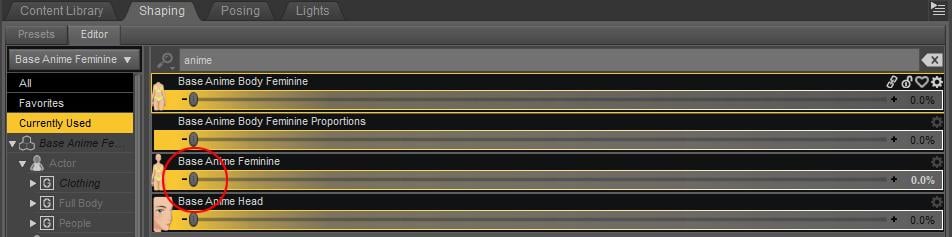
It looks like you're zeroing the body and head, I should have been clearer on zeroing the character morph - there's proportion dials connected to the main dial so you need to actually zero the main dial. See image - on the shaping tab search for Anime, then select Currently Used and then find the main morph - for the female that is Base Anime Feminine and for the male its Base Anime Masculine. That will then zero all proportion dials as well.
 "My DAZ 3D Library" folder on a network hard drive (Mac version)
After many attempts, I finally managed to get the application to correctly recognize the folder on the NAS.
The difference is that I accessed it via smb rather than afp (!!!).
It's still curious that the application makes such a difference (?).
So I achieved my initial goal.
However, access and loading in the application are slow, even though I have a very good wifi connection (I can transfer a 1 GB file in 12 seconds).Buy Something That Doesn't Work in Carrara? Post your Questions and Workarounds here. (please)Ok, back to the wonderful Noname Doll!
https://sharecg.com/v/94144/browse/11/Poser/Noname-Doll-by-GlidmanI was planning to experiment for a while, but since Bunyip02 seems to be a Noname Doll fan like me, I'll share what I understood until now as a draft that hopefully will become a "Definitive Noname Doll in Carrara guide" :-)
Let's start!
I installed all the Noname Doll related files (NND from now): base doll,
update 2
https://sharecg.com/v/96844/related/11/Poser/Noname-Doll-by-Glidman-Update-2
and update 3
https://sharecg.com/v/97405/gallery/11/Poser/Noname-Doll-by-Glidman-Update-3
(you'll probably always find the updates links among the related stuff in the main Doll page).
(Update 13 december 2024: there is also another update for the clothes by Glidman: https://sharecg.com/v/97439/view/11/Poser/Noname-Doll-by-Glidman-Clothes-update)
Then I also installed the "Suit for NonameGirl by Glidman", which is a suit and the doll with some Daz Studio compatibility added (by sasmson1111).
https://sharecg.com/v/94331/related/21/DAZ-Studio/Suit-for-NonameGirl-by-Glidman
(in fact, the comment in its page on ShareCG about this working in DS and Carrara is me again as cunningham)Anyway, I did not get the chance to play with it a lot.
But recently I got Poser 12 in a Humble Bundle deal and so decided to load her in her natural environment -Poser- for a comparison.What's my opinion? I think this DS version by sasmson1111 (NNG from now) works, but to a certain extent.
It takes clothes, mats and even some poses properly. You can move her by rotating joints, but pulling hands and feet around often breaks the mesh. NNG also has less morphs than the original NND has, in both body and head (even though it adds a new "Alita body" morph).So I decided to try the original NND: it does not work directly in Carrara.
Enter good old Carrara plugin called Daz Studio!
In DS (my version is currently 4.22) load her from the !Noname Doll 1.3 thumbnail (the updated one).
Now, with the NND 1.3 selected, go to
- Edit >> Figure >> Rigging >> Convert figure to weight mapping >> Triax
(I tried other conversion types but you get issues like losing movement of the body, eyes and others)
- Save as Scene Subset.
- Import in Carrara.Now, what you get is far from perfect, but works decently.
She has the advantages/disadvantages of NNG (apart from Alita Body). But also has much more: all the body and head morphs seen in Poser are retained (some of them do not work, though); clothes conform and follow better; applying something occurs at normal speed (when I apply something to NNG, instead, my Carrara 8.5 Pro takes several seconds in which it seems to freeze).Unluckily, in all versions, NND and NNG, some poses make the mesh "explode". Sometimes the model adds distortion after distortion to the mesh and becomes unusable. In such cases, you can delete the broken NND/NNG and load a new instance of her which should work correctly, even in the same file.
A lot of Parameters, as well, make the mesh explode (as they have enormous -10.000/10.000 limits). But here we can move them more gradually by the up/down arrows or, better, "Enable range check" by clicking the gear to the left of the parameter and set the limits to small figures.
Eye parameters do not move the eyes, but you can rotate them with the normal tools.
Hand poses, no matter which you choose, just apply to the right hand.
Odango Buns hair work in NNG version. They also work in the Poser version, but load with wrong size: in the "Motion" tab just set x and overall to 100.So, I have more luck with the NND version, but in some cases the NNG could be useful.
Well, nothing prevents us from importing the Daz Studio converted NND and mounting the runtime in both Poser and DS formats, so we can use both dolls and their related stuff in Carrara.
After all, great characters often have a body double to help them :-)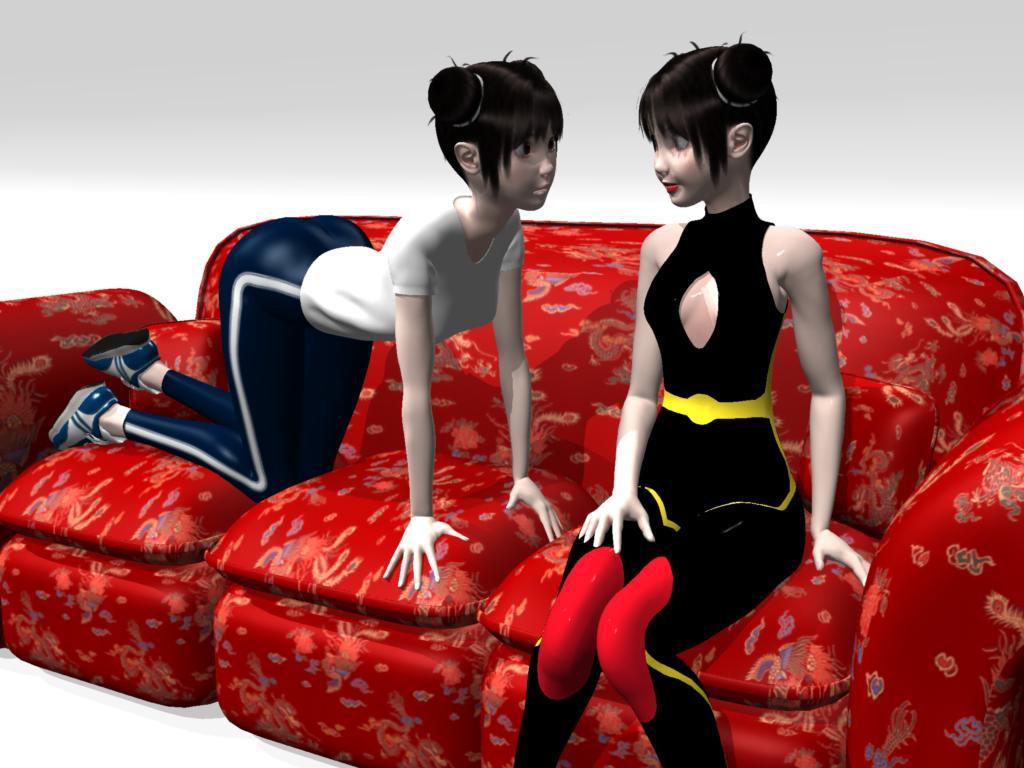
Noname Doll NND (to the left) studying her body double NNG (to the right)(couch courtesy of Carrara tutorials by PhilW)
MimicMolly's Renders & WIPsMimicMolly said:
To my surprise, I sketched the full body drawing of my OC under an hour. And while I'm inspired and motivated, I'm going to work on that instead. However, I didn't re-render or anything. So here is the render next to a crop of my drawing. I eyeball everything, so I don't think their faces will line up. (Especially the "3" mouth.)
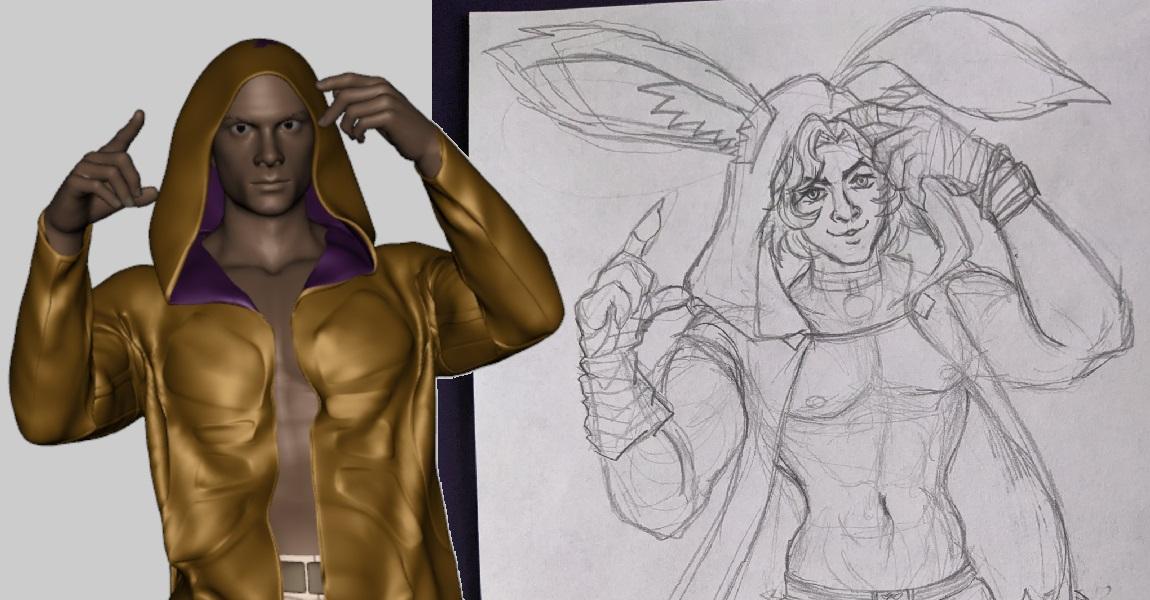
I'm actually more ahead on my drawing, since I've been cleaning it up and painting over it to refine the lines. But since this is a DAZ Studio forum, I don't feel like it's "correct" for me to show further the progress on this drawing here. Also, it doesn't seem like it makes a difference which Genesis base I use as the original reference. I am always looking at photos of actual human beings to make sure the bends are more believable. The face morph used here was some random test one I made with FaceGen for G8M. The body is Dain, but when I was drawing, I pulled out my Made-To-Move Ken and referenced his leaner body instead. This is why the body doesn't quite match anymore.
I'm tempted to remake the face in G9. I know that Faber Inc's Nahuel for G9 would be a good base to start from. At least the face. I just need to check if I downloaded him or not.
Your drawing skills are awesome! WOW! A very cute OC too!
Can turbo loader be applied to only specific character?What do you mean by "It seems after I set one character of gf8, the settings are also aplied automatically to another gf8 characters."? Disabling a Genesis 8 Female morph will disable it on all Genesis 8 Females since ti works directly on the files adding the morphs to the figure on load.
Anime Toons and Filatoon Shader Q&Aainm.sloinneadh said:
I'm not quite grasping how to overcome the optical illusion eyes. With filament rendering from the viewport, I can't figure out how to change what is seen in the render. There are no sliders to change the direction the eyes point in - only how well they stick together in the same direction. I've been mostly using them on the G9 mesh (not the anime G9 mesh). I wonder if that's why I'm missing something here.
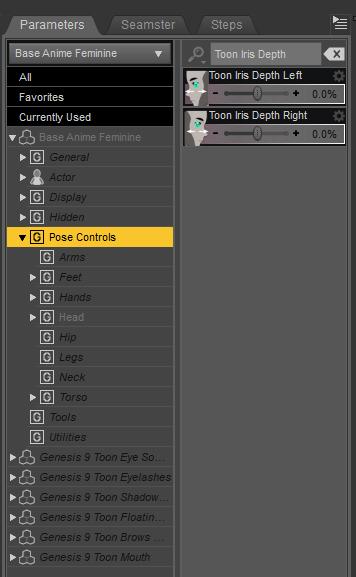
If you load a Toon figure and zero out the anime morph to get the default Genesis and that happens, you can use Toon Iris Depth Left and Right to fix it :)
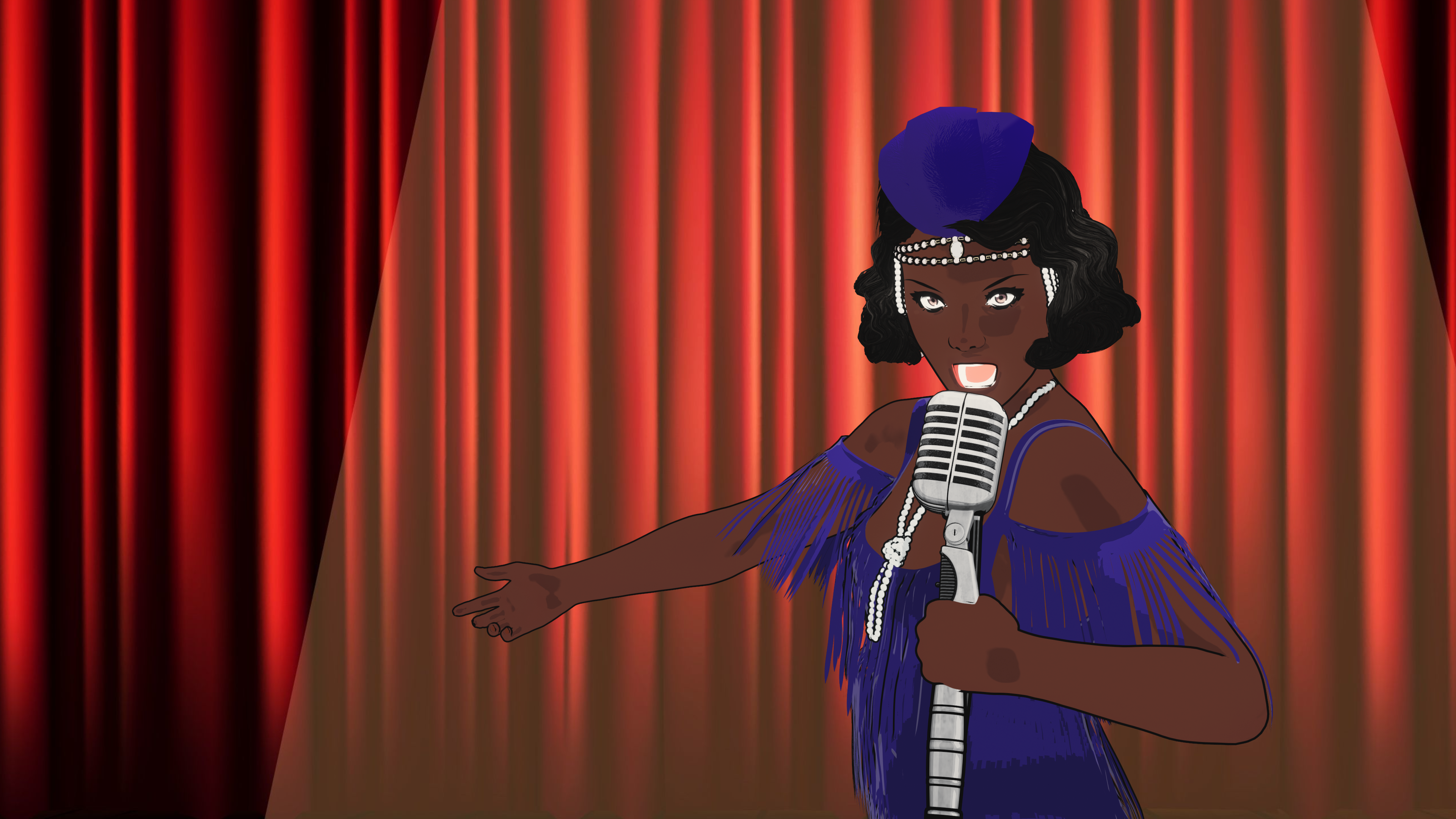
 FilaToon / Cell shaded rendering with Filament
I'm completely clueless when it comes to animation styles so I've been winging it. I'm not hot on anime - know that much - so I've been sticking with my existing Genesis 9 characters. I dialed in 10-ish% of a toon morph for this image of Clara, my prohibition-era jazz singer, and used the anime materials on her. Shaders only on everything else, except the background which was added in GIMP.
 Premier Questions
crosswind said:
kpr said:
@crosswind I was interested in MeshGraber 4 (I wasn't so interested that I immediately upgraded to Premier!)
Could you tell me if you can "add" geometery to a model with the "Premier Hijacked Version" of MG4? Like add a pair of horns to a human head.
You can sort of do this in Hexagon (and Daz Bridge), by extending existing polys, but you can't add new polys (if you do, the Daz Bridge won't import it - Maybe you can do the same in Blender, and import it with MorphLoaderPro?)
If/when you've a little while, be great if you'd check on the functionality in Premier
Oh, no, you cannot "add geometry" but just "deform the geometry", as you said: extend existing polygons by grab (select) them first then drag or push. Now MG 4.0 (Geometry Sculptor) provides a Draw Brush, you can also deform the mesh with Draw Brush... but as usual, you still can do these on Base Mesh, i.e. no SubD manipulation.
I'm also a Blender user, so yes, most of the time it's easy to sculpt complex shape in Blender and import the shape back to DS as a morph by using MLP.
Well, Mesh Grabber 4.0 is better than 3.0, you can check this video https://www.youtube.com/watch?v=Lr5uEgesPnc No big change. But there's still limitations and some bugs. You can check this post:
https://www.daz3d.com/forums/discussion/comment/8903241/#Comment_8903241
@crosswind Thanks very much for the testing and info/links - very kind of you to do and post these
Is it worth $19 a month to me?... Not sure given I can get a similar result in Hexagon and I can use Blender well enough if I want too (has been quite some time, but even so) and would figure MLP if I need to - but would have been great to do all in one "environment"
Installing, activating, and accessing Daz Studio Premier featuresGreetings! I am unable to locate the apps in DIM - when entering the above in the filter box I get a blank screen in Ready to Download and Ready to install - I do get shape Transfer, Pose Converter, Geometry Scultor and dForce manager in the Installed window.
I see nothing related to Queue in the Render Setting Pane.
Thank you for all your responses :)
Can turbo loader be applied to only specific character?
It doesn't make sense.They should be just renamedJames said:Oh, since you say so, there might be this sort of case though I don't think there should be ... Unfortunately I don't have them. You can just look into their data folder while activating / deactivating the morphs in Turbo Loader, check the changes of DSF files...
.You may get some clues ~~
Genesis 9 also the same.
All that I see if a morph is disabled, it is gone from the original folder.Can turbo loader be applied to only specific character?Oh, since you say so, there might be this sort of case though I don't think there should be ... Unfortunately I don't have them. You can just look into their data folder while activating / deactivating the morphs in Turbo Loader, check the changes of DSF files...
You may get some clues ~~
Genesis 9 also the same.
All that I see if a morph is disabled, it is gone from the original folder.Premier QuestionsRichard Haseltine said:
mjmeyer said:
I was not really surprised to find out that the owners of DAZ obviously also want a constant cashflow and not one mainly based on selling 3D models for their platform in addition to regular DAZ Plus membership subscribers like myself. Nearly every software company must (wants to?) follow the "Adobe way", when the latter money eater company opened the box of Pandora by introducing their pricey subscription models.
How do you get that? A major selling point of Premier is increased discounts to encourage people to buy more 3D content, along with free bundles of and free exclusive 3D content
I've been doing my sums, and I get this
To get the discounts with the monthly codes, you need to spend $18 less six each month, so £12. Add to this the $70 annual fee, gives $214 to access the minimum cost
With Premium, monthly only subscription, plus needing to spend $25 to get 10 off, so $15 per month to get the saving. Annual cost of $240 (on monthly basis) plus 12 times the $15, basic minimum cost $419.40.
That's effectively a further $205 just to access the savings. That's a significant chunk of my current annual spend, and I therefore expect, even with discounts on other products, this spend will leave me with fewer products for the same cost.
Now, undiscounted pricing leaves me with even less, but up to now the effect of membership has been to cause me to spend more than otherwise would have done, to DAZ's profit. I therefore expect that if I allow my membership to expire, I will spend less than I would have done if it continued.
Even staying as it is will cost at least $50 more through the move to only charging on a monthly basis just for the same benefits, and given that I have often renewed using sales, more like $75. That is a big price increase, and I'm not sure it's worth it. Just repeating the sales patter for an over-priced and unconvincing offer doesn't make it true. The offer needs to be good. It needs to be amazing. It needs to be access to resources as free offers, not rentware.
Every time I think about the free access to the exclusive content, I wonder how many months it would take for me to have paid for the full price version of the content. And that is why I find rentware that locks us in in a "pay or lose your ability to re-access your work" to be effectively scammy behaviour, and I don't use this kind of provision elsewhere.
I had found myself thinking that I ought to see if there would be any sales offers on an annual renewal, and if there weren't then I would only have myself to blame for not taking a previous one and that i could probably bear the full $70 cost. The extra nearly $50 arising from the annual being withdrawn and only monthly subscription being available.
I don't think there has been any recognition of why this change has not gone down well. Simply stating the transfer offer is based on what was paid rather than the long term value of what we were sold for a price DAZ considered reasonable enough to offer (for the presumably sound commercial reason that it increases spend generally) doesn't make those offers right. Just removing the option to renew for 12 months (even if there are no more sales prices) with no notice means that we don't have a chance to set ourselves up with options we prefer. Going on about all the discounts isn't convincing unless we can properly calculate for ourselves that the discounts leaves us spending less overall for the same amount of content. Tokens often feel like an pressure point to spend more money rather than a useful way to save money.
If the product is that fantastic, let it speak for itself, not gouge extra money from us for the same service for the DAZ+. It leaves a bad taste in the mouth, making me disinclined to want to spend that extra $205 on Premium. It never felt like a good offer, and finally being able to do the sums today, I don't think it is. The likelihood that my spend here decreases once my membership expires is quite high. That is DAZ's loss, and if enough of us find ourselves in the same position, the loss may not be covered by the increased take from those who do stay.
It does feel as though a lot of long-term customers are feeling less than valued by these changes. Glistening sales patter about amazing offers and great discounts does not deal with that. If anything, I think it is contributing to the sense of being ignored and devalued. It certainly hasn't pursuaded me. And what has happened to the NFT nonsense that they was the last big "look at this amazing thing" DAZ were trying to sell us earler? Dead and gone, as far as I can see.
Can turbo loader be applied to only specific character?No, it shouldn't. Turbo Loader activates / deactivates morphs just by Product, so for Character, you select and check one Character Product, it will just deactivate or activate the morph files under that character's data folder, by renaming them.
But be noted, if you deactivate morph files under one single product, DO deactivate them all rather than some of them otherwise you'll have ERC link issue.
Daz 3D is part of

Connect
DAZ Productions, Inc.
7533 S Center View Ct #4664
West Jordan, UT 84084Licensing Agreement | Terms of Service | Privacy Policy | EULA
© 2026 Daz Productions Inc. All Rights Reserved.