-
Morph before simulation
Hello,
Do you know of a way to simulate a garment that takes morphs into account, but only as a starting point?
Let me explain:If I adjust a garment with an ‘expend all’, it keeps the offset even in the simulation. I'd like this offset to no longer be taken into account and for the garment to fit the body.
Thanks in advance
daz hair bone don't follow with morph当 morph 加载在 g8 女声时,发骨不跟着发,就留在老地方了。
但是我发现了一个叫 Mehrloc Hair 的产品,
his hair bone Perfect follow with his hair。
how did he do it?
morph 和 g8 female 一样,但是我们可以发现它们具有不同的属性。
称为子组件 ,
我需要帮忙拜托。
Clothing commission from existing 3d model where/who to ask?ladywolf1 said:
Ah, spend some more hours into this stuff and I can happily say I managed it! ^^ Thank you so much for all your help, and suggestions, I went through everything and learned really a lot! ^^ Hopefully soon I can turn this knowledge towards full projects/
I have one last question (for now i guess lol) on this subject: I can now i manage with g8... But what about g9? With g9 I used this product ( pJCM Poses - For Clothing Creators for Genesis 8 ) from the store to help renaming/know which poses were problematic.
Is there anything similar anywhere I can buy? If not... How do I go through the g9 pjcm without sliding and rename/copy literally every one of them...? thank you!That was great ! One more point for your ref.
Among 100+ corrective morphs (cbs) on G9, only around 1/3 of them are frequently-used. And 50%+ of them can be "symmetrically fixed" in Blender as well as by using Mirroring and Attenuate By options in Morph Loader Pro when updating cbs. So in most of the cases, that can be a pretty quick workflow while you're getting proficient in it ~~ (Personally, I most of the time just fix 10 ~ 15 morphs, at most ~~ then with dForce capability, job's well done ~)
Then I also agree that if you make clothing with MD and just use it for yourself, you don't have to fix jcm/cbs each time, simulating it with morph targets in MD will also do (esp. when dForce lets you down...)
Good luck !
How to save new character morphs?Hi, I just tried to use shape Splitter to separate the head and the body (I hadn't time to do it earlier, sorry, I hope that you remember what is the subject... ) and I tried to overwrite the head morph that I created. But there is a defect that doesn't appear on the Shape Splitter's preview.
Here is what I obtain on the preview:
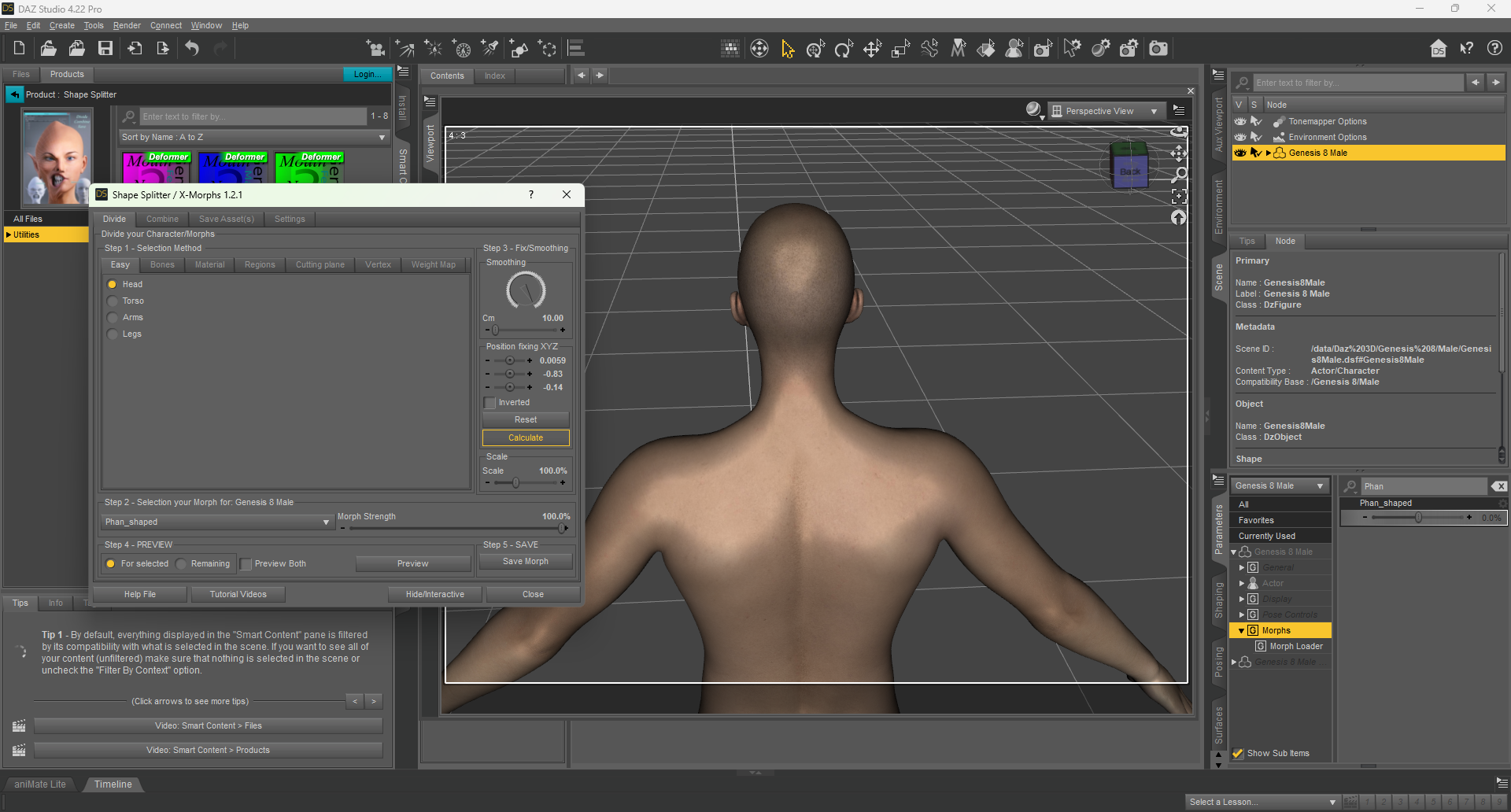
And here is what I obtain after saving the head morph and loading it on a new G8M character :
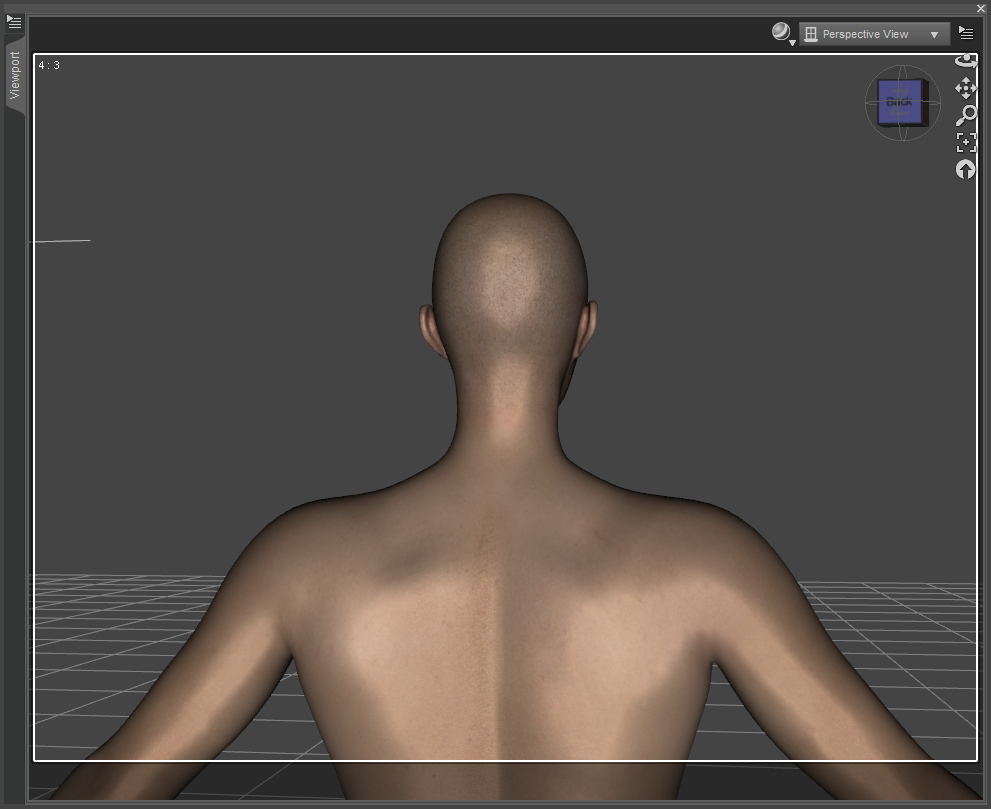
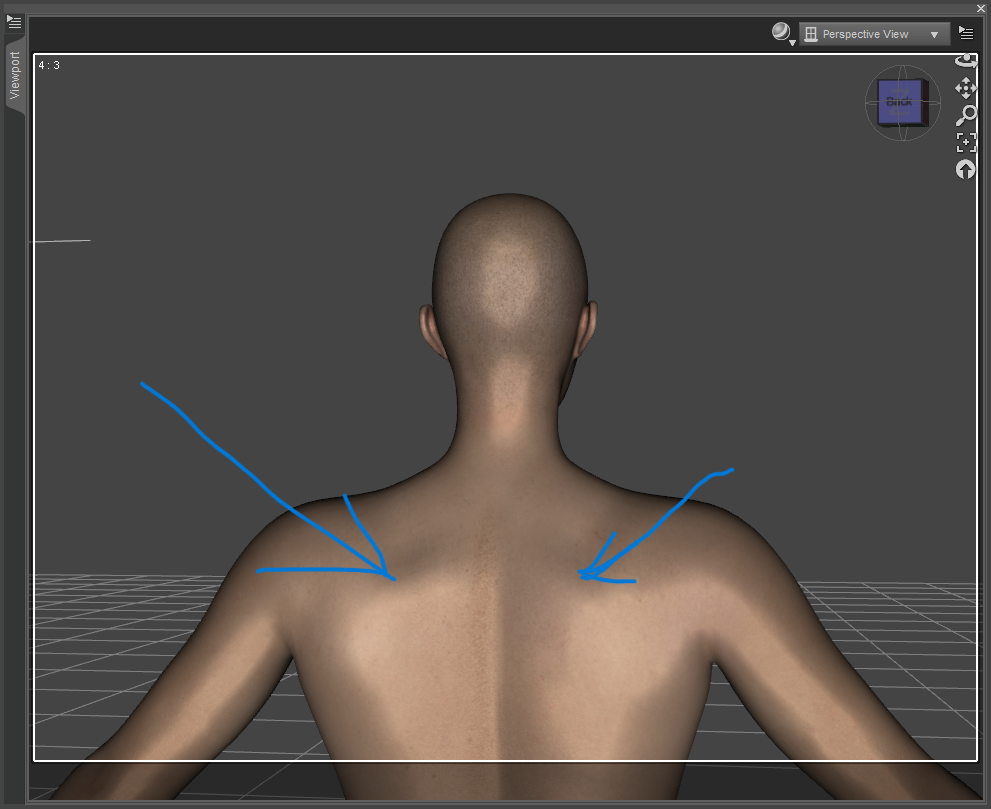
As you can see, it doesn't correspond to the Shape Splitter preview.
I also tried to not use the Shape Splitter's calculate button, but I still got the same issue.
Could it be because I overwritted the morph? Could you help me, please?
Thank you in advance!
Transfer Face morphsLike these Visemes morphs...
BTW, as an alternative, you don't have to transfer them but just batch set Auto Follow on those "facial morphs" before rigging Beard. Then when you dial facial morphs on G1, you'll get auto-triggerred morphs on the conformers / wearables. (screenshot 4)
Transfer Face morphscrosswind said:
Imago said:
Thanks for the pics, but those aren't facial morphs.
I mean things like the ones in the Visemes sub-menu or the Brows and Mouth groups in the Head.
I need to transfer those, otherwise when the char talks or moves hit mouth, the beard doesn't move.
Oh... sorry, you meant those ! Then they should be the same but you have to make sure you really set the Morphs per se as Favorites rather than the "Control properties" which are not Morphs but just a Pose Control.
I'm gonna make an example ~
I'll recheck that, thanks for the help.
Transfer Face morphsImago said:
Thanks for the pics, but those aren't facial morphs.
I mean things like the ones in the Visemes sub-menu or the Brows and Mouth groups in the Head.
I need to transfer those, otherwise when the char talks or moves hit mouth, the beard doesn't move.
Oh... sorry, you meant those ! Then they should be the same but you have to make sure you really set the Morphs per se as Favorites rather than the "Control properties" which are not Morphs but just a Pose Control.
I'm gonna make an example ~
Transfer Face morphsThanks for the pics, but those aren't facial morphs.
I mean things like the ones in the Visemes sub-menu or the Brows and Mouth groups in the Head.
I need to transfer those, otherwise when the char talks or moves hit mouth, the beard doesn't move.
Isla Bikini pressure morph glitch, need help to fixMatt_Castle said:
@NewGuy Unfortunately, my testing showed that the problem is by no means limited to the head and shoulders. The SD components of the pressure morphs here affect all over the figure, each influencing approximately 11,500 of G8F's ~16,500 vertices - hands, elbows, thighs, feet, ears, shoulders, everywhere.
Cleanly masking it back to the areas each should affect is a task I wouldn't want, and I'm definitely an advanced level user.
This is really something that needs to be fixed by the original PA.
You're correct. That is something that would be considerably time consuming and since the "fixed" morph can't be saved by the user, it's best to hope that the PA will be able to fix it or if it was fixed the update can be properly uploaded for users. Best to fill out a ticket!
Isla Bikini pressure morph glitch, need help to fix@tyra_oeildeloup, there is a way to fix this yourself but the steps are pretty advanced.
I'm running off the newest version of DAZ Studio 4.22 Pro.
1. Load the Genesis 8 Female base and the offending morph to 100%. Also select the little heart in the morph to favourite it (this is important for later).
2. Click on the Geometry Editing Tool icon to activate it (pen in front of a grid) or select it under tools/geometry editor.
3. The goal is to select the head and ears in your case to remove the morph from those sections. There are a bunch of ways to do this, but here's the easiest. In polygon selection mode, under regions add the head, face, ears and eyes to your selection. Most of the head should now be yellow/orange highlighted.
4. Mouse over the selection and right click. From the popup menu select "Geometry Selection/Convert Selection/Convert to Vertex Selection". The previously selected regions will now show as selected vertices instead of faces. Only these should be highlighted. You are also now in vertex selection mode by default.
5. Now right click again and select from the popup menu "Morph Editing/Clear Selected Deltas from Favorites". This step will remove the morph (even HD morphs) from those vertices that were selected and favorited.
6. The finally step would normally be to save out the morph by overighting it, but since this is an HD morph, unless you are a PA you can't do that (but you can for Standard morphs. You could also save it out as a new morph and only use that morph instead, but not for HD I'm afraid.
At least you can render the scene without issues, but your progress will be erased the next time you load G8F or a character unless the changes have been saved using "Save As/Support Asset/Morph Asset(s)". This can get comples. I don't know which morph also has your issue, probably the body morph... so will have to investigate that. As others have said, the best solution is to file a ticket again and see if tech support can help you or inform the PA. It may be that the update wasn't properly activated somewhere along the way and somebody should be able to track it down and fix it. Best of luck and hopefully this process may help you if you wanted to manually edit morphs yourself in the future.
Transfer Face morphsI just do transferring Morph Targets from time to time on G3+ though I rarely rig the object to fit...at the same time. But I tried what you wanted with G1/G2, it worked as expected.
The head morphs you set to Favorites work on G1 ? And your DS version ?
Transfer Face morphsThe expression morphs aren't transferred without an extra step, that I thought I did.
I load the beard OBJ and the figure, set the desired facial morphs as Favourite. Then I start the Transfer utility and set Genesis as source and the beard as target. Then I set the tool to transfer the favourite morphs and start the process.
Once finished, the beard is perfect, it follows the head and the neck correctly when I move the char, doesn't stretch abnormally... But the morphs I set as favourite aren't transferred and totally absent on the beard, they aren't even in the Hidden section.
I really can't figure out where I'm doing wrong, other times it worked fine.
Transfer Face morphsYour imported obj is at xyz 0,0,0 before running transfer utiity? Transforms should be baked/applied before doing transfer.
If you transfer rigging and fit to figure, morphs should be automatically projected on the fly to the fitted figure anyway (at least thats how it works on G8+) so manually transferring them may not be necessary?
Transfer Face morphsI'm trying to create a beard for my G1 figure but it seems I'm doing something wrong since the morphs aren't tranferred correctly.
I did this some other times in the past: I import the OBJ, load the figure, set as Favourite the moprhs I want to transfer and then start the Transfer Utility setting it to transfer the favorited miprhs to the prop, but even if the beard is transferred and perfectly working, the facial morphs aren't trasnferred and nowhere to be find in the beard parameters.
Someone can give me the right procedure for this? Thanks!
Isla Bikini pressure morph glitch, need help to fixHello
So lately I bought the Isla Bikini bundle.
The weird thing is that the full outfit (that has pressure morphs included) or use the said pressure morphs, something happens to the face, some weird morph being applied that touches the ears and eyebrow arches, and probably more of the face. It happens on Isla character, on custom character AND on base G8F.
I would just like to fix the problem, could someone help me by telling me what I should be looking for ? Pics on base G8F attached (before and after morphs)
Requesting help to identify the figure.Unfortunately, at the point you know that a morph isn't paired with its skin, it becomes extremely hard to identify. (For one thing, skins are easier to ID than morphs, as they can have distinct features; for another, at this point it's extremely likely the morph is mixed).
I wouldn't get your hopes up around finding that morph specifically.
This can be a downer, I know, but I try to look on the bright side of all this - there's still more morphs out there that I can use than I ever reasonably could use.
HH Scarlett for G9 [Commercial]Herschel Hoffmeyer said:
Drip said:
I like how the leg garters circumvent the problem of garterbelts usually going over panties instead of beneath them on most lingerie outfits in the stores here, though I'd still love to see a new set with the panties going over the garterbelt, even if it's as an option, which should make every customer happy.
I have more traditional style garter belts planned and in the works.
One thing though about garters being over the panties, in terms of how daz and rigging works, is the garter straps can behave freely and act alone in their jcm's for poses. If their default position is to remain under the panties, for it to look right, their jcm's would need to be adjusted so the panties are restricting the bending of the straps to some degree, based on where the pantie line is at. That means they would only look right with only those panties and no adjustments to how the panties are worn. What I will probably do instead is just add in a morph that moves the panties over the garter straps and you'll probably need to make use of pantie and garter adjustment morphs to keep that look for how the figure is posed.
Thanks, that gives an explanation on why this setup seems so rare. It is really very much appreciated. :)
Convert Morphs for Dawn S.E. to Gen 8 or 9Hi, might be worth adjusting the "billions" of morphs available for G8/9 to look similar to what you're desiring from the Dawn figures. Depending upon which morphs are used they might have the advantage of containing existing correction controls [if required].
I'm not aware of any conversion utilities betweent the companies' figures.
There is a slightly complex method one can do for themselves. You would need to create some "clothing" figures of the Dawns for G8/9. [everything at base resolution] You might also require some "auto-fit' clones for them. The tutorials around for making these things between the Genesis characters would have a similar work-flow between these characters too.
Basic concept: On Dawn put a "clothing figure" made from Gen8F, in Dawn dial in the desired morph [remember to have it at the base resolution], HIDE Dawn and export out the Gen8F clothing product as .obj "no groups" ... can clear scene [depends on your computer's power etc] then load the base resolution Gen8F and use Morph Loader to bring in the shaped clothing .obj to make the morph. If you like the morph, remember to save it ;-) [always zero morphs before saving them]
Depending upon the morphs, they may or not require some additional work to play nicely with all the other figure's morphs. [such as correctives, which is why I recommend the first option]
Clothing commission from existing 3d model where/who to ask?Clothing for the Genesis clans [generally speaking] has to be one piece, for eg. pants with pockets and zipper sleeve etc must all be 'one piece' of geometry. Smoothing may show where there are gaps but those gaps need to be welded. Maybe think of it this way, if you cut out a cloth pattern for a pair of pants, how many pieces there are. Put that on. You can't. You have to sew the pieces together. Maybe some static electricity helps hold a pocket piece on but as soon as the wind blows it too will fly away ;-)
In Blender with some $ add-ons and in MD, one can design and 'sew' together some beautiful clothing pieces. Now, you maybe run simulations etc. to make those garments initially, fine. Export out that one item, as we mention, single mesh etc etc. Then park MD. In D/S make the clothing, save the clothing. Might want to clear the scene and reload the figure and clothing. [just to make sure everything is as expected]. Then lift the arm of the figure to trigger one JCM. HIDE the figure and export out the clothing .obj "no groups" for import into Blender or whatever. Fashion that armpit how you want it to look. Export the .obj back out [in Blender make sure something is ticked or not ticked [whichever] so that the vertices are not changed. We can re-arrange where the dots and lines go, we cannot change their number ;-)
In D/S garment is selected, dial OUT the generated morph AND rename it [I call them Delete this] [have to have the Parameter Tab in Edit mode to do this].
Via the Top Bar options, Edit etc. import in the new geometry via the Morph Loader Pro [or whatever it's called now] Make the morph. It will likely jump into play which is fine. Zero the morph and Save it [File > Save As ... morph asset. Save ONLY the 1 morph you've just made {this is where having the other named delete this can be helpful}.
Now, if for any reason that generated morph had been saved, then close D/S and go digging for it in the data folder to delete it. IF you did nothing to save that generated morph [we're talking about the one in the clothing NOT Genesis#] then don't worry about. As you delete the garment from the SCENE, any unsaved morphs will also vanish. Load in the new garment with its newly saved morph, put that arm back up and hopefully all is well.
Now, this laptop does not have D/S on it, this entire speech is just winging it from memory and it's quite possible it's not covering 'everything' -- hence I do recommend going through that beautiful tutorial I made because in there, I actually do all the work and record it step by step. I'm not running simulations to make pJCMs - those are wonderful for helping with pose morphs and is a whole other topic.
Clothing commission from existing 3d model where/who to ask?crosswind said:
@ladywolf1 Just some suggestions for your reference.
1) Firstly, pls make sure you export garment from MD to OBJ by checking Weld and Thin in Export dialogue... otherwise the garment will "break" or "intersect"...
2) For fixing pJCMs, I suggest you a no-go by simulating garment in MD with animation but just Morph Target. However, it still may not be a really good way... because a pJCM that needs a fix is usually a distortion on a partial area around the Joint... If you simulate the whole garment in MD with a Morph Target, all vertex position will change. After you import OBJ to update pJCM property, you'll get a wrong result (every part moves...). So you have to either Pin the geometry with no distorion in MD before simulation, or use the way of Attenuate By in Morph Loader Pro to only update the distorted area on the garment in DS... Though both ways work but turn out to be cumbersome ~~So the best way is always to fix the partial distortion on pJCM with modeling / sculpting software, like Hexagon as Catherine suggested or Blender, etc.
And rigging some garments to get a good result may need proper projection template...(while the templates in DS are limited...) or you have to adjust weight, or finetune its mesh in MD or Blender then Update Base Geometry of the garment to have a perfect initial shape... before fixing anything else. Like the garment you showed in the screenshot, with wider sleeves, full neck 'n chest coverage... yada yada ~ it's just a typical one that may need more tweaking.
Thank you for the suggetions! I can use blender no problem, infact I'm rather sad to be able of creating 3d models (clothes included) and not being able to actually use any of them in daz :') (hence why I was asking for commissions...). But turning a 3d model into a usable one specifically for daz is way more complicated than I possibly expect... I'm beginning to want give up on using marvelous designer and yes, go fully manual for smoothing those areas, but I still get issues with either transfer utility or dfroce/smoothing modifier with any objs (even if no from mdd).
I'm not sure I understand what's the reason of the mesh "detaching" with a smoother modifier. That happens only with the smoothing modifier added? Else works "fine" pjcms aside.Daz 3D is part of

Connect
DAZ Productions, Inc.
7533 S Center View Ct #4664
West Jordan, UT 84084Licensing Agreement | Terms of Service | Privacy Policy | EULA
© 2026 Daz Productions Inc. All Rights Reserved.