-
Questions form
It's not an efficient use of anyone's time to scour promos for what's in it.
Efficient use of time? Really, you are way off base here. How can you to decide whether it "efficient" or not for someone else to try to identify items in a promo picture?
Let's get back to the original posters issue; it would be convenient for vendors to include a list of items used in promo pics for their products. DAZ3d provides a way of doing this but it is up to the vendor as to whether they wish to make the effort to do so for the benefit of (some) clients.
For me, and I suppose many others, vendors who do provide this service have a higher standing and I'm more likely to buy their work.
I can decide really easy. I spent 2 hours this morning doing morph corrections eye closes on 6 heads for a product I've been working on and off since November. When I speak of efficient use of my time, I can either spend that time making sure my full body morphs bend better, adding JCMs where needed OR scour through promos to see who made them. I'm not going to do both nor have the time if I want to submit the product for review on monday. If there's a choice, would the customer prefer a better bending shape, or to know where I got a hair from?
That's what's called efficient use of time. To add a promo credit to a list may be convenient to some, but a better bending custom product holds a higher value to most. And that's why I've been selling products in this store for eight years.
"Doll head" morphs?Are there any characters with a morph to make the head appear to be separate, as with a doll head (like Barbie)? Even the ball joint doll characters have a smooth transition from the head to the neck, but I'm looking for something that can keep the head fairly realistic, but look like it is a separate piece attached to the body. Am I going to have any luck with this?
Thanks!
Needing to transfer face morphs from G2 to G8Well it works just fine. The hands and feet on some of the shapes were a bit wonky but easy enough to fix in ZBrush so it's all good. Here is my very old Fantasy-PABFuzzie morph from Genesis 1. Had some fixing to do with him in ZBrush and the eyes are still a bit off but from this distance looks fine.
Oh, well it known that those tools introduce a bit of distortion in the hands & feet, more on some models than others, and it shows up worse in the fingernails & toenails.
That was one of the problems Singular Blues was trying to resolve in his G3 to G8 scripts in that other thread in the Commons before he pulled them.
G2 to G8 CharactersUse genX to transfer Gianni to G3. then the singular blues script to transfer the Gianni G3 morph to G8. I did this for Giselle and it works great. Here's an image, G2 on the left, G8 on the right.
Where can I find it?
That script set was pulled by Singular Blues. The thread it was originally posted in is in the Commons forum. You might respectfully ask if he repost the latest version of the scripts for you & others. It is only beta but works for most use cases. Singular Blues intends to refine it & sell it as a product in the DAZ Store.
Also, it only ever handle G3M to G3F, G3F to G3M, G3F to G8F, G3M to G38, G8F to G8M, and G8M to G8F.
You can search for the SickleYield document on how to manually transfer morphs from G2 to G3 on Google using Transfer Utility & Morph Loader Pro. Strickly speaking nothing else is needed. It is located as a video on YouTube and a written document at DeviantArt.com
Ah, very good!
I'll wait for the release on the store, then! Thanks for the info!
That's a very big if if itgets released to the store.
Needing to transfer face morphs from G2 to G8Well it works just fine. The hands and feet on some of the shapes were a bit wonky but easy enough to fix in ZBrush so it's all good. Here is my very old Fantasy-PABFuzzie morph from Genesis 1. Had some fixing to do with him in ZBrush and the eyes are still a bit off but from this distance looks fine.
G2 to G8 CharactersUse genX to transfer Gianni to G3. then the singular blues script to transfer the Gianni G3 morph to G8. I did this for Giselle and it works great. Here's an image, G2 on the left, G8 on the right.
Where can I find it?
That script set was pulled by Singular Blues. The thread it was originally posted in is in the Commons forum. You might respectfully ask if he repost the latest version of the scripts for you & others. It is only beta but works for most use cases. Singular Blues intends to refine it & sell it as a product in the DAZ Store.
Also, it only ever handle G3M to G3F, G3F to G3M, G3F to G8F, G3M to G38, G8F to G8M, and G8M to G8F.
You can search for the SickleYield document on how to manually transfer morphs from G2 to G3 on Google using Transfer Utility & Morph Loader Pro. Strickly speaking nothing else is needed. It is located as a video on YouTube and a written document at DeviantArt.com
Ah, very good!
I'll wait for the release on the store, then! Thanks for the info!
Using ZBrush Core and DazI'm not sure why I need to click on the morph in the parameters pane. I assumed that applying a morph to a character meant that if you then save that character it includes the morph.
I have cracked imprting and creating the morph(s) (I think) but I want to be able to save the resulting morphed figure as a new character so that I can reload it any time without having to again load the morphs in the way you described.I saved the morphed figure as a character (Save as/character) but the shaping does not follow the saved item, and neither fo the morph sliders. In addition, when I loaded the saved character it distorted again. I did the Edit>Figure>Rigging>Adjust Rigging to Shape and it returned to 'natural'. I have not found the ERC freeze thing. I don't understand 'In the dialogue box check that the only things checked as sub-components are rigging adjustments (centres and endpoints)' - which dialogue box?
- Load your morph onto the figure and set it, with no other morphs or poses applied
- Use the Adjust Rigging to Shape command - make sure it now poses OK, then remove the posing
- Right-click in the Parameters pane and if it isn't already checked select Edit Mode (I think this is the step you are missing)
- Right-click on yoru morph slider and select ERC Freeze - a dialogue box will open
- Check that the sub-components listed in the lower half of the dialogue are just the rigging adjustments to centres and endpoints
- Leave the check-boxes checked
- Click Accept
- Make sure everything works.
Assuming it does, you can save as a scene, scene subset, or a character preset - but the character preset has to be used to load a new figure to bring your morph in (double-click with nothing selected, or in the dialogue choose new figure rather than modify existing). If it's a morph you want generally available you can also use File>Save As>Support Assets>Morph Asset and select your morph, it will then be available on all future loads of the base figure and its characters.
Using ZBrush Core and DazI'm not sure why I need to click on the morph in the parameters pane. I assumed that applying a morph to a character meant that if you then save that character it includes the morph.
I have cracked imprting and creating the morph(s) (I think) but I want to be able to save the resulting morphed figure as a new character so that I can reload it any time without having to again load the morphs in the way you described.I saved the morphed figure as a character (Save as/character) but the shaping does not follow the saved item, and neither fo the morph sliders. In addition, when I loaded the saved character it distorted again. I did the Edit>Figure>Rigging>Adjust Rigging to Shape and it returned to 'natural'. I have not found the ERC freeze thing. I don't understand 'In the dialogue box check that the only things checked as sub-components are rigging adjustments (centres and endpoints)' - which dialogue box?
Difference between Sickleyield's Ultra Templates and Clones?The V4 and M4 clones come with fixer templates also. I find the V4 ones for G8 to be defective though, so buyer beware. The V4 one if highly distorted and the cloths fit horribly compared to autofitting to G3, saving and then autofitting to G8. I spent several weeks going back and forth with support trying to get a fix, but QA seems to think there isn't a problem (Emmalee in support was extremely helpful though!)
Here is the proof. G3 in yellow, G8 in green. With just the V4 clones dialed in, you can see how warped the G8 clone is. Now autofitting the V4 leotard bodysuit, you can see the near perfect fit on G3, whereas the fit on G8 is loose, distorted, especially in the arms and around the breasts and the mesh is breaking, not good.
That looks like what you get from normal maps that have detail to affect that area that is meant for larger breasts.
It comes from an incredibly distorted autofit clone. Luckily there is a way to easily make working V4 and M4 (and F4 and H4 and A4...) clones from the Genesis versions. https://www.daz3d.com/forums/discussion/193296/freebie-how-to-create-a-v4-clone-and-transfer-other-figures-for-g8f/p1
Needing to transfer face morphs from G2 to G8I'm pretty sure you can follow the SickleYield tutorial on YouTube or DeviantArt to use Transfer Utility & Morph Loader Pro to transfer G2 to G3 & then repeat for G3 to G8.
I have personally followed it to transfer from G3 to G8, both male & female face morphs.
Here's the link: https://sickleyield.deviantart.com/journal/Tutorial-Transferring-Character-Morphs-G1G2G3G8-409437916
Needing to transfer face morphs from G2 to G8I'm pretty sure you can follow the SickleYield tutorial on YouTube or DeviantArt to use Transfer Utility & Morph Loader Pro to transfer G2 to G3 & then repeat for G3 to G8.
I have personally followed it to transfer from G3 to G8, both male & female face morphs.
G2 to G8 CharactersUse genX to transfer Gianni to G3. then the singular blues script to transfer the Gianni G3 morph to G8. I did this for Giselle and it works great. Here's an image, G2 on the left, G8 on the right.
Where can I find it?
That script set was pulled by Singular Blues. The thread it was originally posted in is in the Commons forum. You might respectfully ask if he repost the latest version of the scripts for you & others. It is only beta but works for most use cases. Singular Blues intends to refine it & sell it as a product in the DAZ Store.
Also, it only ever handle G3M to G3F, G3F to G3M, G3F to G8F, G3M to G38, G8F to G8M, and G8M to G8F.
You can search for the SickleYield document on how to manually transfer morphs from G2 to G3 on Google using Transfer Utility & Morph Loader Pro. Strickly speaking nothing else is needed. It is located as a video on YouTube and a written document at DeviantArt.com
"Get Them While You Can!" If Not… Well… "There's Always Another Sale™"The reason I look is because of Carrara. I've almost gotten snared a couple of times. (Carrara has some really neat items!)
I agree here with Novica. I think while it is something that DAZ consumers with some experience under their belt look for - the "Software requirements," field is something a lot of greener DAZ buyers probably frequently get tripped up on - and I also have gotten snared a couple of times... usually with Poser content that doesn't work at all in DAZ because of incompatible morph dials.
I do web based retail for a day job... and I understand the trouble with, "We put the information in the description but the consumer just looked at the pictures and clicked the buy button without reading the details."
It creates customer service headaches for me, too - and I'm always looking for ways to PREVENT the customer from buying something that isn't what they think it is, or to make sure they understand that their single order might ship in two boxes that might not arrive at the same time, or whatever the hassle is. Because keeping the customer happy is more important than getting a sale that makes the consumer feel misled or tricked. I'd rather have them know up front then spend the time with them after the sale trying to fix it.Needing to transfer face morphs from G2 to G8If you own Genx2 you can transfer G2 to G3 then use one of the G3 to G8 morph methods posted in the commons.
Photo-real characters. A different approach.Thanks for the response. This is one I made with Facegen when the most recent version came out. Everything more or less ended up where I intended it to be, but I think she's positive proof that we need more wrinkles around here! Half the reason I got into 3D in the first place was that I'm no great shakes at drawing people, and realistic wrinkles are definitely beyond me. There must be plenty of talented PAs in these parts who could come up with wrinkle overlays for figures - from mild to extreme, I'd have thought they'd be at least as popular as make-up overlays are. If we're looking for realism, as long as the real world is spending a vast fortune in the fruitless pursuit of banishing wrinkles then we probably ought to be buying them :)
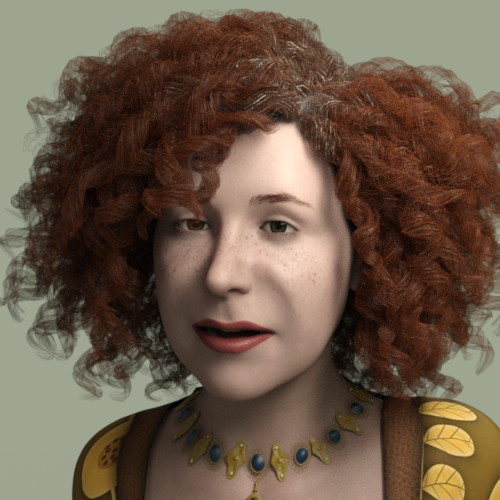
Regarding the idea of a "wrinkles overlay", if you get a product like Alexandra HD, the HD details are on a separate dial and so can effectively be applied to any figure. I've not had a chance to try this yet but I can't see why it shouldn't work.
I find it doesn't work that well, unless one wants all the details; if they did separate morph dials: upper/lower arms and legs, stomach, abdomen, breast/chest area, neck, face, hands, feet; I'd buy em all.
But they are too restrictive for me as they are.
G2 to G8 CharactersUse genX to transfer Gianni to G3. then the singular blues script to transfer the Gianni G3 morph to G8. I did this for Giselle and it works great. Here's an image, G2 on the left, G8 on the right.
Where can I find it?
an "only sometimes" error - Daz duf conversion to Carrarawish i could transfer those old m4 displacement maps to g3m

mebbe zbrush could do it
not Zbrush but UUW3D, Blacksmith 3D (which you have I believe ) and Blender
is a repaint freature
Blacksmith does a good job of conversions, Mike 4 Hi-Res boxers skin on G3M.
 an "only sometimes" error - Daz duf conversion to Carrara
wish i could transfer those old m4 displacement maps to g3m
mebbe zbrush could do it
not Zbrush but UUW3D, Blacksmith 3D (which you have I believe ) and Blender
is a repaint freature
an "only sometimes" error - Daz duf conversion to Carrarawish i could transfer those old m4 displacement maps to g3m
mebbe zbrush could do it
Question regarding Hair Set for Genesis 8 Male*Coverage makes the individual hairs thicker. But yes, the base morphs can be dialed down on at least the torso and back hair. I didn't check the others, but I suspect they are the same. There is an orange morph called Hair Set Torso or Hair Set Back that is default to 1 and you can dial down to shorten the hairs.
*On this set
Daz 3D is part of

Connect
DAZ Productions, Inc.
7533 S Center View Ct #4664
West Jordan, UT 84084Licensing Agreement | Terms of Service | Privacy Policy | EULA
© 2026 Daz Productions Inc. All Rights Reserved.