-
AIUTO...CHI CONOSCE L’ITALIANO? PARTE QUATTORDICI
Crios said:
Ma com'è la stabilità del 4.23?
A me va come la precedente.
Anche se qualcosa è cambiato.. i Morph ora vanno salvati come Modifier Asset.Anime Toons and Filatoon Shader Q&AOso3D said:
For a long time I kept making PWToon renders, even long after I had switched hard to Iray.
FilaToon is the absolute final nail. Works waaaaaaaaaaaay better.
I regretted never buying PWToon, especially with many nice freebie addons released. And, thinking to get back into serious anime-style rendering, I grabbed LineRender9000 not long ago when in was on sale... and filatoon is released. I'm both elated for the new shaders and kicking myself for purchasing a product (LineRender9000) I'm probably going to retire soon. I'd pay for the anime shapes if they were made available on G8. I might try some of the character transfer tutorials I've found, but stylized shapes have me worried about distortions in nose and eye morphs.
Wonderful releases, Daz3D. Thanks to eveyone involved in their creation and for the many tips this thread has provided.
Installing, activating, and accessing Daz Studio Premier featuresRichard Haseltine said:
If you open Edit>Workspace>Customise do you have groups on the elft for the Pose and Shape transfer tools? If so you can drag them into their target folders under Main menu in the Menus tab on the right of the dialogue.
Yes. That worked. Thank you so very much for finding me a solution. I figured the pathing was probably inocuous or had to do with Windows 11, but it's good to know there are some under-the-hood changes that maybe we should be aware of. Have a fabulous rest of your evening.
Issue with some poses after creating a new face morphyuyu.atem said:
Oh, greate, thank you very much!
 After creating the two corrective morphs, I guess the best path to save them would be this one, isn't it ?
Yes ! And you better add your Vendor name into the path so as to easily locate them when needed, for instance: Hidden/Corrective/YuYu. It's up to you... Also set Type to Modifier/Corrective.
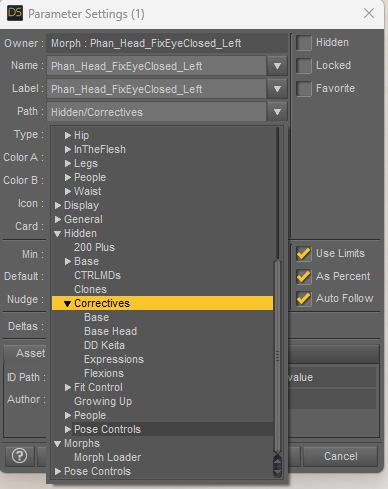
If I save them here, have I also to check the Hidden option or will they be automatically hidden because they will be in Hidden -> Correctives?
Oh... you have to manually check Hidden.
Oh, and I forgot to ask: should I also adjust the rigging to the shape, or is it useless with corrective mophs?
Nope.... if you've already done Adjust Rigging to Shape, then for a partial corrective morph, you never have to do it again... as well as ERC Freeze on partial corrective morph.
Thank you in advance!
Installing, activating, and accessing Daz Studio Premier featuresEve said:
Richard Haseltine said:
What are the paths? Do the plug-ins appear in Help>About Installed Plug-ins? There do seem to be some oddities with the items thats hould appwear in the Edit>Figure menu (I am missing one of them in one release channel, General reelase I think, but have them both in the other - I have reported this to daz, one suggestion was to save the layout then do an Update and merge Menus (Edit>Workspace).
Yeah, sorry. I mentioned that above (that they are installed and seem to be loading fine), but didn't specify that all the plugins are greenlit under Help>About Installed Plug-ins. It's just those two that won't show up where they're supposed to be. Everything went smooth as butter on my older computer and I tried it to see if I was doing something wrong. I did go and try the Update and Merge Menus "fix" before I posted to you, just on the off chance that it was that simple of a solution, but it didn't help. I think because it was a fresh install, I didn't get the pop up from logging in telling me that Premier was activated and I needed to restart, but that's pretty much the only difference that I can recall.
If you open Edit>Workspace>Customise do you have groups on the elft for the Pose and Shape transfer tools? If so you can drag them into their target folders under Main menu in the Menus tab on the right of the dialogue.
Re the Path installations, on the new computer with Windows 11, Daz installed things like the Default Resources into C:\Users\Public\My Daz 3D Lib... (etc), where on the Windows 10 system they're installed in C:\Users\Me\Documents\Daz 3D\Studio ... (etc). I did get Daz to list my default resources in the content manager at least, but I'm not exactly sure how. All I did was uninstall in DIM, point it back at Daz (the default installation path in DIM) and after doing that they showed up in Daz. I was hoping the two awol premier plugins would follow this example, but nope. They're being stubborn. If I need to switch to a different forum or post screen shots somewhere else, I'm happy to do that, as well. I really appreciate your efforts and patience helping as much as you have.
The nw system is shwoing the default path for DIM, the old is the default path before DIM (and still the default path for user-saved files).
:)
EvePixyled Wings Detaching from Bodyechristopherclark said:
Yep, I just figured out it's the custom character. It's one I brought over from Genesis 8 using a fairly manual shape transfer method. I'll try a few other methods, now that I know it's a problem.
If so, then that'll be easy, Adjust Rigging to Shape first, ERC Freeze on Body morph (this issue has nothing to do with Head morph..), then try again. If "offset" issue still persists, you have to fix the FULL BODY MORPH of the character (hidden property) on the wings ...
Pixyled Wings Detaching from BodyYep, I just figured out it's the custom character. It's one I brought over from Genesis 8 using a fairly manual shape transfer method. I'll try a few other methods, now that I know it's a problem.
Celebrity Look-a-Likes for 3D figures Part 4khefrenn said:
I have seen this one, but for some reason, the morph doesn't seems to appear in Daz. Thanks anyway.

It is a data only one, no character file to load. With Genesis 8 Female highlighted do a search of the parameters for FlorencePugh. You should see a FlorencePugh_Head morph to dial in.
Celebrity Look-a-Likes for 3D figures Part 4Haruchai said:
khefrenn said:
Any Florence Pugh look alike around ?
The only one I know of is the morph by magnus1781
The textures are in the Texture pack 7. Note - Textures only, they have to be applied manually in the surfaces tab. 5 different sets to chose from.
Links to the free assests on their DevainatArt page
https://www.deviantart.com/magnus1781/art/F-Pugh-959995769
https://www.deviantart.com/magnus1781/art/Facegen-Textures-7-899368052
I have seen this one, but for some reason, the morph doesn't seems to appear in Daz. Thanks anyway.
DAZ 4.23 non Premier is supposed to fit G9 clothing to G8 but doesn't?!?Wolkenbruch said:
Has anyone gotten this to work?
I have Daz updated to the latest Public Build and while I can see the geometry sculpting, shape transfer, etc. What I was looking forward to the most was the enhanced auto-fit.I do have Premiere connected to my account.
However, it doesn't mention G9 like it does in the video.
I updated all the starter essentials and checked whatever else I could download from the DIM, but to no avail.
Only up to G8.
What am I missing?In File Browser, go to: your Daz Library\data\DAZ 3D\Genesis 8\Female\Morphs\DAZ 3D\Clones Check if there's a file named CloneGenesis9.dsf
If there is, press F2 in DS, Clear DSON Cache Files, then load a G8F into the scene, load a G9 clothing on it, you'll see G9 clone in autofit list.
If you couldn't find the above clone file, completely re-install the latest packages of Genesis 8 Starter Essentials.
Celebrity Look-a-Likes for 3D figures Part 4khefrenn said:
Any Florence Pugh look alike around ?
The only one I know of is the morph by magnus1781
The textures are in the Texture pack 7. Note - Textures only, they have to be applied manually in the surfaces tab. 5 different sets to chose from.
Links to the free assests on their DevainatArt page
https://www.deviantart.com/magnus1781/art/F-Pugh-959995769
https://www.deviantart.com/magnus1781/art/Facegen-Textures-7-899368052
Gen 8 Head Poses for Gen 9?Oh... if you just don't like Jaw Open other than Mouth Open. You can simply change Label in Jaw Open property's Parameter Settings. Then Save Morph Asset (Save Modifier Asset in DS 4.23)... or Save Modified Asset. Modify other morphs with "changed labels" in the same way.
But next time if you update G9 Starter Essentials, Jaw Open, yada yada will be back. So remember to backup your modified morphs (DSF files in data folder.), then restore them after update.
Can turbo loader be applied to only specific character?James said:
I asked the developer on youtube:
Can turbo loader be applied to only specific character? It seems after I set one character of gf8, the settings are also aplied to another gf8 characters.
He explained:
Every G8F morph applies, or can potentially apply, to every G8F character. Turning a morph off for one character turns them off for all.So it changes per figure, then.
To be exactly, we're talking about different things:
1) The way how Turbo Loader works. Turbo Loader lists, activates / deactivates (enables / disables) morphs firstly per Product (no matter Character Product, Morph Product ...) That seems the question you asked in this thread's title and what I explained.
2) The way how a Morph file (dsf) affects a Genesis figure, i.e. a) an activated (enabled) morph can be loaded, seen, dialed and take effect in Parameters pane; b) an deactivated (disabled) Morph cannot... That's more likely what RiverSoftArt replied. Of course, you cannot find disabled morphs on a figure, in fact it's irrelevant to any Character anymore.... That's more likely what Richard said.
Back to the question you further asked: Can turbo loader be applied to only specific character? It seems after I set one character of gf8, the settings are also aplied to another gf8 characters.
The more accurate answer should be more or less a mix of the above points:
Yes, Turbo Loader, as default, applies enablement / disablement per Character / Morph Product based on your selection in Product List. If you disable the morphs under a G8F Character Product (e.g. Victoria 8), you won't find them in G8F figure's property list in Parameter pane, but actually it won't affect another character, let's say Aiko 8 because Aiko 8 doesn't use Victoria 8's morphs...
Yike ~~~
 DAZ 4.23 non Premier is supposed to fit G9 clothing to G8 but doesn't?!?
Has anyone gotten this to work?
I have Daz updated to the latest Public Build and while I can see the geometry sculpting, shape transfer, etc. What I was looking forward to the most was the enhanced auto-fit.I do have Premiere connected to my account.
However, it doesn't mention G9 like it does in the video.
I updated all the starter essentials and checked whatever else I could download from the DIM, but to no avail.
Only up to G8.
What am I missing?Installing, activating, and accessing Daz Studio Premier featuresEve said:
Richard Haseltine said:
The plug-ins provided as part of Daz Studio Premier need to be installed, like any plug-in, through Install Manager with Daz Studio closed. In DIM pasting
rx::ci::^Premier -
into the filter box at top-right should show the Premier add-ons and allow them to be installed, assuming that you have the Download Filters set to include plug-ins.
Once installed, open Daz Studio and log in to your account (Connect>Login..., for the plug-in/feature activation you do not need to update metadata though you do if you also wish to download the content that is tied to your membership; that does not include the free bundles, which are not tied to remaining a member). You should then be prompted to restart Daz Studio.
Once DS is running you can find the new add-ons in the following locations:
- Geometry Sculptor shows up in the Tools menu (remember that, like other content creation tools, it disables any GeoGraft's mesh hiding and won't show interpolated hairs for dForce/Strand Based Hair)
- Pose Converter shows up in Edit>Figure>Pose
- Shape Transfer shows up in Edit>Figure>Shape
- DForce Manager shows up in Simulation Settings pane / Manage
- Render Queue shows up on Render Settings pane / Queue
Good morning,
I've done this in every way and shape possible. I started with a fresh install on a new computer because it arrived just in time for the launch of Premier. Followed these directions to no avail. I've tried rebooting. Uninstalling Daz Studio /the plugins, reinstalling them, rebooting both the app and the machine. The Premier plugins are installed and loading, but Pose Converter and Shape Transfer don't show up under Edit>Figure, and I can't find them anywhere (the others are right where you said they'd be). Not certain it's related, but it also doesn't recognize that the default resources are installed on the new machine. The installation path for those and the Premier plugins are vastly different from my former system (which successfully shows both pose and shape down at the bottom of the figure menu), but I'm not certain if that's an installation difference between Windows 10 and 11. Any idea if I may have overlooked something?
What are the paths? Do the plug-ins appear in Help>About Installed Plug-ins? There do seem to be some oddities with the items thats hould appwear in the Edit>Figure menu (I am missing one of them in one release channel, General reelase I think, but have them both in the other - I have reported this to daz, one suggestion was to save the layout then do an Update and merge Menus (Edit>Workspace).
Installing, activating, and accessing Daz Studio Premier featurescarlrcox said:
Greetings! I am unable to locate the apps in DIM - when entering the above in the filter box I get a blank screen in Ready to Download and Ready to install - I do get shape Transfer, Pose Converter, Geometry Scultor and dForce manager in the Installed window.
I see nothing related to Queue in the Render Setting Pane.
Thank you for all your responses :)
Did you find it yet? It's in an obscure location, as a tab at the top, the bar under the blue render button (assuming we have the same default workspace).
Can turbo loader be applied to only specific character?I asked the developer on youtube:
Can turbo loader be applied to only specific character? It seems after I set one character of gf8, the settings are also aplied to another gf8 characters.
He explained:
Every G8F morph applies, or can potentially apply, to every G8F character. Turning a morph off for one character turns them off for all.So it changes per figure, then.
Fixing pokethrough on dForce strand-based hairAndrewJJP said:
It strikes me from what you've said that it might be to export to Blender possible to export to Blender with geomerty for the hair, then edit there, then import it back as an OBJ and copy across the materials. I don't do animations, so that would be a workaround for now. I've used the same workaround for the lack of HD morph support when I can be bothered...
Yes, Daz SBH can be imported to Blender and adjusted there, then brought back into DAz Studio. You can export as obj and then in Blender convert to Blender's Hair Curves by right clicking: Convert to... Curves. Then you should be able to use the Hair Curves tools to manipulate the hair. To export, you will need to do another conversion back to an exportable format.
You can use omnihair shader etc on imported hair, but copying over the materials presets from another hair won't always work because:
A) Daz dForce SBH has the option use the Scalp UV to map the hair color, which many vendor's utilise, and which you as a non-vendor cant do after importing hair into Daz from Blender. You can still color strands individually with a noise color map or some other texture map, but it wont follow the scalp UV. In my opinion this is a non-issue. For animal fur with specific color patterns like leopard spots or something, then obviously becomes an issue if you cant map hair color. But for human hair, a noise map to color the hair is fine.
B) If you export out of Blender as obj, the vertices of the polylines arent written as a single line. They are written as vertex pairs. This is a problem in Daz Studio when it comes to setting Line Start Width and Line End Width. And you will see why... If you need a workaround for point B you can go here. Another workaround is to export from blender as tubes and do the 'convert tubes to lines' conversion from tubes within Daz Studio itself, as that will write a contiguous curve. I wrote a post about this method here.
C) This point should be obvious, but be aware that copying/pasting surfaces only works if the surface already has same shader applied. So you will need to apply the same shader before you can copy over materials from the hair.
Fixing pokethrough on dForce strand-based haircrosswind said:
If you do need to deform an SBH in 4.22, use D-Former... however, whether that'll be cumbersome or not depends on the case you have and how you want the shape deformed...
I've found dFormers difficult. I've always found the Blender brushes, and in some cases edit mode easier and more flexible, but maybe I could give them another try, it's been a long time...
It strikes me from what you've said that it might be to export to Blender possible to export to Blender with geomerty for the hair, then edit there, then import it back as an OBJ and copy across the materials. I don't do animations, so that would be a workaround for now. I've used the same workaround for the lack of HD morph support when I can be bothered...
Maybe they will fix MeshGrabber at some point. Hopefully keeping an eye on the release notes might tell me...
Thanks both very much!
Installing, activating, and accessing Daz Studio Premier featuresRichard Haseltine said:
The plug-ins provided as part of Daz Studio Premier need to be installed, like any plug-in, through Install Manager with Daz Studio closed. In DIM pasting
rx::ci::^Premier -
into the filter box at top-right should show the Premier add-ons and allow them to be installed, assuming that you have the Download Filters set to include plug-ins.
Once installed, open Daz Studio and log in to your account (Connect>Login..., for the plug-in/feature activation you do not need to update metadata though you do if you also wish to download the content that is tied to your membership; that does not include the free bundles, which are not tied to remaining a member). You should then be prompted to restart Daz Studio.
Once DS is running you can find the new add-ons in the following locations:
- Geometry Sculptor shows up in the Tools menu (remember that, like other content creation tools, it disables any GeoGraft's mesh hiding and won't show interpolated hairs for dForce/Strand Based Hair)
- Pose Converter shows up in Edit>Figure>Pose
- Shape Transfer shows up in Edit>Figure>Shape
- DForce Manager shows up in Simulation Settings pane / Manage
- Render Queue shows up on Render Settings pane / Queue
Good morning,
I've done this in every way and shape possible. I started with a fresh install on a new computer because it arrived just in time for the launch of Premier. Followed these directions to no avail. I've tried rebooting. Uninstalling Daz Studio /the plugins, reinstalling them, rebooting both the app and the machine. The Premier plugins are installed and loading, but Pose Converter and Shape Transfer don't show up under Edit>Figure, and I can't find them anywhere (the others are right where you said they'd be). Not certain it's related, but it also doesn't recognize that the default resources are installed on the new machine. The installation path for those and the Premier plugins are vastly different from my former system (which successfully shows both pose and shape down at the bottom of the figure menu), but I'm not certain if that's an installation difference between Windows 10 and 11. Any idea if I may have overlooked something?
Daz 3D is part of

Connect
DAZ Productions, Inc.
7533 S Center View Ct #4664
West Jordan, UT 84084Licensing Agreement | Terms of Service | Privacy Policy | EULA
© 2026 Daz Productions Inc. All Rights Reserved.