-
There's Always Another Sale Thread -- Discussions Only Pt 5
Speaking of the free Premier bundles, those are down to 6 - as low as I've even seen it. Kayla, Carter, Ally, Pixie, Victoria, & Vicky (toon). I hope they add a few next week.
***
Unfortunately I can't buy as much as I want this weekend, but going to get at least a couple things off my wishlist. Hasn't been a great sale for me but that's okay. Not like I can render until later this month when I get replacement for my computer.
***
Tis the season I start adding DOs to WL, in hopes Santa Daz brings back the Holidaz daily Freebie or $3 choice. That way, I might get less random goodies.
There's Always Another Sale Thread -- Discussions Only Pt 5
I am waiting until tomorrow, but leaning towards Carter. I always tell myself I need more men, but then I end up getting more women. Lolmiladyderyni_173d399f47 said:There's a new orange banner with a new code for either extra 20% off a single new release or extra 50% off a single older item. Coupon DOES stack with today's version of the horror/SF flash sale, which is better than yesterday's, since there's a subgroup of items that are 70% off without buy-ins.
Everything above is based on my experience with https://www.daz3d.com/monster-mashup-for-genesis-9-starter-bundle. With 1 token & the banner code it's $7.62 in cart. That's 8 G9 characters - M/F zombie, M/F alien, M/F goblin, (F) hag, & (M) wizard. I think the hag & wizard could also be dialed in to age other characters for non-fantasy pieces. But, just like the member sale, or whatever it is now, the Halloween offerings haven't been impressive otherwise. Compare last year: even with the chaos around debuting the new membership structure, Daz managed some great spooky offers, including Lycan 9 and a deal for $40 of Halloween/horror DOs free with a New buy-in.
___
So, having gotten a big bundle out of WL Limbo, now I turn my attention to using the free bundle coupon. Carter, Victoria, or Toshi?
There's Always Another Sale Thread -- Discussions Only Pt 5There's a new orange banner with a new code for either extra 20% off a single new release or extra 50% off a single older item. Coupon DOES stack with today's version of the horror/SF flash sale, which is better than yesterday's, since there's a subgroup of items that are 70% off without buy-ins.
Everything above is based on my experience with https://www.daz3d.com/monster-mashup-for-genesis-9-starter-bundle. With 1 token & the banner code it's $7.62 in cart. That's 8 G9 characters - M/F zombie, M/F alien, M/F goblin, (F) hag, & (M) wizard. I think the hag & wizard could also be dialed in to age other characters for non-fantasy pieces. But, just like the member sale, or whatever it is now, the Halloween offerings haven't been impressive otherwise. Compare last year: even with the chaos around debuting the new membership structure, Daz managed some great spooky offers, including Lycan 9 and a deal for $40 of Halloween/horror DOs free with a New buy-in.
___
So, having gotten a big bundle out of WL Limbo, now I turn my attention to using the free bundle coupon. Carter, Victoria, or Toshi?
Kayla 9 - Discussion ThreadWhat gets me is the Juliet Starling costume in the add-on bundle
I guess I'll be using my coupon on Victoria 9.
Help identifying outfit..found the dress:
https://www.daz3d.com/glamour-outfit-for-genesis-3-female-s
There is also a texture set
https://www.daz3d.com/glamour-outfit-textures
The hat, sleeves, and glasses are from this outfit:
https://www.daz3d.com/timeless-outfit-for-victoria-7
[Released] Bone Minion Batch Converter for Genesis 8 Poses [Commercial]k886860 said:
When will a batch converter for Generation 4 to Genesis 8 or Genesis 9 be released? Your Bone Minion product was a godsend for me. Thanks to it, I was able to use numerous poses from Victoria 4 on Genesis 8. However, applying and saving each pose individually was a time-consuming process. If you were to sell a batch converter, I would buy it immediately.
The original bone minion was never intended that you would save the poses, you would just use the poses without needing to save a new pose. However, people like yourself requested it so that is why I am releasing the batch converters now. The Generation 4 Batch Converter will probably be available in Dec.
Fantasies Attic Annual Halloween gifts! 2025She Walks Among Us
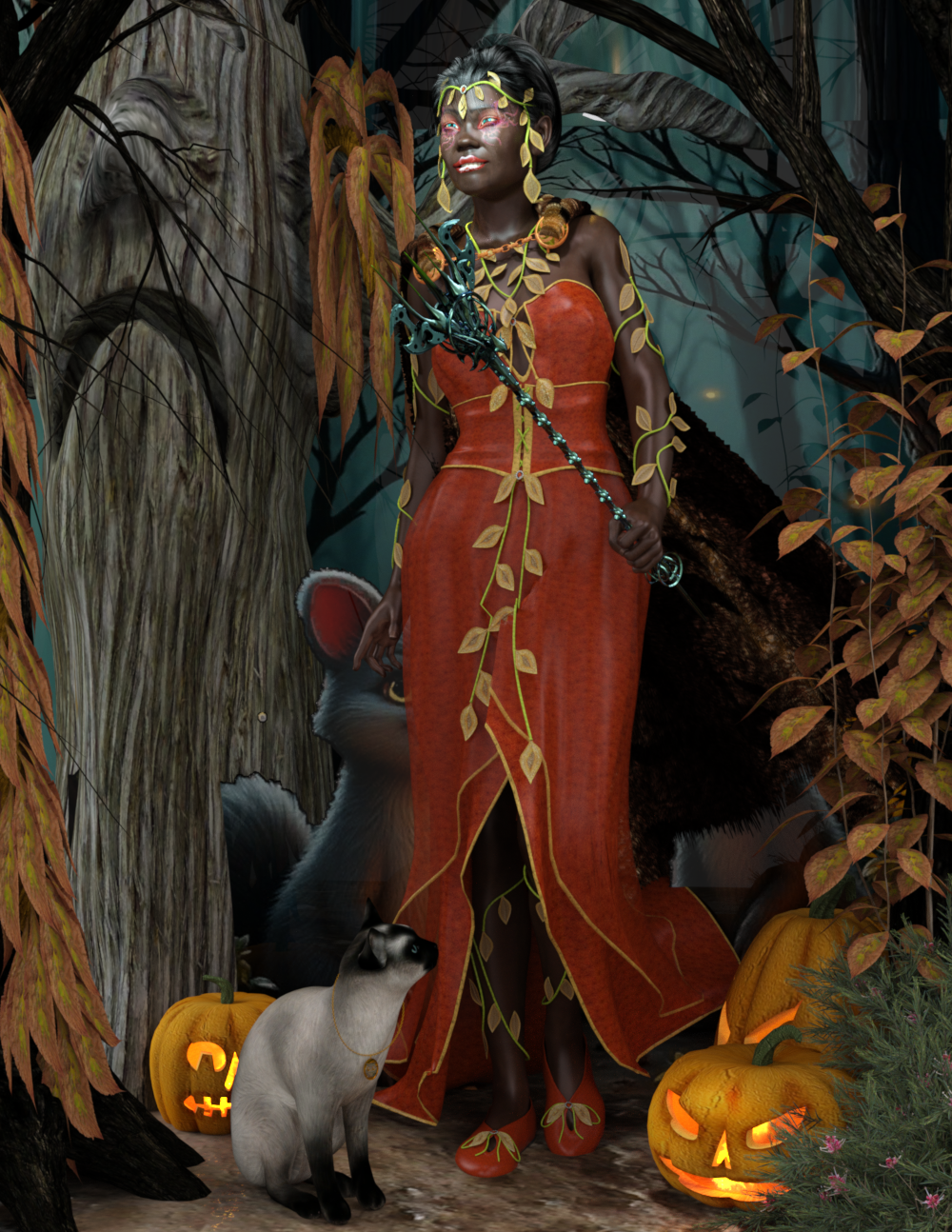
This is Genesis 2 female with some dial-in morphs. She is wearing Gaia for Victoria 4 (Dress textures are a freebie from the 2025 Fantasy Attic's Annual Halloween Gift, Halloween Gaia Gown by GlassLady) and her skin texture is Marvlynn V4 by Shadow_Dancer (Also from the gifts page). With her is the Millennium Cat with a free texture ThaiCat for DAZMillCat by czarny_jednorozec84 and the Owl pendant by emanuela1 also a gift. The environment is one of the free backgrounds from the halloween gift page by EarwenM. The trees are the Dark Trees here at DAZ, Traveler's spooky tree and jacko'lanterns. Dreampaint's forrest set, Xfrog's bushes.
 SY Faceless
ChaosDrgn said:
I'm trying to figure out how to get rid of the mouth texture, tried Dain 9 and Victoria 9 both.
I don't think this product was meant to be made for being used with the characters' original texture maps (Head) ~~
I'm afraid your best option might be retouching / healing the texture map with external image Editors... to remove partial textures around the mouth area ~~
New Year, New Sales Thread: Report Issues Here 3 "Reporting Only"Cybersox said:
So what is the deal with this "Victoria AI agent" that keeps popping up on my screen when I'm on the DAZ store? How did it get turned on and how do I turn it off?
Make sure you don't have any open discussions - if it keeps popping up that is usually the cause, saying goodbye should end the chat and stop it from popping up (unless you have found a new bug or compatibility issue).
Victoria AI chatbot impressions.I hadn't opened that chat bot before and did so today. I found it to be really fast and helpful. It answered my questions and provided not just tips, but forum posts pretaining to my inquiries, recommended products, and so forth. Iwill probably use it much more. A lot faster than Google searches. It will be interesting to see what happens when the questions get more technical in nature. it also references forum topics pertaining to what you are looking for, which I find really nice...much easier than doing a forum seach that sucks, in my opinion.
One thing I did ask was when Genesis 10 was to be released. It hedged that one off very nicely like you would expect when a date isn't even being leaked
OH..one bad that I've found so far..everytime I change pages, the bot pops up automatically now. I cannot get it to stay minimized. I will see after I close the browser and come back in.
EDIT" yes, it is now staying minimized after closing browser and reloading.New Year, New Sales Thread: Report Issues Here 3 "Reporting Only"Cybersox said:
So what is the deal with this "Victoria AI agent" that keeps popping up on my screen when I'm on the DAZ store? How did it get turned on and how do I turn it off?
its an AI chat bot..I just tried it for the first time after seeing this mention and have to say, it is extremely helpful. I pointed me to forum posts to help with my questions, pointed to product, to tutorials, etc etc. And its very fast. I'm impressed actually.
SY FacelessI'm trying to figure out how to get rid of the mouth texture, tried Dain 9 and Victoria 9 both.
New Year, New Sales Thread: Report Issues Here 3 "Reporting Only"So what is the deal with this "Victoria AI agent" that keeps popping up on my screen when I'm on the DAZ store? How did it get turned on and how do I turn it off?
Promo Image Contentsjoanna said:
Stareagle said:
This is more of a request than a discussion. Please, please disclose the names of characters and other models used in your promo images. I often see a hair model, for example, and would like to buy the character used in the poromo image to model that hair item, but I cannot find it. This would be extremely useful to me and to others, I believe.
As Richard Haseltine said, there have been plenty of discussions about listing items in the promo pictures already.
To sum it up: it's not as easy as you think, because (copying my response from another thread):
- the product is not available on Daz
- the product is a private custom and not available for sale anywhere else
- the product is heavily kitbashed and retextured and is not representative of what might be for sale
- the PA did not make their own promo images
- the PA did make their promo images months earlier and they don't remember what they used
You can ask on the forums for a specific product, and people will answer if they recognize something. Sometimes a PA shares their percentage sliders too if it's a custom made but achievable through other figures. So you might have something like "Victoria 3%, Van Helsing 15%, Olivia 24%, Impsymian 4%..." and the list goes on. Not easy to list on the sale page and impossible to list if the parts meet any of the criteria met above.
I used to heavily advocate for listing all the products, but I've gotten over it. On one hand, it's beneficial for Daz for the consumers to more easily access products used on promo pages. On the other hand, it's extra work done by the PA to essentially advertise for other PA's products that will probably have no financial benefit (unless they're also listed on that product). I think the only way for it to really happen is for Daz themselves to do it, since it's them who would really have the most to gain from it.
Either way, I agree the forums will always be the best go-to place, as it has been for a while. On the topic of sharing the percentages used for sliders, one of my favorite examples is from chevybabe25. Like the more recent dForce Bookworm Hair for Genesis 9. Her products always showcase nice combinations with Daz Original models.
Promo Image ContentsStareagle said:
This is more of a request than a discussion. Please, please disclose the names of characters and other models used in your promo images. I often see a hair model, for example, and would like to buy the character used in the poromo image to model that hair item, but I cannot find it. This would be extremely useful to me and to others, I believe.
As Richard Haseltine said, there have been plenty of discussions about listing items in the promo pictures already.
To sum it up: it's not as easy as you think, because (copying my response from another thread):
- the product is not available on Daz
- the product is a private custom and not available for sale anywhere else
- the product is heavily kitbashed and retextured and is not representative of what might be for sale
- the PA did not make their own promo images
- the PA did make their promo images months earlier and they don't remember what they used
You can ask on the forums for a specific product, and people will answer if they recognize something. Sometimes a PA shares their percentage sliders too if it's a custom made but achievable through other figures. So you might have something like "Victoria 3%, Van Helsing 15%, Olivia 24%, Impsymian 4%..." and the list goes on. Not easy to list on the sale page and impossible to list if the parts meet any of the criteria met above.
The futile search for Genesis 9 Male clothes
Original Genesis was a unisex base, but the bulk of the content was categorized by Victoria 5 and Michael 5, so looking for traditionally gendered male or female clothing was pretty easy. Genesis 9 doesn't have gendered clothing searches, so a customer looking for traditionally male clothes has to look through page after page of content, hoping they will spot something useful by the main promo image. It's frustrating and, personally doesn't make me feel welcome.Ron Knights said:Didn't they do the unisex before? Was it an earlier version of Genesis?
Daz Studio 6 Beta - version 6.25.2026.19821! (Updated July 23, 2026)DoctorJellybean said:
crosswind said:
Imago said:
a_gus said:
Hi there.
What about a final version of Daz Studio "2025"? Daz will have to rename it in "Daz 2026"... That's just a "code name" for the Alpha, the final release will be named DAZ Studio 6, as I can see.
Like for Genesis jumping from 3 to 8, DAZ Studio will jump from 4 to 6.
I know 4, 5, 6, 7 are used for Victoria... but I wonder if 5.x has been used for any DS applications ? Why does it jump from 4 to 6 ?

I believe it refers to the QT versions used.
Yes, we've seen 5.x used in discussion about the development builds and SDK versions based on Qt5. They switched to 6 when they upgraded to Qt6.
Daz Studio 6 Beta - version 6.25.2026.19821! (Updated July 23, 2026)DoctorJellybean said:
crosswind said:
Imago said:
a_gus said:
Hi there.
What about a final version of Daz Studio "2025"? Daz will have to rename it in "Daz 2026"... That's just a "code name" for the Alpha, the final release will be named DAZ Studio 6, as I can see.
Like for Genesis jumping from 3 to 8, DAZ Studio will jump from 4 to 6.
I know 4, 5, 6, 7 are used for Victoria... but I wonder if 5.x has been used for any DS applications ? Why does it jump from 4 to 6 ?
I believe it refers to the QT versions used.
Ah, I overlooked Qt ... Thanks !
But I personally prefer to the way that Marvelous Designer (Win) adopted, which has been developed with Qt but never binded its versions to Qt ~~
Daz Studio 6 Beta - version 6.25.2026.19821! (Updated July 23, 2026)crosswind said:
Imago said:
a_gus said:
Hi there.
What about a final version of Daz Studio "2025"? Daz will have to rename it in "Daz 2026"... That's just a "code name" for the Alpha, the final release will be named DAZ Studio 6, as I can see.
Like for Genesis jumping from 3 to 8, DAZ Studio will jump from 4 to 6.
I know 4, 5, 6, 7 are used for Victoria... but I wonder if 5.x has been used for any DS applications ? Why does it jump from 4 to 6 ?
I believe it refers to the QT versions used.
Daz Studio 6 Beta - version 6.25.2026.19821! (Updated July 23, 2026)Imago said:
a_gus said:
Hi there.
What about a final version of Daz Studio "2025"? Daz will have to rename it in "Daz 2026"... That's just a "code name" for the Alpha, the final release will be named DAZ Studio 6, as I can see.
Like for Genesis jumping from 3 to 8, DAZ Studio will jump from 4 to 6.
I know 4, 5, 6, 7 are used for Victoria... but I wonder if 5.x has been used for any DS applications ? Why does it jump from 4 to 6 ?
Daz 3D is part of

Connect
DAZ Productions, Inc.
7533 S Center View Ct #4664
West Jordan, UT 84084Licensing Agreement | Terms of Service | Privacy Policy | EULA
© 2026 Daz Productions Inc. All Rights Reserved.