-
Daz Studio Pro BETA - version 4.12.2.60! (*UPDATED*)
I have a dum-dum question ("dum-dum" bc it's probably been already asked somewhere, but I can't seem to Google it), so please excuse me if it's been asked/answered already...
I have the Beta, but how can I install any plug-ins to see if they work with the Beta?
I'm trying to use pwToon (on my Mac) to see if the new Beta fixes an issue I have where I can't select files from "Open..." menu choice. This makes it very awkward when I try to change texture or shader settings. Most of my files use the pwToon plug-in, so I can't open them in the Beta.
Any assistance would be greatly appreciated.
If pwToon is already installed, uninstall and reinstall it.
Does this mean that pwToon would then work for both the BETA and DS 4.12, or only for the BETA? Also, would I have to do this with any other plug-ins I have working with 4.12?
Daz Studio Pro BETA - version 4.12.2.60! (*UPDATED*)I have a dum-dum question ("dum-dum" bc it's probably been already asked somewhere, but I can't seem to Google it), so please excuse me if it's been asked/answered already...
I have the Beta, but how can I install any plug-ins to see if they work with the Beta?
I'm trying to use pwToon (on my Mac) to see if the new Beta fixes an issue I have where I can't select files from "Open..." menu choice. This makes it very awkward when I try to change texture or shader settings. Most of my files use the pwToon plug-in, so I can't open them in the Beta.
Any assistance would be greatly appreciated.
If pwToon is already installed, uninstall and reinstall it.
Daz Studio Pro BETA - version 4.12.2.60! (*UPDATED*)I have a dum-dum question ("dum-dum" bc it's probably been already asked somewhere, but I can't seem to Google it), so please excuse me if it's been asked/answered already...
I have the Beta, but how can I install any plug-ins to see if they work with the Beta?
I'm trying to use pwToon (on my Mac) to see if the new Beta fixes an issue I have where I can't select files from "Open..." menu choice. This makes it very awkward when I try to change texture or shader settings. Most of my files use the pwToon plug-in, so I can't open them in the Beta.
Any assistance would be greatly appreciated.
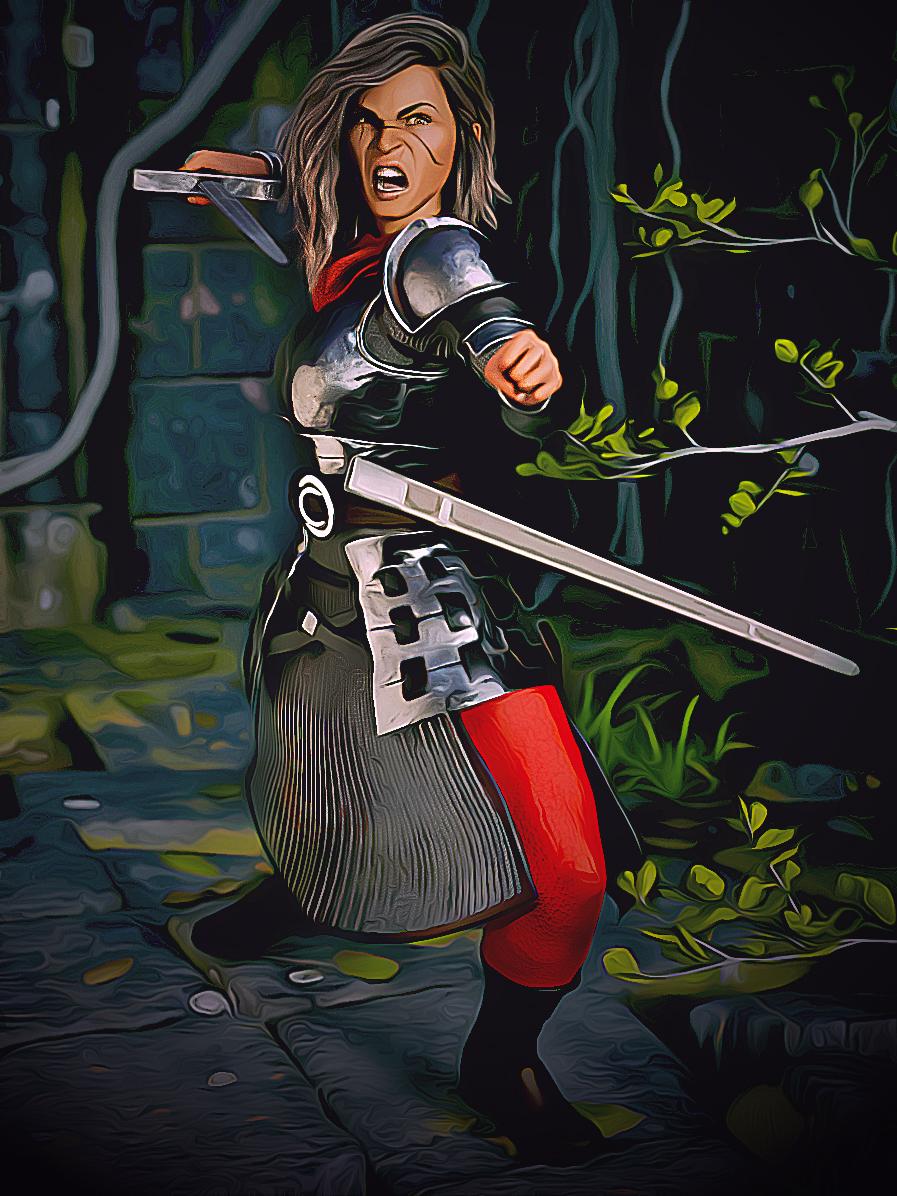
Show us your 3Delight rendersI just started messing around with PWToon, after doing Iray only basically since I first started using DS. So far I'm mainly just fiddling with different settings to see what they do, and am nowhere near developing a style with it. Here is my first full render, along with the Iray original. The framing is slightly different because I was working in the current beta, which seems to have keyboard viewport navigation turned on no matter what you do. Also, I'll need to reapply her face scars since I didn't fully get how to retain maps while I was initially applying the toon shaders, and her expression is more intense because I didn't have AFE when I did the first render.
Nice! Just a general thought , without knowing much about PWToon...to me it looks like you lost a little bit ofcontrast between the subject and the background. But then again, I know nothing about toon styles etc:) Keep 'em comin'!
Welcome to Hatsune Miku Anime Manga Cafe ☕
Just Found Trunk Model for G8 M in devian art . Render using PwToon and enhance in Photoshop
More Non-photorealisitic Renders (NPR II)I just started messing around with PWToon, after doing Iray only basically since I first started using DS. So far I'm mainly just fiddling with different settings to see what they do, and am nowhere near developing a style with it. Here is my first full render, along with the Iray original. The framing is slightly different because I was working in the current beta, which seems to have keyboard viewport navigation turned on no matter what you do. Also, I'll need to reapply her face scars since I didn't fully get how to retain maps while I was initially applying the toon shaders, and her expression is more intense because I didn't have AFE when I did the first render.


Your Iray version look very awesome to work with . Here my quickie edit to show sometimes work with IRAY > Photoshop is possible . Of course doing manual line art work like @tdkrobert always did , will enhance your end results
 More Non-photorealisitic Renders (NPR II)
Hey, I've got that same alley set! Very nice scene, but very dark. It's hard to judge the quality of these scene because it's so dark. I see thick outlines and I like that they give some substance to her figure and help make her pop from the background. The fire effects on the hands are VERY nicely done. Quite effective. The head, though doesn't look that good, though. It's just odd. Is it supposed to be coming out of her mind (in which case we should see some sort of manifestation near the center of her forehead like Sue Storm from the Fantastic Four), or is the top of her head supposed to be ablaze (like Ghost Rider or Firestorm)?
This is a good start, but I think this calls for another pass on the effects.
I also have one comment about the costume design, in general, and that is the midriff. The color is off-putting. If that is supposed to be bare skin, it does not match her face and neck. If it's not bare skin, you should change it to some other color. One of the keys to good character design is not to introduce something that is hard to understand. In this case, I'm puzzling over her middle instead of taking in the whole scene.
The shading and wrinkles on the costume are pretty good, by the way. You're really getting the hang of the textures and PWToon.
Thanks for the input. I wasn't to happy with the hair blaze need to work on photoshop masking to really make the effect work.Not sure how you confused a shirt for skin but I'll keep in mind some people have trouble with colors. Oh before I go I should say I did not use PWtoon but a different Shader product called Visual Style Shader. Its more for an anime look. I then took three different renders one for the Character in 3delight. Then the fire and background were seperate iray renders that i put an oil paint filter on. I also used PS to put a nice dark outline around the character. Anyways thanks for the feedback I'll try harderDang, there is almost no way I can phrase this without sounding snippy or defensive. I'm really not trying to be, honestly, but it's not about me (or anyone) having "difficulty with colors." It's about the decisions you made. You have a black character and an off-black fabric that is fairly close to her skin tone. Also, the top broke exactly at the point where a midriff top would break. And, you are mixing solid blacks with off-black (let's call it charcoal). The yoke pattern on her top is solid black: deep, rich and solid. And then you have a charcoal fabric across her belly and on her boots. They are not reading as black that just has a different texture or reflectiveness. It just comes off as a slightly different color.
Take a day or two away from it and then look at the smaller version in my post and I think you'll see that the charcoal fabric is not sufficiently different from her skin tone.
--------------------
The process you have with the different shaders and combining the renders is working well, but you have these really thick outlines on the outer body and no lines on the interior of the image. That's a bit inconsistent. Nevertheless, it's still nice looking, but still running a bit dark.
Looking forward to seeing what you do next.
Show us your 3Delight rendersI just started messing around with PWToon, after doing Iray only basically since I first started using DS. So far I'm mainly just fiddling with different settings to see what they do, and am nowhere near developing a style with it. Here is my first full render, along with the Iray original. The framing is slightly different because I was working in the current beta, which seems to have keyboard viewport navigation turned on no matter what you do. Also, I'll need to reapply her face scars since I didn't fully get how to retain maps while I was initially applying the toon shaders, and her expression is more intense because I didn't have AFE when I did the first render.
More Non-photorealisitic Renders (NPR II)I just started messing around with PWToon, after doing Iray only basically since I first started using DS. So far I'm mainly just fiddling with different settings to see what they do, and am nowhere near developing a style with it. Here is my first full render, along with the Iray original. The framing is slightly different because I was working in the current beta, which seems to have keyboard viewport navigation turned on no matter what you do. Also, I'll need to reapply her face scars since I didn't fully get how to retain maps while I was initially applying the toon shaders, and her expression is more intense because I didn't have AFE when I did the first render.
What the hell is Gordig doing now?I just started messing around with PWToon, after doing Iray only basically since I first started using DS. So far I'm mainly just fiddling with different settings to see what they do, and am nowhere near developing a style with it. Here is my first full render, along with the Iray original. The framing is slightly different because I was working in the current beta, which seems to have keyboard viewport navigation turned on no matter what you do. Also, I'll need to reapply her face scars since I didn't fully get how to retain maps while I was initially applying the toon shaders, and her expression is more intense because I didn't have AFE when I did the first render.
More Non-photorealisitic Renders (NPR II)
Thanks for the input. I wasn't to happy with the hair blaze need to work on photoshop masking to really make the effect work. Not sure how you confused a shirt for skin but I'll keep in mind some people have trouble with colors. Oh before I go I should say I did not use PWtoon but a different Shader product called Visual Style Shader. Its more for an anime look. I then took three different renders one for the Character in 3delight. Then the fire and background were seperate iray renders that i put an oil paint filter on. I also used PS to put a nice dark outline around the character. Anyways thanks for the feedback I'll try harderHey, I've got that same alley set! Very nice scene, but very dark. It's hard to judge the quality of these scene because it's so dark. I see thick outlines and I like that they give some substance to her figure and help make her pop from the background. The fire effects on the hands are VERY nicely done. Quite effective. The head, though doesn't look that good, though. It's just odd. Is it supposed to be coming out of her mind (in which case we should see some sort of manifestation near the center of her forehead like Sue Storm from the Fantastic Four), or is the top of her head supposed to be ablaze (like Ghost Rider or Firestorm)?
This is a good start, but I think this calls for another pass on the effects.
I also have one comment about the costume design, in general, and that is the midriff. The color is off-putting. If that is supposed to be bare skin, it does not match her face and neck. If it's not bare skin, you should change it to some other color. One of the keys to good character design is not to introduce something that is hard to understand. In this case, I'm puzzling over her middle instead of taking in the whole scene.
The shading and wrinkles on the costume are pretty good, by the way. You're really getting the hang of the textures and PWToon.
More Non-photorealisitic Renders (NPR II)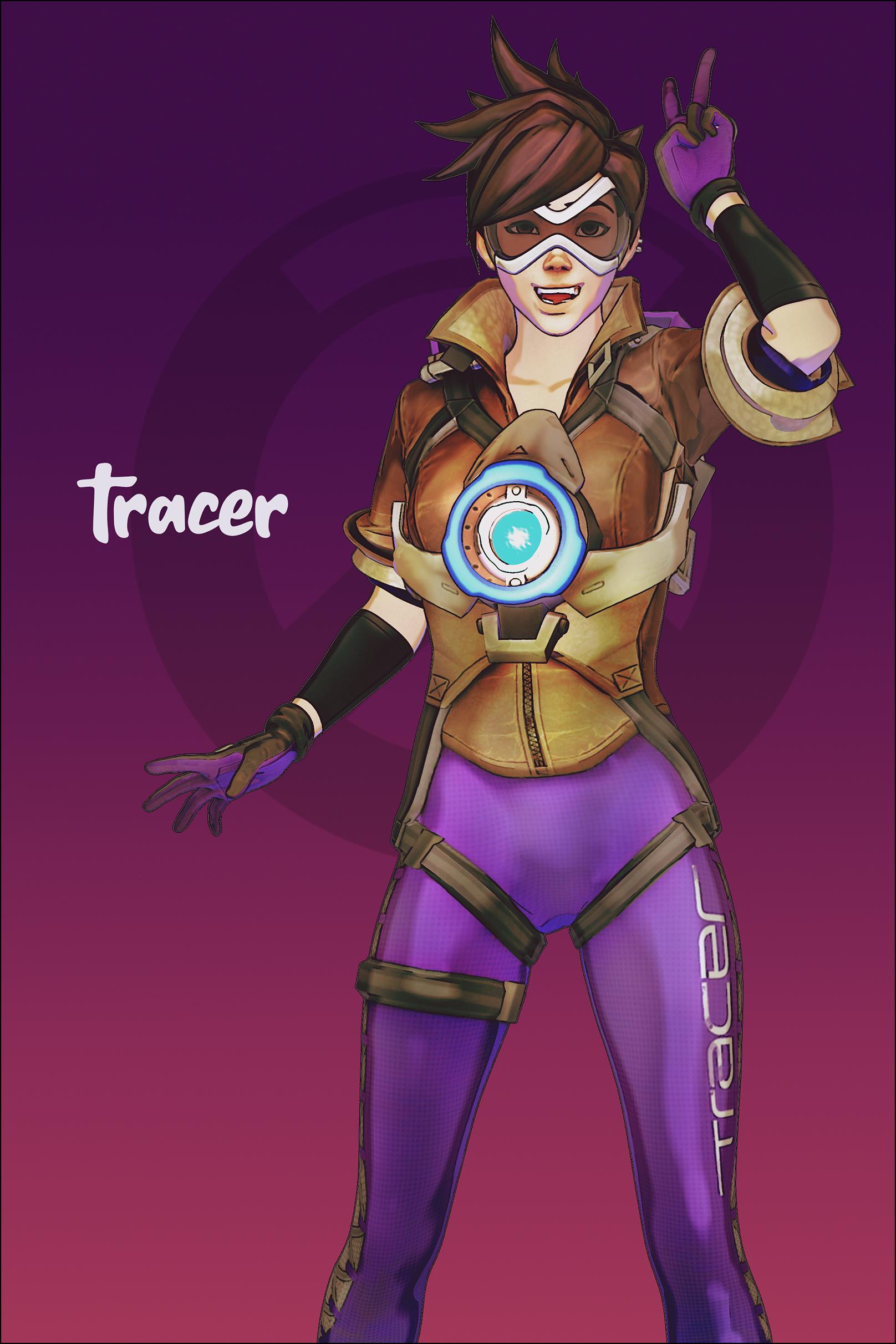
Trying using PW Toon again . Overwatch`s Tracer set for G8f came from Devian Art
Thanks for courages . Lately I`ve been experimenting using IRAY and Toonize via Photoshop . But after found several cool models in devianart , I`d tried again using PW Toon .

This one PwToon render and postworked in Photoshop ( color correction -enhance plus BG). Hope you al like it ;)
You have a great "style" technique with these. They certainly draws attention.
More Non-photorealisitic Renders (NPR II)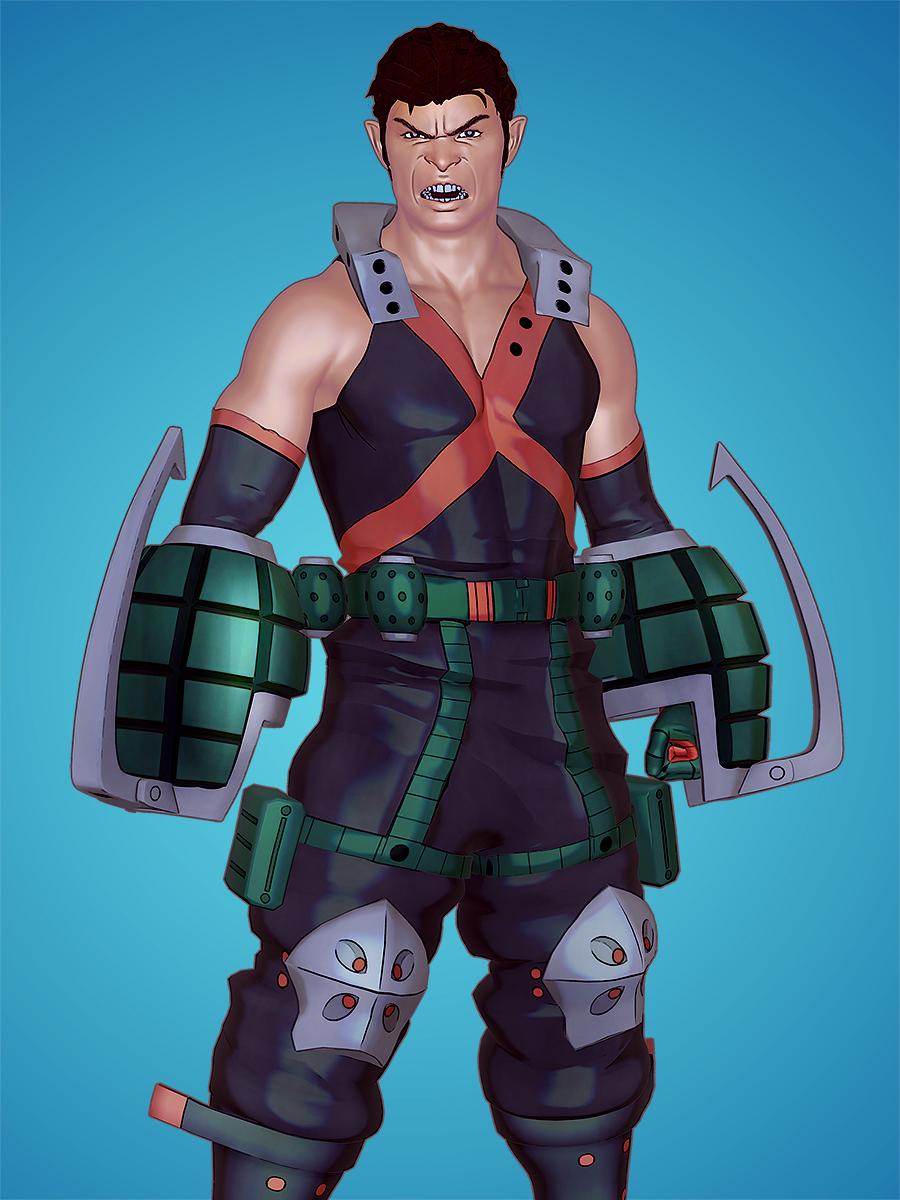
Testing PwToon Smooth Shading default presets and enhance in Photoshop
VERY nice work. I think the linework is crisp and clean. There are a few funky little areas on the knee pads, and a hiccup on his right bicep, but overall this is nicely improved. Colors and highlights are also conherent and work well with the design.
You're getting the usual "painted skin" problem that we all face when working with 3D figures (and pro artists also struggle with this in published comics, so you're not alone). This is apparent on the upper torso where the costume literally looks painted on – as though the fabric has no substance. The lack of substance is also apparent at his waist. It looks like those green vertical stripes should be made of leather or something thicker than the fabric underneath, but then we seen the green stripes bending in the same way as the underlying purple fabric. That makes for a bit of disconnect between realism and toon. As I said, though, even pro artists struggle with this. Just go back and look at some of the 1990s X-Men comics from when there were all sorts of pouches and straps on their uniforms. Some of the less-skilled artists tended to skimp on those details and those features looked painted on, rather than having depth and mass.
Anyway, focusing on colors, linework and character design: You nailed it! This is a very well crafted character. I'm particularly impressed with the results you got on the skin and the great expression. NICE JOB.
Thanks again for great input and advices
More Non-photorealisitic Renders (NPR II)Testing PwToon Smooth Shading default presets and enhance in Photoshop
Man, you and PWToon get along like old friends!
More Non-photorealisitic Renders (NPR II)Another try, with some photoshop help.
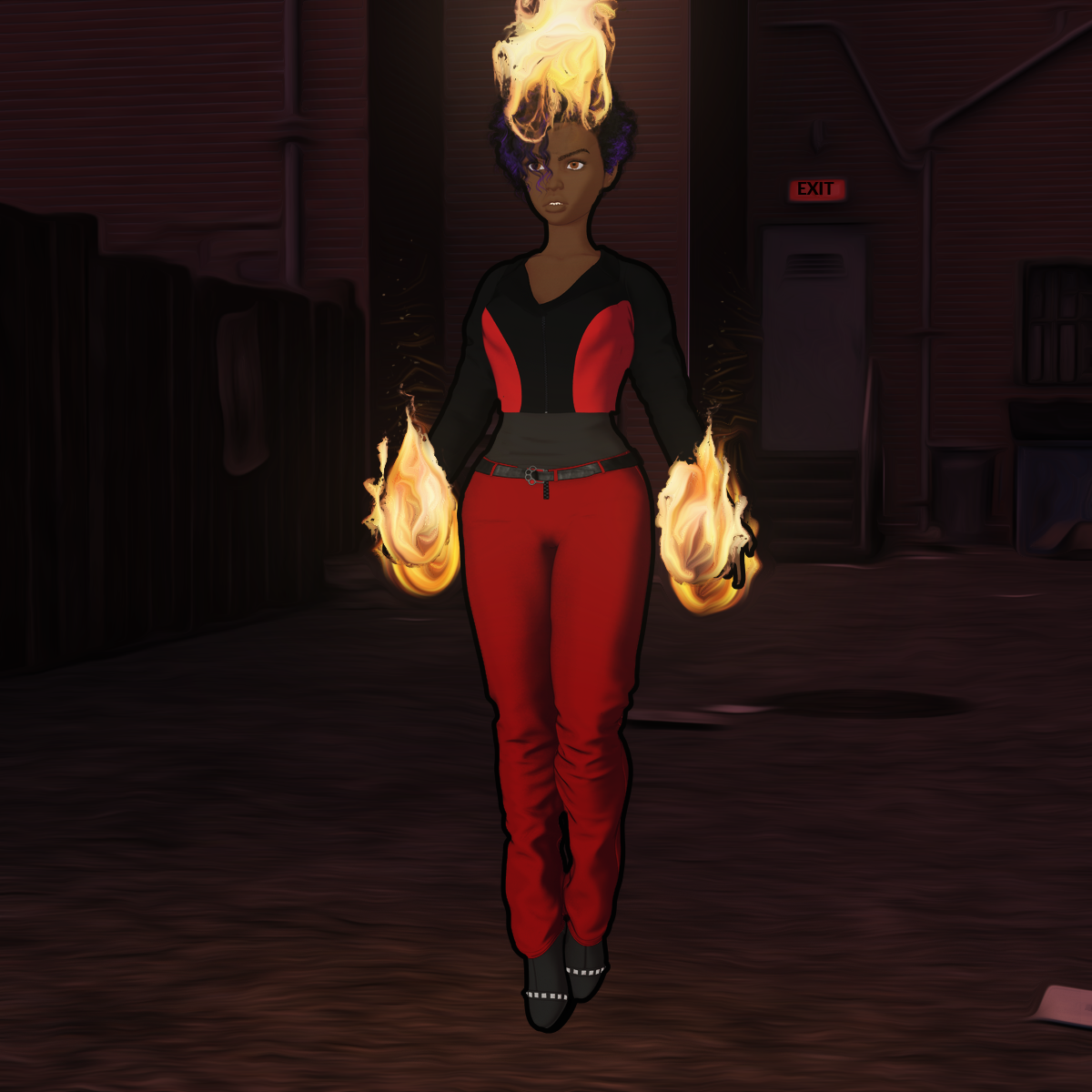
Hey, I've got that same alley set! Very nice scene, but very dark. It's hard to judge the quality of these scene because it's so dark. I see thick outlines and I like that they give some substance to her figure and help make her pop from the background. The fire effects on the hands are VERY nicely done. Quite effective. The head, though doesn't look that good, though. It's just odd. Is it supposed to be coming out of her mind (in which case we should see some sort of manifestation near the center of her forehead like Sue Storm from the Fantastic Four), or is the top of her head supposed to be ablaze (like Ghost Rider or Firestorm)?
This is a good start, but I think this calls for another pass on the effects.
I also have one comment about the costume design, in general, and that is the midriff. The color is off-putting. If that is supposed to be bare skin, it does not match her face and neck. If it's not bare skin, you should change it to some other color. One of the keys to good character design is not to introduce something that is hard to understand. In this case, I'm puzzling over her middle instead of taking in the whole scene.
The shading and wrinkles on the costume are pretty good, by the way. You're really getting the hang of the textures and PWToon.
More Non-photorealisitic Renders (NPR II)Testing PwToon Smooth Shading default presets and enhance in Photoshop
VERY nice work. I think the linework is crisp and clean. There are a few funky little areas on the knee pads, and a hiccup on his right bicep, but overall this is nicely improved. Colors and highlights are also conherent and work well with the design.
You're getting the usual "painted skin" problem that we all face when working with 3D figures (and pro artists also struggle with this in published comics, so you're not alone). This is apparent on the upper torso where the costume literally looks painted on – as though the fabric has no substance. The lack of substance is also apparent at his waist. It looks like those green vertical stripes should be made of leather or something thicker than the fabric underneath, but then we seen the green stripes bending in the same way as the underlying purple fabric. That makes for a bit of disconnect between realism and toon. As I said, though, even pro artists struggle with this. Just go back and look at some of the 1990s X-Men comics from when there were all sorts of pouches and straps on their uniforms. Some of the less-skilled artists tended to skimp on those details and those features looked painted on, rather than having depth and mass.
Anyway, focusing on colors, linework and character design: You nailed it! This is a very well crafted character. I'm particularly impressed with the results you got on the skin and the great expression. NICE JOB.
More Non-photorealisitic Renders (NPR II)Testing PwToon Smooth Shading default presets and enhance in Photoshop
More Non-photorealisitic Renders (NPR II)Trying using PW Toon again . Overwatch`s Tracer set for G8f came from Devian Art
I think you've got something good here. The lines seem to be consistent, at least as far as I can see them. The background is so dark that it obscures the line details. Although the background is very attractive and works well with the figure, I think for a character design sketch that something lighter would work better. Maybe yellow or orange? Something to give us contrast. The outfit looks good and the figure has a nice design (is he original or from a game or anime? I'm not familiar with "Tracer").
One small comment about the shading. Ummm, well, I don't want to be too picky (or pervy), but his "boy bits" need a little more detail in the crotch. He looks like a Ken doll down there. Just slightly darker shadows would give us better detail and make him look a bit more masculine. Just a thought.
Great work, and I'm looking forward to seeing more (of your work, not of the kid's tights!).
"Trying to" use PWToon? I'd say you succeeded, quite decisively.
Thanks for courages . Lately I`ve been experimenting using IRAY and Toonize via Photoshop . But after found several cool models in devianart , I`d tried again using PW Toon .
This one PwToon render and postworked in Photoshop ( color correction -enhance plus BG). Hope you al like it ;)
Definitely one of your best to date! Really LOVE the hair. It is flowing and looks exactly as anime-styled hair should look. IMPRESSIVE.
Again, a lighter background for a character design would let us see the outlines more clearly. Two comments:
- I see very distinct highlight bands on her legs and arm, but do not see the same number on her boots. That's a small disconnect. I don't think you need to match them exactly, but just a little more detail on the boots and cloth would tie them together better. Not that they're bad now, mind you!
- The pose of the gun in her left hand just doesn't work. It just looks like a stick. Aiming a gun directly at the viewer is actually hard to do in comics and movies. To make that work, you either have to be close to the figure so we can see down the barrel of the gun or it needs to be firing so we see a muzzle flash or bullet. This is why guns are usually pointed just a little away from the viewer so we can see a bit of the barrel and body of the gun. For examples of how the pros do it, go do a google search for "Frank Castle Punisher Comics" and you'll see how Marvel Comics artists approach the problem.
And, btw, I'm only nitpicking this much because you are so close to nailing this style. I'm excited to see more of what you're doing.
Thanks for enlighment inputs . Will do in next render
And yeah as @Oso pointed out . Tracer is female who look like a boy ;)
thanks again for point out how to improve those images
More Non-photorealisitic Renders (NPR II)"Trying to" use PWToon? I'd say you succeeded, quite decisively.
Thanks for courages . Lately I`ve been experimenting using IRAY and Toonize via Photoshop . But after found several cool models in devianart , I`d tried again using PW Toon .
This one PwToon render and postworked in Photoshop ( color correction -enhance plus BG). Hope you al like it ;)
Definitely one of your best to date! Really LOVE the hair. It is flowing and looks exactly as anime-styled hair should look. IMPRESSIVE.
Again, a lighter background for a character design would let us see the outlines more clearly. Two comments:
- I see very distinct highlight bands on her legs and arm, but do not see the same number on her boots. That's a small disconnect. I don't think you need to match them exactly, but just a little more detail on the boots and cloth would tie them together better. Not that they're bad now, mind you!
- The pose of the gun in her left hand just doesn't work. It just looks like a stick. Aiming a gun directly at the viewer is actually hard to do in comics and movies. To make that work, you either have to be close to the figure so we can see down the barrel of the gun or it needs to be firing so we see a muzzle flash or bullet. This is why guns are usually pointed just a little away from the viewer so we can see a bit of the barrel and body of the gun. For examples of how the pros do it, go do a google search for "Frank Castle Punisher Comics" and you'll see how Marvel Comics artists approach the problem.
And, btw, I'm only nitpicking this much because you are so close to nailing this style. I'm excited to see more of what you're doing.
More Non-photorealisitic Renders (NPR II)PWToon remains one of my favorite toon approaches.
It has it's flaws, but on the whole it balances speed and ease with quality results. And then you can learn approaches to minimize the flaws.
Definitely! Plus the quality to render time ratio is second to none.
Daz 3D is part of

Connect
DAZ Productions, Inc.
7533 S Center View Ct #4664
West Jordan, UT 84084Licensing Agreement | Terms of Service | Privacy Policy | EULA
© 2026 Daz Productions Inc. All Rights Reserved.