-
Genesis 1 head shapes to Genesis 9...
Catherine3678ab said:
Leana said:
Catherine3678ab said:
https://www.daz3d.com/mmx-genesis-9-clones-for-all
It was on sale just the other day so may appear again if there's a repeat day. Or it may come on sale during next month's sale.
That product is used to convert G9 clothes back to earlier Genesis figures, not to convert shapes to G9.
I don't think there's a shape converter to go directly from G1 to G9. If you have GenX2 and its various add-ons, you could convert it to G3 and then use figure converter to go from G3 to G9. But that would be quite an investment for 2 shapes if you don't have any of those products.
I don't know if this tutorial to convert G8 morphs to G9 could be adapted to G1, but it might be worth a try since G9 includes a G1 clone: https://www.versluis.com/2022/11/how-to-convert-genesis-8-characters-to-genesis-9-using-the-fit-suit-method/
The auto-fit clone can be used to help create a "clothing figure made of G9's base mesh" that looks like Genesis. The "clothing figure" can then be used to transfer a morph of Genesis back into G9.
Indeed, autofit clone shapes can be very useful for manual conversion. Just installing the clones won't provide you with a shape conversion tool though.
Beside, those are G9 clones for the older genesis figures. So they probably would be more useful to convert from G9 to older figures.
Genesis 1 head shapes to Genesis 9...Elor said:
Jay Versluis has a video on the subject and his advice is to convert Genesis to Genesis 2 and then to convert between Genesis 2/3 and 9 (he explains the later in the video, but the former is done with the same method):
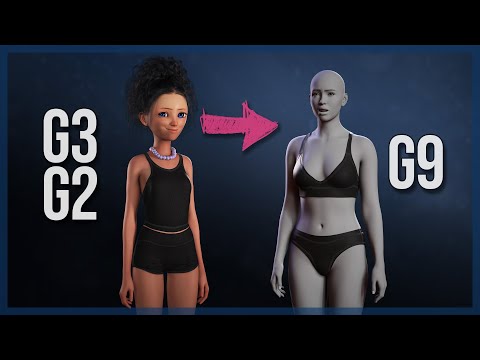
It's part of a playlist:
https://www.youtube.com/playlist?list=PLPcx_LSSGfZd2uZkPrhfMmq5c5vDOTQ3k
The method shown by Jay Versluis is, as far as I understand it, only for full body.
To only get a head morph, there is a tool (I never used it):
https://github.com/Mike3D/Character-Splitter-for-DAZ-Studio
https://www.daz3d.com/forums/discussion/617476/character-splitter/p1
Thanks a lot!
Genesis 1 head shapes to Genesis 9...Leana said:
Catherine3678ab said:
https://www.daz3d.com/mmx-genesis-9-clones-for-all
It was on sale just the other day so may appear again if there's a repeat day. Or it may come on sale during next month's sale.
That product is used to convert G9 clothes back to earlier Genesis figures, not to convert shapes to G9.
I don't think there's a shape converter to go directly from G1 to G9. If you have GenX2 and its various add-ons, you could convert it to G3 and then use figure converter to go from G3 to G9. But that would be quite an investment for 2 shapes if you don't have any of those products.
I don't know if this tutorial to convert G8 morphs to G9 could be adapted to G1, but it might be worth a try since G9 includes a G1 clone: https://www.versluis.com/2022/11/how-to-convert-genesis-8-characters-to-genesis-9-using-the-fit-suit-method/
The auto-fit clone can be used to help create a "clothing figure made of G9's base mesh" that looks like Genesis. The "clothing figure" can then be used to transfer a morph of Genesis back into G9.
Limited Time Freebies Discussion ThreadSilverGirl said:
Hylas said:
SilverGirl said:
admission: I kinda want to see somebody do cave ogre with some of the classical dance poses, but I don't have the utility to cross M/F poses to do it myself.
poses are compatible across genders, so knock yourself out!
Oh, are they? Cool! I thought the reason it always said G3F or G3M (or G8, or...) was that it wouldn't work on the other one, and that was one of the benefits of G9 was that they would! Serves me right for never trying anyway. Thanks for the tip!
I do this all the time. I have seen advice that the poses might need tweaking to use on the other gender, but I haven't needed to. Now, if the figure is a very extreme morph, it might become a factor, regardless of gender.
And using the dance poses with Ogre is great idea.
Best converters for G9 to use G8F assets?Leana said:
There are quite a few options for poses:
Free ones:
- https://www.daz3d.com/forums/discussion/605941/genesis-1-2-3-8-9-to-genesis-3-8-9-pose-converter-updated-2023-04-28/p1
- https://www.renderosity.com/freestuff/items/93219/g8fm-pose-transfer-to-g9
Commercial ones:
- https://www.daz3d.com/genesis-3-and-8-to-9-pose-converter
- https://www.daz3d.com/pose-companion-for-genesis-9
- https://www.daz3d.com/bone-minion-for-genesis-8-and-81-poses-for-genesis-9
Thank you! I feel so foolish, I already own Zevo's pose converter. Must have bought it a while back and forgot.
Best converters for G9 to use G8F assets?The G8F/M->G9 pose transfer I did at Rendo (second freebie in Leana's list) is also available on this forum (here) and will eventually be paired with a G9-G8FM convertor. However, I'm having so much difficulty enjoying G9 that I've started a couple of times and stopped after getting not very much further. It will happen, unfortunately, looking at how busy I am this year with real life, it'll be a struggle to complete this side of 2025. Must admit I don't feel a convertor is complete until you can go back to the origin character to check the conversion.
Regards,
Richard
Genesis 1 head shapes to Genesis 9...Jay Versluis has a video on the subject and his advice is to convert Genesis to Genesis 2 and then to convert between Genesis 2/3 and 9 (he explains the later in the video, but the former is done with the same method):
It's part of a playlist:
https://www.youtube.com/playlist?list=PLPcx_LSSGfZd2uZkPrhfMmq5c5vDOTQ3k
The method shown by Jay Versluis is, as far as I understand it, only for full body.
To only get a head morph, there is a tool (I never used it):
https://github.com/Mike3D/Character-Splitter-for-DAZ-Studio
https://www.daz3d.com/forums/discussion/617476/character-splitter/p1
G9 - is there a way to make teeth more perfect?Taoz said:
Here is, for a change, one that isn't focused on making the teeth look worse, but mostly on different versions of looking good:
The Look Teeth Morph Resource for Genesis 9 - https://www.daz3d.com/the-look-teeth-morph-resource-for-genesis-9
Oh that looks handy. Thank you.
G9 - is there a way to make teeth more perfect?Here is, for a change, one that isn't focused on making the teeth look worse, but mostly on different versions of looking good:
The Look Teeth Morph Resource for Genesis 9 - https://www.daz3d.com/the-look-teeth-morph-resource-for-genesis-9
Best converters for G9 to use G8F assets?There are quite a few options for poses:
Free ones:
- https://www.daz3d.com/forums/discussion/605941/genesis-1-2-3-8-9-to-genesis-3-8-9-pose-converter-updated-2023-04-28/p1
- https://www.renderosity.com/freestuff/items/93219/g8fm-pose-transfer-to-g9
Commercial ones:
- https://www.daz3d.com/genesis-3-and-8-to-9-pose-converter
- https://www.daz3d.com/pose-companion-for-genesis-9
- https://www.daz3d.com/bone-minion-for-genesis-8-and-81-poses-for-genesis-9
UltraScenery - new(er) territory [Commercial]paulawp (marahzen) said:
daveso said:
paulawp (marahzen) said:
Comparison: OK, I admit, it's completely cheesy - it was just a product test scene to confirm basic functionality of the new Bone Minion for horses as well as the new Australia 2.
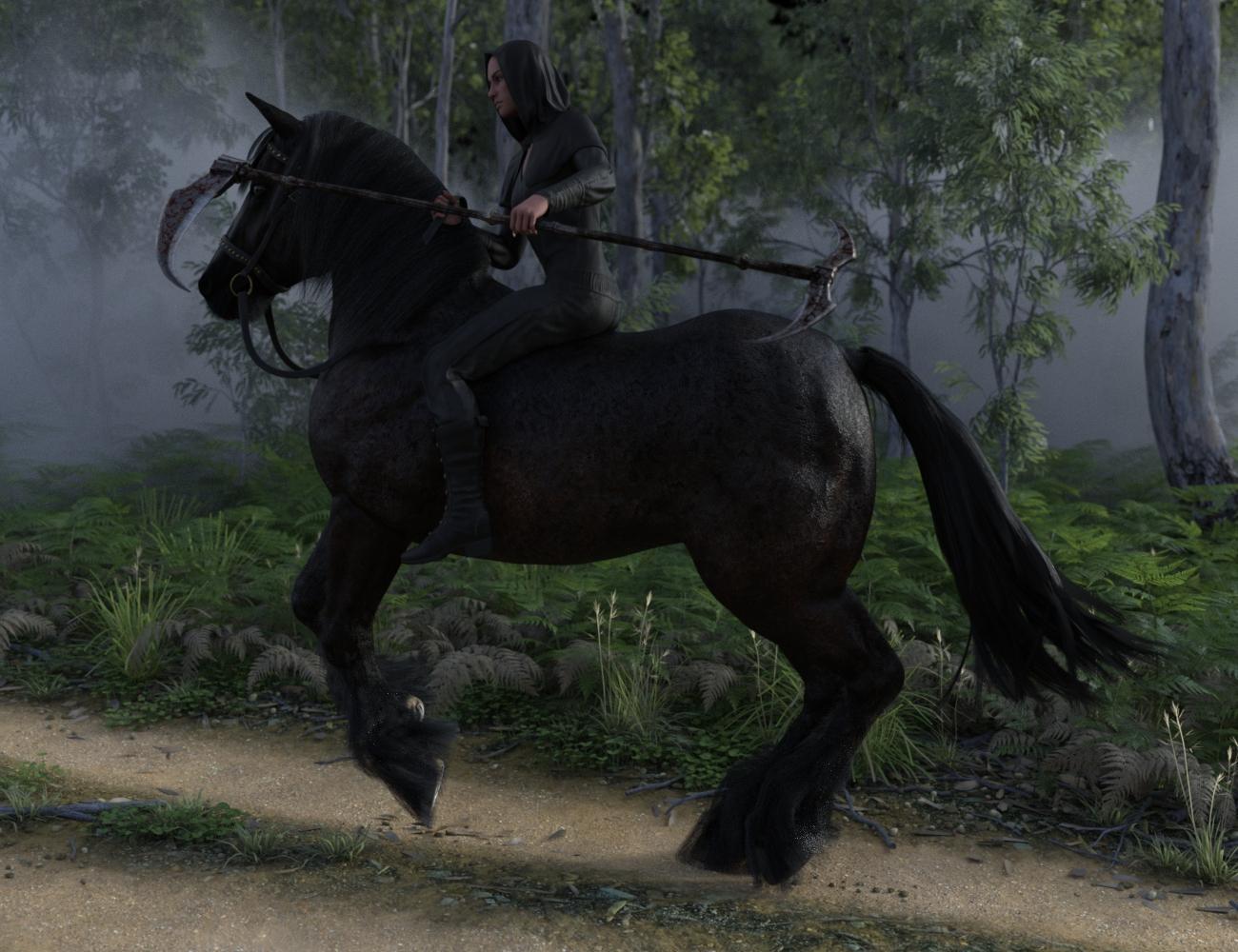
It took 4 minutes, 24 seconds to finish in my 4.22.1.88 beta (yeah, it's old now - I only installed it to test Face Transfer 2). The same file takes 32 minutes, 5 seconds to finish in my release 4.22.0.16.
wow. Hard to believe there can be that much difference. Thats why, with my 4080, the renders should be very fast. Portraits aren't too bad. US2 extremely slow.
Yep. Also, in retrospect, I see that a reasonable person could point to the VDB fog as a possible complication in this example. I tested this problem extensively when I first ran into it (not long after upgrading) and found that all it took was having a USC object, with nothing else, to observe significant difference in render time when comparing to release 4.22.0 and beta 4.22.1 (no longer had a 4.21 instance to test in at that point, of course). Some simpler scenes were less painful, but still much slower. It was when there were lots of tree instances that the real bog down seems to occur.
With that in mind, I retested this scene. In release 4.22.0, with the USC object turned off - rendering only the horse, rider and the fog - it takes 38 seconds to finish (to a 95% convergence). Rendering only the USC object - minus the horse, rider and fog - took ... longer! At 32 minutes, 5 seconds, it was only to 86%. I stopped it after 36 minutes, when it was up to 90%.
In beta 4.22.1, the horse, rider and fog portion of this scene took 39 seconds to finish (also to 95%). The Ultrascenery object alone took 4 minutes, 24 seconds - exactly the same as with the rest of the scene.
Thanks for all the testing, I was slowly going insane here with the performance of USC2, though once established it seems to work much faster but trying to get that grassland growing on a larger set I watited with nothing happend until I gave up. did anybody try an NIVDIA update in this context?
A note to Daz hair developers...crashworship said:
I'm done with strand based hair and will no longer buy strand based hair products. These are now an automatic pass for me in the content store. These hair items rarely work, simulations can take hours, very often crash Studio, the results are less than appealing and, quite frankly, strand based hair doesn't look as good as mesh hair. I have multiple strand based hair props in my library that I almost never use because of these issues. The strand based hair props I do use I use only because they'll work without a simulation and even then, they're a substantial drag on my CPU and GPUs. They're not worth it. I'm just one user and of course, others may find these appealing, but for me, I feel like I've wasted my money.
I understand that many developers put a lot of effort in their products. I appreciate that. This is not a failure of the developers who create these products but rather the intrinsic fault of strand based hair. It's usually far too demanding of CPU and GPU resources and the results aren't worth all that extra time, all the difficulties in posing and rendering and yada, add nausea. And, mesh hair looks better, is easier to use and renders better.
I'm probably gonna get shouted down because of this post and it will probably get frozen and closed but I feel it needed to be said.
Thanks for making this thread
 , I have been meaning to say the same but not got around to it. I have bought a few strandbased hairs and as you say, the simulation take so long, so I don't consider them as dforce. If it takes hours = for me not a working dforce hair. And I agree, they don't look as good as mesh hair, the strands is too thick and coarse. Have bought a few, some that I use sometimes, due to that, despite of the thick hairstrands - it's the righ style. A very few. Most of those I have bought I never use. I see a strandbased hair and I go NOPE. Not the creators fault, the tech is not there I guess, to make it look as smooth and thin hair strands as mesh hair. Sad to see one of my fav hair creators go all in for starandbased hairs. So for me - want a sale - go w mesh transmapped smooth looking thin single hairstrands hair. W a morph of raising the hairline, and w a morph to make the thin hair thinner, and rigged w custom bones that we can select and pose. The hair line morph I can make myself w dformer if forced, and I can live without the thin hair morph if the thin hair looks thin enough, what I am NOT fond of at all - no custom bones hairs, even if it's a mesh hair.Looking for a Shoulder Strap Belt to Add Gadgets or Weapons too for G8F
felis said:
I made it.
It is modelled to fit G8F, but I have saved it as a prop, as I assumed if it was conforming it would deform based on the character. It is saved with 4 bones, so you can adjust it with the bones.
If you want it conforming you can load it and run transfer utility.
In the file it is as a rigged prop and as a wearable preset for G8F.
It is fairly low poly, so there is defult a subD. The textures is simple, but you can apply own shaders.
Let me know if issues.
I'll give this a try, thank you.
Morph export rules for a specific MorphGordig said:
I don't know for sure that this works, but have you tried putting the morph name in quotation marks?
Just tried. Unfortunately nothing is exported if I enclose the morph name in quotation marks.
Morph export rules for a specific MorphI don't know for sure that this works, but have you tried putting the morph name in quotation marks?
Morph export rules for a specific MorphI could also title this "Can we get a list of the simplified regex that the FBX exporter uses".
I want to export a specific morph. For example:
PBMThisMorphBut when I do, it exports "PBMThisMorph" as well as "PBMThisMorphLeft" "PBMThisMorphRight" etc.
I've tried:
PBMThisMorph$PBMThisMorph/bPBMThisMorph.Is there not a character that the exporter recognizes that limits the morph name to an exact match, rather than treating it as a prefix with a wildcard?
UltraScenery - new(er) territory [Commercial]daveso said:
paulawp (marahzen) said:
Comparison: OK, I admit, it's completely cheesy - it was just a product test scene to confirm basic functionality of the new Bone Minion for horses as well as the new Australia 2.
It took 4 minutes, 24 seconds to finish in my 4.22.1.88 beta (yeah, it's old now - I only installed it to test Face Transfer 2). The same file takes 32 minutes, 5 seconds to finish in my release 4.22.0.16.
wow. Hard to believe there can be that much difference. Thats why, with my 4080, the renders should be very fast. Portraits aren't too bad. US2 extremely slow.
Yep. Also, in retrospect, I see that a reasonable person could point to the VDB fog as a possible complication in this example. I tested this problem extensively when I first ran into it (not long after upgrading) and found that all it took was having a USC object, with nothing else, to observe significant difference in render time when comparing to release 4.22.0 and beta 4.22.1 (no longer had a 4.21 instance to test in at that point, of course). Some simpler scenes were less painful, but still much slower. It was when there were lots of tree instances that the real bog down seems to occur.
With that in mind, I retested this scene. In release 4.22.0, with the USC object turned off - rendering only the horse, rider and the fog - it takes 38 seconds to finish (to a 95% convergence). Rendering only the USC object - minus the horse, rider and fog - took ... longer! At 32 minutes, 5 seconds, it was only to 86%. I stopped it after 36 minutes, when it was up to 90%.
In beta 4.22.1, the horse, rider and fog portion of this scene took 39 seconds to finish (also to 95%). The Ultrascenery object alone took 4 minutes, 24 seconds - exactly the same as with the rest of the scene.
UltraScenery - new(er) territory [Commercial]paulawp (marahzen) said:
Comparison: OK, I admit, it's completely cheesy - it was just a product test scene to confirm basic functionality of the new Bone Minion for horses as well as the new Australia 2.
It took 4 minutes, 24 seconds to finish in my 4.22.1.88 beta (yeah, it's old now - I only installed it to test Face Transfer 2). The same file takes 32 minutes, 5 seconds to finish in my release 4.22.0.16.
wow. Hard to believe there can be that much difference. Thats why, with my 4080, the renders should be very fast. Portraits aren't too bad. US2 extremely slow.
Genesis 1 head shapes to Genesis 9...Hi. I'm a weird user, a visual novel developer, who bought almost all content from genesis 1, and refused to move to gen 2, 3, and 8 because I refused to pay double of everything (morphs, poses, resources, etc..) as there were 2 separate figures for male and female. However, I accessed all gen2, 3, and 8 content with clones. I finally upgraded after DAZ went back to "right path" with gen 9, and I've been delighted with it, and spent a lot of $$ on it. However, I have 2 main characters from genesis 1, some unique that I made mixing all the available morphs, that would be very hard to recreate in gen 9. Is there a way to transfer the head shape of that gen 1 char to gen 9?
Thanks.
UltraScenery - new(er) territory [Commercial]Comparison: OK, I admit, it's completely cheesy - it was just a product test scene to confirm basic functionality of the new Bone Minion for horses as well as the new Australia 2.
It took 4 minutes, 24 seconds to finish in my 4.22.1.88 beta (yeah, it's old now - I only installed it to test Face Transfer 2). The same file takes 32 minutes, 5 seconds to finish in my release 4.22.0.16.
Daz 3D is part of

Connect
DAZ Productions, Inc.
7533 S Center View Ct #4664
West Jordan, UT 84084Licensing Agreement | Terms of Service | Privacy Policy | EULA
© 2026 Daz Productions Inc. All Rights Reserved.