-
New DS Filament Render Engine
I'm a little perplexed that anyone could think Filament isn't a gigantic improvement over texture shaded. Sure, it won't replace Iray, or even the Iray preview mode, but I never expected it to.
I think there's a point to be made here about what we might use Filament for. Yes, Filament is more realistic than OpenGL (texture shaded) when it comes to rendering but I'm guessing that most of us don't use Texture shading for finished renders. However, if we use Filament purely as a viewport preview, there are problems. The lighting needs to be re-done before we can render in IRay, for example. Also, I'm finding the Filament preview somewhat blurred and lacking detail and I don't yet know how to improve that in the viewport.
So, personally, I am more comfortable working as I always have with OpenGL because I can easily flip into IRay preview if I need to see how it will look in the render without having to mess with tone mapping and environment intensity and light strength because Filament is nothing like what you get in IRay. Actually, I see little point in Filament if it is not good for previews and hardly good enough for renders.
Daz Studio Pro BETA - version 4.12.2.60! (*UPDATED*)Next question is regarding Filament. I can see how to use Filament in the viewport but not how to use it as a render engine. If I go to the Render Settings tab and click on "Engine" I am offered the same old choices with no Filament option.
Also with regard to filament, the lighting does not equate to the IRay lighting. If I use the settings that look ok in the IRay render, the Filament scene is too bright and washed out by excess light.
Set your draw settings to Filament, and select Viewport as your render engine.
As far as lighting, you either light for Iray or you light for Filament.
So if I am to render in IRay there's no advantage to using Filament in the viewport? Otherwise it would be a hassle to keep changing the lighting before I click render.
Only you can judge how useful anything in DS is for what you want to accomplish. All I know is that Iray's and Filament's lighting requirements are very different. What is confusing to me is that you can't change tone mapping separately for the two render modes. We'll have to see if that's going to change. This is a beta release, so we can still hope that nothing is set in stone.
I hope Daz is following the discussions and paying attention to the concerns users have about Filament. I sure hope they had something clearly in mind when they added it to Daz Studio. I really hope that Daz will share their thinking with the rest of us, and do so in great detail. If not, a lot of effort will have gone to waste.
New DS Filament Render EngineI'm a little perplexed that anyone could think Filament isn't a gigantic improvement over texture shaded. Sure, it won't replace Iray, or even the Iray preview mode, but I never expected it to.
New DS Filament Render EngineCouple of points:
- This is a beta release. Daz had to get this out to a larger pool of users to see what the response would be. The rich kids with 30X0s were dying for an update, so here it is.
- Daz needs to make clear what their thinking is with respect to Filament, why they chose it, and how they expect it to be used, and how the challenges of using items purchased at the Daz store are to be used with it.
- It's a new thing. It's not the old thing. It's not going to be fit for every purpose or replace Iray or even 3DL in a lot of our workflows.
- It's not all terrible.
- It's not the Antichrist. I don't think it is, anyway.
I don't think anyone expected it to be an IRay replacement and no, it is not terrible. Just something of a disappointment. Enough of a disappointment for me to consider remaining with the old OpenGL viewport until Filament improved significantly.
The Eevee comparison is apt, in my view. In Blender I can switch between Cycles and Eevee and see a similar image in the viewport. That is not possible with OpenGL and IRay but I had hoped that Filament would close the gap somewhat. I don't think it does that.
New DS Filament Render EngineI am hoping we get shaders and or a script too
it is certainly an improvement on openGL and for those rendering animations not needing the full PBR of iray and wanting the jcms and HDmorphs you cannot bring to iClone its a treasure.
I will be using it a lot I think
Oh, for sure. A Filament Uber Shader would help solve a lot of issues, I think.
New DS Filament Render EngineCouple of points:
- This is a beta release. Daz had to get this out to a larger pool of users to see what the response would be. The rich kids with 30X0s were dying for an update, so here it is.
- Daz needs to make clear what their thinking is with respect to Filament, why they chose it, and how they expect it to be used, and how the challenges of using items purchased at the Daz store are to be used with it.
- It's a new thing. It's not the old thing. It's not going to be fit for every purpose or replace Iray or even 3DL in a lot of our workflows.
- It's not all terrible.
- It's not the Antichrist. I don't think it is, anyway.
New DS Filament Render EngineI don't understand why Filament and Iray handle lighting so differently if they are both PBR. Why do the renders look so different? Is it because Iray shaders aren't interpreted "properly" by Filament? Filament examples I've seen so far are really disappointing. As a viewport preview, they don't look any closer to a final Iray render than a Texture Shaded preview does. They are different, but not better, to my eyes. Am I misunderstanding the purpose of using Filament in the viewport?
Sorry to say that I agree - I had very high hopes for Filament but the Viewport Preview is poor quality and I actually find the old viewport Texture option more comfortable to work with right now. At least I know how to handle the lighting.
Again, as I commented in another thread, I had hoped that Filament would be the DAZ Studio equivalent of Blender's Eevee but I've seen (and achieved) much better results in Eevee. Let's hope that there are additional shaders and settings to come which will improve the results but so far I don't think I will change my workflow except, perhaps, for my short animations (I have not tried any yet).
New DS Filament Render Engine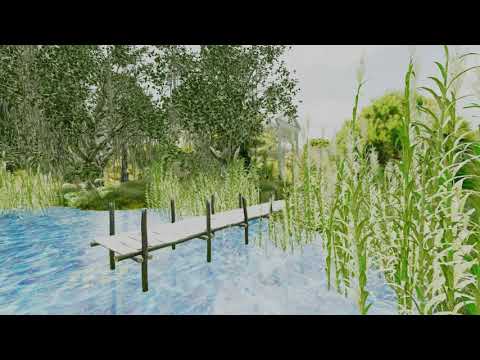
video
transmapped foliage gives a lot of artifacts
and how do I make Dforce strandhair thicker?
can the not Dforce editable ones and they render
Select the hair in the Scene Tab (the hair is usually parented to the cap for dForce hair so you'll have to open up under the cap to find the hair usually) then go to the surfaces tab and where it says "Line Start Width (mm)" increase that value to increase the line thickness. You might also increase the "Line End Width (mm)" as well if you increase the Line Start Width.
sorry already ahead there
(googled and Oso3D had tips)
but yeah iray no line tessalation renders faster
Wierd, on my machine Filament renders the default Daz House Cat WAY faster than Iray. I set Iray to Progressive Rendering >> Max Time to 30 seconds and enabled denoiser. The Iray animation of the Daz House Cat (with Viewport Line Tessellation Sides set to 0) took 15 minutes and 45 seconds to render. The same animation took Filament only 2 minutes and 16 seconds to render.
Iray Render (15 min, 45 sec):
https://player.vimeo.com/video/468355404
Filament Render (2 min, 16 sec):
New DS Filament Render EngineI don't understand why Filament and Iray handle lighting so differently if they are both PBR. Why do the renders look so different? Is it because Iray shaders aren't interpreted "properly" by Filament? Filament examples I've seen so far are really disappointing. As a viewport preview, they don't look any closer to a final Iray render than a Texture Shaded preview does. They are different, but not better, to my eyes. Am I misunderstanding the purpose of using Filament in the viewport?
Daz Studio Pro BETA - version 4.12.2.60! (*UPDATED*)Next question is regarding Filament. I can see how to use Filament in the viewport but not how to use it as a render engine. If I go to the Render Settings tab and click on "Engine" I am offered the same old choices with no Filament option.
Also with regard to filament, the lighting does not equate to the IRay lighting. If I use the settings that look ok in the IRay render, the Filament scene is too bright and washed out by excess light.
Set your draw settings to Filament, and select Viewport as your render engine.
As far as lighting, you either light for Iray or you light for Filament.
So if I am to render in IRay there's no advantage to using Filament in the viewport? Otherwise it would be a hassle to keep changing the lighting before I click render.
Daz Studio Pro BETA - version 4.12.2.60! (*UPDATED*)Where on earth did Tone Mapping and Environment settings go? They're gone from the Render Settings Tab.
Either start a render or use the Iray Viewport Drawstyle for a sec, Tone Mapping and Environments will appear as as well as nodes in the Scene pane.
Is there any particular reason for this change? Sounds a bit weird to me. Could it be to avoid the confusion I've seen some people having with figuring out how to use the Preferences>Scene>Render Settings tickboxes?
There are settings that affect both the Iray render/drawstyle and the Filament drawstyle, which means that depending on context they may be in Draw Settings or Render Settings. Having a node with the proeprties, which can be controlled through the Parameters pane, givs a more consistent way to handle the settings (and it also has logic since these are scene settings, so having them on a node that loads with the scene plays on that association). It's going to take soem getting used to, but it does have its reasons.
I'm already liking the nodes and being able to adjust in the Parameters without needing to switch tabs from Scene to Render Settings.
I've seen discussion of a Filament Preview mode but does that suggest there's a better quality Filament render mode? If so, how do I find it?
It's a DrawStyle - like texture Sahded or Smooth Shaded. Preview mode isn't a thing, as such, but we tend to call the DrawStyle used for the Viewport a preview mode since it is previewing an approximation to the final render.
Ok, so if I understand you correctly, there is no better quality render than what we see in the Viewport with Filament? I'm finding it a bit sensitive at the moment. I've had DAZ Studio crash a couple of times while trying out different things. Once selecting a different HDRi from the Content tab and again when tweaking the environment settings.
I was hoping that Filament might be on a par with Blender's Eevee but from what I see so far, I don't think it is.
New DS Filament Render Enginetrying the cat again but line tessalation at 3 and fur thick enough to see in the viewport rather heavy
rendering to file now
you see it in textured openGL view too of course but Filament just that much more demanding
not sure if better off with iray TBH
Daz Studio Pro BETA - version 4.12.2.60! (*UPDATED*)Next question is regarding Filament. I can see how to use Filament in the viewport but not how to use it as a render engine. If I go to the Render Settings tab and click on "Engine" I am offered the same old choices with no Filament option.
Also with regard to filament, the lighting does not equate to the IRay lighting. If I use the settings that look ok in the IRay render, the Filament scene is too bright and washed out by excess light.
Set your draw settings to Filament, and select Viewport as your render engine.
As far as lighting, you either light for Iray or you light for Filament.
Daz Studio Pro BETA - version 4.12.2.60! (*UPDATED*)Where on earth did Tone Mapping and Environment settings go? They're gone from the Render Settings Tab.
Either start a render or use the Iray Viewport Drawstyle for a sec, Tone Mapping and Environments will appear as as well as nodes in the Scene pane.
Is there any particular reason for this change? Sounds a bit weird to me. Could it be to avoid the confusion I've seen some people having with figuring out how to use the Preferences>Scene>Render Settings tickboxes?
There are settings that affect both the Iray render/drawstyle and the Filament drawstyle, which means that depending on context they may be in Draw Settings or Render Settings. Having a node with the proeprties, which can be controlled through the Parameters pane, givs a more consistent way to handle the settings (and it also has logic since these are scene settings, so having them on a node that loads with the scene plays on that association). It's going to take soem getting used to, but it does have its reasons.
I'm already liking the nodes and being able to adjust in the Parameters without needing to switch tabs from Scene to Render Settings.
I've seen discussion of a Filament Preview mode but does that suggest there's a better quality Filament render mode? If so, how do I find it?
It's a DrawStyle - like texture Sahded or Smooth Shaded. Preview mode isn't a thing, as such, but we tend to call the DrawStyle used for the Viewport a preview mode since it is previewing an approximation to the final render.
Daz Studio Pro BETA - version 4.12.2.60! (*UPDATED*)Where on earth did Tone Mapping and Environment settings go? They're gone from the Render Settings Tab.
Either start a render or use the Iray Viewport Drawstyle for a sec, Tone Mapping and Environments will appear as as well as nodes in the Scene pane.
Is there any particular reason for this change? Sounds a bit weird to me. Could it be to avoid the confusion I've seen some people having with figuring out how to use the Preferences>Scene>Render Settings tickboxes?
There are settings that affect both the Iray render/drawstyle and the Filament drawstyle, which means that depending on context they may be in Draw Settings or Render Settings. Having a node with the proeprties, which can be controlled through the Parameters pane, givs a more consistent way to handle the settings (and it also has logic since these are scene settings, so having them on a node that loads with the scene plays on that association). It's going to take soem getting used to, but it does have its reasons.
I'm already liking the nodes and being able to adjust in the Parameters without needing to switch tabs from Scene to Render Settings.
I've seen discussion of a Filament Preview mode but does that suggest there's a better quality Filament render mode? If so, how do I find it?
Daz Studio Pro BETA - version 4.12.2.60! (*UPDATED*)Where on earth did Tone Mapping and Environment settings go? They're gone from the Render Settings Tab.
Either start a render or use the Iray Viewport Drawstyle for a sec, Tone Mapping and Environments will appear as as well as nodes in the Scene pane.
Is there any particular reason for this change? Sounds a bit weird to me. Could it be to avoid the confusion I've seen some people having with figuring out how to use the Preferences>Scene>Render Settings tickboxes?
There are settings that affect both the Iray render/drawstyle and the Filament drawstyle, which means that depending on context they may be in Draw Settings or Render Settings. Having a node with the proeprties, which can be controlled through the Parameters pane, givs a more consistent way to handle the settings (and it also has logic since these are scene settings, so having them on a node that loads with the scene plays on that association). It's going to take soem getting used to, but it does have its reasons.
Daz Studio Pro BETA - version 4.12.2.60! (*UPDATED*)Next question is regarding Filament. I can see how to use Filament in the viewport but not how to use it as a render engine. If I go to the Render Settings tab and click on "Engine" I am offered the same old choices with no Filament option.
Also with regard to filament, the lighting does not equate to the IRay lighting. If I use the settings that look ok in the IRay render, the Filament scene is too bright and washed out by excess light.
If you're using scene lights, you can go to the Filament draw settings (found in the Create menu) and change scene light scale.
I created the Filament Draw Settings node and played with the Scene Light Scale but it did nothing. However, I only had an HDRi for lighting so I added a spotlight and tried again - still no effect by changing the Scene Light Scale. What exactly is a scene light then?
Daz Studio Pro BETA - version 4.12.2.60! (*UPDATED*)Next question is regarding Filament. I can see how to use Filament in the viewport but not how to use it as a render engine. If I go to the Render Settings tab and click on "Engine" I am offered the same old choices with no Filament option.
Also with regard to filament, the lighting does not equate to the IRay lighting. If I use the settings that look ok in the IRay render, the Filament scene is too bright and washed out by excess light.
If you're using scene lights, you can go to the Filament draw settings (found in the Create menu) and change scene light scale.
Incidentally, if you look in the Filament thread in the Commons, I posted a couple renders showing the opposite problem: a Filament screenshot where the character was in darkness, lit only by a dim spotlight, where the Iray render was drowning in light.Thanks - I'll look at those settings in a moment.
I have double-checked and I still see the Filament version washed out be bright light if I stay with IRay light settings. I find that if I go into Tone Mapping and change the EV from the default 13 up to 14 then the lighting looks about right for Filament.
By the way, I figured out how to render to a window using Filament - the Engine setting needs to be "Viewport" (and the viewport mode needs to be Filament, obviously).
Daz Studio Pro BETA - version 4.12.2.60! (*UPDATED*)Next question is regarding Filament. I can see how to use Filament in the viewport but not how to use it as a render engine. If I go to the Render Settings tab and click on "Engine" I am offered the same old choices with no Filament option.
Also with regard to filament, the lighting does not equate to the IRay lighting. If I use the settings that look ok in the IRay render, the Filament scene is too bright and washed out by excess light.
If you're using scene lights, you can go to the Filament draw settings (found in the Create menu) and change scene light scale.
Incidentally, if you look in the Filament thread in the Commons, I posted a couple renders showing the opposite problem: a Filament screenshot where the character was in darkness, lit only by a dim spotlight, where the Iray render was drowning in light.New DS Filament Render EngineVery excited about this new development, but I don't seem to have the option to actually enable the Filament viewport... what I do have is an entry in the menu to create the "Filament Draw Options" and I can play around with the settings, so I assume I'm on the correct build here.
Please tell me this is not a Windows-only feature?
For now it's a 64 bit WIndows feature, macs and 32 bit Windows are not able to use it and fall back to Texture Sahded. See http://docs.daz3d.com/doku.php/public/software/dazstudio/4/change_log#4_12_2_50
Daz 3D is part of

Connect
DAZ Productions, Inc.
7533 S Center View Ct #4664
West Jordan, UT 84084Licensing Agreement | Terms of Service | Privacy Policy | EULA
© 2026 Daz Productions Inc. All Rights Reserved.







